Mouse freezes continually


James1093

Member
Member
Local time
2:36 PM
Posts
12
OS
Windows 11 64 bit
Windows Version 24H2 (OS Build 26.100.6899

Anyone got an idea how I find what's stalling/freezing my mouse? It seems to have happened after the win 11 upgrade.
I have tried LatencyMon but it doesn't show anything.
When frozen if can quickly restore but sometimes takes several seconds.
It I change USB ports it's temporarily better. (Yes I have tried different mice)

TIA.
 

My Computer My Computer

At a glance

Windows 11 64 bitIntel Core i7 @ 4.20GHz Kaby Lake 14nm Techno...16.0GBU28E590 (3840x2160@30Hz) 2047MB NVIDIA GeForc...
OS
Windows 11 64 bit
Computer type
PC/Desktop
Manufacturer/Model
Asus/Home build
CPU
Intel Core i7 @ 4.20GHz Kaby Lake 14nm Technology
Motherboard
ASUSTeK COMPUTER INC. PRIME B250M-K (LGA1151)
Memory
16.0GB
Graphics Card(s)
U28E590 (3840x2160@30Hz) 2047MB NVIDIA GeForce GT 1030 (ASUStek Computer Inc)
Sound Card
on board
Monitor(s) Displays
Samsung
Screen Resolution
3840x2160
Hard Drives
7452GB Seagate ST8000VN004-3CP101 (SATA )
111GB Corsair Force 3 SSD (SATA (SSD))
2794GB Western Digital WDC WD30EFRX-68AX9N0 (SATA )
931GB Samsung SSD 980 1TB (Unknown (SSD))
1863GB AMicro AM8180 NVME SCSI Disk Device (USB (ATA)
PSU
Corsair RM 1000x
Case
3840x2160
Cooling
Fans
Keyboard
Wireless+
Mouse
Wired (Microsoft)
Internet Speed
fibre
Browser
Firrefox/Chrome
Antivirus
Defender
Tried changing the mouse battery?
 

My Computer My Computer

At a glance

Win 11 26100.2894AMD Ryzen 7 9700X Granite Ridge AM5 3.8Ghz 8 ...GSkill Flare 5 32G DDR5GE Force RTX 3060 Dual Fas 12Gb GDDR6
OS
Win 11 26100.2894
Computer type
PC/Desktop
Manufacturer/Model
Spec Build
CPU
AMD Ryzen 7 9700X Granite Ridge AM5 3.8Ghz 8 Core
Motherboard
Gigbyte B650 Lorus Elite AX ICE AMD AM5 ATX
Memory
GSkill Flare 5 32G DDR5
Graphics Card(s)
GE Force RTX 3060 Dual Fas 12Gb GDDR6
Sound Card
On Board Realtek High Definition Audio
Monitor(s) Displays
MSI G274PF 27"
Screen Resolution
1920x1080@180KZ
Hard Drives
1 x 2Tb Samsung 970 2T VNAND, 1 x 2T Samsung 870 EVO SATA on board, 2 x 1TB external SSD's for backups
PSU
Corsair RM850e
Case
Thermaltake VTX 100
Cooling
3 x Front Case, 1 Rear, Hyper212 CPU
Keyboard
Logitech Wireless K295
Mouse
Logitech Wireless M190
Internet Speed
DL 935Mbps, UL 80Mbps
Browser
Edge 132.0.2957.127, Opera 116.0.5366.51, Firefox 134.02
Antivirus
MSE, CClnr, MWBytes, SAS
Other Info
MS Office Home 2024
Try updating mouse device driver.

Try installing the newest version of GPU driver.

Execute Sfc /scannow command from admin Command Prompt.
 

My Computer My Computer

At a glance

Windows 11AMD Ryzen 7 5700GMicron Technology DDR4-3200 16GBNVIDIA GeForce RTX 3060
OS
Windows 11
Computer type
PC/Desktop
Manufacturer/Model
HP Pavilion
CPU
AMD Ryzen 7 5700G
Motherboard
Erica6
Memory
Micron Technology DDR4-3200 16GB
Graphics Card(s)
NVIDIA GeForce RTX 3060
Sound Card
Realtek ALC671
Monitor(s) Displays
Samsung SyncMaster U28E590
Screen Resolution
3840 x 2160
Hard Drives
SAMSUNG MZVLQ1T0HALB-000H1
Should have said it's a wired mouse.
Freebooter, that may have done it. No issues now for 2 hours. The mouse driver was the latest/right one for basic MS mouse and I couldn't find a graphics driver on the NVIDIA website. Everything except 'Series 10'. sfc /scannow did report Windows Resource Protection found corrupt files and successfully repaired them. I looked in CBS.log but couldn't find anything specific. But it's soooo much better, Here's hoping!
Thank you.
 

My Computer My Computer

At a glance

Windows 11 64 bitIntel Core i7 @ 4.20GHz Kaby Lake 14nm Techno...16.0GBU28E590 (3840x2160@30Hz) 2047MB NVIDIA GeForc...
OS
Windows 11 64 bit
Computer type
PC/Desktop
Manufacturer/Model
Asus/Home build
CPU
Intel Core i7 @ 4.20GHz Kaby Lake 14nm Technology
Motherboard
ASUSTeK COMPUTER INC. PRIME B250M-K (LGA1151)
Memory
16.0GB
Graphics Card(s)
U28E590 (3840x2160@30Hz) 2047MB NVIDIA GeForce GT 1030 (ASUStek Computer Inc)
Sound Card
on board
Monitor(s) Displays
Samsung
Screen Resolution
3840x2160
Hard Drives
7452GB Seagate ST8000VN004-3CP101 (SATA )
111GB Corsair Force 3 SSD (SATA (SSD))
2794GB Western Digital WDC WD30EFRX-68AX9N0 (SATA )
931GB Samsung SSD 980 1TB (Unknown (SSD))
1863GB AMicro AM8180 NVME SCSI Disk Device (USB (ATA)
PSU
Corsair RM 1000x
Case
3840x2160
Cooling
Fans
Keyboard
Wireless+
Mouse
Wired (Microsoft)
Internet Speed
fibre
Browser
Firrefox/Chrome
Antivirus
Defender
@James1093

Welcome to ElevenForum.

Here's ten points just for filling out your computer specs. :-)


Here's some things that you may find useful...


My Computers My Computers

  • At a glance

    Win 11 Home ♦♦♦26200.8875 ♦♦♦♦♦♦♦25H2AMD Ryzen 7 3700XG.Skill (F4-3200C14D-16GTZKW)EVGA RTX 2070 (08G-P4-2171-KR)
    OS
    Win 11 Home ♦♦♦26200.8875 ♦♦♦♦♦♦♦25H2
    Computer type
    PC/Desktop
    Manufacturer/Model
    Built by Ghot® [May 2020]
    CPU
    AMD Ryzen 7 3700X
    Motherboard
    Asus Pro WS X570-ACE (BIOS 5302)
    Memory
    G.Skill (F4-3200C14D-16GTZKW)
    Graphics Card(s)
    EVGA RTX 2070 (08G-P4-2171-KR)
    Sound Card
    Realtek ALC1220P / ALC S1220A
    Monitor(s) Displays
    Dell U3011 30"
    Screen Resolution
    2560 x 1600
    Hard Drives
    2x Samsung 860 EVO 500GB,
    WD 4TB Black FZBX - SATA III,
    WD 8TB Black FZBX - SATA III,
    DRW-24B1ST CD/DVD Burner
    PSU
    PC Power & Cooling 750W Quad EPS12V
    Case
    Cooler Master ATCS 840 Tower
    Cooling
    CM Hyper 212 EVO (push/pull)
    Keyboard
    Ducky DK9008 Shine II Blue LED
    Mouse
    Logitech Optical M-100
    Internet Speed
    300/300
    Browser
    Firefox (latest)
    Antivirus
    Bitdefender Total Security
    Other Info
    Speakers: Klipsch Pro Media 2.1
  • At a glance

    Windows XP Pro 32bit w/SP3AMD Athlon 64 X2 5000+ (OC'd @ 3.2Ghz)TWIN2X2048-6400C4DHX (2 x 1GB, DDR2 800)EVGA 256-P2-N758-TR GeForce 8600GT SSC
    Operating System
    Windows XP Pro 32bit w/SP3
    Computer type
    PC/Desktop
    Manufacturer/Model
    Built by Ghot® (not in use)
    CPU
    AMD Athlon 64 X2 5000+ (OC'd @ 3.2Ghz)
    Motherboard
    ASUS M2N32-SLI Deluxe Wireless Edition
    Memory
    TWIN2X2048-6400C4DHX (2 x 1GB, DDR2 800)
    Graphics card(s)
    EVGA 256-P2-N758-TR GeForce 8600GT SSC
    Sound Card
    Onboard
    Monitor(s) Displays
    ViewSonic G90FB Black 19" Professional (CRT)
    Screen Resolution
    up to 2048 x 1536
    Hard Drives
    WD 36GB 10,000rpm Raptor SATA
    Seagate 80GB 7200rpm SATA
    Lite-On LTR-52246S CD/RW
    Lite-On LH-18A1P CD/DVD Burner
    PSU
    PC Power & Cooling Silencer 750 Quad EPS12V
    Case
    Generic Beige case, 80mm fans
    Cooling
    ZALMAN 9500A 92mm CPU Cooler
    Keyboard
    Logitech Classic Keybooard 200
    Mouse
    Logitech Optical M-BT96a
    Internet Speed
    300/300
    Browser
    Firefox 3.x ??
    Antivirus
    Symantec (Norton)
    Other Info
    Still assembled, still runs. Haven't turned it on for 15 years?
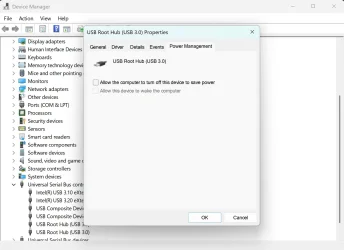
I've seen similar problems with almost every Windows 11 PC I've set up. The problem is usually caused by windows turning off USB hubs to "save power", even while the device is actively being used. (Which has bricked countless external SSD enclosures and flash drives)

Open Device Manager from the start menu
Expand "Universal Serial Bus controllers"
Right click on each item, select "Properties and open the "Power Management" tab if it's shown
Uncheck the "Allow Computer To Turn Off This Device To Save Power" and click OK
 

Attachments

  • usb.webp
    usb.webp
    112.4 KB · Views: 1

My Computer My Computer

At a glance

Windows 11 22H2 Pro (X-lite Micro 11 version)i7 13850HX (20 cores, 28 threads)32GB DDR5Intel UHD/ RTX 1000 ADA
OS
Windows 11 22H2 Pro (X-lite Micro 11 version)
Computer type
Laptop
Manufacturer/Model
Dell/ Precision 7680
CPU
i7 13850HX (20 cores, 28 threads)
Motherboard
Dell
Memory
32GB DDR5
Graphics Card(s)
Intel UHD/ RTX 1000 ADA
Sound Card
Realtek
Monitor(s) Displays
4K UHD Touchscreen
Screen Resolution
3840 x 2400
Hard Drives
Samsung 512GB system drive
WD Blue 1TB game drive
PSU
240W AC adapter, 1800W when docked
Internet Speed
1 gigabit symmetrical
Browser
Firefox, Librewolf
Antivirus
None. Manully configured so nobody except me can change any critical system files. (Don't ask how, it's probably against some rule somewhere)
arrgh problem has shown up again... @DJ I have unchecked all that were,,, about 6 of them. Thanks, will let you know results.
 

My Computer My Computer

At a glance

Windows 11 64 bitIntel Core i7 @ 4.20GHz Kaby Lake 14nm Techno...16.0GBU28E590 (3840x2160@30Hz) 2047MB NVIDIA GeForc...
OS
Windows 11 64 bit
Computer type
PC/Desktop
Manufacturer/Model
Asus/Home build
CPU
Intel Core i7 @ 4.20GHz Kaby Lake 14nm Technology
Motherboard
ASUSTeK COMPUTER INC. PRIME B250M-K (LGA1151)
Memory
16.0GB
Graphics Card(s)
U28E590 (3840x2160@30Hz) 2047MB NVIDIA GeForce GT 1030 (ASUStek Computer Inc)
Sound Card
on board
Monitor(s) Displays
Samsung
Screen Resolution
3840x2160
Hard Drives
7452GB Seagate ST8000VN004-3CP101 (SATA )
111GB Corsair Force 3 SSD (SATA (SSD))
2794GB Western Digital WDC WD30EFRX-68AX9N0 (SATA )
931GB Samsung SSD 980 1TB (Unknown (SSD))
1863GB AMicro AM8180 NVME SCSI Disk Device (USB (ATA)
PSU
Corsair RM 1000x
Case
3840x2160
Cooling
Fans
Keyboard
Wireless+
Mouse
Wired (Microsoft)
Internet Speed
fibre
Browser
Firrefox/Chrome
Antivirus
Defender
What other peripheral devices do you have plugged into your computer?
 

My Computers My Computers

  • At a glance

    Windows 11 Home 25H2 26200.8875AMD Ryzen 3 5300G8gbRadeon Graphics 4.00GHZ
    OS
    Windows 11 Home 25H2 26200.8875
    Computer type
    PC/Desktop
    Manufacturer/Model
    HP Pavilion TP01-2xxx
    CPU
    AMD Ryzen 3 5300G
    Memory
    8gb
    Graphics Card(s)
    Radeon Graphics 4.00GHZ
    Monitor(s) Displays
    ViewSonic
    Keyboard
    HP
    Mouse
    wireless Microsoft
    Browser
    FireFox
    Antivirus
    Avira
  • At a glance

    Updated Windows 10 to 11 25H2 26200.8875Intel Core i3 8100 @3.60 GHz8.GBIntel UHD 360 (HP)
    Operating System
    Updated Windows 10 to 11 25H2 26200.8875
    Computer type
    PC/Desktop
    Manufacturer/Model
    HP
    CPU
    Intel Core i3 8100 @3.60 GHz
    Motherboard
    HP 8653 (U3E1)
    Memory
    8.GB
    Graphics card(s)
    Intel UHD 360 (HP)
    Sound Card
    Realtek High Def
    Monitor(s) Displays
    ViewSonic
    Other Info
    #3 System: HP laptop Windows 25H2 11Pro 26200.8524
  • HP Omni laptop Windows 11 home
    11 25H2 26200.8737
    Intel Core 5 120U
Scanner, printer, M2 drive caddy and a USB Hub. This has a number of external, HDDs connected but only power them on when they're used.
Could software like Apache or Filezilla be 'stealing' the mouse? I could try with them not running. But it's not that obvious e.g. right nos it's not happening (at least as much as it did) but it could kick in again. I almost expect it!
 

My Computer My Computer

At a glance

Windows 11 64 bitIntel Core i7 @ 4.20GHz Kaby Lake 14nm Techno...16.0GBU28E590 (3840x2160@30Hz) 2047MB NVIDIA GeForc...
OS
Windows 11 64 bit
Computer type
PC/Desktop
Manufacturer/Model
Asus/Home build
CPU
Intel Core i7 @ 4.20GHz Kaby Lake 14nm Technology
Motherboard
ASUSTeK COMPUTER INC. PRIME B250M-K (LGA1151)
Memory
16.0GB
Graphics Card(s)
U28E590 (3840x2160@30Hz) 2047MB NVIDIA GeForce GT 1030 (ASUStek Computer Inc)
Sound Card
on board
Monitor(s) Displays
Samsung
Screen Resolution
3840x2160
Hard Drives
7452GB Seagate ST8000VN004-3CP101 (SATA )
111GB Corsair Force 3 SSD (SATA (SSD))
2794GB Western Digital WDC WD30EFRX-68AX9N0 (SATA )
931GB Samsung SSD 980 1TB (Unknown (SSD))
1863GB AMicro AM8180 NVME SCSI Disk Device (USB (ATA)
PSU
Corsair RM 1000x
Case
3840x2160
Cooling
Fans
Keyboard
Wireless+
Mouse
Wired (Microsoft)
Internet Speed
fibre
Browser
Firrefox/Chrome
Antivirus
Defender
please try
open the device manager and find your mouse entry

right click that entry and click uninstall.

unplug/disconnect your mouse from the computer
then reattach/connect your mouse back to the computer

Windows will reinstall the required drivers
then see if there is any improvement with your mouse.

best of luck Steve ..
 

My Computers My Computers

  • At a glance

    Windows 11 HomeRyzen 7 5825u64GB DDR4 3200Ryzen 7 5825u
    OS
    Windows 11 Home
    Computer type
    PC/Desktop
    Manufacturer/Model
    HP 24" AiO
    CPU
    Ryzen 7 5825u
    Motherboard
    HP
    Memory
    64GB DDR4 3200
    Graphics Card(s)
    Ryzen 7 5825u
    Sound Card
    RealTek
    Monitor(s) Displays
    24" HP AiO
    Screen Resolution
    1920 x 1080 @60 Hz
    Hard Drives
    1TB WD Blue SN580 M2 SSD Partitioned.
    2x 1TB USB HDD External Backup/Storage.
    PSU
    90W external power brick
    Case
    24" All in One
    Cooling
    Default Air Cooling
    Keyboard
    HP WiFi UK extended
    Mouse
    HP WiFi 3 Button
    Internet Speed
    1GB full fibre
    Browser
    Edge & Firefox
    Antivirus
    AVG Internet Security/Windows Defender
    Other Info
    Mainly Open Source Software
  • At a glance

    Ubuntu 22.04.5 LTSi5 7200u16GB DDR4Intel
    Operating System
    Ubuntu 22.04.5 LTS
    Computer type
    Laptop
    Manufacturer/Model
    Dell 13" Latitude 2017
    CPU
    i5 7200u
    Motherboard
    Dell
    Memory
    16GB DDR4
    Graphics card(s)
    Intel
    Sound Card
    Intel
    Monitor(s) Displays
    13" Dell Laptop
    Hard Drives
    250GB Crucial 2.5" SSD
    Mouse
    Generic WiFi 3 button
    Internet Speed
    WiFi only
    Browser
    Firefox
    Antivirus
    ClamAV TK
    Other Info
    Mainly Open Source Software
In device manager Mice and other pointing devices I'm showing 2 entries both "HID-compliant mouse"
Isn't this a bit odd ? There's only one mouse.
I disabled one and the mouse is still working. does this suggest windows was trying to control 2 mice ?
Is "HID-compliant mouse" the right driver? It's a Windows basic optical Mouse V2 Model 1113
Can I remove the disabled entry?
 

My Computer My Computer

At a glance

Windows 11 64 bitIntel Core i7 @ 4.20GHz Kaby Lake 14nm Techno...16.0GBU28E590 (3840x2160@30Hz) 2047MB NVIDIA GeForc...
OS
Windows 11 64 bit
Computer type
PC/Desktop
Manufacturer/Model
Asus/Home build
CPU
Intel Core i7 @ 4.20GHz Kaby Lake 14nm Technology
Motherboard
ASUSTeK COMPUTER INC. PRIME B250M-K (LGA1151)
Memory
16.0GB
Graphics Card(s)
U28E590 (3840x2160@30Hz) 2047MB NVIDIA GeForce GT 1030 (ASUStek Computer Inc)
Sound Card
on board
Monitor(s) Displays
Samsung
Screen Resolution
3840x2160
Hard Drives
7452GB Seagate ST8000VN004-3CP101 (SATA )
111GB Corsair Force 3 SSD (SATA (SSD))
2794GB Western Digital WDC WD30EFRX-68AX9N0 (SATA )
931GB Samsung SSD 980 1TB (Unknown (SSD))
1863GB AMicro AM8180 NVME SCSI Disk Device (USB (ATA)
PSU
Corsair RM 1000x
Case
3840x2160
Cooling
Fans
Keyboard
Wireless+
Mouse
Wired (Microsoft)
Internet Speed
fibre
Browser
Firrefox/Chrome
Antivirus
Defender
In device manager Mice and other pointing devices I'm showing 2 entries both "HID-compliant mouse"
Isn't this a bit odd ? There's only one mouse.
I disabled one and the mouse is still working. does this suggest windows was trying to control 2 mice ?
Is "HID-compliant mouse" the right driver? It's a Windows basic optical Mouse V2 Model 1113
Can I remove the disabled entry?
Yes and see if that works........
 

My Computers My Computers

  • At a glance

    Windows 11 Home 25H2 26200.8875AMD Ryzen 3 5300G8gbRadeon Graphics 4.00GHZ
    OS
    Windows 11 Home 25H2 26200.8875
    Computer type
    PC/Desktop
    Manufacturer/Model
    HP Pavilion TP01-2xxx
    CPU
    AMD Ryzen 3 5300G
    Memory
    8gb
    Graphics Card(s)
    Radeon Graphics 4.00GHZ
    Monitor(s) Displays
    ViewSonic
    Keyboard
    HP
    Mouse
    wireless Microsoft
    Browser
    FireFox
    Antivirus
    Avira
  • At a glance

    Updated Windows 10 to 11 25H2 26200.8875Intel Core i3 8100 @3.60 GHz8.GBIntel UHD 360 (HP)
    Operating System
    Updated Windows 10 to 11 25H2 26200.8875
    Computer type
    PC/Desktop
    Manufacturer/Model
    HP
    CPU
    Intel Core i3 8100 @3.60 GHz
    Motherboard
    HP 8653 (U3E1)
    Memory
    8.GB
    Graphics card(s)
    Intel UHD 360 (HP)
    Sound Card
    Realtek High Def
    Monitor(s) Displays
    ViewSonic
    Other Info
    #3 System: HP laptop Windows 25H2 11Pro 26200.8524
  • HP Omni laptop Windows 11 home
    11 25H2 26200.8737
    Intel Core 5 120U
I haven't figured out how to remove it,. but since disabled the mouse has worked perfectly.
So I'll leave well enough alone.
Thanks to all concerned. :)
 

My Computer My Computer

At a glance

Windows 11 64 bitIntel Core i7 @ 4.20GHz Kaby Lake 14nm Techno...16.0GBU28E590 (3840x2160@30Hz) 2047MB NVIDIA GeForc...
OS
Windows 11 64 bit
Computer type
PC/Desktop
Manufacturer/Model
Asus/Home build
CPU
Intel Core i7 @ 4.20GHz Kaby Lake 14nm Technology
Motherboard
ASUSTeK COMPUTER INC. PRIME B250M-K (LGA1151)
Memory
16.0GB
Graphics Card(s)
U28E590 (3840x2160@30Hz) 2047MB NVIDIA GeForce GT 1030 (ASUStek Computer Inc)
Sound Card
on board
Monitor(s) Displays
Samsung
Screen Resolution
3840x2160
Hard Drives
7452GB Seagate ST8000VN004-3CP101 (SATA )
111GB Corsair Force 3 SSD (SATA (SSD))
2794GB Western Digital WDC WD30EFRX-68AX9N0 (SATA )
931GB Samsung SSD 980 1TB (Unknown (SSD))
1863GB AMicro AM8180 NVME SCSI Disk Device (USB (ATA)
PSU
Corsair RM 1000x
Case
3840x2160
Cooling
Fans
Keyboard
Wireless+
Mouse
Wired (Microsoft)
Internet Speed
fibre
Browser
Firrefox/Chrome
Antivirus
Defender
I had thought this fixed, but it has come back worse than ever (after 2-3 days working perfectly)
Now the mouse pointer completely disappears, sometimes for up to 30 secs. It jumps all over, in and out of view and can appear anywhere. Totally impossible to control.
I did remove both mouse entries in Device Manager and rebooted. They restored (one is maybe the wireless keyboard? But no wireless Mouse in use.)
Eventually it'll "come right" until the next time.
I've applied all the suggestions here a couple of times.
Just to confirm it's a wired mouse and others do the same thing. But I don't notice any obvious problems with other USB devices.
Is there any kind of "advanced diagnostic" than might show what's happening?
 

My Computer My Computer

At a glance

Windows 11 64 bitIntel Core i7 @ 4.20GHz Kaby Lake 14nm Techno...16.0GBU28E590 (3840x2160@30Hz) 2047MB NVIDIA GeForc...
OS
Windows 11 64 bit
Computer type
PC/Desktop
Manufacturer/Model
Asus/Home build
CPU
Intel Core i7 @ 4.20GHz Kaby Lake 14nm Technology
Motherboard
ASUSTeK COMPUTER INC. PRIME B250M-K (LGA1151)
Memory
16.0GB
Graphics Card(s)
U28E590 (3840x2160@30Hz) 2047MB NVIDIA GeForce GT 1030 (ASUStek Computer Inc)
Sound Card
on board
Monitor(s) Displays
Samsung
Screen Resolution
3840x2160
Hard Drives
7452GB Seagate ST8000VN004-3CP101 (SATA )
111GB Corsair Force 3 SSD (SATA (SSD))
2794GB Western Digital WDC WD30EFRX-68AX9N0 (SATA )
931GB Samsung SSD 980 1TB (Unknown (SSD))
1863GB AMicro AM8180 NVME SCSI Disk Device (USB (ATA)
PSU
Corsair RM 1000x
Case
3840x2160
Cooling
Fans
Keyboard
Wireless+
Mouse
Wired (Microsoft)
Internet Speed
fibre
Browser
Firrefox/Chrome
Antivirus
Defender
Q.
is the wired mouse connected to a USB type 3 port (blue coloured tab)

if so do you have a USB type 2 port available (black coloured tab)
please plug the mouse into the USB type 2 port and see if there is any improvement.

best of luck Steve ..
 

My Computers My Computers

  • At a glance

    Windows 11 HomeRyzen 7 5825u64GB DDR4 3200Ryzen 7 5825u
    OS
    Windows 11 Home
    Computer type
    PC/Desktop
    Manufacturer/Model
    HP 24" AiO
    CPU
    Ryzen 7 5825u
    Motherboard
    HP
    Memory
    64GB DDR4 3200
    Graphics Card(s)
    Ryzen 7 5825u
    Sound Card
    RealTek
    Monitor(s) Displays
    24" HP AiO
    Screen Resolution
    1920 x 1080 @60 Hz
    Hard Drives
    1TB WD Blue SN580 M2 SSD Partitioned.
    2x 1TB USB HDD External Backup/Storage.
    PSU
    90W external power brick
    Case
    24" All in One
    Cooling
    Default Air Cooling
    Keyboard
    HP WiFi UK extended
    Mouse
    HP WiFi 3 Button
    Internet Speed
    1GB full fibre
    Browser
    Edge & Firefox
    Antivirus
    AVG Internet Security/Windows Defender
    Other Info
    Mainly Open Source Software
  • At a glance

    Ubuntu 22.04.5 LTSi5 7200u16GB DDR4Intel
    Operating System
    Ubuntu 22.04.5 LTS
    Computer type
    Laptop
    Manufacturer/Model
    Dell 13" Latitude 2017
    CPU
    i5 7200u
    Motherboard
    Dell
    Memory
    16GB DDR4
    Graphics card(s)
    Intel
    Sound Card
    Intel
    Monitor(s) Displays
    13" Dell Laptop
    Hard Drives
    250GB Crucial 2.5" SSD
    Mouse
    Generic WiFi 3 button
    Internet Speed
    WiFi only
    Browser
    Firefox
    Antivirus
    ClamAV TK
    Other Info
    Mainly Open Source Software
I couldn't find a graphics driver on the NVIDIA website. Everything except 'Series 10'.
Nvidia uses a unified graphics driver, which means there is not separate drivers between series of cards, In fact AMD does the same thing....One Download file to rule them all.

What kind of settings do you have in the mouse control panel, not the one in Window Settings but in Control Panel ~> Mouse?

I recall there being some sort of auto hide "feature" for your pointer, that may be only while you are watching full screen video that im thinking about.
 

My Computer My Computer

At a glance

Win117800X3D32gb G.Skill4070 Ti Super
OS
Win11
Computer type
PC/Desktop
Manufacturer/Model
Mine 1.5
CPU
7800X3D
Motherboard
ASUS B650 Tuf with wifi.
Memory
32gb G.Skill
Graphics Card(s)
4070 Ti Super
Monitor(s) Displays
1x Nixeus NX_EDG27, 2x Dell S2440L (16:9)
Screen Resolution
1440p
Hard Drives
C:\NVME (500GB), D:\Seagate (2TB), E:\ & F:\ SSD 990EVO (1TB)
PSU
Corsair HX1000i
Case
Phanteks Enthoo Primo w/10 140mm SP Fans
Cooling
Artic TF2 420
Keyboard
Corsair 1000
Mouse
Steel Series Prime Wireless
Internet Speed
20 MB/s
Browser
Firefox 64
Antivirus
not telling!
Other Info
https://i.imgur.com/aoz3vWY.jpg?2
I've swapped a few things around and have the mouse now in USB2 port. It's still playing up - exactly the same.
 

My Computer My Computer

At a glance

Windows 11 64 bitIntel Core i7 @ 4.20GHz Kaby Lake 14nm Techno...16.0GBU28E590 (3840x2160@30Hz) 2047MB NVIDIA GeForc...
OS
Windows 11 64 bit
Computer type
PC/Desktop
Manufacturer/Model
Asus/Home build
CPU
Intel Core i7 @ 4.20GHz Kaby Lake 14nm Technology
Motherboard
ASUSTeK COMPUTER INC. PRIME B250M-K (LGA1151)
Memory
16.0GB
Graphics Card(s)
U28E590 (3840x2160@30Hz) 2047MB NVIDIA GeForce GT 1030 (ASUStek Computer Inc)
Sound Card
on board
Monitor(s) Displays
Samsung
Screen Resolution
3840x2160
Hard Drives
7452GB Seagate ST8000VN004-3CP101 (SATA )
111GB Corsair Force 3 SSD (SATA (SSD))
2794GB Western Digital WDC WD30EFRX-68AX9N0 (SATA )
931GB Samsung SSD 980 1TB (Unknown (SSD))
1863GB AMicro AM8180 NVME SCSI Disk Device (USB (ATA)
PSU
Corsair RM 1000x
Case
3840x2160
Cooling
Fans
Keyboard
Wireless+
Mouse
Wired (Microsoft)
Internet Speed
fibre
Browser
Firrefox/Chrome
Antivirus
Defender
See if Reliability History has entries which might help.
To access it,start typing ---reliability --- in the Search box.
 

My Computer My Computer

At a glance

win 10amd ryzen 5-2600ng skill sniper x 16gbnvidea gtx 1050
OS
win 10
Computer type
PC/Desktop
Manufacturer/Model
home built
CPU
amd ryzen 5-2600
Motherboard
gigabyte b450m-ds3h
Memory
ng skill sniper x 16gb
Graphics Card(s)
nvidea gtx 1050
Monitor(s) Displays
benq fp 92
Hard Drives
samsung 860 evo 500gb m2 ssd
PSU
antec ea550g
Case
nzxt noctis 450
Browser
edge
There wasn't anything Mouse relates, just some updates not starting.
Had an interesting
few hours with chatGPT and updated all sorts of things... but probel persists. But is variable, but can stil,s top you doiug aything cfor ages. lke right now I cannot fix my typos. mouse just will not fo where you want it to. o will awap in a new mothrboard and see if it's any better. (I do have a idenytical spare)
 

My Computer My Computer

At a glance

Windows 11 64 bitIntel Core i7 @ 4.20GHz Kaby Lake 14nm Techno...16.0GBU28E590 (3840x2160@30Hz) 2047MB NVIDIA GeForc...
OS
Windows 11 64 bit
Computer type
PC/Desktop
Manufacturer/Model
Asus/Home build
CPU
Intel Core i7 @ 4.20GHz Kaby Lake 14nm Technology
Motherboard
ASUSTeK COMPUTER INC. PRIME B250M-K (LGA1151)
Memory
16.0GB
Graphics Card(s)
U28E590 (3840x2160@30Hz) 2047MB NVIDIA GeForce GT 1030 (ASUStek Computer Inc)
Sound Card
on board
Monitor(s) Displays
Samsung
Screen Resolution
3840x2160
Hard Drives
7452GB Seagate ST8000VN004-3CP101 (SATA )
111GB Corsair Force 3 SSD (SATA (SSD))
2794GB Western Digital WDC WD30EFRX-68AX9N0 (SATA )
931GB Samsung SSD 980 1TB (Unknown (SSD))
1863GB AMicro AM8180 NVME SCSI Disk Device (USB (ATA)
PSU
Corsair RM 1000x
Case
3840x2160
Cooling
Fans
Keyboard
Wireless+
Mouse
Wired (Microsoft)
Internet Speed
fibre
Browser
Firrefox/Chrome
Antivirus
Defender
In my opinion, you have not proven the direction of your problem...whether this is hardware or software related. I don't see where you have done any troubleshooting to narrow that down. You have to eliminate things one at a time.

See if some other usb device is interfering. Unplug every other usb device you have and test with just a mouse and keyboard. If it starts happening, unplug the keyboard to see it ift stops. If it doesn't happen, plug each external device in one at a time, testing as you go until you narrow down which device might be interfering. If you are using an unpowered hub, I'd start there. You have entirely too many devices plugged in if your usb hub is not externally powered.
If you hub IS externally powered, test it's power supply. Those thing can easily go bad.
I'm betting it's either the hub not being able to handle the number of devices plugged into it OR it's one of the devices plugged into the hub.

I don't read whether or not you have checked for windows corruption.
.Open a command prompt as administrator and type dism /online /cleanup-image /restorehealth
When complete restart. Then open command prompt as admin again and run sfc /scannow
Pay attention to the scan results to see if SFC found anything it could not repair

Perform a clean boot to eliminate software conflict causing the issue. If it doesn't happen in a clean boot, you have some software conflicting with Windows. You have to use process of elimination to find which one. Perform a Clean Boot in Windows 11 to Troubleshoot Software Conflicts Tutorial

See if it happens in safe boot. . Boot to Safe Mode in Windows 11

As a last resort you can absolutely prove whether or not it's a windows issue or a hardware issue by booting from a live Linux distro (try Mint or Ubuntu) If you encounter no issues, that eliminates it being a hardware issue and puts the problem into Windows. That be the case, clean install windows.
 

My Computers My Computers

  • At a glance

    Windows 11 Pro 25H2 26200.8875i9-10900 10 core 20 threads32 gbnone-Intel UHD Graphics 630
    OS
    Windows 11 Pro 25H2 26200.8875
    Computer type
    PC/Desktop
    Manufacturer/Model
    Dell Optiplex 7080
    CPU
    i9-10900 10 core 20 threads
    Motherboard
    DELL 0J37VM
    Memory
    32 gb
    Graphics Card(s)
    none-Intel UHD Graphics 630
    Sound Card
    Integrated Realtek
    Monitor(s) Displays
    Benq 27
    Screen Resolution
    2560x1440
    Hard Drives
    2x1tb Solidigm m.2 nvme /External drives 512gb Samsung m.2 sata+2tb Kingston m2.nvme
    PSU
    500w
    Case
    MT
    Cooling
    Dell Premium
    Keyboard
    Logitech wired
    Mouse
    Logitech wireless
    Internet Speed
    so slow I'm too embarrassed to tell
    Browser
    #1 Edge #2 Firefox
    Antivirus
    Defender+MWB Premium
  • At a glance

    Windows 11 Pro 24H2 26200.8875AMD Ryzen 7 6800U32 gbintegrated
    Operating System
    Windows 11 Pro 24H2 26200.8875
    Computer type
    PC/Desktop
    Manufacturer/Model
    Beelink Mini PC SER5
    CPU
    AMD Ryzen 7 6800U
    Memory
    32 gb
    Graphics card(s)
    integrated
    Sound Card
    integrated
    Monitor(s) Displays
    Benq 27
    Screen Resolution
    2560x1440
    Hard Drives
    1TB Crucial nvme
    Keyboard
    Logitech wired
    Mouse
    Logitech wireless
    Internet Speed
    still too embarrassed to tell
    Browser
    Firefox
    Antivirus
    Defender
    Other Info
    System 3 is non compliant Dell 9020 i7-4770/24gb ram Win11 PRO 26200.8875
Back
Top Bottom