MS account passkeys failing now


Mark K

Well-known member
Member
Local time
5:27 PM
Posts
457
OS
Windows 11 Pro
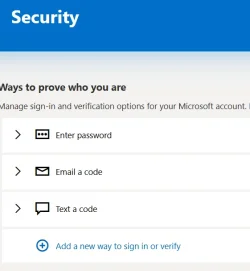
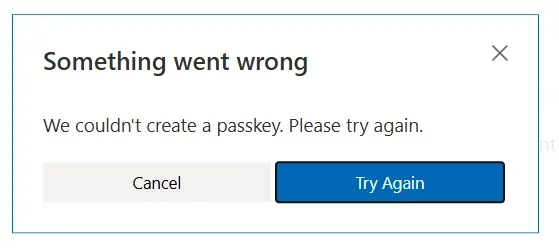
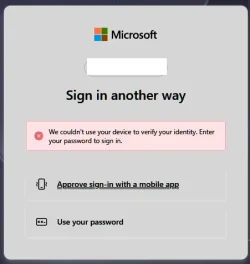
I am just getting back to correcting the Microsoft account passkeys as they stopped working in 26200.7171 (or one before). Now I cannot even create a Microsoft account passkey when using a local user account. I had to log in to my Microsoft account to delete the passkey. Each time I tried to log in with selecting the passkey, it failed. I logged in to the Microsoft account using the Password to delete the passkey. When I try to create a passkey now, it fails in error.

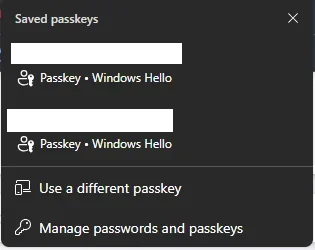
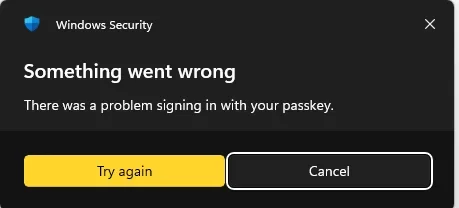
The screen shots the Security window in the Microsoft account after I deleted the existing passkey and tried to create it back. I keep getting "Something went wrong". Anyone else experiencing this problem? Solutions?

I cleared the Windows Hello NGC folder (C:\Windows\ServiceProfiles\LocalService\AppData\Local\Microsoft\Ngc) with no success as I use a local user account.
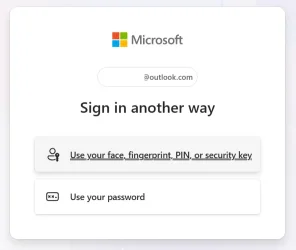
Screenshot 2025-12-15 092039.webpScreenshot 2025-12-15 092048.webpScreenshot 2025-12-15 092811.webpScreenshot 2025-12-15 092851.webp
 
Windows Build/Version
Windows 11 Pro 26200.7462

My Computer

System One

  • OS
    Windows 11 Pro
    Computer type
    Laptop
    Manufacturer/Model
    Dell 16 Plus DB16255
    CPU
    AMD Ryzen AI 7 350 w/ Radeon 860M 50 TOPS
    Motherboard
    Dell 0PKMHG
    Memory
    32GB LPDDR5X 7500 MT/s
    Graphics Card(s)
    AMD Radeon 860M integrated (shared memory)
    Sound Card
    Stereo speakers (2.5 W x 2 = 5 W total peak)/Realtek SounzReal/Dolby Atmos
    Monitor(s) Displays
    Displays: 16" 1920 x 1200 (Full HD+/WUXGA) 300 nits 60Hz *** Samsung - 27” Odyssey FHD IPS 240Hz G-Sync Gaming Monitor
    Screen Resolution
    1920x1080 @ 60Hz
    Hard Drives
    EG6 KIOXIA 1TB NVME
    Case
    Ice Blue
    Cooling
    "dual-fan" or "enhanced" air-cooling system
    Mouse
    Logitech M650 Wireless/Bluetooth
    Internet Speed
    800/600 Fiber
Update -

I went to my other Dell laptop (Dell-Intel), created a new passkey, and authenticated in to my Microsoft account using the YubiKey. Before the Microsoft account would not create a passkey on both Dell laptops.

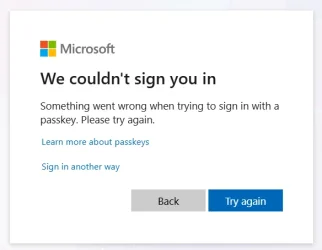
Now when I go to my other Dell laptop (Dell-AMD), I had to log in to the Microsoft account using the password. I kept receiving an error when trying to use the YubiKey for authentication. When selecting the security key option, the window kept showing "We couldn't sign you in."

When I created the passkey and authenticated successfully on the Dell-Intel laptop, I did not notice the "Passkey added" message now shows "This passkey can only be used on this device." The purpose of the YubiKey is that I can authenticate the Microsoft account on other systems. Otherwise this would cause multiple passkeys for the same Microsoft account per computer/device, and yet, Microsoft does not allow you to create another passkey.

Screenshot 2025-12-15 121856.webp
 

My Computer

System One

  • OS
    Windows 11 Pro
    Computer type
    Laptop
    Manufacturer/Model
    Dell 16 Plus DB16255
    CPU
    AMD Ryzen AI 7 350 w/ Radeon 860M 50 TOPS
    Motherboard
    Dell 0PKMHG
    Memory
    32GB LPDDR5X 7500 MT/s
    Graphics Card(s)
    AMD Radeon 860M integrated (shared memory)
    Sound Card
    Stereo speakers (2.5 W x 2 = 5 W total peak)/Realtek SounzReal/Dolby Atmos
    Monitor(s) Displays
    Displays: 16" 1920 x 1200 (Full HD+/WUXGA) 300 nits 60Hz *** Samsung - 27” Odyssey FHD IPS 240Hz G-Sync Gaming Monitor
    Screen Resolution
    1920x1080 @ 60Hz
    Hard Drives
    EG6 KIOXIA 1TB NVME
    Case
    Ice Blue
    Cooling
    "dual-fan" or "enhanced" air-cooling system
    Mouse
    Logitech M650 Wireless/Bluetooth
    Internet Speed
    800/600 Fiber
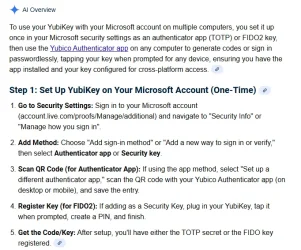
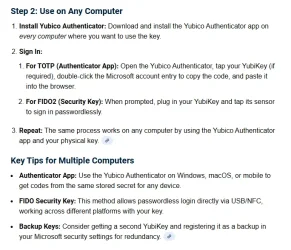
I found a few minutes to research this problem and it seems I may have initially set up the Microsoft account incorrectly. However, this has been working for the past several months. Microsoft must have corrected or updated something recently to cause this issue to occur recently/now.

I will include the link in the Google search I used, not sure if it shows the same results for others, but this seems like a setup issue to me. I hope to have time to try this setup as it seems it is the correct way of doing it.

Screenshot 2025-12-15 153820.webp
Screenshot 2025-12-15 153831.webp
 

My Computer

System One

  • OS
    Windows 11 Pro
    Computer type
    Laptop
    Manufacturer/Model
    Dell 16 Plus DB16255
    CPU
    AMD Ryzen AI 7 350 w/ Radeon 860M 50 TOPS
    Motherboard
    Dell 0PKMHG
    Memory
    32GB LPDDR5X 7500 MT/s
    Graphics Card(s)
    AMD Radeon 860M integrated (shared memory)
    Sound Card
    Stereo speakers (2.5 W x 2 = 5 W total peak)/Realtek SounzReal/Dolby Atmos
    Monitor(s) Displays
    Displays: 16" 1920 x 1200 (Full HD+/WUXGA) 300 nits 60Hz *** Samsung - 27” Odyssey FHD IPS 240Hz G-Sync Gaming Monitor
    Screen Resolution
    1920x1080 @ 60Hz
    Hard Drives
    EG6 KIOXIA 1TB NVME
    Case
    Ice Blue
    Cooling
    "dual-fan" or "enhanced" air-cooling system
    Mouse
    Logitech M650 Wireless/Bluetooth
    Internet Speed
    800/600 Fiber
Just adding both my related and unrelated experiences to yours that may help psychologically (or not). I have created MS account passkeys on both Windows Hello (through explicit addition via Microsoft account or Windows prompts) and a FIDO2 security key (like your case) in the past. I use my MS account (not a local account) to log into my computer. I always verify after creations in an incognito window that the passkey works for logging in.

Both options have failed at one time or another. For the FIDO2 key (like your case), I had to remove the passkey online, removed the passkey record from the physical key with a utility provided by the key manufacturer, added a passkey (using the key) back on MS account, and that got it working again. The current setup for Windows hello's passkeys prompts for the Windows Hello authentication but fails to log in, removing and re-adding the passkeys doesn't help.

1765875414529.webp

When using Edge (instead of Firefox, as mentioned above), it appears I have two passkeys stored in Windows Hello with the same domain (login.microsoft.com) and the same email (one for logging into my Windows account and one supposedly for my online Microsoft account). Selecting one or the other doesn't work. One just shows the error as pictured above, and the other shows a Windows error right away without any web redirection.

1765875784594.webp
1765875807175.webp

My experiences lead me to the conclusion that Microsoft's ongoing changes with passkey implementations make passkey unreliable for MS account login, whether via Windows Hello or the FIDO2 security key. I’m not suggesting that you do the same, but I plan to wait it out to see what (broken) changes MS will bring in the future. Microsoft is a primary principle in the FIDO2 alliance, owns the entire vertical technology stack that authenticates a passkey, and can't get them to work well on Microsoft own platform. This is in contrast to forum software (such as the one being used here) which is way more reliable, even if sometimes implemented differently from other websites.

I can tell you from experience, however, that using Microsoft Authenticator to log into my MS account passwordlessly always works for me. I have at least one relief.
 

My Computer

System One

  • OS
    Windows 11 Pro 25H2
    Computer type
    PC/Desktop
I am now reporting that today, my Windows Hello passkey started working for MS account login again, without having to make any changes. Reiterating, MS account passkey login is unreliable; don't rely on it yet, especially since Microsoft is "beta-testing" allowing third-party password managers to manage passkeys at the Windows level.
 

My Computer

System One

  • OS
    Windows 11 Pro 25H2
    Computer type
    PC/Desktop
I have been battling MS passkeys for the past two or more months when using the YubiKeys. After spending the money on them, I wish I never bought them. Each time I set up my Microsoft accounts to authenticate through the YubiKeys, they would work once or twice, then stop authenticating, and I have to use the password/MFA.

Google and Microsoft web browsers trying to force passkeys in the Password Managers for multi-device authentication purposes, they are making it harder to use these YubiKeys. Not everyone has phones or other devices available. I know many Windows users with basic flip phones where it is strictly just a phone. YubiKeys are good for some people, but Microsoft/Google and among others are making it very difficult.
 

My Computer

System One

  • OS
    Windows 11 Pro
    Computer type
    Laptop
    Manufacturer/Model
    Dell 16 Plus DB16255
    CPU
    AMD Ryzen AI 7 350 w/ Radeon 860M 50 TOPS
    Motherboard
    Dell 0PKMHG
    Memory
    32GB LPDDR5X 7500 MT/s
    Graphics Card(s)
    AMD Radeon 860M integrated (shared memory)
    Sound Card
    Stereo speakers (2.5 W x 2 = 5 W total peak)/Realtek SounzReal/Dolby Atmos
    Monitor(s) Displays
    Displays: 16" 1920 x 1200 (Full HD+/WUXGA) 300 nits 60Hz *** Samsung - 27” Odyssey FHD IPS 240Hz G-Sync Gaming Monitor
    Screen Resolution
    1920x1080 @ 60Hz
    Hard Drives
    EG6 KIOXIA 1TB NVME
    Case
    Ice Blue
    Cooling
    "dual-fan" or "enhanced" air-cooling system
    Mouse
    Logitech M650 Wireless/Bluetooth
    Internet Speed
    800/600 Fiber
After spending the money on them, I wish I never bought them.
All I can say is to hang in there. FIDO2 security keys, including YubiKeys, are the gold standard in device-based passkey authentications. Corporations use them, including Google, Cloudflare, and those investing serious efforts to combat phishing and password breaches. It is likely to get better. You are witnessing a cutting-edge technology moving into the mainstream. It will take a few more years before this settles.
 

My Computer

System One

  • OS
    Windows 11 Pro 25H2
    Computer type
    PC/Desktop
I finally got back to trying to set up the YubiKeys and gave up. They work for about a day and then errors, re-setup, and same problems again. I do not have time to always recreate and setup YubiKeys. Passwords with MFA/2FA are more reliable.

I started to use MS Authenticator app on the phone to log in to these accounts now, so much easier and faster.
 

My Computer

System One

  • OS
    Windows 11 Pro
    Computer type
    Laptop
    Manufacturer/Model
    Dell 16 Plus DB16255
    CPU
    AMD Ryzen AI 7 350 w/ Radeon 860M 50 TOPS
    Motherboard
    Dell 0PKMHG
    Memory
    32GB LPDDR5X 7500 MT/s
    Graphics Card(s)
    AMD Radeon 860M integrated (shared memory)
    Sound Card
    Stereo speakers (2.5 W x 2 = 5 W total peak)/Realtek SounzReal/Dolby Atmos
    Monitor(s) Displays
    Displays: 16" 1920 x 1200 (Full HD+/WUXGA) 300 nits 60Hz *** Samsung - 27” Odyssey FHD IPS 240Hz G-Sync Gaming Monitor
    Screen Resolution
    1920x1080 @ 60Hz
    Hard Drives
    EG6 KIOXIA 1TB NVME
    Case
    Ice Blue
    Cooling
    "dual-fan" or "enhanced" air-cooling system
    Mouse
    Logitech M650 Wireless/Bluetooth
    Internet Speed
    800/600 Fiber
Gives a whole new meaning to:

11715.webp :facepalm: :facepalm: :facepalm:
 

My Computers

System One System Two

  • OS
    Windows 11 Pro
    Computer type
    PC/Desktop
    Manufacturer/Model
    ASUS ROG Strix
  • Operating System
    Windows 11 Pro
    Computer type
    Laptop
    Manufacturer/Model
    ASUS VivoBook
Gives a whole new meaning to:
I would never ever use SMS as a recovery though, that is like using Password123.
 

My Computer

System One

  • OS
    Home26H2Can
    Computer type
    PC/Desktop
    CPU
    AMD Ryzen 5 8600G (07/24)
    Motherboard
    ASROCK B650M-HDV/M.2 (07/24) BIOS 4.21 AGESA ComboAM5 1.3.0.1 (04/26)
    Memory
    2x32GB Kingston FURY DDR5 5600 MHz CL36 @5200 CL36 (07/24)
    Graphics Card(s)
    ASROCK Radeon RX 6600 Challenger D 8G @48FPS (08/24)
    Sound Card
    Creative Sound BlasterX AE-5 Plus (05/24)
    Monitor(s) Displays
    24" Philips 24M1N3200ZS/00 (05/24)
    Screen Resolution
    1920×1080@165Hz via DP1.4
    Hard Drives
    Kingston KC3000 NVMe 2TB (05/24)
    ADATA XPG GAMMIX S11 Pro 512GB (07/19)
    PSU
    Seasonic Core GM 550 Gold (04/24)
    Case
    Fractal Design Define 7 Mini with 3x Noctua NF-P14s/12@555rpm (04/24)
    Cooling
    Noctua NH-U12S with Noctua NF-P12 (04/24)
    Keyboard
    HP Pavilion Wired Keyboard 300 (07/24) + Rabalux 76017 Parker (01/24)
    Mouse
    Logitech M330 Silent Plus (01/26)
    Internet Speed
    500/100 Mbps via RouterOS (05/21) & TCP Optimizer
    Browser
    Edge, Brave for YouTube, LibreWolf for FB
    Antivirus
    NextDNS blocking 1/3 Traffic
    Other Info
    Phone: Motorola Moto G86 (02/26)
    Backup: Hasleo Backup Suite (PreOS)
    Headphones: Sennheiser RS170 (09/10)
    Chair: Huzaro Force 4.4 Grey Mesh (05/24)
    Notifier: Xiaomi Mi Band 9 Milanese (10/24)
    FlexCore USB-C 3.2 Gen 1 (M) to LAN (F) (08/25)

Latest Support Threads

Back
Top Bottom