Solved MS Edge hogging PDF


6391mb

Well-known member
Member
VIP
Local time
9:07 AM
Posts
86
OS
Win11 Pro 24H2
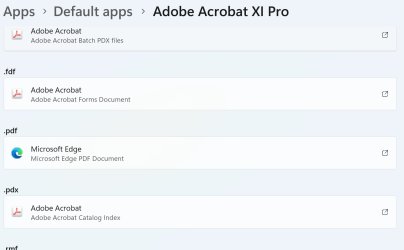
Have Acrobat installed for opening etc PDF files by default. MS Edge recently updated and now unable to set the default to Acrobat for handling PDF files.

Anyone else having this problem as it's driving me nuts!!
 
Windows Build/Version
Win11 x64 Pro

Attachments

  • 2024-05-02 11-56-31.jpg
    2024-05-02 11-56-31.jpg
    53.3 KB · Views: 2

My Computers

System One System Two

  • OS
    Win11 Pro 24H2
    Computer type
    PC/Desktop
    Manufacturer/Model
    Lenovo M90q
    CPU
    i5 12500
    Motherboard
    Lenovo
    Memory
    32GB
    Graphics Card(s)
    Intel CPU integrated
    Sound Card
    Intel MB intergrated
    Monitor(s) Displays
    Dell 4k IPS
    Screen Resolution
    3840 x 2160
    Hard Drives
    500GB NVMe Samsung 980 Pro
    2 TB NVMe Samsung 990 Pro
    1 TB Crucial MX500
    PSU
    Lenovo
    Case
    Lenovo
    Cooling
    Air
    Keyboard
    Logitech BT
    Mouse
    Logitech BT
    Internet Speed
    FTTP
    Browser
    Firefox
    Antivirus
    MS Defender and Malwarebytes
  • Operating System
    Win 11 Pro
    Computer type
    Laptop
    Manufacturer/Model
    Surface Pro 8
    CPU
    i5-1135G7
    Motherboard
    MS
    Memory
    16GB
    Graphics card(s)
    Intel Iris XE
    Sound Card
    ATI/AMD Renoir
    Monitor(s) Displays
    UHD
    Screen Resolution
    2880 x 1920
    Hard Drives
    2TB NVMe
    PSU
    MS
    Case
    Microsoft
    Cooling
    Air
    Keyboard
    Built In
    Mouse
    Touchpad
    Internet Speed
    FTTP
    Browser
    Firefox
    Antivirus
    MS Defender and Malwarebytes

Anyone else having this problem as it's driving me nuts!!
No and it must be a short trip. :giggle:


Have you tried to re-install Acrobat? Or at least attempt a repair?
Have you tried to disable the browser handling of .pdf extensions?
Are you asking for use within Edge or in the OS in general?
Your screenshot shows OS behavior yet you are referring to Edge.
 

My Computers

System One System Two

  • OS
    All Branches but Release
    Computer type
    Laptop
    Manufacturer/Model
    Acer Nitro ANV15-51
    CPU
    AMD Ryzen 7 7735HS 3200-4500 Mhz 8 cores x 2
    Motherboard
    Sportage_RBH
    Memory
    32 GB DDR5
    Graphics Card(s)
    Radeon Graphic / NVIDIA GeForce RTX 4060 8 GB GDDR6
    Sound Card
    AMD/Realtek(R) Audio
    Monitor(s) Displays
    Integrated Monitor (15.3"vis)
    Screen Resolution
    FHD 1920X1080 16:9 144Hz
    Hard Drives
    KINGSTON OM8SEP4512Q-AA 1TB
    Western Digital 256GB
    PSU
    19V DC 6.32 A 120 W
    Cooling
    Dual Fans
    Mouse
    MS Bluetooth
    Internet Speed
    Fiber 1GB Cox -us & 1GB Orange-fr
    Browser
    Edge Canary- Firefox Nightly-Chrome Dev-Chrome Dev
    Antivirus
    Windows Defender
  • Operating System
    Windows 11 Beta
    Computer type
    Laptop
    Manufacturer/Model
    Asus X751BP
    CPU
    AMD A9-9420
    Memory
    8 GB of DDR4
    Graphics card(s)
    AMD Radeon R5
    Screen Resolution
    1600x900
    Hard Drives
    Seagate 1 TB
No and it must be a short trip. :giggle:


Have you tried to re-install Acrobat?
Have you tried to enable the browser extension?
Your screenshot shows OS behavior yet you are referring to Edge.
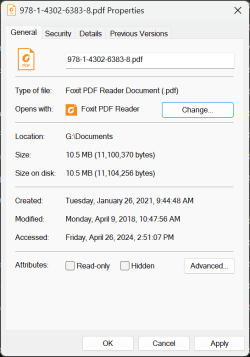
The default for PDF refuses to change from Edge to Acrobat. I can open PDF files with the 'open with' command in Acrobat. Double clicking on the same PDF file and it opens with MS Edge.

The settings will not allow a change from Edge. This seems to have happened after a recent Edge update.
 

My Computers

System One System Two

  • OS
    Win11 Pro 24H2
    Computer type
    PC/Desktop
    Manufacturer/Model
    Lenovo M90q
    CPU
    i5 12500
    Motherboard
    Lenovo
    Memory
    32GB
    Graphics Card(s)
    Intel CPU integrated
    Sound Card
    Intel MB intergrated
    Monitor(s) Displays
    Dell 4k IPS
    Screen Resolution
    3840 x 2160
    Hard Drives
    500GB NVMe Samsung 980 Pro
    2 TB NVMe Samsung 990 Pro
    1 TB Crucial MX500
    PSU
    Lenovo
    Case
    Lenovo
    Cooling
    Air
    Keyboard
    Logitech BT
    Mouse
    Logitech BT
    Internet Speed
    FTTP
    Browser
    Firefox
    Antivirus
    MS Defender and Malwarebytes

  • Operating System
    Win 11 Pro
    Computer type
    Laptop
    Manufacturer/Model
    Surface Pro 8
    CPU
    i5-1135G7
    Motherboard
    MS
    Memory
    16GB
    Graphics card(s)
    Intel Iris XE
    Sound Card
    ATI/AMD Renoir
    Monitor(s) Displays
    UHD
    Screen Resolution
    2880 x 1920
    Hard Drives
    2TB NVMe
    PSU
    MS
    Case
    Microsoft
    Cooling
    Air
    Keyboard
    Built In
    Mouse
    Touchpad
    Internet Speed
    FTTP
    Browser
    Firefox
    Antivirus
    MS Defender and Malwarebytes

My Computer

System One

  • OS
    Windows 11
    Computer type
    PC/Desktop
    Manufacturer/Model
    HP Pavilion
    CPU
    AMD Ryzen 7 5700G
    Motherboard
    Erica6
    Memory
    Micron Technology DDR4-3200 16GB
    Graphics Card(s)
    NVIDIA GeForce RTX 3060
    Sound Card
    Realtek ALC671
    Monitor(s) Displays
    Samsung SyncMaster U28E590
    Screen Resolution
    3840 x 2160
    Hard Drives
    SAMSUNG MZVLQ1T0HALB-000H1
The default for PDF refuses to change from Edge to Acrobat. I can open PDF files with the 'open with' command in Acrobat. Double clicking on the same PDF file and it opens with MS Edge.
Sorry, I can't relate.
You need to check the default type as well. Scroll down to look for 'by type', and type in .pdf with the dot(.)

Screenshot 2024-05-02 131325.jpg
 

My Computers

System One System Two

  • OS
    All Branches but Release
    Computer type
    Laptop
    Manufacturer/Model
    Acer Nitro ANV15-51
    CPU
    AMD Ryzen 7 7735HS 3200-4500 Mhz 8 cores x 2
    Motherboard
    Sportage_RBH
    Memory
    32 GB DDR5
    Graphics Card(s)
    Radeon Graphic / NVIDIA GeForce RTX 4060 8 GB GDDR6
    Sound Card
    AMD/Realtek(R) Audio
    Monitor(s) Displays
    Integrated Monitor (15.3"vis)
    Screen Resolution
    FHD 1920X1080 16:9 144Hz
    Hard Drives
    KINGSTON OM8SEP4512Q-AA 1TB
    Western Digital 256GB
    PSU
    19V DC 6.32 A 120 W
    Cooling
    Dual Fans
    Mouse
    MS Bluetooth
    Internet Speed
    Fiber 1GB Cox -us & 1GB Orange-fr
    Browser
    Edge Canary- Firefox Nightly-Chrome Dev-Chrome Dev
    Antivirus
    Windows Defender
  • Operating System
    Windows 11 Beta
    Computer type
    Laptop
    Manufacturer/Model
    Asus X751BP
    CPU
    AMD A9-9420
    Memory
    8 GB of DDR4
    Graphics card(s)
    AMD Radeon R5
    Screen Resolution
    1600x900
    Hard Drives
    Seagate 1 TB

My Computers

System One System Two

  • OS
    Win11 Pro 24H2
    Computer type
    PC/Desktop
    Manufacturer/Model
    Lenovo M90q
    CPU
    i5 12500
    Motherboard
    Lenovo
    Memory
    32GB
    Graphics Card(s)
    Intel CPU integrated
    Sound Card
    Intel MB intergrated
    Monitor(s) Displays
    Dell 4k IPS
    Screen Resolution
    3840 x 2160
    Hard Drives
    500GB NVMe Samsung 980 Pro
    2 TB NVMe Samsung 990 Pro
    1 TB Crucial MX500
    PSU
    Lenovo
    Case
    Lenovo
    Cooling
    Air
    Keyboard
    Logitech BT
    Mouse
    Logitech BT
    Internet Speed
    FTTP
    Browser
    Firefox
    Antivirus
    MS Defender and Malwarebytes
  • Operating System
    Win 11 Pro
    Computer type
    Laptop
    Manufacturer/Model
    Surface Pro 8
    CPU
    i5-1135G7
    Motherboard
    MS
    Memory
    16GB
    Graphics card(s)
    Intel Iris XE
    Sound Card
    ATI/AMD Renoir
    Monitor(s) Displays
    UHD
    Screen Resolution
    2880 x 1920
    Hard Drives
    2TB NVMe
    PSU
    MS
    Case
    Microsoft
    Cooling
    Air
    Keyboard
    Built In
    Mouse
    Touchpad
    Internet Speed
    FTTP
    Browser
    Firefox
    Antivirus
    MS Defender and Malwarebytes

Thank you - that worked. Your input much appreciated
We are glad to hear your issue has been resolved, thank you for letting us know that all is now well!
 

My Computer

System One

  • OS
    Windows 11
    Computer type
    PC/Desktop
    Manufacturer/Model
    HP Pavilion
    CPU
    AMD Ryzen 7 5700G
    Motherboard
    Erica6
    Memory
    Micron Technology DDR4-3200 16GB
    Graphics Card(s)
    NVIDIA GeForce RTX 3060
    Sound Card
    Realtek ALC671
    Monitor(s) Displays
    Samsung SyncMaster U28E590
    Screen Resolution
    3840 x 2160
    Hard Drives
    SAMSUNG MZVLQ1T0HALB-000H1

Latest Support Threads

Back
Top Bottom