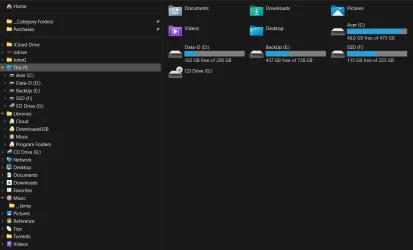
Music Folder in Navigation Pane Shows No Content


One step forward & two steps back. I did restore the default Music library. I did run the batch file Music_folder_Restore_default_locations (renamed) and rebooted. Now I was able to get the properties of the Music folder and it did show the Location tab. So I changed it's location to F:\Music.
After this action selecting the Music folder was unresponsive. In %USERPROFILE% there was no Music folder. So after I created a Music folder I was able to select the Music folder and it was responsive and it showed an empty content. But again the properties of the Music folder doesn't have a Location tab.
In viewing the properties of the F:\Music folder, it does show a Location tab set to F:\Music.
It's curious that when I run the File Explorer alternate OneCommander, it shows the content of the Music folder correctly.
 

My Computer My Computer

At a glance

Windows 11Intel Core i5-1240016gbIntel UHD Graphics 730
OS
Windows 11
Computer type
PC/Desktop
Manufacturer/Model
Acer Aspire TC-1760
CPU
Intel Core i5-12400
Motherboard
Acer Aspire TC-1760
Memory
16gb
Graphics Card(s)
Intel UHD Graphics 730

lets go at this from a different angle.

1. reset the music library
2. reset the music folder
3. reboot
4. ensure both library and music folder open/do not freeze or hang system
5. ensure your F:\Music is accessible as normal

halt after all of these are as listed. let me know.
 

My Computer My Computer

At a glance

Windows 11 Pro
OS
Windows 11 Pro
The Music folder and the Music library do show the files that were moved from F:\Music, but now that F:\Music folder is gone. And the properties of the Music folder does show the Location tab set to %USERPROFILE%\Music.
 

My Computer My Computer

At a glance

Windows 11Intel Core i5-1240016gbIntel UHD Graphics 730
OS
Windows 11
Computer type
PC/Desktop
Manufacturer/Model
Acer Aspire TC-1760
CPU
Intel Core i5-12400
Motherboard
Acer Aspire TC-1760
Memory
16gb
Graphics Card(s)
Intel UHD Graphics 730
ok so it is back to its original state, correct?

1. create your F:\Music folder
2. now, go to
Code:
%AppData%\Microsoft\Windows\Libraries
3. Right-click on the Music Library > Properties > Add > browse and select your custom folder F:\Music

let me know when thats done
 

My Computer My Computer

At a glance

Windows 11 Pro
OS
Windows 11 Pro
The property of the Music library is still showing the default Music folder and I did add the F:\Music folder.
 

My Computer My Computer

At a glance

Windows 11Intel Core i5-1240016gbIntel UHD Graphics 730
OS
Windows 11
Computer type
PC/Desktop
Manufacturer/Model
Acer Aspire TC-1760
CPU
Intel Core i5-12400
Motherboard
Acer Aspire TC-1760
Memory
16gb
Graphics Card(s)
Intel UHD Graphics 730
ok. just wanted that done for a failsafe. now use ThisPC tweaker (i'd say avoid the Registry for now as it was becoming quite a mess...) and highlight Music > uncheck navigation pane box & folders category boxes at the bottom, then click Remove on the right. then relaunch explorer and it should be gone. then use the tweaker again and add a custom folder and select your F:\Music. check both boxes to show in category and nav pane.
 

My Computer My Computer

At a glance

Windows 11 Pro
OS
Windows 11 Pro
After using ThisPC Tweaker as advised and relaunching explorer, the Music folder still shows in the Navigation pane.
 

My Computer My Computer

At a glance

Windows 11Intel Core i5-1240016gbIntel UHD Graphics 730
OS
Windows 11
Computer type
PC/Desktop
Manufacturer/Model
Acer Aspire TC-1760
CPU
Intel Core i5-12400
Motherboard
Acer Aspire TC-1760
Memory
16gb
Graphics Card(s)
Intel UHD Graphics 730
is it your music folder, or the music library?
 

My Computer My Computer

At a glance

Windows 11 Pro
OS
Windows 11 Pro
Both the Music library and the Music folder point to the default location. But the Music folder under This PC is gone.
 

My Computer My Computer

At a glance

Windows 11Intel Core i5-1240016gbIntel UHD Graphics 730
OS
Windows 11
Computer type
PC/Desktop
Manufacturer/Model
Acer Aspire TC-1760
CPU
Intel Core i5-12400
Motherboard
Acer Aspire TC-1760
Memory
16gb
Graphics Card(s)
Intel UHD Graphics 730
no... what is in the navigation pane... music folder or library. post a screenshot
 

My Computer My Computer

At a glance

Windows 11 Pro
OS
Windows 11 Pro
Explorer screenshot
 

Attachments

  • Explorer Screenshot.webp
    Explorer Screenshot.webp
    38.9 KB · Views: 1

My Computer My Computer

At a glance

Windows 11Intel Core i5-1240016gbIntel UHD Graphics 730
OS
Windows 11
Computer type
PC/Desktop
Manufacturer/Model
Acer Aspire TC-1760
CPU
Intel Core i5-12400
Motherboard
Acer Aspire TC-1760
Memory
16gb
Graphics Card(s)
Intel UHD Graphics 730
ahh. thats not the default entry is why. the default entry would show as a sub under This PC tree. so we need to track down where you added it...

in regedit, run a search for:

System.IsPinnedtoNameSpaceTree

find one that is tied to "Music" that has a value of "1". i cant advise on exactly what it'll be under because i dont know how you originally added it... once you find that, set its value to "0" and that will remove it from the nav pane
 

My Computer My Computer

At a glance

Windows 11 Pro
OS
Windows 11 Pro
I did find one entry that was created by Winaero Tweaker. It's value set to "0". Now only the F:\Music custom folder (named Music with a disc icon) appears under This PC by using ThisPC Tweaker. Much appreciation for all you help.
 

My Computer My Computer

At a glance

Windows 11Intel Core i5-1240016gbIntel UHD Graphics 730
OS
Windows 11
Computer type
PC/Desktop
Manufacturer/Model
Acer Aspire TC-1760
CPU
Intel Core i5-12400
Motherboard
Acer Aspire TC-1760
Memory
16gb
Graphics Card(s)
Intel UHD Graphics 730
Hard fact:

If people use the correct tutorials
Move folder
Add folder to this PC
I’d almost 100% garantee that there would be no issue.

People who use Tweaks, like Winaero Tweaker, can not be garanteed that things will go smoothly.

If you want to add a folder to this PC (custom or otherwise) using Winaero Tweaker, this would be the way to do it.

NOTE: This post I made was for someone who wanted Open To Folder to work in File Explorer after they were frustrated that it wouldn’t work. So please ignore what isn’t relevant.
I copied and pasted this from another post.


1 In Winaero Tweaker - Navigate to Customise This PC Folders
2 Selected the User Folder ex Music
3 Remove it
4/5/6/7 Add a Custom folder (same folder ex Music)

(Repeat the process for all user folders and any other folder you want to add to the top of This PC so as to "expand to")

Win-1086.png


8 The folder now appears at the top of This PC
9 Remove the User Folder/s from Quick Access.
There isn't any point in having them in there in my opinion as they are just below, now under This PC

You could still have the folder in quick access, but you would have to remove the one originally there and then drag the new Music folder you just created under This PC, to Quick Access again from the This PC section on the right, so that Quick Access has the correct folder. (If that makes sense)

Clicking on a folder in section 8 in the image, utilizes/allows the process of "Expand to folder" in the right pane of File Explorer


Win-1084.png


This isn't ideal but at least it brings back the expand to folder (wherever that went?) which I rely on to save time.


1 Clicking on the user folder opens the content in the right pane (2)
Clicking on a folder in the right pane opens it/expands it under the user folder (3)

Win-1089.png


Win-1090.png


In Step 3 above, there should be an arrow next to the Music icon on the left (3)
If you click the arrow, all folders in the Music folder (3) will expand and be visible on the left.
 
Last edited:

My Computers My Computers

  • At a glance

    Windows 11 Pro 25H2 Build 26200.9168Intel(R) Core(TM) i7-4770K CPU @ 3.50GHz32.0 GB of I forget and the box is in storage.Gigabyte nVidia GeForce GTX 1660 Super OC 6GB
    OS
    Windows 11 Pro 25H2 Build 26200.9168
    Computer type
    PC/Desktop
    Manufacturer/Model
    Sin-built 2013
    CPU
    Intel(R) Core(TM) i7-4770K CPU @ 3.50GHz
    Motherboard
    ASUS ROG Maximus VI Formula
    Memory
    32.0 GB of I forget and the box is in storage.
    Graphics Card(s)
    Gigabyte nVidia GeForce GTX 1660 Super OC 6GB
    Sound Card
    ROG SupremeFX Formula 8-Channel High Definition Audio
    Monitor(s) Displays
    5 x LG 25MS500-B - 1 x 24MK430H-B - 1 x Wacom Pro 22" Touch Screen Tablet
    Screen Resolution
    All over the place
    Hard Drives
    Too many to list. OS on Samsung 1TB 870 QVO SATA
    PSU
    Silverstone 1500
    Case
    NZXT Phantom 820 Full-Tower Case
    Cooling
    Noctua NH-D15 Elite Class Dual Tower CPU Cooler / 6 x EziDIY 120mm / 2 x Corsair 140mm somethings / 1 x 140mm Thermaltake something / 2 x 200mm Corsair.
    Keyboard
    Corsair K95 / Logitech diNovo Edge Wireless
    Mouse
    Logitech: G402 / G502 / Mx Masters / Mx Air Cordless
    Internet Speed
    2000/500Mbps
    Browser
    All sorts
    Antivirus
    Kaspersky Premium
    Other Info
    ㅤㅤㅤㅤㅤㅤㅤㅤㅤㅤㅤㅤㅤㅤㅤㅤㅤㅤㅤㅤㅤㅤㅤㅤㅤㅤㅤㅤㅤㅤㅤㅤㅤㅤㅤㅤㅤㅤㅤㅤ⠀⠀⠀⠀⠀⠀⠀⠀⠀⠀
    TP-Link BE9300 WiFi 7 Bluetooth 5.4 (Archer TBE550E)
    TP-Link TX201 V1 2.5GB Lan

    Grandstream HT812 - VoIP
    ASUS DSL-AX82U - Mesh
    ASUS RT-AC68U - Mesh
    ASUS RT-BE88U Router

    Brother MFC-L2880DW Printer

    I’m on a horse.
  • At a glance

    Windows 11 Pro 25H2 Build 26200.9168 (Wifes)13th Generation Intel® Core™ i5-1340P Process...16GB LPDDR5-52001x Intel® Iris® Xe Graphics
    Operating System
    Windows 11 Pro 25H2 Build 26200.9168 (Wifes)
    Computer type
    Laptop
    Manufacturer/Model
    LENOVO Yoga 7 14IRL8 - Type 82YL
    CPU
    13th Generation Intel® Core™ i5-1340P Processor(Core™ i5-1340P)
    Memory
    16GB LPDDR5-5200
    Graphics card(s)
    1x Intel® Iris® Xe Graphics
    Sound Card
    Optimized with Dolby Atmos®
    Screen Resolution
    QHD 2880 x 1800 OLED
    Hard Drives
    M.2 512 GB SSD PCIe
    Mouse
    Logiteck MX Master 3S
    Internet Speed
    2000/500
    Antivirus
    Defender / Malwarebytes
    Other Info
    …still on a horse.


    Wireless Network: Wi-Fi 6E 2x2 AX; Bluetooth® 5.1 or above
    Ports: 1x 1 Novo button; 2 in 1 Audio Combo jack; Micro SD Card Reader; HDMI 1.4b; 2 x USB Type-C (TBT4)
    USB 3.2 Gen 2 DP 1.4a
    PD 3.0); 1 x USB 3.2 Gen1 Type A
    Camera
    1x 1080P FHD IR/RGB Hybrid with Privacy Shutter and Dual Array Microphone
    Graphics
    1x Intel® Iris® Xe Graphics
    Monitor
    14" WUXGA
    Form Factor
    Convertible Notebook
  • Windows 11 Pro 25H2 Build 26200.9168 (Wifes)

    Yoga 7 2-in-1 14IML9 - Type 83DJ

    Processor: Intel® Core™ Ultra 7 155H Processor(Core™ Ultra 7 155H)

    Memory: 32GB LPD5X-7467

    Hard Drive: 1 TB SSD PCIe

    Wireless Network: 1x Wi-Fi 6E 2x2 AX; Bluetooth® 5.1 or above

    Ports: 1 x HDMI 2.1 TMDS; 1 x Novo Button; 1 x Combo Audio Jack
    2 x USB-C (USB 4.0)
    1 x USB-A 3.2 Gen 1

    Camera: 1080P FHD IR Hybrid with Dual Microphone

    Graphics: Intel® Arc™ Graphics

    Monitor: 14" 2.8K

    ...Where's my horse?
I did find one entry that was created by Winaero Tweaker. It's value set to "0". Now only the F:\Music custom folder (named Music with a disc icon) appears under This PC by using ThisPC Tweaker. Much appreciation for all you help.
Instead of going through all that, just move the files themselves to a different drive while leaving the default folders themselves alone.

I have 5 drives in my build 4 NVME, 1 SATA SSD. Each drive holds specific data - OS, Photos, Games, Media, local backups. All my default folders have not been moved or altered; I simply move the data around. Simpler, and no folder moving headaches.
 

My Computers My Computers

  • At a glance

    Windows 11 Pro 24H2 (Build 26100.4770)Intel Core 9 Ultra 285K64G (4x16) DDR5 Corsair RGB Dominator Platinu...Radeon (XFX Mercury) RX 9070XT OC (with Magne...
    OS
    Windows 11 Pro 24H2 (Build 26100.4770)
    Computer type
    PC/Desktop
    Manufacturer/Model
    Custom built
    CPU
    Intel Core 9 Ultra 285K
    Motherboard
    Gigabyte Aorus Z890 Xtreme AI Top
    Memory
    64G (4x16) DDR5 Corsair RGB Dominator Platinum (6400Mhz)
    Graphics Card(s)
    Radeon (XFX Mercury) RX 9070XT OC (with Magnetic Fans)
    Sound Card
    Onboard (DTS:X® Ultra Audio: ESS ES9280A DAC)
    Monitor(s) Displays
    27-inch Eizo Color Edge - CG2700X
    Screen Resolution
    3840 x 2160
    Hard Drives
    4 Samsung NVM 990 Pro drives: 1TB (OS), 2TB, 2 X 4TB.
    PSU
    Seasonic TX-1300 (1300 Watts)
    Case
    Cooler Master H500M
    Cooling
    Corsair Link Titan 280 RX RGB
    Keyboard
    Logitech Craft
    Mouse
    Logitech MX Master 3S
    Internet Speed
    1TB Download. 512mb Upload
    Browser
    Microsoft Edge Chromium
    Antivirus
    Windows Security
    Other Info
    System used for gaming, photography, music, school.
  • At a glance

    Windows 11 Pro 24H2 (Build 26100.4061)Intel Core i9-9900K32gig (4 x 8) Corsair Dominator Platinum DDR4...Radeon XFX Merc 7900XT (20gig)
    Operating System
    Windows 11 Pro 24H2 (Build 26100.4061)
    Computer type
    PC/Desktop
    Manufacturer/Model
    Custom built
    CPU
    Intel Core i9-9900K
    Motherboard
    Gigabyte Z390 Aorus Xtreme
    Memory
    32gig (4 x 8) Corsair Dominator Platinum DDR4 3600Mhz (B-Die)
    Graphics card(s)
    Radeon XFX Merc 7900XT (20gig)
    Sound Card
    Onboard
    Monitor(s) Displays
    24-Inch NEC PA242W
    Screen Resolution
    2880 x 1800
    Hard Drives
    2 X NVME, 1 X SATA SSD
    PSU
    EVGA Super Nova 1000 P2 (1000 Watt)
    Case
    Phantek Enthoo Luxe
    Cooling
    Corsair H115i Elite AIO Cooler
    Keyboard
    Logitech Keys
    Mouse
    Logitech MX Master 3
    Internet Speed
    1TB Download. 512mb Upload
    Browser
    Microsoft Edge Chromium
    Antivirus
    Windows Security
    Other Info
    Backup System

Latest Support Threads

Back
Top Bottom