- Local time
- 1:12 AM
- Posts
- 177
- OS
- Windows 11 Pro
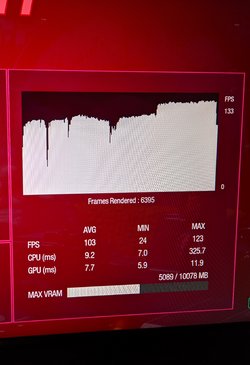
Here is my benchmark results from Guardians of the Galaxy. Left pic is with Windows 11 HAGS off and Right HAGS on. Anyone else use WAGS and have a good experience using it?
Attachments

Last edited:
My Computer
At a glance
Windows 11 ProRyzen 7 5700x3DCORSAIR Vengeance RGB Pro 32GB (4 x 8GB) DDR4...MSI Ventus 3x RTX 3080 OC
- OS
- Windows 11 Pro
- Computer type
- PC/Desktop
- Manufacturer/Model
- DIY
- CPU
- Ryzen 7 5700x3D
- Motherboard
- ASUS TUF GAMING X570-PLUS WiFi
- Memory
- CORSAIR Vengeance RGB Pro 32GB (4 x 8GB) DDR4-3600
- Graphics Card(s)
- MSI Ventus 3x RTX 3080 OC
- Sound Card
- Onboard DTS custom chipset
- Monitor(s) Displays
- Primary: Alienware AW3425DW, Secondary: MSI MAG27QRF-QD,
- Screen Resolution
- Main monitor: 3440x1440@240hz, 2nd 2560x1440@165hz
- Hard Drives
- ADATA XPG SX8200 1TB,. 2TB Samsung 970 Evo plus, 4TB WD Black.
- PSU
- Corsair RM750x
- Case
- Phanteks Enthroo Pro Tempered glass
- Cooling
- Corsair 212 Evo RGB Black air cooler
- Keyboard
- Steeleseries Apex 7 TKL
- Mouse
- Logitech 502 PROTEUS SPECTRUM
- Internet Speed
- 1.5 gigabyte fiber
- Browser
- Chrome
- Antivirus
- Bitdefender