Solved My startup list is blank


HowdyDo

Well-known member
Member
Local time
2:34 AM
Posts
177
Location
Ontario Canada
OS
Win 11 Pro 25H2 O/S Build 22631.2861
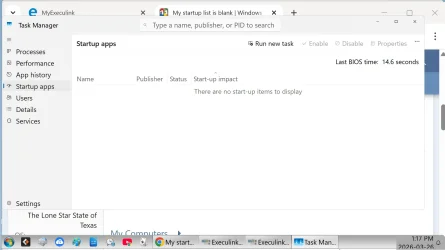
My startup list in Task Manager is blank. I had several entries in this list and I had all but one, disabled. I had "Desktop Reminder" set to open at startup. Even though this program is not in the list, it still continues to open at startup, and the icon is still in my sys tray.
How is this possible? Do I have a problem or not?
Thanks: Dave 😊
 

My Computer My Computer

At a glance

Win 11 Pro 25H2 O/S Build 22631.286112th Gen Intel Core i5-12400 2.5 GHZ16.0 GB
OS
Win 11 Pro 25H2 O/S Build 22631.2861
Computer type
PC/Desktop
Manufacturer/Model
Clone
CPU
12th Gen Intel Core i5-12400 2.5 GHZ
Memory
16.0 GB
Monitor(s) Displays
1 Asus 24"
Screen Resolution
1920x1080
Hard Drives
2x SSD
PSU
600 Watt
Internet Speed
300 mb/sec Download
Browser
Chrome
Sorry no one has answered you. I just saw your thread. I'm not sure I am fully understanding. If you have not restarted, please do so.
Go to task manager and select Startup Apps and post a screenshot.
 

My Computers My Computers

  • At a glance

    Windows 11 Pro 25H2 26200.9168i9-10900 10 core 20 threads32 gbnone-Intel UHD Graphics 630
    OS
    Windows 11 Pro 25H2 26200.9168
    Computer type
    PC/Desktop
    Manufacturer/Model
    Dell Optiplex 7080
    CPU
    i9-10900 10 core 20 threads
    Motherboard
    DELL 0J37VM
    Memory
    32 gb
    Graphics Card(s)
    none-Intel UHD Graphics 630
    Sound Card
    Integrated Realtek
    Monitor(s) Displays
    Benq 27
    Screen Resolution
    2560x1440
    Hard Drives
    2x1tb Solidigm m.2 nvme /External drives 512gb Samsung m.2 sata+2tb Kingston m2.nvme
    PSU
    500w
    Case
    MT
    Cooling
    Dell Premium
    Keyboard
    Logitech wired
    Mouse
    Logitech wireless
    Internet Speed
    so slow I'm too embarrassed to tell
    Browser
    #1 Edge #2 Firefox
    Antivirus
    Defender+MWB Premium
  • At a glance

    Windows 11 Pro 24H2 26200.9168AMD Ryzen 7 6800U32 gbintegrated
    Operating System
    Windows 11 Pro 24H2 26200.9168
    Computer type
    PC/Desktop
    Manufacturer/Model
    Beelink Mini PC SER5
    CPU
    AMD Ryzen 7 6800U
    Memory
    32 gb
    Graphics card(s)
    integrated
    Sound Card
    integrated
    Monitor(s) Displays
    Benq 27
    Screen Resolution
    2560x1440
    Hard Drives
    1TB Crucial nvme
    Keyboard
    Logitech wired
    Mouse
    Logitech wireless
    Internet Speed
    still too embarrassed to tell
    Browser
    Firefox
    Antivirus
    Defender
  • System 3 is non compliant Dell 9020 i7-4770/24gb ram Win11 PRO 26200.9168
Thanks for your reply.
Here is the screenshot you requested.
 

Attachments

  • Untitled.webp
    Untitled.webp
    61.8 KB · Views: 1

My Computer My Computer

At a glance

Win 11 Pro 25H2 O/S Build 22631.286112th Gen Intel Core i5-12400 2.5 GHZ16.0 GB
OS
Win 11 Pro 25H2 O/S Build 22631.2861
Computer type
PC/Desktop
Manufacturer/Model
Clone
CPU
12th Gen Intel Core i5-12400 2.5 GHZ
Memory
16.0 GB
Monitor(s) Displays
1 Asus 24"
Screen Resolution
1920x1080
Hard Drives
2x SSD
PSU
600 Watt
Internet Speed
300 mb/sec Download
Browser
Chrome
Hello Dave, :alien:

You can use steps 1 to 3 in option five below to see if it may find them in the registry.


My Computers My Computers

  • At a glance

    Windows 11 Pro for WorkstationsIntel i7-8700K 5 GHz64 GB (4x16GB) G.SKILL TridentZ RGB DDR4 3600...ASUS ROG-STRIX-GTX1080TI-O11G-GAMING (11GB GD...
    OS
    Windows 11 Pro for Workstations
    Computer type
    PC/Desktop
    Manufacturer/Model
    Custom self build
    CPU
    Intel i7-8700K 5 GHz
    Motherboard
    ASUS ROG Maximus XI Formula Z390
    Memory
    64 GB (4x16GB) G.SKILL TridentZ RGB DDR4 3600 MHz (F4-3600C18D-32GTZR)
    Graphics Card(s)
    ASUS ROG-STRIX-GTX1080TI-O11G-GAMING (11GB GDDR5X)
    Sound Card
    Integrated Digital Audio (S/PDIF)
    Monitor(s) Displays
    2 x Samsung Odyssey G75 27"
    Screen Resolution
    2560x1440
    Hard Drives
    1TB Samsung 990 PRO M.2,
    4TB Samsung 990 PRO M.2,
    TerraMaster F8 SSD Plus NAS
    PSU
    Seasonic Prime Titanium 850W
    Case
    Thermaltake Core P3 wall mounted
    Cooling
    Corsair Hydro H115i
    Keyboard
    Amazon Basics Wired Full Keyboard MD005
    Mouse
    Logitech MX Master 4
    Internet Speed
    2 Gbps Download and 100 Mbps Upload
    Browser
    Chrome and Edge
    Antivirus
    Microsoft Defender
    Other Info
    Logitech Z625 speaker system,
    Logitech BRIO 4K Pro webcam,
    HP Color LaserJet Pro MFP M477fdn,
    CyberPower CP1500PFCLCD
    Galaxy S23 Plus phone
  • At a glance

    Windows 11 ProSnapdragon X Elite (12 core) 3.42 GHz16 GB LPDDR5x-7467 MHz
    Operating System
    Windows 11 Pro
    Computer type
    Laptop
    Manufacturer/Model
    Surface Laptop 7 Copilot+ PC
    CPU
    Snapdragon X Elite (12 core) 3.42 GHz
    Memory
    16 GB LPDDR5x-7467 MHz
    Monitor(s) Displays
    15" HDR
    Screen Resolution
    2496 x 1664
    Hard Drives
    1 TB SSD
    Internet Speed
    Wi-Fi 7 and Bluetooth 5.4
    Browser
    Chrome and Edge
    Antivirus
    Microsoft Defender
I'd try @Brink suggestions then Before jumping to more drastic measures try this.
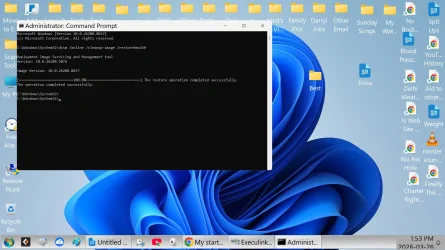
Open a command prompt as administrator and type dism /online /cleanup-image /restorehealth
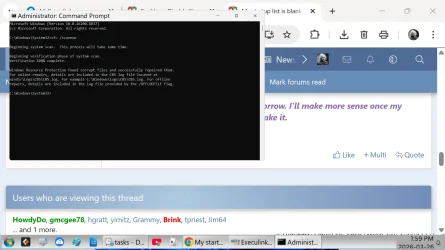
When complete restart. Then open command prompt as admin again and run sfc /scannow
Pay attention to the scan results to see if SFC found anything it could not repair

If that doesn't fix the issue, Repair install Windows 11 with an inplace upgrade Repair Install Windows 11 with an In-place Upgrade
 

My Computers My Computers

  • At a glance

    Windows 11 Pro 25H2 26200.9168i9-10900 10 core 20 threads32 gbnone-Intel UHD Graphics 630
    OS
    Windows 11 Pro 25H2 26200.9168
    Computer type
    PC/Desktop
    Manufacturer/Model
    Dell Optiplex 7080
    CPU
    i9-10900 10 core 20 threads
    Motherboard
    DELL 0J37VM
    Memory
    32 gb
    Graphics Card(s)
    none-Intel UHD Graphics 630
    Sound Card
    Integrated Realtek
    Monitor(s) Displays
    Benq 27
    Screen Resolution
    2560x1440
    Hard Drives
    2x1tb Solidigm m.2 nvme /External drives 512gb Samsung m.2 sata+2tb Kingston m2.nvme
    PSU
    500w
    Case
    MT
    Cooling
    Dell Premium
    Keyboard
    Logitech wired
    Mouse
    Logitech wireless
    Internet Speed
    so slow I'm too embarrassed to tell
    Browser
    #1 Edge #2 Firefox
    Antivirus
    Defender+MWB Premium
  • At a glance

    Windows 11 Pro 24H2 26200.9168AMD Ryzen 7 6800U32 gbintegrated
    Operating System
    Windows 11 Pro 24H2 26200.9168
    Computer type
    PC/Desktop
    Manufacturer/Model
    Beelink Mini PC SER5
    CPU
    AMD Ryzen 7 6800U
    Memory
    32 gb
    Graphics card(s)
    integrated
    Sound Card
    integrated
    Monitor(s) Displays
    Benq 27
    Screen Resolution
    2560x1440
    Hard Drives
    1TB Crucial nvme
    Keyboard
    Logitech wired
    Mouse
    Logitech wireless
    Internet Speed
    still too embarrassed to tell
    Browser
    Firefox
    Antivirus
    Defender
  • System 3 is non compliant Dell 9020 i7-4770/24gb ram Win11 PRO 26200.9168
I'd try @Brink suggestions then Before jumping to more drastic measures try this.
Open a command prompt as administrator and type dism /online /cleanup-image /restorehealth
When complete restart. Then open command prompt as admin again and run sfc /scannow
Pay attention to the scan results to see if SFC found anything it could not repair

If that doesn't fix the issue, Repair install Windows 11 with an inplace upgrade Repair Install Windows 11 with an In-place Upgrade
I've run the two scans that you requested. No effect, still no startup list.
 

Attachments

  • command prompt.webp
    command prompt.webp
    139.4 KB · Views: 1
  • Scan now.webp
    Scan now.webp
    92.4 KB · Views: 1

My Computer My Computer

At a glance

Win 11 Pro 25H2 O/S Build 22631.286112th Gen Intel Core i5-12400 2.5 GHZ16.0 GB
OS
Win 11 Pro 25H2 O/S Build 22631.2861
Computer type
PC/Desktop
Manufacturer/Model
Clone
CPU
12th Gen Intel Core i5-12400 2.5 GHZ
Memory
16.0 GB
Monitor(s) Displays
1 Asus 24"
Screen Resolution
1920x1080
Hard Drives
2x SSD
PSU
600 Watt
Internet Speed
300 mb/sec Download
Browser
Chrome
If Brink's suggestion doesn't work, I wouldn't waste a lot of time on it. Since my data is on a separate drive, if I had a system image made before the issue started, I'd restore that. If not, I would jump straight to a repair install. It's always smart to make a system image first. I don't ever do online repair installs through WU (option 1 in the tutorial) but run from an iso downloaded directly from MS (option 2 ), but that's just me. I always keep install media with the latest iso on hand for emergencies.
 

My Computers My Computers

  • At a glance

    Windows 11 Pro 25H2 26200.9168i9-10900 10 core 20 threads32 gbnone-Intel UHD Graphics 630
    OS
    Windows 11 Pro 25H2 26200.9168
    Computer type
    PC/Desktop
    Manufacturer/Model
    Dell Optiplex 7080
    CPU
    i9-10900 10 core 20 threads
    Motherboard
    DELL 0J37VM
    Memory
    32 gb
    Graphics Card(s)
    none-Intel UHD Graphics 630
    Sound Card
    Integrated Realtek
    Monitor(s) Displays
    Benq 27
    Screen Resolution
    2560x1440
    Hard Drives
    2x1tb Solidigm m.2 nvme /External drives 512gb Samsung m.2 sata+2tb Kingston m2.nvme
    PSU
    500w
    Case
    MT
    Cooling
    Dell Premium
    Keyboard
    Logitech wired
    Mouse
    Logitech wireless
    Internet Speed
    so slow I'm too embarrassed to tell
    Browser
    #1 Edge #2 Firefox
    Antivirus
    Defender+MWB Premium
  • At a glance

    Windows 11 Pro 24H2 26200.9168AMD Ryzen 7 6800U32 gbintegrated
    Operating System
    Windows 11 Pro 24H2 26200.9168
    Computer type
    PC/Desktop
    Manufacturer/Model
    Beelink Mini PC SER5
    CPU
    AMD Ryzen 7 6800U
    Memory
    32 gb
    Graphics card(s)
    integrated
    Sound Card
    integrated
    Monitor(s) Displays
    Benq 27
    Screen Resolution
    2560x1440
    Hard Drives
    1TB Crucial nvme
    Keyboard
    Logitech wired
    Mouse
    Logitech wireless
    Internet Speed
    still too embarrassed to tell
    Browser
    Firefox
    Antivirus
    Defender
  • System 3 is non compliant Dell 9020 i7-4770/24gb ram Win11 PRO 26200.9168
My startup list in Task Manager is blank. I had several entries in this list and I had all but one, disabled. I had "Desktop Reminder" set to open at startup. Even though this program is not in the list, it still continues to open at startup, and the icon is still in my sys tray.
How is this possible? Do I have a problem or not?
Thanks: Dave 😊
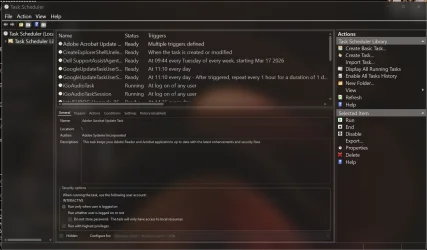
Did you check the Windows Task Scheduler? A lot of overlooked startup apps get put into Task Scheduler.
 

My Computers My Computers

  • At a glance

    Windows 11 25H2Intel Core Ultra 9 275HX (24-Core)64GB DDR5 6400MT/sNVIDIA GeForce RTX 5080 and Intel UHD Graphics
    OS
    Windows 11 25H2
    Computer type
    Laptop
    Manufacturer/Model
    Alienware 18 Area-51
    CPU
    Intel Core Ultra 9 275HX (24-Core)
    Motherboard
    Alienware
    Memory
    64GB DDR5 6400MT/s
    Graphics Card(s)
    NVIDIA GeForce RTX 5080 and Intel UHD Graphics
    Sound Card
    Onboard, Realtek high-performance Audio chips (ALC3329 & ALC1708))
    Monitor(s) Displays
    300HZ 18-inch QHD 500 nit Comfort View+
    Screen Resolution
    2560 x 1600
    Hard Drives
    2TB NVMe M.2 PCIe Gen 5 SSD
    Case
    Magnesium Alloy
    Cooling
    Advanced Cryo-Tech Quad-Fan Cooling system & large vapor chamber
    Keyboard
    Cherry MX ultra low profile mechanical keyboard with per key AlienFX RGB lighting
    Mouse
    Logitech MX Master 4
    Browser
    Vivaldi (main), Firefox, Chrome, Edge
    Antivirus
    MS Defender and Malwarebytes Free
  • At a glance

    Windows 11 25H2Qualcomm Snapdragon X Elite (12 Core) ARM bas...16GB LPDDR5Qualcomm Adreno X1-85
    Operating System
    Windows 11 25H2
    Computer type
    Laptop
    Manufacturer/Model
    Microsoft Surface Laptop 7
    CPU
    Qualcomm Snapdragon X Elite (12 Core) ARM based CPU
    Motherboard
    Microsoft Corp.
    Memory
    16GB LPDDR5
    Graphics card(s)
    Qualcomm Adreno X1-85
    Sound Card
    Omnisonic speakers with Dolby Atmos spatial sound
    Monitor(s) Displays
    120 Hz 13.8-inch 600 nit PixelSense Flow touchscreen
    Screen Resolution
    2304x1536
    Hard Drives
    1TB NVMe Gen 4 SSD
    Case
    Anodized Aluminum
    Cooling
    Traditional active cooling fan system
    Keyboard
    Mechanical QWERTY, backlit when in use
    Mouse
    Logitech MX Master 4 and Surface Arc Mouse
    Browser
    Vivaldi (main), Firefox, Chrome, Edge
    Antivirus
    MS Defender and Malwarebytes Free
If Brink's suggestion doesn't work, I wouldn't waste a lot of time on it. Since my data is on a separate drive, if I had a system image made before the issue started, I'd restore that. If not, I would jump straight to a repair install. It's always smart to make a system image first. I don't ever do online repair installs through WU (option 1 in the tutorial) but run from an iso downloaded directly from MS (option 2 ), but that's just me. I always keep install media with the latest iso on hand for emergencies.
I manually set a new restore point at the start of my day. I suppose I could to a sys restore? The only program I had running was Desktop Reminder and it opens on every restart. Not sure why but sometimes things are not meant to be explained. Thanks very much for your time on my issue.
I'm going to mark the post as Solved. 🤣💕
 

My Computer My Computer

At a glance

Win 11 Pro 25H2 O/S Build 22631.286112th Gen Intel Core i5-12400 2.5 GHZ16.0 GB
OS
Win 11 Pro 25H2 O/S Build 22631.2861
Computer type
PC/Desktop
Manufacturer/Model
Clone
CPU
12th Gen Intel Core i5-12400 2.5 GHZ
Memory
16.0 GB
Monitor(s) Displays
1 Asus 24"
Screen Resolution
1920x1080
Hard Drives
2x SSD
PSU
600 Watt
Internet Speed
300 mb/sec Download
Browser
Chrome
I manually set a new restore point at the start of my day. I suppose I could to a sys restore? The only program I had running was Desktop Reminder and it opens on every restart. Not sure why but sometimes things are not meant to be explained. Thanks very much for your time on my issue.
I'm going to mark the post as Solved. 🤣💕
Usually that means it's scheduled in the Task Scheduler and needs to either be disabled or deleted from it. Been there, done that search for the mystery app that keeps starting on restart.
 

Attachments

  • Screenshot 2026-03-26 123658.webp
    Screenshot 2026-03-26 123658.webp
    112.4 KB · Views: 1

My Computers My Computers

  • At a glance

    Windows 11 25H2Intel Core Ultra 9 275HX (24-Core)64GB DDR5 6400MT/sNVIDIA GeForce RTX 5080 and Intel UHD Graphics
    OS
    Windows 11 25H2
    Computer type
    Laptop
    Manufacturer/Model
    Alienware 18 Area-51
    CPU
    Intel Core Ultra 9 275HX (24-Core)
    Motherboard
    Alienware
    Memory
    64GB DDR5 6400MT/s
    Graphics Card(s)
    NVIDIA GeForce RTX 5080 and Intel UHD Graphics
    Sound Card
    Onboard, Realtek high-performance Audio chips (ALC3329 & ALC1708))
    Monitor(s) Displays
    300HZ 18-inch QHD 500 nit Comfort View+
    Screen Resolution
    2560 x 1600
    Hard Drives
    2TB NVMe M.2 PCIe Gen 5 SSD
    Case
    Magnesium Alloy
    Cooling
    Advanced Cryo-Tech Quad-Fan Cooling system & large vapor chamber
    Keyboard
    Cherry MX ultra low profile mechanical keyboard with per key AlienFX RGB lighting
    Mouse
    Logitech MX Master 4
    Browser
    Vivaldi (main), Firefox, Chrome, Edge
    Antivirus
    MS Defender and Malwarebytes Free
  • At a glance

    Windows 11 25H2Qualcomm Snapdragon X Elite (12 Core) ARM bas...16GB LPDDR5Qualcomm Adreno X1-85
    Operating System
    Windows 11 25H2
    Computer type
    Laptop
    Manufacturer/Model
    Microsoft Surface Laptop 7
    CPU
    Qualcomm Snapdragon X Elite (12 Core) ARM based CPU
    Motherboard
    Microsoft Corp.
    Memory
    16GB LPDDR5
    Graphics card(s)
    Qualcomm Adreno X1-85
    Sound Card
    Omnisonic speakers with Dolby Atmos spatial sound
    Monitor(s) Displays
    120 Hz 13.8-inch 600 nit PixelSense Flow touchscreen
    Screen Resolution
    2304x1536
    Hard Drives
    1TB NVMe Gen 4 SSD
    Case
    Anodized Aluminum
    Cooling
    Traditional active cooling fan system
    Keyboard
    Mechanical QWERTY, backlit when in use
    Mouse
    Logitech MX Master 4 and Surface Arc Mouse
    Browser
    Vivaldi (main), Firefox, Chrome, Edge
    Antivirus
    MS Defender and Malwarebytes Free

Latest Support Threads

Back
Top Bottom