Solved Need advice on graphics card


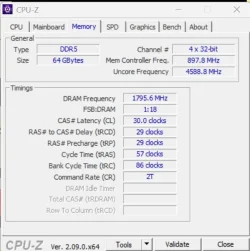
What does CPU-Z say about the RAM frequency?

(It reports the clock frequency, which is half the data transfer rate for all flavors of DDR.)
Hi Bobkn -

Here's a screenshot!

Screenshot 2025-10-10 154006.webp
 

My Computers

System One System Two

  • OS
    Windows 11 Pro Version 25H2 (OS Build 26200.8457)
    Computer type
    PC/Desktop
    Manufacturer/Model
    Dell 8950
    CPU
    i9 12th Generation
    Memory
    64GB
    Graphics Card(s)
    PNY 3060 12GB
    Monitor(s) Displays
    NEC EA27IU
    Screen Resolution
    3840X2160
    Hard Drives
    SSD internal, external drives
    Cooling
    Advanced Air Cooling
    Keyboard
    Microsoft
    Mouse
    Logitech
    Internet Speed
    High-Speed
    Browser
    MS Edge
    Antivirus
    Norton 360
  • Operating System
    Win 11 Pro 25H2 (OS Build 26200.8457)
    Computer type
    PC/Desktop
    Manufacturer/Model
    Dell Tower ECT1250
    CPU
    Intel Ultra 7 265 (20 cores) processor
    Memory
    32GB DDR5 Ram
    Graphics card(s)
    Built-in Intel UHD Graphics
    Sound Card
    Built-in
    Screen Resolution
    1920X1080
    Hard Drives
    2TB internal SSD
    Case
    Tower
Why has this suddenly devolved into a discussion about RAM and video editing? The OP has 32GB RAM, which is twice the recommended RAM for playing WoW.
 

My Computers

System One System Two

  • OS
    11 Home
    Computer type
    Laptop
    Manufacturer/Model
    Asus TUF Gaming F16 (2024)
    CPU
    i7 13650HX
    Memory
    16GB DDR5
    Graphics Card(s)
    GeForce RTX 4060 Mobile
    Sound Card
    Eastern Electric MiniMax DAC Supreme; Emotiva UMC-200; Astell & Kern AK240
    Monitor(s) Displays
    Sony Bravia XR-55X90J
    Screen Resolution
    3840×2160
    Hard Drives
    512GB SSD internal
    37TB external
    PSU
    Li-ion
    Cooling
    2× Arc Flow Fans, 4× exhaust vents, 5× heatpipes
    Keyboard
    Logitech K800
    Mouse
    Logitech G402
    Internet Speed
    30Mbit/s up, 500Mbit/s down
    Browser
    FF
    Antivirus
    What's an antivirus?
  • Operating System
    11 Home
    Computer type
    Laptop
    Manufacturer/Model
    Medion S15450
    CPU
    i5 1135G7
    Memory
    16GB DDR4
    Graphics card(s)
    Intel Iris Xe
    Sound Card
    Eastern Electric MiniMax DAC Supreme; Emotiva UMC-200; Astell & Kern AK240
    Monitor(s) Displays
    Sony Bravia XR-55X90J
    Screen Resolution
    3840×2160
    Hard Drives
    2TB SSD internal
    37TB external
    PSU
    Li-ion
    Keyboard
    Logitech K800
    Mouse
    Logitech G402
    Internet Speed
    30Mbit/s up, 500Mbit/s down
    Browser
    FF
Why has this suddenly devolved into a discussion about RAM and video editing? The OP has 32GB RAM, which is twice the recommended RAM for playing WoW.
Yeah, you're right. But, don't we all gain knowledge from our interactions? Isn't that the purpose of discussion and discourse?
 

My Computers

System One System Two

  • OS
    Windows 11 Pro Version 25H2 (OS Build 26200.8457)
    Computer type
    PC/Desktop
    Manufacturer/Model
    Dell 8950
    CPU
    i9 12th Generation
    Memory
    64GB
    Graphics Card(s)
    PNY 3060 12GB
    Monitor(s) Displays
    NEC EA27IU
    Screen Resolution
    3840X2160
    Hard Drives
    SSD internal, external drives
    Cooling
    Advanced Air Cooling
    Keyboard
    Microsoft
    Mouse
    Logitech
    Internet Speed
    High-Speed
    Browser
    MS Edge
    Antivirus
    Norton 360
  • Operating System
    Win 11 Pro 25H2 (OS Build 26200.8457)
    Computer type
    PC/Desktop
    Manufacturer/Model
    Dell Tower ECT1250
    CPU
    Intel Ultra 7 265 (20 cores) processor
    Memory
    32GB DDR5 Ram
    Graphics card(s)
    Built-in Intel UHD Graphics
    Sound Card
    Built-in
    Screen Resolution
    1920X1080
    Hard Drives
    2TB internal SSD
    Case
    Tower
Yeah, you're right. But, don't we all gain knowledge from our interactions? Isn't that the purpose of discussion and discourse?
Was it really necessary to go that far off topic, though?
 

My Computers

System One System Two

  • OS
    11 Home
    Computer type
    Laptop
    Manufacturer/Model
    Asus TUF Gaming F16 (2024)
    CPU
    i7 13650HX
    Memory
    16GB DDR5
    Graphics Card(s)
    GeForce RTX 4060 Mobile
    Sound Card
    Eastern Electric MiniMax DAC Supreme; Emotiva UMC-200; Astell & Kern AK240
    Monitor(s) Displays
    Sony Bravia XR-55X90J
    Screen Resolution
    3840×2160
    Hard Drives
    512GB SSD internal
    37TB external
    PSU
    Li-ion
    Cooling
    2× Arc Flow Fans, 4× exhaust vents, 5× heatpipes
    Keyboard
    Logitech K800
    Mouse
    Logitech G402
    Internet Speed
    30Mbit/s up, 500Mbit/s down
    Browser
    FF
    Antivirus
    What's an antivirus?
  • Operating System
    11 Home
    Computer type
    Laptop
    Manufacturer/Model
    Medion S15450
    CPU
    i5 1135G7
    Memory
    16GB DDR4
    Graphics card(s)
    Intel Iris Xe
    Sound Card
    Eastern Electric MiniMax DAC Supreme; Emotiva UMC-200; Astell & Kern AK240
    Monitor(s) Displays
    Sony Bravia XR-55X90J
    Screen Resolution
    3840×2160
    Hard Drives
    2TB SSD internal
    37TB external
    PSU
    Li-ion
    Keyboard
    Logitech K800
    Mouse
    Logitech G402
    Internet Speed
    30Mbit/s up, 500Mbit/s down
    Browser
    FF

My Computers

System One System Two

  • OS
    Windows 11 26200.8116
    Computer type
    PC/Desktop
    Manufacturer/Model
    homebuilt
    CPU
    Amd Threadripper 7970X
    Motherboard
    Gigabyte TRX50 Aero D Rev. 1.0
    Memory
    128GB (4 X 32) G.Skill DDR5 6400 (RDIMM)
    Graphics Card(s)
    Gigabyte RTX 4090 OC
    Sound Card
    none (USB to speakers), Realtek
    Monitor(s) Displays
    Innocn 32" OLED
    Screen Resolution
    3840 X 2160 @ 60Hz
    Hard Drives
    Crucial T700 2TB M.2 NVME SSD
    WD 4TB Blue SATA SSD
    Seagate 18TB IronWolf Pro
    PSU
    BeQuiet! Straight Power 12 1500W
    Case
    Lian Li 011 Dynamic Evo XL
    Cooling
    SilverStone Technology XE360-TR5, with 3 Phanteks T30 fans
    Keyboard
    Cherry KC 500 MX LP (mechanical)
    Mouse
    Logitech M500s (wired)
    Internet Speed
    2000/250 Mbps (down/up)
    Other Info
    xFinity gateway
  • Operating System
    windows 11 26200.8116
    Computer type
    PC/Desktop
    Manufacturer/Model
    homebuilt
    CPU
    Intel I9-13900K
    Motherboard
    Asus RoG Strix Z690-E
    Memory
    64GB G.Skill DDR5-6000
    Graphics card(s)
    Gigabyte RTX 3090 ti
    Sound Card
    built in Realtek
    Monitor(s) Displays
    Philips 27E1N8900 27" OLED
    Screen Resolution
    3840 X 2160 @60Hz
    Hard Drives
    WDC SN850 1TB
    8TB Seagate Ironwolf
    4TB Seagate Ironwolf
    PSU
    eVGA SuperNOVA 1300 GT
    Case
    Lian Li 011 Dynamic Evo
    Cooling
    Corsair iCUE H150i ELITE CAPELLIX Liquid CPU Cooler
    Keyboard
    Cherry Streaming (wired)
    Mouse
    Logitech M500s (wired)
The RAM is running at 3600MHz (2X approx. 1800) transfer rate.

This from Dell:


Dell lists 4000MHz for 4 X 16MB. Maybe you could choose that in the 8950's BIOS settings.
Thanks, bobkn -
We did get bit far off the topic, which was helping a fellow member, bamagull, decide on a video card. As a former career auto mechanic with 30 years of experience, I had a mantra: If it works, don't fix it. My personal computer is happy and doing what I need it to do, at present. So, I will not mess with it right now, as I don't want to interrupt my work-flow. Thanks for your suggestion, though.
 

My Computers

System One System Two

  • OS
    Windows 11 Pro Version 25H2 (OS Build 26200.8457)
    Computer type
    PC/Desktop
    Manufacturer/Model
    Dell 8950
    CPU
    i9 12th Generation
    Memory
    64GB
    Graphics Card(s)
    PNY 3060 12GB
    Monitor(s) Displays
    NEC EA27IU
    Screen Resolution
    3840X2160
    Hard Drives
    SSD internal, external drives
    Cooling
    Advanced Air Cooling
    Keyboard
    Microsoft
    Mouse
    Logitech
    Internet Speed
    High-Speed
    Browser
    MS Edge
    Antivirus
    Norton 360
  • Operating System
    Win 11 Pro 25H2 (OS Build 26200.8457)
    Computer type
    PC/Desktop
    Manufacturer/Model
    Dell Tower ECT1250
    CPU
    Intel Ultra 7 265 (20 cores) processor
    Memory
    32GB DDR5 Ram
    Graphics card(s)
    Built-in Intel UHD Graphics
    Sound Card
    Built-in
    Screen Resolution
    1920X1080
    Hard Drives
    2TB internal SSD
    Case
    Tower
Thanks, bobkn -
We did get bit far off the topic, which was helping a fellow member, bamagull, decide on a video card. As a former career auto mechanic with 30 years of experience, I had a mantra: If it works, don't fix it. My personal computer is happy and doing what I need it to do, at present. So, I will not mess with it right now, as I don't want to interrupt my work-flow. Thanks for your suggestion, though.
Sensible. You probably wouldn't notice much improvement, outside of synthetic benchmarks.

You may have noticed that "bamagull" has done a single post to start the thread, and hasn't returned to it.
 
Last edited:

My Computers

System One System Two

  • OS
    Windows 11 26200.8116
    Computer type
    PC/Desktop
    Manufacturer/Model
    homebuilt
    CPU
    Amd Threadripper 7970X
    Motherboard
    Gigabyte TRX50 Aero D Rev. 1.0
    Memory
    128GB (4 X 32) G.Skill DDR5 6400 (RDIMM)
    Graphics Card(s)
    Gigabyte RTX 4090 OC
    Sound Card
    none (USB to speakers), Realtek
    Monitor(s) Displays
    Innocn 32" OLED
    Screen Resolution
    3840 X 2160 @ 60Hz
    Hard Drives
    Crucial T700 2TB M.2 NVME SSD
    WD 4TB Blue SATA SSD
    Seagate 18TB IronWolf Pro
    PSU
    BeQuiet! Straight Power 12 1500W
    Case
    Lian Li 011 Dynamic Evo XL
    Cooling
    SilverStone Technology XE360-TR5, with 3 Phanteks T30 fans
    Keyboard
    Cherry KC 500 MX LP (mechanical)
    Mouse
    Logitech M500s (wired)
    Internet Speed
    2000/250 Mbps (down/up)
    Other Info
    xFinity gateway
  • Operating System
    windows 11 26200.8116
    Computer type
    PC/Desktop
    Manufacturer/Model
    homebuilt
    CPU
    Intel I9-13900K
    Motherboard
    Asus RoG Strix Z690-E
    Memory
    64GB G.Skill DDR5-6000
    Graphics card(s)
    Gigabyte RTX 3090 ti
    Sound Card
    built in Realtek
    Monitor(s) Displays
    Philips 27E1N8900 27" OLED
    Screen Resolution
    3840 X 2160 @60Hz
    Hard Drives
    WDC SN850 1TB
    8TB Seagate Ironwolf
    4TB Seagate Ironwolf
    PSU
    eVGA SuperNOVA 1300 GT
    Case
    Lian Li 011 Dynamic Evo
    Cooling
    Corsair iCUE H150i ELITE CAPELLIX Liquid CPU Cooler
    Keyboard
    Cherry Streaming (wired)
    Mouse
    Logitech M500s (wired)
They've been lurking, but haven't said anything because we're doing all the talking, which has gone completely out of topic. 🙃

@bamagull please let us know if configuring the graphics settings helped solve your game issue, or if you're still into buying a new GPU.

Thank you and sorry on behalf of everyone for spamming completely out of topic stuff and irrelevant opinions.
 

My Computers

System One System Two

  • OS
    Win 11 Pro 25H2 26200.8457 / Linux Mint 22.3
    Computer type
    Laptop
    Manufacturer/Model
    Lenovo A485
    CPU
    Ryzen 7 2700U Pro
    Motherboard
    Lenovo (WiFi/BT module upgraded to Intel Wireless-AC-9260)
    Memory
    32GB
    Graphics Card(s)
    iGPU Vega 10
    Sound Card
    Realtek
    Monitor(s) Displays
    14" FHD (built-in) + 14" Lenovo Thinkvision M14t (touch+pen) + 32" Asus PB328
    Screen Resolution
    FHD + FHD + 1440p
    Hard Drives
    Intel 660p m.2 nVME PCIe3.0 x2 512GB
    PSU
    125W(Dock)/65W(Travel Adapter)
    Keyboard
    Thinkpad / Logitech MX Keys
    Mouse
    Logitech MX Master 2S
    Internet Speed
    1/1Gbit
    Browser
    Firefox
    Antivirus
    Windows Defender
    Other Info
    SecureBoot: Enabled
    TPM2.0: Enabled
    AMD-V: Enabled
  • Operating System
    Win 11 Pro 25H2 26200.8521(RP)
    Computer type
    PC/Desktop
    Manufacturer/Model
    Custom
    CPU
    i7-7700k @4.8GHz
    Motherboard
    Asus PRIME Z270-A
    Memory
    32GB 2x16GB 2133MHz CL15
    Graphics card(s)
    EVGA GTX1080Ti FTW 11GB
    Sound Card
    Integrated
    Monitor(s) Displays
    32" 10-bit Asus PB328Q
    Screen Resolution
    WQHD 2560x1440
    Hard Drives
    512GB ADATA SX8000NP NVMe PCIe Gen 3 x4
    PSU
    850W
    Case
    Fractal Design Define 7
    Cooling
    Noctua NH-D15 chromax.black
    Keyboard
    Logitech MX Keys
    Mouse
    Logitech MX Master 2S
    Internet Speed
    1/1Gbit
    Browser
    Firefox
    Antivirus
    Windows Defender
    Other Info
    AC WiFi Card
My guess is he tried some settings, saw some improvement but he is going to buy a new card anyway. He doesn't really need it but want it and was looking for an excuse.
 

My Computers

System One System Two

  • OS
    Windows 11 Pro 23H2 (5699), 25H2 (8457)
    Computer type
    Laptop
    Manufacturer/Model
    Acer Extensa 5630EZ
    CPU
    Mobile DualCore Intel Core 2 Duo T7250, 2000 MHz
    Motherboard
    Acer Extensa 5630
    Memory
    4GB
    Graphics Card(s)
    Mobile Intel(R) GMA 4500M (Mobile 4 series)
    Sound Card
    Realtek ALC268 @ Intel 82801IB ICH9 - High Definition Audio Controller
    Monitor(s) Displays
    1
    Screen Resolution
    1280x800
    Hard Drives
    Samsung SSD 850 EVO 250GB SATA Device (250 GB, SATA-III)
    Internet Speed
    VDSL 50 Mbps
    Browser
    MICROSOFT EDGE
    Antivirus
    WINDOWS DEFENDER
    Other Info
    Legacy MBR installation, no TPM, no Secure Boot, no WDDM 2.0 graphics drivers, no SSE4.2, cannot get more unsupported ;) This is only my test laptop. I had installed Windows 11 here before upgrading my main PC. For my main PC I use everyday see my 2nd system specs.
  • Operating System
    Windows 11 Pro v25H2 (build 26200.8457)
    Computer type
    PC/Desktop
    Manufacturer/Model
    Custom-built PC
    CPU
    Intel Core-i7 3770 3.40GHz s1155 (3rd generation)
    Motherboard
    Asus P8H61 s1155 ATX
    Memory
    2x Kingston Hyper-X Blu 8GB DDR3-1600
    Graphics card(s)
    GIGABYTE GeForce RTX 3050 WINDFORCE OC V2 6GB (GV-N3050WF2OCV2-6GD)
    Sound Card
    Realtek HD audio (ALC887)
    Monitor(s) Displays
    Sony Bravia KDL-19L4000 19" LCD TV via VGA
    Screen Resolution
    1440x900 32-bit 60Hz
    Hard Drives
    WD Blue SA510 2.5 1000GB SSD as system disk, Western Digital Caviar Purple 4TB SATA III (WD40PURZ) as second
    PSU
    Thermaltake Litepower RGB 550W Full Wired
    Case
    SUPERCASE MIDI-TOWER
    Cooling
    Deepcool Gamma Archer CPU cooler, 1x 8cm fan at the back
    Keyboard
    Mitsumi 101-key PS/2
    Mouse
    Sunnyline OptiEye PS/2
    Internet Speed
    100Mbps
    Browser
    Microsoft Edge, Mozilla Firefox
    Antivirus
    Microsoft Windows Defender
    Other Info
    Legacy BIOS (MBR) installation, no TPM, no Secure Boot, WDDM 3.0 graphics drivers, WEI score 7.4
We don't know that...but having an RTX card is not a bad thing. But for those features to be useful rather than annoying (almost making it) I'd go for at least a 5060Ti or 5070. The lower tiers are a bit weak, though they also add some value to raytracing features. 5090 is overkill though for most users and its price is not really justifiable unless you use the card for making more money (AI, CG etc...)
 

My Computers

System One System Two

  • OS
    Win 11 Pro 25H2 26200.8457 / Linux Mint 22.3
    Computer type
    Laptop
    Manufacturer/Model
    Lenovo A485
    CPU
    Ryzen 7 2700U Pro
    Motherboard
    Lenovo (WiFi/BT module upgraded to Intel Wireless-AC-9260)
    Memory
    32GB
    Graphics Card(s)
    iGPU Vega 10
    Sound Card
    Realtek
    Monitor(s) Displays
    14" FHD (built-in) + 14" Lenovo Thinkvision M14t (touch+pen) + 32" Asus PB328
    Screen Resolution
    FHD + FHD + 1440p
    Hard Drives
    Intel 660p m.2 nVME PCIe3.0 x2 512GB
    PSU
    125W(Dock)/65W(Travel Adapter)
    Keyboard
    Thinkpad / Logitech MX Keys
    Mouse
    Logitech MX Master 2S
    Internet Speed
    1/1Gbit
    Browser
    Firefox
    Antivirus
    Windows Defender
    Other Info
    SecureBoot: Enabled
    TPM2.0: Enabled
    AMD-V: Enabled
  • Operating System
    Win 11 Pro 25H2 26200.8521(RP)
    Computer type
    PC/Desktop
    Manufacturer/Model
    Custom
    CPU
    i7-7700k @4.8GHz
    Motherboard
    Asus PRIME Z270-A
    Memory
    32GB 2x16GB 2133MHz CL15
    Graphics card(s)
    EVGA GTX1080Ti FTW 11GB
    Sound Card
    Integrated
    Monitor(s) Displays
    32" 10-bit Asus PB328Q
    Screen Resolution
    WQHD 2560x1440
    Hard Drives
    512GB ADATA SX8000NP NVMe PCIe Gen 3 x4
    PSU
    850W
    Case
    Fractal Design Define 7
    Cooling
    Noctua NH-D15 chromax.black
    Keyboard
    Logitech MX Keys
    Mouse
    Logitech MX Master 2S
    Internet Speed
    1/1Gbit
    Browser
    Firefox
    Antivirus
    Windows Defender
    Other Info
    AC WiFi Card
AFAIK that can't be had for $500 just yet unless you buy used, and besides, the similarly priced Radeon RX 9070 appears to be a better GPU than the RTX 5070. The 16GB GDDR7 version of 5060Ti is still the sweet spot for heavy gaming at 1080p (1920×1080) resolution.

However like I said, even if WoW is capped at 60 FPS through settings and using 1920×1080 resolution, his CPU can easily become a bit of a limiting factor that can be exacerbated in crowded areas of the game. (Even, if all the various settings are optimized for a well-balanced tradeoff between the FPS stability factor and all the other graphics quality related variables.)
 

My Computers

System One System Two

  • OS
    11 Home
    Computer type
    Laptop
    Manufacturer/Model
    Asus TUF Gaming F16 (2024)
    CPU
    i7 13650HX
    Memory
    16GB DDR5
    Graphics Card(s)
    GeForce RTX 4060 Mobile
    Sound Card
    Eastern Electric MiniMax DAC Supreme; Emotiva UMC-200; Astell & Kern AK240
    Monitor(s) Displays
    Sony Bravia XR-55X90J
    Screen Resolution
    3840×2160
    Hard Drives
    512GB SSD internal
    37TB external
    PSU
    Li-ion
    Cooling
    2× Arc Flow Fans, 4× exhaust vents, 5× heatpipes
    Keyboard
    Logitech K800
    Mouse
    Logitech G402
    Internet Speed
    30Mbit/s up, 500Mbit/s down
    Browser
    FF
    Antivirus
    What's an antivirus?
  • Operating System
    11 Home
    Computer type
    Laptop
    Manufacturer/Model
    Medion S15450
    CPU
    i5 1135G7
    Memory
    16GB DDR4
    Graphics card(s)
    Intel Iris Xe
    Sound Card
    Eastern Electric MiniMax DAC Supreme; Emotiva UMC-200; Astell & Kern AK240
    Monitor(s) Displays
    Sony Bravia XR-55X90J
    Screen Resolution
    3840×2160
    Hard Drives
    2TB SSD internal
    37TB external
    PSU
    Li-ion
    Keyboard
    Logitech K800
    Mouse
    Logitech G402
    Internet Speed
    30Mbit/s up, 500Mbit/s down
    Browser
    FF
AFAIK that can't be had for $500 just yet unless you buy used
This would be correct, but it gets quite close.

I was not talking about price at all, just the features RTX brings to the table. RTX 5050 is almost as good as not having RTX at all for instance. It can enhance a bit of graphics but it is more trouble than worth the effort in many games. 5060 improves on this a bit, but a 16GB card helps a lot vs 8GB. Anything after that is very usable in most modern titles as long as there is enough VRAM. 8GB is not enough, or too close to the limit, when RTX is ON.
 

My Computers

System One System Two

  • OS
    Win 11 Pro 25H2 26200.8457 / Linux Mint 22.3
    Computer type
    Laptop
    Manufacturer/Model
    Lenovo A485
    CPU
    Ryzen 7 2700U Pro
    Motherboard
    Lenovo (WiFi/BT module upgraded to Intel Wireless-AC-9260)
    Memory
    32GB
    Graphics Card(s)
    iGPU Vega 10
    Sound Card
    Realtek
    Monitor(s) Displays
    14" FHD (built-in) + 14" Lenovo Thinkvision M14t (touch+pen) + 32" Asus PB328
    Screen Resolution
    FHD + FHD + 1440p
    Hard Drives
    Intel 660p m.2 nVME PCIe3.0 x2 512GB
    PSU
    125W(Dock)/65W(Travel Adapter)
    Keyboard
    Thinkpad / Logitech MX Keys
    Mouse
    Logitech MX Master 2S
    Internet Speed
    1/1Gbit
    Browser
    Firefox
    Antivirus
    Windows Defender
    Other Info
    SecureBoot: Enabled
    TPM2.0: Enabled
    AMD-V: Enabled
  • Operating System
    Win 11 Pro 25H2 26200.8521(RP)
    Computer type
    PC/Desktop
    Manufacturer/Model
    Custom
    CPU
    i7-7700k @4.8GHz
    Motherboard
    Asus PRIME Z270-A
    Memory
    32GB 2x16GB 2133MHz CL15
    Graphics card(s)
    EVGA GTX1080Ti FTW 11GB
    Sound Card
    Integrated
    Monitor(s) Displays
    32" 10-bit Asus PB328Q
    Screen Resolution
    WQHD 2560x1440
    Hard Drives
    512GB ADATA SX8000NP NVMe PCIe Gen 3 x4
    PSU
    850W
    Case
    Fractal Design Define 7
    Cooling
    Noctua NH-D15 chromax.black
    Keyboard
    Logitech MX Keys
    Mouse
    Logitech MX Master 2S
    Internet Speed
    1/1Gbit
    Browser
    Firefox
    Antivirus
    Windows Defender
    Other Info
    AC WiFi Card
This would be correct, but it gets quite close.

I was not talking about price at all, just the features RTX brings to the table. RTX 5050 is almost as good as not having RTX at all for instance. It can enhance a bit of graphics but it is more trouble than worth the effort in many games. 5060 improves on this a bit, but a 16GB card helps a lot vs 8GB. Anything after that is very usable in most modern titles as long as there is enough VRAM. 8GB is not enough, or too close to the limit, when RTX is ON.
But I am assuming that he also needs to stay on budget to make the next logical step in his future upgrade path possible soon. To replace his motherboard and CPU, that is. I guess that he could probably just keep his 32GB RAM. I certainly wouldn't want to wait too long with the motherboard+CPU upgrade. I would probably wait until Black Friday week or Cyber Monday. And/or use my pickpocketing skill to get the best deal that I can find... :sneaky:

637018786650171682.png
 

My Computers

System One System Two

  • OS
    11 Home
    Computer type
    Laptop
    Manufacturer/Model
    Asus TUF Gaming F16 (2024)
    CPU
    i7 13650HX
    Memory
    16GB DDR5
    Graphics Card(s)
    GeForce RTX 4060 Mobile
    Sound Card
    Eastern Electric MiniMax DAC Supreme; Emotiva UMC-200; Astell & Kern AK240
    Monitor(s) Displays
    Sony Bravia XR-55X90J
    Screen Resolution
    3840×2160
    Hard Drives
    512GB SSD internal
    37TB external
    PSU
    Li-ion
    Cooling
    2× Arc Flow Fans, 4× exhaust vents, 5× heatpipes
    Keyboard
    Logitech K800
    Mouse
    Logitech G402
    Internet Speed
    30Mbit/s up, 500Mbit/s down
    Browser
    FF
    Antivirus
    What's an antivirus?
  • Operating System
    11 Home
    Computer type
    Laptop
    Manufacturer/Model
    Medion S15450
    CPU
    i5 1135G7
    Memory
    16GB DDR4
    Graphics card(s)
    Intel Iris Xe
    Sound Card
    Eastern Electric MiniMax DAC Supreme; Emotiva UMC-200; Astell & Kern AK240
    Monitor(s) Displays
    Sony Bravia XR-55X90J
    Screen Resolution
    3840×2160
    Hard Drives
    2TB SSD internal
    37TB external
    PSU
    Li-ion
    Keyboard
    Logitech K800
    Mouse
    Logitech G402
    Internet Speed
    30Mbit/s up, 500Mbit/s down
    Browser
    FF
This would be correct, but it gets quite close.

I was not talking about price at all, just the features RTX brings to the table. RTX 5050 is almost as good as not having RTX at all for instance. It can enhance a bit of graphics but it is more trouble than worth the effort in many games. 5060 improves on this a bit, but a 16GB card helps a lot vs 8GB. Anything after that is very usable in most modern titles as long as there is enough VRAM. 8GB is not enough, or too close to the limit, when RTX is ON.
My point exactly. Why would he needs to enable RTX or any other complex effects? Disable some of the complex effects or at least set them to medium or low and boom! His 1660 suddenly can give more than 60fps, unless there is a software limit of course.
 

My Computers

System One System Two

  • OS
    Windows 11 Pro 23H2 (5699), 25H2 (8457)
    Computer type
    Laptop
    Manufacturer/Model
    Acer Extensa 5630EZ
    CPU
    Mobile DualCore Intel Core 2 Duo T7250, 2000 MHz
    Motherboard
    Acer Extensa 5630
    Memory
    4GB
    Graphics Card(s)
    Mobile Intel(R) GMA 4500M (Mobile 4 series)
    Sound Card
    Realtek ALC268 @ Intel 82801IB ICH9 - High Definition Audio Controller
    Monitor(s) Displays
    1
    Screen Resolution
    1280x800
    Hard Drives
    Samsung SSD 850 EVO 250GB SATA Device (250 GB, SATA-III)
    Internet Speed
    VDSL 50 Mbps
    Browser
    MICROSOFT EDGE
    Antivirus
    WINDOWS DEFENDER
    Other Info
    Legacy MBR installation, no TPM, no Secure Boot, no WDDM 2.0 graphics drivers, no SSE4.2, cannot get more unsupported ;) This is only my test laptop. I had installed Windows 11 here before upgrading my main PC. For my main PC I use everyday see my 2nd system specs.
  • Operating System
    Windows 11 Pro v25H2 (build 26200.8457)
    Computer type
    PC/Desktop
    Manufacturer/Model
    Custom-built PC
    CPU
    Intel Core-i7 3770 3.40GHz s1155 (3rd generation)
    Motherboard
    Asus P8H61 s1155 ATX
    Memory
    2x Kingston Hyper-X Blu 8GB DDR3-1600
    Graphics card(s)
    GIGABYTE GeForce RTX 3050 WINDFORCE OC V2 6GB (GV-N3050WF2OCV2-6GD)
    Sound Card
    Realtek HD audio (ALC887)
    Monitor(s) Displays
    Sony Bravia KDL-19L4000 19" LCD TV via VGA
    Screen Resolution
    1440x900 32-bit 60Hz
    Hard Drives
    WD Blue SA510 2.5 1000GB SSD as system disk, Western Digital Caviar Purple 4TB SATA III (WD40PURZ) as second
    PSU
    Thermaltake Litepower RGB 550W Full Wired
    Case
    SUPERCASE MIDI-TOWER
    Cooling
    Deepcool Gamma Archer CPU cooler, 1x 8cm fan at the back
    Keyboard
    Mitsumi 101-key PS/2
    Mouse
    Sunnyline OptiEye PS/2
    Internet Speed
    100Mbps
    Browser
    Microsoft Edge, Mozilla Firefox
    Antivirus
    Microsoft Windows Defender
    Other Info
    Legacy BIOS (MBR) installation, no TPM, no Secure Boot, WDDM 3.0 graphics drivers, WEI score 7.4
Makes sense to move to a newer card anyway to avoid GPU GOP issues when the 2011 cert is revoked next year.
 

My Computer

System One

  • OS
    Windows 11 Pro
Makes sense to move to a newer card anyway to avoid GPU GOP issues when the 2011 cert is revoked next year.
What do you mean? Anyone having an old card must replace it otherwise it won't boot in UEFI mode? That's ridiculous. Probably the manufacturer will issue a new BIOS to make the card compliant with the new certificate 2023.

PS: What about older graphics card without UEFI BIOS? Won't they boot in UEFI mode at all? Thankfully I have an unsupported Legacy BIOS installation so I won't be affected by the new certificate and other BS.
 

My Computers

System One System Two

  • OS
    Windows 11 Pro 23H2 (5699), 25H2 (8457)
    Computer type
    Laptop
    Manufacturer/Model
    Acer Extensa 5630EZ
    CPU
    Mobile DualCore Intel Core 2 Duo T7250, 2000 MHz
    Motherboard
    Acer Extensa 5630
    Memory
    4GB
    Graphics Card(s)
    Mobile Intel(R) GMA 4500M (Mobile 4 series)
    Sound Card
    Realtek ALC268 @ Intel 82801IB ICH9 - High Definition Audio Controller
    Monitor(s) Displays
    1
    Screen Resolution
    1280x800
    Hard Drives
    Samsung SSD 850 EVO 250GB SATA Device (250 GB, SATA-III)
    Internet Speed
    VDSL 50 Mbps
    Browser
    MICROSOFT EDGE
    Antivirus
    WINDOWS DEFENDER
    Other Info
    Legacy MBR installation, no TPM, no Secure Boot, no WDDM 2.0 graphics drivers, no SSE4.2, cannot get more unsupported ;) This is only my test laptop. I had installed Windows 11 here before upgrading my main PC. For my main PC I use everyday see my 2nd system specs.
  • Operating System
    Windows 11 Pro v25H2 (build 26200.8457)
    Computer type
    PC/Desktop
    Manufacturer/Model
    Custom-built PC
    CPU
    Intel Core-i7 3770 3.40GHz s1155 (3rd generation)
    Motherboard
    Asus P8H61 s1155 ATX
    Memory
    2x Kingston Hyper-X Blu 8GB DDR3-1600
    Graphics card(s)
    GIGABYTE GeForce RTX 3050 WINDFORCE OC V2 6GB (GV-N3050WF2OCV2-6GD)
    Sound Card
    Realtek HD audio (ALC887)
    Monitor(s) Displays
    Sony Bravia KDL-19L4000 19" LCD TV via VGA
    Screen Resolution
    1440x900 32-bit 60Hz
    Hard Drives
    WD Blue SA510 2.5 1000GB SSD as system disk, Western Digital Caviar Purple 4TB SATA III (WD40PURZ) as second
    PSU
    Thermaltake Litepower RGB 550W Full Wired
    Case
    SUPERCASE MIDI-TOWER
    Cooling
    Deepcool Gamma Archer CPU cooler, 1x 8cm fan at the back
    Keyboard
    Mitsumi 101-key PS/2
    Mouse
    Sunnyline OptiEye PS/2
    Internet Speed
    100Mbps
    Browser
    Microsoft Edge, Mozilla Firefox
    Antivirus
    Microsoft Windows Defender
    Other Info
    Legacy BIOS (MBR) installation, no TPM, no Secure Boot, WDDM 3.0 graphics drivers, WEI score 7.4
Why would he needs to enable RTX or any other complex effects? Disable some of the complex effects or at least set them to medium or low and boom! His 1660 suddenly can give more than 60fps, unless there is a software limit of course.
Read the news. lol The War Within runs like dogsh!t. There is no logical relationship between many of the settings and the FPS you get. The FPS also very heavily depends on where you are in the game. Results tend to vary so wildly between different areas in the game that you need to have a degree in gnomish engineering to be able to figure this out. Just to give only some idea of what this is:
 

My Computers

System One System Two

  • OS
    11 Home
    Computer type
    Laptop
    Manufacturer/Model
    Asus TUF Gaming F16 (2024)
    CPU
    i7 13650HX
    Memory
    16GB DDR5
    Graphics Card(s)
    GeForce RTX 4060 Mobile
    Sound Card
    Eastern Electric MiniMax DAC Supreme; Emotiva UMC-200; Astell & Kern AK240
    Monitor(s) Displays
    Sony Bravia XR-55X90J
    Screen Resolution
    3840×2160
    Hard Drives
    512GB SSD internal
    37TB external
    PSU
    Li-ion
    Cooling
    2× Arc Flow Fans, 4× exhaust vents, 5× heatpipes
    Keyboard
    Logitech K800
    Mouse
    Logitech G402
    Internet Speed
    30Mbit/s up, 500Mbit/s down
    Browser
    FF
    Antivirus
    What's an antivirus?
  • Operating System
    11 Home
    Computer type
    Laptop
    Manufacturer/Model
    Medion S15450
    CPU
    i5 1135G7
    Memory
    16GB DDR4
    Graphics card(s)
    Intel Iris Xe
    Sound Card
    Eastern Electric MiniMax DAC Supreme; Emotiva UMC-200; Astell & Kern AK240
    Monitor(s) Displays
    Sony Bravia XR-55X90J
    Screen Resolution
    3840×2160
    Hard Drives
    2TB SSD internal
    37TB external
    PSU
    Li-ion
    Keyboard
    Logitech K800
    Mouse
    Logitech G402
    Internet Speed
    30Mbit/s up, 500Mbit/s down
    Browser
    FF
That's why after installing new certificate 2023 in UEFI firmware you must avoid revoking the old certificate 2011. If this is done automatically, then those booting Windows 11 with Secure Boot enabled are screwed. Even if the GPU manufacturers issue a new firmware, who is going to flash it? Most users have no idea what to do, unless this is done automatically from Windows Update. Probably Microsoft or the motherboard manufacturers should find a way to automatically add our existing GPU to the trusted list without requiring to upgrade its firmware, otherwise they are going to lose a lot of users.
 

My Computers

System One System Two

  • OS
    Windows 11 Pro 23H2 (5699), 25H2 (8457)
    Computer type
    Laptop
    Manufacturer/Model
    Acer Extensa 5630EZ
    CPU
    Mobile DualCore Intel Core 2 Duo T7250, 2000 MHz
    Motherboard
    Acer Extensa 5630
    Memory
    4GB
    Graphics Card(s)
    Mobile Intel(R) GMA 4500M (Mobile 4 series)
    Sound Card
    Realtek ALC268 @ Intel 82801IB ICH9 - High Definition Audio Controller
    Monitor(s) Displays
    1
    Screen Resolution
    1280x800
    Hard Drives
    Samsung SSD 850 EVO 250GB SATA Device (250 GB, SATA-III)
    Internet Speed
    VDSL 50 Mbps
    Browser
    MICROSOFT EDGE
    Antivirus
    WINDOWS DEFENDER
    Other Info
    Legacy MBR installation, no TPM, no Secure Boot, no WDDM 2.0 graphics drivers, no SSE4.2, cannot get more unsupported ;) This is only my test laptop. I had installed Windows 11 here before upgrading my main PC. For my main PC I use everyday see my 2nd system specs.
  • Operating System
    Windows 11 Pro v25H2 (build 26200.8457)
    Computer type
    PC/Desktop
    Manufacturer/Model
    Custom-built PC
    CPU
    Intel Core-i7 3770 3.40GHz s1155 (3rd generation)
    Motherboard
    Asus P8H61 s1155 ATX
    Memory
    2x Kingston Hyper-X Blu 8GB DDR3-1600
    Graphics card(s)
    GIGABYTE GeForce RTX 3050 WINDFORCE OC V2 6GB (GV-N3050WF2OCV2-6GD)
    Sound Card
    Realtek HD audio (ALC887)
    Monitor(s) Displays
    Sony Bravia KDL-19L4000 19" LCD TV via VGA
    Screen Resolution
    1440x900 32-bit 60Hz
    Hard Drives
    WD Blue SA510 2.5 1000GB SSD as system disk, Western Digital Caviar Purple 4TB SATA III (WD40PURZ) as second
    PSU
    Thermaltake Litepower RGB 550W Full Wired
    Case
    SUPERCASE MIDI-TOWER
    Cooling
    Deepcool Gamma Archer CPU cooler, 1x 8cm fan at the back
    Keyboard
    Mitsumi 101-key PS/2
    Mouse
    Sunnyline OptiEye PS/2
    Internet Speed
    100Mbps
    Browser
    Microsoft Edge, Mozilla Firefox
    Antivirus
    Microsoft Windows Defender
    Other Info
    Legacy BIOS (MBR) installation, no TPM, no Secure Boot, WDDM 3.0 graphics drivers, WEI score 7.4

Latest Support Threads

Back
Top Bottom