Solved Need app to compare 2 text documents and delete duplicates


JAK

Active member
Member
Local time
11:23 PM
Posts
182
OS
Windows 11
Need an app to compare 2 text documents and delete duplicates.
Used note ++ to create 2 'Docs' one with current list of my music titles, DOC1 the other DOC2 with a list of new to be added. Not ++ dies have compare and compare + plugins, but only highlights duplicates, although doesn't seem easy to understand. Hoped for away to delete the duplicates on DOC2 to leave only the different music titles.
Unless there's a better App to achieve this. Searching gives a multitude of online options, which I'm not comfortable with.

Thank you
 

My Computer My Computer

At a glance

Windows 11Ryzen 78+16 total 24GB
OS
Windows 11
Computer type
Laptop
Manufacturer/Model
Asus
CPU
Ryzen 7
Memory
8+16 total 24GB
Other Info
Asus Vivobook 15 M513U

Hoped for away to delete the duplicates on DOC2 to leave only the different music titles.
Edit/Line Operations/Remove Duplicate Lines
 

My Computers My Computers

  • At a glance

    Windows 11 Pro
    OS
    Windows 11 Pro
    Computer type
    PC/Desktop
    Manufacturer/Model
    ASUS ROG Strix
  • At a glance

    Windows 11 Pro
    Operating System
    Windows 11 Pro
    Computer type
    Laptop
    Manufacturer/Model
    ASUS VivoBook
  • ASUS VivoBook 'Lite' ~ Windows 11 Home

My Computer My Computer

At a glance

Win 10 Pro 19045.6937 Win 11 25H2 VMXeon W-10885M64GB ECC DDR4 128GB maxIntel 1080p + Quadro RTX 5000 Max-Q 16GB 4K
OS
Win 10 Pro 19045.6937 Win 11 25H2 VM
Computer type
Laptop
Manufacturer/Model
Dell Precicion 15 Workstation
CPU
Xeon W-10885M
Motherboard
Dell
Memory
64GB ECC DDR4 128GB max
Graphics Card(s)
Intel 1080p + Quadro RTX 5000 Max-Q 16GB 4K
Sound Card
onboard Realtec
Monitor(s) Displays
NA
Screen Resolution
1080p to 4k
Hard Drives
1 TB Samsung 9100 M2 SSD main
2 TB Samsung 9100 M2 SSD storage
500 GB Corsair T500 storage M2 SSD (6 TB max)
PSU
NA
Case
NA
Cooling
NA
Keyboard
backlit
Mouse
Logitec M720 Bluetooth Free scroll
Internet Speed
slow
Browser
Pale Moon 33.9.x.x - x64 AVX2 build
Antivirus
Windows Defender
  • Like
Reactions: JAK
It would be easier if you use EditPad text editor.
You can then just add the entries in doc2 to doc1 open it in EditPad then
on the extra tab at the top select sort alphabetically and then use delete duplicate lines.


My Computer My Computer

At a glance

Win 10 Pro 19045.6937 Win 11 25H2 VMXeon W-10885M64GB ECC DDR4 128GB maxIntel 1080p + Quadro RTX 5000 Max-Q 16GB 4K
OS
Win 10 Pro 19045.6937 Win 11 25H2 VM
Computer type
Laptop
Manufacturer/Model
Dell Precicion 15 Workstation
CPU
Xeon W-10885M
Motherboard
Dell
Memory
64GB ECC DDR4 128GB max
Graphics Card(s)
Intel 1080p + Quadro RTX 5000 Max-Q 16GB 4K
Sound Card
onboard Realtec
Monitor(s) Displays
NA
Screen Resolution
1080p to 4k
Hard Drives
1 TB Samsung 9100 M2 SSD main
2 TB Samsung 9100 M2 SSD storage
500 GB Corsair T500 storage M2 SSD (6 TB max)
PSU
NA
Case
NA
Cooling
NA
Keyboard
backlit
Mouse
Logitec M720 Bluetooth Free scroll
Internet Speed
slow
Browser
Pale Moon 33.9.x.x - x64 AVX2 build
Antivirus
Windows Defender
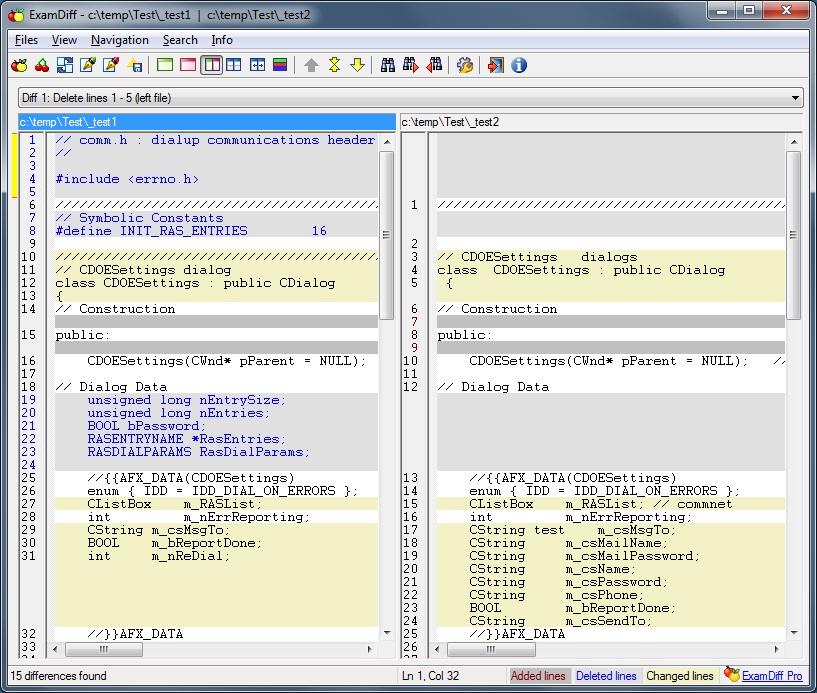
Re ExamDiff free, will this compare 2 files and also auto delete all duplicates from one (user choice) of the files.
 

My Computer My Computer

At a glance

Windows 11Ryzen 78+16 total 24GB
OS
Windows 11
Computer type
Laptop
Manufacturer/Model
Asus
CPU
Ryzen 7
Memory
8+16 total 24GB
Other Info
Asus Vivobook 15 M513U

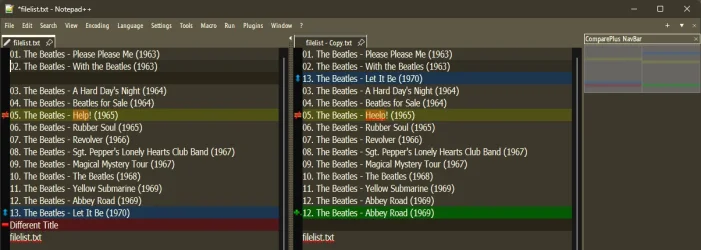
Notepad++

Blue: Moved line.
Green: Added line (exists only in the new file).
Red: Deleted/Removed line (exists only in the old file).
Orange/Yellow: Changed/Modified line (same line, different content).

12889.webp
 

My Computers My Computers

  • At a glance

    Windows 11 Pro
    OS
    Windows 11 Pro
    Computer type
    PC/Desktop
    Manufacturer/Model
    ASUS ROG Strix
  • At a glance

    Windows 11 Pro
    Operating System
    Windows 11 Pro
    Computer type
    Laptop
    Manufacturer/Model
    ASUS VivoBook
  • ASUS VivoBook 'Lite' ~ Windows 11 Home
@Edwin
good answer - other solutions available too.

With Linux - easy enough even in command line -- just use diff or even easier the comm command !!!
However if you want a gui with a wysiwyg type of application.
Even from a VM -- 7 ways to compare text files on Linux

For Windows - not sure but doesn't Office (Word) etc have some type of file compare if you have Office. LibreOffice (Free) has some sort of comparison if you don't have Ms Word. Notepad ++ also does the job as stated by @Edwin


cheers
jimbo
 

My Computer My Computer

At a glance

Windows XP,11 Linux Fedora Rawhide pre-releas...2 X Intel i7
OS
Windows XP,11 Linux Fedora Rawhide pre-release 45
Computer type
PC/Desktop
CPU
2 X Intel i7
Screen Resolution
4KUHD X 2
Re notepad ++
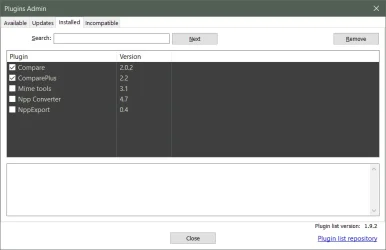
Do like this app, especially with the plugins, can't see an option with compare + plugin to delete duplicates, unless I'm missing something.
 

My Computer My Computer

At a glance

Windows 11Ryzen 78+16 total 24GB
OS
Windows 11
Computer type
Laptop
Manufacturer/Model
Asus
CPU
Ryzen 7
Memory
8+16 total 24GB
Other Info
Asus Vivobook 15 M513U

Re notepad ++
Do like this app, especially with the plugins, can't see an option with compare + plugin to delete duplicates, unless I'm missing something.
Post #2
 

My Computers My Computers

  • At a glance

    Windows 11 Pro
    OS
    Windows 11 Pro
    Computer type
    PC/Desktop
    Manufacturer/Model
    ASUS ROG Strix
  • At a glance

    Windows 11 Pro
    Operating System
    Windows 11 Pro
    Computer type
    Laptop
    Manufacturer/Model
    ASUS VivoBook
  • ASUS VivoBook 'Lite' ~ Windows 11 Home

My Computers My Computers

  • At a glance

    Windows 11 Pro
    OS
    Windows 11 Pro
    Computer type
    PC/Desktop
    Manufacturer/Model
    ASUS ROG Strix
  • At a glance

    Windows 11 Pro
    Operating System
    Windows 11 Pro
    Computer type
    Laptop
    Manufacturer/Model
    ASUS VivoBook
  • ASUS VivoBook 'Lite' ~ Windows 11 Home
Thanks


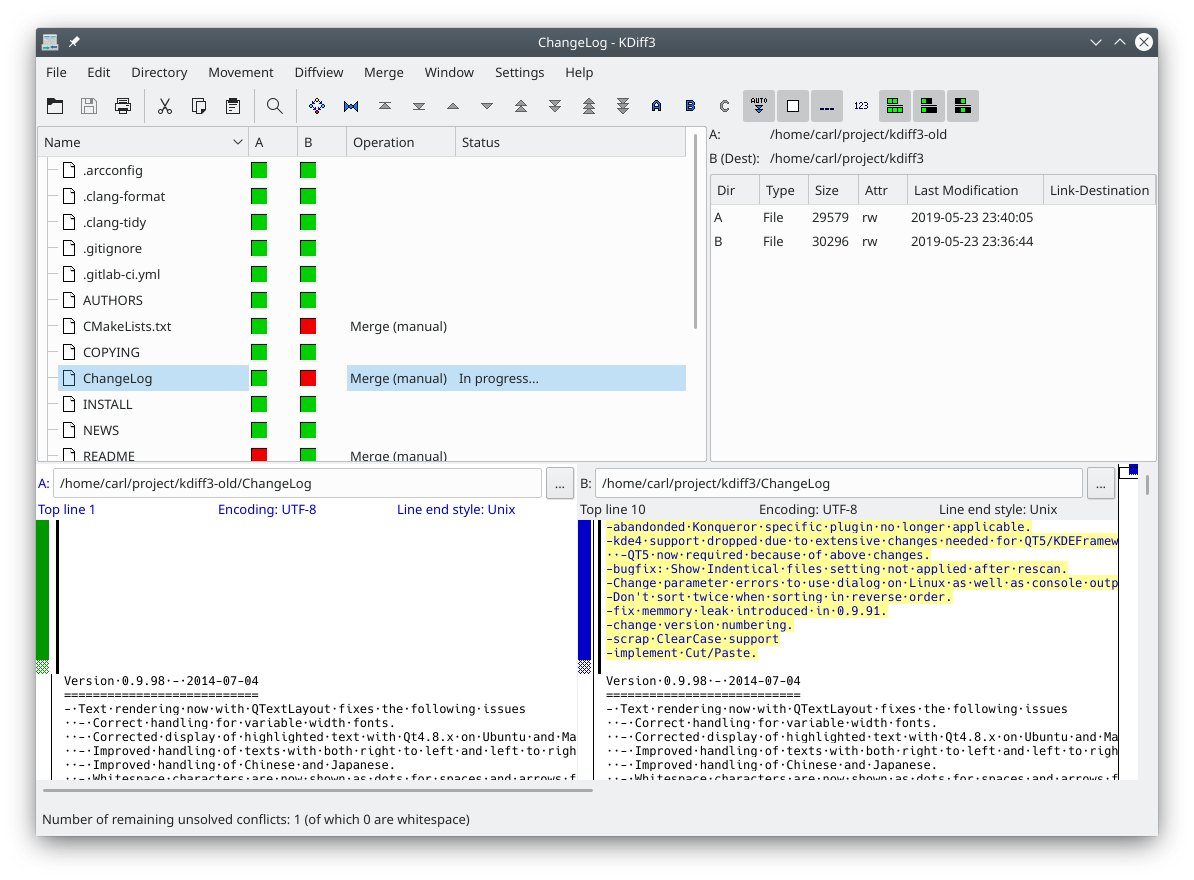
I like though(again from Linux which I know you use from time to time ) for text files if you use KDE desktop is kdiff3.


However for most who want only Windows solutions the notepad++ for Windows is probably the best solution for reasonably simple edits and compares.

Cheers
jimbo
 

My Computer My Computer

At a glance

Windows XP,11 Linux Fedora Rawhide pre-releas...2 X Intel i7
OS
Windows XP,11 Linux Fedora Rawhide pre-release 45
Computer type
PC/Desktop
CPU
2 X Intel i7
Screen Resolution
4KUHD X 2
... notepad++ for Windows is probably the best solution for reasonably simple edits and compares.
Yup. Word will do it, but it's a convoluted mess!
 

My Computers My Computers

  • At a glance

    Windows 11 Pro
    OS
    Windows 11 Pro
    Computer type
    PC/Desktop
    Manufacturer/Model
    ASUS ROG Strix
  • At a glance

    Windows 11 Pro
    Operating System
    Windows 11 Pro
    Computer type
    Laptop
    Manufacturer/Model
    ASUS VivoBook
  • ASUS VivoBook 'Lite' ~ Windows 11 Home
Re notepad ++
Do like this app, especially with the plugins, can't see an option with compare + plugin to delete duplicates, unless I'm missing something.

Of course "with the plugins", because, how else..;)

EDIT: "Ported" KDiff3, Windows Binaries, KDE - Experience Freedom!
@
Code:
https://download.kde.org/stable/kdiff3/?C=M;O=D
 

Attachments

  • !Compare.webp
    !Compare.webp
    14.2 KB · Views: 2
Last edited:

My Computer My Computer

At a glance

Windows 10 Pro13th Gen Intel(R) Core(TM) i5-13420H24.0 GBNVIDIA GeForce RTX 2050 (4 GB), Intel(R) UHD ...
OS
Windows 10 Pro
Computer type
Laptop
Manufacturer/Model
Acer Nitro ANV15-51
CPU
13th Gen Intel(R) Core(TM) i5-13420H
Memory
24.0 GB
Graphics Card(s)
NVIDIA GeForce RTX 2050 (4 GB), Intel(R) UHD Graphics (128 MB)
  • Like
Reactions: JAK
KDiff3 looks good, cant see a way to hide all duplicates, must be easy just cant see it
 

My Computer My Computer

At a glance

Windows 11Ryzen 78+16 total 24GB
OS
Windows 11
Computer type
Laptop
Manufacturer/Model
Asus
CPU
Ryzen 7
Memory
8+16 total 24GB
Other Info
Asus Vivobook 15 M513U

Re ExamDiff free, will this compare 2 files and also auto delete all duplicates from one (user choice) of the files.
No it wont automatically delete the duplicates.
If you would use EditPad as I mentioned above and merge both files and use the
Extra Tab to sort Alphabetically then use the Extra tab to delete duplicate lines, you will have one file from two.
To do that takes about two minutes.
 

My Computer My Computer

At a glance

Win 10 Pro 19045.6937 Win 11 25H2 VMXeon W-10885M64GB ECC DDR4 128GB maxIntel 1080p + Quadro RTX 5000 Max-Q 16GB 4K
OS
Win 10 Pro 19045.6937 Win 11 25H2 VM
Computer type
Laptop
Manufacturer/Model
Dell Precicion 15 Workstation
CPU
Xeon W-10885M
Motherboard
Dell
Memory
64GB ECC DDR4 128GB max
Graphics Card(s)
Intel 1080p + Quadro RTX 5000 Max-Q 16GB 4K
Sound Card
onboard Realtec
Monitor(s) Displays
NA
Screen Resolution
1080p to 4k
Hard Drives
1 TB Samsung 9100 M2 SSD main
2 TB Samsung 9100 M2 SSD storage
500 GB Corsair T500 storage M2 SSD (6 TB max)
PSU
NA
Case
NA
Cooling
NA
Keyboard
backlit
Mouse
Logitec M720 Bluetooth Free scroll
Internet Speed
slow
Browser
Pale Moon 33.9.x.x - x64 AVX2 build
Antivirus
Windows Defender
  • Like
Reactions: JAK
Will give that a try thanks
 

My Computer My Computer

At a glance

Windows 11Ryzen 78+16 total 24GB
OS
Windows 11
Computer type
Laptop
Manufacturer/Model
Asus
CPU
Ryzen 7
Memory
8+16 total 24GB
Other Info
Asus Vivobook 15 M513U

Hi
Just realised that I've not made myself clear.
I have 2 text files

1-original music collection
2-new music

What I actually need is a modified file or list of the new music file, with any tracks that exist in the original file removed.

So if the original file has

-Coldplay yellow
-Elton John Rocket man
-Beatles abbey road
-Beatles Love me do
-Beatles hey Jude
-Monkees daydream believer

And the new music file has

-Beatles abbey road
-Beatles Love me do
-Beatles hey Jude
-Monkees daydream believer
-The move blackberry way

Then the 'modified' new music file would only have

-The move blackberry way

'So that the 'modified' new music file Only has any entries that are Not in the 'original' file
 

My Computer My Computer

At a glance

Windows 11Ryzen 78+16 total 24GB
OS
Windows 11
Computer type
Laptop
Manufacturer/Model
Asus
CPU
Ryzen 7
Memory
8+16 total 24GB
Other Info
Asus Vivobook 15 M513U
What I actually need is a modified file or list of the new music file, with any tracks that exist in the original file removed.
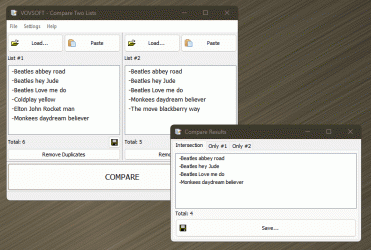
Kind of hard to hit the nail on the head, but, I think this is as close as we're gonna get:

Vovsoft Compare Two Lists

Intersection shows identical items in both,
Only #1 shows unique items in 1 that are not in 2,
Only #2 shows unique items in 2 that are not in 1

12930.gif
 
Last edited:

My Computers My Computers

  • At a glance

    Windows 11 Pro
    OS
    Windows 11 Pro
    Computer type
    PC/Desktop
    Manufacturer/Model
    ASUS ROG Strix
  • At a glance

    Windows 11 Pro
    Operating System
    Windows 11 Pro
    Computer type
    Laptop
    Manufacturer/Model
    ASUS VivoBook
  • ASUS VivoBook 'Lite' ~ Windows 11 Home
  • Like
Reactions: JAK
Vovsoft compare two lists is the perfect solution
Thank you
 

My Computer My Computer

At a glance

Windows 11Ryzen 78+16 total 24GB
OS
Windows 11
Computer type
Laptop
Manufacturer/Model
Asus
CPU
Ryzen 7
Memory
8+16 total 24GB
Other Info
Asus Vivobook 15 M513U
Back
Top Bottom