Solved Need Help Removing Something from Navigation Pane in File Explorer


CompuGeekCasey

Active member
Member
Local time
3:38 AM
Posts
55
OS
Windows 11 Home 25H2 (OS Build: 26200.7849)
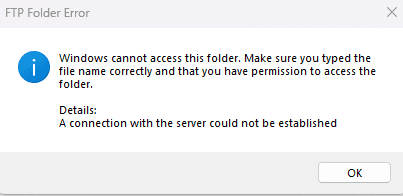
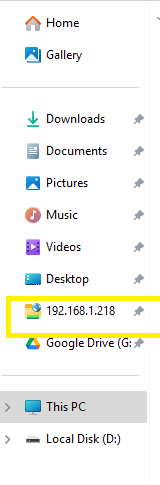
When I open open File Explorer in that navigaion panel shows what looks like an IP number (See Photo), but when I click on it I get the message "Windows cannot access this folder. Make sure you typed the file name correctly and that you have permission to access the folder" and I cannot figure out how to remove it. When I right click on it I get show more options and when I click that the only option I get is to expand. Any help is appreciated.
 
Windows Build/Version
24H2 (OS Build: 26100.1586)

Attachments
  • Screenshot_1.png
    Screenshot_1.png
    5 KB · Views: 4
  • Screenshot_2.png
    Screenshot_2.png
    3.2 KB · Views: 4

My Computer

System One

  • OS
    Windows 11 Home 25H2 (OS Build: 26200.7849)
    Computer type
    Laptop
    Manufacturer/Model
    HP Laptop 15-fc0xxx
    CPU
    AMD Athlon Silver 7120U 2.40 gigahertz
    Motherboard
    HP 8DC9 52.52
    Memory
    8GB with 7.25 Gigabytes Usable Installed Memory
    Graphics Card(s)
    512MB ATI AMD Radeon Graphics (HP)
    Sound Card
    Realtek High Definition Audio
    Monitor(s) Displays
    Integrated Monitor (15.3"vis, May 2021)
    Screen Resolution
    1366 X 768
    Hard Drives
    SAMSUNG MZVL8256HEJD-00BH1 NVMe SSD
    Keyboard
    Standard PS/2 Keyboard
    Mouse
    USB HID-compliant mouse
    Internet Speed
    103.67Mbps (Up) and 11.22 Mbps (Down)
    Browser
    Microsoft Edge
    Antivirus
    Windows Security
Hello Casey, :alien:

Are you able to unpin the network folder from Quick Access using an option below?


If so, then you remove the folder from Quick Access afterwards using an option below.


If not, then you can reset Quick Access below to remove it.


My Computers

System One System Two

  • OS
    Windows 11 Pro for Workstations
    Computer type
    PC/Desktop
    Manufacturer/Model
    Custom self build
    CPU
    Intel i7-8700K 5 GHz
    Motherboard
    ASUS ROG Maximus XI Formula Z390
    Memory
    64 GB (4x16GB) G.SKILL TridentZ RGB DDR4 3600 MHz (F4-3600C18D-32GTZR)
    Graphics Card(s)
    ASUS ROG-STRIX-GTX1080TI-O11G-GAMING (11GB GDDR5X)
    Sound Card
    Integrated Digital Audio (S/PDIF)
    Monitor(s) Displays
    2 x Samsung Odyssey G75 27"
    Screen Resolution
    2560x1440
    Hard Drives
    1TB Samsung 990 PRO M.2,
    4TB Samsung 990 PRO M.2,
    TerraMaster F8 SSD Plus NAS
    PSU
    Seasonic Prime Titanium 850W
    Case
    Thermaltake Core P3 wall mounted
    Cooling
    Corsair Hydro H115i
    Keyboard
    Amazon Basics Wired Full Keyboard MD005
    Mouse
    Logitech MX Master 4
    Internet Speed
    2 Gbps Download and 100 Mbps Upload
    Browser
    Chrome and Edge
    Antivirus
    Microsoft Defender
    Other Info
    Logitech Z625 speaker system,
    Logitech BRIO 4K Pro webcam,
    HP Color LaserJet Pro MFP M477fdn,
    CyberPower CP1500PFCLCD
    Galaxy S23 Plus phone
  • Operating System
    Windows 11 Pro
    Computer type
    Laptop
    Manufacturer/Model
    Surface Laptop 7 Copilot+ PC
    CPU
    Snapdragon X Elite (12 core) 3.42 GHz
    Memory
    16 GB LPDDR5x-7467 MHz
    Monitor(s) Displays
    15" HDR
    Screen Resolution
    2496 x 1664
    Hard Drives
    1 TB SSD
    Internet Speed
    Wi-Fi 7 and Bluetooth 5.4
    Browser
    Chrome and Edge
    Antivirus
    Microsoft Defender
Hello Casey, :alien:

Are you able to unpin the network folder from Quick Access using an option below?


If so, then you remove the folder from Quick Access afterwards using an option below.


If not, then you can reset Quick Access below to remove it.

The third solution work, thanks for your help!
 

My Computer

System One

  • OS
    Windows 11 Home 25H2 (OS Build: 26200.7849)
    Computer type
    Laptop
    Manufacturer/Model
    HP Laptop 15-fc0xxx
    CPU
    AMD Athlon Silver 7120U 2.40 gigahertz
    Motherboard
    HP 8DC9 52.52
    Memory
    8GB with 7.25 Gigabytes Usable Installed Memory
    Graphics Card(s)
    512MB ATI AMD Radeon Graphics (HP)
    Sound Card
    Realtek High Definition Audio
    Monitor(s) Displays
    Integrated Monitor (15.3"vis, May 2021)
    Screen Resolution
    1366 X 768
    Hard Drives
    SAMSUNG MZVL8256HEJD-00BH1 NVMe SSD
    Keyboard
    Standard PS/2 Keyboard
    Mouse
    USB HID-compliant mouse
    Internet Speed
    103.67Mbps (Up) and 11.22 Mbps (Down)
    Browser
    Microsoft Edge
    Antivirus
    Windows Security
You're most welcome. :shawn:
 

My Computers

System One System Two

  • OS
    Windows 11 Pro for Workstations
    Computer type
    PC/Desktop
    Manufacturer/Model
    Custom self build
    CPU
    Intel i7-8700K 5 GHz
    Motherboard
    ASUS ROG Maximus XI Formula Z390
    Memory
    64 GB (4x16GB) G.SKILL TridentZ RGB DDR4 3600 MHz (F4-3600C18D-32GTZR)
    Graphics Card(s)
    ASUS ROG-STRIX-GTX1080TI-O11G-GAMING (11GB GDDR5X)
    Sound Card
    Integrated Digital Audio (S/PDIF)
    Monitor(s) Displays
    2 x Samsung Odyssey G75 27"
    Screen Resolution
    2560x1440
    Hard Drives
    1TB Samsung 990 PRO M.2,
    4TB Samsung 990 PRO M.2,
    TerraMaster F8 SSD Plus NAS
    PSU
    Seasonic Prime Titanium 850W
    Case
    Thermaltake Core P3 wall mounted
    Cooling
    Corsair Hydro H115i
    Keyboard
    Amazon Basics Wired Full Keyboard MD005
    Mouse
    Logitech MX Master 4
    Internet Speed
    2 Gbps Download and 100 Mbps Upload
    Browser
    Chrome and Edge
    Antivirus
    Microsoft Defender
    Other Info
    Logitech Z625 speaker system,
    Logitech BRIO 4K Pro webcam,
    HP Color LaserJet Pro MFP M477fdn,
    CyberPower CP1500PFCLCD
    Galaxy S23 Plus phone
  • Operating System
    Windows 11 Pro
    Computer type
    Laptop
    Manufacturer/Model
    Surface Laptop 7 Copilot+ PC
    CPU
    Snapdragon X Elite (12 core) 3.42 GHz
    Memory
    16 GB LPDDR5x-7467 MHz
    Monitor(s) Displays
    15" HDR
    Screen Resolution
    2496 x 1664
    Hard Drives
    1 TB SSD
    Internet Speed
    Wi-Fi 7 and Bluetooth 5.4
    Browser
    Chrome and Edge
    Antivirus
    Microsoft Defender

Latest Support Threads

Back
Top Bottom