Need help with Start Menu search bar behavior after Windows 11 reinstall


Redbird14

Member
Local time
9:55 AM
Posts
13
OS
Windows 11 Pro
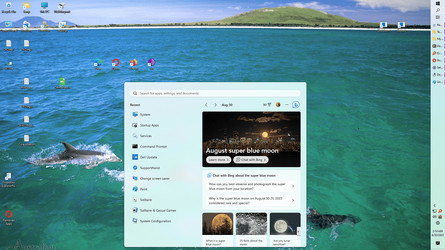
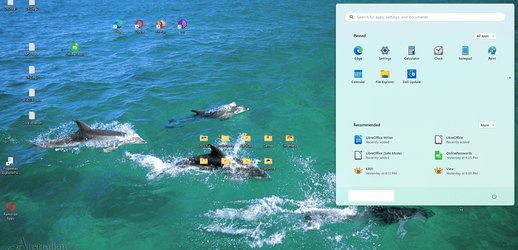
I recently had to do a reinstall of Windows 11 due to my not knowing that I shouldn't install NVIDIA driver updates from NVIDIA but I should get them from Dell. Apparently Dell has to tweak the NVIDIA drivers to accommodate their motherboard. The last NVIDIA update I took made my screen flash constantly. I couldn't click on any icon or do anything. Same with safe mode. I could boot into the BIOS which is how I managed to do the reinstall. Prior to the reinstall, when I clicked on the Start Menu icon the Start Menu came up and I could type in the search bar and the Start Menu would stay where it originally opened up. Since the reinstall, as soon as I click on the search bar, the Start Menu moves down and left. The two attached screen caps show the before clicking, after clicking positions. Is there some setting I can set to not make this happen? Its annoying. The reason I think there might be a setting to adjust is that this did NOT happen prior to my reinstalling Windows 11. I don't have access to any site where I can post a short video showing this but I can make such a video if someone can guide me as to how to upload it to a site you can see it on (I don't do social media). Instead, I posted two 'static' screen caps, before and after clicking on the search bar.
 
Windows Build/Version
Windows 11 Version 22H2 (OS Build 22621.1992). Winver doesn't indicate I'm running the 64bit Pro version of Win 11.

Attachments
  • W11Fa2.png
    W11Fa2.png
    339.1 KB · Views: 3
  • W11Fb2.png
    W11Fb2.png
    368.3 KB · Views: 3

My Computer My Computer

At a glance

Windows 11 Pro12th Gen Intel Core i7-12700 2.10 GHz64 GB (Crucial)NVIDIA GeForce RTX 3060 Ti
OS
Windows 11 Pro
Computer type
PC/Desktop
Manufacturer/Model
Dell XPS8950 'special edition'
CPU
12th Gen Intel Core i7-12700 2.10 GHz
Motherboard
Dell proprietary
Memory
64 GB (Crucial)
Graphics Card(s)
NVIDIA GeForce RTX 3060 Ti
Sound Card
none
Monitor(s) Displays
Dell G2722HS
Screen Resolution
1920 x 1080
Hard Drives
1TB Seagate ST1000DM010-2EP102, 8TB WDC WD8002FZWX-01
PSU
Dell proprietary 750W
Case
Dell proprietary 'Tower'
Cooling
2 air fans
Keyboard
Dell wired
Mouse
Dell optical wired
Internet Speed
1000 Mbps up and down (fibre to the modem)
Browser
Opera, Firefox, Edge & Tor
Antivirus
Windows Defender
Try updating your OS again to the latest stable build 2134.

Build 2134.png
 

My Computers My Computers

  • At a glance

    Windows 11 ProAMD Ryzen 9 8945HS32GB DDR5 SO-DIMMIntegrated AMD Radeon 780M (4.00 GHz)
    OS
    Windows 11 Pro
    Computer type
    PC/Desktop
    Manufacturer/Model
    GMKtec K11
    CPU
    AMD Ryzen 9 8945HS
    Memory
    32GB DDR5 SO-DIMM
    Graphics Card(s)
    Integrated AMD Radeon 780M (4.00 GHz)
    Monitor(s) Displays
    Benq 2250HM
    Screen Resolution
    1920 x 1080
    Hard Drives
    1 TB PCIe 4.0 NVMe M.2 SSD
  • At a glance

    Windows 11 HomeIntel® Core™ Ultra 7 - 255H processor16 GB LPDDR5 SDRAMIntel Arc 140T onboard graphics
    Operating System
    Windows 11 Home
    Computer type
    Laptop
    Manufacturer/Model
    ASUS Zenbook 14 OLED 14" Laptop - UX3405CA-QL192W
    CPU
    Intel® Core™ Ultra 7 - 255H processor
    Memory
    16 GB LPDDR5 SDRAM
    Graphics card(s)
    Intel Arc 140T onboard graphics
    Screen Resolution
    1920 x 1200 (16:10 WUXGA resolution) OLED Touchscreen
    Hard Drives
    1TB SSD
Ran all the updates. First time back I couldn't even access the search bar. When I clicked on it, nothing happened as if it were disabled. I've experienced that before and it requires rebooting. So I rebooted and now I can access the search bar but the start menu still moves as soon as I try to move the cursor into the search bar (I can get you screen caps again if you need them and I'll include the Windows 11 Version screen this time). Don't know if this is significant or not but I'm not on 22621.2134. I'm on 22621.2215.
 

My Computer My Computer

At a glance

Windows 11 Pro12th Gen Intel Core i7-12700 2.10 GHz64 GB (Crucial)NVIDIA GeForce RTX 3060 Ti
OS
Windows 11 Pro
Computer type
PC/Desktop
Manufacturer/Model
Dell XPS8950 'special edition'
CPU
12th Gen Intel Core i7-12700 2.10 GHz
Motherboard
Dell proprietary
Memory
64 GB (Crucial)
Graphics Card(s)
NVIDIA GeForce RTX 3060 Ti
Sound Card
none
Monitor(s) Displays
Dell G2722HS
Screen Resolution
1920 x 1080
Hard Drives
1TB Seagate ST1000DM010-2EP102, 8TB WDC WD8002FZWX-01
PSU
Dell proprietary 750W
Case
Dell proprietary 'Tower'
Cooling
2 air fans
Keyboard
Dell wired
Mouse
Dell optical wired
Internet Speed
1000 Mbps up and down (fibre to the modem)
Browser
Opera, Firefox, Edge & Tor
Antivirus
Windows Defender
In case of corrupt files try running this batch file: -
 

Attachments

My Computers My Computers

  • At a glance

    Windows 11 ProAMD Ryzen 9 8945HS32GB DDR5 SO-DIMMIntegrated AMD Radeon 780M (4.00 GHz)
    OS
    Windows 11 Pro
    Computer type
    PC/Desktop
    Manufacturer/Model
    GMKtec K11
    CPU
    AMD Ryzen 9 8945HS
    Memory
    32GB DDR5 SO-DIMM
    Graphics Card(s)
    Integrated AMD Radeon 780M (4.00 GHz)
    Monitor(s) Displays
    Benq 2250HM
    Screen Resolution
    1920 x 1080
    Hard Drives
    1 TB PCIe 4.0 NVMe M.2 SSD
  • At a glance

    Windows 11 HomeIntel® Core™ Ultra 7 - 255H processor16 GB LPDDR5 SDRAMIntel Arc 140T onboard graphics
    Operating System
    Windows 11 Home
    Computer type
    Laptop
    Manufacturer/Model
    ASUS Zenbook 14 OLED 14" Laptop - UX3405CA-QL192W
    CPU
    Intel® Core™ Ultra 7 - 255H processor
    Memory
    16 GB LPDDR5 SDRAM
    Graphics card(s)
    Intel Arc 140T onboard graphics
    Screen Resolution
    1920 x 1200 (16:10 WUXGA resolution) OLED Touchscreen
    Hard Drives
    1TB SSD
Looks like you're running a third party app to change Windows' GUI?
 

My Computers My Computers

  • At a glance

    Win 11 ProAMD Ryzen™ 7 7730U24GB Dual-Channel DDR4 @ 1596MHz (22-22-22-52)512MB ATI AMD Radeon Graphics (ASUStek Comput...
    OS
    Win 11 Pro
    Computer type
    Laptop
    Manufacturer/Model
    ASUS Vivobook
    CPU
    AMD Ryzen™ 7 7730U
    Motherboard
    M1605YA
    Memory
    24GB Dual-Channel DDR4 @ 1596MHz (22-22-22-52)
    Graphics Card(s)
    512MB ATI AMD Radeon Graphics (ASUStek Computer Inc)
    Monitor(s) Displays
    Generic PnP Monitor (1920x1200@60Hz) - P1 PLUS (1920x1080@59Hz)
    Screen Resolution
    1920 X 1200
    Hard Drives
    953GB Western Digital WD
    PSU
    45 Watts
    Mouse
    Lenovo Bluetooth.
    Internet Speed
    500 Mbps
    Browser
    Edge
    Antivirus
    Defender
  • At a glance

    Windows 11AMD Ryzen 7 5800H / 3.2 GHz32 GB DDR4 SDRAM 3200 MHzNVIDIA GeForce RTX 3060 6 GB GDDR6 SDRAM
    Operating System
    Windows 11
    Computer type
    Laptop
    Manufacturer/Model
    ACER NITRO
    CPU
    AMD Ryzen 7 5800H / 3.2 GHz
    Motherboard
    CZ Scala_CAS (FP6)
    Memory
    32 GB DDR4 SDRAM 3200 MHz
    Graphics card(s)
    NVIDIA GeForce RTX 3060 6 GB GDDR6 SDRAM
    Sound Card
    Realtek Audio. NVIDIA High Definition Audio
    Monitor(s) Displays
    15.6" LED backlight 1920 x 1080 (Full HD) 144 Hz
    Screen Resolution
    1920 x 1080 (Full HD)
    Hard Drives
    Samsung 970 Evo Plus 2TB NVMe M.2
    PSU
    180 Watt, 19.5 V
    Mouse
    Lenovo Bluetooth
    Internet Speed
    500 Mbps
    Browser
    Edge
    Antivirus
    Defender
Looks like you're running a third party app to change Windows' GUI?
Yes, Explorer Patcher. Does 3 things for me: let's me control where the task bar goes, lets me use small icons on the task bar and allows me to have similar icons NOT automatically combined.

EDIT: I've been running it since before I had to do the Windows re-install. At that point, I didn't have the issue with clicking on the search bar causing the start menu to slide across the screen.
 

My Computer My Computer

At a glance

Windows 11 Pro12th Gen Intel Core i7-12700 2.10 GHz64 GB (Crucial)NVIDIA GeForce RTX 3060 Ti
OS
Windows 11 Pro
Computer type
PC/Desktop
Manufacturer/Model
Dell XPS8950 'special edition'
CPU
12th Gen Intel Core i7-12700 2.10 GHz
Motherboard
Dell proprietary
Memory
64 GB (Crucial)
Graphics Card(s)
NVIDIA GeForce RTX 3060 Ti
Sound Card
none
Monitor(s) Displays
Dell G2722HS
Screen Resolution
1920 x 1080
Hard Drives
1TB Seagate ST1000DM010-2EP102, 8TB WDC WD8002FZWX-01
PSU
Dell proprietary 750W
Case
Dell proprietary 'Tower'
Cooling
2 air fans
Keyboard
Dell wired
Mouse
Dell optical wired
Internet Speed
1000 Mbps up and down (fibre to the modem)
Browser
Opera, Firefox, Edge & Tor
Antivirus
Windows Defender

Attachments

My Computer My Computer

At a glance

Windows 11 Pro12th Gen Intel Core i7-12700 2.10 GHz64 GB (Crucial)NVIDIA GeForce RTX 3060 Ti
OS
Windows 11 Pro
Computer type
PC/Desktop
Manufacturer/Model
Dell XPS8950 'special edition'
CPU
12th Gen Intel Core i7-12700 2.10 GHz
Motherboard
Dell proprietary
Memory
64 GB (Crucial)
Graphics Card(s)
NVIDIA GeForce RTX 3060 Ti
Sound Card
none
Monitor(s) Displays
Dell G2722HS
Screen Resolution
1920 x 1080
Hard Drives
1TB Seagate ST1000DM010-2EP102, 8TB WDC WD8002FZWX-01
PSU
Dell proprietary 750W
Case
Dell proprietary 'Tower'
Cooling
2 air fans
Keyboard
Dell wired
Mouse
Dell optical wired
Internet Speed
1000 Mbps up and down (fibre to the modem)
Browser
Opera, Firefox, Edge & Tor
Antivirus
Windows Defender
Batch file seeems to have found and fixed corrupt files and also Component store corruption was found and fixed.

Did it help?
 

My Computers My Computers

  • At a glance

    Windows 11 ProAMD Ryzen 9 8945HS32GB DDR5 SO-DIMMIntegrated AMD Radeon 780M (4.00 GHz)
    OS
    Windows 11 Pro
    Computer type
    PC/Desktop
    Manufacturer/Model
    GMKtec K11
    CPU
    AMD Ryzen 9 8945HS
    Memory
    32GB DDR5 SO-DIMM
    Graphics Card(s)
    Integrated AMD Radeon 780M (4.00 GHz)
    Monitor(s) Displays
    Benq 2250HM
    Screen Resolution
    1920 x 1080
    Hard Drives
    1 TB PCIe 4.0 NVMe M.2 SSD
  • At a glance

    Windows 11 HomeIntel® Core™ Ultra 7 - 255H processor16 GB LPDDR5 SDRAMIntel Arc 140T onboard graphics
    Operating System
    Windows 11 Home
    Computer type
    Laptop
    Manufacturer/Model
    ASUS Zenbook 14 OLED 14" Laptop - UX3405CA-QL192W
    CPU
    Intel® Core™ Ultra 7 - 255H processor
    Memory
    16 GB LPDDR5 SDRAM
    Graphics card(s)
    Intel Arc 140T onboard graphics
    Screen Resolution
    1920 x 1200 (16:10 WUXGA resolution) OLED Touchscreen
    Hard Drives
    1TB SSD
No. I tried rebooting after SFC ran and the issue persists.
 

My Computer My Computer

At a glance

Windows 11 Pro12th Gen Intel Core i7-12700 2.10 GHz64 GB (Crucial)NVIDIA GeForce RTX 3060 Ti
OS
Windows 11 Pro
Computer type
PC/Desktop
Manufacturer/Model
Dell XPS8950 'special edition'
CPU
12th Gen Intel Core i7-12700 2.10 GHz
Motherboard
Dell proprietary
Memory
64 GB (Crucial)
Graphics Card(s)
NVIDIA GeForce RTX 3060 Ti
Sound Card
none
Monitor(s) Displays
Dell G2722HS
Screen Resolution
1920 x 1080
Hard Drives
1TB Seagate ST1000DM010-2EP102, 8TB WDC WD8002FZWX-01
PSU
Dell proprietary 750W
Case
Dell proprietary 'Tower'
Cooling
2 air fans
Keyboard
Dell wired
Mouse
Dell optical wired
Internet Speed
1000 Mbps up and down (fibre to the modem)
Browser
Opera, Firefox, Edge & Tor
Antivirus
Windows Defender
Don't know if this is significant or not but I'm not on 22621.2134. I'm on 22621.2215.
Your OP showed build 1992? I think that build 2215 is a preview build so expect more bugs in preview builds.

Maybe the next stable 'Patch Tuesday' update on 12th September might fix it it but no garauntees.

I can't think of anything else so good luck.
 
Last edited:

My Computers My Computers

  • At a glance

    Windows 11 ProAMD Ryzen 9 8945HS32GB DDR5 SO-DIMMIntegrated AMD Radeon 780M (4.00 GHz)
    OS
    Windows 11 Pro
    Computer type
    PC/Desktop
    Manufacturer/Model
    GMKtec K11
    CPU
    AMD Ryzen 9 8945HS
    Memory
    32GB DDR5 SO-DIMM
    Graphics Card(s)
    Integrated AMD Radeon 780M (4.00 GHz)
    Monitor(s) Displays
    Benq 2250HM
    Screen Resolution
    1920 x 1080
    Hard Drives
    1 TB PCIe 4.0 NVMe M.2 SSD
  • At a glance

    Windows 11 HomeIntel® Core™ Ultra 7 - 255H processor16 GB LPDDR5 SDRAMIntel Arc 140T onboard graphics
    Operating System
    Windows 11 Home
    Computer type
    Laptop
    Manufacturer/Model
    ASUS Zenbook 14 OLED 14" Laptop - UX3405CA-QL192W
    CPU
    Intel® Core™ Ultra 7 - 255H processor
    Memory
    16 GB LPDDR5 SDRAM
    Graphics card(s)
    Intel Arc 140T onboard graphics
    Screen Resolution
    1920 x 1200 (16:10 WUXGA resolution) OLED Touchscreen
    Hard Drives
    1TB SSD

Latest Support Threads

Back
Top Bottom