Solved Network Icon Disappeared


Hmm it fixed it permanently for me. Try SFC?
I think that icon has a mind of its own. When I woke my laptop this morning, the icon came back.
 

My Computers My Computers

  • At a glance

    Windows 11 Pro 25H2Intel Core i7-10700K16GB (8GB PC4-19200 DDR4 SDRAM x2)NVIDIA GeForce GTX 1050 TI
    OS
    Windows 11 Pro 25H2
    Computer type
    PC/Desktop
    Manufacturer/Model
    PowerSpec B746
    CPU
    Intel Core i7-10700K
    Motherboard
    ASRock Z490 Phantom Gaming 4/ax
    Memory
    16GB (8GB PC4-19200 DDR4 SDRAM x2)
    Graphics Card(s)
    NVIDIA GeForce GTX 1050 TI
    Sound Card
    Realtek Audio
    Monitor(s) Displays
    #1. LG ULTRAWIDE 34" #2. AOC Q32G2WG3 32"
    Screen Resolution
    #1. 3440 X 1440 #2. 1920 x 1080
    Hard Drives
    NVMe WDC WDS100T2B0C-00PXH0 1TB
    Samsung SSD 860 EVO 1TB
    PSU
    750 Watts (62.5A)
    Case
    PowerSpec/Lian Li ATX 205
    Keyboard
    Logitech K270
    Mouse
    Logitech M185
    Browser
    Microsoft Edge and Firefox
    Antivirus
    Webroot SecureAnywhere CE 26.1
  • At a glance

    Windows 11 Canary ChannelIntel Core i5-8400 CPU @ 2.80GHz16 MB DDR 4-2666
    Operating System
    Windows 11 Canary Channel
    Computer type
    PC/Desktop
    Manufacturer/Model
    PowerSpec G156
    CPU
    Intel Core i5-8400 CPU @ 2.80GHz
    Motherboard
    AsusTeK Prime B360M-A
    Memory
    16 MB DDR 4-2666
    Monitor(s) Displays
    23" Speptre HDMI 75Hz
    Screen Resolution
    1920x1080
    Hard Drives
    Samsung 970 EVO 500GB NVMe
    Keyboard
    Logitek K270
    Mouse
    Logitek M185
    Browser
    Firefox, Edge and Edge Canary
    Antivirus
    Windows Defender
So I been having the same problem. With the wifi icon disappearing...And I think I found the solution. It has to do something with clicking the Bluetooth icon on and off a couple of times and resetting your computer. You might have to do it a few times for the Wi-Fi icon to come back. But what I noticed is that's the only thing that works for me so far.
 

My Computer My Computer

At a glance

Windows 11
OS
Windows 11
Computer type
Laptop
Manufacturer/Model
Asus Vistabook 15
Are there any solutions to the missing network icon?


I have win11 installed on a PC and a laptop. I am also running EP and Open Shell on both with identical settings for these.


On the laptop the network icon - wifi - is showing and on the PC it is missing.

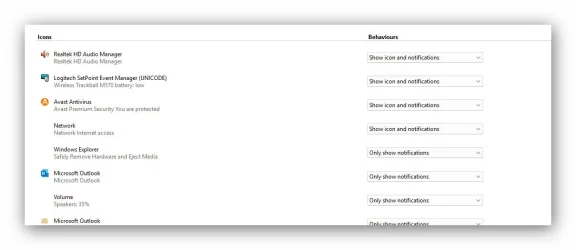
The internet icon DOES show during the UI buildup, but then disappears when more icons are added to the taskbar. There is a gap where the network icon should be sitting but nothing to click. I went into the taskbar icon settings and in there the network icon does not have an icon showing while other programms have icons displayed.


I did read through some threads where it was recommended to changge various service settings, a network reset which all did not help.

 

Attachments

  • Snap_2026.03.21_09h39m02s_002_.webp
    Snap_2026.03.21_09h39m02s_002_.webp
    4 KB · Views: 1
  • Snap_2026.03.21_09h38m16s_001_.webp
    Snap_2026.03.21_09h38m16s_001_.webp
    29.3 KB · Views: 1

My Computer My Computer

At a glance

Win 10 at present
OS
Win 10 at present

Latest Support Threads

Back
Top Bottom