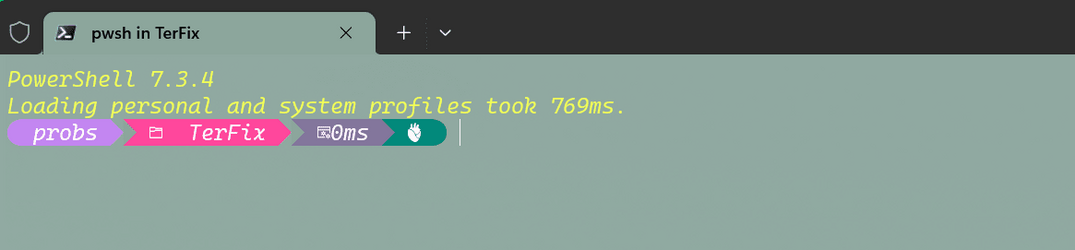
New powershell (how to updates)


empleat

Well-known member
Local time
12:01 AM
Posts
116
OS
Windows 11 Pro 22H2 22621.963
New powershell is saying it wants me to update it. Am I supposed to manually update to each version WTF?
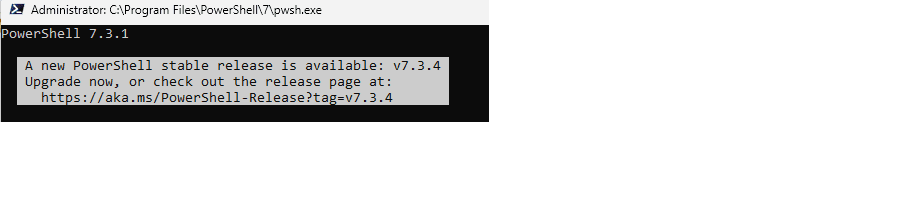
powershell up.png
It is allowed in firewall, should be able to access internet!

Also i noticed i have still old powershell on my system!!! HOW TO GET RID OF IT?


I Am used to launching PS alf+f+s+a as admin, but now it launches old one and i have to navigate by cd each time zzzzzzz

Thank you very much!
 

My Computer My Computer

At a glance

Windows 11 Pro 22H2 22621.963I5 9600 KfG.Skill Trident Z 3200mhz 2x8GBRTX 3070
OS
Windows 11 Pro 22H2 22621.963
Computer type
PC/Desktop
CPU
I5 9600 Kf
Motherboard
ASUS Z390-i Gaming
Memory
G.Skill Trident Z 3200mhz 2x8GB
Graphics Card(s)
RTX 3070
Monitor(s) Displays
AOC G2590fx
Screen Resolution
1920x1080
Hard Drives
NVME:
Adata XPG8200 Pro (1024GB)
HDD:
WDC WD40EZRZ-00GXCB0
PSU
Corsair RX650RM .2018
Keyboard
Cooler master Nova Touch PRO
Mouse
MX VERTICAL ADVANCED ERGONOMIC MOUSE
Browser
Chrome, Firefox
You can install or update your PowerShell version to the latest version with following command:

Code:
winget install --id Microsoft.Powershell --source winget

Or, you can install a specific version of PowerShell Core:

Code:
winget install --id=Microsoft.PowerShell -v "7.1.2" -e
 

My Computer My Computer

At a glance

Windows 11AMD Ryzen 7 5700GMicron Technology DDR4-3200 16GBNVIDIA GeForce RTX 3060
OS
Windows 11
Computer type
PC/Desktop
Manufacturer/Model
HP Pavilion
CPU
AMD Ryzen 7 5700G
Motherboard
Erica6
Memory
Micron Technology DDR4-3200 16GB
Graphics Card(s)
NVIDIA GeForce RTX 3060
Sound Card
Realtek ALC671
Monitor(s) Displays
Samsung SyncMaster U28E590
Screen Resolution
3840 x 2160
Hard Drives
SAMSUNG MZVLQ1T0HALB-000H1
LOL do you need to update it manually? Strange, i will run it once in awhile if that is case, i won't bother..

And how to get rid of old one, when i try to launch powershell from a folder by alt+f+s+a, there is old powershell still and how to uninstall old blue powershell, it is not in add or remove custom features in control panel...
 

My Computer My Computer

At a glance

Windows 11 Pro 22H2 22621.963I5 9600 KfG.Skill Trident Z 3200mhz 2x8GBRTX 3070
OS
Windows 11 Pro 22H2 22621.963
Computer type
PC/Desktop
CPU
I5 9600 Kf
Motherboard
ASUS Z390-i Gaming
Memory
G.Skill Trident Z 3200mhz 2x8GB
Graphics Card(s)
RTX 3070
Monitor(s) Displays
AOC G2590fx
Screen Resolution
1920x1080
Hard Drives
NVME:
Adata XPG8200 Pro (1024GB)
HDD:
WDC WD40EZRZ-00GXCB0
PSU
Corsair RX650RM .2018
Keyboard
Cooler master Nova Touch PRO
Mouse
MX VERTICAL ADVANCED ERGONOMIC MOUSE
Browser
Chrome, Firefox
LOL do you need to update it manually? Strange, i will run it once in awhile if that is case, i won't bother..

And how to get rid of old one, when i try to launch powershell from a folder by alt+f+s+a, there is old powershell still and how to uninstall old blue powershell, it is not in add or remove custom features in control panel...
If you install PowerShell from the MS Store, it will automatically update on its own like any Store app. This is the same PS, but packaged differently so it can use Windows Update to take care of it.

You don't remove the old PS 5.1. Both PowerShell's are designed to co-exist on the same system, and 7 isn't explicitly a replacement for 5.1. There are technical programming reasons for keeping both.

The Admin CMD window will always use 5.1, and the Terminal app will always use 7.
 

My Computer My Computer

At a glance

Windows 7
OS
Windows 7
OK I will try get it from store, i use pre-installed from windows 11 right now!

Well I think i remember that some commands didn't work in 5.1, that's why i wanted to launch v7 from explorer by (alt+f+s+a), is there a way to do it, instead of launching 5 as admin?
 

My Computer My Computer

At a glance

Windows 11 Pro 22H2 22621.963I5 9600 KfG.Skill Trident Z 3200mhz 2x8GBRTX 3070
OS
Windows 11 Pro 22H2 22621.963
Computer type
PC/Desktop
CPU
I5 9600 Kf
Motherboard
ASUS Z390-i Gaming
Memory
G.Skill Trident Z 3200mhz 2x8GB
Graphics Card(s)
RTX 3070
Monitor(s) Displays
AOC G2590fx
Screen Resolution
1920x1080
Hard Drives
NVME:
Adata XPG8200 Pro (1024GB)
HDD:
WDC WD40EZRZ-00GXCB0
PSU
Corsair RX650RM .2018
Keyboard
Cooler master Nova Touch PRO
Mouse
MX VERTICAL ADVANCED ERGONOMIC MOUSE
Browser
Chrome, Firefox
PS5 is powershell
PS7 is pwsh

Just run pwsh instead.
 

My Computer My Computer

At a glance

Windows 7
OS
Windows 7
Problem all methods seem to open old powershell when trying to open it from current folder.
1. from address bar
2. shift+right click
3. explorer/file/powershell
 

My Computer My Computer

At a glance

Windows 11 Pro 22H2 22621.963I5 9600 KfG.Skill Trident Z 3200mhz 2x8GBRTX 3070
OS
Windows 11 Pro 22H2 22621.963
Computer type
PC/Desktop
CPU
I5 9600 Kf
Motherboard
ASUS Z390-i Gaming
Memory
G.Skill Trident Z 3200mhz 2x8GB
Graphics Card(s)
RTX 3070
Monitor(s) Displays
AOC G2590fx
Screen Resolution
1920x1080
Hard Drives
NVME:
Adata XPG8200 Pro (1024GB)
HDD:
WDC WD40EZRZ-00GXCB0
PSU
Corsair RX650RM .2018
Keyboard
Cooler master Nova Touch PRO
Mouse
MX VERTICAL ADVANCED ERGONOMIC MOUSE
Browser
Chrome, Firefox
Problem all methods seem to open old powershell when trying to open it from current folder.
1. from address bar
2. shift+right click
3. explorer/file/powershell
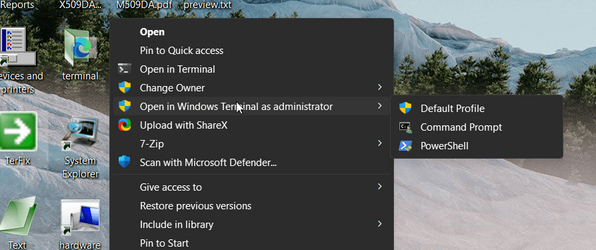
See this tutorial,


Example,

roE7JpMMb3.png

Use default profile and it opens Terminal PowerShell v7 or v5 if you select PowerShell.

QkmvLj68ED.png
 

My Computers My Computers

  • At a glance

    Win 11 ProAMD Ryzen™ 7 7730U24GB Dual-Channel DDR4 @ 1596MHz (22-22-22-52)512MB ATI AMD Radeon Graphics (ASUStek Comput...
    OS
    Win 11 Pro
    Computer type
    Laptop
    Manufacturer/Model
    ASUS Vivobook
    CPU
    AMD Ryzen™ 7 7730U
    Motherboard
    M1605YA
    Memory
    24GB Dual-Channel DDR4 @ 1596MHz (22-22-22-52)
    Graphics Card(s)
    512MB ATI AMD Radeon Graphics (ASUStek Computer Inc)
    Monitor(s) Displays
    Generic PnP Monitor (1920x1200@60Hz) - P1 PLUS (1920x1080@59Hz)
    Screen Resolution
    1920 X 1200
    Hard Drives
    953GB Western Digital WD
    PSU
    45 Watts
    Mouse
    Lenovo Bluetooth.
    Internet Speed
    500 Mbps
    Browser
    Edge
    Antivirus
    Defender
  • At a glance

    Windows 11AMD Ryzen 7 5800H / 3.2 GHz32 GB DDR4 SDRAM 3200 MHzNVIDIA GeForce RTX 3060 6 GB GDDR6 SDRAM
    Operating System
    Windows 11
    Computer type
    Laptop
    Manufacturer/Model
    ACER NITRO
    CPU
    AMD Ryzen 7 5800H / 3.2 GHz
    Motherboard
    CZ Scala_CAS (FP6)
    Memory
    32 GB DDR4 SDRAM 3200 MHz
    Graphics card(s)
    NVIDIA GeForce RTX 3060 6 GB GDDR6 SDRAM
    Sound Card
    Realtek Audio. NVIDIA High Definition Audio
    Monitor(s) Displays
    15.6" LED backlight 1920 x 1080 (Full HD) 144 Hz
    Screen Resolution
    1920 x 1080 (Full HD)
    Hard Drives
    Samsung 970 Evo Plus 2TB NVMe M.2
    PSU
    180 Watt, 19.5 V
    Mouse
    Lenovo Bluetooth
    Internet Speed
    500 Mbps
    Browser
    Edge
    Antivirus
    Defender
powershell.exe is always PS5. pwsh.exe is PS7.
If you want to run PS7 then call pwsh (not powershell). I told you it's by design.
 

My Computer My Computer

At a glance

Windows 7
OS
Windows 7
See this tutorial,


Example,

View attachment 62069

Use default profile and it opens Terminal PowerShell v7 or v5 if you select PowerShell.

View attachment 62070
Slight issue, happens both when i open default cmd and powershell 7. I first added this: Add_PowerShell_7_as_admin.reg and then this: (when i realized i need both) Add_expandable_Open_in_Windows_Terminal_as_administrator.reg
 

Attachments

  • pwsh7.png
    pwsh7.png
    6.1 KB · Views: 2

My Computer My Computer

At a glance

Windows 11 Pro 22H2 22621.963I5 9600 KfG.Skill Trident Z 3200mhz 2x8GBRTX 3070
OS
Windows 11 Pro 22H2 22621.963
Computer type
PC/Desktop
CPU
I5 9600 Kf
Motherboard
ASUS Z390-i Gaming
Memory
G.Skill Trident Z 3200mhz 2x8GB
Graphics Card(s)
RTX 3070
Monitor(s) Displays
AOC G2590fx
Screen Resolution
1920x1080
Hard Drives
NVME:
Adata XPG8200 Pro (1024GB)
HDD:
WDC WD40EZRZ-00GXCB0
PSU
Corsair RX650RM .2018
Keyboard
Cooler master Nova Touch PRO
Mouse
MX VERTICAL ADVANCED ERGONOMIC MOUSE
Browser
Chrome, Firefox
Since i installed store i can't now run powershell scripts. but i can launch powershell weird. I can't chose how .ps1 scripts are to be open because i cannot access folder in program files/windowsapps even on admin account... So i can't select powershell 7.3.4 exe in properties of .ps1 script...
 

My Computer My Computer

At a glance

Windows 11 Pro 22H2 22621.963I5 9600 KfG.Skill Trident Z 3200mhz 2x8GBRTX 3070
OS
Windows 11 Pro 22H2 22621.963
Computer type
PC/Desktop
CPU
I5 9600 Kf
Motherboard
ASUS Z390-i Gaming
Memory
G.Skill Trident Z 3200mhz 2x8GB
Graphics Card(s)
RTX 3070
Monitor(s) Displays
AOC G2590fx
Screen Resolution
1920x1080
Hard Drives
NVME:
Adata XPG8200 Pro (1024GB)
HDD:
WDC WD40EZRZ-00GXCB0
PSU
Corsair RX650RM .2018
Keyboard
Cooler master Nova Touch PRO
Mouse
MX VERTICAL ADVANCED ERGONOMIC MOUSE
Browser
Chrome, Firefox
Bump any idea, why it doesn't work. I can't access program files/WindowsApps folder, so i can associate pwsh 7.3.4 downloaded from store for launching .ps1 files!!! And i couldn't associate it any other way i tried!
 

My Computer My Computer

At a glance

Windows 11 Pro 22H2 22621.963I5 9600 KfG.Skill Trident Z 3200mhz 2x8GBRTX 3070
OS
Windows 11 Pro 22H2 22621.963
Computer type
PC/Desktop
CPU
I5 9600 Kf
Motherboard
ASUS Z390-i Gaming
Memory
G.Skill Trident Z 3200mhz 2x8GB
Graphics Card(s)
RTX 3070
Monitor(s) Displays
AOC G2590fx
Screen Resolution
1920x1080
Hard Drives
NVME:
Adata XPG8200 Pro (1024GB)
HDD:
WDC WD40EZRZ-00GXCB0
PSU
Corsair RX650RM .2018
Keyboard
Cooler master Nova Touch PRO
Mouse
MX VERTICAL ADVANCED ERGONOMIC MOUSE
Browser
Chrome, Firefox
The solution might be to uninstall the Store version, and re-install the Github release. It's the same build, but packaged differently so the PowerShell program paths don't get treated as Appx folders.
 

My Computer My Computer

At a glance

Windows 7
OS
Windows 7
But it wont get updated automatically, it is so annoying! And why the hell i should install windows powershell from some random github dev? if microsoft is supposed to care of that, classic microsoft, they care only about making more money, but system is so garbage nothing even works... Plus they can only annoy, annoy, annoy users in another ways...
 

My Computer My Computer

At a glance

Windows 11 Pro 22H2 22621.963I5 9600 KfG.Skill Trident Z 3200mhz 2x8GBRTX 3070
OS
Windows 11 Pro 22H2 22621.963
Computer type
PC/Desktop
CPU
I5 9600 Kf
Motherboard
ASUS Z390-i Gaming
Memory
G.Skill Trident Z 3200mhz 2x8GB
Graphics Card(s)
RTX 3070
Monitor(s) Displays
AOC G2590fx
Screen Resolution
1920x1080
Hard Drives
NVME:
Adata XPG8200 Pro (1024GB)
HDD:
WDC WD40EZRZ-00GXCB0
PSU
Corsair RX650RM .2018
Keyboard
Cooler master Nova Touch PRO
Mouse
MX VERTICAL ADVANCED ERGONOMIC MOUSE
Browser
Chrome, Firefox
The GitHub installer has a final dialog, where it asks if you want Windows Update to manage it.
 

My Computer My Computer

At a glance

Windows 7
OS
Windows 7
Back
Top Bottom