New SSD drive - fresh install - critical precautions.


KingDing

Active member
Local time
2:48 AM
Posts
21
OS
Windows 11 Home
Dell latitude 5590 laptop.

Currently rocking Windows 11 Home OEM. (Upgraded from 10 Home OEM).

Current Ssd is 256gb. Ripping it out and inserting a brand new, factory fresh (blank) 2TB SSD in its place.

I will be buying a win 11 pro key from ElectronicsFirst.

OS install - Windows media creation tool with Win 11 Pro Retail key.

It will be a fresh/clean install.

I haven't done this on a Win 11 machine before.

I am asking for guidance on the critical settings I need to change, before fresh os installation:

(e.g Bios settings such as Raid/Ahci, tpm modifications/clearing, secure boot settings etc. + anything else that needs changing like bitlocker on/off etc etc).

Then, once 11 PRO Retail is on - what settings do I need to change back?

My thanks to any willing to guide.

KD
 
Windows Build/Version
11 HOME to PRO

My Computer My Computer

At a glance

Windows 11 Home
OS
Windows 11 Home
Computer type
PC/Desktop
Manufacturer/Model
Hp Pavillion Desktop

Just to start with, Dell support said that if the bios setting is set to Raid - I should change it to AHCI - until the install is complete.

Then, once complete - set it back to Raid.

I have no idea if I need to turn secure boot on or off. I have no idea if TPM needs to be cleared.

Asking for guidance on how to get this right.
 

My Computer My Computer

At a glance

Windows 11 Home
OS
Windows 11 Home
Computer type
PC/Desktop
Manufacturer/Model
Hp Pavillion Desktop

Do you need RAID? Do have or will you have 2 or more drives IN the computer? My experience came with an early install of Win10, had 2 drives in the case and Win10 automatically picked the RAID part of the BIOS setting for AHCI/RAID. Later removal of the second drive broke the booting process, had to reinstall with only one drive in the case. I later added another drive for storage but did not change the BIOS. The only RAID I use now is RAID 1 on a 2-disk NAS drive attached to my Router. RAID 0 stripes data across 2 or more drives to increase storage, lose one and all data is lost. RAID 1 is mirroring, second drive is a duplicate of first drive but total capacity of 2 x 2TB drives is 2TB. There's other type of RAID.

RAID​


RAID is a data storage virtualization technology that combines multiple physical disk drive components into one or more logical units for the purposes of data redundancy, performance improvement, or both. This is in contrast to the previous concept of highly reliable mainframe disk drives referred to as "single large expensive disk". Wikipedia
 

My Computers My Computers

  • At a glance

    Win11 Pro RTM Version 24H2 Build 26100.4202Intel Core i5 11th Gen. 2.40GHz12GB
    OS
    Win11 Pro RTM Version 24H2 Build 26100.4202
    Computer type
    Laptop
    Manufacturer/Model
    Dell Vostro 3400
    CPU
    Intel Core i5 11th Gen. 2.40GHz
    Memory
    12GB
    Hard Drives
    256GB SSD NVMe M.2
  • At a glance

    Win11 Pro RTM Version 24H2 Build 26100.4202Intel Core i5 10th Gen. 2.90GHz16GBOnboard, no VGA, using a DisplayPort-to-VGA a...
    Operating System
    Win11 Pro RTM Version 24H2 Build 26100.4202
    Computer type
    PC/Desktop
    Manufacturer/Model
    Dell Vostro 5890
    CPU
    Intel Core i5 10th Gen. 2.90GHz
    Memory
    16GB
    Graphics card(s)
    Onboard, no VGA, using a DisplayPort-to-VGA adapter
    Monitor(s) Displays
    24" Dell
    Hard Drives
    512GB SSD NVMe, 4TB Seagate HDD
    Browser
    Firefox, Edge
    Antivirus
    Windows Defender/Microsoft Security
Dell ships with raid by default for some dumb reason on most of their machines (Even laptops with one drive slot!). Set it to ahci, and turn on secure boot and tpm in the bios. (probably already enabled) Then install windows 11 on the drive. Make any windows changes you like, run through all windows updates etc. Then Download and Run dell support assist if you want an easy way to get all the latest drivers.

Done. Enjoy
 
Last edited:

My Computers My Computers

  • At a glance

    Windows 11 ProRyzen 7 5700 X3D64 GB DDR4 3600mhz Gskill Ripjaws VRTX 4070 Super , 12GB VRAM Asus EVO Overclock
    OS
    Windows 11 Pro
    Computer type
    PC/Desktop
    Manufacturer/Model
    Custom Built
    CPU
    Ryzen 7 5700 X3D
    Motherboard
    MSI MPG B550 GAMING PLUS
    Memory
    64 GB DDR4 3600mhz Gskill Ripjaws V
    Graphics Card(s)
    RTX 4070 Super , 12GB VRAM Asus EVO Overclock
    Monitor(s) Displays
    Gigabyte M27Q (rev. 2.0) 2560 x 1440 @ 170hz HDR
    Hard Drives
    2TB Samsung nvme ssd
    4TB Western Digital nvme ssd
    PSU
    CORSAIR RMx SHIFT Series™ RM750x 80 PLUS Gold Fully Modular ATX Power Supply
    Case
    CORSAIR 3500X ARGB Mid-Tower ATX PC Case – Black
    Cooling
    ID-COOLING FROSTFLOW X 240 CPU Water Cooler
    Keyboard
    Logitech G213
    Mouse
    Logitech G203
    Internet Speed
    1.2gbps Fiber 😎
  • At a glance

    Chrome OSIntel Pentium Quad Core4GB LPDDR4
    Operating System
    Chrome OS
    Computer type
    Laptop
    Manufacturer/Model
    HP Chromebook
    CPU
    Intel Pentium Quad Core
    Memory
    4GB LPDDR4
    Monitor(s) Displays
    14 Inch HD SVA anti glare micro edge display
    Hard Drives
    64 GB emmc
Many discussions about the RAID thing. If you're not going to use RAID then it doesn't need to be ON. There may be some specific instances where it is required especially if using the not supported anymore Optane Drives. TPM shouldn't need to be tweaked but you never know. Secure Boot is a requirement for Win11 but the requirement for it to be Secure Boot capable, not necessarily ON.
The one question is do you desire to have to use a Microsoft Account during install? Unless you use one of the several methods to bypass that Microsoft Account during the install process you'll have to enter that to fully install Win11. The thought is generally to use a Local Acct to sign in to the OS vs using your Microsoft acct.
 

My Computer My Computer

At a glance

Win 7/10/11
OS
Win 7/10/11
Computer type
PC/Desktop
Other Info
I'm a computer enthusiast so have quite a few systems that I run. More like an advanced hobby.
The one question is do you desire to have to use a Microsoft Account during install? Unless you use one of the several methods to bypass that Microsoft Account during the install process you'll have to enter that to fully install Win11. The thought is generally to use a Local Acct to sign in to the OS vs using your Microsoft acct.
Keep secure boot on. Also, They have windows 11 pro, they can just hit other option to sign in and click domain join. Then enter the user info and password they want and that skips the account creation.
 

My Computers My Computers

  • At a glance

    Windows 11 ProRyzen 7 5700 X3D64 GB DDR4 3600mhz Gskill Ripjaws VRTX 4070 Super , 12GB VRAM Asus EVO Overclock
    OS
    Windows 11 Pro
    Computer type
    PC/Desktop
    Manufacturer/Model
    Custom Built
    CPU
    Ryzen 7 5700 X3D
    Motherboard
    MSI MPG B550 GAMING PLUS
    Memory
    64 GB DDR4 3600mhz Gskill Ripjaws V
    Graphics Card(s)
    RTX 4070 Super , 12GB VRAM Asus EVO Overclock
    Monitor(s) Displays
    Gigabyte M27Q (rev. 2.0) 2560 x 1440 @ 170hz HDR
    Hard Drives
    2TB Samsung nvme ssd
    4TB Western Digital nvme ssd
    PSU
    CORSAIR RMx SHIFT Series™ RM750x 80 PLUS Gold Fully Modular ATX Power Supply
    Case
    CORSAIR 3500X ARGB Mid-Tower ATX PC Case – Black
    Cooling
    ID-COOLING FROSTFLOW X 240 CPU Water Cooler
    Keyboard
    Logitech G213
    Mouse
    Logitech G203
    Internet Speed
    1.2gbps Fiber 😎
  • At a glance

    Chrome OSIntel Pentium Quad Core4GB LPDDR4
    Operating System
    Chrome OS
    Computer type
    Laptop
    Manufacturer/Model
    HP Chromebook
    CPU
    Intel Pentium Quad Core
    Memory
    4GB LPDDR4
    Monitor(s) Displays
    14 Inch HD SVA anti glare micro edge display
    Hard Drives
    64 GB emmc
A) Do I need to clear the TPM? (Installing PRO where previous drive was HOME).

B) I prefer Local Account to MS account.

C) This Dell Laptop came with Raid enabled - yet it only has one drive. I do not understand why.
 

My Computer My Computer

At a glance

Windows 11 Home
OS
Windows 11 Home
Computer type
PC/Desktop
Manufacturer/Model
Hp Pavillion Desktop
A. I don't think that needs to be done. The Operating System reads the BIOS to know about the resources it has to work with. I've not cleared it on either of mine.

B. That can be done, go ahead and install Windows then after it's working go into Accounts/Users and set up a new User with a slightly different name then reboot into the new User and remove the original User.

C. I've had issue with installing when RAID was active in the BIOS, I'd set it to AHCI on a Notebook as most can't handle a second internal drive. An issue with 2 drives set as RAID and one fails the machine either won't boot or if one drive fails all is lost [RAID 0 striping]. RAID 1 is mirroring, second drive copy of first drive and removal of one causes boot issue [been there and done that].
 

My Computers My Computers

  • At a glance

    Win11 Pro RTM Version 24H2 Build 26100.4202Intel Core i5 11th Gen. 2.40GHz12GB
    OS
    Win11 Pro RTM Version 24H2 Build 26100.4202
    Computer type
    Laptop
    Manufacturer/Model
    Dell Vostro 3400
    CPU
    Intel Core i5 11th Gen. 2.40GHz
    Memory
    12GB
    Hard Drives
    256GB SSD NVMe M.2
  • At a glance

    Win11 Pro RTM Version 24H2 Build 26100.4202Intel Core i5 10th Gen. 2.90GHz16GBOnboard, no VGA, using a DisplayPort-to-VGA a...
    Operating System
    Win11 Pro RTM Version 24H2 Build 26100.4202
    Computer type
    PC/Desktop
    Manufacturer/Model
    Dell Vostro 5890
    CPU
    Intel Core i5 10th Gen. 2.90GHz
    Memory
    16GB
    Graphics card(s)
    Onboard, no VGA, using a DisplayPort-to-VGA adapter
    Monitor(s) Displays
    24" Dell
    Hard Drives
    512GB SSD NVMe, 4TB Seagate HDD
    Browser
    Firefox, Edge
    Antivirus
    Windows Defender/Microsoft Security
C) This Dell Laptop came with Raid enabled - yet it only has one drive. I do not understand why.
Dell defaults to RAID for the Intel RST (Rapid Storage Technology) driver. You can switch to AHCI as others have mentioned, which uses the Windows native driver. Doing so means lower performance though.
 

My Computer My Computer

At a glance

Windows 11 Enterprise 25H2
OS
Windows 11 Enterprise 25H2
Dell defaults to RAID for the Intel RST (Rapid Storage Technology) driver. You can switch to AHCI as others have mentioned, which uses the Windows native driver. Doing so means lower performance though.
thats been the opposite of my experience with over 300+ DELL's. Interesting. Maybe it is so little its not noticable?

A) Do I need to clear the TPM? (Installing PRO where previous drive was HOME).

B) I prefer Local Account to MS account.

C) This Dell Laptop came with Raid enabled - yet it only has one drive. I do not understand why.

A. No but you can if you want.

B. With windows 11 pro, you can just hit other option set up for work or school, then sign in options and click domain join. Then enter the user info and password you want and that skips the account creation.

C. It is the intel rapid storage driver as pseymour pointed out, but we disagree on the reason. See above.
 

My Computers My Computers

  • At a glance

    Windows 11 ProRyzen 7 5700 X3D64 GB DDR4 3600mhz Gskill Ripjaws VRTX 4070 Super , 12GB VRAM Asus EVO Overclock
    OS
    Windows 11 Pro
    Computer type
    PC/Desktop
    Manufacturer/Model
    Custom Built
    CPU
    Ryzen 7 5700 X3D
    Motherboard
    MSI MPG B550 GAMING PLUS
    Memory
    64 GB DDR4 3600mhz Gskill Ripjaws V
    Graphics Card(s)
    RTX 4070 Super , 12GB VRAM Asus EVO Overclock
    Monitor(s) Displays
    Gigabyte M27Q (rev. 2.0) 2560 x 1440 @ 170hz HDR
    Hard Drives
    2TB Samsung nvme ssd
    4TB Western Digital nvme ssd
    PSU
    CORSAIR RMx SHIFT Series™ RM750x 80 PLUS Gold Fully Modular ATX Power Supply
    Case
    CORSAIR 3500X ARGB Mid-Tower ATX PC Case – Black
    Cooling
    ID-COOLING FROSTFLOW X 240 CPU Water Cooler
    Keyboard
    Logitech G213
    Mouse
    Logitech G203
    Internet Speed
    1.2gbps Fiber 😎
  • At a glance

    Chrome OSIntel Pentium Quad Core4GB LPDDR4
    Operating System
    Chrome OS
    Computer type
    Laptop
    Manufacturer/Model
    HP Chromebook
    CPU
    Intel Pentium Quad Core
    Memory
    4GB LPDDR4
    Monitor(s) Displays
    14 Inch HD SVA anti glare micro edge display
    Hard Drives
    64 GB emmc
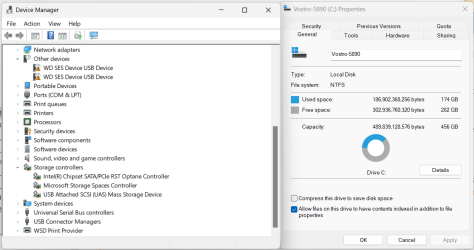
My latest computer with the IRST which includes Optane memory, has less storage available on the 512GB NVMe drive than just what the formatting does:

1709326730097.png
 

My Computers My Computers

  • At a glance

    Win11 Pro RTM Version 24H2 Build 26100.4202Intel Core i5 11th Gen. 2.40GHz12GB
    OS
    Win11 Pro RTM Version 24H2 Build 26100.4202
    Computer type
    Laptop
    Manufacturer/Model
    Dell Vostro 3400
    CPU
    Intel Core i5 11th Gen. 2.40GHz
    Memory
    12GB
    Hard Drives
    256GB SSD NVMe M.2
  • At a glance

    Win11 Pro RTM Version 24H2 Build 26100.4202Intel Core i5 10th Gen. 2.90GHz16GBOnboard, no VGA, using a DisplayPort-to-VGA a...
    Operating System
    Win11 Pro RTM Version 24H2 Build 26100.4202
    Computer type
    PC/Desktop
    Manufacturer/Model
    Dell Vostro 5890
    CPU
    Intel Core i5 10th Gen. 2.90GHz
    Memory
    16GB
    Graphics card(s)
    Onboard, no VGA, using a DisplayPort-to-VGA adapter
    Monitor(s) Displays
    24" Dell
    Hard Drives
    512GB SSD NVMe, 4TB Seagate HDD
    Browser
    Firefox, Edge
    Antivirus
    Windows Defender/Microsoft Security
thats been the opposite of my experience with over 300+ DELL's. Interesting. Maybe it is so little its not noticable?
Could be, depending on other things in the system. We have a little over 6,000 Dells, and we had to decide whether to switch to AHCI or integrate the RST driver, so we ran a few different benchmarks and kept the "RAID."
 

My Computer My Computer

At a glance

Windows 11 Enterprise 25H2
OS
Windows 11 Enterprise 25H2
One thing to note on the Windows 11 install. The computer has a product key for Windows 10/11 Home stored in BIOS. The standard Windows setup will read that key and not give you any options - it will install Windows 10 or 11 Home without asking you to change it. In order to prevent that, on the USB drive for installing Windows you need to create a text file in the root directory, it needs to be called ei.cfg

It needs to contain the lines:
[Channel]
Retail
 

My Computers My Computers

  • At a glance

    Windows 11AMD Ryzen 7 3800XT32GBEVGA GeForce GTX 1080 Ti
    OS
    Windows 11
    Computer type
    PC/Desktop
    Manufacturer/Model
    Homebuilt
    CPU
    AMD Ryzen 7 3800XT
    Motherboard
    ASUS ROG Crosshair VII Hero (WiFi)
    Memory
    32GB
    Graphics Card(s)
    EVGA GeForce GTX 1080 Ti
  • At a glance

    Windows 11 EducationIntel i7-8550U32GBNvidia Geforce MX150
    Operating System
    Windows 11 Education
    Computer type
    Laptop
    Manufacturer/Model
    Dell Inspiron 7773
    CPU
    Intel i7-8550U
    Memory
    32GB
    Graphics card(s)
    Nvidia Geforce MX150
    Sound Card
    Realtek
    Monitor(s) Displays
    17"
    Screen Resolution
    1920 x 1080
    Hard Drives
    Toshiba 512GB NVMe SSD
    SK Hynix 512GB SATA SSD
    Internet Speed
    Fast!

My Computers My Computers

  • At a glance

    11 Homei7 13650HX16GB DDR5GeForce RTX 4060 Mobile
    OS
    11 Home
    Computer type
    Laptop
    Manufacturer/Model
    Asus TUF Gaming F16 (2024)
    CPU
    i7 13650HX
    Memory
    16GB DDR5
    Graphics Card(s)
    GeForce RTX 4060 Mobile
    Sound Card
    Eastern Electric MiniMax DAC Supreme; Emotiva UMC-200; Astell & Kern AK240
    Monitor(s) Displays
    Sony Bravia XR-55X90J
    Screen Resolution
    3840×2160
    Hard Drives
    512GB SSD internal
    37TB external
    PSU
    Li-ion
    Cooling
    2× Arc Flow Fans, 4× exhaust vents, 5× heatpipes
    Keyboard
    Logitech K800
    Mouse
    Logitech G402
    Internet Speed
    30Mbit/s up, 500Mbit/s down
    Browser
    FF
    Antivirus
    What's an antivirus?
  • At a glance

    11 Homei5 1135G716GB DDR4Intel Iris Xe
    Operating System
    11 Home
    Computer type
    Laptop
    Manufacturer/Model
    Medion S15450
    CPU
    i5 1135G7
    Memory
    16GB DDR4
    Graphics card(s)
    Intel Iris Xe
    Sound Card
    Eastern Electric MiniMax DAC Supreme; Emotiva UMC-200; Astell & Kern AK240
    Monitor(s) Displays
    Sony Bravia XR-55X90J
    Screen Resolution
    3840×2160
    Hard Drives
    2TB SSD internal
    37TB external
    PSU
    Li-ion
    Keyboard
    Logitech K800
    Mouse
    Logitech G402
    Internet Speed
    30Mbit/s up, 500Mbit/s down
    Browser
    FF

My Computers My Computers

  • At a glance

    Windows 11 ProRyzen 7 5700 X3D64 GB DDR4 3600mhz Gskill Ripjaws VRTX 4070 Super , 12GB VRAM Asus EVO Overclock
    OS
    Windows 11 Pro
    Computer type
    PC/Desktop
    Manufacturer/Model
    Custom Built
    CPU
    Ryzen 7 5700 X3D
    Motherboard
    MSI MPG B550 GAMING PLUS
    Memory
    64 GB DDR4 3600mhz Gskill Ripjaws V
    Graphics Card(s)
    RTX 4070 Super , 12GB VRAM Asus EVO Overclock
    Monitor(s) Displays
    Gigabyte M27Q (rev. 2.0) 2560 x 1440 @ 170hz HDR
    Hard Drives
    2TB Samsung nvme ssd
    4TB Western Digital nvme ssd
    PSU
    CORSAIR RMx SHIFT Series™ RM750x 80 PLUS Gold Fully Modular ATX Power Supply
    Case
    CORSAIR 3500X ARGB Mid-Tower ATX PC Case – Black
    Cooling
    ID-COOLING FROSTFLOW X 240 CPU Water Cooler
    Keyboard
    Logitech G213
    Mouse
    Logitech G203
    Internet Speed
    1.2gbps Fiber 😎
  • At a glance

    Chrome OSIntel Pentium Quad Core4GB LPDDR4
    Operating System
    Chrome OS
    Computer type
    Laptop
    Manufacturer/Model
    HP Chromebook
    CPU
    Intel Pentium Quad Core
    Memory
    4GB LPDDR4
    Monitor(s) Displays
    14 Inch HD SVA anti glare micro edge display
    Hard Drives
    64 GB emmc
If not yet upgraded there was a BIOS February 2024 upgrade:


Code:
Description
This package contains the Dell system BIOS update.
BIOS is a firmware package that is embedded on a small memory chip on the system board.
It controls the keyboard, monitor, disk drives, and other devices.
This update addresses the Dell Security Advisories (DSA).
A security advisory is a statement when a security vulnerability impacts a product, and a remedy is available for the vulnerability.
 

My Computer My Computer

At a glance

Windows 10Intel(R) Core(TM) i7-4800MQ CPU @ 2.70GHz16 GB Total: Manufacturer : Samsung MemoryTyp...NVIDIA Quadro K3100M; Intel(R) HD Graphics 4600
OS
Windows 10
Computer type
Laptop
Manufacturer/Model
HP
CPU
Intel(R) Core(TM) i7-4800MQ CPU @ 2.70GHz
Motherboard
Product : 190A Version : KBC Version 94.56
Memory
16 GB Total: Manufacturer : Samsung MemoryType : DDR3 FormFactor : SODIMM Capacity : 8GB Speed : 1600
Graphics Card(s)
NVIDIA Quadro K3100M; Intel(R) HD Graphics 4600
Sound Card
IDT High Definition Audio CODEC; PNP Device ID HDAUDIO\FUNC_01&VEN_111D&DEV_76E0
Hard Drives
Model Hitachi HTS727575A9E364
Antivirus
Microsoft Defender
Other Info
Mobile Workstation
Current Ssd is 256gb. Ripping it out and inserting a brand new, factory fresh (blank) 2TB SSD in its place.
You should keep that SSD as a backup if anything should happen to the 2TB one.
I know it's not the Pro version but, it does have the original OEM backup file on it.
 

My Computers My Computers

  • At a glance

    windows 11 22631.5039Core i9 12th gen 12900HK 2.9 MHz (overcloked:...32 Gigs DDR5-4800nVidia RTX 3070 Ti / 8 Gigs DDR6
    OS
    windows 11 22631.5039
    Computer type
    Laptop
    Manufacturer/Model
    MSI Raider GE76
    CPU
    Core i9 12th gen 12900HK 2.9 MHz (overcloked: 3890.48)
    Motherboard
    MSI
    Memory
    32 Gigs DDR5-4800
    Graphics Card(s)
    nVidia RTX 3070 Ti / 8 Gigs DDR6
    Sound Card
    DYNAUDIO - Steelsries Arena 7- Sound Effects by Nahimic 3
    Monitor(s) Displays
    17.3" 1920 x 1080 360 Hz 3 ms, IPS / Connected to MSI 32 inch curved @ 165 Hz
    Screen Resolution
    1920 x 1080 / Both
    Hard Drives
    Samsung 990 Pro 2TB (OS) - Solidigm P41 2TB (Storage)
    PSU
    280 watts
    Case
    MSI GE series
    Cooling
    internal
    Keyboard
    Steelseries
    Mouse
    G903 Lightspeed
    Internet Speed
    1000 Mbps
    Browser
    Firefox / Opera GX- Do not like Edge
    Antivirus
    Malwarebytes'
    Other Info
    just ask.
  • At a glance

    Windows 10 22H2Intel Core i7 7820HK 2.9 Ghz16 Gigs DDR4 2400 MhznVidia 1070 8GB RAM
    Operating System
    Windows 10 22H2
    Computer type
    Laptop
    Manufacturer/Model
    MSI GT73 7RE VR Titan
    CPU
    Intel Core i7 7820HK 2.9 Ghz
    Motherboard
    MSI
    Memory
    16 Gigs DDR4 2400 Mhz
    Graphics card(s)
    nVidia 1070 8GB RAM
    Sound Card
    DYNAUDIO / Nahimic 2
    Monitor(s) Displays
    IPS / 120HZ
    Screen Resolution
    1920x1080P
    Hard Drives
    Samsung NVME EVO 970 1TB / Samsung SSD (SATA) 1TB
    PSU
    240 watts
    Case
    MSI
    Cooling
    Internal
    Keyboard
    Steelseries
    Mouse
    Logitech G903 Lightspeed
    Internet Speed
    1 Gb/s
    Browser
    Firefox / Vivaldi
    Antivirus
    MalwareBytes'
    Other Info
    none.
You can switch to AHCI as others have mentioned, which uses the Windows native driver.
If one switches to AHCI and completes the clean install, can the machine later be changed back to RAID without issues?
 

My Computer My Computer

At a glance

windows 11 Pro11th Gen Intel(R) Core(TM) i7-11800H @ 2.30GH...16 GBNVIDIA GeForce RTX 3050 Ti
OS
windows 11 Pro
Computer type
Laptop
Manufacturer/Model
Dell XPS 15 9510
CPU
11th Gen Intel(R) Core(TM) i7-11800H @ 2.30GHz (16 CPUs
Memory
16 GB
Graphics Card(s)
NVIDIA GeForce RTX 3050 Ti
Hard Drives
512GB Solid State Drive
Browser
Firefox
no
 

My Computer My Computer

At a glance

windows 11 ProIntel I7 12700k32 GB Corsair Vengeance RGB Pro DDR4 3200EVGA 3070
OS
windows 11 Pro
Computer type
PC/Desktop
Manufacturer/Model
Asus
CPU
Intel I7 12700k
Motherboard
Asus Rog Strix Z690-A Gaming WiFi D4
Memory
32 GB Corsair Vengeance RGB Pro DDR4 3200
Graphics Card(s)
EVGA 3070
Sound Card
On Board
Monitor(s) Displays
Dell S2721QS
Screen Resolution
3840 x 2160
Hard Drives
Samsung 980 pro m.2 1TB pci-express gen 4.0 x 4 NVMe
Samsung 970 EVO Plus m.2 2TB PCIe-express gen 3.0 x 4 NVMe
PSU
Corsair RM 850
Case
Asus Rog Strix Helios GX601
Cooling
Asus Rog Strix LC II 240 ARGB
Mouse
Microsoft
Internet Speed
1 GB
Browser
Edge
Antivirus
Malwarebytes Premium

My Computer My Computer

At a glance

windows 11 Pro11th Gen Intel(R) Core(TM) i7-11800H @ 2.30GH...16 GBNVIDIA GeForce RTX 3050 Ti
OS
windows 11 Pro
Computer type
Laptop
Manufacturer/Model
Dell XPS 15 9510
CPU
11th Gen Intel(R) Core(TM) i7-11800H @ 2.30GHz (16 CPUs
Memory
16 GB
Graphics Card(s)
NVIDIA GeForce RTX 3050 Ti
Hard Drives
512GB Solid State Drive
Browser
Firefox

Latest Support Threads

Back
Top Bottom