
New to 11, Windows Update issue


remover

Well-known member
Power User
VIP
Local time
7:24 AM
Posts
848
Location
Tucson, AZ.
OS
Windows 11 25H2 (OS Build 26200.9445)
I only had windows 11 for appx: 2 months - got a windows update question please - I've been looking at Windows Update/Uninstall History for about a week & a 1/2 now -
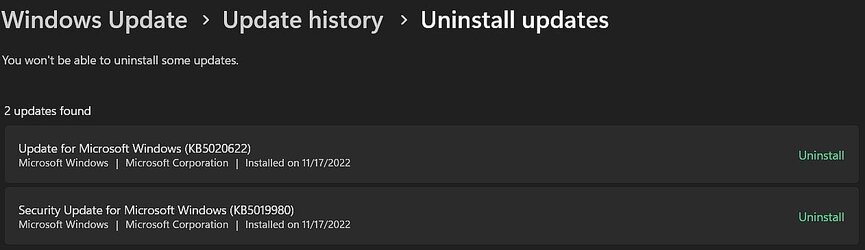
I uninstalled the pic below: "uninstalled"

Today I did a windows update; and it looks like there back.? 2nd. pic. "updates" I can't find these KB files? anyone? I'm a newbe at Win 11 - thx regards
 
Windows Build/Version
version 22H2 OS build 22621.819

Attachments
  • Uninstalled.jpg
    Uninstalled.jpg
    33.3 KB · Views: 4
  • updates.jpg
    updates.jpg
    16 KB · Views: 4

My Computer My Computer

At a glance

Windows 11 25H2 (OS Build 26200.9445)Processor: 11th Gen Intel(R) Core(TM) i5-1135...12GBIntel R Iris R XE Graphics family
OS
Windows 11 25H2 (OS Build 26200.9445)
Computer type
Laptop
Manufacturer/Model
Dell
CPU
Processor: 11th Gen Intel(R) Core(TM) i5-1135G7 @ 2.40G
Motherboard
64-bit operating system Dell 0XMF7W
Memory
12GB
Graphics Card(s)
Intel R Iris R XE Graphics family
Sound Card
Cirrus Speakers High Definition Audio
Monitor(s) Displays
Generic PnP monitor
Screen Resolution
1920 x 1080
Hard Drives
NVMe 670p SSDPEKNU512GZ NVMe I NTEL 512GB
Case
cheap
Mouse
Logitech wireless mouse
Internet Speed
16 Mps download
Browser
Google Chrome
Antivirus
Security: Microsoft Defender & Malwarebytes Premium (with browser guard)
Other Info
Dell model: Inspiron 15 3511

Today I did a windows update; and it looks like there back.? 2nd. pic. "updates" I can't find these KB files? anyone? I'm a newbe at Win 11 - thx regards

KB5019980 - latest cummulative update for Windows 22H2 Public & Release Preview channels

KB5020622 - latest cummulative update for .NET Framework 3.5, 4.8 & 4.8.1 for Windows 11

It would help if you completed 'My Computer' with as much information as you can - see mine below.
 

My Computer My Computer

At a glance

Windows 11 Pro 26H2 (Build 26300.9539)Intel Core Ultra 9 285 5.6 GHz32.00 GBIntel Integrated Graphics (128 MB)
OS
Windows 11 Pro 26H2 (Build 26300.9539)
Computer type
PC/Desktop
Manufacturer/Model
Dell Pro Max Tower T2 FCT2250
CPU
Intel Core Ultra 9 285 5.6 GHz
Motherboard
64-bit operating system, x64-based processor
Memory
32.00 GB
Graphics Card(s)
Intel Integrated Graphics (128 MB)
Sound Card
Realtek Audio
Monitor(s) Displays
Dell P2714H Monitor
Screen Resolution
1920 x 1080
Hard Drives
1 x 512GB M.2 XG10d SED KIOXIA PCIe solid state drive (Internal)
1 x 2TB Seagate ST2000DM008-2UB102 HDD (Internal)
1 x 4TB Seagate STGX4000400 External HDD
1 x 6TB WD Elements AE 2689 External HDD
PSU
500 Watts
Cooling
Air
Keyboard
Microsoft Wired Keyboard 600
Mouse
Microsoft USB Basic Optical Mouse v2.0
Browser
Firefox
Antivirus
Windows Defender + Malwarebytes Premium
Other Info
BaseBoard Manufacturer Dell Inc.
BaseBoard Product 022RY57
BaseBoard Version A01
I did an update on my computer system! I was wondering why in WindowsUpdate/UpdateHistory/Uninstall-Updates was there in my pic ? When I did the uninstall - a click on windows update put them back? cheers !
 

My Computer My Computer

At a glance

Windows 11 25H2 (OS Build 26200.9445)Processor: 11th Gen Intel(R) Core(TM) i5-1135...12GBIntel R Iris R XE Graphics family
OS
Windows 11 25H2 (OS Build 26200.9445)
Computer type
Laptop
Manufacturer/Model
Dell
CPU
Processor: 11th Gen Intel(R) Core(TM) i5-1135G7 @ 2.40G
Motherboard
64-bit operating system Dell 0XMF7W
Memory
12GB
Graphics Card(s)
Intel R Iris R XE Graphics family
Sound Card
Cirrus Speakers High Definition Audio
Monitor(s) Displays
Generic PnP monitor
Screen Resolution
1920 x 1080
Hard Drives
NVMe 670p SSDPEKNU512GZ NVMe I NTEL 512GB
Case
cheap
Mouse
Logitech wireless mouse
Internet Speed
16 Mps download
Browser
Google Chrome
Antivirus
Security: Microsoft Defender & Malwarebytes Premium (with browser guard)
Other Info
Dell model: Inspiron 15 3511
I see the very same updates under Uninstall-Updates. I installed them on 11/14/2022. They are listed in the Uninstall-Updates because you are allowed 10 days (?) to back out an update. If you don't want to back out an update, don't. It will eventually be removed from the listing. I have been using W11 since lasts December and have never had to back out a update.

I had a bit of an issue with those two updates. I had them waiting for install for about a week and then finally found the time to install them. Everything seemed good at first, but the Chrome browser didn't come back with all my tabs. While I was setting it up again, I got the BSOD. It flashed a message that said "Something went wrong!" but it was too quick to find out what. Then the computer shut down. I waited a few seconds and powered it back up. After that, everything seemed to work fine. Although Chrome still didn't restart properly. My computer has been running fine since then.

Oddly enough I still have a Office 2010 update (KB2881030, 32 Bit) listed in Uninstall-Updates, that was installed in December 2019. What's odd is, I don't have Office 2010 and I am on a 64 bit system. I use Office 2007, which may be 32 bit..
 

My Computers My Computers

  • At a glance

    Windows 11 Home, 25H2, Latest OS BuildIntel(R) Core(TM) i3-8145U CPU @ 2.10GHz 2.30...8GB
    OS
    Windows 11 Home, 25H2, Latest OS Build
    Computer type
    Laptop
    Manufacturer/Model
    HP 15-dw0xx
    CPU
    Intel(R) Core(TM) i3-8145U CPU @ 2.10GHz 2.30 GHz
    Memory
    8GB
    Screen Resolution
    1366 x 768
    Hard Drives
    930 GB
    Keyboard
    Built In
    Mouse
    Wireless Logitech M325S
    Browser
    Chrome 139.0.7258.128
    Antivirus
    Windows Defender
    Other Info
    Cygwin64
  • At a glance

    Windows 10 Home, Version 22H2, Build19045.3693AMD E-300 with Radeon HD Graphics 1.30 GHz10GBRadeon HD Graphics 1.30 GHz
    Operating System
    Windows 10 Home, Version 22H2, Build19045.3693
    Computer type
    PC/Desktop
    Manufacturer/Model
    HP Pavilion
    CPU
    AMD E-300 with Radeon HD Graphics 1.30 GHz
    Memory
    10GB
    Graphics card(s)
    Radeon HD Graphics 1.30 GHz
    Sound Card
    Realtek
    Monitor(s) Displays
    15"
    Screen Resolution
    1280 x 1024
    Hard Drives
    700 GB
    Keyboard
    Wireless
    Mouse
    Wireless
    Browser
    Chrome
    Antivirus
    Windows Defender
    Other Info
    This computer is connected to my IC-735 radio.
I uninstalled a couple of times as there were issues I thought were update related. I ended up doing a hard reset to revert back to when I first upgraded from Win10 to Win11 last year. Now the Smart App is in evaluation mode but it will automatically switch to On and then I will be bombarded with popups saying some apps are blocked and won't function properly. Once that happens I'll be turning it off.
 

My Computer My Computer

At a glance

Win11 22623.89111th Gen Intel R Core TM i7 - 1165G7 @ 2.80GHz16gbIntel R Iris R Xe Graphics
OS
Win11 22623.891
Computer type
Laptop
Manufacturer/Model
HP
CPU
11th Gen Intel R Core TM i7 - 1165G7 @ 2.80GHz
Memory
16gb
Graphics Card(s)
Intel R Iris R Xe Graphics
Sound Card
Realtek R Audio, Intel Smart Sound
Hard Drives
C
Browser
Google
Antivirus
Windows Security/Microsoft Defender
Other Info
Downloaded MSEdgeRedirect
Thank you all for the replies ! regards, (back to work)
 

My Computer My Computer

At a glance

Windows 11 25H2 (OS Build 26200.9445)Processor: 11th Gen Intel(R) Core(TM) i5-1135...12GBIntel R Iris R XE Graphics family
OS
Windows 11 25H2 (OS Build 26200.9445)
Computer type
Laptop
Manufacturer/Model
Dell
CPU
Processor: 11th Gen Intel(R) Core(TM) i5-1135G7 @ 2.40G
Motherboard
64-bit operating system Dell 0XMF7W
Memory
12GB
Graphics Card(s)
Intel R Iris R XE Graphics family
Sound Card
Cirrus Speakers High Definition Audio
Monitor(s) Displays
Generic PnP monitor
Screen Resolution
1920 x 1080
Hard Drives
NVMe 670p SSDPEKNU512GZ NVMe I NTEL 512GB
Case
cheap
Mouse
Logitech wireless mouse
Internet Speed
16 Mps download
Browser
Google Chrome
Antivirus
Security: Microsoft Defender & Malwarebytes Premium (with browser guard)
Other Info
Dell model: Inspiron 15 3511
Back
Top Bottom



