New Version of ExplorerPatcher


This method does not work either. Same as the CtrlAltDel version where the process apparently exists but the window never appears.
So the Task Manager window position is offscreen then? If that's your case, you should be able to fix that by pressing Alt + Spacebar, then press M to make the window stick to your mouse, and move your mouse around. Move the window inside the screen borders, and finally click to un-stick it.
 

My Computers My Computers

  • At a glance

    11 Homei7 13650HX16GB DDR5GeForce RTX 4060 Mobile
    OS
    11 Home
    Computer type
    Laptop
    Manufacturer/Model
    Asus TUF Gaming F16 (2024)
    CPU
    i7 13650HX
    Memory
    16GB DDR5
    Graphics Card(s)
    GeForce RTX 4060 Mobile
    Sound Card
    Eastern Electric MiniMax DAC Supreme; Emotiva UMC-200; Astell & Kern AK240
    Monitor(s) Displays
    Sony Bravia XR-55X90J
    Screen Resolution
    3840×2160
    Hard Drives
    512GB SSD internal
    37TB external
    PSU
    Li-ion
    Cooling
    2× Arc Flow Fans, 4× exhaust vents, 5× heatpipes
    Keyboard
    Logitech K800
    Mouse
    Logitech G402
    Internet Speed
    30Mbit/s up, 500Mbit/s down
    Browser
    FF
    Antivirus
    What's an antivirus?
  • At a glance

    11 Homei5 1135G716GB DDR4Intel Iris Xe
    Operating System
    11 Home
    Computer type
    Laptop
    Manufacturer/Model
    Medion S15450
    CPU
    i5 1135G7
    Memory
    16GB DDR4
    Graphics card(s)
    Intel Iris Xe
    Sound Card
    Eastern Electric MiniMax DAC Supreme; Emotiva UMC-200; Astell & Kern AK240
    Monitor(s) Displays
    Sony Bravia XR-55X90J
    Screen Resolution
    3840×2160
    Hard Drives
    2TB SSD internal
    37TB external
    PSU
    Li-ion
    Keyboard
    Logitech K800
    Mouse
    Logitech G402
    Internet Speed
    30Mbit/s up, 500Mbit/s down
    Browser
    FF
Tried doing it from the login menu and it somehow went into a black screen with mouse from the shift restart, but this one doesn’t allow me to use ctrl alt delete at all.
 

My Computer My Computer

At a glance

Windows 11
OS
Windows 11
Mysteriously a power button restart after that fixed the issue. This would have been about the fifteenth one so I’m not sure what happened. ExplorerPatcher even seems to work.
 

My Computer My Computer

At a glance

Windows 11
OS
Windows 11
Explorer crashes on startup (no error message) and Windows just relaunches it, creating an endless loop. I'll try again on a VM this time and see if I can replicate the issue. It already happened twice on a physical machine. It was a test machine, so no big deal for me.
Normally the explorer process isn't automatically restarted each time after the explorer process crashes. I could be wrong, but don't think either Windows 11 or ExplorerPatcher can cause that kind of behavior by default.
 

My Computers My Computers

  • At a glance

    11 Homei7 13650HX16GB DDR5GeForce RTX 4060 Mobile
    OS
    11 Home
    Computer type
    Laptop
    Manufacturer/Model
    Asus TUF Gaming F16 (2024)
    CPU
    i7 13650HX
    Memory
    16GB DDR5
    Graphics Card(s)
    GeForce RTX 4060 Mobile
    Sound Card
    Eastern Electric MiniMax DAC Supreme; Emotiva UMC-200; Astell & Kern AK240
    Monitor(s) Displays
    Sony Bravia XR-55X90J
    Screen Resolution
    3840×2160
    Hard Drives
    512GB SSD internal
    37TB external
    PSU
    Li-ion
    Cooling
    2× Arc Flow Fans, 4× exhaust vents, 5× heatpipes
    Keyboard
    Logitech K800
    Mouse
    Logitech G402
    Internet Speed
    30Mbit/s up, 500Mbit/s down
    Browser
    FF
    Antivirus
    What's an antivirus?
  • At a glance

    11 Homei5 1135G716GB DDR4Intel Iris Xe
    Operating System
    11 Home
    Computer type
    Laptop
    Manufacturer/Model
    Medion S15450
    CPU
    i5 1135G7
    Memory
    16GB DDR4
    Graphics card(s)
    Intel Iris Xe
    Sound Card
    Eastern Electric MiniMax DAC Supreme; Emotiva UMC-200; Astell & Kern AK240
    Monitor(s) Displays
    Sony Bravia XR-55X90J
    Screen Resolution
    3840×2160
    Hard Drives
    2TB SSD internal
    37TB external
    PSU
    Li-ion
    Keyboard
    Logitech K800
    Mouse
    Logitech G402
    Internet Speed
    30Mbit/s up, 500Mbit/s down
    Browser
    FF
Is there no chance for Explorer Patcher to be updated by the developer at all ? I got so used to how well a proper start menu can work for my day to day

Normally the explorer process isn't automatically restarted each time after the explorer process crashes. I could be wrong, but don't think either Windows 11 or ExplorerPatcher can cause that kind of behavior by default.
Yes it does restart and will do so for ever resulting in tons of errors in the log.

If Explorerpatcher is preventing you from using your computer, these are the steps to take.
After your login, and between the flashes, press CTRL Alt DEL (at the same time)
Choose Task Manager
Select in the top left menu, Run new task as Admin.
1- Type in cmd (press enter)
2- Type in cd c:\ (press enter)
3- Type in cd %ProgramFiles%\ExplorerPatcher (press enter)
4- Type in cp ep_setup.exe ep_uninstall.exe (press enter)
5- Type in ep_uninstall.exe (press enter)

This will give you back control of your system.


My Computers My Computers

  • At a glance

    All Branches but ReleaseAMD Ryzen 7 7735HS 3200-4500 Mhz 8 cores x 232 GB DDR5Radeon Graphic / NVIDIA GeForce RTX 4060 8 GB...
    OS
    All Branches but Release
    Computer type
    Laptop
    Manufacturer/Model
    Acer Nitro ANV15-51
    CPU
    AMD Ryzen 7 7735HS 3200-4500 Mhz 8 cores x 2
    Motherboard
    Sportage_RBH
    Memory
    32 GB DDR5
    Graphics Card(s)
    Radeon Graphic / NVIDIA GeForce RTX 4060 8 GB GDDR6
    Sound Card
    AMD/Realtek(R) Audio
    Monitor(s) Displays
    Integrated Monitor (15.3"vis)
    Screen Resolution
    FHD 1920X1080 16:9 144Hz
    Hard Drives
    KINGSTON OM8SEP4512Q-AA 1TB
    Western Digital 256GB
    PSU
    19V DC 6.32 A 120 W
    Cooling
    Dual Fans
    Mouse
    MS Bluetooth
    Internet Speed
    Fiber 1GB Cox -us & 1GB Orange-fr
    Browser
    Edge Canary- Firefox Nightly-Chrome Dev-Chrome Dev
    Antivirus
    Windows Defender
  • At a glance

    Windows 11 BetaAMD A9-94208 GB of DDR4AMD Radeon R5
    Operating System
    Windows 11 Beta
    Computer type
    Laptop
    Manufacturer/Model
    Asus X751BP
    CPU
    AMD A9-9420
    Memory
    8 GB of DDR4
    Graphics card(s)
    AMD Radeon R5
    Screen Resolution
    1600x900
    Hard Drives
    Seagate 1 TB
I'll be damned!!!
KB5022906 just borked my W10 machine!!! 🤷‍♂️ 🤷‍♂️ 🤷‍♂️
What the hell!!!
 

My Computers My Computers

  • At a glance

    Windows 11 Pro
    OS
    Windows 11 Pro
    Computer type
    PC/Desktop
    Manufacturer/Model
    ASUS ROG Strix
  • At a glance

    Windows 11 Pro
    Operating System
    Windows 11 Pro
    Computer type
    Laptop
    Manufacturer/Model
    ASUS VivoBook
  • ASUS VivoBook 'Lite' ~ Windows 11 Home
As ExplorerPatcher does not work correctly in the latest build, I replaced this with StartAllBack, but I am struggling to get rid of the Recommended section from the Start Menu.
I applied the following change (1st post) Removing "Recommended" from Start Menu on Windows 11 22H2 Pro but it doesnt work well with StartAllBack. The Recommended section is gone, but the gap remains - it only disappears if I restart the process explorer.exe ~1-2 times.

I wonder if you are aware of any other workaround?

Zrzut ekranu 2023-03-01 180637.png

If StartAllBack is not enabled, then the gap is not shown.

I would like to keep an old taskbar and StartAllBack works good when it comes to this, but the only functionality I still need is the removal of the Recommendations.

Any ideas?
 

My Computer My Computer

At a glance

W11
OS
W11
Winaero tweaker and Start All Back works fine for me. 22H2 Build 22621.1265
Got rid of EP after some problems I had a few months ago.
I think this is the best way to customize.
 

My Computer My Computer

At a glance

Windows 11 Pro 25H2 Multi-BootAMD Ryzen 9 9950X3D 16 CoreTrident Z5 Neo Series DDR5 RAM XMP+EXPO 64GB ...Gigabyte GeForce RTX-5060Ti 16GB, AMD Radeon ...
OS
Windows 11 Pro 25H2 Multi-Boot
Computer type
PC/Desktop
Manufacturer/Model
Self Made
CPU
AMD Ryzen 9 9950X3D 16 Core
Motherboard
ASUS ROG Crosshair X870E Hero
Memory
Trident Z5 Neo Series DDR5 RAM XMP+EXPO 64GB (2x32GB) 6000MT/s CL36-36-36-96
Graphics Card(s)
Gigabyte GeForce RTX-5060Ti 16GB, AMD Radeon Integrated CPU
Sound Card
Denon x4200 Atmos AVR 12 speakers
Monitor(s) Displays
65" Hisense 4K and 4-27inchers
Screen Resolution
4K TV. 4 @ 1920x1080
Hard Drives
Samsung SSD 9100 PRO 2TB PCIE 5.0, Samsung 990 PRO 4TB PCIE 4.0
PSU
Lian Li Edge Series-850W Full Modular Power Supply-80 Plus Platinum-ATX 3.0, 3.1-PCIE 5.1-L-Shape Design for Dual Chamber Case-120mm FDB Fan-Supports up to 4X USB Devices-Black (EG0850BE.US)
Case
MUSETEX ATX PC Case,6 PWM ARGB Fans ,360MM RAD Support,Type-C Gaming PC Case,270° Full View Tempered Glass Mid Tower,Black ATX Computer Case,Y6 ontrolled 120mm ARGB Fans, Tempered Glass Panels G05MN6-HB)
Cooling
Thermalright FW360 SE ARGB V2 360mm CPU AIO Liquid Cooler, 2" LCD Screen, TL-M12Q 2000 RPM Daisy-Chain Fans, for AM4/AM5 & Intel LGA 1700/1851, Black
Keyboard
Corsair K57 Wireless RGB
Mouse
Logitech Couch Mouse
Internet Speed
Comcast Gigabit 2.5Gbps FIBER OPTIC Symetric 5+Gbps Soon! Cable Laid 7-13-2026
Browser
FIrefox Portable, Slimjet, or Cent Browser
Antivirus
Windows Defender
Other Info
This PC was built in November 2025.
Denon Dolby Atmosphere sound system with 7.3.2 (3subs and 9 speakers).
Storage on portable hard drive attached to USB 3.0 router port. (Movies, Music, and files)
Few other PC's, laptops, tablets, Raspberry PI's. So many other tech devices.
Everything is on a Oupes 2400 2250 watt hour power station. Champion 11,000 watt inverter Tri-Fuel generator using circuit breaker panel interlock.
My broadcastify live feed from a Beelink Mini PC.
https://www.broadcastify.com/listen/feed/34853
Winaero tweaker and Start All Back works fine for me. 22H2 Build 22621.1265
Got rid of EP after some problems I had a few months ago.
I think this is the best way to customize.
Does Winaero tweaker allow to remove the Recommendations from the Menu?
I can't see this feature in the app.
 

My Computer My Computer

At a glance

W11
OS
W11
... remove the Recommendations from the Menu...
If you're using SAB, why are you bothering with the native W11 Menu?
 

My Computers My Computers

  • At a glance

    Windows 11 Pro
    OS
    Windows 11 Pro
    Computer type
    PC/Desktop
    Manufacturer/Model
    ASUS ROG Strix
  • At a glance

    Windows 11 Pro
    Operating System
    Windows 11 Pro
    Computer type
    Laptop
    Manufacturer/Model
    ASUS VivoBook
  • ASUS VivoBook 'Lite' ~ Windows 11 Home
Does Winaero tweaker allow to remove the Recommendations from the Menu?
I can't see this feature in the app.
Winaero does not offer that feature.
 

My Computers My Computers

  • At a glance

    All Branches but ReleaseAMD Ryzen 7 7735HS 3200-4500 Mhz 8 cores x 232 GB DDR5Radeon Graphic / NVIDIA GeForce RTX 4060 8 GB...
    OS
    All Branches but Release
    Computer type
    Laptop
    Manufacturer/Model
    Acer Nitro ANV15-51
    CPU
    AMD Ryzen 7 7735HS 3200-4500 Mhz 8 cores x 2
    Motherboard
    Sportage_RBH
    Memory
    32 GB DDR5
    Graphics Card(s)
    Radeon Graphic / NVIDIA GeForce RTX 4060 8 GB GDDR6
    Sound Card
    AMD/Realtek(R) Audio
    Monitor(s) Displays
    Integrated Monitor (15.3"vis)
    Screen Resolution
    FHD 1920X1080 16:9 144Hz
    Hard Drives
    KINGSTON OM8SEP4512Q-AA 1TB
    Western Digital 256GB
    PSU
    19V DC 6.32 A 120 W
    Cooling
    Dual Fans
    Mouse
    MS Bluetooth
    Internet Speed
    Fiber 1GB Cox -us & 1GB Orange-fr
    Browser
    Edge Canary- Firefox Nightly-Chrome Dev-Chrome Dev
    Antivirus
    Windows Defender
  • At a glance

    Windows 11 BetaAMD A9-94208 GB of DDR4AMD Radeon R5
    Operating System
    Windows 11 Beta
    Computer type
    Laptop
    Manufacturer/Model
    Asus X751BP
    CPU
    AMD A9-9420
    Memory
    8 GB of DDR4
    Graphics card(s)
    AMD Radeon R5
    Screen Resolution
    1600x900
    Hard Drives
    Seagate 1 TB
I'll be damned!!!
KB5022906 just borked my W10 machine!!! 🤷‍♂️ 🤷‍♂️
What the hell!!!
Whew!!! I do not know what the heck happened!!!

res.jpg

The KB Restarted, I got all black screens, rebooted and it wouldn't! 🤷‍♂️
 

My Computers My Computers

  • At a glance

    Windows 11 Pro
    OS
    Windows 11 Pro
    Computer type
    PC/Desktop
    Manufacturer/Model
    ASUS ROG Strix
  • At a glance

    Windows 11 Pro
    Operating System
    Windows 11 Pro
    Computer type
    Laptop
    Manufacturer/Model
    ASUS VivoBook
  • ASUS VivoBook 'Lite' ~ Windows 11 Home
ExplorerPatcher 22621.1344.53.1 is out.


xT5LMLGLcygWnc41Ik.gif
 
Last edited:

My Computers My Computers

  • At a glance

    11 Homei7 13650HX16GB DDR5GeForce RTX 4060 Mobile
    OS
    11 Home
    Computer type
    Laptop
    Manufacturer/Model
    Asus TUF Gaming F16 (2024)
    CPU
    i7 13650HX
    Memory
    16GB DDR5
    Graphics Card(s)
    GeForce RTX 4060 Mobile
    Sound Card
    Eastern Electric MiniMax DAC Supreme; Emotiva UMC-200; Astell & Kern AK240
    Monitor(s) Displays
    Sony Bravia XR-55X90J
    Screen Resolution
    3840×2160
    Hard Drives
    512GB SSD internal
    37TB external
    PSU
    Li-ion
    Cooling
    2× Arc Flow Fans, 4× exhaust vents, 5× heatpipes
    Keyboard
    Logitech K800
    Mouse
    Logitech G402
    Internet Speed
    30Mbit/s up, 500Mbit/s down
    Browser
    FF
    Antivirus
    What's an antivirus?
  • At a glance

    11 Homei5 1135G716GB DDR4Intel Iris Xe
    Operating System
    11 Home
    Computer type
    Laptop
    Manufacturer/Model
    Medion S15450
    CPU
    i5 1135G7
    Memory
    16GB DDR4
    Graphics card(s)
    Intel Iris Xe
    Sound Card
    Eastern Electric MiniMax DAC Supreme; Emotiva UMC-200; Astell & Kern AK240
    Monitor(s) Displays
    Sony Bravia XR-55X90J
    Screen Resolution
    3840×2160
    Hard Drives
    2TB SSD internal
    37TB external
    PSU
    Li-ion
    Keyboard
    Logitech K800
    Mouse
    Logitech G402
    Internet Speed
    30Mbit/s up, 500Mbit/s down
    Browser
    FF
Valinet is awesome!
 

My Computer My Computer

At a glance

Windows 11 2H225600X32GB 3600C143070
OS
Windows 11 2H22
Computer type
PC/Desktop
Manufacturer/Model
User Built
CPU
5600X
Motherboard
X570S MASTER
Memory
32GB 3600C14
Graphics Card(s)
3070
Sound Card
SOUNDBLASTER G6
Monitor(s) Displays
27 INCH 165HZ FREESYNC ISP - DELL
Screen Resolution
1440P
Hard Drives
960GB 905P
PSU
CORSAIR AX1600I
Case
FRACTAL R6 BLACKOUT
Cooling
NH-D15S
Keyboard
LOGITECH K120
Mouse
MX518 LEGENDAARY
Internet Speed
1GB
Browser
EDGE
Resurrected.

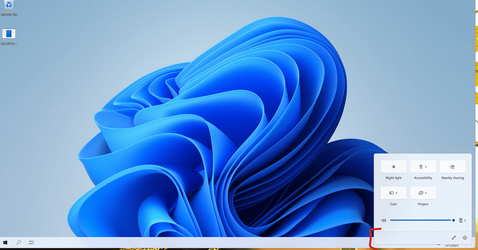
There is a little visual bug in the latest build - this also affects notifications that are displayed over the taskbar:
 

Attachments

  • Zrzut ekranu 2023-03-01 214700.png
    Zrzut ekranu 2023-03-01 214700.png
    238.9 KB · Views: 2

My Computer My Computer

At a glance

W11
OS
W11
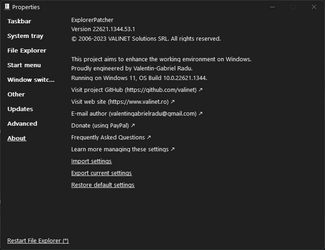
If you haven't been looking, a new version of ExplorerPatcher is out.


22621.1344.53.1

I haven't tested all areas, but so far no crashes.
 

Attachments

  • EP226211344531.png
    EP226211344531.png
    10.1 KB · Views: 2

My Computers My Computers

  • At a glance

    Windows 11 ProRyzen 7 3700x32 GBNVIDA GeForce GTX 1050 Ti
    OS
    Windows 11 Pro
    Computer type
    PC/Desktop
    Manufacturer/Model
    Personal Build
    CPU
    Ryzen 7 3700x
    Motherboard
    ASUS ROG Crosshair VI AMD X370
    Memory
    32 GB
    Graphics Card(s)
    NVIDA GeForce GTX 1050 Ti
    Sound Card
    On board
    Monitor(s) Displays
    (2) AOC E2752Vh 27-inch
    Screen Resolution
    1920 x 1080
    Hard Drives
    SSD M.2 and SATA
    Cooling
    Air cooling
    Keyboard
    Logitech K800 Wireless
    Mouse
    Logitech M705 Wireless
    Internet Speed
    100 Mbps Download | 10 Mbps Upload
    Browser
    Firefox Beta
    Antivirus
    Windows Security???
    Other Info
    Microsoft 365 Family
    Macrium Reflect (Paid)
    eM Client
    Adobe Acrobat DC (Subscription)
  • At a glance

    Windows 11 ProIntel Core i7 10510U @1.80GHz16GB DDR4
    Operating System
    Windows 11 Pro
    Computer type
    Laptop
    Manufacturer/Model
    Lenovo ThinkPad 20U1001UUS
    CPU
    Intel Core i7 10510U @1.80GHz
    Memory
    16GB DDR4
    Screen Resolution
    1920 x 1080
    Browser
    Firefox Beta
Nice to see that Valinet is still working on EP! Unfortunately the UWP bug has still not been fixed.
 

Attachments

  • Screenshot_1.png
    Screenshot_1.png
    211.8 KB · Views: 3

My Computer My Computer

At a glance

Windows 11 22H2Intel Core i7 9700F16 GB RAMASUS Radeon RX Vega 64
OS
Windows 11 22H2
Computer type
PC/Desktop
Manufacturer/Model
ASUS
CPU
Intel Core i7 9700F
Motherboard
ASUS PRIME-B360
Memory
16 GB RAM
Graphics Card(s)
ASUS Radeon RX Vega 64
Sound Card
Realtek High Defintion Audio
Screen Resolution
1080p
Hi,
I read about the issues with ExplorerPatcher and the new Windows update, but I tried anyway. It looped on restart like the articles said they would. I restored from my backup and did some more research. Many articles state Microsoft is "looking" into this. Another said today's update was basically a "beta" of the update and the official update will be Feb 14. It pondered whether Microsoft will fix whatever broke the 3rd party customization apps by the 14th.

Meanwhile I see ExplorerPatcher has been updated this morning. I uninstalled the old version, installed the new version, and then the cumulative Windows update. Everything works ok and no more looping, but most of my taskbar is now transparent except near the tray area on the right. It used to be my accent color in the windows settings. I toggled the radio switches for Transparency, and the two that allow for for the color to be in windows, taskbar, etc., but that did not help. I didn't see anything in ExplorerPatcher "properties" to fix it, but if I changed to Windows 10 type taskbar, it displayed (the solid color) properly while it was initializing, but then when back to transparent (and visa-versa going back to 11 style).

I actually think the transparent taskbar is kindda cool, but wonder if it is a bug, or I missed a setting, or intentional?

Regardless, thanks to the author of ExplorerPatcher for making a fix so fast!

 

My Computer My Computer

At a glance

Windows 11
OS
Windows 11
Thank you Valinet!
 

My Computer My Computer

At a glance

windows 11intel I7-8750h32 gbnvidia GTX 1070
OS
windows 11
Computer type
PC/Desktop
Manufacturer/Model
ACER
CPU
intel I7-8750h
Motherboard
CFL Cayman
Memory
32 gb
Graphics Card(s)
nvidia GTX 1070
I was just about to ask ya'll if the absolute fiasco I had this morning trying to install the new Win11 update (with EP installed) is resolved.

I was happy to see later today Explorerpatcher was updated, and so had some hope that EP update responded to the crippling post-Windows Update situation. Rather than UNinstalle EP, I went through uninstalling the update from Safe Mode, then paused updates and manually updated Windows Security until this gets figured out one way or t'other.

I just updated EP to today's update. I was hoping documentation at EP would indicate yes/no it had address something similar, but I couldn't find it if it is there.

Wondered if anyone had tried installing the KB after updating EP. Before I try the KB again, I'd like to know if EP will land me in flashing-monitor-no-pc land again. If yes, I will wait again as long as I can.

Is there any hope that if I UNinstalled EP, then installed this update, that my Windows Explorer will look more like Windows 10/EP settings?
 

My Computer My Computer

At a glance

Windows 1
OS
Windows 1
Back
Top Bottom