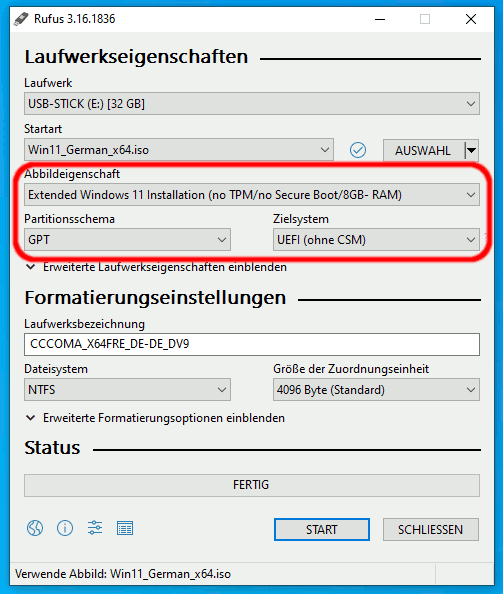
No Extended option on Rufus for W11 installation without TPM?


ddiaconu21

Well-known member
Local time
5:38 PM
Posts
20
OS
Windows 11
I've seen online that this option is available for installing via Rufus, but for the love of everything, I can't find this option when I'm running it.

Am I doing something wrong?
 

My Computer My Computer

At a glance

Windows 11
OS
Windows 11
I've seen online that this option is available for installing via Rufus, but for the love of everything, I can't find this option when I'm running it.

Am I doing something wrong?
What do you mean by extended option?
 

My Computer My Computer

At a glance

Windows 11 Pro + Win11 Canary VM.I9 13th gen i9-13900H 2.60 GHZ16 GB solderedIntegrated Intel Iris XE
OS
Windows 11 Pro + Win11 Canary VM.
Computer type
Laptop
Manufacturer/Model
ASUS Zenbook 14
CPU
I9 13th gen i9-13900H 2.60 GHZ
Motherboard
Yep, Laptop has one.
Memory
16 GB soldered
Graphics Card(s)
Integrated Intel Iris XE
Sound Card
Realtek built in
Monitor(s) Displays
laptop OLED screen
Screen Resolution
2880x1800 touchscreen
Hard Drives
1 TB NVME SSD (only weakness is only one slot)
PSU
Internal + 65W thunderbolt USB4 charger
Case
Yep, got one
Cooling
Stella Artois (UK pint cans - 568 ml) - extra cost.
Keyboard
Built in UK keybd
Mouse
Bluetooth , wireless dongled, wired
Internet Speed
900 mbs (ethernet), wifi 6 typical 350-450 mb/s both up and down
Browser
Edge
Antivirus
Defender
Other Info
TPM 2.0, 2xUSB4 thunderbolt, 1xUsb3 (usb a), 1xUsb-c, hdmi out, 3.5 mm audio out/in combo, ASUS backlit trackpad (inc. switchable number pad)

Macrium Reflect Home V8
Office 365 Family (6 users each 1TB onedrive space)
Hyper-V (a vm runs almost as fast as my older laptop)
Just follow the instructions as shown below:
rufus.png

rufus 1.png
rufus 2.png
 

My Computers My Computers

  • At a glance

    Windows 11 Pro 64-bits 25H2 26200-7922AMD Ryzen 3 3200G with Radeon Vega Graphics 3...32,00 GB TeamGroup DDR4-2667Nvidia GeForce GT 730 & Radeon™ Vega 8 Graphics
    OS
    Windows 11 Pro 64-bits 25H2 26200-7922
    Computer type
    PC/Desktop
    Manufacturer/Model
    Custom self built
    CPU
    AMD Ryzen 3 3200G with Radeon Vega Graphics 3.60 GHz
    Motherboard
    MSI B350 PC MATE
    Memory
    32,00 GB TeamGroup DDR4-2667
    Graphics Card(s)
    Nvidia GeForce GT 730 & Radeon™ Vega 8 Graphics
    Sound Card
    nVIDIA GK208 HDMI/DP High Definition Audio Controller
    Monitor(s) Displays
    AOC 27"
    Screen Resolution
    3840x2160
    Hard Drives
    SSD Team Group T-Force Cardea Zero Z440 1TB Gen4 M.2 NVMe (5000/4400MB/s), SSD Team Group CX2 512GB SATA III (530/470MB/s) and 2x Seagate 1TB BarraCuda 64MB 7200rpm SATA III 3.5 - ST1000DM010
    PSU
    LC-Power 650W V2.3
    Case
    ATX Nox Hummer ZS
    Cooling
    No cooling
    Keyboard
    Logitech K220
    Mouse
    Logitech
    Internet Speed
    1000/200
    Browser
    Firefox 148.0
    Antivirus
    Windows Defender
    Other Info
    Optical Drive ASUS DRW-24D5MT
  • At a glance

    Windows 11 Pro 64-bits 25H2 26200-7922Intel Core i5-8365U16 GBIntel UHD Graphics 620 - Whiskey Lake-U GT2
    Operating System
    Windows 11 Pro 64-bits 25H2 26200-7922
    Computer type
    Laptop
    Manufacturer/Model
    Dell Latitude 5400
    CPU
    Intel Core i5-8365U
    Motherboard
    Dell 03WM4C - Intel Cannon Lake-U PCH-LP Premium
    Memory
    16 GB
    Graphics card(s)
    Intel UHD Graphics 620 - Whiskey Lake-U GT2
    Sound Card
    Intel Cannon Lake-LP - cAVS (Audio, Voice, Speech) [D0]
    Monitor(s) Displays
    Dell NV14N4F
    Screen Resolution
    1920 x 1080
    Hard Drives
    Micron 2200S NVMe 256 GB
    PSU
    Dell X7XY03
    Internet Speed
    1000 Mbps / 200 MBps
    Browser
    Firefox 148.0
    Antivirus
    Microsoft Windows Defender
Windows-11-auf-jedem-PC-installieren-Rufus_5.png
What do you mean by extended option?
 

My Computer My Computer

At a glance

Windows 11
OS
Windows 11
Rufus 3.18
rufus 3.png
 

My Computers My Computers

  • At a glance

    Windows 11 Pro 64-bits 25H2 26200-7922AMD Ryzen 3 3200G with Radeon Vega Graphics 3...32,00 GB TeamGroup DDR4-2667Nvidia GeForce GT 730 & Radeon™ Vega 8 Graphics
    OS
    Windows 11 Pro 64-bits 25H2 26200-7922
    Computer type
    PC/Desktop
    Manufacturer/Model
    Custom self built
    CPU
    AMD Ryzen 3 3200G with Radeon Vega Graphics 3.60 GHz
    Motherboard
    MSI B350 PC MATE
    Memory
    32,00 GB TeamGroup DDR4-2667
    Graphics Card(s)
    Nvidia GeForce GT 730 & Radeon™ Vega 8 Graphics
    Sound Card
    nVIDIA GK208 HDMI/DP High Definition Audio Controller
    Monitor(s) Displays
    AOC 27"
    Screen Resolution
    3840x2160
    Hard Drives
    SSD Team Group T-Force Cardea Zero Z440 1TB Gen4 M.2 NVMe (5000/4400MB/s), SSD Team Group CX2 512GB SATA III (530/470MB/s) and 2x Seagate 1TB BarraCuda 64MB 7200rpm SATA III 3.5 - ST1000DM010
    PSU
    LC-Power 650W V2.3
    Case
    ATX Nox Hummer ZS
    Cooling
    No cooling
    Keyboard
    Logitech K220
    Mouse
    Logitech
    Internet Speed
    1000/200
    Browser
    Firefox 148.0
    Antivirus
    Windows Defender
    Other Info
    Optical Drive ASUS DRW-24D5MT
  • At a glance

    Windows 11 Pro 64-bits 25H2 26200-7922Intel Core i5-8365U16 GBIntel UHD Graphics 620 - Whiskey Lake-U GT2
    Operating System
    Windows 11 Pro 64-bits 25H2 26200-7922
    Computer type
    Laptop
    Manufacturer/Model
    Dell Latitude 5400
    CPU
    Intel Core i5-8365U
    Motherboard
    Dell 03WM4C - Intel Cannon Lake-U PCH-LP Premium
    Memory
    16 GB
    Graphics card(s)
    Intel UHD Graphics 620 - Whiskey Lake-U GT2
    Sound Card
    Intel Cannon Lake-LP - cAVS (Audio, Voice, Speech) [D0]
    Monitor(s) Displays
    Dell NV14N4F
    Screen Resolution
    1920 x 1080
    Hard Drives
    Micron 2200S NVMe 256 GB
    PSU
    Dell X7XY03
    Internet Speed
    1000 Mbps / 200 MBps
    Browser
    Firefox 148.0
    Antivirus
    Microsoft Windows Defender
I used version 3.20 to make an ISO and the option didn't show until I started making the ISO.
 

My Computers My Computers

  • At a glance

    Windows 11 Pro 25H2Intel Core i7-10700K16GB (8GB PC4-19200 DDR4 SDRAM x2)NVIDIA GeForce GTX 1050 TI
    OS
    Windows 11 Pro 25H2
    Computer type
    PC/Desktop
    Manufacturer/Model
    PowerSpec B746
    CPU
    Intel Core i7-10700K
    Motherboard
    ASRock Z490 Phantom Gaming 4/ax
    Memory
    16GB (8GB PC4-19200 DDR4 SDRAM x2)
    Graphics Card(s)
    NVIDIA GeForce GTX 1050 TI
    Sound Card
    Realtek Audio
    Monitor(s) Displays
    #1. LG ULTRAWIDE 34" #2. AOC Q32G2WG3 32"
    Screen Resolution
    #1. 3440 X 1440 #2. 1920 x 1080
    Hard Drives
    NVMe WDC WDS100T2B0C-00PXH0 1TB
    Samsung SSD 860 EVO 1TB
    PSU
    750 Watts (62.5A)
    Case
    PowerSpec/Lian Li ATX 205
    Keyboard
    Logitech K270
    Mouse
    Logitech M185
    Browser
    Microsoft Edge and Firefox
    Antivirus
    Webroot SecureAnywhere CE 26.1
  • At a glance

    Windows 11 Canary ChannelIntel Core i5-8400 CPU @ 2.80GHz16 MB DDR 4-2666
    Operating System
    Windows 11 Canary Channel
    Computer type
    PC/Desktop
    Manufacturer/Model
    PowerSpec G156
    CPU
    Intel Core i5-8400 CPU @ 2.80GHz
    Motherboard
    AsusTeK Prime B360M-A
    Memory
    16 MB DDR 4-2666
    Monitor(s) Displays
    23" Speptre HDMI 75Hz
    Screen Resolution
    1920x1080
    Hard Drives
    Samsung 970 EVO 500GB NVMe
    Keyboard
    Logitek K270
    Mouse
    Logitek M185
    Browser
    Firefox, Edge and Edge Canary
    Antivirus
    Windows Defender
I’ll try again. Tried 3.20 and didn’t see the option on different PCs…
 

My Computer My Computer

At a glance

Windows 11
OS
Windows 11
The option for "no TPM / no Secure Boot) was added as a selection in "Image option" starting with Rufus 3.16.
The option for "no TPM / no Secure Boot) was moved to a new Windows User Experience dialog starting with Rufus 3.19. This dialog is only available if a Windows 11 ISO is selected and is not shown until after the Start button is clicked.

All this is documented in the Rufus Changelog.

Excerpts from Rufus Changelog

Version 3.16 (2021.10.13)
...
Add Windows 11 "Extended" installation support (Disables TPM/Secure Boot requirements)
...

Version 3.19 (2022.07.01)
Add a new selection dialog for Windows 11 setup customization:
- Secure Boot and TPM bypass have now been moved to this dialog
- Also allows to bypass the mandatory requirement for a Microsoft account on Windows 11 22H2
(NB: Network *MUST* be temporarily disabled for the local account creation to be proposed)
- Also add an option to skip all collection questions (Sets all answers to "Don't allow")
- Also add an option for setting internal drives offline for Windows To Go
Note: These customization options are only proposed when using a Windows 11 image.


1668194562663.jpeg
 

My Computers My Computers

  • At a glance

    Windows 11 Pro 25H2 (26200.6901)AMD Ryzen 7 6800H with Radeon 680M GPU (486MB...Crucial DDR5-4800 (2400MHz) 32GB (2 x 16GB)NVIDIA RTX 3060 Laptop (6GB RAM)
    OS
    Windows 11 Pro 25H2 (26200.6901)
    Computer type
    Laptop
    Manufacturer/Model
    ASUS TUF Gaming A15 (2022)
    CPU
    AMD Ryzen 7 6800H with Radeon 680M GPU (486MB RAM)
    Memory
    Crucial DDR5-4800 (2400MHz) 32GB (2 x 16GB)
    Graphics Card(s)
    NVIDIA RTX 3060 Laptop (6GB RAM)
    Sound Card
    n/a
    Monitor(s) Displays
    15.6-inch
    Screen Resolution
    1920x1080 300Hz
    Hard Drives
    2 x Samsung 990 Evo Plus (2TB M.2 NVME SSD)
    PSU
    n/a
    Mouse
    Wireless Mouse M510
    Internet Speed
    2100Mbps/300Mbps
    Browser
    Firefox
    Antivirus
    Malwarebytes
  • At a glance

    Windows 11 Pro 25H2 (26200.8246)AMD Ryzen 7 5700X3DG.SKILL Flare X 32GB (2x16GB) DDR4ASUS ROG-STRIX-RTX3060TI-08G-V2-GAMING (RTX 3...
    Operating System
    Windows 11 Pro 25H2 (26200.8246)
    Computer type
    PC/Desktop
    Manufacturer/Model
    Custom build
    CPU
    AMD Ryzen 7 5700X3D
    Motherboard
    ASUS ROG Strix B550-F Gaming WiFi II
    Memory
    G.SKILL Flare X 32GB (2x16GB) DDR4
    Graphics card(s)
    ASUS ROG-STRIX-RTX3060TI-08G-V2-GAMING (RTX 3060-Ti, 8GB RAM)
    Monitor(s) Displays
    Samsung G50D IPS 27"
    Screen Resolution
    1440p/180Hz
    Hard Drives
    SAMSUNG 990 EVO Plus (2TB] M.2 NVME SSD
    SAMSUNG 990 EVO Plus (4TB) M.2 NVME SSD
    PSU
    Corsair RM750x (750 watts)
    Case
    Cooler Master MasterCase 5
    Cooling
    Scythe Mugen 6
    Keyboard
    Logitech K520 (MK540 keyboard/mouse combo)
    Mouse
    Logitech M310 (MK540 keyboard/mouse combo)
    Internet Speed
    2100 Mbps down / 300 Mbps up
    Browser
    Firefox, Edge, Chrome
    Antivirus
    Malwarebytes (Premium)
    Other Info
    ASUS Blu-ray Burner BW-16D1HT (SATA) || Western Digital Easystore 20TB USB 3.0 external hard drive used with Acronis True Image 2025 backup software || HP OfficeJet Pro 6975 Printer/Scanner
What's your OS?

If Windows 7, no, you cannot see the options. If you need to use it on Windows 7, read below,

If Windows 11/10, the options will be seen. can be selected. When you made it, you can use it on any OS system. During my Windows 7 upgrade, I did this way, made ISO copy on a Windows 10 computer, then run it to upgrade Windows 7.


I've seen online that this option is available for installing via Rufus, but for the love of everything, I can't find this option when I'm running it.

Am I doing something wrong?
 

My Computer My Computer

At a glance

Windows 7/11Intel i7-11800H32GB DDR4 3200MHzNVIDIA GeForce RTX 3070
OS
Windows 7/11
Computer type
PC/Desktop
Manufacturer/Model
HP/Lenovo/Asus
CPU
Intel i7-11800H
Motherboard
Lenovo Legion 5i Pro Gen 6
Memory
32GB DDR4 3200MHz
Graphics Card(s)
NVIDIA GeForce RTX 3070
Monitor(s) Displays
LG 35WN65C-B
Screen Resolution
3440 x 1440
Hard Drives
1TB PCIe SSD
Other Info
Edition Windows 11 Pro
Version 25H2
Installed on ‎12/‎12/‎2025
OS build 26200.7462
Hi there

@ddiaconu21

just install via dism /Apply-Image. This method doesn't check for the appropriate hardware - get the relevant ISO you want from UUPDUMP.

Buenos Tardes. !!

Cheers
jimbo
 

My Computer My Computer

At a glance

Windows XP,11 Linux Fedora Rawhide pre-releas...2 X Intel i7
OS
Windows XP,11 Linux Fedora Rawhide pre-release 46
Computer type
PC/Desktop
CPU
2 X Intel i7
Screen Resolution
4KUHD X 2
Hi there

@ddiaconu21

just install via dism /Apply-Image. This method doesn't check for the appropriate hardware - get the relevant ISO you want from UUPDUMP.

Buenos Tardes. !!

Cheers
jimbo
Command line with no GUI! Only an old school engineer would suggest that. (That's the way I would do it too, BTW.)
 

My Computers My Computers

  • At a glance

    Windows 11AMD Ryzen 7 3800XT32GBEVGA GeForce GTX 1080 Ti
    OS
    Windows 11
    Computer type
    PC/Desktop
    Manufacturer/Model
    Homebuilt
    CPU
    AMD Ryzen 7 3800XT
    Motherboard
    ASUS ROG Crosshair VII Hero (WiFi)
    Memory
    32GB
    Graphics Card(s)
    EVGA GeForce GTX 1080 Ti
  • At a glance

    Windows 11 EducationIntel i7-8550U32GBNvidia Geforce MX150
    Operating System
    Windows 11 Education
    Computer type
    Laptop
    Manufacturer/Model
    Dell Inspiron 7773
    CPU
    Intel i7-8550U
    Memory
    32GB
    Graphics card(s)
    Nvidia Geforce MX150
    Sound Card
    Realtek
    Monitor(s) Displays
    17"
    Screen Resolution
    1920 x 1080
    Hard Drives
    Toshiba 512GB NVMe SSD
    SK Hynix 512GB SATA SSD
    Internet Speed
    Fast!
Hi there

@ddiaconu21

just install via dism /Apply-Image. This method doesn't check for the appropriate hardware - get the relevant ISO you want from UUPDUMP.

Buenos Tardes. !!

Cheers
jimbo
You do know that not everyone is as computer savy as you?
 

My Computers My Computers

  • At a glance

    Windows 11 Pro 25H2Intel Core i7-10700K16GB (8GB PC4-19200 DDR4 SDRAM x2)NVIDIA GeForce GTX 1050 TI
    OS
    Windows 11 Pro 25H2
    Computer type
    PC/Desktop
    Manufacturer/Model
    PowerSpec B746
    CPU
    Intel Core i7-10700K
    Motherboard
    ASRock Z490 Phantom Gaming 4/ax
    Memory
    16GB (8GB PC4-19200 DDR4 SDRAM x2)
    Graphics Card(s)
    NVIDIA GeForce GTX 1050 TI
    Sound Card
    Realtek Audio
    Monitor(s) Displays
    #1. LG ULTRAWIDE 34" #2. AOC Q32G2WG3 32"
    Screen Resolution
    #1. 3440 X 1440 #2. 1920 x 1080
    Hard Drives
    NVMe WDC WDS100T2B0C-00PXH0 1TB
    Samsung SSD 860 EVO 1TB
    PSU
    750 Watts (62.5A)
    Case
    PowerSpec/Lian Li ATX 205
    Keyboard
    Logitech K270
    Mouse
    Logitech M185
    Browser
    Microsoft Edge and Firefox
    Antivirus
    Webroot SecureAnywhere CE 26.1
  • At a glance

    Windows 11 Canary ChannelIntel Core i5-8400 CPU @ 2.80GHz16 MB DDR 4-2666
    Operating System
    Windows 11 Canary Channel
    Computer type
    PC/Desktop
    Manufacturer/Model
    PowerSpec G156
    CPU
    Intel Core i5-8400 CPU @ 2.80GHz
    Motherboard
    AsusTeK Prime B360M-A
    Memory
    16 MB DDR 4-2666
    Monitor(s) Displays
    23" Speptre HDMI 75Hz
    Screen Resolution
    1920x1080
    Hard Drives
    Samsung 970 EVO 500GB NVMe
    Keyboard
    Logitek K270
    Mouse
    Logitek M185
    Browser
    Firefox, Edge and Edge Canary
    Antivirus
    Windows Defender
The option for "no TPM / no Secure Boot) was added as a selection in "Image option" starting with Rufus 3.16.
The option for "no TPM / no Secure Boot) was moved to a new Windows User Experience dialog starting with Rufus 3.19. This dialog is only available if a Windows 11 ISO is selected and is not shown until after the Start button is clicked.

All this is documented in the Rufus Changelog.

Excerpts from Rufus Changelog

Version 3.16 (2021.10.13)
...
Add Windows 11 "Extended" installation support (Disables TPM/Secure Boot requirements)
...

Version 3.19 (2022.07.01)
Add a new selection dialog for Windows 11 setup customization:
- Secure Boot and TPM bypass have now been moved to this dialog
- Also allows to bypass the mandatory requirement for a Microsoft account on Windows 11 22H2
(NB: Network *MUST* be temporarily disabled for the local account creation to be proposed)
- Also add an option to skip all collection questions (Sets all answers to "Don't allow")
- Also add an option for setting internal drives offline for Windows To Go
Note: These customization options are only proposed when using a Windows 11 image.


View attachment 44918

Why from my win7 rufus 3.20 i don't see any of these options?
 

My Computer My Computer

At a glance

Windows 7 and 11 and 12
OS
Windows 7 and 11 and 12
Computer type
PC/Desktop
Browser
Firefox
Why from my win7 rufus 3.20 i don't see any of these options?
If you read what you quoted from my post you will see "This dialog is only available if a Windows 11 ISO is selected and is not shown until after the Start button is clicked." Besides why would Rufus show an option that is not even relevant to Windows 7? If you have any more questions you need to ask the developer of Rufus.
 

My Computers My Computers

  • At a glance

    Windows 11 Pro 25H2 (26200.6901)AMD Ryzen 7 6800H with Radeon 680M GPU (486MB...Crucial DDR5-4800 (2400MHz) 32GB (2 x 16GB)NVIDIA RTX 3060 Laptop (6GB RAM)
    OS
    Windows 11 Pro 25H2 (26200.6901)
    Computer type
    Laptop
    Manufacturer/Model
    ASUS TUF Gaming A15 (2022)
    CPU
    AMD Ryzen 7 6800H with Radeon 680M GPU (486MB RAM)
    Memory
    Crucial DDR5-4800 (2400MHz) 32GB (2 x 16GB)
    Graphics Card(s)
    NVIDIA RTX 3060 Laptop (6GB RAM)
    Sound Card
    n/a
    Monitor(s) Displays
    15.6-inch
    Screen Resolution
    1920x1080 300Hz
    Hard Drives
    2 x Samsung 990 Evo Plus (2TB M.2 NVME SSD)
    PSU
    n/a
    Mouse
    Wireless Mouse M510
    Internet Speed
    2100Mbps/300Mbps
    Browser
    Firefox
    Antivirus
    Malwarebytes
  • At a glance

    Windows 11 Pro 25H2 (26200.8246)AMD Ryzen 7 5700X3DG.SKILL Flare X 32GB (2x16GB) DDR4ASUS ROG-STRIX-RTX3060TI-08G-V2-GAMING (RTX 3...
    Operating System
    Windows 11 Pro 25H2 (26200.8246)
    Computer type
    PC/Desktop
    Manufacturer/Model
    Custom build
    CPU
    AMD Ryzen 7 5700X3D
    Motherboard
    ASUS ROG Strix B550-F Gaming WiFi II
    Memory
    G.SKILL Flare X 32GB (2x16GB) DDR4
    Graphics card(s)
    ASUS ROG-STRIX-RTX3060TI-08G-V2-GAMING (RTX 3060-Ti, 8GB RAM)
    Monitor(s) Displays
    Samsung G50D IPS 27"
    Screen Resolution
    1440p/180Hz
    Hard Drives
    SAMSUNG 990 EVO Plus (2TB] M.2 NVME SSD
    SAMSUNG 990 EVO Plus (4TB) M.2 NVME SSD
    PSU
    Corsair RM750x (750 watts)
    Case
    Cooler Master MasterCase 5
    Cooling
    Scythe Mugen 6
    Keyboard
    Logitech K520 (MK540 keyboard/mouse combo)
    Mouse
    Logitech M310 (MK540 keyboard/mouse combo)
    Internet Speed
    2100 Mbps down / 300 Mbps up
    Browser
    Firefox, Edge, Chrome
    Antivirus
    Malwarebytes (Premium)
    Other Info
    ASUS Blu-ray Burner BW-16D1HT (SATA) || Western Digital Easystore 20TB USB 3.0 external hard drive used with Acronis True Image 2025 backup software || HP OfficeJet Pro 6975 Printer/Scanner
You do know that not everyone is as computer savy as you?
Hi there

I've made several step by step easy methods on showing how this is done that most people could easily follow without needing a Doctorate in Computer Science !!!!.

It really isn't that hard -- and presumably that's why people logon to sites like these is to enhance their knowledge as well as trying to find solutions to problems.

Actually when it comes to Windows I'm still quite a novice. However I'm always up to trying new things. The secret as always is to have backup and recovery before starting as I'm sure we've all hosed up things big times before. !!!!

It's amazing even today how many still refuse to take even simple backups => there's so many FREE solutions available it's bonkers not to do it. It doesn't take long, use up much Disk space and can save hours of hassle and aggro afterwards if you need to recover things.

If you only have only ONE computer also it really doesn't make sense to try out various "Pre-release" new builds - especially if you rely on that machine and don't want to go through the hassle of re-installing Windows, getting serial numbers for other products too and their updates --especially when some of those companies have gone out of business.

This is where using a VM comes in useful in those cases as you can test new builds without compromising your running machine. It takes time learning this as well but there's plenty of help on the Forums.

Cheers
jimbo
 

My Computer My Computer

At a glance

Windows XP,11 Linux Fedora Rawhide pre-releas...2 X Intel i7
OS
Windows XP,11 Linux Fedora Rawhide pre-release 46
Computer type
PC/Desktop
CPU
2 X Intel i7
Screen Resolution
4KUHD X 2
I've made several step by step easy methods on showing how this is done that most people could easily follow
You do know that just that line alone backs up what I posted
 

My Computers My Computers

  • At a glance

    Windows 11 Pro 25H2Intel Core i7-10700K16GB (8GB PC4-19200 DDR4 SDRAM x2)NVIDIA GeForce GTX 1050 TI
    OS
    Windows 11 Pro 25H2
    Computer type
    PC/Desktop
    Manufacturer/Model
    PowerSpec B746
    CPU
    Intel Core i7-10700K
    Motherboard
    ASRock Z490 Phantom Gaming 4/ax
    Memory
    16GB (8GB PC4-19200 DDR4 SDRAM x2)
    Graphics Card(s)
    NVIDIA GeForce GTX 1050 TI
    Sound Card
    Realtek Audio
    Monitor(s) Displays
    #1. LG ULTRAWIDE 34" #2. AOC Q32G2WG3 32"
    Screen Resolution
    #1. 3440 X 1440 #2. 1920 x 1080
    Hard Drives
    NVMe WDC WDS100T2B0C-00PXH0 1TB
    Samsung SSD 860 EVO 1TB
    PSU
    750 Watts (62.5A)
    Case
    PowerSpec/Lian Li ATX 205
    Keyboard
    Logitech K270
    Mouse
    Logitech M185
    Browser
    Microsoft Edge and Firefox
    Antivirus
    Webroot SecureAnywhere CE 26.1
  • At a glance

    Windows 11 Canary ChannelIntel Core i5-8400 CPU @ 2.80GHz16 MB DDR 4-2666
    Operating System
    Windows 11 Canary Channel
    Computer type
    PC/Desktop
    Manufacturer/Model
    PowerSpec G156
    CPU
    Intel Core i5-8400 CPU @ 2.80GHz
    Motherboard
    AsusTeK Prime B360M-A
    Memory
    16 MB DDR 4-2666
    Monitor(s) Displays
    23" Speptre HDMI 75Hz
    Screen Resolution
    1920x1080
    Hard Drives
    Samsung 970 EVO 500GB NVMe
    Keyboard
    Logitek K270
    Mouse
    Logitek M185
    Browser
    Firefox, Edge and Edge Canary
    Antivirus
    Windows Defender
Back
Top Bottom