No Operating System Options at boot


tecknot

living in a van down by the river
Power User
Local time
9:19 AM
Posts
516
Location
US (West Coast)
OS
Windows 11 Pro 25H2 build 26300.9725
Hello everyone,

Yes, I did it again...screwed up my system. I have a dual boot system. I attempted to create another Windows 10 installation with a restored backup (via Acronis 2020) for use as a virtual machine in Windows 11. So, I created new partitions off of my original Windows 10 partition for the prescribed Windows partitions (EFI, MSR, Windows & Recovery(?)), as H:. However, after restoring my backup (which is a copy of my original Windows 10 installation) and rebooting, my system just hung for a very long time at the manufacture's splash screen and the booted directly into Windows 11. The option for booting into an operating system never came up. So, the first thing I did was check my System Configuration for the boot order and found this:
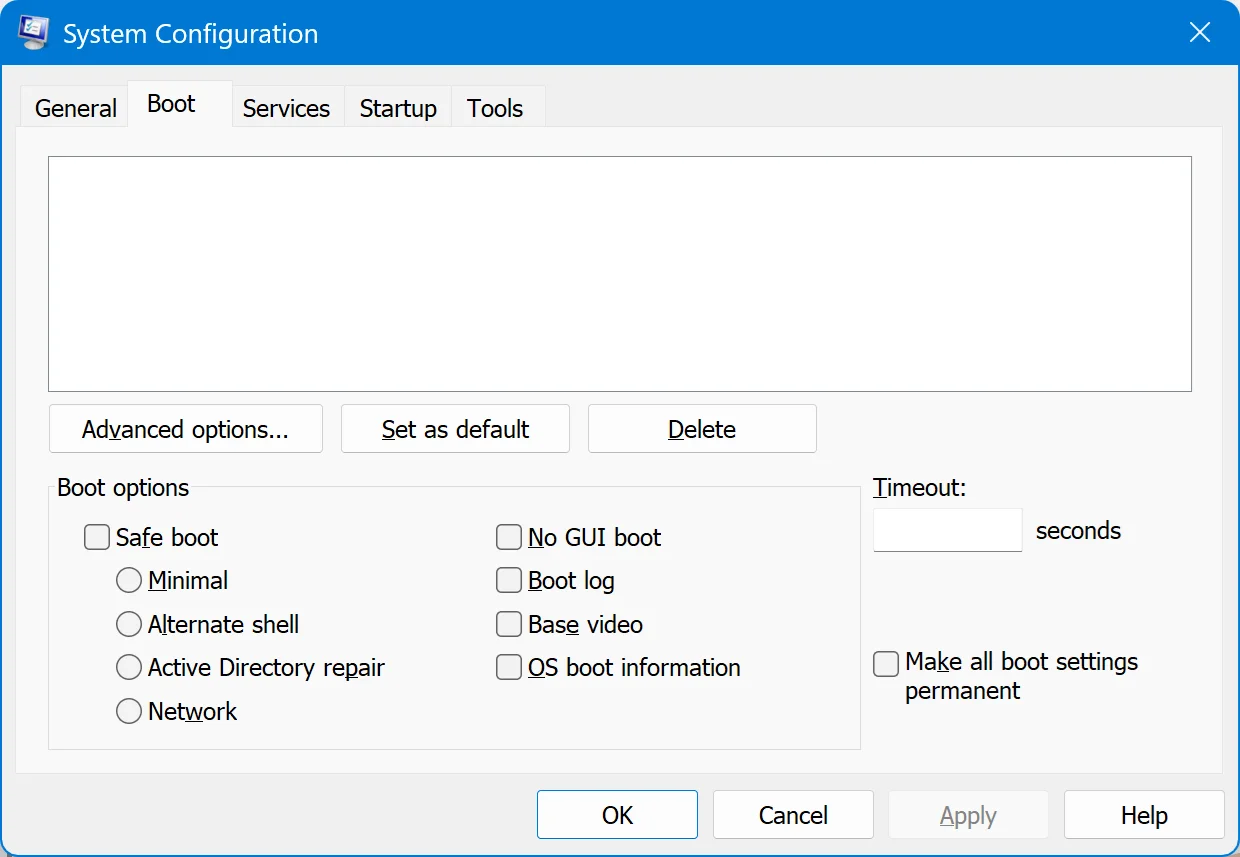
No boot options.webp


I then attempted to fix it by entering "bcdedit" and got this:
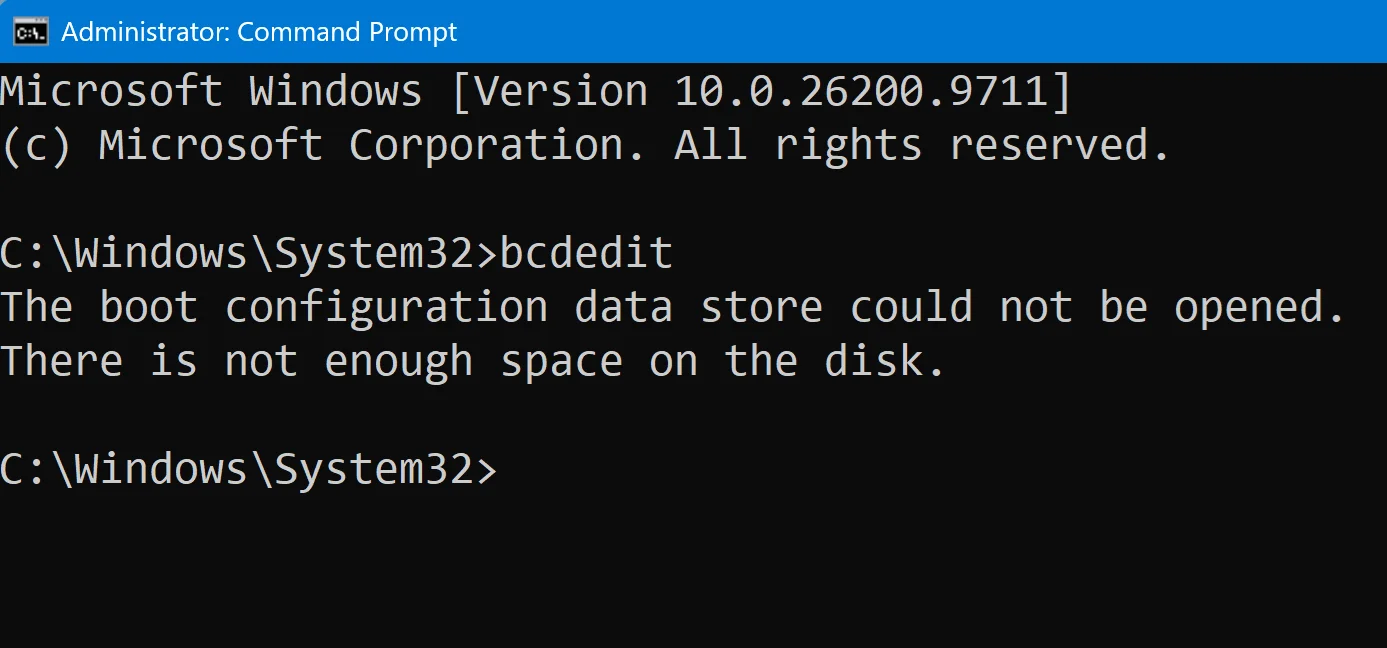
bcdedit no space.webp


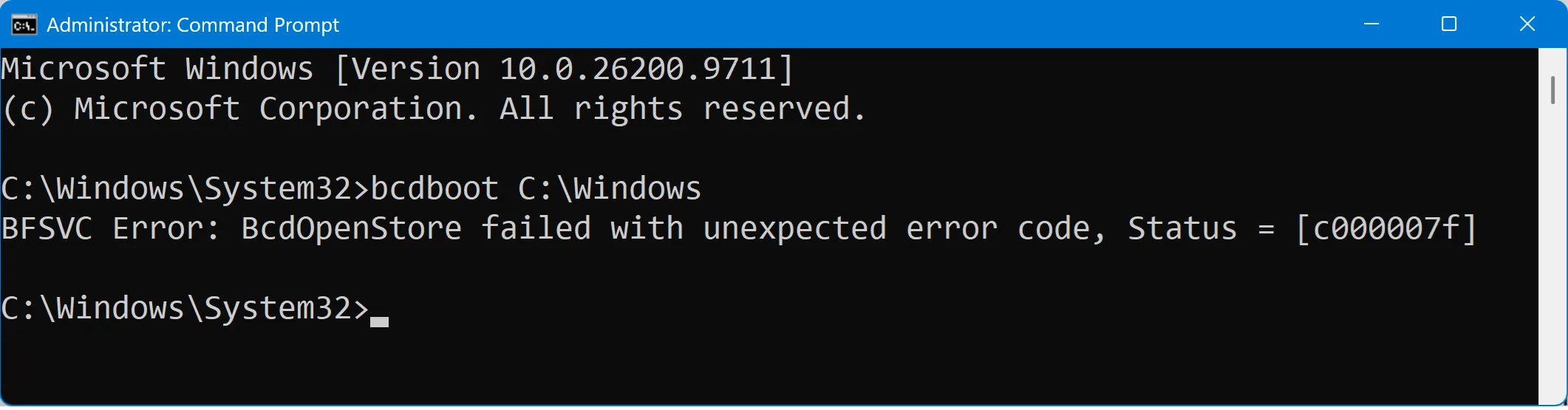
Then tried to load the boot:

bcdboot error c000007f.webp


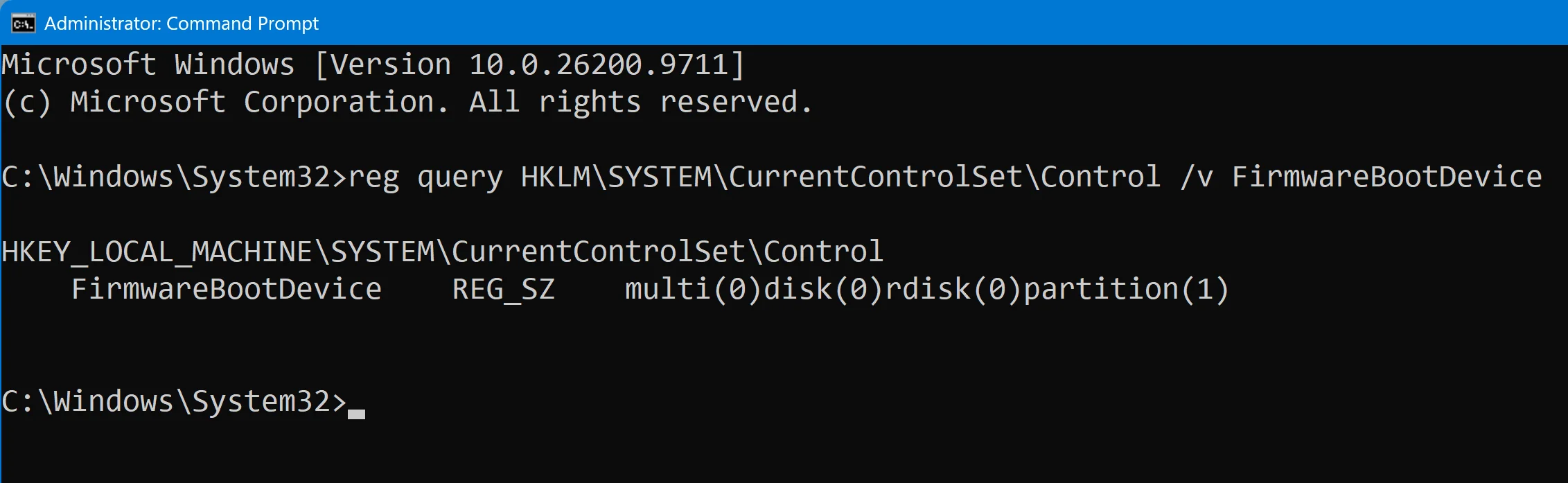
And tried to query the boot:

reg query - FirmwareBootDevice.webp


Here is a screenshot of my Disk Manager:
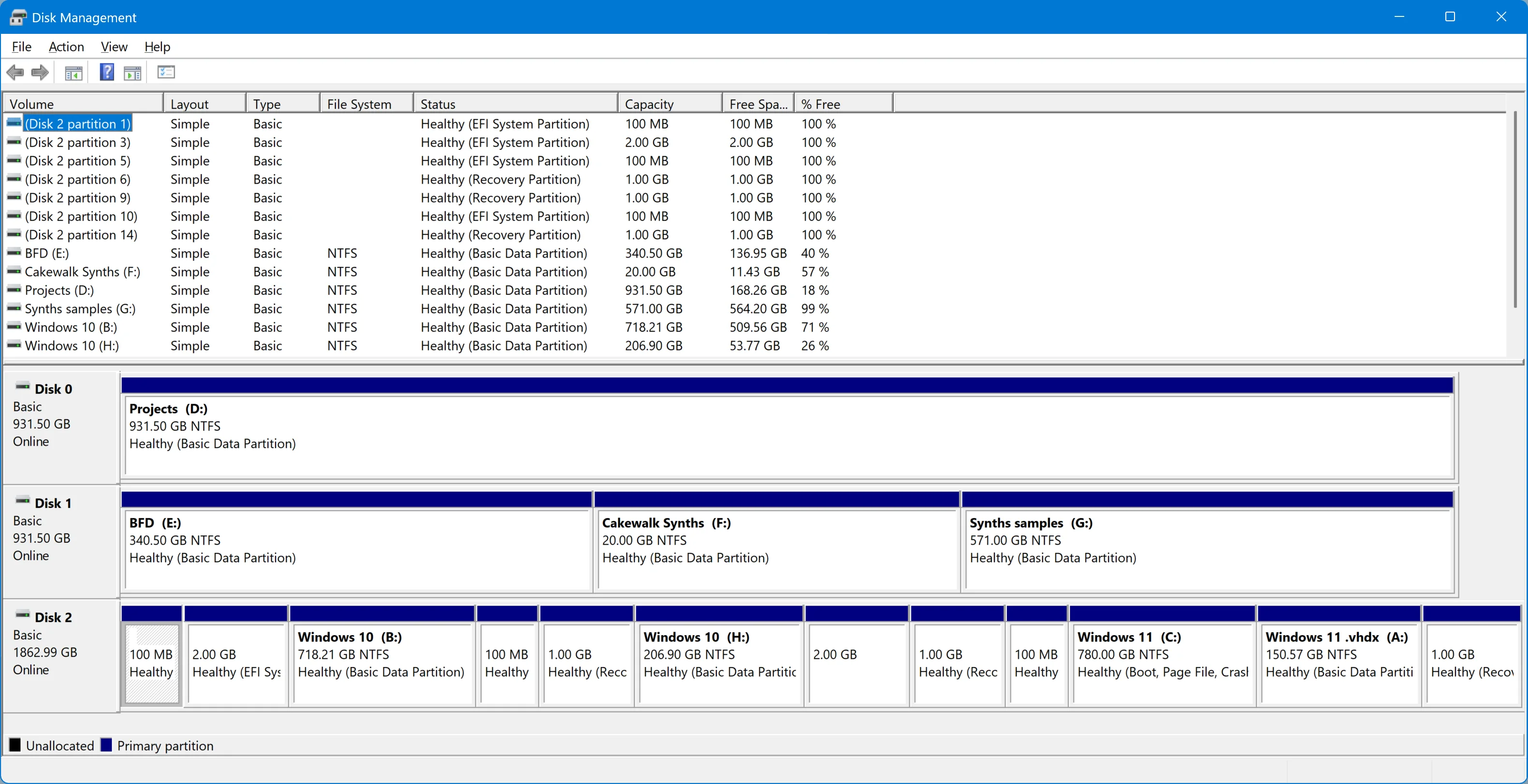
Disk Management with new H.webp


I am sure you guys have been through fixing these boot problems an hundred times, but would you be so kind as to help me out one more time and help me fix my system? I would really, greatly appreciate it.

Kind regards,

tecknot
 

My Computers My Computers

  • At a glance

    Windows 11 Pro 25H2 build 26300.9725Intel i7 8750H @ 2.2 GHz16 GB (all Samsung) DDR4-3200 SODIMM (non-ECC...Intel UHD Graphics 630 & NVIDIA Quadro P600
    OS
    Windows 11 Pro 25H2 build 26300.9725
    Computer type
    Laptop
    Manufacturer/Model
    Lenovo ThinkPad Workstation P72
    CPU
    Intel i7 8750H @ 2.2 GHz
    Motherboard
    Lenovo 01YU291
    Memory
    16 GB (all Samsung) DDR4-3200 SODIMM (non-ECC) PCIe 3
    Graphics Card(s)
    Intel UHD Graphics 630 & NVIDIA Quadro P600
    Sound Card
    Realtek ALC3286 & Focusrite Saffire 24 Pro DSP
    Monitor(s) Displays
    17.3"
    Screen Resolution
    3840x2160
    Hard Drives
    1TB SSD Samsung 860 EVO SATA 3
    1TB SSD Samsung 970 EVO M.2 NVMe PCIe 3 x 4
    2TB SSD Samsung 990 PRO M.2 NVMe PCIe 3 x 4
    PSU
    230W
    Cooling
    fan
    Keyboard
    UltraNav
    Mouse
    Kensington wireless Orbit
    Internet Speed
    640Mbps
    Browser
    DuckDuckGo and Firefox
    Antivirus
    Defender
    Other Info
    CM246 Chipset
  • VM with Windows 11 26H2 b 26300.9725: 4 GB (all Samsung) DDR4-3200 SODIMM (non-ECC) PCIe 3; 150GB on SSD Samsung 990 PRO M.2 NVMe PCIe 3 x 4
Have you tried to rebuild BCD store from Windows 11 recovery console by executing following commands.

Code:
bootrec /scanos
bootrec /rebuildbcd
 

My Computer My Computer

At a glance

Windows 11AMD Ryzen 7 5700GMicron Technology DDR4-3200 16GBNVIDIA GeForce RTX 3060
OS
Windows 11
Computer type
PC/Desktop
Manufacturer/Model
HP Pavilion
CPU
AMD Ryzen 7 5700G
Motherboard
Erica6
Memory
Micron Technology DDR4-3200 16GB
Graphics Card(s)
NVIDIA GeForce RTX 3060
Sound Card
Realtek ALC671
Monitor(s) Displays
Samsung SyncMaster U28E590
Screen Resolution
3840 x 2160
Hard Drives
SAMSUNG MZVLQ1T0HALB-000H1
Have you tried to rebuild BCD store from Windows 11 recovery console by executing following commands.

Code:
bootrec /scanos
bootrec /rebuildbcd

Hi FreeBooter!

I have tried a couple of "bootrec" commands but got the same error:

bootrec error.webp


Kind regards,

tecknot
 

My Computers My Computers

  • At a glance

    Windows 11 Pro 25H2 build 26300.9725Intel i7 8750H @ 2.2 GHz16 GB (all Samsung) DDR4-3200 SODIMM (non-ECC...Intel UHD Graphics 630 & NVIDIA Quadro P600
    OS
    Windows 11 Pro 25H2 build 26300.9725
    Computer type
    Laptop
    Manufacturer/Model
    Lenovo ThinkPad Workstation P72
    CPU
    Intel i7 8750H @ 2.2 GHz
    Motherboard
    Lenovo 01YU291
    Memory
    16 GB (all Samsung) DDR4-3200 SODIMM (non-ECC) PCIe 3
    Graphics Card(s)
    Intel UHD Graphics 630 & NVIDIA Quadro P600
    Sound Card
    Realtek ALC3286 & Focusrite Saffire 24 Pro DSP
    Monitor(s) Displays
    17.3"
    Screen Resolution
    3840x2160
    Hard Drives
    1TB SSD Samsung 860 EVO SATA 3
    1TB SSD Samsung 970 EVO M.2 NVMe PCIe 3 x 4
    2TB SSD Samsung 990 PRO M.2 NVMe PCIe 3 x 4
    PSU
    230W
    Cooling
    fan
    Keyboard
    UltraNav
    Mouse
    Kensington wireless Orbit
    Internet Speed
    640Mbps
    Browser
    DuckDuckGo and Firefox
    Antivirus
    Defender
    Other Info
    CM246 Chipset
  • VM with Windows 11 26H2 b 26300.9725: 4 GB (all Samsung) DDR4-3200 SODIMM (non-ECC) PCIe 3; 150GB on SSD Samsung 990 PRO M.2 NVMe PCIe 3 x 4
You are executing command from booted Windows you need to execute the Bootrec command from Windows Recovery Environment start the Command Prompt.
 

My Computer My Computer

At a glance

Windows 11AMD Ryzen 7 5700GMicron Technology DDR4-3200 16GBNVIDIA GeForce RTX 3060
OS
Windows 11
Computer type
PC/Desktop
Manufacturer/Model
HP Pavilion
CPU
AMD Ryzen 7 5700G
Motherboard
Erica6
Memory
Micron Technology DDR4-3200 16GB
Graphics Card(s)
NVIDIA GeForce RTX 3060
Sound Card
Realtek ALC671
Monitor(s) Displays
Samsung SyncMaster U28E590
Screen Resolution
3840 x 2160
Hard Drives
SAMSUNG MZVLQ1T0HALB-000H1
You are executing command from booted Windows you need to execute the Bootrec command from Windows Recovery Environment start the Command Prompt.

Oh, okay. I'll do that. Thanks, FreeBooter.

Kind regards,

tecknot

P.S. I'll be right back.
 

My Computers My Computers

  • At a glance

    Windows 11 Pro 25H2 build 26300.9725Intel i7 8750H @ 2.2 GHz16 GB (all Samsung) DDR4-3200 SODIMM (non-ECC...Intel UHD Graphics 630 & NVIDIA Quadro P600
    OS
    Windows 11 Pro 25H2 build 26300.9725
    Computer type
    Laptop
    Manufacturer/Model
    Lenovo ThinkPad Workstation P72
    CPU
    Intel i7 8750H @ 2.2 GHz
    Motherboard
    Lenovo 01YU291
    Memory
    16 GB (all Samsung) DDR4-3200 SODIMM (non-ECC) PCIe 3
    Graphics Card(s)
    Intel UHD Graphics 630 & NVIDIA Quadro P600
    Sound Card
    Realtek ALC3286 & Focusrite Saffire 24 Pro DSP
    Monitor(s) Displays
    17.3"
    Screen Resolution
    3840x2160
    Hard Drives
    1TB SSD Samsung 860 EVO SATA 3
    1TB SSD Samsung 970 EVO M.2 NVMe PCIe 3 x 4
    2TB SSD Samsung 990 PRO M.2 NVMe PCIe 3 x 4
    PSU
    230W
    Cooling
    fan
    Keyboard
    UltraNav
    Mouse
    Kensington wireless Orbit
    Internet Speed
    640Mbps
    Browser
    DuckDuckGo and Firefox
    Antivirus
    Defender
    Other Info
    CM246 Chipset
  • VM with Windows 11 26H2 b 26300.9725: 4 GB (all Samsung) DDR4-3200 SODIMM (non-ECC) PCIe 3; 150GB on SSD Samsung 990 PRO M.2 NVMe PCIe 3 x 4
You must boot the computer as UEFI to use BCDEdit, Bootrec.


Denis

Hi Denis,

I am in an UEFI bios.

Kind regards,

tecknot
 

My Computers My Computers

  • At a glance

    Windows 11 Pro 25H2 build 26300.9725Intel i7 8750H @ 2.2 GHz16 GB (all Samsung) DDR4-3200 SODIMM (non-ECC...Intel UHD Graphics 630 & NVIDIA Quadro P600
    OS
    Windows 11 Pro 25H2 build 26300.9725
    Computer type
    Laptop
    Manufacturer/Model
    Lenovo ThinkPad Workstation P72
    CPU
    Intel i7 8750H @ 2.2 GHz
    Motherboard
    Lenovo 01YU291
    Memory
    16 GB (all Samsung) DDR4-3200 SODIMM (non-ECC) PCIe 3
    Graphics Card(s)
    Intel UHD Graphics 630 & NVIDIA Quadro P600
    Sound Card
    Realtek ALC3286 & Focusrite Saffire 24 Pro DSP
    Monitor(s) Displays
    17.3"
    Screen Resolution
    3840x2160
    Hard Drives
    1TB SSD Samsung 860 EVO SATA 3
    1TB SSD Samsung 970 EVO M.2 NVMe PCIe 3 x 4
    2TB SSD Samsung 990 PRO M.2 NVMe PCIe 3 x 4
    PSU
    230W
    Cooling
    fan
    Keyboard
    UltraNav
    Mouse
    Kensington wireless Orbit
    Internet Speed
    640Mbps
    Browser
    DuckDuckGo and Firefox
    Antivirus
    Defender
    Other Info
    CM246 Chipset
  • VM with Windows 11 26H2 b 26300.9725: 4 GB (all Samsung) DDR4-3200 SODIMM (non-ECC) PCIe 3; 150GB on SSD Samsung 990 PRO M.2 NVMe PCIe 3 x 4
You must boot the computer as UEFI to use BCDEdit, Bootrec.


Denis
Sorry to correct you but the both commands execute with MBR mode.
 

My Computer My Computer

At a glance

Windows 11AMD Ryzen 7 5700GMicron Technology DDR4-3200 16GBNVIDIA GeForce RTX 3060
OS
Windows 11
Computer type
PC/Desktop
Manufacturer/Model
HP Pavilion
CPU
AMD Ryzen 7 5700G
Motherboard
Erica6
Memory
Micron Technology DDR4-3200 16GB
Graphics Card(s)
NVIDIA GeForce RTX 3060
Sound Card
Realtek ALC671
Monitor(s) Displays
Samsung SyncMaster U28E590
Screen Resolution
3840 x 2160
Hard Drives
SAMSUNG MZVLQ1T0HALB-000H1
both commands execute with MBR mode.
Thanks for telling me. I've had a note [4 years old] that they could only be used after UEFI boots.
After posting, I looked through my notes but could not find any source for that info - that was why I deleted my post but both tecknot & you were quicker than me.


All the best,
Denis
 

My Computer My Computer

At a glance

Windows 11 Home x64 Version 26H2 Build 26300....
OS
Windows 11 Home x64 Version 26H2 Build 26300.9457
You are executing command from booted Windows you need to execute the Bootrec command from Windows Recovery Environment start the Command Prompt.

Oh, okay. I'll do that. Thanks, FreeBooter.

Kind regards,

tecknot

P.S. I'll be right back.

Okay, I'm back. Unfortunately, when I go into the Recovery mode and then into Troubleshooting, I only get the option to enter the UEFI. There is no option to open the Command Prompt.

I'm out of luck.

Kind regards,

tecknot
 

My Computers My Computers

  • At a glance

    Windows 11 Pro 25H2 build 26300.9725Intel i7 8750H @ 2.2 GHz16 GB (all Samsung) DDR4-3200 SODIMM (non-ECC...Intel UHD Graphics 630 & NVIDIA Quadro P600
    OS
    Windows 11 Pro 25H2 build 26300.9725
    Computer type
    Laptop
    Manufacturer/Model
    Lenovo ThinkPad Workstation P72
    CPU
    Intel i7 8750H @ 2.2 GHz
    Motherboard
    Lenovo 01YU291
    Memory
    16 GB (all Samsung) DDR4-3200 SODIMM (non-ECC) PCIe 3
    Graphics Card(s)
    Intel UHD Graphics 630 & NVIDIA Quadro P600
    Sound Card
    Realtek ALC3286 & Focusrite Saffire 24 Pro DSP
    Monitor(s) Displays
    17.3"
    Screen Resolution
    3840x2160
    Hard Drives
    1TB SSD Samsung 860 EVO SATA 3
    1TB SSD Samsung 970 EVO M.2 NVMe PCIe 3 x 4
    2TB SSD Samsung 990 PRO M.2 NVMe PCIe 3 x 4
    PSU
    230W
    Cooling
    fan
    Keyboard
    UltraNav
    Mouse
    Kensington wireless Orbit
    Internet Speed
    640Mbps
    Browser
    DuckDuckGo and Firefox
    Antivirus
    Defender
    Other Info
    CM246 Chipset
  • VM with Windows 11 26H2 b 26300.9725: 4 GB (all Samsung) DDR4-3200 SODIMM (non-ECC) PCIe 3; 150GB on SSD Samsung 990 PRO M.2 NVMe PCIe 3 x 4

My Computer My Computer

At a glance

Windows 11 Home x64 Version 26H2 Build 26300....
OS
Windows 11 Home x64 Version 26H2 Build 26300.9457

My Computers My Computers

  • At a glance

    Windows 11 Pro 25H2 build 26300.9725Intel i7 8750H @ 2.2 GHz16 GB (all Samsung) DDR4-3200 SODIMM (non-ECC...Intel UHD Graphics 630 & NVIDIA Quadro P600
    OS
    Windows 11 Pro 25H2 build 26300.9725
    Computer type
    Laptop
    Manufacturer/Model
    Lenovo ThinkPad Workstation P72
    CPU
    Intel i7 8750H @ 2.2 GHz
    Motherboard
    Lenovo 01YU291
    Memory
    16 GB (all Samsung) DDR4-3200 SODIMM (non-ECC) PCIe 3
    Graphics Card(s)
    Intel UHD Graphics 630 & NVIDIA Quadro P600
    Sound Card
    Realtek ALC3286 & Focusrite Saffire 24 Pro DSP
    Monitor(s) Displays
    17.3"
    Screen Resolution
    3840x2160
    Hard Drives
    1TB SSD Samsung 860 EVO SATA 3
    1TB SSD Samsung 970 EVO M.2 NVMe PCIe 3 x 4
    2TB SSD Samsung 990 PRO M.2 NVMe PCIe 3 x 4
    PSU
    230W
    Cooling
    fan
    Keyboard
    UltraNav
    Mouse
    Kensington wireless Orbit
    Internet Speed
    640Mbps
    Browser
    DuckDuckGo and Firefox
    Antivirus
    Defender
    Other Info
    CM246 Chipset
  • VM with Windows 11 26H2 b 26300.9725: 4 GB (all Samsung) DDR4-3200 SODIMM (non-ECC) PCIe 3; 150GB on SSD Samsung 990 PRO M.2 NVMe PCIe 3 x 4
At which step of the tutorial does what you see differ from what the tutorial illustrates?
Please would you post a photo of that first different screen [you'll probably need to crop it heavily to fit in the forum's size constraints but do make sure the screen heading remains on the photo to avoid misunderstandings].


Denis
 

My Computer My Computer

At a glance

Windows 11 Home x64 Version 26H2 Build 26300....
OS
Windows 11 Home x64 Version 26H2 Build 26300.9457
At which step of the tutorial does what you see differ from what the tutorial illustrates?
Please would you post a photo of that first different screen [you'll probably need to crop it heavily to fit in the forum's size constraints but do make sure the screen heading remains on the photo to avoid misunderstandings].


Denis

Hi Denis,

Sorry for the long delay. At every step. Here is what I see:

Adv Startup.webp


Troubleshoot.webp


Enter Troubleshoot.webp


Hope these pics show what I mean.

Kind regards,

tecknot
 

My Computers My Computers

  • At a glance

    Windows 11 Pro 25H2 build 26300.9725Intel i7 8750H @ 2.2 GHz16 GB (all Samsung) DDR4-3200 SODIMM (non-ECC...Intel UHD Graphics 630 & NVIDIA Quadro P600
    OS
    Windows 11 Pro 25H2 build 26300.9725
    Computer type
    Laptop
    Manufacturer/Model
    Lenovo ThinkPad Workstation P72
    CPU
    Intel i7 8750H @ 2.2 GHz
    Motherboard
    Lenovo 01YU291
    Memory
    16 GB (all Samsung) DDR4-3200 SODIMM (non-ECC) PCIe 3
    Graphics Card(s)
    Intel UHD Graphics 630 & NVIDIA Quadro P600
    Sound Card
    Realtek ALC3286 & Focusrite Saffire 24 Pro DSP
    Monitor(s) Displays
    17.3"
    Screen Resolution
    3840x2160
    Hard Drives
    1TB SSD Samsung 860 EVO SATA 3
    1TB SSD Samsung 970 EVO M.2 NVMe PCIe 3 x 4
    2TB SSD Samsung 990 PRO M.2 NVMe PCIe 3 x 4
    PSU
    230W
    Cooling
    fan
    Keyboard
    UltraNav
    Mouse
    Kensington wireless Orbit
    Internet Speed
    640Mbps
    Browser
    DuckDuckGo and Firefox
    Antivirus
    Defender
    Other Info
    CM246 Chipset
  • VM with Windows 11 26H2 b 26300.9725: 4 GB (all Samsung) DDR4-3200 SODIMM (non-ECC) PCIe 3; 150GB on SSD Samsung 990 PRO M.2 NVMe PCIe 3 x 4

My Computer My Computer

At a glance

Windows 11 Home x64 Version 26H2 Build 26300....
OS
Windows 11 Home x64 Version 26H2 Build 26300.9457
@Brink,

tecknot is getting completely different responses to yours when doing the procedure in Startup Repair - ElevenForumTutorials
tecknot's responses are posted in #13 above.
Any ideas?


Denis

Looks like his WinRE options are missing as well.

Might try booting from a Windows installation USB to WinRE instead like option 7 below.


My Computers My Computers

  • At a glance

    Windows 11 Pro for WorkstationsIntel i7-8700K 5 GHz64 GB (4x16GB) G.SKILL TridentZ RGB DDR4 3600...ASUS ROG-STRIX-GTX1080TI-O11G-GAMING (11GB GD...
    OS
    Windows 11 Pro for Workstations
    Computer type
    PC/Desktop
    Manufacturer/Model
    Custom self build
    CPU
    Intel i7-8700K 5 GHz
    Motherboard
    ASUS ROG Maximus XI Formula Z390
    Memory
    64 GB (4x16GB) G.SKILL TridentZ RGB DDR4 3600 MHz (F4-3600C18D-32GTZR)
    Graphics Card(s)
    ASUS ROG-STRIX-GTX1080TI-O11G-GAMING (11GB GDDR5X)
    Sound Card
    Integrated Digital Audio (S/PDIF)
    Monitor(s) Displays
    2 x Samsung Odyssey G75 27"
    Screen Resolution
    2560x1440
    Hard Drives
    1TB Samsung 990 PRO M.2,
    4TB Samsung 990 PRO M.2,
    TerraMaster F8 SSD Plus NAS
    PSU
    Seasonic Prime Titanium 850W
    Case
    Thermaltake Core P3 wall mounted
    Cooling
    Corsair Hydro H115i
    Keyboard
    Amazon Basics Wired Full Keyboard MD005
    Mouse
    Logitech MX Master 4
    Internet Speed
    2 Gbps Download and 100 Mbps Upload
    Browser
    Chrome and Edge
    Antivirus
    Microsoft Defender
    Other Info
    Logitech Z625 speaker system,
    Logitech BRIO 4K Pro webcam,
    HP Color LaserJet Pro MFP M477fdn,
    CyberPower CP1500PFCLCD
    Galaxy S23 Plus phone
  • At a glance

    Windows 11 ProSnapdragon X Elite (12 core) 3.42 GHz16 GB LPDDR5x-7467 MHz
    Operating System
    Windows 11 Pro
    Computer type
    Laptop
    Manufacturer/Model
    Surface Laptop 7 Copilot+ PC
    CPU
    Snapdragon X Elite (12 core) 3.42 GHz
    Memory
    16 GB LPDDR5x-7467 MHz
    Monitor(s) Displays
    15" HDR
    Screen Resolution
    2496 x 1664
    Hard Drives
    1 TB SSD
    Internet Speed
    Wi-Fi 7 and Bluetooth 5.4
    Browser
    Chrome and Edge
    Antivirus
    Microsoft Defender
Looks like his WinRE options are missing as well.

Might try booting from a Windows installation USB to WinRE instead like option 7 below.


Thank you, Shawn. I got to Command Prompt and ran the commands FreeBooter gave me.

Thank you too @Try3 Denis!

Kind regards,

tecknot
 

My Computers My Computers

  • At a glance

    Windows 11 Pro 25H2 build 26300.9725Intel i7 8750H @ 2.2 GHz16 GB (all Samsung) DDR4-3200 SODIMM (non-ECC...Intel UHD Graphics 630 & NVIDIA Quadro P600
    OS
    Windows 11 Pro 25H2 build 26300.9725
    Computer type
    Laptop
    Manufacturer/Model
    Lenovo ThinkPad Workstation P72
    CPU
    Intel i7 8750H @ 2.2 GHz
    Motherboard
    Lenovo 01YU291
    Memory
    16 GB (all Samsung) DDR4-3200 SODIMM (non-ECC) PCIe 3
    Graphics Card(s)
    Intel UHD Graphics 630 & NVIDIA Quadro P600
    Sound Card
    Realtek ALC3286 & Focusrite Saffire 24 Pro DSP
    Monitor(s) Displays
    17.3"
    Screen Resolution
    3840x2160
    Hard Drives
    1TB SSD Samsung 860 EVO SATA 3
    1TB SSD Samsung 970 EVO M.2 NVMe PCIe 3 x 4
    2TB SSD Samsung 990 PRO M.2 NVMe PCIe 3 x 4
    PSU
    230W
    Cooling
    fan
    Keyboard
    UltraNav
    Mouse
    Kensington wireless Orbit
    Internet Speed
    640Mbps
    Browser
    DuckDuckGo and Firefox
    Antivirus
    Defender
    Other Info
    CM246 Chipset
  • VM with Windows 11 26H2 b 26300.9725: 4 GB (all Samsung) DDR4-3200 SODIMM (non-ECC) PCIe 3; 150GB on SSD Samsung 990 PRO M.2 NVMe PCIe 3 x 4
Have you tried to rebuild BCD store from Windows 11 recovery console by executing following commands.

Code:
bootrec /scanos
bootrec /rebuildbcd

Hi FreeBooter,

I ran the two commands above, but still got this in my System Configuration:

No boot options.webp


And I cannot boot into my other Operating System (Windows 10 in this case).

Kind regards,

tecknot
 

My Computers My Computers

  • At a glance

    Windows 11 Pro 25H2 build 26300.9725Intel i7 8750H @ 2.2 GHz16 GB (all Samsung) DDR4-3200 SODIMM (non-ECC...Intel UHD Graphics 630 & NVIDIA Quadro P600
    OS
    Windows 11 Pro 25H2 build 26300.9725
    Computer type
    Laptop
    Manufacturer/Model
    Lenovo ThinkPad Workstation P72
    CPU
    Intel i7 8750H @ 2.2 GHz
    Motherboard
    Lenovo 01YU291
    Memory
    16 GB (all Samsung) DDR4-3200 SODIMM (non-ECC) PCIe 3
    Graphics Card(s)
    Intel UHD Graphics 630 & NVIDIA Quadro P600
    Sound Card
    Realtek ALC3286 & Focusrite Saffire 24 Pro DSP
    Monitor(s) Displays
    17.3"
    Screen Resolution
    3840x2160
    Hard Drives
    1TB SSD Samsung 860 EVO SATA 3
    1TB SSD Samsung 970 EVO M.2 NVMe PCIe 3 x 4
    2TB SSD Samsung 990 PRO M.2 NVMe PCIe 3 x 4
    PSU
    230W
    Cooling
    fan
    Keyboard
    UltraNav
    Mouse
    Kensington wireless Orbit
    Internet Speed
    640Mbps
    Browser
    DuckDuckGo and Firefox
    Antivirus
    Defender
    Other Info
    CM246 Chipset
  • VM with Windows 11 26H2 b 26300.9725: 4 GB (all Samsung) DDR4-3200 SODIMM (non-ECC) PCIe 3; 150GB on SSD Samsung 990 PRO M.2 NVMe PCIe 3 x 4
What was the output of the two commands?
 

My Computer My Computer

At a glance

Windows 11AMD Ryzen 7 5700GMicron Technology DDR4-3200 16GBNVIDIA GeForce RTX 3060
OS
Windows 11
Computer type
PC/Desktop
Manufacturer/Model
HP Pavilion
CPU
AMD Ryzen 7 5700G
Motherboard
Erica6
Memory
Micron Technology DDR4-3200 16GB
Graphics Card(s)
NVIDIA GeForce RTX 3060
Sound Card
Realtek ALC671
Monitor(s) Displays
Samsung SyncMaster U28E590
Screen Resolution
3840 x 2160
Hard Drives
SAMSUNG MZVLQ1T0HALB-000H1
What was the output of the two commands?

Hi FreeBooter,

I don't recall exactly, but they were in the positive.

Kind regards,

tecknot

P.S. I can run them again if you like.

I'll be right back!
 

My Computers My Computers

  • At a glance

    Windows 11 Pro 25H2 build 26300.9725Intel i7 8750H @ 2.2 GHz16 GB (all Samsung) DDR4-3200 SODIMM (non-ECC...Intel UHD Graphics 630 & NVIDIA Quadro P600
    OS
    Windows 11 Pro 25H2 build 26300.9725
    Computer type
    Laptop
    Manufacturer/Model
    Lenovo ThinkPad Workstation P72
    CPU
    Intel i7 8750H @ 2.2 GHz
    Motherboard
    Lenovo 01YU291
    Memory
    16 GB (all Samsung) DDR4-3200 SODIMM (non-ECC) PCIe 3
    Graphics Card(s)
    Intel UHD Graphics 630 & NVIDIA Quadro P600
    Sound Card
    Realtek ALC3286 & Focusrite Saffire 24 Pro DSP
    Monitor(s) Displays
    17.3"
    Screen Resolution
    3840x2160
    Hard Drives
    1TB SSD Samsung 860 EVO SATA 3
    1TB SSD Samsung 970 EVO M.2 NVMe PCIe 3 x 4
    2TB SSD Samsung 990 PRO M.2 NVMe PCIe 3 x 4
    PSU
    230W
    Cooling
    fan
    Keyboard
    UltraNav
    Mouse
    Kensington wireless Orbit
    Internet Speed
    640Mbps
    Browser
    DuckDuckGo and Firefox
    Antivirus
    Defender
    Other Info
    CM246 Chipset
  • VM with Windows 11 26H2 b 26300.9725: 4 GB (all Samsung) DDR4-3200 SODIMM (non-ECC) PCIe 3; 150GB on SSD Samsung 990 PRO M.2 NVMe PCIe 3 x 4
Did the both command find the both operating system and did you ad them to BCD?
 

My Computer My Computer

At a glance

Windows 11AMD Ryzen 7 5700GMicron Technology DDR4-3200 16GBNVIDIA GeForce RTX 3060
OS
Windows 11
Computer type
PC/Desktop
Manufacturer/Model
HP Pavilion
CPU
AMD Ryzen 7 5700G
Motherboard
Erica6
Memory
Micron Technology DDR4-3200 16GB
Graphics Card(s)
NVIDIA GeForce RTX 3060
Sound Card
Realtek ALC671
Monitor(s) Displays
Samsung SyncMaster U28E590
Screen Resolution
3840 x 2160
Hard Drives
SAMSUNG MZVLQ1T0HALB-000H1

Latest Support Threads

Back
Top Bottom