
- Local time
- 9:58 PM
- Posts
- 241
- OS
- Windows 11 Pro 22H2
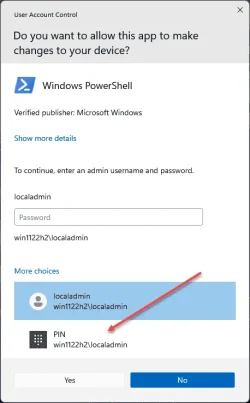
I am running as a Standard Local Account and whenever I need to elevate as an Administrator, the UAC prompt does not show the choice to select using Windows Hello PIN. Only password.
Even when I signed in to my local Administrator account profile and setting up the Hello PIN from that account, it still doesn't show the option to use the PIN from the UAC prompt when performing the Run As Administrator whenever I need to perform some tasks that needs Administrator rights under my Standard Local Account.
My Standard Local Account has a PIN setup as well.
See image attached as to what I am referring to. I don't see this option to enter a PIN.
Even when I signed in to my local Administrator account profile and setting up the Hello PIN from that account, it still doesn't show the option to use the PIN from the UAC prompt when performing the Run As Administrator whenever I need to perform some tasks that needs Administrator rights under my Standard Local Account.
My Standard Local Account has a PIN setup as well.
See image attached as to what I am referring to. I don't see this option to enter a PIN.
Attachments
My Computer
At a glance
Windows 11 Pro 22H2
- OS
- Windows 11 Pro 22H2






