No starting after windows update


gremar

Member
Local time
8:54 PM
Posts
10
OS
windows 11
Hi guys I feel I’ve been done by Microsoft. I was just browsing the internet and a message popped up that I need to restart my computer to finish installing the update. After restarting, the PC won’t boot up there is no display from the bios on the screen only the normal beep and no motherboard logo on the screen, just a long beep followed by 3 short ones. I searched the internet for a fix, I did what they suggested like removing everything leaving just the keyboard and one stick of memory. The problem still persists.

I looked into the ASUS Manual of to clear the CMOS and I shortened to 2 pins, but still nothing happening. I took the power off and removed the battery and kept pressing the starting button, but nothing happened.

The motherboard is still brand new, only 3 weeks old. ASUS
ASUS TUF Gaming X570-Plus
Ryzen 5 5600X processor

I thinking of taking the board off the box and reinstalling the processor, will that help? Is there anything else can do, your help is much appreciated?
 

My Computer My Computer

At a glance

windows 11Intel i5-9300H (4 Cores / 8 Threads) – 2.40GH...16 GBIntel UHD Graphics 630
OS
windows 11
Computer type
Laptop
Manufacturer/Model
Clevo NH55RZQ
CPU
Intel i5-9300H (4 Cores / 8 Threads) – 2.40GHz (Turbo 4
Memory
16 GB
Graphics Card(s)
Intel UHD Graphics 630
Sound Card
Intel High Definition Audio + SOUND BLASTER™
Monitor(s) Displays
15.6″ IPS LED FULL-HD 1920×1080 with 60Hz (Matt)
Screen Resolution
1920×1080
Hard Drives
M.2 500 GB
Internet Speed
70 mbps
Browser
Edge
Antivirus
Malwarebytes Free
just a long beep followed by 3 short ones. I searched the internet for a fix
But did you check the motherboard details for beep error code meanings?
The lack of a BIOS screen is concerning as it usually means either the CPU has an issue if using the integrated graphics or the dedicated GPU has an issue.
Before doing anything else check that all connections are solid, change display cables, ports and display devices if possible to rule out a simple failed cable/ connection or monitor.
 

My Computer My Computer

At a glance

Windows 11 Pro 22H2, build: 22621.521Intel i7-12700K 3.6GHz Base (5.0GHz Turbo)64GB DDR 3600MhzAsus Tuff RTX 3080 10GB OC
OS
Windows 11 Pro 22H2, build: 22621.521
Computer type
PC/Desktop
Manufacturer/Model
Scan 3XS Custom 1700
CPU
Intel i7-12700K 3.6GHz Base (5.0GHz Turbo)
Motherboard
Asus ProArt Creator B660 D4
Memory
64GB DDR 3600Mhz
Graphics Card(s)
Asus Tuff RTX 3080 10GB OC
Sound Card
Onboard Realtek
Monitor(s) Displays
Gigabyte G32QC 32inch 16:9 curved @2560 x 1440p 165Hz Freesync Premium Pro/ Dell SE2422H 24inch 16:9 1920 x 1080p 75Hz Freesync
Screen Resolution
2560 x 1440p & 1920 x 1080p
Hard Drives
WD SN570 1TB NVME (Boot), Samsung 870QVO 1TB (SSD), SanDisk 3D Ultra 500Gb (SSD) x2, Seagate 3Tb Expansion Desk (Ext HDD), 2x Toshiba 1Tb P300 (Ext HDD)
PSU
Corsair RM1000X Modular
Case
Corsair 4000D Airflow Desktop
Cooling
Corsair Hydro H150i RGB Pro XT 360mm Liquid Cooler, 3 x 120mm fans, 1x Exhaust
Keyboard
Microsoft Ergonomic
Mouse
Logitech G402
Internet Speed
800Mbs
Browser
Edge Chromium
Antivirus
Defender, Malwarebytes
I was just browsing the internet and a message popped up that I need to restart my computer to finish installing the update.
Did you go into Settings>Windows Update to check that this was a genuine Windows update and not a virus? Hackers rely on people just clicking on Yes/Okay/Restart now etc without checking.

I say this because in my experience a genuine Windows update has never bricked my computers so totally.
 

My Computers My Computers

  • At a glance

    Windows 11 ProAMD Ryzen 9 8945HS32GB DDR5 SO-DIMMIntegrated AMD Radeon 780M (4.00 GHz)
    OS
    Windows 11 Pro
    Computer type
    PC/Desktop
    Manufacturer/Model
    GMKtec K11
    CPU
    AMD Ryzen 9 8945HS
    Memory
    32GB DDR5 SO-DIMM
    Graphics Card(s)
    Integrated AMD Radeon 780M (4.00 GHz)
    Monitor(s) Displays
    Benq 2250HM
    Screen Resolution
    1920 x 1080
    Hard Drives
    1 TB PCIe 4.0 NVMe M.2 SSD
    Antivirus
    Bit Defender Total Security
  • At a glance

    Windows 11 HomeIntel® Core™ Ultra 7 - 255H processor16 GB LPDDR5 SDRAMIntel Arc 140T onboard graphics
    Operating System
    Windows 11 Home
    Computer type
    Laptop
    Manufacturer/Model
    ASUS Zenbook 14 OLED 14" Laptop - UX3405CA-QL192W
    CPU
    Intel® Core™ Ultra 7 - 255H processor
    Memory
    16 GB LPDDR5 SDRAM
    Graphics card(s)
    Intel Arc 140T onboard graphics
    Screen Resolution
    1920 x 1200 (16:10 WUXGA resolution) OLED Touchscreen
    Hard Drives
    1TB SSD
    Antivirus
    Bit Defender Total Security
Thanks, guys, for the reply I took the CPU out and, in the process, I managed to bend a few pins and that is the end of my miserable story. Now I am looking for new CPU, thanks anyway.
 

My Computer My Computer

At a glance

windows 11Intel i5-9300H (4 Cores / 8 Threads) – 2.40GH...16 GBIntel UHD Graphics 630
OS
windows 11
Computer type
Laptop
Manufacturer/Model
Clevo NH55RZQ
CPU
Intel i5-9300H (4 Cores / 8 Threads) – 2.40GHz (Turbo 4
Memory
16 GB
Graphics Card(s)
Intel UHD Graphics 630
Sound Card
Intel High Definition Audio + SOUND BLASTER™
Monitor(s) Displays
15.6″ IPS LED FULL-HD 1920×1080 with 60Hz (Matt)
Screen Resolution
1920×1080
Hard Drives
M.2 500 GB
Internet Speed
70 mbps
Browser
Edge
Antivirus
Malwarebytes Free
Sorry about your catastrophe. We've all (or at least me) have done it. Those pins are so delicate even in handling, but when the cpu is put in the wrong direction that heat sync will mangle them big time. You may well get a black screen after the cpu is replaced as IMO I think the issue pointed more so to the discrete GPU or mobo than the CPU. That's what I don't like about a cpu that doesn't have integrated graphics to fall back on. It makes testing graphics issues much harder. Were you getting power lights when this happened? If not, look at your power supply. Good luck.
 

My Computers My Computers

  • At a glance

    Windows 11 Pro 25H2 26200.9445i9-10900 10 core 20 threads32 gbnone-Intel UHD Graphics 630
    OS
    Windows 11 Pro 25H2 26200.9445
    Computer type
    PC/Desktop
    Manufacturer/Model
    Dell Optiplex 7080
    CPU
    i9-10900 10 core 20 threads
    Motherboard
    DELL 0J37VM
    Memory
    32 gb
    Graphics Card(s)
    none-Intel UHD Graphics 630
    Sound Card
    Integrated Realtek
    Monitor(s) Displays
    Benq 27
    Screen Resolution
    2560x1440
    Hard Drives
    2x1tb Solidigm m.2 nvme /External drives 512gb Samsung m.2 sata+2tb Kingston m2.nvme
    PSU
    500w
    Case
    MT
    Cooling
    Dell Premium
    Keyboard
    Logitech wired
    Mouse
    Logitech wireless
    Internet Speed
    so slow I'm too embarrassed to tell
    Browser
    #1 Edge #2 Firefox
    Antivirus
    Defender+MWB Premium
  • At a glance

    Windows 11 Pro 24H2 26200.9445AMD Ryzen 7 6800U32 gbintegrated
    Operating System
    Windows 11 Pro 24H2 26200.9445
    Computer type
    PC/Desktop
    Manufacturer/Model
    Beelink Mini PC SER5
    CPU
    AMD Ryzen 7 6800U
    Memory
    32 gb
    Graphics card(s)
    integrated
    Sound Card
    integrated
    Monitor(s) Displays
    Benq 27
    Screen Resolution
    2560x1440
    Hard Drives
    1TB Crucial nvme
    Keyboard
    Logitech wired
    Mouse
    Logitech wireless
    Internet Speed
    still too embarrassed to tell
    Browser
    Firefox
    Antivirus
    Defender
  • System 3 is non compliant Dell 9020 i7-4770/24gb ram Win11 PRO 26200.9445
Thanks, guys, for the reply I took the CPU out and, in the process, I managed to bend a few pins and that is the end of my miserable story. Now I am looking for new CPU, thanks anyway.
Yikes.

I've done that myself with an AMD CPU, due to a too-adhesive heat sink compound. Removing the heat sink ripped the CPU right out of its socket. (Taught me to twist the heat sink to break loose the compound before lifting the heat sink.)

The good news was that the socket was undamaged.
 

My Computers My Computers

  • At a glance

    Windows 11 26300.9278Amd Threadripper 7970X128GB (4 X 32) G.Skill DDR5 6400 (RDIMM)Gigabyte RTX 4090 OC
    OS
    Windows 11 26300.9278
    Computer type
    PC/Desktop
    Manufacturer/Model
    homebuilt
    CPU
    Amd Threadripper 7970X
    Motherboard
    Gigabyte TRX50 Aero D Rev. 1.0
    Memory
    128GB (4 X 32) G.Skill DDR5 6400 (RDIMM)
    Graphics Card(s)
    Gigabyte RTX 4090 OC
    Sound Card
    none (USB to speakers), Realtek
    Monitor(s) Displays
    Innocn 32" OLED
    Screen Resolution
    3840 X 2160 @ 60Hz
    Hard Drives
    Crucial T700 2TB M.2 NVME SSD
    WD 4TB Blue SATA SSD
    Seagate 18TB IronWolf Pro
    PSU
    BeQuiet! Straight Power 12 1500W
    Case
    Lian Li 011 Dynamic Evo XL
    Cooling
    SilverStone Technology XE360-TR5, with 3 Phanteks T30 fans
    Keyboard
    Cherry KC 500 MX LP (mechanical)
    Mouse
    Logitech M500s (wired)
    Internet Speed
    2000/250 Mbps (down/up)
    Other Info
    xFinity gateway
  • At a glance

    windows 11 26300.9278Intel I9-13900K64GB G.Skill DDR5-6000Gigabyte RTX 3090 ti
    Operating System
    windows 11 26300.9278
    Computer type
    PC/Desktop
    Manufacturer/Model
    homebuilt
    CPU
    Intel I9-13900K
    Motherboard
    Asus RoG Strix Z690-E
    Memory
    64GB G.Skill DDR5-6000
    Graphics card(s)
    Gigabyte RTX 3090 ti
    Sound Card
    built in Realtek
    Monitor(s) Displays
    Philips 27E1N8900 27" OLED
    Screen Resolution
    3840 X 2160 @60Hz
    Hard Drives
    WDC SN850 1TB
    8TB Seagate Ironwolf
    4TB Seagate Ironwolf
    PSU
    eVGA SuperNOVA 1300 GT
    Case
    Lian Li 011 Dynamic Evo
    Cooling
    Corsair iCUE H150i ELITE CAPELLIX Liquid CPU Cooler
    Keyboard
    Cherry Streaming (wired)
    Mouse
    Logitech M500s (wired)
This is exactly what happened to me it simply refuses to come out.
I lifted up the little lever and it just won't budge. With a little force It ended on the floor still thin intel CPU socket are far superior. Lesson learned
 

My Computer My Computer

At a glance

windows 11Intel i5-9300H (4 Cores / 8 Threads) – 2.40GH...16 GBIntel UHD Graphics 630
OS
windows 11
Computer type
Laptop
Manufacturer/Model
Clevo NH55RZQ
CPU
Intel i5-9300H (4 Cores / 8 Threads) – 2.40GHz (Turbo 4
Memory
16 GB
Graphics Card(s)
Intel UHD Graphics 630
Sound Card
Intel High Definition Audio + SOUND BLASTER™
Monitor(s) Displays
15.6″ IPS LED FULL-HD 1920×1080 with 60Hz (Matt)
Screen Resolution
1920×1080
Hard Drives
M.2 500 GB
Internet Speed
70 mbps
Browser
Edge
Antivirus
Malwarebytes Free
This is exactly what happened to me it simply refuses to come out.
I lifted up the little lever and it just won't budge. With a little force It ended on the floor still thin intel CPU socket are far superior. Lesson learned

The newer AM5 CPUs use a land grid array, similar to Intel.

There are no pins on an LGA CPU, but the fingers in the socket are quite easily bent.
 

My Computers My Computers

  • At a glance

    Windows 11 26300.9278Amd Threadripper 7970X128GB (4 X 32) G.Skill DDR5 6400 (RDIMM)Gigabyte RTX 4090 OC
    OS
    Windows 11 26300.9278
    Computer type
    PC/Desktop
    Manufacturer/Model
    homebuilt
    CPU
    Amd Threadripper 7970X
    Motherboard
    Gigabyte TRX50 Aero D Rev. 1.0
    Memory
    128GB (4 X 32) G.Skill DDR5 6400 (RDIMM)
    Graphics Card(s)
    Gigabyte RTX 4090 OC
    Sound Card
    none (USB to speakers), Realtek
    Monitor(s) Displays
    Innocn 32" OLED
    Screen Resolution
    3840 X 2160 @ 60Hz
    Hard Drives
    Crucial T700 2TB M.2 NVME SSD
    WD 4TB Blue SATA SSD
    Seagate 18TB IronWolf Pro
    PSU
    BeQuiet! Straight Power 12 1500W
    Case
    Lian Li 011 Dynamic Evo XL
    Cooling
    SilverStone Technology XE360-TR5, with 3 Phanteks T30 fans
    Keyboard
    Cherry KC 500 MX LP (mechanical)
    Mouse
    Logitech M500s (wired)
    Internet Speed
    2000/250 Mbps (down/up)
    Other Info
    xFinity gateway
  • At a glance

    windows 11 26300.9278Intel I9-13900K64GB G.Skill DDR5-6000Gigabyte RTX 3090 ti
    Operating System
    windows 11 26300.9278
    Computer type
    PC/Desktop
    Manufacturer/Model
    homebuilt
    CPU
    Intel I9-13900K
    Motherboard
    Asus RoG Strix Z690-E
    Memory
    64GB G.Skill DDR5-6000
    Graphics card(s)
    Gigabyte RTX 3090 ti
    Sound Card
    built in Realtek
    Monitor(s) Displays
    Philips 27E1N8900 27" OLED
    Screen Resolution
    3840 X 2160 @60Hz
    Hard Drives
    WDC SN850 1TB
    8TB Seagate Ironwolf
    4TB Seagate Ironwolf
    PSU
    eVGA SuperNOVA 1300 GT
    Case
    Lian Li 011 Dynamic Evo
    Cooling
    Corsair iCUE H150i ELITE CAPELLIX Liquid CPU Cooler
    Keyboard
    Cherry Streaming (wired)
    Mouse
    Logitech M500s (wired)
With a steady hand and maybe a magnifying glass and razor blade you can rescue a CPU with bent pins if you are gentle.
 

My Computer My Computer

At a glance

Windows 11 Pro 22H2, build: 22621.521Intel i7-12700K 3.6GHz Base (5.0GHz Turbo)64GB DDR 3600MhzAsus Tuff RTX 3080 10GB OC
OS
Windows 11 Pro 22H2, build: 22621.521
Computer type
PC/Desktop
Manufacturer/Model
Scan 3XS Custom 1700
CPU
Intel i7-12700K 3.6GHz Base (5.0GHz Turbo)
Motherboard
Asus ProArt Creator B660 D4
Memory
64GB DDR 3600Mhz
Graphics Card(s)
Asus Tuff RTX 3080 10GB OC
Sound Card
Onboard Realtek
Monitor(s) Displays
Gigabyte G32QC 32inch 16:9 curved @2560 x 1440p 165Hz Freesync Premium Pro/ Dell SE2422H 24inch 16:9 1920 x 1080p 75Hz Freesync
Screen Resolution
2560 x 1440p & 1920 x 1080p
Hard Drives
WD SN570 1TB NVME (Boot), Samsung 870QVO 1TB (SSD), SanDisk 3D Ultra 500Gb (SSD) x2, Seagate 3Tb Expansion Desk (Ext HDD), 2x Toshiba 1Tb P300 (Ext HDD)
PSU
Corsair RM1000X Modular
Case
Corsair 4000D Airflow Desktop
Cooling
Corsair Hydro H150i RGB Pro XT 360mm Liquid Cooler, 3 x 120mm fans, 1x Exhaust
Keyboard
Microsoft Ergonomic
Mouse
Logitech G402
Internet Speed
800Mbs
Browser
Edge Chromium
Antivirus
Defender, Malwarebytes
With a steady hand and maybe a magnifying glass and razor blade you can rescue a CPU with bent pins if you are gentle.
I'm pessimistic, if the CPU was ripped out of the socket by being stuck to the heatsink.
 

My Computers My Computers

  • At a glance

    Windows 11 26300.9278Amd Threadripper 7970X128GB (4 X 32) G.Skill DDR5 6400 (RDIMM)Gigabyte RTX 4090 OC
    OS
    Windows 11 26300.9278
    Computer type
    PC/Desktop
    Manufacturer/Model
    homebuilt
    CPU
    Amd Threadripper 7970X
    Motherboard
    Gigabyte TRX50 Aero D Rev. 1.0
    Memory
    128GB (4 X 32) G.Skill DDR5 6400 (RDIMM)
    Graphics Card(s)
    Gigabyte RTX 4090 OC
    Sound Card
    none (USB to speakers), Realtek
    Monitor(s) Displays
    Innocn 32" OLED
    Screen Resolution
    3840 X 2160 @ 60Hz
    Hard Drives
    Crucial T700 2TB M.2 NVME SSD
    WD 4TB Blue SATA SSD
    Seagate 18TB IronWolf Pro
    PSU
    BeQuiet! Straight Power 12 1500W
    Case
    Lian Li 011 Dynamic Evo XL
    Cooling
    SilverStone Technology XE360-TR5, with 3 Phanteks T30 fans
    Keyboard
    Cherry KC 500 MX LP (mechanical)
    Mouse
    Logitech M500s (wired)
    Internet Speed
    2000/250 Mbps (down/up)
    Other Info
    xFinity gateway
  • At a glance

    windows 11 26300.9278Intel I9-13900K64GB G.Skill DDR5-6000Gigabyte RTX 3090 ti
    Operating System
    windows 11 26300.9278
    Computer type
    PC/Desktop
    Manufacturer/Model
    homebuilt
    CPU
    Intel I9-13900K
    Motherboard
    Asus RoG Strix Z690-E
    Memory
    64GB G.Skill DDR5-6000
    Graphics card(s)
    Gigabyte RTX 3090 ti
    Sound Card
    built in Realtek
    Monitor(s) Displays
    Philips 27E1N8900 27" OLED
    Screen Resolution
    3840 X 2160 @60Hz
    Hard Drives
    WDC SN850 1TB
    8TB Seagate Ironwolf
    4TB Seagate Ironwolf
    PSU
    eVGA SuperNOVA 1300 GT
    Case
    Lian Li 011 Dynamic Evo
    Cooling
    Corsair iCUE H150i ELITE CAPELLIX Liquid CPU Cooler
    Keyboard
    Cherry Streaming (wired)
    Mouse
    Logitech M500s (wired)
It's an American Megatrends (AMI) BIOS. 1 long, plus 3 short beeps usually means a RAM problem.

No need to unplug the mouse. Keep the mouse and keyboard plugged in.
Try a different single RAM module. You may have kept the faulty one in.
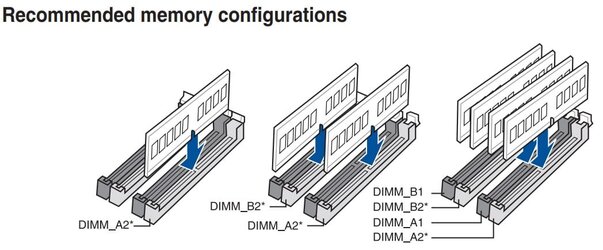
Also. Use the recommended slots for the number of modules used.

Memory Configuration.jpg
 
Last edited:

My Computers My Computers

  • At a glance

    Windows 11 ProIntel Core i9-10900XCorsair 64 GB (4 x 16 GB) CMW64GX4M4C3000C15 ...GIGABYTE GeForce GTX 1660 Super Mini ITX 6 GB OC
    OS
    Windows 11 Pro
    Computer type
    PC/Desktop
    Manufacturer/Model
    Stigg's Build
    CPU
    Intel Core i9-10900X
    Motherboard
    GIGABYTE X299X DESIGNARE 10G
    Memory
    Corsair 64 GB (4 x 16 GB) CMW64GX4M4C3000C15 Vengeance RGB Pro 3000Mhz DDR4
    Graphics Card(s)
    GIGABYTE GeForce GTX 1660 Super Mini ITX 6 GB OC
    Sound Card
    Realtek ALC1220
    Monitor(s) Displays
    Samsung 27" FHD LED FreeSync Gaming Monitor (LS27F350FHEXXY)
    Screen Resolution
    1920 x 1080
    Hard Drives
    Samsung 970 Pro Series 1TB M.2 2280 NVMe SSD
    Western Digital Red Pro WD8003FFBX-68B9AN0 8 TB, 7200 RPM, SATA-III
    Western Digital Red Pro WD8003FFBX-68B9AN0 8 TB, 7200 RPM, SATA-III
    PSU
    Corsair HX1200 1200W 80 Plus Platinum
    Case
    Fractal Design Define 7 Black Solid Case
    Cooling
    Noctua NH-D15 Chromax Black
    Keyboard
    Razer Ornata V2
    Mouse
    Razer DeathAdder Essential
    Internet Speed
    FTTN 100Mbps / 40Mbps
    Browser
    Mozilla Firefox
    Antivirus
    N/A
    Other Info
    Logitech BRIO 4k Ultra HD USB-C Webcam
  • At a glance

    Windows 10 ProCore i7-8750HSK Hynix 32 GB (2 x 16 GB) HMA82GS6CJR8N-VK 1...NVIDIA GeForce GTX 1070
    Operating System
    Windows 10 Pro
    Computer type
    Laptop
    Manufacturer/Model
    ASUS ROG Zephyrus M GM501GS
    CPU
    Core i7-8750H
    Motherboard
    Zephyrus M GM501GS
    Memory
    SK Hynix 32 GB (2 x 16 GB) HMA82GS6CJR8N-VK 16 GB DDR4-2666 DDR4 SDRAM
    Graphics card(s)
    NVIDIA GeForce GTX 1070
    Sound Card
    Realtek ALC294
    Monitor(s) Displays
    AU Optronics B156HAN07.1 [15.6" LCD]
    Screen Resolution
    1920 x 1080
    Hard Drives
    Samsung MZVKW512HMJP-00000 512 GB, PCI-E 3.0 x4
    Samsung SSD 860 QVO 4TB 4 TB, SATA-III
    PSU
    N/A
    Case
    N/A
    Cooling
    N/A
    Keyboard
    PC/AT Enhanced PS2 Keyboard (101/102-Key)
    Mouse
    Razer DeathAdder Essential
    Internet Speed
    FTTN 100Mbps / 40Mbps
    Browser
    Mozilla Firefox
    Antivirus
    N/A
    Other Info
    USB2.0 HD UVC Webcam
Hi,

thank you, but i have already replaced the RAM modules, CPU and graphics card. but I'm still getting the same error. the only thing I haven't replaced is the PSU, this means the problem is the motherboard and since its only 3 or 4 weeks old I can claim warranty.
Is there anything you suggest i do?
or I take to the computer shop?

thank you
 

My Computer My Computer

At a glance

windows 11Intel i5-9300H (4 Cores / 8 Threads) – 2.40GH...16 GBIntel UHD Graphics 630
OS
windows 11
Computer type
Laptop
Manufacturer/Model
Clevo NH55RZQ
CPU
Intel i5-9300H (4 Cores / 8 Threads) – 2.40GHz (Turbo 4
Memory
16 GB
Graphics Card(s)
Intel UHD Graphics 630
Sound Card
Intel High Definition Audio + SOUND BLASTER™
Monitor(s) Displays
15.6″ IPS LED FULL-HD 1920×1080 with 60Hz (Matt)
Screen Resolution
1920×1080
Hard Drives
M.2 500 GB
Internet Speed
70 mbps
Browser
Edge
Antivirus
Malwarebytes Free
Back
Top Bottom