Notepad not saving texts


ICIT2LOL

Well-known member
Member
VIP
Local time
3:19 AM
Posts
2,187
Location
Central West NSW Australia
OS
Windows 11 Pro 23H2 (OS Build 22631.4169) Desktop (OS Build 22621.4317)
I am having some difficulty in saving a document from my Notepad in that I put in some text and then go to Save as and it comes back doing nothing. As a matter of fact the text I enter is not displayed in the notepad title bar.
Any help really appreciated.
 

My Computers My Computers

  • At a glance

    Windows 11 Pro 23H2 (OS Build 22631.4169) Des...i7 -10510U / Intel i5 3750KSamsung 16GB DDR4 2666 MHz & G-Skill 16GB DDR...On board Intel CPU graphics & Nvidia GeForce ...
    OS
    Windows 11 Pro 23H2 (OS Build 22631.4169) Desktop (OS Build 22621.4317)
    Computer type
    Laptop
    Manufacturer/Model
    Asus Vivo notebook X712FA or Desktop Ivy Bridge build
    CPU
    i7 -10510U / Intel i5 3750K
    Motherboard
    Asus generic & Asus P8Z77-V
    Memory
    Samsung 16GB DDR4 2666 MHz & G-Skill 16GB DDR3 2134MHz
    Graphics Card(s)
    On board Intel CPU graphics & Nvidia GeForce GTX 1050Ti
    Sound Card
    Laptop onboard & Xonar DSX Card
    Monitor(s) Displays
    Generic & Samsung 27" SAM0C4C
    Hard Drives
    Samsung 970 Pro NMe & Samsung 870 EVO 500GB
    PSU
    N/A
    Case
    N/A
    Cooling
    Asus in built
    Keyboard
    Generic
    Mouse
    Logitec Wireless
    Internet Speed
    50Mbs max allowance - occasionally up to 75Mbs
    Browser
    Brave
    Antivirus
    ESET Ultimate Security on both
    Other Info
    Desktop running Windows11 Pro with unsupported hardware fix
  • At a glance

    Windows 11 Pro OS build 22000.376i53750K16GB DDR3 @ 2133MHzAsus GTX 650TI
    Operating System
    Windows 11 Pro OS build 22000.376
    Computer type
    PC/Desktop
    Manufacturer/Model
    Home build
    CPU
    i53750K
    Motherboard
    Asus P8Z77-V
    Memory
    16GB DDR3 @ 2133MHz
    Graphics card(s)
    Asus GTX 650TI
    Sound Card
    Asus Xonar DSX
    Monitor(s) Displays
    Samsung 4K
    Screen Resolution
    3840x2160
    Hard Drives
    Samsung EVO 970
    PSU
    Corsair HX1100
    Case
    Coolermaster HAF -M
    Cooling
    Liquid
    Keyboard
    Microsoft Sidewinder 6
    Mouse
    Logitec
    Internet Speed
    50Mbs
    Browser
    Edge
    Antivirus
    Only Windows at the moment
Here is an article from Microsoft that might help.


My Computers My Computers

  • At a glance

    Windows 11 ProRyzen 7 3700x32 GBNVIDA GeForce GTX 1050 Ti
    OS
    Windows 11 Pro
    Computer type
    PC/Desktop
    Manufacturer/Model
    Personal Build
    CPU
    Ryzen 7 3700x
    Motherboard
    ASUS ROG Crosshair VI AMD X370
    Memory
    32 GB
    Graphics Card(s)
    NVIDA GeForce GTX 1050 Ti
    Sound Card
    On board
    Monitor(s) Displays
    (2) AOC E2752Vh 27-inch
    Screen Resolution
    1920 x 1080
    Hard Drives
    SSD M.2 and SATA
    Cooling
    Air cooling
    Keyboard
    Logitech K800 Wireless
    Mouse
    Logitech M705 Wireless
    Internet Speed
    100 Mbps Download | 10 Mbps Upload
    Browser
    Firefox Beta
    Antivirus
    Windows Security???
    Other Info
    Microsoft 365 Family
    Macrium Reflect (Paid)
    eM Client
    Adobe Acrobat DC (Subscription)
  • At a glance

    Windows 11 ProIntel Core i7 10510U @1.80GHz16GB DDR4
    Operating System
    Windows 11 Pro
    Computer type
    Laptop
    Manufacturer/Model
    Lenovo ThinkPad 20U1001UUS
    CPU
    Intel Core i7 10510U @1.80GHz
    Memory
    16GB DDR4
    Screen Resolution
    1920 x 1080
    Browser
    Firefox Beta
Thanks kgarret mate I have already seen that following a net search What I don't get is that there is no mention of permissions when I right-click the File tab??
 

My Computers My Computers

  • At a glance

    Windows 11 Pro 23H2 (OS Build 22631.4169) Des...i7 -10510U / Intel i5 3750KSamsung 16GB DDR4 2666 MHz & G-Skill 16GB DDR...On board Intel CPU graphics & Nvidia GeForce ...
    OS
    Windows 11 Pro 23H2 (OS Build 22631.4169) Desktop (OS Build 22621.4317)
    Computer type
    Laptop
    Manufacturer/Model
    Asus Vivo notebook X712FA or Desktop Ivy Bridge build
    CPU
    i7 -10510U / Intel i5 3750K
    Motherboard
    Asus generic & Asus P8Z77-V
    Memory
    Samsung 16GB DDR4 2666 MHz & G-Skill 16GB DDR3 2134MHz
    Graphics Card(s)
    On board Intel CPU graphics & Nvidia GeForce GTX 1050Ti
    Sound Card
    Laptop onboard & Xonar DSX Card
    Monitor(s) Displays
    Generic & Samsung 27" SAM0C4C
    Hard Drives
    Samsung 970 Pro NMe & Samsung 870 EVO 500GB
    PSU
    N/A
    Case
    N/A
    Cooling
    Asus in built
    Keyboard
    Generic
    Mouse
    Logitec Wireless
    Internet Speed
    50Mbs max allowance - occasionally up to 75Mbs
    Browser
    Brave
    Antivirus
    ESET Ultimate Security on both
    Other Info
    Desktop running Windows11 Pro with unsupported hardware fix
  • At a glance

    Windows 11 Pro OS build 22000.376i53750K16GB DDR3 @ 2133MHzAsus GTX 650TI
    Operating System
    Windows 11 Pro OS build 22000.376
    Computer type
    PC/Desktop
    Manufacturer/Model
    Home build
    CPU
    i53750K
    Motherboard
    Asus P8Z77-V
    Memory
    16GB DDR3 @ 2133MHz
    Graphics card(s)
    Asus GTX 650TI
    Sound Card
    Asus Xonar DSX
    Monitor(s) Displays
    Samsung 4K
    Screen Resolution
    3840x2160
    Hard Drives
    Samsung EVO 970
    PSU
    Corsair HX1100
    Case
    Coolermaster HAF -M
    Cooling
    Liquid
    Keyboard
    Microsoft Sidewinder 6
    Mouse
    Logitec
    Internet Speed
    50Mbs
    Browser
    Edge
    Antivirus
    Only Windows at the moment
I suggest you bowl out that Permissions possibility by going to the folder you were trying to save in using File explorer then right-click over a blank area on the right-hand side, New, {select anything - text document, bmp, ...}.
If the new file is created in your chosen folder then your problem has nothing to do with Permissions.


Best of luck,
Denis
 

My Computer My Computer

At a glance

Windows 11 Home x64 Version 25H2 Build 26200....
OS
Windows 11 Home x64 Version 25H2 Build 26200.8037
Thanks kgarret mate I have already seen that following a net search What I don't get is that there is no mention of permissions when I right-click the File tab??
What about the location that you are trying to save the file. Could that folder be protected? Try saving in a different folder to see if you get different results.
 

My Computers My Computers

  • At a glance

    Windows 11 ProRyzen 7 3700x32 GBNVIDA GeForce GTX 1050 Ti
    OS
    Windows 11 Pro
    Computer type
    PC/Desktop
    Manufacturer/Model
    Personal Build
    CPU
    Ryzen 7 3700x
    Motherboard
    ASUS ROG Crosshair VI AMD X370
    Memory
    32 GB
    Graphics Card(s)
    NVIDA GeForce GTX 1050 Ti
    Sound Card
    On board
    Monitor(s) Displays
    (2) AOC E2752Vh 27-inch
    Screen Resolution
    1920 x 1080
    Hard Drives
    SSD M.2 and SATA
    Cooling
    Air cooling
    Keyboard
    Logitech K800 Wireless
    Mouse
    Logitech M705 Wireless
    Internet Speed
    100 Mbps Download | 10 Mbps Upload
    Browser
    Firefox Beta
    Antivirus
    Windows Security???
    Other Info
    Microsoft 365 Family
    Macrium Reflect (Paid)
    eM Client
    Adobe Acrobat DC (Subscription)
  • At a glance

    Windows 11 ProIntel Core i7 10510U @1.80GHz16GB DDR4
    Operating System
    Windows 11 Pro
    Computer type
    Laptop
    Manufacturer/Model
    Lenovo ThinkPad 20U1001UUS
    CPU
    Intel Core i7 10510U @1.80GHz
    Memory
    16GB DDR4
    Screen Resolution
    1920 x 1080
    Browser
    Firefox Beta
Well I Don't know what to do next as the notepad will not even save anything from gobbledygook to a batch file I was trying to save. I can only put it down to an update that broke the notepad??
 

My Computers My Computers

  • At a glance

    Windows 11 Pro 23H2 (OS Build 22631.4169) Des...i7 -10510U / Intel i5 3750KSamsung 16GB DDR4 2666 MHz & G-Skill 16GB DDR...On board Intel CPU graphics & Nvidia GeForce ...
    OS
    Windows 11 Pro 23H2 (OS Build 22631.4169) Desktop (OS Build 22621.4317)
    Computer type
    Laptop
    Manufacturer/Model
    Asus Vivo notebook X712FA or Desktop Ivy Bridge build
    CPU
    i7 -10510U / Intel i5 3750K
    Motherboard
    Asus generic & Asus P8Z77-V
    Memory
    Samsung 16GB DDR4 2666 MHz & G-Skill 16GB DDR3 2134MHz
    Graphics Card(s)
    On board Intel CPU graphics & Nvidia GeForce GTX 1050Ti
    Sound Card
    Laptop onboard & Xonar DSX Card
    Monitor(s) Displays
    Generic & Samsung 27" SAM0C4C
    Hard Drives
    Samsung 970 Pro NMe & Samsung 870 EVO 500GB
    PSU
    N/A
    Case
    N/A
    Cooling
    Asus in built
    Keyboard
    Generic
    Mouse
    Logitec Wireless
    Internet Speed
    50Mbs max allowance - occasionally up to 75Mbs
    Browser
    Brave
    Antivirus
    ESET Ultimate Security on both
    Other Info
    Desktop running Windows11 Pro with unsupported hardware fix
  • At a glance

    Windows 11 Pro OS build 22000.376i53750K16GB DDR3 @ 2133MHzAsus GTX 650TI
    Operating System
    Windows 11 Pro OS build 22000.376
    Computer type
    PC/Desktop
    Manufacturer/Model
    Home build
    CPU
    i53750K
    Motherboard
    Asus P8Z77-V
    Memory
    16GB DDR3 @ 2133MHz
    Graphics card(s)
    Asus GTX 650TI
    Sound Card
    Asus Xonar DSX
    Monitor(s) Displays
    Samsung 4K
    Screen Resolution
    3840x2160
    Hard Drives
    Samsung EVO 970
    PSU
    Corsair HX1100
    Case
    Coolermaster HAF -M
    Cooling
    Liquid
    Keyboard
    Microsoft Sidewinder 6
    Mouse
    Logitec
    Internet Speed
    50Mbs
    Browser
    Edge
    Antivirus
    Only Windows at the moment
Well I Don't know what to do next as the notepad will not even save anything from gobbledygook to a batch file I was trying to save. I can only put it down to an update that broke the notepad??
In setting, goto Installed Apps, then scroll down to find Notepad. To the right, click the 3 dots and choose Advanced Options. Scroll down that page a bit and you'll see Repair. Click and try that once.
 

My Computers My Computers

  • At a glance

    Windows 11 ProRyzen 7 3700x32 GBNVIDA GeForce GTX 1050 Ti
    OS
    Windows 11 Pro
    Computer type
    PC/Desktop
    Manufacturer/Model
    Personal Build
    CPU
    Ryzen 7 3700x
    Motherboard
    ASUS ROG Crosshair VI AMD X370
    Memory
    32 GB
    Graphics Card(s)
    NVIDA GeForce GTX 1050 Ti
    Sound Card
    On board
    Monitor(s) Displays
    (2) AOC E2752Vh 27-inch
    Screen Resolution
    1920 x 1080
    Hard Drives
    SSD M.2 and SATA
    Cooling
    Air cooling
    Keyboard
    Logitech K800 Wireless
    Mouse
    Logitech M705 Wireless
    Internet Speed
    100 Mbps Download | 10 Mbps Upload
    Browser
    Firefox Beta
    Antivirus
    Windows Security???
    Other Info
    Microsoft 365 Family
    Macrium Reflect (Paid)
    eM Client
    Adobe Acrobat DC (Subscription)
  • At a glance

    Windows 11 ProIntel Core i7 10510U @1.80GHz16GB DDR4
    Operating System
    Windows 11 Pro
    Computer type
    Laptop
    Manufacturer/Model
    Lenovo ThinkPad 20U1001UUS
    CPU
    Intel Core i7 10510U @1.80GHz
    Memory
    16GB DDR4
    Screen Resolution
    1920 x 1080
    Browser
    Firefox Beta
Ok K I tried that mat but still no go. But in the meantime, I have stumbled across a way to get my batch file to a new folder in C: drive how I did that I cannot quite remember how?
But thanks anyway I had no idea that you could do that sort of action.;-)
 

My Computers My Computers

  • At a glance

    Windows 11 Pro 23H2 (OS Build 22631.4169) Des...i7 -10510U / Intel i5 3750KSamsung 16GB DDR4 2666 MHz & G-Skill 16GB DDR...On board Intel CPU graphics & Nvidia GeForce ...
    OS
    Windows 11 Pro 23H2 (OS Build 22631.4169) Desktop (OS Build 22621.4317)
    Computer type
    Laptop
    Manufacturer/Model
    Asus Vivo notebook X712FA or Desktop Ivy Bridge build
    CPU
    i7 -10510U / Intel i5 3750K
    Motherboard
    Asus generic & Asus P8Z77-V
    Memory
    Samsung 16GB DDR4 2666 MHz & G-Skill 16GB DDR3 2134MHz
    Graphics Card(s)
    On board Intel CPU graphics & Nvidia GeForce GTX 1050Ti
    Sound Card
    Laptop onboard & Xonar DSX Card
    Monitor(s) Displays
    Generic & Samsung 27" SAM0C4C
    Hard Drives
    Samsung 970 Pro NMe & Samsung 870 EVO 500GB
    PSU
    N/A
    Case
    N/A
    Cooling
    Asus in built
    Keyboard
    Generic
    Mouse
    Logitec Wireless
    Internet Speed
    50Mbs max allowance - occasionally up to 75Mbs
    Browser
    Brave
    Antivirus
    ESET Ultimate Security on both
    Other Info
    Desktop running Windows11 Pro with unsupported hardware fix
  • At a glance

    Windows 11 Pro OS build 22000.376i53750K16GB DDR3 @ 2133MHzAsus GTX 650TI
    Operating System
    Windows 11 Pro OS build 22000.376
    Computer type
    PC/Desktop
    Manufacturer/Model
    Home build
    CPU
    i53750K
    Motherboard
    Asus P8Z77-V
    Memory
    16GB DDR3 @ 2133MHz
    Graphics card(s)
    Asus GTX 650TI
    Sound Card
    Asus Xonar DSX
    Monitor(s) Displays
    Samsung 4K
    Screen Resolution
    3840x2160
    Hard Drives
    Samsung EVO 970
    PSU
    Corsair HX1100
    Case
    Coolermaster HAF -M
    Cooling
    Liquid
    Keyboard
    Microsoft Sidewinder 6
    Mouse
    Logitec
    Internet Speed
    50Mbs
    Browser
    Edge
    Antivirus
    Only Windows at the moment
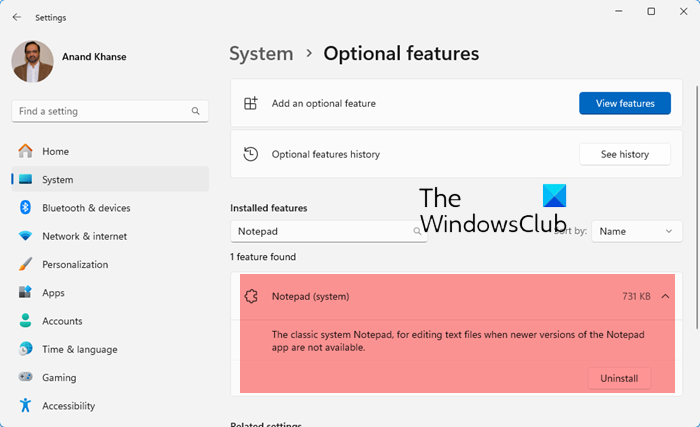
Uninstall notepad, restart, and reinstall notepad.

If that doesn't work open cmd as admin and run sfc /scannow
 

My Computers My Computers

  • At a glance

    Windows 11 Pro 25H2 26200.8655i9-10900 10 core 20 threads32 gbnone-Intel UHD Graphics 630
    OS
    Windows 11 Pro 25H2 26200.8655
    Computer type
    PC/Desktop
    Manufacturer/Model
    Dell Optiplex 7080
    CPU
    i9-10900 10 core 20 threads
    Motherboard
    DELL 0J37VM
    Memory
    32 gb
    Graphics Card(s)
    none-Intel UHD Graphics 630
    Sound Card
    Integrated Realtek
    Monitor(s) Displays
    Benq 27
    Screen Resolution
    2560x1440
    Hard Drives
    2x1tb Solidigm m.2 nvme /External drives 512gb Samsung m.2 sata+2tb Kingston m2.nvme
    PSU
    500w
    Case
    MT
    Cooling
    Dell Premium
    Keyboard
    Logitech wired
    Mouse
    Logitech wireless
    Internet Speed
    so slow I'm too embarrassed to tell
    Browser
    #1 Edge #2 Firefox
    Antivirus
    Defender+MWB Premium
  • At a glance

    Windows 11 Pro 24H2 26200.8457AMD Ryzen 7 6800U32 gbintegrated
    Operating System
    Windows 11 Pro 24H2 26200.8457
    Computer type
    PC/Desktop
    Manufacturer/Model
    Beelink Mini PC SER5
    CPU
    AMD Ryzen 7 6800U
    Memory
    32 gb
    Graphics card(s)
    integrated
    Sound Card
    integrated
    Monitor(s) Displays
    Benq 27
    Screen Resolution
    2560x1440
    Hard Drives
    1TB Crucial nvme
    Keyboard
    Logitech wired
    Mouse
    Logitech wireless
    Internet Speed
    still too embarrassed to tell
    Browser
    Firefox
    Antivirus
    Defender
    Other Info
    System 3 is non compliant Dell 9020 i7-4770/24gb ram Win11 PRO 26200.8457
Thanks, glasscutter I did that and notepad now shows the save as - the files name but I cannot get it to save to the C: drive as a start batch file. It seems to be fixated on One Drive for a place for the file to be saved for even though I have set a new folder in the C: drive. Oh and a sfc came back as all clear.
 

My Computers My Computers

  • At a glance

    Windows 11 Pro 23H2 (OS Build 22631.4169) Des...i7 -10510U / Intel i5 3750KSamsung 16GB DDR4 2666 MHz & G-Skill 16GB DDR...On board Intel CPU graphics & Nvidia GeForce ...
    OS
    Windows 11 Pro 23H2 (OS Build 22631.4169) Desktop (OS Build 22621.4317)
    Computer type
    Laptop
    Manufacturer/Model
    Asus Vivo notebook X712FA or Desktop Ivy Bridge build
    CPU
    i7 -10510U / Intel i5 3750K
    Motherboard
    Asus generic & Asus P8Z77-V
    Memory
    Samsung 16GB DDR4 2666 MHz & G-Skill 16GB DDR3 2134MHz
    Graphics Card(s)
    On board Intel CPU graphics & Nvidia GeForce GTX 1050Ti
    Sound Card
    Laptop onboard & Xonar DSX Card
    Monitor(s) Displays
    Generic & Samsung 27" SAM0C4C
    Hard Drives
    Samsung 970 Pro NMe & Samsung 870 EVO 500GB
    PSU
    N/A
    Case
    N/A
    Cooling
    Asus in built
    Keyboard
    Generic
    Mouse
    Logitec Wireless
    Internet Speed
    50Mbs max allowance - occasionally up to 75Mbs
    Browser
    Brave
    Antivirus
    ESET Ultimate Security on both
    Other Info
    Desktop running Windows11 Pro with unsupported hardware fix
  • At a glance

    Windows 11 Pro OS build 22000.376i53750K16GB DDR3 @ 2133MHzAsus GTX 650TI
    Operating System
    Windows 11 Pro OS build 22000.376
    Computer type
    PC/Desktop
    Manufacturer/Model
    Home build
    CPU
    i53750K
    Motherboard
    Asus P8Z77-V
    Memory
    16GB DDR3 @ 2133MHz
    Graphics card(s)
    Asus GTX 650TI
    Sound Card
    Asus Xonar DSX
    Monitor(s) Displays
    Samsung 4K
    Screen Resolution
    3840x2160
    Hard Drives
    Samsung EVO 970
    PSU
    Corsair HX1100
    Case
    Coolermaster HAF -M
    Cooling
    Liquid
    Keyboard
    Microsoft Sidewinder 6
    Mouse
    Logitec
    Internet Speed
    50Mbs
    Browser
    Edge
    Antivirus
    Only Windows at the moment
I cannot get it to save to the C: drive
Do not try to save anything to the root of the C:\ drive. I don't think that's what you've been trying but I'm not certain.
So what is the path to the folder you've been trying - "even though I have set a new folder in the C: drive"?

I suggest you bowl out that Permissions possibility by going to the folder you were trying to save in using File explorer then right-click over a blank area on the right-hand side, New, {select anything - text document, bmp, ...}.
If the new file is created in your chosen folder then your problem has nothing to do with Permissions.
You have not responded to this suggestion yet.


All the best,
Denis
 

My Computer My Computer

At a glance

Windows 11 Home x64 Version 25H2 Build 26200....
OS
Windows 11 Home x64 Version 25H2 Build 26200.8037
Sorry late reply Denis (in hospital right now) I don't know how to get to permissions although I might do an Edge search. I have got the batch fle to work after much ado and really it was only as I was trying to follow the instructions of a YouTube video on having the Performance show on the taskbar for easy access to that info.
 

My Computers My Computers

  • At a glance

    Windows 11 Pro 23H2 (OS Build 22631.4169) Des...i7 -10510U / Intel i5 3750KSamsung 16GB DDR4 2666 MHz & G-Skill 16GB DDR...On board Intel CPU graphics & Nvidia GeForce ...
    OS
    Windows 11 Pro 23H2 (OS Build 22631.4169) Desktop (OS Build 22621.4317)
    Computer type
    Laptop
    Manufacturer/Model
    Asus Vivo notebook X712FA or Desktop Ivy Bridge build
    CPU
    i7 -10510U / Intel i5 3750K
    Motherboard
    Asus generic & Asus P8Z77-V
    Memory
    Samsung 16GB DDR4 2666 MHz & G-Skill 16GB DDR3 2134MHz
    Graphics Card(s)
    On board Intel CPU graphics & Nvidia GeForce GTX 1050Ti
    Sound Card
    Laptop onboard & Xonar DSX Card
    Monitor(s) Displays
    Generic & Samsung 27" SAM0C4C
    Hard Drives
    Samsung 970 Pro NMe & Samsung 870 EVO 500GB
    PSU
    N/A
    Case
    N/A
    Cooling
    Asus in built
    Keyboard
    Generic
    Mouse
    Logitec Wireless
    Internet Speed
    50Mbs max allowance - occasionally up to 75Mbs
    Browser
    Brave
    Antivirus
    ESET Ultimate Security on both
    Other Info
    Desktop running Windows11 Pro with unsupported hardware fix
  • At a glance

    Windows 11 Pro OS build 22000.376i53750K16GB DDR3 @ 2133MHzAsus GTX 650TI
    Operating System
    Windows 11 Pro OS build 22000.376
    Computer type
    PC/Desktop
    Manufacturer/Model
    Home build
    CPU
    i53750K
    Motherboard
    Asus P8Z77-V
    Memory
    16GB DDR3 @ 2133MHz
    Graphics card(s)
    Asus GTX 650TI
    Sound Card
    Asus Xonar DSX
    Monitor(s) Displays
    Samsung 4K
    Screen Resolution
    3840x2160
    Hard Drives
    Samsung EVO 970
    PSU
    Corsair HX1100
    Case
    Coolermaster HAF -M
    Cooling
    Liquid
    Keyboard
    Microsoft Sidewinder 6
    Mouse
    Logitec
    Internet Speed
    50Mbs
    Browser
    Edge
    Antivirus
    Only Windows at the moment
Windows refuses to let me save to the C: drive. However, it does let me save somewhere else. The default location is the Documents folder. If you select No then you can browse to somewhere else and save it there.

Save.jpg
 

My Computers My Computers

  • At a glance

    Windows 11 Pro 25H2 (26200.6901)AMD Ryzen 7 6800H with Radeon 680M GPU (486MB...Crucial DDR5-4800 (2400MHz) 32GB (2 x 16GB)NVIDIA RTX 3060 Laptop (6GB RAM)
    OS
    Windows 11 Pro 25H2 (26200.6901)
    Computer type
    Laptop
    Manufacturer/Model
    ASUS TUF Gaming A15 (2022)
    CPU
    AMD Ryzen 7 6800H with Radeon 680M GPU (486MB RAM)
    Memory
    Crucial DDR5-4800 (2400MHz) 32GB (2 x 16GB)
    Graphics Card(s)
    NVIDIA RTX 3060 Laptop (6GB RAM)
    Sound Card
    n/a
    Monitor(s) Displays
    15.6-inch
    Screen Resolution
    1920x1080 300Hz
    Hard Drives
    2 x Samsung 990 Evo Plus (2TB M.2 NVME SSD)
    PSU
    n/a
    Mouse
    Wireless Mouse M510
    Internet Speed
    2100Mbps/300Mbps
    Browser
    Firefox
    Antivirus
    Malwarebytes
  • At a glance

    Windows 11 Pro 25H2 (26200.8246)AMD Ryzen 7 5700X3DG.SKILL Flare X 32GB (2x16GB) DDR4ASUS ROG-STRIX-RTX3060TI-08G-V2-GAMING (RTX 3...
    Operating System
    Windows 11 Pro 25H2 (26200.8246)
    Computer type
    PC/Desktop
    Manufacturer/Model
    Custom build
    CPU
    AMD Ryzen 7 5700X3D
    Motherboard
    ASUS ROG Strix B550-F Gaming WiFi II
    Memory
    G.SKILL Flare X 32GB (2x16GB) DDR4
    Graphics card(s)
    ASUS ROG-STRIX-RTX3060TI-08G-V2-GAMING (RTX 3060-Ti, 8GB RAM)
    Monitor(s) Displays
    Samsung G50D IPS 27"
    Screen Resolution
    1440p/180Hz
    Hard Drives
    SAMSUNG 990 EVO Plus (2TB] M.2 NVME SSD
    SAMSUNG 990 EVO Plus (4TB) M.2 NVME SSD
    PSU
    Corsair RM750x (750 watts)
    Case
    Cooler Master MasterCase 5
    Cooling
    Scythe Mugen 6
    Keyboard
    Logitech K520 (MK540 keyboard/mouse combo)
    Mouse
    Logitech M310 (MK540 keyboard/mouse combo)
    Internet Speed
    2100 Mbps down / 300 Mbps up
    Browser
    Firefox, Edge, Chrome
    Antivirus
    Malwarebytes (Premium)
    Other Info
    ASUS Blu-ray Burner BW-16D1HT (SATA) || Western Digital Easystore 20TB USB 3.0 external hard drive used with Acronis True Image 2025 backup software || HP OfficeJet Pro 6975 Printer/Scanner
I don't know how to get to permissions
You don't need to. The test does not require you to know anything about permissions and, depending on the result, you might never need to.

save to the C: drive as a start batch file
I have got the batch fle to work after much ado
If you want to discuss how to get a batch file to run at startup then please confirm whether or not it needs Admin approval because that is a significant difference when doing this.

See you when you get parole,
All the best,
Denis
 
Last edited:

My Computer My Computer

At a glance

Windows 11 Home x64 Version 25H2 Build 26200....
OS
Windows 11 Home x64 Version 25H2 Build 26200.8037
Windows refuses to let me save to the C: drive
Sorry, that should be, "Windows refuses to let me save to the root of the C: drive".
That has been a limitation for decades.
The root of the OS drive used to be used by malware and preventing its use was a means of protecting the system. [Don't ask me how it's a protection, I've never understood it.]


All the best,
Denis
 

My Computer My Computer

At a glance

Windows 11 Home x64 Version 25H2 Build 26200....
OS
Windows 11 Home x64 Version 25H2 Build 26200.8037

Latest Support Threads

Back
Top Bottom