Nvidia Driver and/or Game Error


ultimate99

Well-known member
Member
Local time
7:29 AM
Posts
22
OS
Windows 11
Hello.
I started getting the following error since updating BF6 (I haven't played it for a few days, apparently there was a big update).


bf6_QZSgcq2mVH.webp

Even Viewer:
Code:
The description for Event ID 153 from source nvlddmkm cannot be found. Either the component that raises this event is not installed on your local computer or the installation is corrupted. You can install or repair the component on the local computer.

If the event originated on another computer, the display information had to be saved with the event.

The following information was included with the event:

\Device\Video13
Error occurred on GPUID: 100

The message resource is present but the message was not found in the message table

I installed the latest Nvidia drivers after doing DDU in Safe Mode. I still get the same error when I start the game. Also, I'm getting Black Screen of Death with error:
Code:
stop code system_service_exception (0x3b)

I went through DDU several times and installed Nvidia drivers again. Now I'm getting the following error:

bf6_2sDyYnKagz.webp

Not sure why this suddenly happened and how else can I troubleshoot (without reformatting >_<).
 

My Computers My Computers

  • At a glance

    Windows 11Ryzen 3900x32GB DDR46800XT
    OS
    Windows 11
    Computer type
    PC/Desktop
    CPU
    Ryzen 3900x
    Motherboard
    Aorus Master x570
    Memory
    32GB DDR4
    Graphics Card(s)
    6800XT
    Monitor(s) Displays
    SCEPTRE 35" Ultrawide
    Screen Resolution
    1440p
    PSU
    EVGA G6 1000
    Case
    Corsaire 5000D
  • At a glance

    Win11 EnterpriseAMD 9950x3D64gb DDR5 6400 cl28Asus Astral 5090 32gb
    Operating System
    Win11 Enterprise
    Computer type
    PC/Desktop
    CPU
    AMD 9950x3D
    Motherboard
    Asus x870-itx
    Memory
    64gb DDR5 6400 cl28
    Graphics card(s)
    Asus Astral 5090 32gb
    PSU
    Corsair SFX 1000w
    Antivirus
    ...do i need one?...
Type ---dxdiag ---in the Search box and check through all pages for entries.
In the System page,confirm the latest DirectX version is 12.
Ensure all drivers are as downloaded.If not,then in the Systems page uncheck WHQL which will allow you to download drivers of your choice.Do not leave it permanently unchecked as it will allow dodgy drivers to download.
Check Reliability History for entries.Access it by typing ---reliability ---into the Search box.
 

My Computer My Computer

At a glance

win 10amd ryzen 5-2600ng skill sniper x 16gbnvidea gtx 1050
OS
win 10
Computer type
PC/Desktop
Manufacturer/Model
home built
CPU
amd ryzen 5-2600
Motherboard
gigabyte b450m-ds3h
Memory
ng skill sniper x 16gb
Graphics Card(s)
nvidea gtx 1050
Monitor(s) Displays
benq fp 92
Hard Drives
samsung 860 evo 500gb m2 ssd
PSU
antec ea550g
Case
nzxt noctis 450
Browser
edge
Please run the V2 log collector > post a share link


My Computer My Computer

At a glance

Windows 10Intel(R) Core(TM) i7-4800MQ CPU @ 2.70GHz16 GB Total: Manufacturer : Samsung MemoryTyp...NVIDIA Quadro K3100M; Intel(R) HD Graphics 4600
OS
Windows 10
Computer type
Laptop
Manufacturer/Model
HP
CPU
Intel(R) Core(TM) i7-4800MQ CPU @ 2.70GHz
Motherboard
Product : 190A Version : KBC Version 94.56
Memory
16 GB Total: Manufacturer : Samsung MemoryType : DDR3 FormFactor : SODIMM Capacity : 8GB Speed : 1600
Graphics Card(s)
NVIDIA Quadro K3100M; Intel(R) HD Graphics 4600
Sound Card
IDT High Definition Audio CODEC; PNP Device ID HDAUDIO\FUNC_01&VEN_111D&DEV_76E0
Hard Drives
Model Hitachi HTS727575A9E364
Antivirus
Microsoft Defender
Other Info
Mobile Workstation
@ultimate99

First... here's ten points for filling out your computer specs. :-)


DDU Instructions - Nvidia
1. First, do Option #2, step #3 and onward, here...
2. This will block MS from including drivers in Windows Updates.
3. They'll still be listed as Optional Updates, if you ever need them.


1. Get this program, here: Display Driver Uninstaller (DDU) | Wagnardsoft ...get the latest version, and save it to your desktop.
2. Get the Nvidia WHQL vid card driver here... https://www.guru3d.com/files/category/videocards-nvidia-geforce-windows-7-8-10/ ...save this to your desktop.

3. Unhook the internet completely.

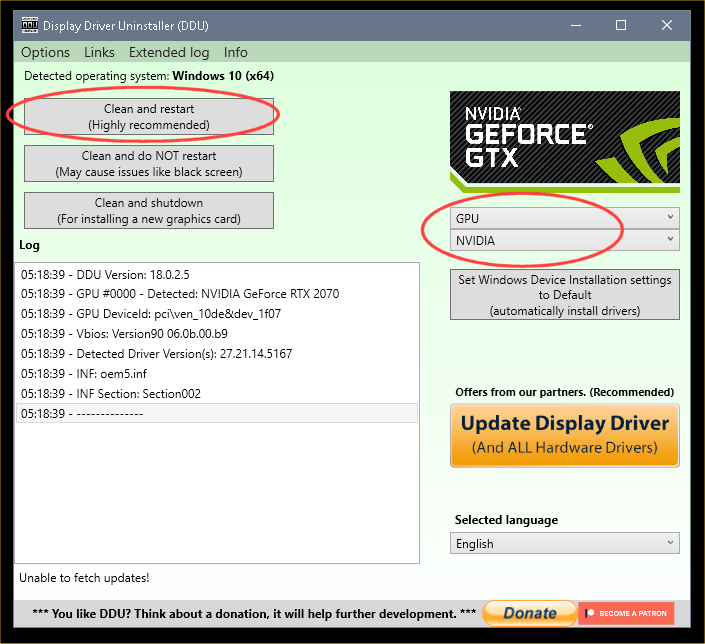
4. Reboot into Safe Mode and run DDU (Display Driver Uninstaller) choose the "Highly Recommend Option", and just do what it tells you.
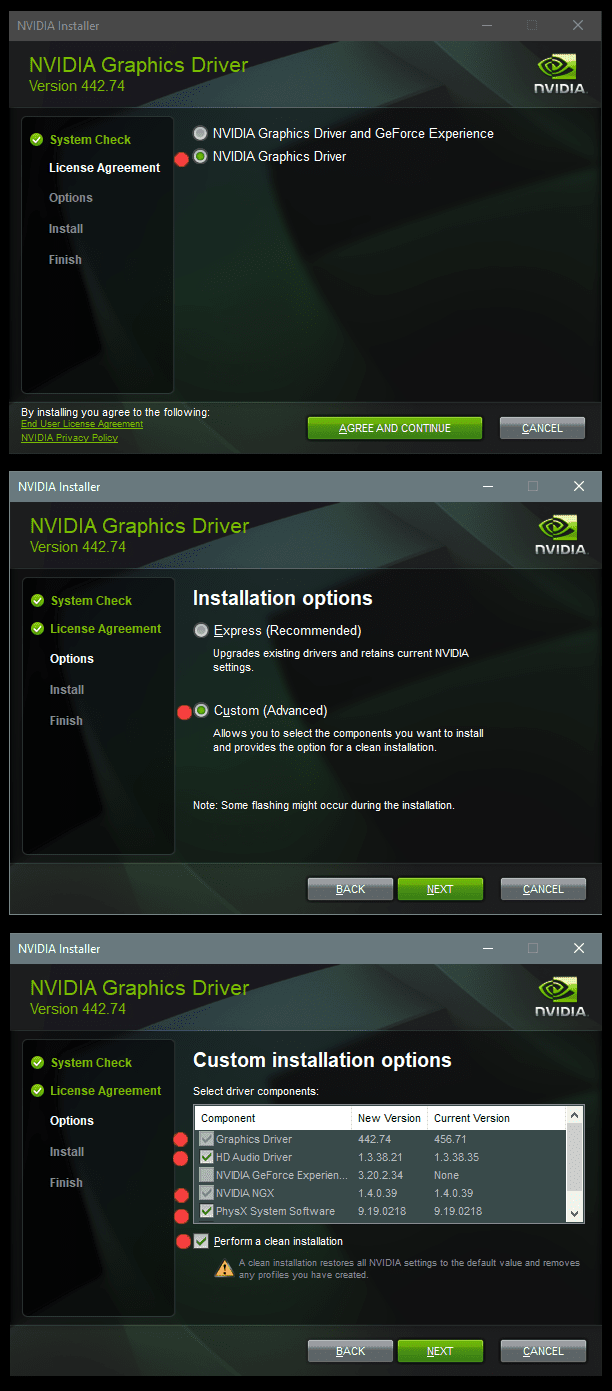
5. After it's done, reboot to normal mode, then just double click the Nvidia driver to install.
[See pics below]. If it want's to reboot, let it.

Rehook the internet.

a2onZnt.png


NjaiKLm.png
 

My Computers My Computers

  • At a glance

    Win 11 Home ♦♦♦26200.8655 ♦♦♦♦♦♦♦25H2AMD Ryzen 7 3700XG.Skill (F4-3200C14D-16GTZKW)EVGA RTX 2070 (08G-P4-2171-KR)
    OS
    Win 11 Home ♦♦♦26200.8655 ♦♦♦♦♦♦♦25H2
    Computer type
    PC/Desktop
    Manufacturer/Model
    Built by Ghot® [May 2020]
    CPU
    AMD Ryzen 7 3700X
    Motherboard
    Asus Pro WS X570-ACE (BIOS 5302)
    Memory
    G.Skill (F4-3200C14D-16GTZKW)
    Graphics Card(s)
    EVGA RTX 2070 (08G-P4-2171-KR)
    Sound Card
    Realtek ALC1220P / ALC S1220A
    Monitor(s) Displays
    Dell U3011 30"
    Screen Resolution
    2560 x 1600
    Hard Drives
    2x Samsung 860 EVO 500GB,
    WD 4TB Black FZBX - SATA III,
    WD 8TB Black FZBX - SATA III,
    DRW-24B1ST CD/DVD Burner
    PSU
    PC Power & Cooling 750W Quad EPS12V
    Case
    Cooler Master ATCS 840 Tower
    Cooling
    CM Hyper 212 EVO (push/pull)
    Keyboard
    Ducky DK9008 Shine II Blue LED
    Mouse
    Logitech Optical M-100
    Internet Speed
    300/300
    Browser
    Firefox (latest)
    Antivirus
    Bitdefender Total Security
    Other Info
    Speakers: Klipsch Pro Media 2.1
  • At a glance

    Windows XP Pro 32bit w/SP3AMD Athlon 64 X2 5000+ (OC'd @ 3.2Ghz)TWIN2X2048-6400C4DHX (2 x 1GB, DDR2 800)EVGA 256-P2-N758-TR GeForce 8600GT SSC
    Operating System
    Windows XP Pro 32bit w/SP3
    Computer type
    PC/Desktop
    Manufacturer/Model
    Built by Ghot® (not in use)
    CPU
    AMD Athlon 64 X2 5000+ (OC'd @ 3.2Ghz)
    Motherboard
    ASUS M2N32-SLI Deluxe Wireless Edition
    Memory
    TWIN2X2048-6400C4DHX (2 x 1GB, DDR2 800)
    Graphics card(s)
    EVGA 256-P2-N758-TR GeForce 8600GT SSC
    Sound Card
    Onboard
    Monitor(s) Displays
    ViewSonic G90FB Black 19" Professional (CRT)
    Screen Resolution
    up to 2048 x 1536
    Hard Drives
    WD 36GB 10,000rpm Raptor SATA
    Seagate 80GB 7200rpm SATA
    Lite-On LTR-52246S CD/RW
    Lite-On LH-18A1P CD/DVD Burner
    PSU
    PC Power & Cooling Silencer 750 Quad EPS12V
    Case
    Generic Beige case, 80mm fans
    Cooling
    ZALMAN 9500A 92mm CPU Cooler
    Keyboard
    Logitech Classic Keybooard 200
    Mouse
    Logitech Optical M-BT96a
    Internet Speed
    300/300
    Browser
    Firefox 3.x ??
    Antivirus
    Symantec (Norton)
    Other Info
    Still assembled, still runs. Haven't turned it on for 15 years?
Type ---dxdiag ---in the Search box and check through all pages for entries.
In the System page,confirm the latest DirectX version is 12.
Ensure all drivers are as downloaded.If not,then in the Systems page uncheck WHQL which will allow you to download drivers of your choice.Do not leave it permanently unchecked as it will allow dodgy drivers to download.
Check Reliability History for entries.Access it by typing ---reliability ---into the Search box.
No problems in each page.
Drivers are up to date.
 

My Computers My Computers

  • At a glance

    Windows 11Ryzen 3900x32GB DDR46800XT
    OS
    Windows 11
    Computer type
    PC/Desktop
    CPU
    Ryzen 3900x
    Motherboard
    Aorus Master x570
    Memory
    32GB DDR4
    Graphics Card(s)
    6800XT
    Monitor(s) Displays
    SCEPTRE 35" Ultrawide
    Screen Resolution
    1440p
    PSU
    EVGA G6 1000
    Case
    Corsaire 5000D
  • At a glance

    Win11 EnterpriseAMD 9950x3D64gb DDR5 6400 cl28Asus Astral 5090 32gb
    Operating System
    Win11 Enterprise
    Computer type
    PC/Desktop
    CPU
    AMD 9950x3D
    Motherboard
    Asus x870-itx
    Memory
    64gb DDR5 6400 cl28
    Graphics card(s)
    Asus Astral 5090 32gb
    PSU
    Corsair SFX 1000w
    Antivirus
    ...do i need one?...
@ultimate99

First... here's ten points for filling out your computer specs. :-)


DDU Instructions - Nvidia
1. First, do Option #2, step #3 and onward, here...
2. This will block MS from including drivers in Windows Updates.
3. They'll still be listed as Optional Updates, if you ever need them.


1. Get this program, here: Display Driver Uninstaller (DDU) | Wagnardsoft ...get the latest version, and save it to your desktop.
2. Get the Nvidia WHQL vid card driver here... https://www.guru3d.com/files/category/videocards-nvidia-geforce-windows-7-8-10/ ...save this to your desktop.

3. Unhook the internet completely.

4. Reboot into Safe Mode and run DDU (Display Driver Uninstaller) choose the "Highly Recommend Option", and just do what it tells you.
5. After it's done, reboot to normal mode, then just double click the Nvidia driver to install.
[See pics below]. If it want's to reboot, let it.

Rehook the internet.

a2onZnt.png


NjaiKLm.png
I did each step exactly as written, I got a Black Screen of Death. I wasn't quick enough to take a picture, but it said something about TRAP?

UPDATE: From BlueScreenView:

1776608642211.webp
 

My Computers My Computers

  • At a glance

    Windows 11Ryzen 3900x32GB DDR46800XT
    OS
    Windows 11
    Computer type
    PC/Desktop
    CPU
    Ryzen 3900x
    Motherboard
    Aorus Master x570
    Memory
    32GB DDR4
    Graphics Card(s)
    6800XT
    Monitor(s) Displays
    SCEPTRE 35" Ultrawide
    Screen Resolution
    1440p
    PSU
    EVGA G6 1000
    Case
    Corsaire 5000D
  • At a glance

    Win11 EnterpriseAMD 9950x3D64gb DDR5 6400 cl28Asus Astral 5090 32gb
    Operating System
    Win11 Enterprise
    Computer type
    PC/Desktop
    CPU
    AMD 9950x3D
    Motherboard
    Asus x870-itx
    Memory
    64gb DDR5 6400 cl28
    Graphics card(s)
    Asus Astral 5090 32gb
    PSU
    Corsair SFX 1000w
    Antivirus
    ...do i need one?...
I started getting the following error since updating BF6

Known issue with this game on AMD or Nvidia GPU since the update and EA has notified the game publisher.

There is a site that has a list of known fixes you can try.

I would start with #4


My Computer My Computer

At a glance

Windows 11 Pro
OS
Windows 11 Pro
Run the following commands (w/admin rights) and when all completed successfully and without error/s. In the following order:


Dism.exe /online /Cleanup-Image /checkhealth


Dism.exe /online /Cleanup-Image /scanhealth


Dism.exe /online /Cleanup-Image /Restorehealth


sfc /scannow


Dism.exe /Online /Cleanup-Image /AnalyzeComponentStore


Dism.exe /Online /Cleanup-Image /StartComponentCleanup


RESTART computer as the last step.
 

My Computer My Computer

At a glance

Windows 11 Home 25H2.26200.8457i7 14700F32GB DDR5 Kingston (x2) KF556C40-16 DDR5 16GBRTX 5060ti 16GB (596.49 drivers)
OS
Windows 11 Home 25H2.26200.8457
Computer type
PC/Desktop
Manufacturer/Model
MSI R2 B14NUC7-095US
CPU
i7 14700F
Motherboard
MSI Pro B760-VC WIFI II (AMI BIOS 7D98vBI 2026-04-10)
Memory
32GB DDR5 Kingston (x2) KF556C40-16 DDR5 16GB
Graphics Card(s)
RTX 5060ti 16GB (596.49 drivers)
Sound Card
Realtek HD Audio
Monitor(s) Displays
LG 32in LED
Screen Resolution
2560x1080
Hard Drives
C: MSI M482 2TB nVME
D: SPCC 4TB SSD
F: CT4000P3PSSD8 nVME (4TB)
G: Seagate Backup Drive 8TB
I: Kingspec P-3 4TB 2.5 SSD
PSU
650w
Case
MSI Codex Series R2
Cooling
ARGB Fan air cooling
Keyboard
Thermaltake Tt esports
Mouse
Thermaltake esports
Internet Speed
Xfinity 1Gbps
Browser
Firefox
Antivirus
Avast Free
Other Info
(AMI BIOS 7D98vBI 2026-04-10)

Latest Support Threads

Back
Top Bottom