OEM logo


pcfreak49

Member
Local time
12:14 PM
Posts
31
OS
Mac Os Windows
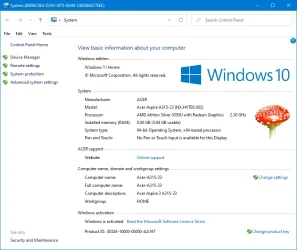
I have a problem, I don't get a logo with OEM information in Windows 11, does anyone know why this is happening?
 

My Computer My Computer

At a glance

Mac Os Windows
OS
Mac Os Windows
Computer type
Laptop
Which logo are you referring to?

From Google AI:

In Windows 11, the OEM logo, which used to be visible in the "Performance Information and Tools" section of the Control Panel, is no longer displayed there. It is also not shown in the Settings app. The OEM logo is primarily displayed during the boot process on the boot screen and during POST (Power-On Self-Test). If you are not seeing the OEM logo during boot, it could be due to your system using UEFI and Secure Boot, which often show the PC/MOBO manufacturer's logo instead of the Windows or OEM logo.

For UEFI mode installations you see the motherboard manufacturer or the computer manufacturer logo with the spinning curves (spinning dots in earlier versions). This logo can be changed either in UEFI firmware or using a utility from manufacturer. If you have an unsupported computer and you have a Legacy BIOS mode installation instead, you see a blue Windows logo (cyan in Windows 10) with the spinning dots. As far as I know this logo cannot be changed. If anyone knows different, please post.
 

My Computers My Computers

  • At a glance

    Windows 11 Pro 23H2 (7582), 25H2 (9457)Mobile DualCore Intel Core 2 Duo T7250, 2000 MHz4GBMobile Intel(R) GMA 4500M (Mobile 4 series)
    OS
    Windows 11 Pro 23H2 (7582), 25H2 (9457)
    Computer type
    Laptop
    Manufacturer/Model
    Acer Extensa 5630EZ
    CPU
    Mobile DualCore Intel Core 2 Duo T7250, 2000 MHz
    Motherboard
    Acer Extensa 5630
    Memory
    4GB
    Graphics Card(s)
    Mobile Intel(R) GMA 4500M (Mobile 4 series)
    Sound Card
    Realtek ALC268 @ Intel 82801IB ICH9 - High Definition Audio Controller
    Monitor(s) Displays
    1
    Screen Resolution
    1280x800
    Hard Drives
    Samsung SSD 850 EVO 250GB SATA Device (250 GB, SATA-III)
    Internet Speed
    802.11g wireless 54 Mbps
    Browser
    MICROSOFT EDGE
    Antivirus
    WINDOWS DEFENDER
    Other Info
    Legacy MBR installation, no TPM, no Secure Boot, no WDDM 2.0 graphics drivers, no SSE4.2, cannot get more unsupported ;) This is only my test laptop. I had installed Windows 11 here before upgrading my main PC. For my main PC I use everyday see my 2nd system specs.
  • At a glance

    Windows 11 Pro 25H2 (build 26200.9457)Intel Core-i7 3770 3.40GHz s1155 (3rd generat...2x Kingston Hyper-X Blu 8GB DDR3-1600GIGABYTE GeForce RTX 3050 WINDFORCE OC V2 6GB...
    Operating System
    Windows 11 Pro 25H2 (build 26200.9457)
    Computer type
    PC/Desktop
    Manufacturer/Model
    Custom-built PC
    CPU
    Intel Core-i7 3770 3.40GHz s1155 (3rd generation)
    Motherboard
    Asus P8H61 s1155 ATX
    Memory
    2x Kingston Hyper-X Blu 8GB DDR3-1600
    Graphics card(s)
    GIGABYTE GeForce RTX 3050 WINDFORCE OC V2 6GB (GV-N3050WF2OCV2-6GD)
    Sound Card
    Realtek HD audio (ALC887)
    Monitor(s) Displays
    Sony Bravia KDL-19L4000 19" LCD TV via VGA
    Screen Resolution
    1440x900 32-bit 60Hz
    Hard Drives
    WD Blue SA510 2.5 1000GB SSD as system disk, Western Digital Caviar Purple 4TB SATA III (WD40PURZ) as second
    PSU
    Thermaltake Litepower RGB 550W Full Wired
    Case
    SUPERCASE MIDI-TOWER
    Cooling
    Deepcool Gamma Archer CPU cooler, 1x 8cm fan at the back
    Keyboard
    Mitsumi 101-key PS/2
    Mouse
    Microsoft Compact Optical Mouse
    Internet Speed
    802.11ac 5GHz wireless 260Mpbs
    Browser
    Microsoft Edge, Mozilla Firefox
    Antivirus
    Microsoft Windows Defender
    Other Info
    Legacy BIOS (MBR) installation, no TPM, no Secure Boot, WDDM 3.0 graphics drivers, WEI score 7.4
Which logo are you referring to?

From Google AI:

In Windows 11, the OEM logo, which used to be visible in the "Performance Information and Tools" section of the Control Panel, is no longer displayed there. It is also not shown in the Settings app. The OEM logo is primarily displayed during the boot process on the boot screen and during POST (Power-On Self-Test). If you are not seeing the OEM logo during boot, it could be due to your system using UEFI and Secure Boot, which often show the PC/MOBO manufacturer's logo instead of the Windows or OEM logo.

For UEFI mode installations you see the motherboard manufacturer or the computer manufacturer logo with the spinning curves (spinning dots in earlier versions). This logo can be changed either in UEFI firmware or using a utility from manufacturer. If you have an unsupported computer and you have a Legacy BIOS mode installation instead, you see a blue Windows logo (cyan in Windows 10) with the spinning dots. As far as I know this logo cannot be changed. If anyone knows different, please post.

like this I mean but in windows 11
 

Attachments

  • Classic control panel 'System'.webp
    Classic control panel 'System'.webp
    57 KB · Views: 5

My Computer My Computer

At a glance

Mac Os Windows
OS
Mac Os Windows
Computer type
Laptop
like this I mean but in windows 11
To change the OEM logo one easy way it to use Winaero Tweaker which also provides many other tweaks without having to manually modify the Registry. In latest Windows 11 versions the Windows logo no longer appears, only the OEM logo. If you want to replace the Windows logo in "traditional" System Properties (valid for earlier versions that it appears) and for the About Windows window (winver), you have to modify these two system files with Resource Hacker:

C:\Windows\Branding\Basebrd\basebrd.dll
C:\Windows\Branding\shellbrd\shellbrd.dll

These cannot be modified directly, you have to copy the files in another folder, then take ownership of the folders and the files, End Task File Explorer (because it uses the files), replace them from Command Prompt or PowerShell and then load File Explorer for the changes to take effect.


This is how my About Window looks like after replacing the wrong "Windows 10" text with "Windows 11" and the Windows 7 start button (orb). I use the Aero Lite theme in order to het the good old red "close" buttons.

About Windows 11.webp

Here is how my System Properties (classic) looks like:

System Properties.webp

Yes, since it is a custom-build PC, I am the "Manufacturer".
 
Last edited:

My Computers My Computers

  • At a glance

    Windows 11 Pro 23H2 (7582), 25H2 (9457)Mobile DualCore Intel Core 2 Duo T7250, 2000 MHz4GBMobile Intel(R) GMA 4500M (Mobile 4 series)
    OS
    Windows 11 Pro 23H2 (7582), 25H2 (9457)
    Computer type
    Laptop
    Manufacturer/Model
    Acer Extensa 5630EZ
    CPU
    Mobile DualCore Intel Core 2 Duo T7250, 2000 MHz
    Motherboard
    Acer Extensa 5630
    Memory
    4GB
    Graphics Card(s)
    Mobile Intel(R) GMA 4500M (Mobile 4 series)
    Sound Card
    Realtek ALC268 @ Intel 82801IB ICH9 - High Definition Audio Controller
    Monitor(s) Displays
    1
    Screen Resolution
    1280x800
    Hard Drives
    Samsung SSD 850 EVO 250GB SATA Device (250 GB, SATA-III)
    Internet Speed
    802.11g wireless 54 Mbps
    Browser
    MICROSOFT EDGE
    Antivirus
    WINDOWS DEFENDER
    Other Info
    Legacy MBR installation, no TPM, no Secure Boot, no WDDM 2.0 graphics drivers, no SSE4.2, cannot get more unsupported ;) This is only my test laptop. I had installed Windows 11 here before upgrading my main PC. For my main PC I use everyday see my 2nd system specs.
  • At a glance

    Windows 11 Pro 25H2 (build 26200.9457)Intel Core-i7 3770 3.40GHz s1155 (3rd generat...2x Kingston Hyper-X Blu 8GB DDR3-1600GIGABYTE GeForce RTX 3050 WINDFORCE OC V2 6GB...
    Operating System
    Windows 11 Pro 25H2 (build 26200.9457)
    Computer type
    PC/Desktop
    Manufacturer/Model
    Custom-built PC
    CPU
    Intel Core-i7 3770 3.40GHz s1155 (3rd generation)
    Motherboard
    Asus P8H61 s1155 ATX
    Memory
    2x Kingston Hyper-X Blu 8GB DDR3-1600
    Graphics card(s)
    GIGABYTE GeForce RTX 3050 WINDFORCE OC V2 6GB (GV-N3050WF2OCV2-6GD)
    Sound Card
    Realtek HD audio (ALC887)
    Monitor(s) Displays
    Sony Bravia KDL-19L4000 19" LCD TV via VGA
    Screen Resolution
    1440x900 32-bit 60Hz
    Hard Drives
    WD Blue SA510 2.5 1000GB SSD as system disk, Western Digital Caviar Purple 4TB SATA III (WD40PURZ) as second
    PSU
    Thermaltake Litepower RGB 550W Full Wired
    Case
    SUPERCASE MIDI-TOWER
    Cooling
    Deepcool Gamma Archer CPU cooler, 1x 8cm fan at the back
    Keyboard
    Mitsumi 101-key PS/2
    Mouse
    Microsoft Compact Optical Mouse
    Internet Speed
    802.11ac 5GHz wireless 260Mpbs
    Browser
    Microsoft Edge, Mozilla Firefox
    Antivirus
    Microsoft Windows Defender
    Other Info
    Legacy BIOS (MBR) installation, no TPM, no Secure Boot, WDDM 3.0 graphics drivers, WEI score 7.4
To change the OEM logo one easy way it to use Winaero Tweaker which also provides many other tweaks without having to manually modify the Registry. In latest Windows 11 versions the Windows logo no longer appears, only the OEM logo. If you want to replace the Windows logo in "traditional" System Properties (valid for earlier versions that it appears) and for the About Windows window (winver), you have to modify these two system files with Resource Hacker:

C:\Windows\Branding\Basebrd\basebrd.dll
C:\Windows\Branding\shellbrd\shellbrd.dll

These cannot be modified directly, you have to copy the files in another folder, then take ownership of the folders and the files, End Task File Explorer (because it uses the files), replace them from Command Prompt or PowerShell and then load File Explorer for the changes to take effect.


This is how my About Window looks like after replacing the wrong "Windows 10" text with "Windows 11" and the Windows 7 start button (orb). I use the Aero Lite theme in order to het the good old red "close" buttons.

View attachment 140385

Here is how my System Properties (classic) looks like:

View attachment 140386

Yes, since it is a custom-build PC, I am the "Manufacturer".

Okay, is there a reg key or powershell script for this because I am making custom ISO files?
 

My Computer My Computer

At a glance

Mac Os Windows
OS
Mac Os Windows
Computer type
Laptop

Latest Support Threads

Back
Top Bottom