On Manually updating UEFI CA2023 security keys


jumanji

Well-known member
Power User
VIP
Local time
1:24 AM
Posts
5,473
OS
Windows 11 Pro Version:25H2 OS Build: 26200.8524
My Dell Inspiron 3280 AIO running Windows Home 25H2 Build 8437 (the latest preview) will not be getting the automatic update of CA 2023 keys.

Has any one manually updated such End of Service Life (EoSL) desktops/Laptops successfully with the following recommended PowerShell commands run as administrator? Is there any risk involved?

Copy and paste in Powershell admin
Set-ItemProperty -Path "HKLM:\SYSTEM\CurrentControlSet\Control\SecureBoot" -Name "AvailableUpdates" -Value 0x40
Trigger the update next
Start-ScheduledTask -TaskName "\Microsoft\Windows\PI\Secure-Boot-Update"

Restart your PC twice to apply the keys to your motherboard firmware.
 
Last edited:

My Computers

System One System Two

  • OS
    Windows 11 Pro Version:25H2 OS Build: 26200.8524
    Computer type
    PC/Desktop
    Manufacturer/Model
    Beelink Mini PC Model: SEi12
    CPU
    12th Gen Intel core i5-1235U(Alder
    Motherboard
    SEi (manufactured by AZW)
    Memory
    16*2 (32 GB) DDR 4-3200(1600MHz) Crucial Technology
    Graphics Card(s)
    Intel Iris Xe Graphics (Internal)
    Sound Card
    Internal
    Monitor(s) Displays
    BenQ GW2283
    Screen Resolution
    1920*1080
    Hard Drives
    500GB NVME (Kingston SNV2S500G)
    1TB (Crucial CT1000BX500SSD1)
    PSU
    Power Brick 19V-6.32A , 120.08W
    Keyboard
    Dell KB3322Wi (Wireless)
    Mouse
    Dell WM118t (Wireless)
    Internet Speed
    4G/5G
    Browser
    MS Edge, Chrome
    Antivirus
    Malwarebytes Premium - Subscription
  • Operating System
    Windows 11 Home Version 25H2 Build 26200.8524
    Computer type
    PC/Desktop
    Manufacturer/Model
    Dell Inspiron 3280 AIO 22"
    CPU
    Intel Core i3 8145U
    Motherboard
    Dell inc. 027W48
    Memory
    Intel Optane 16GB module + DDR 4 16GB (Optane disabled.)
    Graphics card(s)
    Intel UHD Graphics 620
    Sound Card
    Internal
    Monitor(s) Displays
    Dell Monitor 22"
    Screen Resolution
    1920x1080
    Hard Drives
    Crucial CT1000BX500SSD1 ; 1000,2 GB
    PSU
    Power Brick
    Case
    All-in one
    Keyboard
    Dell Wireless KM636
    Mouse
    Dell Wireless KM 636
    Internet Speed
    4G
    Browser
    Edge, Chrome
    Antivirus
    Malwarebytes
    Other Info
    Upgraded from Windows 10 Home to Windows 11 Home on 28 Oct 2023
No risk. Once you add them, you leave the old secure boot certificates alone. Microsoft will revoke them when secure boot is ready to boot from the new secure boot certificates.
 

My Computers

System One System Two

  • OS
    Windows 11 Education For 25H2
    Computer type
    Laptop
    Manufacturer/Model
    HP ZBook G2
    CPU
    Intel® Core i7 5500u
    Motherboard
    HP
    Memory
    8 GB
    Graphics Card(s)
    Intel HD Family Graphics 5500 AMD Firepro 4150M
    Sound Card
    Realtek High Audio
    Hard Drives
    1 TB SSD
    Mouse
    HP USB Mouse
    Antivirus
    Windows Defender
  • Operating System
    Windows 11 Pro For Workstations 25H2
    Computer type
    Laptop
    Manufacturer/Model
    HP Zbook G4
    CPU
    Xeon 1535m v6
    Motherboard
    HP
    Memory
    32 GB
    Graphics card(s)
    AMD Quadro Pro 4100
    Sound Card
    Bang and Olufson Audio
    Hard Drives
    1TB SSD
    Mouse
    HP USB Mouse
    Antivirus
    Windows Defender
1. Your last BIOS update for the Inspiron 3280 AIO was August 2023, so it won't be factory supported. It may be possible that Dell submitted a signed KEK CA 2023 to MS, but it's more unlikely given the BIOS's age.

2. Window's Secure Boot update task cannot do anything to harm your PC. But it'solimited when there is no matching KEK CA 2023 cert available for your PC. This blocks the entire rest of the update process, as the chain of trust is established from having a valid KEK CA 2023.

If using AvailableUpdates=0x40 doesn't do anything, then manual help is required.

3. My experience is on most Dell PC's, they don't support manual enrollment of the KEK cert file because they're expecting a different signing format. Unfortunately, only Dell can provide a file signed this way.

To update this PC, you will have to temporarily disable Secure Boot, change the UEFI mode from Standard to Custom mode, and Delete All Keys. This allows a replacement set of certs (Windows OEM Devices) to be installed. With this new set of certs, your UEFI will be compliant and Windows can finish the rest of the Secure Boot migration steps.

After you have deleted all the Secure Boot keys, you can run an update script to install the Windows OEM Devices bundle of certs:
garlin's PowerShell scripts for updating Secure Boot CA 2023

This solution has worked for a good number of Dell owners of different PC models.
 

My Computer

System One

  • OS
    Windows 7
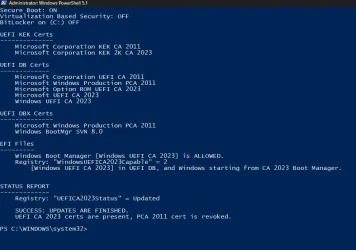
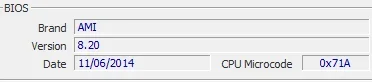
I used the @garlin scripts to update Secure Boot for an old HP-ENVY desktop with a BIOS date in 2014.

Screenshot 2026-05-29 103908.webp

It actually went way easier than I had anticipated when I decided to revive this old computer!
 

My Computers

System One System Two

  • OS
    Win 11 Pro 25H2, Build 26200.8524
    Computer type
    PC/Desktop
    Manufacturer/Model
    Home Brew
    CPU
    Intel Core i5 14500
    Motherboard
    Gigabyte B760M G P WIFI
    Memory
    64GB DDR4
    Graphics Card(s)
    GeForce RTX 4060
    Sound Card
    Chipset Realtek
    Monitor(s) Displays
    LG 45" Ultragear, Acer 24" 1080p
    Screen Resolution
    5120x1440, 1920x1080
    Hard Drives
    Crucial P310 2TB 2280 PCIe Gen4 3D NAND NVMe M.2 SSD (O/S)
    Silicon Power 2TB US75 NVMe PCIe Gen4 M.2 2280 SSD (backup)
    Crucial BX500 2TB 3D NAND (2nd backup)
    Seagate 4TB Ironwolf, rotating HDD archive files
    External off-line backup Drives: 2 NVMe 4TB drives in external enclosures
    PSU
    Thermaltake Toughpower GF3 750W
    Case
    LIAN LI LANCOOL 216 E-ATX PC Case
    Cooling
    Lots of fans!
    Keyboard
    Microsoft Comfort Curve 2000
    Mouse
    Logitech G305
    Internet Speed
    Verizon FiOS 1GB
    Browser
    Firefox
    Antivirus
    Malware Bytes & Windows Defender Security
  • Operating System
    Win 11 Pro 25H2, Build 26200.8524
    Computer type
    PC/Desktop
    Manufacturer/Model
    Home Brew
    CPU
    Intel Core i5 14400
    Motherboard
    Gigabyte B760M DS3H AX
    Memory
    32GB DDR5
    Graphics card(s)
    Intel 700 Embedded GPU
    Sound Card
    Realtek Embedded
    Monitor(s) Displays
    27" HP 1080p
    Screen Resolution
    1920x1080
    Hard Drives
    Crucial P310 2TB 2280 PCIe Gen4 eD NAND PCIe SSD
    Samsung EVO 990 2TB NVMe Gen4 SSD
    Samsung 2TB SATA SSD
    PSU
    Thermaltake Smart BM3 650W
    Case
    Okinos Micro ATX Case
    Cooling
    Fans
    Keyboard
    Microsoft Comfort Curve 2000
    Mouse
    Logitech G305
    Internet Speed
    Verizon FiOS 1GB
    Browser
    Firefox
    Antivirus
    Malware Bytes & Windows Defender Security
''''''''''''To update this PC, you will have to temporarily disable Secure Boot, change the UEFI mode from Standard to Custom mode, and Delete All Keys. This allows a replacement set of certs (Windows OEM Devices) to be installed. With this new set of certs, your UEFI will be compliant and Windows can finish the rest of the Secure Boot migration steps. .............
Thanks for chipping in.

At the moment I am not inclined to meddle with the BIOS in anyway.

In the meanwhile, I would request you to kindly review the following youtube video - Secure Boot Warning? Fix Older Boot Trust Configuration (Easy Guide) - for your expert opinion, if you please.


@gunrunnerjohn

I doubt what is applicable to your 2014 HP -Envy would be applicable to my 2019 Dell Inspiron 3280. ( Only birds of the same feather flock together :-).) In any case I will keep it in mind.
 
Last edited:

My Computers

System One System Two

  • OS
    Windows 11 Pro Version:25H2 OS Build: 26200.8524
    Computer type
    PC/Desktop
    Manufacturer/Model
    Beelink Mini PC Model: SEi12
    CPU
    12th Gen Intel core i5-1235U(Alder
    Motherboard
    SEi (manufactured by AZW)
    Memory
    16*2 (32 GB) DDR 4-3200(1600MHz) Crucial Technology
    Graphics Card(s)
    Intel Iris Xe Graphics (Internal)
    Sound Card
    Internal
    Monitor(s) Displays
    BenQ GW2283
    Screen Resolution
    1920*1080
    Hard Drives
    500GB NVME (Kingston SNV2S500G)
    1TB (Crucial CT1000BX500SSD1)
    PSU
    Power Brick 19V-6.32A , 120.08W
    Keyboard
    Dell KB3322Wi (Wireless)
    Mouse
    Dell WM118t (Wireless)
    Internet Speed
    4G/5G
    Browser
    MS Edge, Chrome
    Antivirus
    Malwarebytes Premium - Subscription
  • Operating System
    Windows 11 Home Version 25H2 Build 26200.8524
    Computer type
    PC/Desktop
    Manufacturer/Model
    Dell Inspiron 3280 AIO 22"
    CPU
    Intel Core i3 8145U
    Motherboard
    Dell inc. 027W48
    Memory
    Intel Optane 16GB module + DDR 4 16GB (Optane disabled.)
    Graphics card(s)
    Intel UHD Graphics 620
    Sound Card
    Internal
    Monitor(s) Displays
    Dell Monitor 22"
    Screen Resolution
    1920x1080
    Hard Drives
    Crucial CT1000BX500SSD1 ; 1000,2 GB
    PSU
    Power Brick
    Case
    All-in one
    Keyboard
    Dell Wireless KM636
    Mouse
    Dell Wireless KM 636
    Internet Speed
    4G
    Browser
    Edge, Chrome
    Antivirus
    Malwarebytes
    Other Info
    Upgraded from Windows 10 Home to Windows 11 Home on 28 Oct 2023
The CA 2023 certs don't have to be downloaded. They're included in the \Windows\System32\SecureBootUpdates folder as "post-signed" binary files, which are appended to your existing Secure Boot variables.

The Secure Boot update task proceeds on the concept of a "chain of trust" where it must first install the underlying certs in sequence. While you can request the task to install certs out of sequence, none of that matters unless you have all the certs aligned.

1. Your PC has a Platform Key (PK) provided by the OEM.

2. To validate the CA 2023 certs, a KEK CA 2023 cert must be installed. This KEK is signed by the PC's PK (which is controlled by the OEM) to validate the trust. Once the MS KEK is added, then all the CA 2023 DB or DBX certs provided by MS are now trusted.

3. You don't need a KEK in order to install the DB or DBX certs, but those certs cannot be validated (trusted) without the presence of the KEK CA 2023. Without it, your trust chain is not valid and CA 2023-signed files are not authenticated.

If you're fortunate, then KEK CA 2023 is provided in a factory BIOS or submitted to MS. MS collects submitted KEK files from OEM's, whenever a BIOS update will not be provided to users. Sometimes you're unlucky, and no KEK file is available because the OEM never bothered to sign one.

PC's which are marked in the "High Confidence" bucket will have a BIOS update, or a signed KEK given to MS.
PC's which are marked "Need More Data", are more likely to need manual updating of the BIOS.

4. Certs stored in the UEFI are entirely unrelated to certs imported to the Windows certificate store. This does nothing to fix your Secure Boot problems. When the BIOS boots an operating system, there is no OS that exists yet. Therefore it cannot read the Windows cert store, the only certs it can read before the OS loads are from the UEFI's stored keys.

Importing the Secure Boot certs to the cert store doesn't do anything for the UEFI.

5. Bottom line: The Secure Boot update task should have run by now on everyone's W11 system. If it hasn't installed the CA 2023 certs by itself, then the chances of requiring manual intervention are high. The holdup for the migration process has always been the OEM's providing the KEK file.
 

My Computer

System One

  • OS
    Windows 7
Thanks @garlin for your review and importance of KEK.

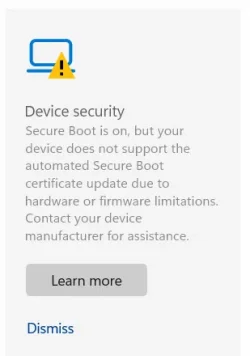
From what I read under "Device Security" ( screenshot below) it is obvious that Dell has not done anything mitigate the problem and have simply washed off their hands.
30-05-2026 11-29-30.webp
So may be a BIOS level intervention to eliminate the existing keys is necessary as you opine. If by any mistake, the system becomes unbootable I can always restore the factory keys.
 

My Computers

System One System Two

  • OS
    Windows 11 Pro Version:25H2 OS Build: 26200.8524
    Computer type
    PC/Desktop
    Manufacturer/Model
    Beelink Mini PC Model: SEi12
    CPU
    12th Gen Intel core i5-1235U(Alder
    Motherboard
    SEi (manufactured by AZW)
    Memory
    16*2 (32 GB) DDR 4-3200(1600MHz) Crucial Technology
    Graphics Card(s)
    Intel Iris Xe Graphics (Internal)
    Sound Card
    Internal
    Monitor(s) Displays
    BenQ GW2283
    Screen Resolution
    1920*1080
    Hard Drives
    500GB NVME (Kingston SNV2S500G)
    1TB (Crucial CT1000BX500SSD1)
    PSU
    Power Brick 19V-6.32A , 120.08W
    Keyboard
    Dell KB3322Wi (Wireless)
    Mouse
    Dell WM118t (Wireless)
    Internet Speed
    4G/5G
    Browser
    MS Edge, Chrome
    Antivirus
    Malwarebytes Premium - Subscription
  • Operating System
    Windows 11 Home Version 25H2 Build 26200.8524
    Computer type
    PC/Desktop
    Manufacturer/Model
    Dell Inspiron 3280 AIO 22"
    CPU
    Intel Core i3 8145U
    Motherboard
    Dell inc. 027W48
    Memory
    Intel Optane 16GB module + DDR 4 16GB (Optane disabled.)
    Graphics card(s)
    Intel UHD Graphics 620
    Sound Card
    Internal
    Monitor(s) Displays
    Dell Monitor 22"
    Screen Resolution
    1920x1080
    Hard Drives
    Crucial CT1000BX500SSD1 ; 1000,2 GB
    PSU
    Power Brick
    Case
    All-in one
    Keyboard
    Dell Wireless KM636
    Mouse
    Dell Wireless KM 636
    Internet Speed
    4G
    Browser
    Edge, Chrome
    Antivirus
    Malwarebytes
    Other Info
    Upgraded from Windows 10 Home to Windows 11 Home on 28 Oct 2023
@jumanji
i used that method in the video, post#5, to update 3 chuwa laptops with the 2023 certs
then used this HowTo to finish off updating the certs. yes i know that they are not dells

but chuwa have little or no support so it was a D.I.Y job or nothing.
best of luck Steve ..
 

My Computers

System One System Two

  • OS
    Windows 11 Home
    Computer type
    PC/Desktop
    Manufacturer/Model
    HP 24" AiO
    CPU
    Ryzen 7 5825u
    Motherboard
    HP
    Memory
    64GB DDR4 3200
    Graphics Card(s)
    Ryzen 7 5825u
    Sound Card
    RealTek
    Monitor(s) Displays
    24" HP AiO
    Screen Resolution
    1920 x 1080 @60 Hz
    Hard Drives
    1TB WD Blue SN580 M2 SSD Partitioned.
    2x 1TB USB HDD External Backup/Storage.
    PSU
    90W external power brick
    Case
    24" All in One
    Cooling
    Default Air Cooling
    Keyboard
    HP WiFi UK extended
    Mouse
    HP WiFi 3 Button
    Internet Speed
    1GB full fibre
    Browser
    Edge & Firefox
    Antivirus
    AVG Internet Security/Windows Defender
    Other Info
    Mainly Open Source Software
  • Operating System
    Ubuntu 22.04.5 LTS
    Computer type
    Laptop
    Manufacturer/Model
    Dell 13" Latitude 2017
    CPU
    i5 7200u
    Motherboard
    Dell
    Memory
    16GB DDR4
    Graphics card(s)
    Intel
    Sound Card
    Intel
    Monitor(s) Displays
    13" Dell Laptop
    Hard Drives
    250GB Crucial 2.5" SSD
    Mouse
    Generic WiFi 3 button
    Internet Speed
    WiFi only
    Browser
    Firefox
    Antivirus
    ClamAV TK
    Other Info
    Mainly Open Source Software
Thanks for chipping in.

At the moment I am not inclined to meddle with the BIOS in anyway.

In the meanwhile, I would request you to kindly review the following youtube video - Secure Boot Warning? Fix Older Boot Trust Configuration (Easy Guide) - for your expert opinion, if you please.


@gunrunnerjohn

I doubt what is applicable to your 2014 HP -Envy would be applicable to my 2019 Dell Inspiron 3280. ( Only birds of the same feather flock together :-).) In any case I will keep it in mind.
Thanks for the video.

I updated my Secure Boot certificates about a year ago. Then I watched the video and looked for Windows UEFI CA 2023 certificate in certlm.msc console.

I couldn't find Windows UEFI CA 2023 certificate in there.

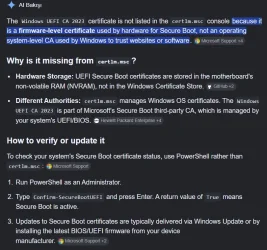
Then just out of sheer curiosity, I asked AI why I could not see the said certificate in the certlm.msc console (in the certificate store). The following is the answer from the AI:

certlm.webp

So what is the point in installing the Windows UEFI CA 2023 certificate in the certificates store ?
 

My Computers

System One System Two

  • OS
    Windows 11 Pro build 26200.8524
    Computer type
    PC/Desktop
    Manufacturer/Model
    Home Built
    CPU
    Intel i7-4790
    Motherboard
    Asus H97 Pro Gamer with add-on TPM1.2 module
    Memory
    Teams DDR3-1600 4x4 GB
    Graphics Card(s)
    MSI Nvidia GeForce GTX 1050Ti
    Sound Card
    Realtek ALC1150
    Monitor(s) Displays
    Dell P2425D
    Screen Resolution
    2560 by 1440 pixels
    Hard Drives
    Corsair NVMe M.2 Core XT 1000 GB (Windows 11 v.25H2); Samsung SATA Evo 870 500 GB (Windows 11 v.25H2);
    PSU
    Corsair HX850
    Case
    Gigabyte Solo 210
    Cooling
    Zalman CNPS7X Tower
    Keyboard
    Microsoft AIO Wireless (includes touchpad)
    Mouse
    HP S1000 Plus Wireless
    Internet Speed
    500 Mb fiber optic
    Browser
    Chrome; MS Edge
    Antivirus
    Windows Defender
  • Operating System
    MacOS 12 Monterey
    Computer type
    Laptop
    Manufacturer/Model
    Apple Macbook Air
    CPU
    Intel Core i5
    Memory
    8 GB
    Graphics card(s)
    Intel integrated
    Screen Resolution
    1440 by 900 pixels
    Hard Drives
    128 GB
    Keyboard
    Built-in
    Mouse
    Microsoft Wireless
    Internet Speed
    802.11 ac
    Browser
    Chrome; Safari
    Antivirus
    N/A
@garlin , @XxXxX and @suatcini54

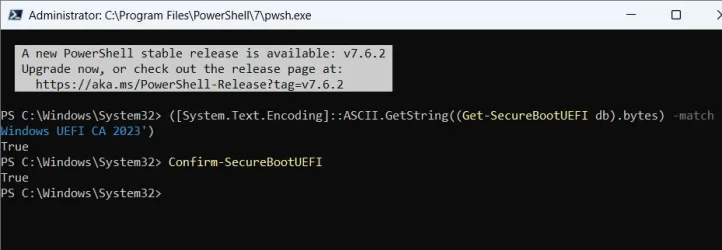
I ran the following Powershell Admin commands
([System.Text.Encoding]::ASCII.GetString((Get-SecureBootUEFI db).bytes) -match 'Windows UEFI CA 2023')

confirm-SecureBootUEFI
and both returned TRUE as shown in the following screenshot

30-05-2026 16-49-28.webp

Does that mean my system has been updated to UEFI CA2023?
 

My Computers

System One System Two

  • OS
    Windows 11 Pro Version:25H2 OS Build: 26200.8524
    Computer type
    PC/Desktop
    Manufacturer/Model
    Beelink Mini PC Model: SEi12
    CPU
    12th Gen Intel core i5-1235U(Alder
    Motherboard
    SEi (manufactured by AZW)
    Memory
    16*2 (32 GB) DDR 4-3200(1600MHz) Crucial Technology
    Graphics Card(s)
    Intel Iris Xe Graphics (Internal)
    Sound Card
    Internal
    Monitor(s) Displays
    BenQ GW2283
    Screen Resolution
    1920*1080
    Hard Drives
    500GB NVME (Kingston SNV2S500G)
    1TB (Crucial CT1000BX500SSD1)
    PSU
    Power Brick 19V-6.32A , 120.08W
    Keyboard
    Dell KB3322Wi (Wireless)
    Mouse
    Dell WM118t (Wireless)
    Internet Speed
    4G/5G
    Browser
    MS Edge, Chrome
    Antivirus
    Malwarebytes Premium - Subscription
  • Operating System
    Windows 11 Home Version 25H2 Build 26200.8524
    Computer type
    PC/Desktop
    Manufacturer/Model
    Dell Inspiron 3280 AIO 22"
    CPU
    Intel Core i3 8145U
    Motherboard
    Dell inc. 027W48
    Memory
    Intel Optane 16GB module + DDR 4 16GB (Optane disabled.)
    Graphics card(s)
    Intel UHD Graphics 620
    Sound Card
    Internal
    Monitor(s) Displays
    Dell Monitor 22"
    Screen Resolution
    1920x1080
    Hard Drives
    Crucial CT1000BX500SSD1 ; 1000,2 GB
    PSU
    Power Brick
    Case
    All-in one
    Keyboard
    Dell Wireless KM636
    Mouse
    Dell Wireless KM 636
    Internet Speed
    4G
    Browser
    Edge, Chrome
    Antivirus
    Malwarebytes
    Other Info
    Upgraded from Windows 10 Home to Windows 11 Home on 28 Oct 2023
@garlin , @XxXxX and @suatcini54

I ran the following Powershell Admin commands
([System.Text.Encoding]::ASCII.GetString((Get-SecureBootUEFI db).bytes) -match 'Windows UEFI CA 2023')

confirm-SecureBootUEFI
and both returned TRUE as shown in the following screenshot

View attachment 172954

Does that mean the my system has been updated to UEFI CA2023?
yes.
best of luck Steve ..
 

My Computers

System One System Two

  • OS
    Windows 11 Home
    Computer type
    PC/Desktop
    Manufacturer/Model
    HP 24" AiO
    CPU
    Ryzen 7 5825u
    Motherboard
    HP
    Memory
    64GB DDR4 3200
    Graphics Card(s)
    Ryzen 7 5825u
    Sound Card
    RealTek
    Monitor(s) Displays
    24" HP AiO
    Screen Resolution
    1920 x 1080 @60 Hz
    Hard Drives
    1TB WD Blue SN580 M2 SSD Partitioned.
    2x 1TB USB HDD External Backup/Storage.
    PSU
    90W external power brick
    Case
    24" All in One
    Cooling
    Default Air Cooling
    Keyboard
    HP WiFi UK extended
    Mouse
    HP WiFi 3 Button
    Internet Speed
    1GB full fibre
    Browser
    Edge & Firefox
    Antivirus
    AVG Internet Security/Windows Defender
    Other Info
    Mainly Open Source Software
  • Operating System
    Ubuntu 22.04.5 LTS
    Computer type
    Laptop
    Manufacturer/Model
    Dell 13" Latitude 2017
    CPU
    i5 7200u
    Motherboard
    Dell
    Memory
    16GB DDR4
    Graphics card(s)
    Intel
    Sound Card
    Intel
    Monitor(s) Displays
    13" Dell Laptop
    Hard Drives
    250GB Crucial 2.5" SSD
    Mouse
    Generic WiFi 3 button
    Internet Speed
    WiFi only
    Browser
    Firefox
    Antivirus
    ClamAV TK
    Other Info
    Mainly Open Source Software
So what is the point in installing the Windows UEFI CA 2023 certificate in the certificates store ?
None. Anyone who provides this advice doesn't understand how Secure Boot works. It's a BIOS-based security measure. The same cert can be imported from the BIOS menu (on some PC's).

If it was as simple as in the video, there would be no unsupported PC's and MS wouldn't have to constantly remind you to update Secure Boot.
 

My Computer

System One

  • OS
    Windows 7
None. Anyone who provides this advice doesn't understand how Secure Boot works. It's a BIOS-based security measure. The same cert can be imported from the BIOS menu (on some PC's).

If it was as simple as in the video, there would be no unsupported PC's and MS wouldn't have to constantly remind you to update Secure Boot.

3 chuwa laptops my grandchildren use wouldn't update secure boot.
it was only after i added the certs to the data base did the TPM/BIOS secure boot update
i have no explanation why or why not but that was the only way they would update.

the 2 HP all in ones in use updated their secure boot certs without the need to update the data base
again i can give no explanation why or why not, that was just the way it happened.

needless to say this whole affair to update systems has been time consuming.
best of luck Steve ..
 

My Computers

System One System Two

  • OS
    Windows 11 Home
    Computer type
    PC/Desktop
    Manufacturer/Model
    HP 24" AiO
    CPU
    Ryzen 7 5825u
    Motherboard
    HP
    Memory
    64GB DDR4 3200
    Graphics Card(s)
    Ryzen 7 5825u
    Sound Card
    RealTek
    Monitor(s) Displays
    24" HP AiO
    Screen Resolution
    1920 x 1080 @60 Hz
    Hard Drives
    1TB WD Blue SN580 M2 SSD Partitioned.
    2x 1TB USB HDD External Backup/Storage.
    PSU
    90W external power brick
    Case
    24" All in One
    Cooling
    Default Air Cooling
    Keyboard
    HP WiFi UK extended
    Mouse
    HP WiFi 3 Button
    Internet Speed
    1GB full fibre
    Browser
    Edge & Firefox
    Antivirus
    AVG Internet Security/Windows Defender
    Other Info
    Mainly Open Source Software
  • Operating System
    Ubuntu 22.04.5 LTS
    Computer type
    Laptop
    Manufacturer/Model
    Dell 13" Latitude 2017
    CPU
    i5 7200u
    Motherboard
    Dell
    Memory
    16GB DDR4
    Graphics card(s)
    Intel
    Sound Card
    Intel
    Monitor(s) Displays
    13" Dell Laptop
    Hard Drives
    250GB Crucial 2.5" SSD
    Mouse
    Generic WiFi 3 button
    Internet Speed
    WiFi only
    Browser
    Firefox
    Antivirus
    ClamAV TK
    Other Info
    Mainly Open Source Software

Attachments

  • Screenshot 2026-05-26 035508.webp
    Screenshot 2026-05-26 035508.webp
    48.7 KB · Views: 1

My Computer

System One

  • OS
    WINDOWS 11 WINDOWS 10
    Computer type
    PC/Desktop
    Manufacturer/Model
    HP H8 1360T
    CPU
    Intel(R) Core(TM) i7 -3770K CPU 3.50 GZ 3501 4 CORE
    Motherboard
    PEGATRON 2AD5
    Memory
    32.0 GB (31.9 GB usable)
    Graphics Card(s)
    AMD RADEON TM R5240 INTELL HD GRAPHICS 4600 TIGER 1+1 USB
    Sound Card
    AMD HD . IDT
    Monitor(s) Displays
    AOC WAL MART SPECIAL . HP 2311 IX IPS LED DELL 1708 FP
    Screen Resolution
    1920 X 1080 1600X900 1280X940
    Hard Drives
    1 FAXING S 100 512GB 1 KINGSTON 120 GB SSD 1 X12 SSD 512 GB
    PSU
    300 WATT HP
    Case
    FULL
    Cooling
    ON BOARD FAN
    Keyboard
    LOGITEC K 520 WIRELESS
    Mouse
    LOGITEC M 510 WIRELESS
    Internet Speed
    55 UP 11.2 DOWN
    Browser
    CHROME EDGE
    Antivirus
    WINDOWS SECUIRTY
    Other Info
    NON SUPPORTED HARDWARE FOR WINDOWS 11
3 chuwa laptops my grandchildren use wouldn't update secure boot.
it was only after i added the certs to the data base did the TPM/BIOS secure boot update
i have no explanation why or why not but that was the only way they would update.

the 2 HP all in ones in use updated their secure boot certs without the need to update the data base
again i can give no explanation why or why not, that was just the way it happened.

needless to say this whole affair to update systems has been time consuming.
best of luck Steve ..
What matters is whether a KEK CA 2023 was provided via a previous or recent BIOS update, or a submitted KEK file. Everyone who ends up in the "High Confidence" bucket falls into those categories. Everyone who's stuck in "More Data Needed" is unsupported, until the OEM does something.

The longer you wait, there's a slightly larger chance that a lagging OEM finally submits the KEK file to MS. After receiving a KEK, MS can move your PC from "More Data Needed" to "High Confidence" and the Secure Boot task does it's thing. Every month, Windows pushes a revised set of JSON files which indicate whether your PC will be updated or not.

There's a lot of smoke & mirrors in this process, IMO to protect the OEM's reputations. MS isn't going to publicly shame the vendors for abandoning certain PC models. Everyone hides behind the "waiting for telemetry data" story even though all the parties know which PC's won't get automatic updates.

Many PC's could be supported by manual key enrollment, but all parties don't want the tech support headache that entails. If the vendor hasn't stepped by the end of this summer, they probably won't ever for your individual PC.
 

My Computer

System One

  • OS
    Windows 7
i am not on a dell but a older hp from like 2014 . and with garlin's scripts and this
How to manage the Windows Boot Manager revocations for Secure Boot changes associated with CVE-2023-24932 - Microsoft Support.
i was able to get this machine current . the only reason is used the link is because i could not get power shell to work .
I recently updated an old HP-ENVY desktop with a 2014 AMI BIOS using the @garlin scripts. It went slick and quick and MSC is happy with my configuration. garlin's check script also says I'm in good shape. The most time consuming part was just finding and setting the BIOS Secure Boot initialization to get the ball rolling.
 

My Computers

System One System Two

  • OS
    Win 11 Pro 25H2, Build 26200.8524
    Computer type
    PC/Desktop
    Manufacturer/Model
    Home Brew
    CPU
    Intel Core i5 14500
    Motherboard
    Gigabyte B760M G P WIFI
    Memory
    64GB DDR4
    Graphics Card(s)
    GeForce RTX 4060
    Sound Card
    Chipset Realtek
    Monitor(s) Displays
    LG 45" Ultragear, Acer 24" 1080p
    Screen Resolution
    5120x1440, 1920x1080
    Hard Drives
    Crucial P310 2TB 2280 PCIe Gen4 3D NAND NVMe M.2 SSD (O/S)
    Silicon Power 2TB US75 NVMe PCIe Gen4 M.2 2280 SSD (backup)
    Crucial BX500 2TB 3D NAND (2nd backup)
    Seagate 4TB Ironwolf, rotating HDD archive files
    External off-line backup Drives: 2 NVMe 4TB drives in external enclosures
    PSU
    Thermaltake Toughpower GF3 750W
    Case
    LIAN LI LANCOOL 216 E-ATX PC Case
    Cooling
    Lots of fans!
    Keyboard
    Microsoft Comfort Curve 2000
    Mouse
    Logitech G305
    Internet Speed
    Verizon FiOS 1GB
    Browser
    Firefox
    Antivirus
    Malware Bytes & Windows Defender Security
  • Operating System
    Win 11 Pro 25H2, Build 26200.8524
    Computer type
    PC/Desktop
    Manufacturer/Model
    Home Brew
    CPU
    Intel Core i5 14400
    Motherboard
    Gigabyte B760M DS3H AX
    Memory
    32GB DDR5
    Graphics card(s)
    Intel 700 Embedded GPU
    Sound Card
    Realtek Embedded
    Monitor(s) Displays
    27" HP 1080p
    Screen Resolution
    1920x1080
    Hard Drives
    Crucial P310 2TB 2280 PCIe Gen4 eD NAND PCIe SSD
    Samsung EVO 990 2TB NVMe Gen4 SSD
    Samsung 2TB SATA SSD
    PSU
    Thermaltake Smart BM3 650W
    Case
    Okinos Micro ATX Case
    Cooling
    Fans
    Keyboard
    Microsoft Comfort Curve 2000
    Mouse
    Logitech G305
    Internet Speed
    Verizon FiOS 1GB
    Browser
    Firefox
    Antivirus
    Malware Bytes & Windows Defender Security
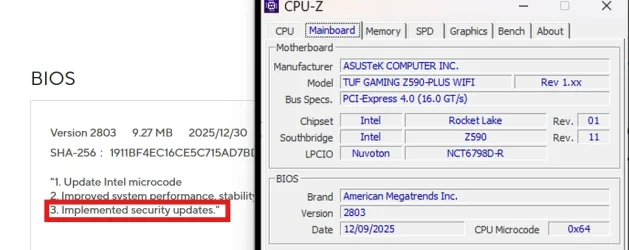
What matters is whether a KEK CA 2023 was provided via a previous or recent BIOS update

It was.

1780166649169.webp

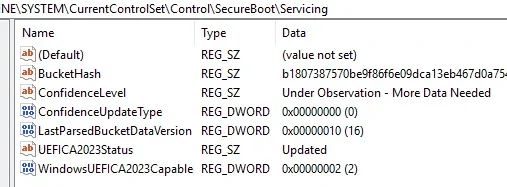
Everyone who's stuck in "More Data Needed" is unsupported, until the OEM does something.

But I'm stuck in "More Data Needed".

1780166812435.webp

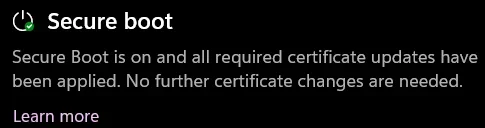
Although my system 2 is fully updated.

1780166906699.webp

Code:
PS D:\Scripts\SecureBoot-CA-2023-Updates.v2026.05.27> .\Check_UEFI-CA2023.ps1 -verbose
Windows 11 25H2 (26200.8524)

Secure Boot: ON
Virtualization Based Security: ON
BitLocker on (C:) OFF

BIOS Firmware
-------------
    ASUS System Product Name
    Version: 2803
    Date: 2025-12-08

Factory Default UEFI PK Cert
----------------------------
    ASUSTeK MotherBoard PK Certificate

UEFI PK Cert
------------
    ASUSTeK MotherBoard PK Certificate

Factory Default UEFI KEK Certs
------------------------------
    Microsoft Corporation KEK CA 2011
    Microsoft Corporation KEK 2K CA 2023
    ASUSTeK MotherBoard KEK Certificate

UEFI KEK Certs
--------------
    Microsoft Corporation KEK CA 2011
    Microsoft Corporation KEK 2K CA 2023
    Canonical Ltd. Master Certificate Authority
    ASUSTeK MotherBoard KEK Certificate

Factory Default UEFI DB Certs
-----------------------------
    Microsoft Corporation UEFI CA 2011
    Microsoft Windows Production PCA 2011
    Microsoft Option ROM UEFI CA 2023
    Microsoft UEFI CA 2023
    Windows UEFI CA 2023
    ASUSTeK MotherBoard SW Key Certificate
    ASUSTeK Notebook SW Key Certificate

UEFI DB Certs
-------------
    Microsoft Corporation UEFI CA 2011
    Microsoft Windows Production PCA 2011
    Microsoft Option ROM UEFI CA 2023
    Microsoft UEFI CA 2023
    Windows UEFI CA 2023
    Canonical Ltd. Master Certificate Authority
    ASUSTeK MotherBoard SW Key Certificate
    ASUSTeK Notebook SW Key Certificate

Factory Default UEFI DBX Certs
------------------------------
    (NONE)
    EFI_CERT_SHA256_GUID Signatures: 430

UEFI DBX Certs
--------------
    Microsoft Windows Production PCA 2011
    Windows BootMgr SVN 8.0
    EFI_CERT_SHA256_GUID Signatures: 489

UEFI Variables
--------------
    DeviceGuard (VBS): ON
    Credential Guard: ON
    SBAT (Linux only): sbat,1,2024010900 / shim,4 / grub,3 / grub.debian,4

EFI Files
---------
    Windows Boot Manager [Windows UEFI CA 2023] is ALLOWED.
        \\.\HarddiskVolume1\EFI\Microsoft\Boot\bootmgfw.efi
        File Version: 28000.327, SVN 8.0

    Registry: "WindowsUEFICA2023Capable" = 2
        [Windows UEFI CA 2023] in UEFI DB, and Windows starting from CA 2023 Boot Manager.

    SkuSiPolicy.p7b is CURRENT.
        \\.\HarddiskVolume1\EFI\Microsoft\Boot\SkuSiPolicy.p7b
        Version: 3.0.0.14
    NOT RECOMMENDED for dual-boot setups.


STATUS REPORT
-------------
    Registry: "UEFICA2023Status" = Updated

    SUCCESS: UPDATES ARE FINISHED.
    UEFI CA 2023 certs are present, PCA 2011 cert is revoked.

PS D:\Scripts\SecureBoot-CA-2023-Updates.v2026.05.27>
 

My Computers

System One System Two

  • OS
    Win 11 Pro 25H2 26200.8524
    Computer type
    PC/Desktop
    Manufacturer/Model
    Self Built
    CPU
    Intel® Core™ i7-14700K
    Motherboard
    ASUS TUF Z690-PLUS WIFI BIOS 4505 11/29/25
    Memory
    G.SKILL Ripjaws S5 Series 64GB (2 x 32GB) DDR5
    Graphics Card(s)
    ASUS GeForce RTX 4070 Super 12GB
    Sound Card
    Sound Blaster AE-5 Plus
    Monitor(s) Displays
    ASUS TUF Gaming 27" 2K HDR Gaming
    Screen Resolution
    2560 x 1440
    Hard Drives
    Samsung 990 Pro 1TB NVMe (Win 11 25H2)
    SK hynix P41 500GB NVMe 25H2 DEV/Games
    SK hynix P41 2TB NVMe (x3)
    Crucial P3 Plus 4TB
    PSU
    Corsair RM850x Shift
    Case
    Antec Dark Phantom DP502 FLUX
    Cooling
    Corsair Nautilus 360 RS AIO
    Keyboard
    Logitech MK 320
    Mouse
    Razer Basilisk V3
    Internet Speed
    350Mbs
    Browser
    Firefox
    Antivirus
    Winows Security
    Other Info
    MR 8.1 Home

    System 3 Specs
    Win 11 Pro 25H2 26200.8524
    ASUS PRIME Z370-P II BIOS 3004 7/12/21
    Intel Core i7-8700 CPU @ 3.20GHz
    32GB DDR4 RAM (4x8)
    iGPU Intel UHD Graphics 630
  • Operating System
    Win 11 Pro 25H2 26200.8524
    Computer type
    PC/Desktop
    Manufacturer/Model
    Self Built
    CPU
    Intel Core i7-11700F
    Motherboard
    Asus TUF Gaming Z590 Plus WiFi (BIOS 2803)
    Memory
    64 GB DDR4
    Graphics card(s)
    MSI GeForce RTX 3060 Ventus 2X 12GB
    Sound Card
    SoundBlaster Audigy Fx V2
    Monitor(s) Displays
    Samsung F27T350
    Screen Resolution
    1920x1080
    Hard Drives
    Samsung 980 Pro 1TB
    Samsung 970 EVO Plus 2TB
    Samsung 870 EVO 500GB SSD
    PSU
    Corsair HX750
    Case
    Cougar MX330-G Window
    Cooling
    Thermalright Frozen Edge 240 Black AIO
    Internet Speed
    350Mbps
    Browser
    Firefox
    Antivirus
    Windows Security
But I'm stuck in "More Data Needed".

Although my system 2 is fully updated.
Your case is a typical example, of why you don't put too much credibility into the Confidence Bucket reporting.

1. If your OEM has a BIOS update, they could share those details with MS (motherboard model + minimum BIOS version). Windows can cross-index your motherboard + BIOS version against the OEM's list of supported PC's. It might be only a BIOS version above a certain date is needed, and older BIOS'es cannot be updated.

2. With a signed KEK file (see the MS Secure Boot Objects repo on GitHub), MS collects a known thumbprint from the OEM. By matching the thumbprint against your PC, they have a good guess that a submitted KEK can be written to your BIOS. Everyone in the supported side is marked "High Confidence".

3. There's a 3rd bucket, in which MS blocks all updates because there's a confirmed BIOS defect that needs to be addressed by the OEM. Everyone who is not "High Confidence" or the "blocked" bucket belongs in "More Data Needed".

The different pools can be summarized as Supported / Bad Update / "I don't know".

"More Data Needed" is the commonly misunderstood category. It doesn't imply whether an update is possible or not, but MS hasn't gathered definitive proof that your PC has an available BIOS or still doesn't have a signed KEK that matches your BIOS's thumbprint. It doesn't know. If you're in "More Data Needed" you will spend at least one more month (until the next Monthly Update) before possibly getting moved to "High Confidence".

A live system where all the Secure Boot changes have been applied, can still be reported as "More Data Needed". The category is only defined by what group your bucket ID has been assigned to (updated once a month). This status doesn't reflect whether you already finished with updates or not. To be a member of the "High Confidence" or "More Data Needed" buckets is determined solely by matching your generated Bucket ID against a list every month.

Success or failure of applying the updates (which show up as TPM-WMI events) will not change the Confidence level. It represents a "best guess" of what MS expects to happen with your specific PC.

This is why my tools completely ignore the Bucket indicators. And performs directing checking of each cert in the KEK, DB and DBX variables by name. No harm can be done by trying to append new certs to the existing variables. If you don't have the right KEK file, the KEK append will fail with an authentication error. Then you know it's time to try so manual intervention.
 

My Computer

System One

  • OS
    Windows 7
If it helps, for me the process was as simple as:
  • Update BIOS (Means, check if there's an update for you, so you get the certs in BIOS, you need them, especially if the manufacturere updated or sent their KEK to MS for Cert updates.)
  • Run @garlin 's script to check status
  • Run the Update script from him wih the revoke option to update the certs and reboot
  • Profit.
Hear the man, he knows his business, thanks to him my 3 systems are up to date without issues. I was really scared because I hate messing with BIOS and I ignored everything about the process. He has even talked with Microsoft people to get fixes for commands that Microsoft broke for certs, or to get info about files like DBX databases so we know we are updated.

He's basically your salvation, follow his advice.
 

My Computers

System One System Two

  • OS
    Windows 11 Pro 25H2
    Computer type
    PC/Desktop
    Manufacturer/Model
    Built PC
    CPU
    AMD Ryzen 5 5600G @ 3.9/4.4Ghz
    Motherboard
    MSI B550M-PRO-WiFi Ver. 1.4
    Memory
    2 x 16 GB DDR4 Kingston Fury Beast 3200 Mhz
    Graphics Card(s)
    AMD Radeon RX 6600 XT MSI Mech 2X OC Edition 8 GB
    Sound Card
    Realtek High Definition Audio (Integrated)
    Monitor(s) Displays
    Samsung C50Rx 27" LED / HP S2031 20" LCD
    Screen Resolution
    1920 x 1080 px / 1600 x 900 px
    Hard Drives
    WD Blue SN570 NVME M.2 SSD [1 TB] -- External Drives: - WD Scorpion Blue 250 GB 5400 RPM (Data Backup) - Hitachi 500 GB 5400 RPM (Software / ISOs Backup) - Toshiba MQ01ABD100 1 TB 5400 RPM (OS Images) - HGST TravelStar 7K1000 1 TB, 7200 RPM USB 3.0 - ADATA SU800 2TB SSD USB 3.0
    PSU
    Corsair RM750e 750W Fully Modular
    Case
    Naceb Hydra NA-1602
    Cooling
    Naceb Orpheus x 3 (Front) + Naceb Cepheus 1200 RPM Max (Rear) + ThemalRight Assasin X 90 SE (CPU)
    Keyboard
    Logitech MK470 Wireless
    Mouse
    Logitech MK470 Wireless
    Internet Speed
    120 MB Symetrical
    Browser
    Firefox / Brave / Edge
    Antivirus
    Windows Defender
    Other Info
    - VMs: WMware Player - Windows 8.1 Pro x64 / Windows 11 Pro
    - Wacom Intuos Pro Small Tablet PTH-460
  • Operating System
    Windows 11 Pro 25H2
    Computer type
    Laptop
    Manufacturer/Model
    HP Pavilion 15-eh3000la (80M53LA)
    CPU
    AMD Ryzen 7 7730U @ 2.0/4.5 Ghz
    Motherboard
    HP 8BC7
    Memory
    2 x 16 GB Kingston Fury Impact DDR4 3200 Mhz
    Graphics card(s)
    Radeon (tm) Graphics Vega 8 (512 MB)
    Sound Card
    Realtek High Definition Audio (Integrated)
    Monitor(s) Displays
    AU Optronics
    Screen Resolution
    1920 x 1080 px (125% size)
    Hard Drives
    WD Blue SN570 1TB NVME M.2 Drive
    PSU
    45 Watt Charger
    Cooling
    Laptop Cooling Pad
    Keyboard
    Free Wolf Foldable Portable Keyboard
    Mouse
    Free Wolf Wireless Mouse
    Internet Speed
    120 MB Symetrical
    Browser
    Firefox / Brave / Edge
    Antivirus
    Windows Defender
    Other Info
    - 41mWh battery.
    - Wacom Intuos Pro Small Tablet PTH-460

Latest Support Threads

Back
Top Bottom