- Local time
- 1:31 AM
- Posts
- 48
- Location
- North Florida
- OS
- Dual Boot W11 Home25H2/Linux Mint22.2 Cinnamon
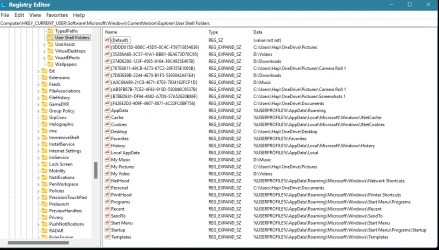
I once had OneDrive installed on an older W10 computer, and it was so problematic, it had to be removed. I had learned my lesson from that experience, until this past week when I tried to do a Data backup using W11, and discovered OneDrive had hijacked my Sys folder "D ictures".
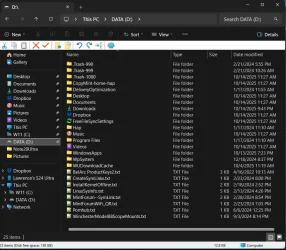
All of my W11 Sys folders, on my new W11 Laptop, were moved from W11 (C:) to the newly created separate partition, "DATA (D:).
W11 is normally only used for DATA backups, because W11 works fluidly with FreeFileSync, then after that task is completed, I boot back into Linux, until it's time to do another DATA backup.
At the present time, all "Sys Folders" reside in DATA (D:), except for Dictures, which it now resides in OneDrive.
About 2mo ago, I found OneDrive had been mysteriously reinstalled on my W11 laptop, so I uninstalled it
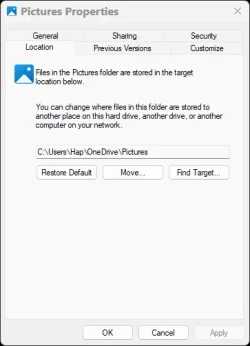
I need to move the Pictures Sys Folder, "C:\Users\Hap\OneDrive" back to my local folder "DATA (D:)", and then completely rid my computer from any OneDrive remnants.
OneDrive and MS Edge are the STD's of the W11 world!
ictures".All of my W11 Sys folders, on my new W11 Laptop, were moved from W11 (C:) to the newly created separate partition, "DATA (D:).
W11 is normally only used for DATA backups, because W11 works fluidly with FreeFileSync, then after that task is completed, I boot back into Linux, until it's time to do another DATA backup.
At the present time, all "Sys Folders" reside in DATA (D:), except for D
ictures, which it now resides in OneDrive.About 2mo ago, I found OneDrive had been mysteriously reinstalled on my W11 laptop, so I uninstalled it
I need to move the Pictures Sys Folder, "C:\Users\Hap\OneDrive" back to my local folder "DATA (D:)", and then completely rid my computer from any OneDrive remnants.
OneDrive and MS Edge are the STD's of the W11 world!
- Windows Build/Version
- W11 v24H2, Build 26100.6725
My Computers
-
At a glance
Dual Boot W11 Home25H2/Linux Mint22.2 CinnamonAMD 4Ghz Ryzen 9 7940HS w/ Radeon 780M Graphics32GB DDR5 5600HzNVIDIA GeForce RTX 4050- OS
- Dual Boot W11 Home25H2/Linux Mint22.2 Cinnamon
- Computer type
- Laptop
- Manufacturer/Model
- ASUS TUF Gaming A17 (2023) FA707XU-EH94
- CPU
- AMD 4Ghz Ryzen 9 7940HS w/ Radeon 780M Graphics
- Motherboard
- ASUSTeK COMPUTER INC. FA707XU 1.0
- Memory
- 32GB DDR5 5600Hz
- Graphics Card(s)
- NVIDIA GeForce RTX 4050
- Sound Card
- Realtek Dolby Atmos
- Monitor(s) Displays
- 17.3-inch, FHD (1920 x 1080) 16:9
- Screen Resolution
- 1920 x 1080
- Hard Drives
- 1TB PCIe® 4.0 NVMe™ M.2 SSD
311GB C:W11,
200GB D:DATA (Shared),
108GB Linux Mint22.2
170GB: Linux Timeshift
- PSU
- 90Wh battery - 240w AC Adapter, Output: 20v DC, 12A
- Case
- Aluminum lid with a plastic base
- Cooling
- 5 pipe, 4 vent, Dual 84 blade fans
- Keyboard
- Backlit Chiclet Keyboard 1-Zone RGB Touchpad
- Mouse
- Logitech MX Master 3S
- Internet Speed
- ATT Fiber Optic, 500Mb/sec
- Browser
- Firefox, Chromium
- Antivirus
- Windows Defender
- Other Info
- Realtek 8852BE Wireless LAN WiFi 6 PCI-E NIC
Bluetooth 5.3 Wireless Card
-
At a glance
W10 Home 22H2Intel Pentium N3540 2.16GHz, 4 cores16GB DDR3Intel HD graphics (Bay Trail)- Operating System
- W10 Home 22H2
- Computer type
- Laptop
- Manufacturer/Model
- HP 15-f271gm
- CPU
- Intel Pentium N3540 2.16GHz, 4 cores
- Motherboard
- Hewlett-Packard 233F v06.27
- Memory
- 16GB DDR3
- Graphics card(s)
- Intel HD graphics (Bay Trail)
- Hard Drives
- ADATA SU760 512GB
200GB C:W10, 256GB E:DATA
- PSU
- 65W
- Case
- Plastic
- Cooling
- 1Pipe, 1 Fan
- Mouse
- Logitech MX Master
- Internet Speed
- ATT Fiber Optic 500 Mb/sec
- Browser
- Firefox/Chromium
- Antivirus
- Windows Defender