Solved OneDrive hijacks local folder, D:Pictures


hapEcat

Well-known member
Member
Local time
3:49 PM
Posts
48
Location
North Florida
OS
Dual Boot W11 Home25H2/Linux Mint22.2 Cinnamon
I once had OneDrive installed on an older W10 computer, and it was so problematic, it had to be removed. I had learned my lesson from that experience, until this past week when I tried to do a Data backup using W11, and discovered OneDrive had hijacked my Sys folder "D:Pictures".

All of my W11 Sys folders, on my new W11 Laptop, were moved from W11 (C:) to the newly created separate partition, "DATA (D:).
W11 is normally only used for DATA backups, because W11 works fluidly with FreeFileSync, then after that task is completed, I boot back into Linux, until it's time to do another DATA backup.

At the present time, all "Sys Folders" reside in DATA (D:), except for D:Pictures, which it now resides in OneDrive.
About 2mo ago, I found OneDrive had been mysteriously reinstalled on my W11 laptop, so I uninstalled it
I need to move the Pictures Sys Folder, "C:\Users\Hap\OneDrive" back to my local folder "DATA (D:)", and then completely rid my computer from any OneDrive remnants.
OneDrive and MS Edge are the STD's of the W11 world!
 
Windows Build/Version
W11 v24H2, Build 26100.6725

My Computers

System One System Two

  • OS
    Dual Boot W11 Home25H2/Linux Mint22.2 Cinnamon
    Computer type
    Laptop
    Manufacturer/Model
    ASUS TUF Gaming A17 (2023) FA707XU-EH94
    CPU
    AMD 4Ghz Ryzen 9 7940HS w/ Radeon 780M Graphics
    Motherboard
    ASUSTeK COMPUTER INC. FA707XU 1.0
    Memory
    32GB DDR5 5600Hz
    Graphics Card(s)
    NVIDIA GeForce RTX 4050
    Sound Card
    Realtek Dolby Atmos
    Monitor(s) Displays
    17.3-inch, FHD (1920 x 1080) 16:9
    Screen Resolution
    1920 x 1080
    Hard Drives
    1TB PCIe® 4.0 NVMe™ M.2 SSD
    311GB C:W11,
    200GB D:DATA (Shared),
    108GB Linux Mint22.2
    170GB: Linux Timeshift
    PSU
    90Wh battery - 240w AC Adapter, Output: 20v DC, 12A
    Case
    Aluminum lid with a plastic base
    Cooling
    5 pipe, 4 vent, Dual 84 blade fans
    Keyboard
    Backlit Chiclet Keyboard 1-Zone RGB Touchpad
    Mouse
    Logitech MX Master 3S
    Internet Speed
    ATT Fiber Optic, 500Mb/sec
    Browser
    Firefox, Chromium
    Antivirus
    Windows Defender
    Other Info
    Realtek 8852BE Wireless LAN WiFi 6 PCI-E NIC
    Bluetooth 5.3 Wireless Card
  • Operating System
    W10 Home 22H2
    Computer type
    Laptop
    Manufacturer/Model
    HP 15-f271gm
    CPU
    Intel Pentium N3540 2.16GHz, 4 cores
    Motherboard
    Hewlett-Packard 233F v06.27
    Memory
    16GB DDR3
    Graphics card(s)
    Intel HD graphics (Bay Trail)
    Hard Drives
    ADATA SU760 512GB
    200GB C:W10, 256GB E:DATA
    PSU
    65W
    Case
    Plastic
    Cooling
    1Pipe, 1 Fan
    Mouse
    Logitech MX Master
    Internet Speed
    ATT Fiber Optic 500 Mb/sec
    Browser
    Firefox/Chromium
    Antivirus
    Windows Defender
Well to start with... here's ten points for filling out your computer specs. :-)


Here's the tutorials for killing one drive. Do them in order.


Disable this...

Turn this OFF...

Do Option One, here...
 

My Computers

System One System Two

  • OS
    Win 11 Home ♦♦♦26200.8655 ♦♦♦♦♦♦♦25H2
    Computer type
    PC/Desktop
    Manufacturer/Model
    Built by Ghot® [May 2020]
    CPU
    AMD Ryzen 7 3700X
    Motherboard
    Asus Pro WS X570-ACE (BIOS 5302)
    Memory
    G.Skill (F4-3200C14D-16GTZKW)
    Graphics Card(s)
    EVGA RTX 2070 (08G-P4-2171-KR)
    Sound Card
    Realtek ALC1220P / ALC S1220A
    Monitor(s) Displays
    Dell U3011 30"
    Screen Resolution
    2560 x 1600
    Hard Drives
    2x Samsung 860 EVO 500GB,
    WD 4TB Black FZBX - SATA III,
    WD 8TB Black FZBX - SATA III,
    DRW-24B1ST CD/DVD Burner
    PSU
    PC Power & Cooling 750W Quad EPS12V
    Case
    Cooler Master ATCS 840 Tower
    Cooling
    CM Hyper 212 EVO (push/pull)
    Keyboard
    Ducky DK9008 Shine II Blue LED
    Mouse
    Logitech Optical M-100
    Internet Speed
    300/300
    Browser
    Firefox (latest)
    Antivirus
    Bitdefender Total Security
    Other Info
    Speakers: Klipsch Pro Media 2.1
  • Operating System
    Windows XP Pro 32bit w/SP3
    Computer type
    PC/Desktop
    Manufacturer/Model
    Built by Ghot® (not in use)
    CPU
    AMD Athlon 64 X2 5000+ (OC'd @ 3.2Ghz)
    Motherboard
    ASUS M2N32-SLI Deluxe Wireless Edition
    Memory
    TWIN2X2048-6400C4DHX (2 x 1GB, DDR2 800)
    Graphics card(s)
    EVGA 256-P2-N758-TR GeForce 8600GT SSC
    Sound Card
    Onboard
    Monitor(s) Displays
    ViewSonic G90FB Black 19" Professional (CRT)
    Screen Resolution
    up to 2048 x 1536
    Hard Drives
    WD 36GB 10,000rpm Raptor SATA
    Seagate 80GB 7200rpm SATA
    Lite-On LTR-52246S CD/RW
    Lite-On LH-18A1P CD/DVD Burner
    PSU
    PC Power & Cooling Silencer 750 Quad EPS12V
    Case
    Generic Beige case, 80mm fans
    Cooling
    ZALMAN 9500A 92mm CPU Cooler
    Keyboard
    Logitech Classic Keybooard 200
    Mouse
    Logitech Optical M-BT96a
    Internet Speed
    300/300
    Browser
    Firefox 3.x ??
    Antivirus
    Symantec (Norton)
    Other Info
    Still assembled, still runs. Haven't turned it on for 15 years?
OneDrive is no longer installed on this computer.
Does that mean that it needs to be reinstalled, in order to restore the hijacked folder to its original drive?
 

My Computers

System One System Two

  • OS
    Dual Boot W11 Home25H2/Linux Mint22.2 Cinnamon
    Computer type
    Laptop
    Manufacturer/Model
    ASUS TUF Gaming A17 (2023) FA707XU-EH94
    CPU
    AMD 4Ghz Ryzen 9 7940HS w/ Radeon 780M Graphics
    Motherboard
    ASUSTeK COMPUTER INC. FA707XU 1.0
    Memory
    32GB DDR5 5600Hz
    Graphics Card(s)
    NVIDIA GeForce RTX 4050
    Sound Card
    Realtek Dolby Atmos
    Monitor(s) Displays
    17.3-inch, FHD (1920 x 1080) 16:9
    Screen Resolution
    1920 x 1080
    Hard Drives
    1TB PCIe® 4.0 NVMe™ M.2 SSD
    311GB C:W11,
    200GB D:DATA (Shared),
    108GB Linux Mint22.2
    170GB: Linux Timeshift
    PSU
    90Wh battery - 240w AC Adapter, Output: 20v DC, 12A
    Case
    Aluminum lid with a plastic base
    Cooling
    5 pipe, 4 vent, Dual 84 blade fans
    Keyboard
    Backlit Chiclet Keyboard 1-Zone RGB Touchpad
    Mouse
    Logitech MX Master 3S
    Internet Speed
    ATT Fiber Optic, 500Mb/sec
    Browser
    Firefox, Chromium
    Antivirus
    Windows Defender
    Other Info
    Realtek 8852BE Wireless LAN WiFi 6 PCI-E NIC
    Bluetooth 5.3 Wireless Card
  • Operating System
    W10 Home 22H2
    Computer type
    Laptop
    Manufacturer/Model
    HP 15-f271gm
    CPU
    Intel Pentium N3540 2.16GHz, 4 cores
    Motherboard
    Hewlett-Packard 233F v06.27
    Memory
    16GB DDR3
    Graphics card(s)
    Intel HD graphics (Bay Trail)
    Hard Drives
    ADATA SU760 512GB
    200GB C:W10, 256GB E:DATA
    PSU
    65W
    Case
    Plastic
    Cooling
    1Pipe, 1 Fan
    Mouse
    Logitech MX Master
    Internet Speed
    ATT Fiber Optic 500 Mb/sec
    Browser
    Firefox/Chromium
    Antivirus
    Windows Defender
(Here we go again..., yet another instance where OneDrive has made someone's life miserable!!!) :facepalm::facepalm::facepalm:
MS should be really proud of their malware!!!
 

My Computers

System One System Two

  • OS
    Windows 11 Pro
    Computer type
    PC/Desktop
    Manufacturer/Model
    ASUS ROG Strix
  • Operating System
    Windows 11 Pro
    Computer type
    Laptop
    Manufacturer/Model
    ASUS VivoBook
(Here we go again...,
Man-O-Man are you right on that!... And MS Edge is another example!
That's exactly why I use Linux 99% of the time, only booting into Windows when absolutely necessary!
 

My Computers

System One System Two

  • OS
    Dual Boot W11 Home25H2/Linux Mint22.2 Cinnamon
    Computer type
    Laptop
    Manufacturer/Model
    ASUS TUF Gaming A17 (2023) FA707XU-EH94
    CPU
    AMD 4Ghz Ryzen 9 7940HS w/ Radeon 780M Graphics
    Motherboard
    ASUSTeK COMPUTER INC. FA707XU 1.0
    Memory
    32GB DDR5 5600Hz
    Graphics Card(s)
    NVIDIA GeForce RTX 4050
    Sound Card
    Realtek Dolby Atmos
    Monitor(s) Displays
    17.3-inch, FHD (1920 x 1080) 16:9
    Screen Resolution
    1920 x 1080
    Hard Drives
    1TB PCIe® 4.0 NVMe™ M.2 SSD
    311GB C:W11,
    200GB D:DATA (Shared),
    108GB Linux Mint22.2
    170GB: Linux Timeshift
    PSU
    90Wh battery - 240w AC Adapter, Output: 20v DC, 12A
    Case
    Aluminum lid with a plastic base
    Cooling
    5 pipe, 4 vent, Dual 84 blade fans
    Keyboard
    Backlit Chiclet Keyboard 1-Zone RGB Touchpad
    Mouse
    Logitech MX Master 3S
    Internet Speed
    ATT Fiber Optic, 500Mb/sec
    Browser
    Firefox, Chromium
    Antivirus
    Windows Defender
    Other Info
    Realtek 8852BE Wireless LAN WiFi 6 PCI-E NIC
    Bluetooth 5.3 Wireless Card
  • Operating System
    W10 Home 22H2
    Computer type
    Laptop
    Manufacturer/Model
    HP 15-f271gm
    CPU
    Intel Pentium N3540 2.16GHz, 4 cores
    Motherboard
    Hewlett-Packard 233F v06.27
    Memory
    16GB DDR3
    Graphics card(s)
    Intel HD graphics (Bay Trail)
    Hard Drives
    ADATA SU760 512GB
    200GB C:W10, 256GB E:DATA
    PSU
    65W
    Case
    Plastic
    Cooling
    1Pipe, 1 Fan
    Mouse
    Logitech MX Master
    Internet Speed
    ATT Fiber Optic 500 Mb/sec
    Browser
    Firefox/Chromium
    Antivirus
    Windows Defender
OneDrive can be very useful, especially when you have as many PCs as I have. But it has to be tamed first.

Just turn off all the default folder backups MS would like you to use. Then only the files you deliberately choose to put in your OneDrive folder will be 'in the cloud'.

1760484799111.webp
 

My Computers

System One System Two

  • OS
    Windows 11 Home
    Computer type
    Laptop
    Manufacturer/Model
    Acer Aspire 3 A315-23-R9VY
    CPU
    AMD Athlon Silver 3050U
    Memory
    8GB
    Graphics Card(s)
    Radeon Graphics
    Monitor(s) Displays
    laptop screen
    Screen Resolution
    1366x768 native resolution, up to 2560x1440 with Radeon Virtual Super Resolution
    Hard Drives
    1TB Samsung EVO 870 SSD (from April 2026: 250GB EVO 850)
    Internet Speed
    150 Mbps
    Browser
    Edge, Firefox
    Antivirus
    Defender
    Other Info
    fully 'Windows 11 ready' laptop. Windows 10 C: partition migrated from my old unsupported 'main machine' then upgraded to 11. A test migration ran Insider builds for 2 months. When 11 was released on 5th October 2021 it was re-imaged back to 10 and was offered the upgrade in Windows Update on 20th October. Windows Update offered the 22H2 Feature Update on 20th September 2022. It got the 23H2 Feature Update on 4th November 2023 through Windows Update, 24H2 on 3rd October 2024 through Windows Update by setting the Target Release Version for 24H2, and 25H2 on 30th September 2025 through Windows Update by setting the Target Release Version for 25H2.

    UPDATE - 11 April 2026: due to mechanical deterioration this PC has been retired from active duty. The OS with all software and files has been migrated to my System Seven below to carry on as my general purpose 'main machine'.

    My SYSTEM THREE is a Dell Latitude 5410, i7-10610U, 32GB RAM, 512GB NVMe ssd, supported device running Windows 11 Pro.

    My SYSTEM FOUR is a 2-in-1 convertible Lenovo Yoga 11e 20DA, Celeron N2930, 8GB RAM, 256GB ssd. Unsupported device: currently running Win10 Pro, plus Win11 Pro RTM and Insider Dev, Beta, and RP 24H2 as native boot vhdx.

    My SYSTEM FIVE is a Dell Latitude 3190 2-in-1, Pentium Silver N5030, 8GB RAM, 1TB NVMe ssd, supported device running Windows 11 Pro, plus Insider Beta, Dev, and Canary builds (and a few others) as a native boot .vhdx.

    My SYSTEM SIX is a Dell Latitude 5550, Core Ultra 7 165H, 64GB RAM, 1TB NVMe SSD, supported device, Windows 11 Pro 24H2, Hyper-V host machine. Updated to 25H2 on 30th September 2025.

    My SYSTEM SEVEN is a Lenovo Thinkpad T580, Intel Core i7-8650U, 16GB RAM, 512GB NVMe SSD + 2nd 512GB NVMe SSD, a supported device for Windows 11. This is my current general purpose 'main machine'. The installed Windows 11 Home from my System One has been migrated to this machine.
  • Operating System
    Windows 11 Pro
    Computer type
    Laptop
    Manufacturer/Model
    Dell Latitude E4310
    CPU
    Intel® Core™ i5-520M
    Motherboard
    0T6M8G
    Memory
    8GB
    Graphics card(s)
    (integrated graphics) Intel HD Graphics
    Screen Resolution
    1366x768
    Hard Drives
    500GB Crucial MX500 SSD
    Browser
    Firefox, Edge
    Antivirus
    Defender
    Other Info
    unsupported machine: Legacy bios, MBR, TPM 1.2, upgraded from W10 to W11 using W10/W11 hybrid install media workaround. In-place upgrade to 22H2 using ISO and a workaround. Feature Update to 23H2 by manually installing the Enablement Package. In-place upgrade to 24H2 using hybrid 23H2/24H2 install media. Upgraded to 25H2 by Enablement Package. Also running Insider Dev, and Canary builds and Windows 10 as native boot .vhdx.

    My SYSTEM THREE is a Dell Latitude 5410, i7-10610U, 32GB RAM, 512GB NVMe ssd, supported device running Windows 11 Pro.

    My SYSTEM FOUR is a 2-in-1 convertible Lenovo Yoga 11e 20DA, Celeron N2930, 8GB RAM, 256GB ssd. Unsupported device: currently running Win10 Pro, plus Win11 Pro RTM and Insider Dev, Beta, and RP 24H2 as native boot vhdx.

    My SYSTEM FIVE is a Dell Latitude 3190 2-in-1, Pentium Silver N5030, 8GB RAM, 1TB NVMe ssd, supported device running Windows 11 Pro, plus Insider Beta, Dev, and Canary builds (and a few others) as a native boot .vhdx.

    My SYSTEM SIX is a Dell Latitude 5550, Core Ultra 7 165H, 64GB RAM, 1TB NVMe SSD, supported device, Windows 11 Pro 24H2, Hyper-V host machine. Updated to 25H2 on 30th September 2025.

    My SYSTEM SEVEN is a Lenovo Thinkpad T580, Intel Core i7-8650U, 16GB RAM, 512GB NVMe SSD + 2nd 512GB NVMe SSD, a supported device for Windows 11. This is my current general purpose 'main machine'. The installed Windows 11 Home from my System One has been migrated to this machine.
But it has to be tamed first.

Just turn off all the default folder backups
Am I to assume that OneDrive needs to be reinstalled, in order to restore the hijacked folder to its original drive, and then uninstalled?
 

My Computers

System One System Two

  • OS
    Dual Boot W11 Home25H2/Linux Mint22.2 Cinnamon
    Computer type
    Laptop
    Manufacturer/Model
    ASUS TUF Gaming A17 (2023) FA707XU-EH94
    CPU
    AMD 4Ghz Ryzen 9 7940HS w/ Radeon 780M Graphics
    Motherboard
    ASUSTeK COMPUTER INC. FA707XU 1.0
    Memory
    32GB DDR5 5600Hz
    Graphics Card(s)
    NVIDIA GeForce RTX 4050
    Sound Card
    Realtek Dolby Atmos
    Monitor(s) Displays
    17.3-inch, FHD (1920 x 1080) 16:9
    Screen Resolution
    1920 x 1080
    Hard Drives
    1TB PCIe® 4.0 NVMe™ M.2 SSD
    311GB C:W11,
    200GB D:DATA (Shared),
    108GB Linux Mint22.2
    170GB: Linux Timeshift
    PSU
    90Wh battery - 240w AC Adapter, Output: 20v DC, 12A
    Case
    Aluminum lid with a plastic base
    Cooling
    5 pipe, 4 vent, Dual 84 blade fans
    Keyboard
    Backlit Chiclet Keyboard 1-Zone RGB Touchpad
    Mouse
    Logitech MX Master 3S
    Internet Speed
    ATT Fiber Optic, 500Mb/sec
    Browser
    Firefox, Chromium
    Antivirus
    Windows Defender
    Other Info
    Realtek 8852BE Wireless LAN WiFi 6 PCI-E NIC
    Bluetooth 5.3 Wireless Card
  • Operating System
    W10 Home 22H2
    Computer type
    Laptop
    Manufacturer/Model
    HP 15-f271gm
    CPU
    Intel Pentium N3540 2.16GHz, 4 cores
    Motherboard
    Hewlett-Packard 233F v06.27
    Memory
    16GB DDR3
    Graphics card(s)
    Intel HD graphics (Bay Trail)
    Hard Drives
    ADATA SU760 512GB
    200GB C:W10, 256GB E:DATA
    PSU
    65W
    Case
    Plastic
    Cooling
    1Pipe, 1 Fan
    Mouse
    Logitech MX Master
    Internet Speed
    ATT Fiber Optic 500 Mb/sec
    Browser
    Firefox/Chromium
    Antivirus
    Windows Defender

Am I to assume that OneDrive needs to be reinstalled, in order to restore the hijacked folder to its original drive, and then uninstalled?

No, you can manually check & reset your user folder locations without going anywhere near OneDrive.

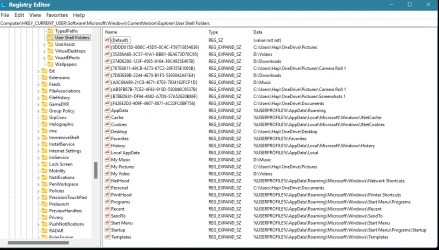
I suggest you run RegEdit then go to
HKEY_CURRENT_USER\SOFTWARE\Microsoft\Windows\CurrentVersion\Explorer\User Shell Folders
[just copy that line and paste it into RegEdit's address bar]
and post a screenshot of all the settings there.
- Drag around the column dividers [just as you would with File explorer column dividers] so that all the text in Name & Data coulmns is readable.
- Crop out bits of the screenshot that show nothing of interest so that it's easier to read what is of interest.
- Then close RegEdit after you post the screenshot.

Example:-
BrandNewUser-UserShellFolders.webp

The solution will probably be to suggest you edit the entry for My pictures since that is likely to point to OneDrive.
There might also be another one at the top [similar to the Downloads one you can see here with the very long complex name].

Denis
 

My Computer

System One

  • OS
    Windows 11 Home x64 Version 25H2 Build 26200.8037
Denis.... I hope this is what you wanted to see.

Registry Editor_2025-10-15 13_15_49.webp


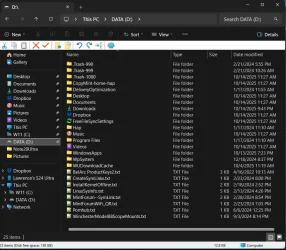
The whole left panel of File Explorer, every folder reflects the AD, "C:\Users\Hap\OneDrive\<SysFolfer>"

D__ - File Explorer_2025-10-15 13_30_22.webp
 

Attachments

  • 1760548615727.webp
    1760548615727.webp
    147.1 KB · Views: 2

My Computers

System One System Two

  • OS
    Dual Boot W11 Home25H2/Linux Mint22.2 Cinnamon
    Computer type
    Laptop
    Manufacturer/Model
    ASUS TUF Gaming A17 (2023) FA707XU-EH94
    CPU
    AMD 4Ghz Ryzen 9 7940HS w/ Radeon 780M Graphics
    Motherboard
    ASUSTeK COMPUTER INC. FA707XU 1.0
    Memory
    32GB DDR5 5600Hz
    Graphics Card(s)
    NVIDIA GeForce RTX 4050
    Sound Card
    Realtek Dolby Atmos
    Monitor(s) Displays
    17.3-inch, FHD (1920 x 1080) 16:9
    Screen Resolution
    1920 x 1080
    Hard Drives
    1TB PCIe® 4.0 NVMe™ M.2 SSD
    311GB C:W11,
    200GB D:DATA (Shared),
    108GB Linux Mint22.2
    170GB: Linux Timeshift
    PSU
    90Wh battery - 240w AC Adapter, Output: 20v DC, 12A
    Case
    Aluminum lid with a plastic base
    Cooling
    5 pipe, 4 vent, Dual 84 blade fans
    Keyboard
    Backlit Chiclet Keyboard 1-Zone RGB Touchpad
    Mouse
    Logitech MX Master 3S
    Internet Speed
    ATT Fiber Optic, 500Mb/sec
    Browser
    Firefox, Chromium
    Antivirus
    Windows Defender

    Other Info
    Realtek 8852BE Wireless LAN WiFi 6 PCI-E NIC
    Bluetooth 5.3 Wireless Card
  • Operating System
    W10 Home 22H2
    Computer type
    Laptop
    Manufacturer/Model
    HP 15-f271gm
    CPU
    Intel Pentium N3540 2.16GHz, 4 cores
    Motherboard
    Hewlett-Packard 233F v06.27
    Memory
    16GB DDR3
    Graphics card(s)
    Intel HD graphics (Bay Trail)
    Hard Drives
    ADATA SU760 512GB
    200GB C:W10, 256GB E:DATA
    PSU
    65W
    Case
    Plastic
    Cooling
    1Pipe, 1 Fan
    Mouse
    Logitech MX Master
    Internet Speed
    ATT Fiber Optic 500 Mb/sec
    Browser
    Firefox/Chromium
    Antivirus
    Windows Defender

Man-O-Man are you right on that!... And MS Edge is another example!
That's exactly why I use Linux 99% of the time, only booting into Windows when absolutely necessary!

Well Edge is pretty avoidable. I consider Edge to be adware.

Good thing alternatives to Edge are available.

About 2mo ago, I found OneDrive had been mysteriously reinstalled on my W11 laptop, so I uninstalled it

Ho-boy, how did that happen? I can take a big guess.... 😡 🤬

How does one prevent that from permanently happening...

I have a Win 11 Pro laptop that I set up using a local account. I did not supply an email address during set-up. I only had to supply an email address afterwards in order to download Office 2021 Home & Student Edition and immediately the laptop thinks I'm signed into a system-wide account. I did not intend to do that. Windows 10 Pro does the same thing. Just found out how to sign out of that version of Office not too long ago.


Check to make sure that's also not the case if you use any version of Office.
 

My Computers

System One System Two

  • OS
    Windows 11 Pro 25H2 build: (26200.7623)
    Computer type
    Laptop
    Manufacturer/Model
    Microsoft Surface Pro
    Memory
    32GB
  • Operating System
    Microsoft 25H2 Pro
    Computer type
    Laptop
    Manufacturer/Model
    Dell Pro 14 - PC14250
    CPU
    Intel Core Ultra 7
    Memory
    64GB
    Graphics card(s)
    Intel Integrated Graphics
    Hard Drives
    Micron 1TB SSD
OK.
I would always make a new system image first if I was going to fix these faults.

Let's start with your user folder Documents. It'll be the same procedure for each of them.
1 Create a Documents folder where you want it. I assume this will be at C:\Users\Hap\Documents or at D:\Documents [judging by some of your other entries]. Copy the path to it from the File explorer Address bar ready to paste in step3.
2 In the left hand "Navigation" pane of File explorer, select the Documents entry and use File explorer to move its contents to that new Documents folder you've created.
3 In the left hand "Navigation" pane of File explorer, right-click on the Documents entry & select Properties. There should be a Location tab. In its input box, paste in the copied path [Ctrl-V] then click on apply.
4 You should now be able to check that the "relocation" has completed correctly by right-clicking on that new folder C:\Users\Hap\Documents or D:\Documents or whatever you decided upon then selecting Properties. You should see that this folder now has a Location tab [demonstrating that it is now one of your user folders].
5 If it does not then go to that Registry Key, double-click on the Personal entry [Personal=Documents] and paste in the path C:\Users\Hap\Documents or D:\Documents or whatever you decided upon into its 'Value data' input box and then click on the OK button.
6 And now you should be able to repeat step 4 to check it is now the Documents user folder.

Do the same for the entries
- Desktop [you might chose C:\Users\Hap\Desktop or D:\Desktop or ...]
- My pictures [you might chose C:\Users\Hap\Pictures or D:\Pictures or ...]
and then, purely inside the Registry User Shell Folders, for the oddly-labelled lines at the top, paste in these
- In place of the line beginning ODD015D, paste in the same path you've just used for your My pictures folder
- In place of the line beginning 767, paste in the path for your My pictures but followed by \Camera roll 1
- In place of the line beginning AB5, paste in the path for your My pictures but followed by \Camera roll 1
- In place of the line beginning B7B, paste in the path for your My pictures but followed by \Screenshots
- In place of the line beginning F42, paste in the path for your Documents as done in your first step.

You should now have no OneDrive references left in your Registry User Shell Folders entries and all your user folders are now set as local folders.


All the best,
Denis
 
Last edited:

My Computer

System One

  • OS
    Windows 11 Home x64 Version 25H2 Build 26200.8037
Onedrive is a great app.....for the people that want to use it. For those that want no part of it, it is the most misunderstood thing in Windows and defaulting a customer to use OD is the absolute worst injustice MS has forced on its users.

Over and over we see users THINK they were rid of Onedrive only for it to bite them in the behind later. The reason...they did not follow through with all the steps necessary to rid themselves of it. To make it even worse, steps must be done in a proper sequence. The procedure to do this has been posted countless times here, yet even longtime members tend to cherry-pick parts of it when they advise someone with a onedrive issue. Uninstalling onedrive is not enough. Rerouting user folder location is not enough. Un-syncing to OD is not enough.

If done correctly using the proper steps in the proper order, Onedrive won't re-enable itself (unless you clean install or use Office 365 or 2019-2024 which have to be dealt with separately). But done incorrectly, most any result can happen if given the correct trigger to make it happen and the user's situation becomes even worse..
 

My Computers

System One System Two

  • OS
    Windows 11 Pro 25H2 26200.8655
    Computer type
    PC/Desktop
    Manufacturer/Model
    Dell Optiplex 7080
    CPU
    i9-10900 10 core 20 threads
    Motherboard
    DELL 0J37VM
    Memory
    32 gb
    Graphics Card(s)
    none-Intel UHD Graphics 630
    Sound Card
    Integrated Realtek
    Monitor(s) Displays
    Benq 27
    Screen Resolution
    2560x1440
    Hard Drives
    2x1tb Solidigm m.2 nvme /External drives 512gb Samsung m.2 sata+2tb Kingston m2.nvme
    PSU
    500w
    Case
    MT
    Cooling
    Dell Premium
    Keyboard
    Logitech wired
    Mouse
    Logitech wireless
    Internet Speed
    so slow I'm too embarrassed to tell
    Browser
    #1 Edge #2 Firefox
    Antivirus
    Defender+MWB Premium
  • Operating System
    Windows 11 Pro 24H2 26200.8457
    Computer type
    PC/Desktop
    Manufacturer/Model
    Beelink Mini PC SER5
    CPU
    AMD Ryzen 7 6800U
    Memory
    32 gb
    Graphics card(s)
    integrated
    Sound Card
    integrated
    Monitor(s) Displays
    Benq 27
    Screen Resolution
    2560x1440
    Hard Drives
    1TB Crucial nvme
    Keyboard
    Logitech wired
    Mouse
    Logitech wireless
    Internet Speed
    still too embarrassed to tell
    Browser
    Firefox
    Antivirus
    Defender

    Other Info
    System 3 is non compliant Dell 9020 i7-4770/24gb ram Win11 PRO 26200.8457
The procedure to do this has been posted countless times here, yet even longtime members tend to cherry-pick parts of it when they advise someone with a onedrive issue. Uninstalling onedrive is not enough. Rerouting user folder location is not enough. Un-syncing to OD is not enough.

Sorry to bother you. Once again, can you post the steps link here for those who are new to this thread and forum?

Or will the three seperate links @Ghot posted in post #2 be sufficient?

Thanks

Onedrive won't re-enable itself (unless you clean install or use Office 365 or 2019-2024 which have to be dealt with separately). But done incorrectly, most any result can happen if given the correct trigger to make it happen and the user's situation becomes even worse..

And if you never sign in to an account, OneDrive never gets activated. Correct?
 

My Computers

System One System Two

  • OS
    Windows 11 Pro 25H2 build: (26200.7623)
    Computer type
    Laptop
    Manufacturer/Model
    Microsoft Surface Pro
    Memory
    32GB
  • Operating System
    Microsoft 25H2 Pro
    Computer type
    Laptop
    Manufacturer/Model
    Dell Pro 14 - PC14250
    CPU
    Intel Core Ultra 7
    Memory
    64GB
    Graphics card(s)
    Intel Integrated Graphics
    Hard Drives
    Micron 1TB SSD
Denis....
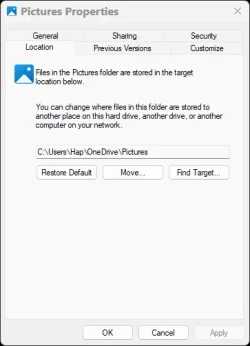
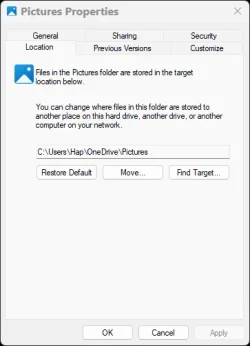
I must ask, in the ScrnSht below, in the "Location" tab, there is the option to "Restore Default". Could that possibly restore this SysFolder back to its original location, which is D:\Pictures?

Pictures Properties_2025-10-15 17_06_22.webp

In the very beginning, when this Laptop was initialized, the 1st thing I did was to create a DATA partition (D:, and /dev/nvme0n1p8), and move all System Data folders to that drive, then installed Linux. That kept all my Data separate from the OS's, and should the OS's become unbootable, I could still access that Data from a Linux Live USB session, plus all Linux Data is kept there also.
DATA (D:) is a shared Data partition for both W11 and Linux.
 

Attachments

  • Pictures Properties_2025-10-15 17_06_22.webp
    Pictures Properties_2025-10-15 17_06_22.webp
    15 KB · Views: 0

My Computers

System One System Two

  • OS
    Dual Boot W11 Home25H2/Linux Mint22.2 Cinnamon
    Computer type
    Laptop
    Manufacturer/Model
    ASUS TUF Gaming A17 (2023) FA707XU-EH94
    CPU
    AMD 4Ghz Ryzen 9 7940HS w/ Radeon 780M Graphics
    Motherboard
    ASUSTeK COMPUTER INC. FA707XU 1.0
    Memory
    32GB DDR5 5600Hz
    Graphics Card(s)
    NVIDIA GeForce RTX 4050
    Sound Card
    Realtek Dolby Atmos
    Monitor(s) Displays
    17.3-inch, FHD (1920 x 1080) 16:9
    Screen Resolution
    1920 x 1080
    Hard Drives
    1TB PCIe® 4.0 NVMe™ M.2 SSD
    311GB C:W11,
    200GB D:DATA (Shared),
    108GB Linux Mint22.2
    170GB: Linux Timeshift
    PSU
    90Wh battery - 240w AC Adapter, Output: 20v DC, 12A
    Case
    Aluminum lid with a plastic base
    Cooling
    5 pipe, 4 vent, Dual 84 blade fans
    Keyboard
    Backlit Chiclet Keyboard 1-Zone RGB Touchpad
    Mouse
    Logitech MX Master 3S
    Internet Speed
    ATT Fiber Optic, 500Mb/sec
    Browser
    Firefox, Chromium
    Antivirus
    Windows Defender

    Other Info
    Realtek 8852BE Wireless LAN WiFi 6 PCI-E NIC
    Bluetooth 5.3 Wireless Card
  • Operating System
    W10 Home 22H2
    Computer type
    Laptop
    Manufacturer/Model
    HP 15-f271gm
    CPU
    Intel Pentium N3540 2.16GHz, 4 cores
    Motherboard
    Hewlett-Packard 233F v06.27
    Memory
    16GB DDR3
    Graphics card(s)
    Intel HD graphics (Bay Trail)
    Hard Drives
    ADATA SU760 512GB
    200GB C:W10, 256GB E:DATA
    PSU
    65W
    Case
    Plastic
    Cooling
    1Pipe, 1 Fan
    Mouse
    Logitech MX Master
    Internet Speed
    ATT Fiber Optic 500 Mb/sec
    Browser
    Firefox/Chromium
    Antivirus
    Windows Defender
And if you never sign in to an account, OneDrive never gets activated. Correct?
I'm not sure how to answer this. Mostly Yes but sometimes No. There is no activation, per se. It's just there if one uses a MS account either to login to Windows or use Ofc365 or other Office versions. That's why not only does one have to stop syncing his account to Onedrive and unlink his account and PC from Onedrive, He has to change settings in his Office apps too. Even if one sets up a local account, Onedrive is still installed, just unused.

"Restore Default". Could that possibly restore this SysFolder back to its original location, which is D:\Pictures?
No "restore default" will restore default location to c:\users\. You would have to use the "Move" function.


can you post the steps link here for those who are new to this thread and forum?

@cheaterslick This is the latest rewrite of many rewrites. It's been very difficult to cover all scenarios.
:
How to Properly Remove OneDrive from Windows 11

When you sign in with a Microsoft account, Windows automatically sets Documents, Desktop, Pictures, and Videos folders to use OneDrive as their default storage location. If you don’t want to use OneDrive, you’ll need to carefully follow the steps below. Skipping or rearranging them can cause issues with your files and folders.

Important:
These instructions assume that OneDrive is still installed on your PC.
If you’ve already uninstalled it, for this procedure to work, you will need to first reinstall OneDrive by downloading it from Microsoft’s official site.
  • Restart your PC, sign in to OneDrive, and then continue with the tutorial.
Step 1: Turn Off OneDrive Folder Backup Syncing
First, you need to stop OneDrive from automatically syncing your Desktop, Documents, Pictures, and Videos folders. This guide will also help you get your files back on to your local drive.
Turn On or Off OneDrive Folder Backup Syncing in Windows 11

Only If the folders don’t automatically return to their default local location under C:\Users|YourUserName in step 1:

Use the tutorials below (Option Three) to manually restore the default location of each folder and move your files from Onedrive into it.
Move or Restore Default Location of Desktop Folder in Windows 11
Move or Restore Default Location of Documents Folder in Windows 11
Move or Restore Default Location of Pictures Folder in Windows 11
Move or Restore Default Location of Videos Folder in Windows 11 |
-----------------------------------------------------------------
Step 2: Unlink Account & PC from OneDrive

After syncing is turned off, disconnect your account and computer from OneDrive:
Unlink account & PC from Onedrive.

Once you do this the files you have in onedrive will remain there until you login to Onedrive on the Web and delete them.
Microsoft OneDrive
----------------------------------------------------------------------

Step 3: Prevent OneDrive from Starting Automatically or Uninstall Onedrive

At this point, you can either disable OneDrive from autostart or uninstall it.

NOTE: Office 365 and Ofc 2019-2024 DEFAULT save location is Onedrive. You will have to go into each Office app and change its default save location to a folder on your computer.
ALSO NOTE: : Autosave will no longer works unless files are saved to Onedrive by default.

To disable Onedrive from auto-starting(recommended):

Open Task Manager (Ctrl+Shift+Esc).

Go to the Startup Apps tab.

Find OneDrive, right-click it, and select Disable.

This prevents OneDrive from launching at startup and survives Windows and Office updates.

To Uninstall OneDrive (Optional)
Note: An Office update may reinstall Onedrive at some point.
If you prefer to completely remove OneDrive, use one of these methods:

Method 1 – Using Revo Uninstaller (recommended):
Download Revo Uninstaller Freeware Portable.
  • Open Revo and look under Windows Apps to find OneDrive.
  • Uninstall it using Revo, then run its scan feature. Check all the leftover files and registry entries Revo finds and remove.
Method 2 – Built-in Windows option:
You can also uninstall OneDrive through Windows settings, but this may leave some registry entries behind. Uninstall and Reinstall OneDrive in Windows 11
--------------------------------------------------------------
Following this sequence ensures your files are safe and your folders return to their proper locations, while OneDrive is disabled or completely removed from your system. Note: Whether this will work as written for you depends on what steps were taken in your prior attempts to get rid of Onedrive. Sometimes a user’s incorrect actions can have unwanted results. Nevertheless, your files should still be in Onedrive so they are not lost.
 

My Computers

System One System Two

  • OS
    Windows 11 Pro 25H2 26200.8655
    Computer type
    PC/Desktop
    Manufacturer/Model
    Dell Optiplex 7080
    CPU
    i9-10900 10 core 20 threads
    Motherboard
    DELL 0J37VM
    Memory
    32 gb
    Graphics Card(s)
    none-Intel UHD Graphics 630
    Sound Card
    Integrated Realtek
    Monitor(s) Displays
    Benq 27
    Screen Resolution
    2560x1440
    Hard Drives
    2x1tb Solidigm m.2 nvme /External drives 512gb Samsung m.2 sata+2tb Kingston m2.nvme
    PSU
    500w
    Case
    MT
    Cooling
    Dell Premium
    Keyboard
    Logitech wired
    Mouse
    Logitech wireless
    Internet Speed
    so slow I'm too embarrassed to tell
    Browser
    #1 Edge #2 Firefox
    Antivirus
    Defender+MWB Premium
  • Operating System
    Windows 11 Pro 24H2 26200.8457
    Computer type
    PC/Desktop
    Manufacturer/Model
    Beelink Mini PC SER5
    CPU
    AMD Ryzen 7 6800U
    Memory
    32 gb
    Graphics card(s)
    integrated
    Sound Card
    integrated
    Monitor(s) Displays
    Benq 27
    Screen Resolution
    2560x1440
    Hard Drives
    1TB Crucial nvme
    Keyboard
    Logitech wired
    Mouse
    Logitech wireless
    Internet Speed
    still too embarrassed to tell
    Browser
    Firefox
    Antivirus
    Defender
    Other Info
    System 3 is non compliant Dell 9020 i7-4770/24gb ram Win11 PRO 26200.8457
Nuking OneDrive is one of the very first steps in a new install for me! I treat it as a virus. Since I don't have anything but they're puny 5GB free account if I activate it, it's pretty useless for me anyway. I'm not paying MSC for adding complications to my life! Add to that the fact that it does things behind your back, and it's simply gotta' go!
 

My Computers

System One System Two

  • OS
    Win 11 Pro 25H2, Build 26200.8655
    Computer type
    PC/Desktop
    Manufacturer/Model
    Home Brew
    CPU
    Intel Core i5 14500
    Motherboard
    Gigabyte B760M G P WIFI
    Memory
    64GB DDR4
    Graphics Card(s)
    GeForce RTX 4060
    Sound Card
    Chipset Realtek
    Monitor(s) Displays
    LG 45" Ultragear, Acer 24" 1080p
    Screen Resolution
    5120x1440, 1920x1080
    Hard Drives
    Crucial P310 2TB 2280 PCIe Gen4 3D NAND NVMe M.2 SSD (O/S)
    Silicon Power 2TB US75 NVMe PCIe Gen4 M.2 2280 SSD (backup)
    Crucial BX500 2TB 3D NAND (2nd backup)
    Seagate 4TB Ironwolf, rotating HDD archive files
    External off-line backup Drives: 2 NVMe 4TB drives in external enclosures
    PSU
    Thermaltake Toughpower GF3 750W
    Case
    LIAN LI LANCOOL 216 E-ATX PC Case
    Cooling
    Lots of fans!
    Keyboard
    Microsoft Comfort Curve 2000
    Mouse
    Logitech G305
    Internet Speed
    Verizon FiOS 1GB
    Browser
    Firefox
    Antivirus
    Malware Bytes & Windows Defender Security
  • Operating System
    Win 11 Pro 25H2, Build 26200.8524
    Computer type
    PC/Desktop
    Manufacturer/Model
    Home Brew
    CPU
    Intel Core i5 14400
    Motherboard
    Gigabyte B760M DS3H AX
    Memory
    32GB DDR5
    Graphics card(s)
    Intel 700 Embedded GPU
    Sound Card
    Realtek Embedded
    Monitor(s) Displays
    27" HP 1080p
    Screen Resolution
    1920x1080
    Hard Drives
    Crucial P310 2TB 2280 PCIe Gen4 eD NAND PCIe SSD
    Samsung EVO 990 2TB NVMe Gen4 SSD
    Samsung 2TB SATA SSD
    PSU
    Thermaltake Smart BM3 650W
    Case
    Okinos Micro ATX Case
    Cooling
    Fans
    Keyboard
    Microsoft Comfort Curve 2000
    Mouse
    Logitech G305
    Internet Speed
    Verizon FiOS 1GB
    Browser
    Firefox
    Antivirus
    Malware Bytes & Windows Defender Security
Microsoft is trying to create, "Dependency".
They get you used to using it, i.e. depending on it, so you have to purchase progressively larger plans!
I do my best to keep both, Google and Microsoft out of my life and computer!
That is why I basically rely on Linux for my computing needs, only to use W11 in "have to" situations!
 

My Computers

System One System Two

  • OS
    Dual Boot W11 Home25H2/Linux Mint22.2 Cinnamon
    Computer type
    Laptop
    Manufacturer/Model
    ASUS TUF Gaming A17 (2023) FA707XU-EH94
    CPU
    AMD 4Ghz Ryzen 9 7940HS w/ Radeon 780M Graphics
    Motherboard
    ASUSTeK COMPUTER INC. FA707XU 1.0
    Memory
    32GB DDR5 5600Hz
    Graphics Card(s)
    NVIDIA GeForce RTX 4050
    Sound Card
    Realtek Dolby Atmos
    Monitor(s) Displays
    17.3-inch, FHD (1920 x 1080) 16:9
    Screen Resolution
    1920 x 1080
    Hard Drives
    1TB PCIe® 4.0 NVMe™ M.2 SSD
    311GB C:W11,
    200GB D:DATA (Shared),
    108GB Linux Mint22.2
    170GB: Linux Timeshift
    PSU
    90Wh battery - 240w AC Adapter, Output: 20v DC, 12A
    Case
    Aluminum lid with a plastic base
    Cooling
    5 pipe, 4 vent, Dual 84 blade fans
    Keyboard
    Backlit Chiclet Keyboard 1-Zone RGB Touchpad
    Mouse
    Logitech MX Master 3S
    Internet Speed
    ATT Fiber Optic, 500Mb/sec
    Browser
    Firefox, Chromium
    Antivirus
    Windows Defender
    Other Info
    Realtek 8852BE Wireless LAN WiFi 6 PCI-E NIC
    Bluetooth 5.3 Wireless Card
  • Operating System
    W10 Home 22H2
    Computer type
    Laptop
    Manufacturer/Model
    HP 15-f271gm
    CPU
    Intel Pentium N3540 2.16GHz, 4 cores
    Motherboard
    Hewlett-Packard 233F v06.27
    Memory
    16GB DDR3
    Graphics card(s)
    Intel HD graphics (Bay Trail)
    Hard Drives
    ADATA SU760 512GB
    200GB C:W10, 256GB E:DATA
    PSU
    65W
    Case
    Plastic
    Cooling
    1Pipe, 1 Fan
    Mouse
    Logitech MX Master
    Internet Speed
    ATT Fiber Optic 500 Mb/sec
    Browser
    Firefox/Chromium
    Antivirus
    Windows Defender
Well, I don't have any ties to Microsoft or Google subscription plans, and I'm keeping it that way until it's not possible!
 

My Computers

System One System Two

  • OS
    Win 11 Pro 25H2, Build 26200.8655
    Computer type
    PC/Desktop
    Manufacturer/Model
    Home Brew
    CPU
    Intel Core i5 14500
    Motherboard
    Gigabyte B760M G P WIFI
    Memory
    64GB DDR4
    Graphics Card(s)
    GeForce RTX 4060
    Sound Card
    Chipset Realtek
    Monitor(s) Displays
    LG 45" Ultragear, Acer 24" 1080p
    Screen Resolution
    5120x1440, 1920x1080
    Hard Drives
    Crucial P310 2TB 2280 PCIe Gen4 3D NAND NVMe M.2 SSD (O/S)
    Silicon Power 2TB US75 NVMe PCIe Gen4 M.2 2280 SSD (backup)
    Crucial BX500 2TB 3D NAND (2nd backup)
    Seagate 4TB Ironwolf, rotating HDD archive files
    External off-line backup Drives: 2 NVMe 4TB drives in external enclosures
    PSU
    Thermaltake Toughpower GF3 750W
    Case
    LIAN LI LANCOOL 216 E-ATX PC Case
    Cooling
    Lots of fans!
    Keyboard
    Microsoft Comfort Curve 2000
    Mouse
    Logitech G305
    Internet Speed
    Verizon FiOS 1GB
    Browser
    Firefox
    Antivirus
    Malware Bytes & Windows Defender Security
  • Operating System
    Win 11 Pro 25H2, Build 26200.8524
    Computer type
    PC/Desktop
    Manufacturer/Model
    Home Brew
    CPU
    Intel Core i5 14400
    Motherboard
    Gigabyte B760M DS3H AX
    Memory
    32GB DDR5
    Graphics card(s)
    Intel 700 Embedded GPU
    Sound Card
    Realtek Embedded
    Monitor(s) Displays
    27" HP 1080p
    Screen Resolution
    1920x1080
    Hard Drives
    Crucial P310 2TB 2280 PCIe Gen4 eD NAND PCIe SSD
    Samsung EVO 990 2TB NVMe Gen4 SSD
    Samsung 2TB SATA SSD
    PSU
    Thermaltake Smart BM3 650W
    Case
    Okinos Micro ATX Case
    Cooling
    Fans
    Keyboard
    Microsoft Comfort Curve 2000
    Mouse
    Logitech G305
    Internet Speed
    Verizon FiOS 1GB
    Browser
    Firefox
    Antivirus
    Malware Bytes & Windows Defender Security
(Here we go again..., yet another instance where OneDrive has made someone's life miserable!!!) :facepalm::facepalm::facepalm:
MS should be really proud of their malware!!!
It keeps claiming more victims. 😔
 

My Computers

System One System Two

  • OS
    Windows 11 Pro
    Computer type
    PC/Desktop
    Manufacturer/Model
    Stigg's Build
    CPU
    Intel Core i9-10900X
    Motherboard
    GIGABYTE X299X DESIGNARE 10G
    Memory
    Corsair 64 GB (4 x 16 GB) CMW64GX4M4C3000C15 Vengeance RGB Pro 3000Mhz DDR4
    Graphics Card(s)
    GIGABYTE GeForce GTX 1660 Super Mini ITX 6 GB OC
    Sound Card
    Realtek ALC1220
    Monitor(s) Displays
    Samsung 27" FHD LED FreeSync Gaming Monitor (LS27F350FHEXXY)
    Screen Resolution
    1920 x 1080
    Hard Drives
    Samsung 970 Pro Series 1TB M.2 2280 NVMe SSD
    Western Digital Red Pro WD8003FFBX-68B9AN0 8 TB, 7200 RPM, SATA-III
    Western Digital Red Pro WD8003FFBX-68B9AN0 8 TB, 7200 RPM, SATA-III
    PSU
    Corsair HX1200 1200W 80 Plus Platinum
    Case
    Fractal Design Define 7 Black Solid Case
    Cooling
    Noctua NH-D15 Chromax Black
    Keyboard
    Razer Ornata V2
    Mouse
    Razer DeathAdder Essential
    Internet Speed
    FTTN 100Mbps / 40Mbps
    Browser
    Mozilla Firefox
    Antivirus
    N/A
    Other Info
    Logitech BRIO 4k Ultra HD USB-C Webcam
  • Operating System
    Windows 10 Pro
    Computer type
    Laptop
    Manufacturer/Model
    ASUS ROG Zephyrus M GM501GS
    CPU
    Core i7-8750H
    Motherboard
    Zephyrus M GM501GS
    Memory
    SK Hynix 32 GB (2 x 16 GB) HMA82GS6CJR8N-VK 16 GB DDR4-2666 DDR4 SDRAM
    Graphics card(s)
    NVIDIA GeForce GTX 1070
    Sound Card
    Realtek ALC294
    Monitor(s) Displays
    AU Optronics B156HAN07.1 [15.6" LCD]
    Screen Resolution
    1920 x 1080
    Hard Drives
    Samsung MZVKW512HMJP-00000 512 GB, PCI-E 3.0 x4
    Samsung SSD 860 QVO 4TB 4 TB, SATA-III
    PSU
    N/A
    Case
    N/A
    Cooling
    N/A
    Keyboard
    PC/AT Enhanced PS2 Keyboard (101/102-Key)
    Mouse
    Razer DeathAdder Essential
    Internet Speed
    FTTN 100Mbps / 40Mbps
    Browser
    Mozilla Firefox
    Antivirus
    N/A
    Other Info
    USB2.0 HD UVC Webcam
Microsoft is trying to create, "Dependency".
They get you used to using it, i.e. depending on it, so you have to purchase progressively larger plans!
I do my best to keep both, Google and Microsoft out of my life and computer!
That is why I basically rely on Linux for my computing needs, only to use W11 in "have to" situations!
Meh. Have a little fun. Show a little heart. Windows isn't all that bad.
MS isn't "trying" to create dependency — they already developed it and produced it.
When you really think about it they are the originators of ransom ware.
These boys think big. 😎
 

My Computer

System One

  • OS
    WIN 11, WIN 10, WIN 8.1, WIN 7 U, WIN 7 PRO, WIN 7 HOME (32 Bit), LINUX MINT
    Computer type
    PC/Desktop
    Manufacturer/Model
    DIY, ASUS, and DELL
    CPU
    Intel i7 6900K and i9-7960X / AMD 3800X (8 core)
    Motherboard
    ASUS X99E-WS USB 3.1 and ASUS X299 SAGE
    Memory
    128 GB CORSAIR DOMINATOR PLATINUM (B DIE)
    Graphics Card(s)
    NVIDIA 1070 and RTX 3070
    Sound Card
    Crystal Sound (onboard)
    Monitor(s) Displays
    single Samsung 30" 4K and 8" aux monitor
    Screen Resolution
    4K and something equally attrocious. I'll be working on this.
    Hard Drives
    A, B, C, D, E, F, G, H, I, J, K, L, M, N, O, P, Q, R, S, T, U, V, W

    Ports X, Y, and Z are reserved for USB access and removable drives.

    Drive types consist of the following: Various mechanical hard drives bearing the brand names, Seagate, Toshiba, and Western Digital. Various NVMe drives bearing the brand names Kingston, Intel, Silicon Power, Crucial, Western Digital, and Team Group. Various SATA SSDs bearing various different brand names.

    RAID arrays included:

    LSI RAID 10 (WD Velociraptors) 1115.72 GB
    LSI RAID 10 (WD SSDS) 463.80 GB

    INTEL RAID 0 (KINGSTON HYPER X) System 447.14 GB
    INTEL RAID 1 TOSHIBA ENTERPRIZE class Data 2794.52 GB
    INTEL RAID 1 SEAGATE HYBRID 931.51 GB
    PSU
    SEVERAL. I prefer my Corsair Platinum HX1000i but I also like EVGA power supplies
    Case
    ThermalTake Level 10 GT (among others)
    Cooling
    Noctua is my favorite and I use it in my main. I also own various other coolers.
    Keyboard
    all kinds.
    Mouse
    all kinds
    Internet Speed
    360 mbps - 1 gbps (depending)
    Browser
    FIREFOX
    Antivirus
    KASPERSKY (no apologies)
    Other Info
    Gave Dell touch screen with Windows 11 to daughter and got me an OTVOC. Being a PC builder I own many desktop PCs as well. I am a father of five providing PCs, laptops, and tablets for all my family, most of which I have modified, rebuilt, or simply built from scratch. I do not own a cell phone, never have, never will.
Back
Top Bottom