SYSTEM CONTEXT:
=============
- OS Edition: Windows 11 Pro
Version: 23H2
Build: 22631.3672
Windows Feature Experience Pack: 1000.22700.1009.0
- OneDrive
Build 24.091.0505.0003 (64 bits)
- My account is "System Administrator"/"Owner"/"OneDrive "cloud" Organizer.
PROBLEM
=======
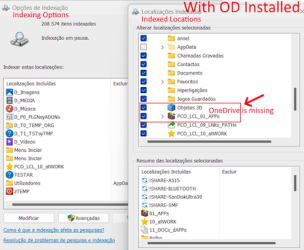
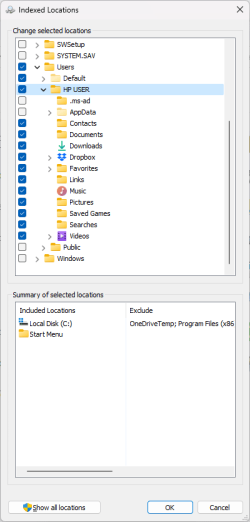
Although the local OneDrive folder exists, located at <C:\users\"username"\OneDrive>, the folder does not appear in the Windows Indexer, under <Indexed Locations>, in the path <C:\users\"username"\ > therefore the Indexer cannot index the OneDrive Local folder! Windows and OneDrive are up to date (as seen above).
I've already run a "System File Check", with the SFC and DISM commands (everything is fine!)
I've already unlinked and re-linked the OneDrive account.
I've already uninstalled and reinstalled the OneDrive
NOTE: only with the OneDrive uninstalledthe path <C:\users\"username"\OneDrive> appeared in <Indexed Locations> and it disappeared immediately after reinstalling OneDrive!
I've already transferred all files from OneDrive cloud to One Drive Local,"OneDrive Settings>Sync and Backup>Advanced Settings>Transfer all files" (it's been days!)
NOTE: the old option {... “Files On Demand”, uncheck “Save space and download files as you use them”...} no longer exists, as such, in the OneDrive config/settings.
I've already performed a clean boot (through msconfig) only maintaining the MS services.
I don't have malware on the system.
... "others"
Nothing solved the problem! NOTE: all the processes above indicated were preceded and followed by a restart of the System.
Any suggestions for solving the problem? Thanks
Windows Build/Version
Windows 11 Pro, 23H2, 22631.3672
My Computer
At a glance
Windows 11 ProIntel Core i7-12700H32 GBIntel Iris Xe Graphics (1024MB) and NVIDIA Ge...
There are more than 2 months since I put this problem on "FeedbackPortal.microsoft.com" ( Community ) and I haven't had any suggestions to solve it yet!
I don't know if there are more people with this problem — it looks like it would be necessary to have a "critical mass" of Windows users with the same problem to have greater attention from MS!
There seems to be only one last "desperate" attempt to see if I can solve the problem: perform an in-place install of Windows! I would like to have your opinion!
Thank you in advance!
My Computer
At a glance
Windows 11 ProIntel Core i7-12700H32 GBIntel Iris Xe Graphics (1024MB) and NVIDIA Ge...
This thread sort of interesting to me. I have and still notice that OneDrive does not appear in my list of indexed locations. Maybe never has? But as far as I can tell, the items I want to have indexed and available via searching are available for searching. And appear in File History.
So I have just put it down to one of those many Windows mysteries we encounter. Of course I may be missing some items I would like to have indexed and saved to File History, but I don't know what they may be.
My Computer
At a glance
Windows 11 25H2 26200.94572.10GHz Intel 12th Gen Core i7-1270016GBNVIDIA GeForce 3050
OS
Windows 11 25H2 26200.9457
Computer type
PC/Desktop
Manufacturer/Model
HP Envy Desktop TE02-0xxx
CPU
2.10GHz Intel 12th Gen Core i7-12700
Motherboard
HP 'BlizzardU' 894B 10; Chipset Intel ADL Z690
Memory
16GB
Graphics Card(s)
NVIDIA GeForce 3050
Sound Card
Realtek Audio
Monitor(s) Displays
HP27er
Screen Resolution
1920x1080
Hard Drives
256GB NVMe SSD
2TB HDD
PSU
600W
Case
Desktop Tower
Cooling
Air
Keyboard
Logitech K350
Mouse
Logitech M510
Internet Speed
25Mps (Max)
Browser
Chrome
Antivirus
Windows native security
Other Info
HP replaced SSD under warranty in November, 2023.
No VPN.