- Local time
- 1:13 PM
- Posts
- 392
- OS
- Windows 11 Pro 25H2 build 26200.8875
Hello everyone,
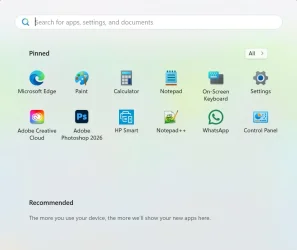
I was just about to shut down for the night when I realized that my Start Menu went back to the original way (without the recent items as I tweaked it). Now the All [Apps] is back to a button in the upper right instead of being listed under the Pinned items. This just happened. I didn't do any update nor roll back any updates. It just popped up that way.
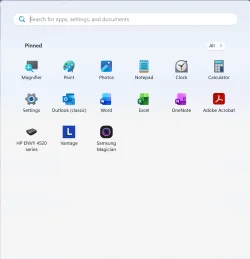
Anyone else seeing the same?
Kind regards,
tecknot
I was just about to shut down for the night when I realized that my Start Menu went back to the original way (without the recent items as I tweaked it). Now the All [Apps] is back to a button in the upper right instead of being listed under the Pinned items. This just happened. I didn't do any update nor roll back any updates. It just popped up that way.
Anyone else seeing the same?
Kind regards,
tecknot
My Computer
At a glance
Windows 11 Pro 25H2 build 26200.8875Intel i7 8750H @ 2.2 GHz16 GB (all Samsung) DDR4-3200 SODIMM (non-ECC...Intel UHD Graphics 630 & NVIDIA Quadro P600
- OS
- Windows 11 Pro 25H2 build 26200.8875
- Computer type
- Laptop
- Manufacturer/Model
- Lenovo ThinkPad Workstation P72
- CPU
- Intel i7 8750H @ 2.2 GHz
- Motherboard
- Lenovo 01YU291
- Memory
- 16 GB (all Samsung) DDR4-3200 SODIMM (non-ECC) PCIe 3
- Graphics Card(s)
- Intel UHD Graphics 630 & NVIDIA Quadro P600
- Sound Card
- Realtek ALC3286 & Focusrite Saffire 24 Pro DSP
- Monitor(s) Displays
- 17.3"
- Screen Resolution
- 3840x2160
- Hard Drives
- 1TB SSD Samsung 860 EVO SATA 3
1TB SSD Samsung 970 EVO M.2 NVMe PCIe 3 x 4
2TB SSD Samsung 990 PRO M.2 NVMe PCIe 3 x 4
- PSU
- 230W
- Cooling
- fan
- Keyboard
- UltraNav
- Mouse
- Kensington wireless Orbit
- Internet Speed
- 640Mbps
- Browser
- DuckDuckGo and Firefox
- Antivirus
- Defender
- Other Info
- CM246 Chipset


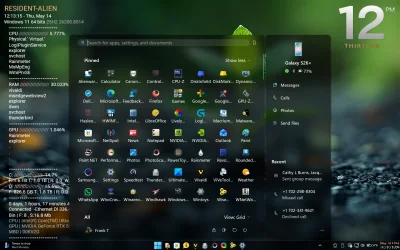


 And/or microsoft can read my google searches about start 11 (which I was just looking up but don't fancy it).
 I will do that when it reverts back again! Right now it has just reverted to the old one.