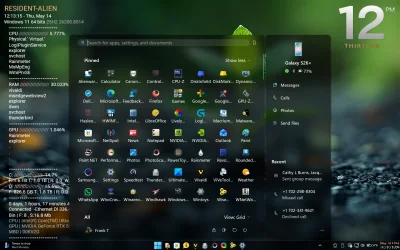
Original start menu restored


tecknot

living in a van down by the river
Power User
Local time
5:14 AM
Posts
391
OS
Windows 11 Pro 25H2 build 26200.8457
Hello everyone,

I was just about to shut down for the night when I realized that my Start Menu went back to the original way (without the recent items as I tweaked it). Now the All [Apps] is back to a button in the upper right instead of being listed under the Pinned items. This just happened. I didn't do any update nor roll back any updates. It just popped up that way.
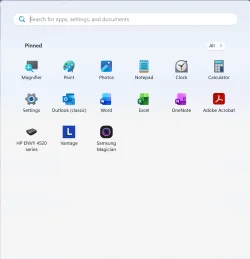
start menu.webp

Anyone else seeing the same?

Kind regards,

tecknot
 

My Computer

System One

  • OS
    Windows 11 Pro 25H2 build 26200.8457
    Computer type
    Laptop
    Manufacturer/Model
    Lenovo ThinkPad Workstation P72
    CPU
    Intel i7 8750H @ 2.2 GHz
    Motherboard
    Lenovo 01YU291
    Memory
    16 GB (all Samsung) DDR4-3200 SODIMM (non-ECC) PCIe 3
    Graphics Card(s)
    Intel UHD Graphics 630 & NVIDIA Quadro P600
    Sound Card
    Realtek ALC3286 & Focusrite Saffire 24 Pro DSP
    Monitor(s) Displays
    17.3"
    Screen Resolution
    3840x2160
    Hard Drives
    1TB SSD Samsung 860 EVO SATA 3
    1TB SSD Samsung 970 EVO M.2 NVMe PCIe 3 x 4
    2TB SSD Samsung 990 PRO M.2 NVMe PCIe 3 x 4
    PSU
    230W
    Cooling
    fan
    Keyboard
    UltraNav
    Mouse
    Kensington wireless Orbit
    Internet Speed
    640Mbps
    Browser
    DuckDuckGo and Firefox
    Antivirus
    Defender
    Other Info
    CM246 Chipset
Mine never changed to the new Start Menu.
 

My Computers

System One System Two

  • OS
    Win 11 Home ♦♦♦26200.8457 ♦♦♦♦♦♦♦25H2
    Computer type
    PC/Desktop
    Manufacturer/Model
    Built by Ghot® [May 2020]
    CPU
    AMD Ryzen 7 3700X
    Motherboard
    Asus Pro WS X570-ACE (BIOS 5302)
    Memory
    G.Skill (F4-3200C14D-16GTZKW)
    Graphics Card(s)
    EVGA RTX 2070 (08G-P4-2171-KR)
    Sound Card
    Realtek ALC1220P / ALC S1220A
    Monitor(s) Displays
    Dell U3011 30"
    Screen Resolution
    2560 x 1600
    Hard Drives
    2x Samsung 860 EVO 500GB,
    WD 4TB Black FZBX - SATA III,
    WD 8TB Black FZBX - SATA III,
    DRW-24B1ST CD/DVD Burner
    PSU
    PC Power & Cooling 750W Quad EPS12V
    Case
    Cooler Master ATCS 840 Tower
    Cooling
    CM Hyper 212 EVO (push/pull)
    Keyboard
    Ducky DK9008 Shine II Blue LED
    Mouse
    Logitech Optical M-100
    Internet Speed
    300/300
    Browser
    Firefox (latest)
    Antivirus
    Bitdefender Total Security
    Other Info
    Speakers: Klipsch Pro Media 2.1
  • Operating System
    Windows XP Pro 32bit w/SP3
    Computer type
    PC/Desktop
    Manufacturer/Model
    Built by Ghot® (not in use)
    CPU
    AMD Athlon 64 X2 5000+ (OC'd @ 3.2Ghz)
    Motherboard
    ASUS M2N32-SLI Deluxe Wireless Edition
    Memory
    TWIN2X2048-6400C4DHX (2 x 1GB, DDR2 800)
    Graphics card(s)
    EVGA 256-P2-N758-TR GeForce 8600GT SSC
    Sound Card
    Onboard
    Monitor(s) Displays
    ViewSonic G90FB Black 19" Professional (CRT)
    Screen Resolution
    up to 2048 x 1536
    Hard Drives
    WD 36GB 10,000rpm Raptor SATA
    Seagate 80GB 7200rpm SATA
    Lite-On LTR-52246S CD/RW
    Lite-On LH-18A1P CD/DVD Burner
    PSU
    PC Power & Cooling Silencer 750 Quad EPS12V
    Case
    Generic Beige case, 80mm fans
    Cooling
    ZALMAN 9500A 92mm CPU Cooler
    Keyboard
    Logitech Classic Keybooard 200
    Mouse
    Logitech Optical M-BT96a
    Internet Speed
    300/300
    Browser
    Firefox 3.x ??
    Antivirus
    Symantec (Norton)
    Other Info
    Still assembled, still runs. Haven't turned it on for 15 years?
Try this:
 

My Computer

System One

  • OS
    Windows 11 Pro Insider 64 bit 25H2 26200.5742
    Computer type
    PC/Desktop
    Manufacturer/Model
    Gigabyte Z390 UD
    CPU
    Intel Core i7 9700K 3.60
    Motherboard
    Gigabyte Z390 UD
    Memory
    16 GB
    Graphics Card(s)
    nVidia GEForce RTX 2060 Super
    Sound Card
    onboard
    Monitor(s) Displays
    Two 27" Dell 4K monitors
    Screen Resolution
    3840 x 2160
    Hard Drives
    M.2 NVME SSD, 500 GB; Two 2TB Mechanical HDD's
    PSU
    850w PSU
    Case
    Cyberpower PC
    Cooling
    Water cooled
    Keyboard
    Backlit Cyberpower gaming keyboard
    Mouse
    Backlit Cyberpower gaming mouse
    Internet Speed
    1 GB mbps
    Browser
    Brave
    Antivirus
    Windows Security
Yes, the Windows 11 Start menu keeps changing back to the small Start menu then to the awful upgraded Start menu between updates. Microsoft is very inconsistent on updating features.
 

My Computer

System One

  • OS
    Windows 11 Pro
    Computer type
    Laptop
    Manufacturer/Model
    Dell 16 Plus DB16255
    CPU
    AMD Ryzen AI 7 350 w/ Radeon 860M 50 TOPS
    Motherboard
    Dell 0PKMHG
    Memory
    32GB LPDDR5X 7500 MT/s
    Graphics Card(s)
    AMD Radeon 860M integrated (shared memory)
    Sound Card
    Stereo speakers (2.5 W x 2 = 5 W total peak)/Realtek SounzReal/Dolby Atmos
    Monitor(s) Displays
    Displays: 16" 1920 x 1200 (Full HD+/WUXGA) 300 nits 60Hz *** Samsung - 27” Odyssey FHD IPS 240Hz G-Sync Gaming Monitor
    Screen Resolution
    1920x1080 @ 60Hz
    Hard Drives
    EG6 KIOXIA 1TB NVME
    Case
    Ice Blue
    Cooling
    "dual-fan" or "enhanced" air-cooling system
    Mouse
    Logitech M650 Wireless/Bluetooth
    Internet Speed
    800/600 Fiber
I wish mine would do that! I updated and found I had a new start menu and really don't want it! It's horrible. I changed it to list view but the top of the list is still visible. I had already adapted to the old start menu by pinning what I needed either on the taskbar or the main menu and so rarely, if ever, needed to do the extra click to open the main apps menu. And I was quite happy with that so now don't want the blooming thing in my face in a stupid location!

Are there are any tips for putting it back the way it was before?
 

My Computers

System One System Two

  • OS
    Windows 11 Home 25H2
    Computer type
    Laptop
    Manufacturer/Model
    HP Pavilion 14-ce3606sa
    CPU
    Core i5-1035G1
    Memory
    32gb
    Hard Drives
    Samsung 870 evo sata ssd
    Cooling
    Could be better
    Internet Speed
    50 mbps Starlink
    Browser
    Firefox
    Other Info
    Originally came installed with a 500gb H10 Optane ssd
  • Operating System
    Windows 11 Home
    Computer type
    Laptop
    Manufacturer/Model
    HP Pavilion ce3606sa
    CPU
    Intel Core i5-1035G1
    Memory
    16gb
    Hard Drives
    Hynix Gold P31 2TB
    Internet Speed
    200mbps Starlink
    Browser
    Firefox
    Antivirus
    Defender
Found this video which shows how to use Vivetool to put it back how it was before. Although it does say it could still end up changing back again.


My Computers

System One System Two

  • OS
    Windows 11 Home 25H2
    Computer type
    Laptop
    Manufacturer/Model
    HP Pavilion 14-ce3606sa
    CPU
    Core i5-1035G1
    Memory
    32gb
    Hard Drives
    Samsung 870 evo sata ssd
    Cooling
    Could be better
    Internet Speed
    50 mbps Starlink
    Browser
    Firefox
    Other Info
    Originally came installed with a 500gb H10 Optane ssd
  • Operating System
    Windows 11 Home
    Computer type
    Laptop
    Manufacturer/Model
    HP Pavilion ce3606sa
    CPU
    Intel Core i5-1035G1
    Memory
    16gb
    Hard Drives
    Hynix Gold P31 2TB
    Internet Speed
    200mbps Starlink
    Browser
    Firefox
    Antivirus
    Defender
I wish mine would do that! I updated and found I had a new start menu and really don't want it! It's horrible. I changed it to list view but the top of the list is still visible.

Are there are any tips for putting it back the way it was before?
If you fill the pinned items all the way you won't see the top of the list lol. I know, not much help but I remember reading they are already working on a new Start Menu that is more customizable and will let us choose the size if that helps.
 

Attachments

  • Screenshot (1).webp
    Screenshot (1).webp
    251.7 KB · Views: 3

My Computers

System One System Two

  • OS
    Windows 11 25H2
    Computer type
    Laptop
    Manufacturer/Model
    Alienware 18 Area-51
    CPU
    Intel Core Ultra 9 275HX (24-Core)
    Motherboard
    Alienware
    Memory
    64GB DDR5 6400MT/s
    Graphics Card(s)
    NVIDIA GeForce RTX 5080 and Intel UHD Graphics
    Sound Card
    Onboard, Realtek high-performance Audio chips (ALC3329 & ALC1708))
    Monitor(s) Displays
    300HZ 18-inch QHD 500 nit Comfort View+
    Screen Resolution
    2560 x 1600
    Hard Drives
    2TB NVMe M.2 PCIe Gen 5 SSD
    Case
    Magnesium Alloy
    Cooling
    Advanced Cryo-Tech Quad-Fan Cooling system & large vapor chamber
    Keyboard
    Cherry MX ultra low profile mechanical keyboard with per key AlienFX RGB lighting
    Mouse
    Logitech MX Master 4
    Browser
    Vivaldi (main), Firefox, Chrome, Edge
    Antivirus
    MS Defender and Malwarebytes Free
  • Operating System
    Windows 11 25H2
    Computer type
    Laptop
    Manufacturer/Model
    Microsoft Surface Laptop 7
    CPU
    Qualcomm Snapdragon X Elite (12 Core) ARM based CPU
    Motherboard
    Microsoft Corp.
    Memory
    16GB LPDDR5
    Graphics card(s)
    Qualcomm Adreno X1-85
    Sound Card
    Omnisonic speakers with Dolby Atmos spatial sound
    Monitor(s) Displays
    120 Hz 13.8-inch 600 nit PixelSense Flow touchscreen
    Screen Resolution
    2304x1536
    Hard Drives
    1TB NVMe Gen 4 SSD
    Case
    Anodized Aluminum
    Cooling
    Traditional active cooling fan system
    Keyboard
    Mechanical QWERTY, backlit when in use
    Mouse
    Logitech MX Master 4 and Surface Arc Mouse
    Browser
    Vivaldi (main), Firefox, Chrome, Edge
    Antivirus
    MS Defender and Malwarebytes Free
Are there are any tips for putting it back the way it was before?
It involves the use of vivetool:

Code:
vivetool /disable /id:47205210

Restart your system.

-It is unknown how long this will last though.
 

My Computers

System One System Two

  • OS
    All Branches but Release
    Computer type
    Laptop
    Manufacturer/Model
    Acer Nitro ANV15-51
    CPU
    AMD Ryzen 7 7735HS 3200-4500 Mhz 8 cores x 2
    Motherboard
    Sportage_RBH
    Memory
    32 GB DDR5
    Graphics Card(s)
    Radeon Graphic / NVIDIA GeForce RTX 4060 8 GB GDDR6
    Sound Card
    AMD/Realtek(R) Audio
    Monitor(s) Displays
    Integrated Monitor (15.3"vis)
    Screen Resolution
    FHD 1920X1080 16:9 144Hz
    Hard Drives
    KINGSTON OM8SEP4512Q-AA 1TB
    Western Digital 256GB
    PSU
    19V DC 6.32 A 120 W
    Cooling
    Dual Fans
    Mouse
    MS Bluetooth
    Internet Speed
    Fiber 1GB Cox -us & 1GB Orange-fr
    Browser
    Edge Canary- Firefox Nightly-Chrome Dev-Chrome Dev
    Antivirus
    Windows Defender
  • Operating System
    Windows 11 Beta
    Computer type
    Laptop
    Manufacturer/Model
    Asus X751BP
    CPU
    AMD A9-9420
    Memory
    8 GB of DDR4
    Graphics card(s)
    AMD Radeon R5
    Screen Resolution
    1600x900
    Hard Drives
    Seagate 1 TB

just save the PS1 i made here and you can toggle between the new/old via a gui
 

My Computer

System One

  • OS
    Windows 11 Pro
Ha - and now mine has also reverted back to the old one just now! All on its own. This must mean microsoft can read what I typed on here ...... 😲 And/or microsoft can read my google searches about start 11 (which I was just looking up but don't fancy it).
 

My Computers

System One System Two

  • OS
    Windows 11 Home 25H2
    Computer type
    Laptop
    Manufacturer/Model
    HP Pavilion 14-ce3606sa
    CPU
    Core i5-1035G1
    Memory
    32gb
    Hard Drives
    Samsung 870 evo sata ssd
    Cooling
    Could be better
    Internet Speed
    50 mbps Starlink
    Browser
    Firefox
    Other Info
    Originally came installed with a 500gb H10 Optane ssd
  • Operating System
    Windows 11 Home
    Computer type
    Laptop
    Manufacturer/Model
    HP Pavilion ce3606sa
    CPU
    Intel Core i5-1035G1
    Memory
    16gb
    Hard Drives
    Hynix Gold P31 2TB
    Internet Speed
    200mbps Starlink
    Browser
    Firefox
    Antivirus
    Defender

just save the PS1 i made here and you can toggle between the new/old via a gui
Thank you ❤️ I will do that when it reverts back again! Right now it has just reverted to the old one.
 

My Computers

System One System Two

  • OS
    Windows 11 Home 25H2
    Computer type
    Laptop
    Manufacturer/Model
    HP Pavilion 14-ce3606sa
    CPU
    Core i5-1035G1
    Memory
    32gb
    Hard Drives
    Samsung 870 evo sata ssd
    Cooling
    Could be better
    Internet Speed
    50 mbps Starlink
    Browser
    Firefox
    Other Info
    Originally came installed with a 500gb H10 Optane ssd
  • Operating System
    Windows 11 Home
    Computer type
    Laptop
    Manufacturer/Model
    HP Pavilion ce3606sa
    CPU
    Intel Core i5-1035G1
    Memory
    16gb
    Hard Drives
    Hynix Gold P31 2TB
    Internet Speed
    200mbps Starlink
    Browser
    Firefox
    Antivirus
    Defender
If you fill the pinned items all the way you won't see the top of the list lol. I know, not much help but I remember reading they are already working on a new Start Menu that is more customizable and will let us choose the size if that helps.
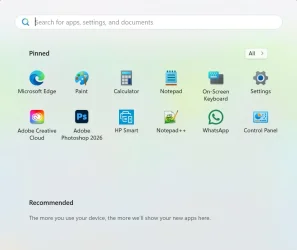
Thanks very much - but I don't like that either - sorry! Mine is quite minimal - this is what it was like before (and has just reverted back to). With some other items pinned to task bar.

Start.webp
 

My Computers

System One System Two

  • OS
    Windows 11 Home 25H2
    Computer type
    Laptop
    Manufacturer/Model
    HP Pavilion 14-ce3606sa
    CPU
    Core i5-1035G1
    Memory
    32gb
    Hard Drives
    Samsung 870 evo sata ssd
    Cooling
    Could be better
    Internet Speed
    50 mbps Starlink
    Browser
    Firefox
    Other Info
    Originally came installed with a 500gb H10 Optane ssd
  • Operating System
    Windows 11 Home
    Computer type
    Laptop
    Manufacturer/Model
    HP Pavilion ce3606sa
    CPU
    Intel Core i5-1035G1
    Memory
    16gb
    Hard Drives
    Hynix Gold P31 2TB
    Internet Speed
    200mbps Starlink
    Browser
    Firefox
    Antivirus
    Defender

My Computers

System One System Two

  • OS
    Windows 11 Home 25H2
    Computer type
    Laptop
    Manufacturer/Model
    HP Pavilion 14-ce3606sa
    CPU
    Core i5-1035G1
    Memory
    32gb
    Hard Drives
    Samsung 870 evo sata ssd
    Cooling
    Could be better
    Internet Speed
    50 mbps Starlink
    Browser
    Firefox
    Other Info
    Originally came installed with a 500gb H10 Optane ssd
  • Operating System
    Windows 11 Home
    Computer type
    Laptop
    Manufacturer/Model
    HP Pavilion ce3606sa
    CPU
    Intel Core i5-1035G1
    Memory
    16gb
    Hard Drives
    Hynix Gold P31 2TB
    Internet Speed
    200mbps Starlink
    Browser
    Firefox
    Antivirus
    Defender
Thanks very much - but I don't like that either - sorry! Mine is quite minimal - this is what it was like before (and has just reverted back to). With some other items pinned to task bar.

View attachment 171532
A choice of menu size and a customizable category option would be a huge improvement. Maybe for 26H2, we'll see. 🤞🏽
 

My Computers

System One System Two

  • OS
    Windows 11 25H2
    Computer type
    Laptop
    Manufacturer/Model
    Alienware 18 Area-51
    CPU
    Intel Core Ultra 9 275HX (24-Core)
    Motherboard
    Alienware
    Memory
    64GB DDR5 6400MT/s
    Graphics Card(s)
    NVIDIA GeForce RTX 5080 and Intel UHD Graphics
    Sound Card
    Onboard, Realtek high-performance Audio chips (ALC3329 & ALC1708))
    Monitor(s) Displays
    300HZ 18-inch QHD 500 nit Comfort View+
    Screen Resolution
    2560 x 1600
    Hard Drives
    2TB NVMe M.2 PCIe Gen 5 SSD
    Case
    Magnesium Alloy
    Cooling
    Advanced Cryo-Tech Quad-Fan Cooling system & large vapor chamber
    Keyboard
    Cherry MX ultra low profile mechanical keyboard with per key AlienFX RGB lighting
    Mouse
    Logitech MX Master 4
    Browser
    Vivaldi (main), Firefox, Chrome, Edge
    Antivirus
    MS Defender and Malwarebytes Free
  • Operating System
    Windows 11 25H2
    Computer type
    Laptop
    Manufacturer/Model
    Microsoft Surface Laptop 7
    CPU
    Qualcomm Snapdragon X Elite (12 Core) ARM based CPU
    Motherboard
    Microsoft Corp.
    Memory
    16GB LPDDR5
    Graphics card(s)
    Qualcomm Adreno X1-85
    Sound Card
    Omnisonic speakers with Dolby Atmos spatial sound
    Monitor(s) Displays
    120 Hz 13.8-inch 600 nit PixelSense Flow touchscreen
    Screen Resolution
    2304x1536
    Hard Drives
    1TB NVMe Gen 4 SSD
    Case
    Anodized Aluminum
    Cooling
    Traditional active cooling fan system
    Keyboard
    Mechanical QWERTY, backlit when in use
    Mouse
    Logitech MX Master 4 and Surface Arc Mouse
    Browser
    Vivaldi (main), Firefox, Chrome, Edge
    Antivirus
    MS Defender and Malwarebytes Free
I think I'd prefer @dacrone 's script to downloading anything like vivetool or start 11. I'm assuming my reverted menu will revert back at some point again ...............
 

My Computers

System One System Two

  • OS
    Windows 11 Home 25H2
    Computer type
    Laptop
    Manufacturer/Model
    HP Pavilion 14-ce3606sa
    CPU
    Core i5-1035G1
    Memory
    32gb
    Hard Drives
    Samsung 870 evo sata ssd
    Cooling
    Could be better
    Internet Speed
    50 mbps Starlink
    Browser
    Firefox
    Other Info
    Originally came installed with a 500gb H10 Optane ssd
  • Operating System
    Windows 11 Home
    Computer type
    Laptop
    Manufacturer/Model
    HP Pavilion ce3606sa
    CPU
    Intel Core i5-1035G1
    Memory
    16gb
    Hard Drives
    Hynix Gold P31 2TB
    Internet Speed
    200mbps Starlink
    Browser
    Firefox
    Antivirus
    Defender
Seems like Microsoft has Windows 11 so unstable, the features enable/disable at random times. You never know if you have the new feature that you had before and when it may return and what it may do next.

You may have it now, not later or the next time, you have may it back soon, not sure when, but it may be soon or later, not sure which yet, but the feature is availabe, we think. Summary of Microsoft's rollout features. LOL.
 

My Computer

System One

  • OS
    Windows 11 Pro
    Computer type
    Laptop
    Manufacturer/Model
    Dell 16 Plus DB16255
    CPU
    AMD Ryzen AI 7 350 w/ Radeon 860M 50 TOPS
    Motherboard
    Dell 0PKMHG
    Memory
    32GB LPDDR5X 7500 MT/s
    Graphics Card(s)
    AMD Radeon 860M integrated (shared memory)
    Sound Card
    Stereo speakers (2.5 W x 2 = 5 W total peak)/Realtek SounzReal/Dolby Atmos
    Monitor(s) Displays
    Displays: 16" 1920 x 1200 (Full HD+/WUXGA) 300 nits 60Hz *** Samsung - 27” Odyssey FHD IPS 240Hz G-Sync Gaming Monitor
    Screen Resolution
    1920x1080 @ 60Hz
    Hard Drives
    EG6 KIOXIA 1TB NVME
    Case
    Ice Blue
    Cooling
    "dual-fan" or "enhanced" air-cooling system
    Mouse
    Logitech M650 Wireless/Bluetooth
    Internet Speed
    800/600 Fiber
I still haven't seen the "new" Start Menu on any of the 3 desktop PC's I have here (one is "unsupported"). I know I can make it appear if I want to (I have the Registry file here to do it) but I've been waiting to see how long it would take if I just left it alone.

I do find it quite bizarre that MS could make such an apparent mess of something like this.
 

My Computer

System One

  • OS
    Windows 11 Professional 25H2
    Computer type
    PC/Desktop
    Manufacturer/Model
    Home Built
    CPU
    12th Gen Intel(R) Core(TM) i5-12400F 2.50 GHz
    Motherboard
    Gigabyte B760 DS3H AX DDR4
    Memory
    32GB (4x8GB) Kingston Fury RGB DDR4
    Graphics Card(s)
    NVIDIA GeForce GTX 1650
    Sound Card
    Onboard Sound
    Monitor(s) Displays
    BenQ GL2460 (24 inch - oldie but a goodie)
    Screen Resolution
    1920x1080
    Hard Drives
    Samsung SSD 870 EVO x 2 (250GB and 500GB) plus several external Samsung SSD's.
    PSU
    Corsair HX 750
    Case
    DeepCool
    Cooling
    Stock CPU cooler. 5 case fans (2 front, 2 top and 1 rear)
    Keyboard
    Logitech
    Mouse
    Logitech
    Internet Speed
    500/40 Fibre
    Browser
    Mozilla Firefox and Microsoft Edge
    Antivirus
    Windows Security
I still haven't seen the "new" Start Menu on any of the 3 desktop PC's I have here (one is "unsupported"). I know I can make it appear if I want to (I have the Registry file here to do it) but I've been waiting to see how long it would take if I just left it alone.

I do find it quite bizarre that MS could make such an apparent mess of something like this.
I just updated four machines. My main one I had had windows updates off for a couple of months. The other three hadn't been used for about 6 months. They all had the latest updates (April ones) and the new start menu appeared on all of them. I think it was KB5089549. There was only that and the .Net Framework Security update KB5087051 installed.
 

My Computers

System One System Two

  • OS
    Windows 11 Home 25H2
    Computer type
    Laptop
    Manufacturer/Model
    HP Pavilion 14-ce3606sa
    CPU
    Core i5-1035G1
    Memory
    32gb
    Hard Drives
    Samsung 870 evo sata ssd
    Cooling
    Could be better
    Internet Speed
    50 mbps Starlink
    Browser
    Firefox
    Other Info
    Originally came installed with a 500gb H10 Optane ssd
  • Operating System
    Windows 11 Home
    Computer type
    Laptop
    Manufacturer/Model
    HP Pavilion ce3606sa
    CPU
    Intel Core i5-1035G1
    Memory
    16gb
    Hard Drives
    Hynix Gold P31 2TB
    Internet Speed
    200mbps Starlink
    Browser
    Firefox
    Antivirus
    Defender
I'm starting to believe Microsoft is finding the new start menu problematic and rolling it back on some systems XD
For me, I just started using WindHawk with the SideBySide2 style, and I'm happy...
 

My Computers

System One System Two

  • OS
    Windows 11 Pro 25H2
    Computer type
    PC/Desktop
    Manufacturer/Model
    Built PC
    CPU
    AMD Ryzen 5 5600G @ 3.9/4.4Ghz
    Motherboard
    MSI B550M-PRO-WiFi Ver. 1.4
    Memory
    2 x 16 GB DDR4 Kingston Fury Beast 3200 Mhz
    Graphics Card(s)
    AMD Radeon RX 6600 XT MSI Mech 2X OC Edition 8 GB
    Sound Card
    Realtek High Definition Audio (Integrated)
    Monitor(s) Displays
    Samsung C50Rx 27" LED / HP S2031 20" LCD
    Screen Resolution
    1920 x 1080 px / 1600 x 900 px
    Hard Drives
    WD Blue SN570 NVME M.2 SSD [1 TB] -- External Drives: - WD Scorpion Blue 250 GB 5400 RPM (Data Backup) - Hitachi 500 GB 5400 RPM (Software / ISOs Backup) - Toshiba MQ01ABD100 1 TB 5400 RPM (OS Images) - HGST TravelStar 7K1000 1 TB, 7200 RPM USB 3.0 - ADATA SU800 2TB SSD USB 3.0
    PSU
    Corsair RM750e 750W Fully Modular
    Case
    Naceb Hydra NA-1602
    Cooling
    Naceb Orpheus x 3 (Front) + Naceb Cepheus 1200 RPM Max (Rear) + ThemalRight Assasin X 90 SE (CPU)
    Keyboard
    Logitech MK470 Wireless
    Mouse
    Logitech MK470 Wireless
    Internet Speed
    120 MB Symetrical
    Browser
    Firefox / Brave / Edge
    Antivirus
    Windows Defender
    Other Info
    - VMs: WMware Player - Windows 8.1 Pro x64 / Windows 11 Pro
    - Wacom Intuos Pro Small Tablet PTH-460
  • Operating System
    Windows 11 Pro 25H2
    Computer type
    Laptop
    Manufacturer/Model
    HP Pavilion 15-eh3000la (80M53LA)
    CPU
    AMD Ryzen 7 7730U @ 2.0/4.5 Ghz
    Motherboard
    HP 8BC7
    Memory
    2 x 16 GB Kingston Fury Impact DDR4 3200 Mhz
    Graphics card(s)
    Radeon (tm) Graphics Vega 8 (512 MB)
    Sound Card
    Realtek High Definition Audio (Integrated)
    Monitor(s) Displays
    AU Optronics
    Screen Resolution
    1920 x 1080 px (125% size)
    Hard Drives
    WD Blue SN570 1TB NVME M.2 Drive
    PSU
    45 Watt Charger
    Cooling
    Laptop Cooling Pad
    Keyboard
    Free Wolf Foldable Portable Keyboard
    Mouse
    Free Wolf Wireless Mouse
    Internet Speed
    120 MB Symetrical
    Browser
    Firefox / Brave / Edge
    Antivirus
    Windows Defender
    Other Info
    - 41mWh battery.
    - Wacom Intuos Pro Small Tablet PTH-460
Back
Top Bottom