
Navigation
Install the app
How to install the app on iOS
Follow along with the video below to see how to install our site as a web app on your home screen.
Note: This feature may not be available in some browsers.
More options
Style variation
System
Light
Dark
You are using an out of date browser. It may not display this or other websites correctly.
You should upgrade or use an alternative browser.
You should upgrade or use an alternative browser.
"Other devices"
- Thread starter mto1971
- Start date

- Local time
- 4:34 PM
- Posts
- 392
- OS
- Windows 11 Pro 25H2 build 26200.8875
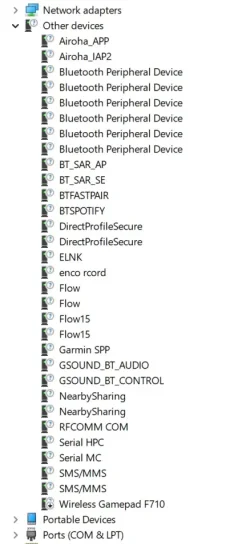
Hello, i have a lot of "Other devices" in my Device manager list.
How do i get rid of them?
Thnx
Regards
You can uninstall the drivers if you are sure you don't need them.
Kind regards,

My Computer
At a glance
Windows 11 Pro 25H2 build 26200.8875Intel i7 8750H @ 2.2 GHz16 GB (all Samsung) DDR4-3200 SODIMM (non-ECC...Intel UHD Graphics 630 & NVIDIA Quadro P600
- OS
- Windows 11 Pro 25H2 build 26200.8875
- Computer type
- Laptop
- Manufacturer/Model
- Lenovo ThinkPad Workstation P72
- CPU
- Intel i7 8750H @ 2.2 GHz
- Motherboard
- Lenovo 01YU291
- Memory
- 16 GB (all Samsung) DDR4-3200 SODIMM (non-ECC) PCIe 3
- Graphics Card(s)
- Intel UHD Graphics 630 & NVIDIA Quadro P600
- Sound Card
- Realtek ALC3286 & Focusrite Saffire 24 Pro DSP
- Monitor(s) Displays
- 17.3"
- Screen Resolution
- 3840x2160
- Hard Drives
- 1TB SSD Samsung 860 EVO SATA 3
1TB SSD Samsung 970 EVO M.2 NVMe PCIe 3 x 4
2TB SSD Samsung 990 PRO M.2 NVMe PCIe 3 x 4
- PSU
- 230W
- Cooling
- fan
- Keyboard
- UltraNav
- Mouse
- Kensington wireless Orbit
- Internet Speed
- 640Mbps
- Browser
- DuckDuckGo and Firefox
- Antivirus
- Defender
- Other Info
- CM246 Chipset

- Local time
- 9:34 AM
- Posts
- 17,837
- Location
- Gold Coast, Australia
- OS
- Windows 11 Pro 25H2 Build 26200.8894
Scroll down to "Device Cleanup Tool V1.5.1" and download it. Needs to be run as Administrator.
.
Each once attached device leaves an entry in the Windows device management. By means of the Windows device manager you can delete one by one only. With this tool you can delete multiple or all non-present devices.
Since V1.5 there is a separate dialog for Bluetooth devices in the Tools menu.
Non-PnP devices and 'soft' devices are not listed by default, this can be changed in the Options menu.
.
My Computers
-
At a glance
Windows 11 Pro 25H2 Build 26200.8894Intel(R) Core(TM) i7-4770K CPU @ 3.50GHz32.0 GB of I forget and the box is in storage.Gigabyte nVidia GeForce GTX 1660 Super OC 6GB- OS
- Windows 11 Pro 25H2 Build 26200.8894
- Computer type
- PC/Desktop
- Manufacturer/Model
- Sin-built 2013
- CPU
- Intel(R) Core(TM) i7-4770K CPU @ 3.50GHz
- Motherboard
- ASUS ROG Maximus VI Formula
- Memory
- 32.0 GB of I forget and the box is in storage.
- Graphics Card(s)
- Gigabyte nVidia GeForce GTX 1660 Super OC 6GB
- Sound Card
- ROG SupremeFX Formula 8-Channel High Definition Audio
- Monitor(s) Displays
- 5 x LG 25MS500-B - 1 x 24MK430H-B - 1 x Wacom Pro 22" Touch Screen Tablet
- Screen Resolution
- All over the place
- Hard Drives
- Too many to list. OS on Samsung 1TB 870 QVO SATA
- PSU
- Silverstone 1500
- Case
- NZXT Phantom 820 Full-Tower Case
- Cooling
- Noctua NH-D15 Elite Class Dual Tower CPU Cooler / 6 x EziDIY 120mm / 2 x Corsair 140mm somethings / 1 x 140mm Thermaltake something / 2 x 200mm Corsair.
- Keyboard
- Corsair K95 / Logitech diNovo Edge Wireless
- Mouse
- Logitech: G402 / G502 / Mx Masters / Mx Air Cordless
- Internet Speed
- 2000/500Mbps
- Browser
- All sorts
- Antivirus
- Kaspersky Premium
- Other Info
- ㅤㅤㅤㅤㅤㅤㅤㅤㅤㅤㅤㅤㅤㅤㅤㅤㅤㅤㅤㅤㅤㅤㅤㅤㅤㅤㅤㅤㅤㅤㅤㅤㅤㅤㅤㅤㅤㅤㅤㅤ⠀⠀⠀⠀⠀⠀⠀⠀⠀⠀
TP-Link BE9300 WiFi 7 Bluetooth 5.4 (Archer TBE550E)
TP-Link TX201 V1 2.5GB Lan
Grandstream HT812 - VoIP
ASUS DSL-AX82U - Mesh
ASUS RT-AC68U - Mesh
ASUS RT-BE88U Router
Brother MFC-L2880DW Printer
I’m on a horse.
-
At a glance
Windows 11 Pro 25H2 Build 26200.8894 (Wifes)13th Generation Intel® Core™ i5-1340P Process...16GB LPDDR5-52001x Intel® Iris® Xe Graphics- Operating System
- Windows 11 Pro 25H2 Build 26200.8894 (Wifes)
- Computer type
- Laptop
- Manufacturer/Model
- LENOVO Yoga 7 14IRL8 - Type 82YL
- CPU
- 13th Generation Intel® Core™ i5-1340P Processor(Core™ i5-1340P)
- Memory
- 16GB LPDDR5-5200
- Graphics card(s)
- 1x Intel® Iris® Xe Graphics
- Sound Card
- Optimized with Dolby Atmos®
- Screen Resolution
- QHD 2880 x 1800 OLED
- Hard Drives
- M.2 512 GB SSD PCIe
- Mouse
- Logiteck MX Master 3S
- Internet Speed
- 2000/500
- Antivirus
- Defender / Malwarebytes
- Other Info
- …still on a horse.
Wireless Network: Wi-Fi 6E 2x2 AX; Bluetooth® 5.1 or above
Ports: 1x 1 Novo button; 2 in 1 Audio Combo jack; Micro SD Card Reader; HDMI 1.4b; 2 x USB Type-C (TBT4)
USB 3.2 Gen 2 DP 1.4a
PD 3.0); 1 x USB 3.2 Gen1 Type A
Camera
1x 1080P FHD IR/RGB Hybrid with Privacy Shutter and Dual Array Microphone
Graphics
1x Intel® Iris® Xe Graphics
Monitor
14" WUXGA
Form Factor
Convertible Notebook
-
Windows 11 Pro 25H2 Build 26200.8894 (Wifes)
Yoga 7 2-in-1 14IML9 - Type 83DJ
Processor: Intel® Core™ Ultra 7 155H Processor(Core™ Ultra 7 155H)
Memory: 32GB LPD5X-7467
Hard Drive: 1 TB SSD PCIe
Wireless Network: 1x Wi-Fi 6E 2x2 AX; Bluetooth® 5.1 or above
Ports: 1 x HDMI 2.1 TMDS; 1 x Novo Button; 1 x Combo Audio Jack
2 x USB-C (USB 4.0)
1 x USB-A 3.2 Gen 1
Camera: 1080P FHD IR Hybrid with Dual Microphone
Graphics: Intel® Arc™ Graphics
Monitor: 14" 2.8K
...Where's my horse?

Once I tried to manually force install drivers for all the Bluetooth protocols in "Other devices" of Device Manager. What I did made my Bluetooth to not connect to any device at all! To fix it I had to uninstall (delete) all Bluetooth devices in Device Manager and restart the computer to automatically install them again expect the "Other devices". So from now on I just ignore them.
My Computers
-
At a glance
Windows 11 Pro 23H2 (5699), 25H2 (8875)Mobile DualCore Intel Core 2 Duo T7250, 2000 MHz4GBMobile Intel(R) GMA 4500M (Mobile 4 series)- OS
- Windows 11 Pro 23H2 (5699), 25H2 (8875)
- Computer type
- Laptop
- Manufacturer/Model
- Acer Extensa 5630EZ
- CPU
- Mobile DualCore Intel Core 2 Duo T7250, 2000 MHz
- Motherboard
- Acer Extensa 5630
- Memory
- 4GB
- Graphics Card(s)
- Mobile Intel(R) GMA 4500M (Mobile 4 series)
- Sound Card
- Realtek ALC268 @ Intel 82801IB ICH9 - High Definition Audio Controller
- Monitor(s) Displays
- 1
- Screen Resolution
- 1280x800
- Hard Drives
- Samsung SSD 850 EVO 250GB SATA Device (250 GB, SATA-III)
- Internet Speed
- VDSL 50 Mbps
- Browser
- MICROSOFT EDGE
- Antivirus
- WINDOWS DEFENDER
- Other Info
- Legacy MBR installation, no TPM, no Secure Boot, no WDDM 2.0 graphics drivers, no SSE4.2, cannot get more unsupported ;) This is only my test laptop. I had installed Windows 11 here before upgrading my main PC. For my main PC I use everyday see my 2nd system specs.
-
At a glance
Windows 11 Pro v25H2 (build 26200.8875)Intel Core-i7 3770 3.40GHz s1155 (3rd generat...2x Kingston Hyper-X Blu 8GB DDR3-1600GIGABYTE GeForce RTX 3050 WINDFORCE OC V2 6GB...- Operating System
- Windows 11 Pro v25H2 (build 26200.8875)
- Computer type
- PC/Desktop
- Manufacturer/Model
- Custom-built PC
- CPU
- Intel Core-i7 3770 3.40GHz s1155 (3rd generation)
- Motherboard
- Asus P8H61 s1155 ATX
- Memory
- 2x Kingston Hyper-X Blu 8GB DDR3-1600
- Graphics card(s)
- GIGABYTE GeForce RTX 3050 WINDFORCE OC V2 6GB (GV-N3050WF2OCV2-6GD)
- Sound Card
- Realtek HD audio (ALC887)
- Monitor(s) Displays
- Sony Bravia KDL-19L4000 19" LCD TV via VGA
- Screen Resolution
- 1440x900 32-bit 60Hz
- Hard Drives
- WD Blue SA510 2.5 1000GB SSD as system disk, Western Digital Caviar Purple 4TB SATA III (WD40PURZ) as second
- PSU
- Thermaltake Litepower RGB 550W Full Wired
- Case
- SUPERCASE MIDI-TOWER
- Cooling
- Deepcool Gamma Archer CPU cooler, 1x 8cm fan at the back
- Keyboard
- Mitsumi 101-key PS/2
- Mouse
- Sunnyline OptiEye PS/2
- Internet Speed
- 100Mbps
- Browser
- Microsoft Edge, Mozilla Firefox
- Antivirus
- Microsoft Windows Defender
- Other Info
- Legacy BIOS (MBR) installation, no TPM, no Secure Boot, WDDM 3.0 graphics drivers, WEI score 7.4

Did you first try deleting them through Settings > Bluetooth & devices > ... > Remove device
Last edited:
My Computers
-
At a glance
Windows 11 (up to date)Intel i5 12400Corsair Vengeance LPX 16GBOn Board the Z690- OS
- Windows 11 (up to date)
- Computer type
- PC/Desktop
- Manufacturer/Model
- Custom
- CPU
- Intel i5 12400
- Motherboard
- Gigabyte Z690 UA
- Memory
- Corsair Vengeance LPX 16GB
- Graphics Card(s)
- On Board the Z690
- Sound Card
- On Board
- Monitor(s) Displays
- 43" Samsung tu7000
- Screen Resolution
- 2560 x 1440
- Hard Drives
- SAMSUNG SSD 1TB NVMe M.2
- PSU
- Thermaltake smart 500w 80+
- Case
- LIAN LANCOOL_205M
- Cooling
- Bunch of fans . . . :o) (lights dont work)
- Keyboard
- Unicomp: Ultra Classic White Buckling Spring USB
- Mouse
- M510
- Internet Speed
- 50mbps on Ethernet
- Browser
- Fire Fox
- Antivirus
- Windows
- Other Info
- Love this computer but I still prefer Win-7 like I love my old Lazy Boy Recliner . . . it just feels better.
-
At a glance
WIN-7-64BIT and Win-11 pro for testing on uns...i5-3570K CPU @ 3.40GHz, 3801 Mhz, 4 Core(s), ...16 GB - Crucial Ballistick 4GB PC3-14900 DDR3...NVIDIA GeForce GTX 1050- Operating System
- WIN-7-64BIT and Win-11 pro for testing on unsupported hardware
- Computer type
- PC/Desktop
- Manufacturer/Model
- Home built
- CPU
- i5-3570K CPU @ 3.40GHz, 3801 Mhz, 4 Core(s), 4 Logical Processor(s)
- Motherboard
- GA-Z77-HD3
- Memory
- 16 GB - Crucial Ballistick 4GB PC3-14900 DDR3-1333 MHz
- Graphics card(s)
- NVIDIA GeForce GTX 1050
- Sound Card
- On Board
- Monitor(s) Displays
- ASUS VP278
- Screen Resolution
- 1920 x 1080
- Hard Drives
- 4 - internal Samsung 2.5" SSD, 1 WD HDD 7200 and some external drives
- PSU
- EVGA 550w
- Case
- Old Gygabyte Tower
- Cooling
- Yes
- Keyboard
- Unicomp - UNIOP4A USB (like the old IBM Model H that I started with)
- Mouse
- M510
- Internet Speed
- 50mbps
- Browser
- Firefox
- Antivirus
- Windows
- Other Info
- The only thing it lack is USB-3.2 on the front face but it has 3.0 on the back

They are generally devices that don't need a driver.
My Computers
-
At a glance
Windows 11 Enterprise 25H2 26200 7462Intel XEON E5-2699 v364GB Teamgroup UD4-3600NVIDIA GeForce GTX 1080 Ti- OS
- Windows 11 Enterprise 25H2 26200 7462
- Computer type
- PC/Desktop
- Manufacturer/Model
- Custom Build
- CPU
- Intel XEON E5-2699 v3
- Motherboard
- ASUS X99-A
- Memory
- 64GB Teamgroup UD4-3600
- Graphics Card(s)
- NVIDIA GeForce GTX 1080 Ti
- Sound Card
- Integrated
- Monitor(s) Displays
- ACER X34 Predator
- Screen Resolution
- 3440 x 1440
- Hard Drives
- Crucial CT1000P 3P SSD8 1TB
Crucial CT1000 BX500 SSD 1TB
- PSU
- GameMax Pro
- Case
- Fractal Design
- Cooling
- Corsair H110iGT + 6 140mm Fans
- Keyboard
- Corsair K4
- Mouse
- G-Skill G502
- Internet Speed
- 300MBs
- Browser
- Chrome
- Antivirus
- OEM
- Other Info
- ASUS RT-AC87U Router
-
At a glance
25H2 26200.50748GB- Operating System
- 25H2 26200.5074
- Computer type
- Laptop
- Manufacturer/Model
- ASUS X555LA
- Memory
- 8GB
- Browser
- Chrome
- Antivirus
- OEM

- Local time
- 6:34 PM
- Posts
- 481
- OS
- Windows 11 22H2 Pro (X-lite Micro 11 version)
This falls under the "If it's not broken, don't try to fix it" category. Not all hardware needs a specific driver to function correctly. If you're not seeing errors or problem codes, there's nothing wrong with your system.Hello, i have a lot of "Other devices" in my Device manager list.
How do i get rid of them?
Thnx
Regards
View attachment 162199
My Computer
At a glance
Windows 11 22H2 Pro (X-lite Micro 11 version)i7 13850HX (20 cores, 28 threads)32GB DDR5Intel UHD/ RTX 1000 ADA
- OS
- Windows 11 22H2 Pro (X-lite Micro 11 version)
- Computer type
- Laptop
- Manufacturer/Model
- Dell/ Precision 7680
- CPU
- i7 13850HX (20 cores, 28 threads)
- Motherboard
- Dell
- Memory
- 32GB DDR5
- Graphics Card(s)
- Intel UHD/ RTX 1000 ADA
- Sound Card
- Realtek
- Monitor(s) Displays
- 4K UHD Touchscreen
- Screen Resolution
- 3840 x 2400
- Hard Drives
- Samsung 512GB system drive
WD Blue 1TB game drive
- PSU
- 240W AC adapter, 1800W when docked
- Internet Speed
- 1 gigabit symmetrical
- Browser
- Firefox, Librewolf
- Antivirus
- None. Manully configured so nobody except me can change any critical system files. (Don't ask how, it's probably against some rule somewhere)

- Local time
- 1:34 AM
- Posts
- 2
- OS
- W11
Thanks y'all for the replies. I indeed assume that there's nothing (really) wrong with the system
but it would be nice if they disappeared :)
I forgot to mention that this happened after i disabled a bunch of "unnecessary" services.
but it would be nice if they disappeared :)
I forgot to mention that this happened after i disabled a bunch of "unnecessary" services.
My Computer
At a glance
W11
- OS
- W11
- Computer type
- PC/Desktop

- Local time
- 12:34 AM
- Posts
- 8,698
- OS
- Windows 11 Pro + Win11 Canary VM.
Perhaps they were not as unecessary as you think!Thanks y'all for the replies. I indeed assume that there's nothing (really) wrong with the system
but it would be nice if they disappeared :)
I forgot to mention that this happened after i disabled a bunch of "unnecessary" services.
People often go to insane lengths to deleting services in pursuit of the holy grail of "improved performance" and frankly this is pointless and has not be needed since XP days. As you have seen turning off services can have unexpected consequences. Never listen to internet warriors who tell you it is safe to stop service a,b,.... blah blah blah.
Funny how they never tell you of hidden consequences, how to reverse changes or advise making backups etc first
 .
.My Computer
At a glance
Windows 11 Pro + Win11 Canary VM.I9 13th gen i9-13900H 2.60 GHZ16 GB solderedIntegrated Intel Iris XE
- OS
- Windows 11 Pro + Win11 Canary VM.
- Computer type
- Laptop
- Manufacturer/Model
- ASUS Zenbook 14
- CPU
- I9 13th gen i9-13900H 2.60 GHZ
- Motherboard
- Yep, Laptop has one.
- Memory
- 16 GB soldered
- Graphics Card(s)
- Integrated Intel Iris XE
- Sound Card
- Realtek built in
- Monitor(s) Displays
- laptop OLED screen
- Screen Resolution
- 2880x1800 touchscreen
- Hard Drives
- 1 TB NVME SSD (only weakness is only one slot)
- PSU
- Internal + 65W thunderbolt USB4 charger
- Case
- Yep, got one
- Cooling
- Stella Artois (UK pint cans - 568 ml) - extra cost.
- Keyboard
- Built in UK keybd
- Mouse
- Bluetooth , wireless dongled, wired
- Internet Speed
- 900 mbs (ethernet), wifi 6 typical 350-450 mb/s both up and down
- Browser
- Edge
- Antivirus
- Defender
- Other Info
- TPM 2.0, 2xUSB4 thunderbolt, 1xUsb3 (usb a), 1xUsb-c, hdmi out, 3.5 mm audio out/in combo, ASUS backlit trackpad (inc. switchable number pad)
Macrium Reflect Home V8
Office 365 Family (6 users each 1TB onedrive space)
Hyper-V (a vm runs almost as fast as my older laptop)
I remember back in Windows XP days that I read about disabling Telephony service (supposedly not needed if you are not using a dial-up internet connection) and cryptography (or similar) service (supposedly not needed if you don't encrypt your hard disk). Of course I didn't want to risk some incompatibility so I didn't do that. Even if I did the performance improvement would be negligible, I don't think these services use too much RAM or CPU time. One simpler and safer way to speedup a system is to disable all visual effects (transparency, fades, animations), all useless startup applications (browsers, update reminders and the like) and some non-Microsoft services. The latter are require more experience to figure out if you need them or not, so if unsure don't touch them. Of course all these imply that you have first updated all your drivers. I prefer to download the graphics driver directly from manufacturer (nVidia, Intel, AMD) to get the latest version and the full package including the Control Panel to tweak performance and appearance. Windows Update frequently installs an older version without any extras (core functionality, not Control Panel) and as you might know the default settings are not ideal.
My Computers
-
At a glance
Windows 11 Pro 23H2 (5699), 25H2 (8875)Mobile DualCore Intel Core 2 Duo T7250, 2000 MHz4GBMobile Intel(R) GMA 4500M (Mobile 4 series)- OS
- Windows 11 Pro 23H2 (5699), 25H2 (8875)
- Computer type
- Laptop
- Manufacturer/Model
- Acer Extensa 5630EZ
- CPU
- Mobile DualCore Intel Core 2 Duo T7250, 2000 MHz
- Motherboard
- Acer Extensa 5630
- Memory
- 4GB
- Graphics Card(s)
- Mobile Intel(R) GMA 4500M (Mobile 4 series)
- Sound Card
- Realtek ALC268 @ Intel 82801IB ICH9 - High Definition Audio Controller
- Monitor(s) Displays
- 1
- Screen Resolution
- 1280x800
- Hard Drives
- Samsung SSD 850 EVO 250GB SATA Device (250 GB, SATA-III)
- Internet Speed
- VDSL 50 Mbps
- Browser
- MICROSOFT EDGE
- Antivirus
- WINDOWS DEFENDER
- Other Info
- Legacy MBR installation, no TPM, no Secure Boot, no WDDM 2.0 graphics drivers, no SSE4.2, cannot get more unsupported ;) This is only my test laptop. I had installed Windows 11 here before upgrading my main PC. For my main PC I use everyday see my 2nd system specs.
-
At a glance
Windows 11 Pro v25H2 (build 26200.8875)Intel Core-i7 3770 3.40GHz s1155 (3rd generat...2x Kingston Hyper-X Blu 8GB DDR3-1600GIGABYTE GeForce RTX 3050 WINDFORCE OC V2 6GB...- Operating System
- Windows 11 Pro v25H2 (build 26200.8875)
- Computer type
- PC/Desktop
- Manufacturer/Model
- Custom-built PC
- CPU
- Intel Core-i7 3770 3.40GHz s1155 (3rd generation)
- Motherboard
- Asus P8H61 s1155 ATX
- Memory
- 2x Kingston Hyper-X Blu 8GB DDR3-1600
- Graphics card(s)
- GIGABYTE GeForce RTX 3050 WINDFORCE OC V2 6GB (GV-N3050WF2OCV2-6GD)
- Sound Card
- Realtek HD audio (ALC887)
- Monitor(s) Displays
- Sony Bravia KDL-19L4000 19" LCD TV via VGA
- Screen Resolution
- 1440x900 32-bit 60Hz
- Hard Drives
- WD Blue SA510 2.5 1000GB SSD as system disk, Western Digital Caviar Purple 4TB SATA III (WD40PURZ) as second
- PSU
- Thermaltake Litepower RGB 550W Full Wired
- Case
- SUPERCASE MIDI-TOWER
- Cooling
- Deepcool Gamma Archer CPU cooler, 1x 8cm fan at the back
- Keyboard
- Mitsumi 101-key PS/2
- Mouse
- Sunnyline OptiEye PS/2
- Internet Speed
- 100Mbps
- Browser
- Microsoft Edge, Mozilla Firefox
- Antivirus
- Microsoft Windows Defender
- Other Info
- Legacy BIOS (MBR) installation, no TPM, no Secure Boot, WDDM 3.0 graphics drivers, WEI score 7.4

- Local time
- 7:34 PM
- Posts
- 38
- OS
- Win11 Pro 25H2 26200.8894
The device manager is bricked. Once you clean it up on the next boot every thing will be bonkers again. MS has to be aware of this. But there are numerous examples of Win 11 MS apps that are bricked. Things are in sad shape at MS.
My Computer
At a glance
Win11 Pro 25H2 26200.8894Processor: 12th Gen Intel(R) Core(TM) i7-1255U40 GBIntel
- OS
- Win11 Pro 25H2 26200.8894
- Computer type
- Laptop
- Manufacturer/Model
- Lenovo IdeaPad 3 15IAU7
- CPU
- Processor: 12th Gen Intel(R) Core(TM) i7-1255U
- Memory
- 40 GB
- Graphics Card(s)
- Intel
- Monitor(s) Displays
- 15.6 FHD and 31.5 HP
- Screen Resolution
- 1920x1080
- Hard Drives
- Numerous
- Mouse
- Track Ball EM01 NL Bluetooth
- Browser
- FireFox
- Antivirus
- MS
Just a reminder... Whatever is in "Other devices" category is not without drivers. That category has devices without installed drivers, but also has devices that have drivers and work properly but not belong to any other category. If you have some free time, you can right-click one of them, select Properties and check the drivers. If it has drivers, it is OK. If it hasn't you can see the Hardware IDs and Google them to find drivers. Once again I warn you to just ignore Bluetooth devices. Unnecessarily installing drivers for all protocols might make your Bluetooth unable to connect to any Bluetooth device! Been there done that.
For those that don't want to manually search for drivers, you can use Snappy Driver Installer which detects the missing drivers and installs them from its database. To avoid incompatibility issues DON'T update existing drivers (blue text in the list). Install only missing drivers (green text in the list). Also NEVER use Snappy or other driver tools in tablets. You will lose the touch and rotation features and nothing you do can fix it, unless you download the chipset (aka platform) drivers from manufacturer and reinstall them. Even then success is not guaranteed, you may have to reinstall Windows! You have been warned.
Snappy Driver Installer
For those that don't want to manually search for drivers, you can use Snappy Driver Installer which detects the missing drivers and installs them from its database. To avoid incompatibility issues DON'T update existing drivers (blue text in the list). Install only missing drivers (green text in the list). Also NEVER use Snappy or other driver tools in tablets. You will lose the touch and rotation features and nothing you do can fix it, unless you download the chipset (aka platform) drivers from manufacturer and reinstall them. Even then success is not guaranteed, you may have to reinstall Windows! You have been warned.
Snappy Driver Installer
My Computers
-
At a glance
Windows 11 Pro 23H2 (5699), 25H2 (8875)Mobile DualCore Intel Core 2 Duo T7250, 2000 MHz4GBMobile Intel(R) GMA 4500M (Mobile 4 series)- OS
- Windows 11 Pro 23H2 (5699), 25H2 (8875)
- Computer type
- Laptop
- Manufacturer/Model
- Acer Extensa 5630EZ
- CPU
- Mobile DualCore Intel Core 2 Duo T7250, 2000 MHz
- Motherboard
- Acer Extensa 5630
- Memory
- 4GB
- Graphics Card(s)
- Mobile Intel(R) GMA 4500M (Mobile 4 series)
- Sound Card
- Realtek ALC268 @ Intel 82801IB ICH9 - High Definition Audio Controller
- Monitor(s) Displays
- 1
- Screen Resolution
- 1280x800
- Hard Drives
- Samsung SSD 850 EVO 250GB SATA Device (250 GB, SATA-III)
- Internet Speed
- VDSL 50 Mbps
- Browser
- MICROSOFT EDGE
- Antivirus
- WINDOWS DEFENDER
- Other Info
- Legacy MBR installation, no TPM, no Secure Boot, no WDDM 2.0 graphics drivers, no SSE4.2, cannot get more unsupported ;) This is only my test laptop. I had installed Windows 11 here before upgrading my main PC. For my main PC I use everyday see my 2nd system specs.
-
At a glance
Windows 11 Pro v25H2 (build 26200.8875)Intel Core-i7 3770 3.40GHz s1155 (3rd generat...2x Kingston Hyper-X Blu 8GB DDR3-1600GIGABYTE GeForce RTX 3050 WINDFORCE OC V2 6GB...- Operating System
- Windows 11 Pro v25H2 (build 26200.8875)
- Computer type
- PC/Desktop
- Manufacturer/Model
- Custom-built PC
- CPU
- Intel Core-i7 3770 3.40GHz s1155 (3rd generation)
- Motherboard
- Asus P8H61 s1155 ATX
- Memory
- 2x Kingston Hyper-X Blu 8GB DDR3-1600
- Graphics card(s)
- GIGABYTE GeForce RTX 3050 WINDFORCE OC V2 6GB (GV-N3050WF2OCV2-6GD)
- Sound Card
- Realtek HD audio (ALC887)
- Monitor(s) Displays
- Sony Bravia KDL-19L4000 19" LCD TV via VGA
- Screen Resolution
- 1440x900 32-bit 60Hz
- Hard Drives
- WD Blue SA510 2.5 1000GB SSD as system disk, Western Digital Caviar Purple 4TB SATA III (WD40PURZ) as second
- PSU
- Thermaltake Litepower RGB 550W Full Wired
- Case
- SUPERCASE MIDI-TOWER
- Cooling
- Deepcool Gamma Archer CPU cooler, 1x 8cm fan at the back
- Keyboard
- Mitsumi 101-key PS/2
- Mouse
- Sunnyline OptiEye PS/2
- Internet Speed
- 100Mbps
- Browser
- Microsoft Edge, Mozilla Firefox
- Antivirus
- Microsoft Windows Defender
- Other Info
- Legacy BIOS (MBR) installation, no TPM, no Secure Boot, WDDM 3.0 graphics drivers, WEI score 7.4
The Device Manager is not bricked. In the OP's screenshot I see all the Bluetooth devices and protocols. If you delete them they are detected and listed again. This is normal. Just ignore them. Don't ask for trouble.The device manager is bricked. Once you clean it up on the next boot every thing will be bonkers again. MS has to be aware of this. But there are numerous examples of Win 11 MS apps that are bricked. Things are in sad shape at MS.
Last edited:
My Computers
-
At a glance
Windows 11 Pro 23H2 (5699), 25H2 (8875)Mobile DualCore Intel Core 2 Duo T7250, 2000 MHz4GBMobile Intel(R) GMA 4500M (Mobile 4 series)- OS
- Windows 11 Pro 23H2 (5699), 25H2 (8875)
- Computer type
- Laptop
- Manufacturer/Model
- Acer Extensa 5630EZ
- CPU
- Mobile DualCore Intel Core 2 Duo T7250, 2000 MHz
- Motherboard
- Acer Extensa 5630
- Memory
- 4GB
- Graphics Card(s)
- Mobile Intel(R) GMA 4500M (Mobile 4 series)
- Sound Card
- Realtek ALC268 @ Intel 82801IB ICH9 - High Definition Audio Controller
- Monitor(s) Displays
- 1
- Screen Resolution
- 1280x800
- Hard Drives
- Samsung SSD 850 EVO 250GB SATA Device (250 GB, SATA-III)
- Internet Speed
- VDSL 50 Mbps
- Browser
- MICROSOFT EDGE
- Antivirus
- WINDOWS DEFENDER
- Other Info
- Legacy MBR installation, no TPM, no Secure Boot, no WDDM 2.0 graphics drivers, no SSE4.2, cannot get more unsupported ;) This is only my test laptop. I had installed Windows 11 here before upgrading my main PC. For my main PC I use everyday see my 2nd system specs.
-
At a glance
Windows 11 Pro v25H2 (build 26200.8875)Intel Core-i7 3770 3.40GHz s1155 (3rd generat...2x Kingston Hyper-X Blu 8GB DDR3-1600GIGABYTE GeForce RTX 3050 WINDFORCE OC V2 6GB...- Operating System
- Windows 11 Pro v25H2 (build 26200.8875)
- Computer type
- PC/Desktop
- Manufacturer/Model
- Custom-built PC
- CPU
- Intel Core-i7 3770 3.40GHz s1155 (3rd generation)
- Motherboard
- Asus P8H61 s1155 ATX
- Memory
- 2x Kingston Hyper-X Blu 8GB DDR3-1600
- Graphics card(s)
- GIGABYTE GeForce RTX 3050 WINDFORCE OC V2 6GB (GV-N3050WF2OCV2-6GD)
- Sound Card
- Realtek HD audio (ALC887)
- Monitor(s) Displays
- Sony Bravia KDL-19L4000 19" LCD TV via VGA
- Screen Resolution
- 1440x900 32-bit 60Hz
- Hard Drives
- WD Blue SA510 2.5 1000GB SSD as system disk, Western Digital Caviar Purple 4TB SATA III (WD40PURZ) as second
- PSU
- Thermaltake Litepower RGB 550W Full Wired
- Case
- SUPERCASE MIDI-TOWER
- Cooling
- Deepcool Gamma Archer CPU cooler, 1x 8cm fan at the back
- Keyboard
- Mitsumi 101-key PS/2
- Mouse
- Sunnyline OptiEye PS/2
- Internet Speed
- 100Mbps
- Browser
- Microsoft Edge, Mozilla Firefox
- Antivirus
- Microsoft Windows Defender
- Other Info
- Legacy BIOS (MBR) installation, no TPM, no Secure Boot, WDDM 3.0 graphics drivers, WEI score 7.4
Similar threads
- Replies
- 14
- Views
- 914

- Replies
- 2
- Views
- 691

- Replies
- 0
- Views
- 517


Latest Support Threads
-
Chrome Remote Desktop acting up since I upgraded from W7 to W11
- Started by hershey4
- Replies: 0
-
-
 Solved Unable to update Edge browser due to lack of connection (Solved)
- Started by OAT
- Replies: 19
-
-
Latest Tutorials
-
 Personalization Add or Remove "Open in Intelligent Terminal" context menu in Windows 11
- Started by Brink
- Replies: 0
-
 Browsers and Mail Enable or Disable Process Isolation in Microsoft Edge on Windows 11
- Started by Brink
- Replies: 0
-
 Time and Language Find Device Setup Country or Region Geographic Location (GeoID) in Windows 11
- Started by Brink
- Replies: 3
-
 Phone Enable or Disable Mobile Device Notification Previews on Hover in Start Menu on Windows 11
- Started by Brink
- Replies: 0
-
