Overwhelmed - Macrium Reflect


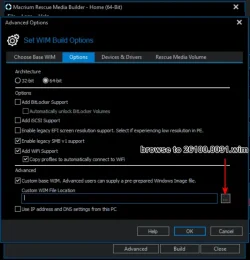
26100.8031 works macrium mounts


26100.8031-macrium-ok.webp

Information for Image 1
-----------------------
Index: 1
Name: Microsoft Windows Recovery Environment (amd64
Description: Microsoft Windows Recover Environment (amd64)
Directory Count: 4601
File Count: 21754
Total Bytes: 3272771087
Hard Link Bytes: 1307531777
Creation Time: Fri Jan 09 19:16:48 2026 UTC
Last Modification Time: Thu Apr 16 01:56:41 2026 UTC
Architecture: x86_64
Product Name: Microsoft« Windows« Operating System
Edition ID: WindowsPE
Installation Type: WindowsPE
Product Type: WinNT
Languages: en-US
Default Language: en-US
System Root: WINDOWS
Major Version: 10
Minor Version: 0
Build: 26100
Service Pack Build: 8031
Service Pack Level: 0
WIMBoot compatible: no
 

My Computers My Computers

  • At a glance

    Win7,Win11i7-97002x16gb 3600mhz
    OS
    Win7,Win11
    Computer type
    PC/Desktop
    CPU
    i7-9700
    Motherboard
    gigabyte b365m ds3h
    Memory
    2x16gb 3600mhz
    Monitor(s) Displays
    benq gw2480
    PSU
    bequiet pure power 11 400CM
    Cooling
    cryorig m9i
  • At a glance

    win7,win11i5-84002x8gb 3200
    Operating System
    win7,win11
    Computer type
    PC/Desktop
    CPU
    i5-8400
    Motherboard
    gigabyte b365m ds3h
    Memory
    2x8gb 3200
    PSU
    xfx pro 450
➡️ 8031.zip


1778064565642.webp


********************************************************************************************************************************

Optional:

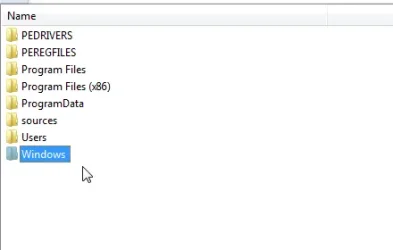
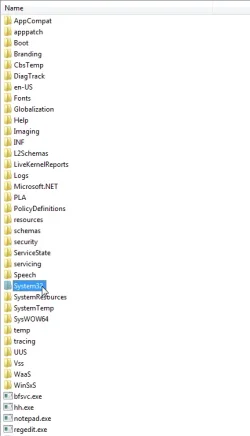
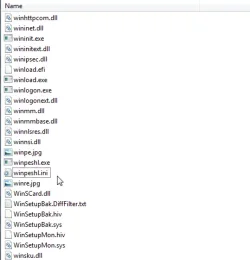
After macrium has made boot.wim from it , the menu with other goodies can be launched. Simply by opening the boot.wim with 7-zip scroll down to open system32 and drag this winpeshl.ini into system32. Note : if macrium has mde the wim read only then the winpeshl.ini can be replaced by mounting the wim.

winpeshl.ini

Code:
[LaunchApp]

AppPath="Pecmd.exe Main %SystemDrive%\Windows\System32\Pecmd.ini"

the above winpeshl.ini is already in 26100.8031.wim. Copy it out before macrium does its thing.

then use 7-zip to drag it back in to the boot.wim \windows\system32 macrium has made


add-winpesl-1.webp


add-winpesl-2.webp


add-winpesl-3.webp
Optional:
 
Last edited:

My Computers My Computers

  • At a glance

    Win7,Win11i7-97002x16gb 3600mhz
    OS
    Win7,Win11
    Computer type
    PC/Desktop
    CPU
    i7-9700
    Motherboard
    gigabyte b365m ds3h
    Memory
    2x16gb 3600mhz
    Monitor(s) Displays
    benq gw2480
    PSU
    bequiet pure power 11 400CM
    Cooling
    cryorig m9i
  • At a glance

    win7,win11i5-84002x8gb 3200
    Operating System
    win7,win11
    Computer type
    PC/Desktop
    CPU
    i5-8400
    Motherboard
    gigabyte b365m ds3h
    Memory
    2x8gb 3200
    PSU
    xfx pro 450
there are vmd drivers in the pedrivers folder. pnputil will install them if needed.

if you want other drivers it is easy to delete what is in there and/or drag any other drivers you want into the pedrivers folder using 7-zip. Touchscreen drivers or whatever.
 

My Computers My Computers

  • At a glance

    Win7,Win11i7-97002x16gb 3600mhz
    OS
    Win7,Win11
    Computer type
    PC/Desktop
    CPU
    i7-9700
    Motherboard
    gigabyte b365m ds3h
    Memory
    2x16gb 3600mhz
    Monitor(s) Displays
    benq gw2480
    PSU
    bequiet pure power 11 400CM
    Cooling
    cryorig m9i
  • At a glance

    win7,win11i5-84002x8gb 3200
    Operating System
    win7,win11
    Computer type
    PC/Desktop
    CPU
    i5-8400
    Motherboard
    gigabyte b365m ds3h
    Memory
    2x8gb 3200
    PSU
    xfx pro 450
Workaround ("easier"):
Make a bootable USB from latest Hiren's BootCD PE x64 (v1.0.8) iso with Rufus (there are some settings, you need to set in Rufus to be able to boot in secure mode), create a Macrium 8 folder on the pendrive in Programs, copy the full C:\Program Files\Macrium\ (or Program Files (x86)\Macrium\ if you have the 32bit version installed) content and the psmounterex.sys driver from C:\Windows\System32\Drivers\ to this folder, so it has the latest Macrium version (there is and older Macrium included in the Programs\Macrium Reflect folder, I didn't try it), boot from it and mount the backup images as normal without any error. After you are done with extracting the needed files from the backup, just reboot normally to Windows.

With secure boot enabled in bios I couldn't boot from Macrium's rescue media, that's why I choose Hiren's BootCD PE. I know that there is a workaround for Macrium's rescue environment too, but this was faster and works out of the box. I have the latest free Macrium v8.0.7783 x64 version.
 

My Computer My Computer

At a glance

Windows 11 Insider Pro (Build 25357)AMD Ryzen 1800X4x8GB Trident Z RGB DDR4MSI Geforce GTX 1070 OC
OS
Windows 11 Insider Pro (Build 25357)
Computer type
PC/Desktop
Manufacturer/Model
Custom
CPU
AMD Ryzen 1800X
Motherboard
Gigabyte AX370 Gaming K7 rev1
Memory
4x8GB Trident Z RGB DDR4
Graphics Card(s)
MSI Geforce GTX 1070 OC
Sound Card
Sound BlasterX AE-5
Monitor(s) Displays
LG Ultrawide 32" 21:9 + Samsung Syncmaster 2343BW
Screen Resolution
Wide 1080p/1080p
Hard Drives
24TB HDD + 2x500GB +1x250GB SSD
PSU
FSP 850W
Case
Cooler Master MasterCase Pro 5
Cooling
Noctua NH-D15 + 7 other fans
Keyboard
Ryzer Blackwidow Chroma v1
Mouse
Logitech G502 RGB
Internet Speed
80/25 Mbit
Browser
Chrome Canary
Antivirus
Windows Defender
I had a look at the lite version a while ago.

just ran it in winpe, seems ok. Made a test image of only the esp partition, then had a look at it

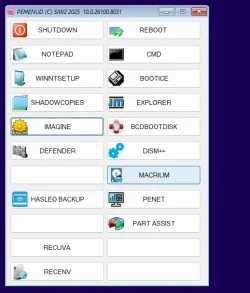
The desktop in the pic is my fancy winpe

View attachment 170681

View attachment 170682

Doesnt seem to have anything elaborate like exclusions or delta restore.

The data recovery program from the same company is apparently good

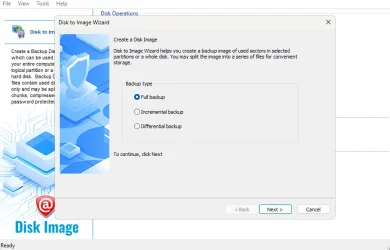
As far as I can tell the free version does a complete image each time - cant see any option for incremental/differential
My needs are simple

I do full backup with Free Macrium weekly.

Occasionally I may want to retrieve a file or folder from the image. The inability to mount the image without having to do some temporary changes in the settings is a bit frustrating with Macrium

I now a make a full image with Active@Disk Image immediately after making a Macrium image. It is extremely quick. I will mount this image and retrieve the file or folder when needed
 

My Computer My Computer

At a glance

windows 11 ,Ubuntu Cinnamon - for tinkering onlyIntel i51140016 GB0
OS
windows 11 ,Ubuntu Cinnamon - for tinkering only
Computer type
PC/Desktop
Manufacturer/Model
No Name - Assembled by a Compute shop in a Strip Mall.
CPU
Intel i511400
Motherboard
ASUS PRIME B560-PLUS motherboard
Memory
16 GB
Graphics Card(s)
0
Sound Card
0
Monitor(s) Displays
25 in BenQ
Screen Resolution
1920 x 1080
Hard Drives
9 SSDs 4 Nvme, 2 in M.2 slot and 2 in PCIE with adapter + 5 Sata. DVD drive
PSU
600w
Case
Antec- VSK4000E-U3 Mid Tower
Internet Speed
Bell pure fibre optic. 3 GB package. 6E Wireless adapter 750/500
Browser
Firefox, Microsoft Edge
Antivirus
Defender
I only did one small test with active@diskimage it seemed to be very quick.
I used the free version which doesnt make its own boot media so I cobbled it together myself

Just checked that aomei backupper mounts in the most recent pe. It does.
 

My Computers My Computers

  • At a glance

    Win7,Win11i7-97002x16gb 3600mhz
    OS
    Win7,Win11
    Computer type
    PC/Desktop
    CPU
    i7-9700
    Motherboard
    gigabyte b365m ds3h
    Memory
    2x16gb 3600mhz
    Monitor(s) Displays
    benq gw2480
    PSU
    bequiet pure power 11 400CM
    Cooling
    cryorig m9i
  • At a glance

    win7,win11i5-84002x8gb 3200
    Operating System
    win7,win11
    Computer type
    PC/Desktop
    CPU
    i5-8400
    Motherboard
    gigabyte b365m ds3h
    Memory
    2x8gb 3200
    PSU
    xfx pro 450
Just FYI - the paid version of Active @ Disk Image does support

Full, Incremental, and Differential backups


1778115623535.webp
 

My Computer My Computer

At a glance

Windows 10Intel i9-9900K64GBEVGA GeForce GTX 1070 TI
OS
Windows 10
Computer type
PC/Desktop
Manufacturer/Model
MSI Custom build
CPU
Intel i9-9900K
Motherboard
MSI MPG Z390 Gaming Edge AC
Memory
64GB
Graphics Card(s)
EVGA GeForce GTX 1070 TI
Internet Speed
1 Gbps
Browser
Firefox
Antivirus
Malwarebytes
I'm hopeful that Macrium Reflect and Microsoft will get the driver issue resolved sooner or later.

Many people don't use the mounting of a MR image in Explorer so are not missing out. The backups and restores do work as they've been working for years now without issue.

For those that do need to do Full, Incremental, and Differential backups and Mount images there are still other free programs.

FREE programs

Hasleo Backup Suite Free | Fully functional (I've been using now for a couple of weeks and works well)
Veeam Agent for Microsoft Windows | Fully functional (I use this for custom backups of programming data but works well too)

There are a couple of other programs but I've not tested and verified they work after this recent security update by Microsoft.
 

My Computer My Computer

At a glance

Windows 10Intel i9-9900K64GBEVGA GeForce GTX 1070 TI
OS
Windows 10
Computer type
PC/Desktop
Manufacturer/Model
MSI Custom build
CPU
Intel i9-9900K
Motherboard
MSI MPG Z390 Gaming Edge AC
Memory
64GB
Graphics Card(s)
EVGA GeForce GTX 1070 TI
Internet Speed
1 Gbps
Browser
Firefox
Antivirus
Malwarebytes
Cant remember if easeus todo does all that.

Aomei backupper does, however mounting is not in the current free version.

Edit BackupperV6.9.1 free can be found which I think mounts.
6.9.1

might check it in a mo
 
Last edited:

My Computers My Computers

  • At a glance

    Win7,Win11i7-97002x16gb 3600mhz
    OS
    Win7,Win11
    Computer type
    PC/Desktop
    CPU
    i7-9700
    Motherboard
    gigabyte b365m ds3h
    Memory
    2x16gb 3600mhz
    Monitor(s) Displays
    benq gw2480
    PSU
    bequiet pure power 11 400CM
    Cooling
    cryorig m9i
  • At a glance

    win7,win11i5-84002x8gb 3200
    Operating System
    win7,win11
    Computer type
    PC/Desktop
    CPU
    i5-8400
    Motherboard
    gigabyte b365m ds3h
    Memory
    2x8gb 3200
    PSU
    xfx pro 450
Yeah, I checked all of them out before but it's been a few years so I don't have any current information on them.

If I can free up some more time I may go test and write up some basic reviews
 

My Computer My Computer

At a glance

Windows 10Intel i9-9900K64GBEVGA GeForce GTX 1070 TI
OS
Windows 10
Computer type
PC/Desktop
Manufacturer/Model
MSI Custom build
CPU
Intel i9-9900K
Motherboard
MSI MPG Z390 Gaming Edge AC
Memory
64GB
Graphics Card(s)
EVGA GeForce GTX 1070 TI
Internet Speed
1 Gbps
Browser
Firefox
Antivirus
Malwarebytes
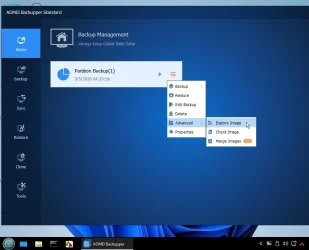
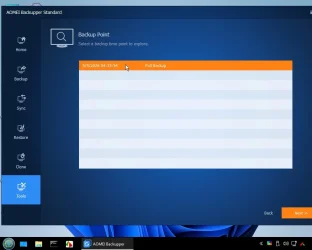
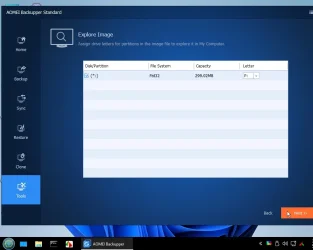
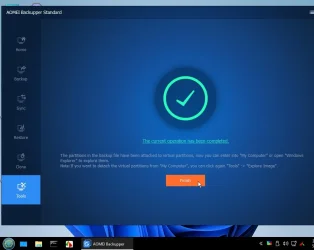
6.9.1 just tested in my fancy 26H1 winpe ( I am posting from it now using palemoon portable )

aomei-6.9.1-1.webp


aomei-6.9.1-2.webp

aomei-6.9.1-3.webp

aomei-6.9.1-4.webp

works great

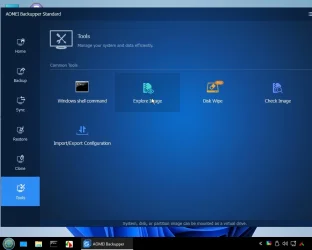
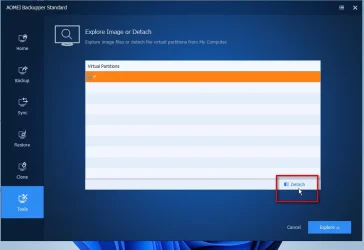
to unmount go to Tools> Explore Image

aomei-6.9.1-5.webp


aomei-6.9.1-6.webp
 

My Computers My Computers

  • At a glance

    Win7,Win11i7-97002x16gb 3600mhz
    OS
    Win7,Win11
    Computer type
    PC/Desktop
    CPU
    i7-9700
    Motherboard
    gigabyte b365m ds3h
    Memory
    2x16gb 3600mhz
    Monitor(s) Displays
    benq gw2480
    PSU
    bequiet pure power 11 400CM
    Cooling
    cryorig m9i
  • At a glance

    win7,win11i5-84002x8gb 3200
    Operating System
    win7,win11
    Computer type
    PC/Desktop
    CPU
    i5-8400
    Motherboard
    gigabyte b365m ds3h
    Memory
    2x8gb 3200
    PSU
    xfx pro 450
It is possible to include both versions - the latest AomeiBackupper and the 6.9.1 in one wim, but it is a bit bulky.

I have most programs on the usb stick and just link them to the pe desktop/start menu
It is also easier to update them and add extra programs on the usb stick instead of making changes to the wim.

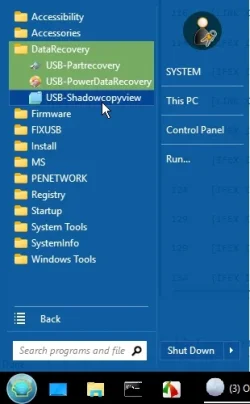
an example of pecmd log to show how the linking works

it searches the root of all drives

if it finds both files peusby.ini and usbprogs.ini

it gets the drive letter and loads usbprogs.ini

there is a list of commands in usbprogs.ini

which is sort of :

if exist this drive\USBprograms\shadowcopyview-x64\ShadowCopyViewx64.exe (
link to startmenu\datarecovery folder
)

in pecmd speak :

ENVI PECMN=%CurDir%\USBprograms

IFEX %PECMN%\shadowcopyview-x64\ShadowCopyViewx64.exe,
{
LINK %StartMenu%\DataRecovery\USB-Shadowcopyview,%PECMN%\shadowcopyview-x64\ShadowCopyViewx64.exe
}

which the log file shows as:


{IFEX I:\USBprograms\shadowcopyview-x64\ShadowCopyViewx64.exe,}

[LINK X:\Users\Default\AppData\Roaming\Microsoft\Windows\Start Menu\DataRecovery\USB-Shadowcopyview,I:\USBprograms\shadowcopyview-x64\ShadowCopyViewx64.exe] <0> :The operation completed successfully.

[IFEX I:\USBprograms\shadowcopyview-x64\ShadowCopyViewx64.exe,] <0> :The operation completed successfully.


start menu links

pecmd-startmenu-links.webp
 
Last edited:

My Computers My Computers

  • At a glance

    Win7,Win11i7-97002x16gb 3600mhz
    OS
    Win7,Win11
    Computer type
    PC/Desktop
    CPU
    i7-9700
    Motherboard
    gigabyte b365m ds3h
    Memory
    2x16gb 3600mhz
    Monitor(s) Displays
    benq gw2480
    PSU
    bequiet pure power 11 400CM
    Cooling
    cryorig m9i
  • At a glance

    win7,win11i5-84002x8gb 3200
    Operating System
    win7,win11
    Computer type
    PC/Desktop
    CPU
    i5-8400
    Motherboard
    gigabyte b365m ds3h
    Memory
    2x8gb 3200
    PSU
    xfx pro 450
You can view Backup files using any Macrium Reflect bootable flash drive(BOOT ISO) v7.3 - v.8.0 - 8.1
You won't have an "error psmounterex.sys " on any version of Windows

(1). How to create a Macrium Reflect BOOT ISO
Install Macrium Reflect v7.3 or v.8.0 or v.8.1
Then Create a BOOT ISO:
"Rescue" – "select ISO-File"(Create new ISO File) – "Advanced" – "Choose Base WIM" – here select "Windows PE 11 (WADK)" –
-- "Options" – here select only "64bit" – "Ok" – "Build"
NOTE: to create an ISO file, the program downloads about 900 MB, so you must turn on the Internet.

(2). How to burn a Macrium Reflect BOOT ISO file to a bootable USB flash drive:
Create a bootable USB flash drive with the Ventoy program
Then copy the ISO File (p.p. (1)) to this USB flash drive.

(3). How to view your Backup files using a bootable USB flash drive:
- Boot from a USB flash drive (while the computer is booting, hold down the F12 key and then select "Boot from a USB flash drive" from the Menu)
- After downloading the Macrium Reflect program (from 1 to 3 minutes), select your Backup file to view:
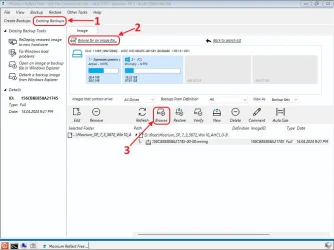
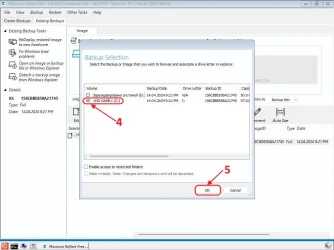
"Existing Backup" – "Brouse for on image file" – select your Backup file here – "Brouse" – After the "Backup Selection" tab opens, mark your Disk on this tab – "Ok"
.. Now your Backup file will open as an Archive and you will be able to extract the necessary files.

You can make the Macrium Reflect ISO file yourself or download it(Macrium Reflect Free v.8.0.7175) from the link:
MR_Free_8_0_7175_pe11_22000_x64_en.7z (322 Mb)
 

Attachments

  • 03__807175_ISO.webp
    03__807175_ISO.webp
    58.3 KB · Views: 3
  • 04__807175_ISO.webp
    04__807175_ISO.webp
    54.3 KB · Views: 2

My Computer My Computer

At a glance

Windows 10/11
OS
Windows 10/11
Computer type
PC/Desktop
Manufacturer/Model
Windows 10 21H2 LTSC x64 [MSDN]; Windows 11 24H2 LTSC; m/b Z77-HD3(BIOS-MBR/UEFI); HDD WD 500Gb
Obviously a wim file from before the offending update shouldn't block psmounterex. 2200 is not recent
 
Last edited:

My Computers My Computers

  • At a glance

    Win7,Win11i7-97002x16gb 3600mhz
    OS
    Win7,Win11
    Computer type
    PC/Desktop
    CPU
    i7-9700
    Motherboard
    gigabyte b365m ds3h
    Memory
    2x16gb 3600mhz
    Monitor(s) Displays
    benq gw2480
    PSU
    bequiet pure power 11 400CM
    Cooling
    cryorig m9i
  • At a glance

    win7,win11i5-84002x8gb 3200
    Operating System
    win7,win11
    Computer type
    PC/Desktop
    CPU
    i5-8400
    Motherboard
    gigabyte b365m ds3h
    Memory
    2x8gb 3200
    PSU
    xfx pro 450
(3). How to view your Backup files using a bootable USB flash drive:
- Boot from a USB flash drive (while the computer is booting, hold down the F12 key and then select "Boot from a USB flash drive" from the Menu)
- After downloading the Macrium Reflect program (from 1 to 3 minutes), select your Backup file to view:
"Existing Backup" – "Brouse for on image file" – select your Backup file here – "Brouse" – After the "Backup Selection" tab opens, mark your Disk on this tab – "Ok"
.. Now your Backup file will open as an Archive and you will be able to extract the necessary files.

I tried this with my Macruim USB drive. I can see all the files but how do you extract them?
 

My Computer My Computer

At a glance

windows 11 ,Ubuntu Cinnamon - for tinkering onlyIntel i51140016 GB0
OS
windows 11 ,Ubuntu Cinnamon - for tinkering only
Computer type
PC/Desktop
Manufacturer/Model
No Name - Assembled by a Compute shop in a Strip Mall.
CPU
Intel i511400
Motherboard
ASUS PRIME B560-PLUS motherboard
Memory
16 GB
Graphics Card(s)
0
Sound Card
0
Monitor(s) Displays
25 in BenQ
Screen Resolution
1920 x 1080
Hard Drives
9 SSDs 4 Nvme, 2 in M.2 slot and 2 in PCIE with adapter + 5 Sata. DVD drive
PSU
600w
Case
Antec- VSK4000E-U3 Mid Tower
Internet Speed
Bell pure fibre optic. 3 GB package. 6E Wireless adapter 750/500
Browser
Firefox, Microsoft Edge
Antivirus
Defender
I think the bog standard macrium boot media has a basic explorer type thing. Might be on the taskbar of the quasi desktop

You could try that to get to the mounted image and copy stuff out - perhaps there is a copy option on the rt click menu in the explorer thing
 

My Computers My Computers

  • At a glance

    Win7,Win11i7-97002x16gb 3600mhz
    OS
    Win7,Win11
    Computer type
    PC/Desktop
    CPU
    i7-9700
    Motherboard
    gigabyte b365m ds3h
    Memory
    2x16gb 3600mhz
    Monitor(s) Displays
    benq gw2480
    PSU
    bequiet pure power 11 400CM
    Cooling
    cryorig m9i
  • At a glance

    win7,win11i5-84002x8gb 3200
    Operating System
    win7,win11
    Computer type
    PC/Desktop
    CPU
    i5-8400
    Motherboard
    gigabyte b365m ds3h
    Memory
    2x8gb 3200
    PSU
    xfx pro 450
I think the bog standard macrium boot media has a basic explorer type thing. Might be on the taskbar of the quasi desktop

You could try that to get to the mounted image and copy stuff out - perhaps there is a copy option on the rt click menu in the explorer thing
There is no copy function. What would you copy to?
 

My Computer My Computer

At a glance

windows 11 ,Ubuntu Cinnamon - for tinkering onlyIntel i51140016 GB0
OS
windows 11 ,Ubuntu Cinnamon - for tinkering only
Computer type
PC/Desktop
Manufacturer/Model
No Name - Assembled by a Compute shop in a Strip Mall.
CPU
Intel i511400
Motherboard
ASUS PRIME B560-PLUS motherboard
Memory
16 GB
Graphics Card(s)
0
Sound Card
0
Monitor(s) Displays
25 in BenQ
Screen Resolution
1920 x 1080
Hard Drives
9 SSDs 4 Nvme, 2 in M.2 slot and 2 in PCIE with adapter + 5 Sata. DVD drive
PSU
600w
Case
Antec- VSK4000E-U3 Mid Tower
Internet Speed
Bell pure fibre optic. 3 GB package. 6E Wireless adapter 750/500
Browser
Firefox, Microsoft Edge
Antivirus
Defender
I tried this with my Macruim USB drive. I can see all the files but how do you extract them?
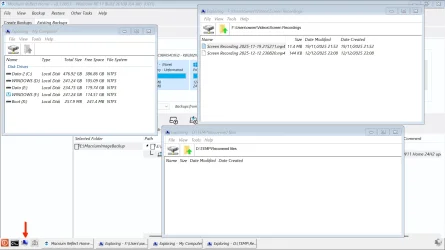
When booted from the rescue USB and mounting an image as a drive it opens in a Macrium PE Explorer Window. You can open more PE Explorer windows by clicking on the computer icon on the taskbar. Here I have opened three, the 'My Computer' one on the left is just there to show that the mounted image is the F: drive, and that my Windows drive appears as the D: drive (for now). The upper Window on the right is the mounted F: drive and I have navigated the the Screen Recordings folder in my user folder, Users\Owner. The lower right window I have navigated to where I want to copy the files(s) to on my D: drive (which will be the C: drive again when I boot back into Windows).

Select the file, files, or folders you want to copy from the image. Right-click on them and select 'Copy'. Right-click in the window where you want to copy them to, and select 'Paste'.

screenshot2.webp
 

My Computers My Computers

  • At a glance

    Windows 11 HomeAMD Athlon Silver 3050U8GBRadeon Graphics
    OS
    Windows 11 Home
    Computer type
    Laptop
    Manufacturer/Model
    Acer Aspire 3 A315-23-R9VY
    CPU
    AMD Athlon Silver 3050U
    Memory
    8GB
    Graphics Card(s)
    Radeon Graphics
    Monitor(s) Displays
    laptop screen
    Screen Resolution
    1366x768 native resolution, up to 2560x1440 with Radeon Virtual Super Resolution
    Hard Drives
    1TB Samsung EVO 870 SSD (from April 2026: 250GB EVO 850)
    Internet Speed
    150 Mbps
    Browser
    Edge, Firefox
    Antivirus
    Defender
    Other Info
    fully 'Windows 11 ready' laptop. Windows 10 C: partition migrated from my old unsupported 'main machine' then upgraded to 11. A test migration ran Insider builds for 2 months. When 11 was released on 5th October 2021 it was re-imaged back to 10 and was offered the upgrade in Windows Update on 20th October. Windows Update offered the 22H2 Feature Update on 20th September 2022. It got the 23H2 Feature Update on 4th November 2023 through Windows Update, 24H2 on 3rd October 2024 through Windows Update by setting the Target Release Version for 24H2, and 25H2 on 30th September 2025 through Windows Update by setting the Target Release Version for 25H2.

    UPDATE - 11 April 2026: due to mechanical deterioration this PC has been retired from active duty. The OS with all software and files has been migrated to my System Seven in 'Other systems' to carry on as my general purpose 'main machine'.
  • At a glance

    Windows 11 ProIntel® Core™ i5-520M8GB(integrated graphics) Intel HD Graphics
    Operating System
    Windows 11 Pro
    Computer type
    Laptop
    Manufacturer/Model
    Dell Latitude E4310
    CPU
    Intel® Core™ i5-520M
    Motherboard
    0T6M8G
    Memory
    8GB
    Graphics card(s)
    (integrated graphics) Intel HD Graphics
    Screen Resolution
    1366x768
    Hard Drives
    500GB Crucial MX500 SSD
    Browser
    Firefox, Edge
    Antivirus
    Defender
    Other Info
    unsupported machine: Legacy bios, MBR, TPM 1.2, upgraded from W10 to W11 using W10/W11 hybrid install media workaround.

    In-place upgrade to 22H2 using ISO and a workaround.
    Feature Update to 23H2 by manually installing the Enablement Package.
    In-place upgrade to 24H2 using hybrid 23H2/24H2 install media.
    Upgraded to 25H2 by Enablement Package.

    Also running Insider Dev, and Canary builds and Windows 10 as native boot .vhdx.
  • My SYSTEM THREE is a Dell Latitude 5410, i7-10610U, 32GB RAM, 512GB NVMe ssd, supported device running Windows 11 Pro.

    My SYSTEM FOUR is a 2-in-1 convertible Lenovo Yoga 11e 20DA, Celeron N2930, 8GB RAM, 256GB ssd. Unsupported device: currently running Win10 Pro, plus Win11 Pro RTM and Insider Dev, Beta, and RP 24H2 as native boot vhdx.

    My SYSTEM FIVE is a Dell Latitude 3190 2-in-1, Pentium Silver N5030, 8GB RAM, 1TB NVMe ssd, supported device running Windows 11 Pro, plus Insider Beta, Dev, and Canary builds (and a few others) as a native boot .vhdx.

    My SYSTEM SIX is a Dell Latitude 5550, Core Ultra 7 165H, 64GB RAM, 1TB NVMe SSD, supported device, Windows 11 Pro 24H2, Hyper-V host machine. Updated to 25H2 on 30th September 2025.

    My SYSTEM SEVEN is a Lenovo Thinkpad T580, Intel Core i7-8650U, 16GB RAM, 512GB NVMe SSD + 2nd 512GB NVMe SSD, a supported device for Windows 11. This is my current general purpose 'main machine'. The installed Windows 11 Home from my System One has been migrated to this machine.
copy onto any attached disk/usb stick

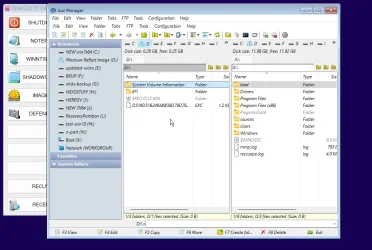
I include justmanager in my simple pe builds , does the useful functions


copy and paste from one pane to the other or use the copy button at the bottom pane

mrimg-simple-pe.webp

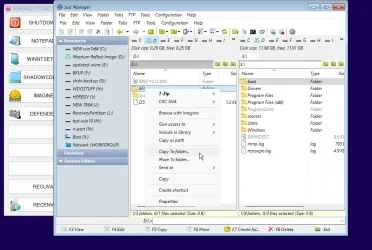
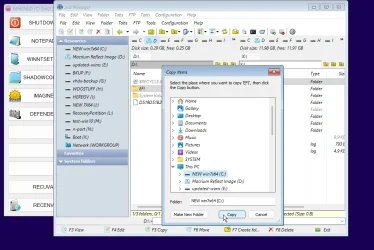
I usually also add copy to function on context menu

Captured_001.webp

Captured_003.webp
copy and paste from one pane to the other or
 
Last edited:

My Computers My Computers

  • At a glance

    Win7,Win11i7-97002x16gb 3600mhz
    OS
    Win7,Win11
    Computer type
    PC/Desktop
    CPU
    i7-9700
    Motherboard
    gigabyte b365m ds3h
    Memory
    2x16gb 3600mhz
    Monitor(s) Displays
    benq gw2480
    PSU
    bequiet pure power 11 400CM
    Cooling
    cryorig m9i
  • At a glance

    win7,win11i5-84002x8gb 3200
    Operating System
    win7,win11
    Computer type
    PC/Desktop
    CPU
    i5-8400
    Motherboard
    gigabyte b365m ds3h
    Memory
    2x8gb 3200
    PSU
    xfx pro 450
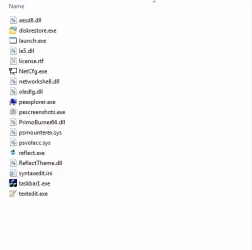
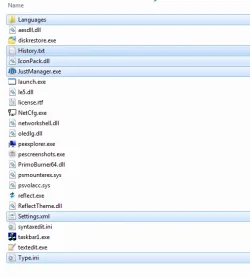
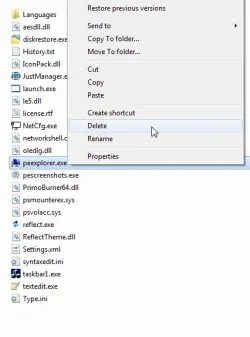
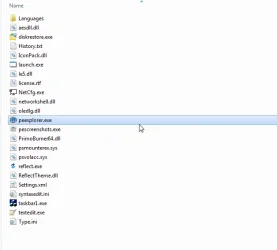
Might work to put the justmanager files in the wim program files\macrium folder renaming justmanager.exe to peexplorer.exe

perhaps it will then feature on the task bar instead of the macrium peexplorer

I havent bothered trying it that way

mac-add-justman1.webp

add just manager files

mac-add-justman2.webp

delete peexplorer.exe

mac-add-justman3.webp

rename justmanager.exe to peexplorer.exe


mac-add-justman4.webp

might work worth a try
 
Last edited:

My Computers My Computers

  • At a glance

    Win7,Win11i7-97002x16gb 3600mhz
    OS
    Win7,Win11
    Computer type
    PC/Desktop
    CPU
    i7-9700
    Motherboard
    gigabyte b365m ds3h
    Memory
    2x16gb 3600mhz
    Monitor(s) Displays
    benq gw2480
    PSU
    bequiet pure power 11 400CM
    Cooling
    cryorig m9i
  • At a glance

    win7,win11i5-84002x8gb 3200
    Operating System
    win7,win11
    Computer type
    PC/Desktop
    CPU
    i5-8400
    Motherboard
    gigabyte b365m ds3h
    Memory
    2x8gb 3200
    PSU
    xfx pro 450
Back
Top Bottom