UPDATE:
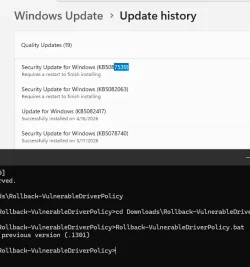
we installed the May update on our 2025 Server test server (no Internet) and were happy the old driversipolicy.p7b (.1301) is still in place. However, we see a reboot is still required for both the April and May security updates. See screenshot. What would our live server do in that case? Will it post load and install the latest driversipolicy.p7b ?
Blocked Drivers policy (or any Code Integrity security policies) are only applied at boot time. If you make changes on a live system to which policy file is to be used, they don't take effect until the next Windows restart.
The reason applying May 2026 didn't change the currently linked driversipolicy.p7b is due to how Component Based Servicing works.
1. Monthly Updates are cumulative. Barring any bad changes which had to be reverted, every month's updates will include the same set of patched Component folders to be added to \Windows\WinSxS as the previous month. Or simply, after MS decides to patch some Component (ie. driversipolicy.p7b), then some form of that file is included in every Monthly Update for this release until support runs out.
June 2026 and July 2026 will include some copy of driversipolicy.p7b that is the same or newer than the previous months.
2. Just because a Component is included, it doesn't have to change every month. Maybe an one-time fix to Windows was required, and it will never need to be updated again. So the cumulative update can carry the same Component version forever.
3. Your updated system keeps older versions of Components, just in case you need to uninstall updates. When a new Monthly Update is applied, WU does a smart comparison of the update's contents. If the patch includes a component, WU checks if that same version has already been installed before.
Duplicated components are skipped. Any new or missing components are installed, and it results in some change.
Since May 2026 keeps the same driversipolicy.p7b as April 2026, there is no effective change for this component. Therefore Windows doesn't touch the policy file (which is currently hardlinked to the pre-April version). Had a new driver blocklist been included, WU would have replaced the existing hardlink with a new one pointing to the later file version.
With no new changes to apply on the driver blocklist file, WU leaves the existing file alone (which preserves the current state of linking it back to the older driver version). We're taking advantage that WU is "blind" to our hack, since it's not running a consistency check. It's only watching for newer files to install. Applying May 2026 will not clobber what the script has done, but generally you have to reboot anyway after a CU's been applied.
PS: what tool are you using to export the ToC to a .csv
A browser. Every CU is listed on the W10 and W11 Update History portals. If you select any update from the left margin, and scroll ALL THE WAY TO THE PAGE'S BOTTOM, there's a link for files changed in this update.
May 12, 2026—KB5089549 (OS Builds 26200.8457 and 26100.8457) - Microsoft Support
File information
For a list of the files provided in this update,
download the file information for cumulative update 5089549.
For a list of the files provided in the servicing stack update,
download the file information for the SSU (KB5092762) - version 26100.8456.
When you collect a few of the recent CSV files, you can check if the file sizes changed over time. Because there's no checksums a file could may have stayed the same size but changed. But it's unlikely for the driver blocklist, which only tends to grow in length.





 They already had over a month