Overwhelmed - Macrium Reflect


Subscribed....watching to see what happens....
 

My Computer My Computer

At a glance

W10 (Yes, I'm still on W10 lol)i7-9700K 3.6GHz 8 Core32GB DDR4nVidia GeForce GTX 960
OS
W10 (Yes, I'm still on W10 lol)
Computer type
PC/Desktop
Manufacturer/Model
home brew
CPU
i7-9700K 3.6GHz 8 Core
Motherboard
MSi Z390
Memory
32GB DDR4
Graphics Card(s)
nVidia GeForce GTX 960
Monitor(s) Displays
Acer R271 + ASUS
Screen Resolution
1920 x 1080 60Hz
Hard Drives
SSDs + spinners
PSU
EVGA SuperNOVA 750G1 Gold
Case
Corsair Obsidian 750D
Keyboard
Corsair K70 Cherry MX
Mouse
Logitech ergonomic
Internet Speed
200GB
Browser
FF
I don't expect that change anytime soon until Macrium fixes its security issue with that driver. If a fix is coming, it will be issued by Macrium and although the name may be the same, the HASH for the new version will not violate MicroSloth's existing security list until it is tested by MS... which may be a while from now.
 

My Computer My Computer

At a glance

Windows 10, Linux MINT (V-guests 7, 11, ZorinOS)Intel Core i7-1070032gB (DDR4)Intel UHD Graphics 630
OS
Windows 10, Linux MINT (V-guests 7, 11, ZorinOS)
Computer type
PC/Desktop
Manufacturer/Model
HP Z2 G5 Workstation
CPU
Intel Core i7-10700
Motherboard
HP Model# 8751
Memory
32gB (DDR4)
Graphics Card(s)
Intel UHD Graphics 630
Sound Card
Realtek basic audio
Monitor(s) Displays
32" (Viewsonic) UHD
Screen Resolution
3840 x 2160
Hard Drives
2-NvME (mainboard), 1-NvME (PCIe), 1-SATA3 SSD
Thanks @garlin worked for us on our test environment. :)

After running the bat file the computer had to go through 2-stage (automatic) repair after I pressed F8 just before the final repair stage. After the second stage repair we ran the bat again and it said it is on previous (older) version of driversipolicy.p7b (1301)

The windows update history shows that KB5082063 is incomplete and requires a reboot.

We where able to run our Back-UP Job without Errors

After running bat with –restore :
Restoring latest version (.32684) of driversipolicy.p7b. Please be patient

The restore works, the Macrium error is back

Running bat shows:
Exiting. driversipolicy.p7b is already the latest version (.32684)

Another downgrade using the bat does not cause a repair action.

We will Probably wait till Wednesday (PATCH DAY) before trying it on live just to see, if Microsoft has grey-listed the driver or not and how it reacts when the may update is installed.

For now it works.
UPDATE:
we installed the May update on our 2025 Server test server (no Internet) and were happy the old driversipolicy.p7b (.1301) is still in place. However, we see a reboot is still required for both the April and May security updates. See screenshot. What would our live server do in that case? Will it post load and install the latest driversipolicy.p7b ?

Screenshot 2026-05-13 140019-1.webp
No changes in the May 2026 Monthly Update, it's the same set of blocked drivers as last month.

Code:
5083769.csv:"driversipolicy.p7b","Not versioned","11-Apr-2026","22:08","242,130"
5083769.csv:"driversipolicy.p7b","Not versioned","11-Apr-2026","21:53","242,130"
5089549.csv:"driversipolicy.p7b","Not versioned","07-May-2026","03:36","242,130"
5089549.csv:"driversipolicy.p7b","Not versioned","07-May-2026","03:33","242,130"

PS: what tool are you using to export the ToC to a .csv
 

My Computer My Computer

At a glance

Windows 11
OS
Windows 11
Computer type
Laptop
Manufacturer/Model
Dell
UPDATE:
we installed the May update on our 2025 Server test server (no Internet) and were happy the old driversipolicy.p7b (.1301) is still in place. However, we see a reboot is still required for both the April and May security updates. See screenshot. What would our live server do in that case? Will it post load and install the latest driversipolicy.p7b ?
Blocked Drivers policy (or any Code Integrity security policies) are only applied at boot time. If you make changes on a live system to which policy file is to be used, they don't take effect until the next Windows restart.

The reason applying May 2026 didn't change the currently linked driversipolicy.p7b is due to how Component Based Servicing works.

1. Monthly Updates are cumulative. Barring any bad changes which had to be reverted, every month's updates will include the same set of patched Component folders to be added to \Windows\WinSxS as the previous month. Or simply, after MS decides to patch some Component (ie. driversipolicy.p7b), then some form of that file is included in every Monthly Update for this release until support runs out.

June 2026 and July 2026 will include some copy of driversipolicy.p7b that is the same or newer than the previous months.

2. Just because a Component is included, it doesn't have to change every month. Maybe an one-time fix to Windows was required, and it will never need to be updated again. So the cumulative update can carry the same Component version forever.

3. Your updated system keeps older versions of Components, just in case you need to uninstall updates. When a new Monthly Update is applied, WU does a smart comparison of the update's contents. If the patch includes a component, WU checks if that same version has already been installed before.

Duplicated components are skipped. Any new or missing components are installed, and it results in some change.

Since May 2026 keeps the same driversipolicy.p7b as April 2026, there is no effective change for this component. Therefore Windows doesn't touch the policy file (which is currently hardlinked to the pre-April version). Had a new driver blocklist been included, WU would have replaced the existing hardlink with a new one pointing to the later file version.
With no new changes to apply on the driver blocklist file, WU leaves the existing file alone (which preserves the current state of linking it back to the older driver version). We're taking advantage that WU is "blind" to our hack, since it's not running a consistency check. It's only watching for newer files to install. Applying May 2026 will not clobber what the script has done, but generally you have to reboot anyway after a CU's been applied.

PS: what tool are you using to export the ToC to a .csv
A browser. Every CU is listed on the W10 and W11 Update History portals. If you select any update from the left margin, and scroll ALL THE WAY TO THE PAGE'S BOTTOM, there's a link for files changed in this update.

May 12, 2026—KB5089549 (OS Builds 26200.8457 and 26100.8457) - Microsoft Support
File information

For a list of the files provided in this update, download the file information for cumulative update 5089549.

For a list of the files provided in the servicing stack update, download the file information for the SSU (KB5092762) - version 26100.8456.

When you collect a few of the recent CSV files, you can check if the file sizes changed over time. Because there's no checksums a file could may have stayed the same size but changed. But it's unlikely for the driver blocklist, which only tends to grow in length.

 

My Computer My Computer

At a glance

Windows 7
OS
Windows 7

My Computer My Computer

At a glance

Windows 11 ProCore i7-13700K64 GB Kingston Fury Beast DDR5Gigabyte GeForce RTX 2060 Super Gaming OC 8G
OS
Windows 11 Pro
Computer type
PC/Desktop
Manufacturer/Model
Self build
CPU
Core i7-13700K
Motherboard
Asus TUF Gaming Plus WiFi Z790
Memory
64 GB Kingston Fury Beast DDR5
Graphics Card(s)
Gigabyte GeForce RTX 2060 Super Gaming OC 8G
Sound Card
Realtek S1200A
Monitor(s) Displays
Viewsonic VP2770 & Dell (secondary)
Screen Resolution
2560 x 1440
Hard Drives
Kingston KC3000 2TB NVME SSD & SATA HDDs & SSD
PSU
EVGA SuperNova G2 850W
Case
Nanoxia Deep Silence 1
Cooling
Noctua NH-D14
Keyboard
Microsoft Digital Media Pro
Mouse
Logitech Wireless
Internet Speed
80 Mb / s
Browser
Chrome
Antivirus
Defender, Malwarebytes Free & AdwCleaner
I've told them to fix the issue to preseve their reputatation
Macrium owners will not "take note" of Users' concerns for versions 7.3 - 8.0 - 8.1
They won't do anything to fix this problem.
Why?
If a third-party driver with an OFFICIAL Microsoft digital signature is assigned the status of a "Vulnerable Driver", it means that:
- the developer of the "outdated" program wants to get rid of the old version, which is no longer serviced or sold, i.e. it does not generate income.
- the program developer wants to force Users to upgrade to a new (current) version that sells and generates revenue.
- the program developer appeals to Microfoft with a proposal to conclude a "CONTRACT to change the status of the driver of the "outdated" program from "authorized driver" to "vulnerable driver"
... How much does such a "service" from Microsoft cost?
.. We know for sure that Microsoft does not do anything for free.
This is just THE BEGINNING..
Today - they blocked the "outdated driver" C:\Windows\System32\drivers\psmounterex.sys - and they created "image mount errors"
Tomorrow - they will block the "outdated MIG driver" C:\Windows\System32\drivers\mrigflt.sys - and they will create an "access error"
The day after tomorrow, they will block the "outdated drivers" of the ViBoot function, and they will create a "virtual mode error"..
**
In short:
The new Macrium "development team" is not creating anything, they are only destroying what was created by the "old Team" before October 2024.
Everything will be fine, get ready...
**
I have been using MacriumRescue 8.0.7175(BOOT ISO) for a long time, so I have no problems with Backup of ANY versions of Windows 7/8/10/11
I am grateful to the OLD development team who created the wonderful Macrium Reflect ver. 8.0.7175 program in 2022.
 

My Computer My Computer

At a glance

Windows 11 24H2 Enterprise LTSC 26100.1CPU E3-1270 V2 3.50GHz16Gb
OS
Windows 11 24H2 Enterprise LTSC 26100.1
Computer type
PC/Desktop
Manufacturer/Model
GigaByte Z77-HD3
CPU
CPU E3-1270 V2 3.50GHz
Memory
16Gb
Macrium owners will not "take note" of Users' concerns for versions 7.3 - 8.0 - 8.1
They won't do anything to fix this problem.
Why?
If a third-party driver with an OFFICIAL Microsoft digital signature is assigned the status of a "Vulnerable Driver", it means that:
- the developer of the "outdated" program wants to get rid of the old version, which is no longer serviced or sold, i.e. it does not generate income.
- the program developer wants to force Users to upgrade to a new (current) version that sells and generates revenue.
- the program developer appeals to Microfoft with a proposal to conclude a "CONTRACT to change the status of the driver of the "outdated" program from "authorized driver" to "vulnerable driver"
... How much does such a "service" from Microsoft cost?
.. We know for sure that Microsoft does not do anything for free.
This is just THE BEGINNING..
Today - they blocked the "outdated driver" C:\Windows\System32\drivers\psmounterex.sys - and they created "image mount errors"
Tomorrow - they will block the "outdated MIG driver" C:\Windows\System32\drivers\mrigflt.sys - and they will create an "access error"
The day after tomorrow, they will block the "outdated drivers" of the ViBoot function, and they will create a "virtual mode error"..
**
In short:
The new Macrium "development team" is not creating anything, they are only destroying what was created by the "old Team" before October 2024.
Everything will be fine, get ready...
**
I have been using MacriumRescue 8.0.7175(BOOT ISO) for a long time, so I have no problems with Backup of ANY versions of Windows 7/8/10/11
I am grateful to the OLD development team who created the wonderful Macrium Reflect ver. 8.0.7175 program in 2022.
I had no idea there was an "old" development team and a "new" development team. Do you know if anyone that was on the "old" development team is still left alive?
 

My Computers My Computers

  • At a glance

    Windows 11 ProIntel Series 3 Core Ultra X9 388H64GB LPDDR5x 9600 MT/sIntel Arc graphics B390 Panther Lake
    OS
    Windows 11 Pro
    Computer type
    Laptop
    Manufacturer/Model
    Dell XPS 16 DA16260
    CPU
    Intel Series 3 Core Ultra X9 388H
    Memory
    64GB LPDDR5x 9600 MT/s
    Graphics Card(s)
    Intel Arc graphics B390 Panther Lake
    Monitor(s) Displays
    16" 3.2K Tandem OLED Infinity Edge
    Screen Resolution
    3200 x 2000 16:10 236 PPI
    Hard Drives
    1 Terabyte M.2 PCIe NVMe SSD
    Case
    Black Anodized Aluminum
    Cooling
    Vapor Chamber Cooling
    Mouse
    None
    Internet Speed
    942 Mbps Netgear Mesh + 2 Satellites
    Browser
    Microsoft Edge (Chromium)
    Antivirus
    Windows Security (Defender)
    Other Info
    NPU delivering 67 TOPS
    Microsoft 365 subscription
    Microsoft Office 365
    Microsoft OneDrive 1TB Cloud
    Microsoft Visual Studio
    Microsoft Visual Studio Code
    Microsoft Sysinternals Suite
    Microsoft BitLocker
    Microsoft Copilot
    Dell Support Assist
    Dell Command | Update
    Macrium Reflect X subscription
    1Password Password Manager
    Amazon Kindle for PC
    Lightroom/Photoshop subscription
    Interactive Brokers Trader Workstation
  • At a glance

    Windows 11 ProSnapdragon® X Elite (12 Core) with Hexagon NP...32GB LPDDR5x 8448 MT/sIntegrated Adreno GPU
    Operating System
    Windows 11 Pro
    Computer type
    Laptop
    Manufacturer/Model
    Microsoft Surface Laptop 7
    CPU
    Snapdragon® X Elite (12 Core) with Hexagon NPU delivering 45 TOPS
    Memory
    32GB LPDDR5x 8448 MT/s
    Graphics card(s)
    Integrated Adreno GPU
    Sound Card
    Omnisonic speakers with Dolby Atmos spatial sound
    Monitor(s) Displays
    13.8″ PixelSense Flow touchscreen 120 Hz 600 NIT
    Screen Resolution
    2304 × 1536 (201 PPI), 3:2 aspect ratio
    Hard Drives
    1 TB PCIe NVMe Gen 4 SSD
    Case
    Black Anodized Aluminum
    Cooling
    Vapor Chamber Cooling
    Mouse
    None
    Internet Speed
    942 Mbps Netgear Mesh + 2 Satellites
    Browser
    Microsoft Edge (Chromium)
    Antivirus
    Windows Security (Defender)
    Other Info
    Microsoft 365 subscription (Office)
    Microsoft Office 365
    Microsoft OneDrive 1TB Cloud
    Microsoft Visual Studio 2026
    Microsoft Visual Studio Code
    Interactive Brokers Trader Workstation
    Lightroom/Photoshop subscription
    1Password Password Manager
    Microsoft Sysinternals
    Amazon Kindle for PC
    Microsoft BitLocker
    Microsoft Copilot
Macrium owners will not "take note" of Users' concerns for versions 7.3 - 8.0 - 8.1
They won't do anything to fix this problem.
Why?
If a third-party driver with an OFFICIAL Microsoft digital signature is assigned the status of a "Vulnerable Driver", it means that:
- the developer of the "outdated" program wants to get rid of the old version, which is no longer serviced or sold, i.e. it does not generate income.
- the program developer wants to force Users to upgrade to a new (current) version that sells and generates revenue.
- the program developer appeals to Microfoft with a proposal to conclude a "CONTRACT to change the status of the driver of the "outdated" program from "authorized driver" to "vulnerable driver"
... How much does such a "service" from Microsoft cost?
.. We know for sure that Microsoft does not do anything for free.
This is just THE BEGINNING..
Today - they blocked the "outdated driver" C:\Windows\System32\drivers\psmounterex.sys - and they created "image mount errors"
Tomorrow - they will block the "outdated MIG driver" C:\Windows\System32\drivers\mrigflt.sys - and they will create an "access error"
The day after tomorrow, they will block the "outdated drivers" of the ViBoot function, and they will create a "virtual mode error"..
**
In short:
The new Macrium "development team" is not creating anything, they are only destroying what was created by the "old Team" before October 2024.
Everything will be fine, get ready...
**
I have been using MacriumRescue 8.0.7175(BOOT ISO) for a long time, so I have no problems with Backup of ANY versions of Windows 7/8/10/11
I am grateful to the OLD development team who created the wonderful Macrium Reflect ver. 8.0.7175 program in 2022.
Macrium will break UK consumer law if they don't fix the problem or offer suitable compemstaion since I have a 6 year claim window for Reflect 8 under UK consumer law which hasn't expired yet. I'm prepared to challenge them in the UK Small Claims Court for a small fee if they don't fix this driver issue in a reasonable time.
 

My Computer My Computer

At a glance

Windows 11 ProCore i7-13700K64 GB Kingston Fury Beast DDR5Gigabyte GeForce RTX 2060 Super Gaming OC 8G
OS
Windows 11 Pro
Computer type
PC/Desktop
Manufacturer/Model
Self build
CPU
Core i7-13700K
Motherboard
Asus TUF Gaming Plus WiFi Z790
Memory
64 GB Kingston Fury Beast DDR5
Graphics Card(s)
Gigabyte GeForce RTX 2060 Super Gaming OC 8G
Sound Card
Realtek S1200A
Monitor(s) Displays
Viewsonic VP2770 & Dell (secondary)
Screen Resolution
2560 x 1440
Hard Drives
Kingston KC3000 2TB NVME SSD & SATA HDDs & SSD
PSU
EVGA SuperNova G2 850W
Case
Nanoxia Deep Silence 1
Cooling
Noctua NH-D14
Keyboard
Microsoft Digital Media Pro
Mouse
Logitech Wireless
Internet Speed
80 Mb / s
Browser
Chrome
Antivirus
Defender, Malwarebytes Free & AdwCleaner
Macrium will break UK consumer law if they don't fix the problem or offer suitable compemstaion since I have a 6 year claim window for Reflect 8 under UK consumer law which hasn't expired yet. I'm prepared to challenge them in the UK Small Claims Court for a small fee if they don't fix this driver issue in a reasonable time.
can you keep us up-to-date regarding this matter?
hope they just fix it
 

My Computer My Computer

At a glance

Windows 11
OS
Windows 11
Computer type
Laptop
Manufacturer/Model
Dell

My Computer My Computer

At a glance

Windows 11 ProCore i7-13700K64 GB Kingston Fury Beast DDR5Gigabyte GeForce RTX 2060 Super Gaming OC 8G
OS
Windows 11 Pro
Computer type
PC/Desktop
Manufacturer/Model
Self build
CPU
Core i7-13700K
Motherboard
Asus TUF Gaming Plus WiFi Z790
Memory
64 GB Kingston Fury Beast DDR5
Graphics Card(s)
Gigabyte GeForce RTX 2060 Super Gaming OC 8G
Sound Card
Realtek S1200A
Monitor(s) Displays
Viewsonic VP2770 & Dell (secondary)
Screen Resolution
2560 x 1440
Hard Drives
Kingston KC3000 2TB NVME SSD & SATA HDDs & SSD
PSU
EVGA SuperNova G2 850W
Case
Nanoxia Deep Silence 1
Cooling
Noctua NH-D14
Keyboard
Microsoft Digital Media Pro
Mouse
Logitech Wireless
Internet Speed
80 Mb / s
Browser
Chrome
Antivirus
Defender, Malwarebytes Free & AdwCleaner
:rolleyes: They already had over a month :-)

 

My Computer My Computer

At a glance

Windows 10, Linux MINT (V-guests 7, 11, ZorinOS)Intel Core i7-1070032gB (DDR4)Intel UHD Graphics 630
OS
Windows 10, Linux MINT (V-guests 7, 11, ZorinOS)
Computer type
PC/Desktop
Manufacturer/Model
HP Z2 G5 Workstation
CPU
Intel Core i7-10700
Motherboard
HP Model# 8751
Memory
32gB (DDR4)
Graphics Card(s)
Intel UHD Graphics 630
Sound Card
Realtek basic audio
Monitor(s) Displays
32" (Viewsonic) UHD
Screen Resolution
3840 x 2160
Hard Drives
2-NvME (mainboard), 1-NvME (PCIe), 1-SATA3 SSD
Why wait? It is EOL and not being maintained, so switching to a more current program that is maintained seems to be the sensible move going forward. Having an MR recovery USB will allow you to restore an old backup if an emergency arises.
 

My Computer My Computer

At a glance

Windows 11 ProIntel Core Ultra16GBIntel(R) Arc Graphics
OS
Windows 11 Pro
Computer type
Laptop
Manufacturer/Model
ASUS Zenbook 14 OLED
CPU
Intel Core Ultra
Memory
16GB
Graphics Card(s)
Intel(R) Arc Graphics
Sound Card
Realtek High Definition Audio(SST)
Screen Resolution
2880 x 1800
Hard Drives
500 GB NVMe SSD
Internet Speed
1,500Mbps
Browser
Firefox, Edge
Antivirus
Windows Defender
It is EOL and not being maintained, so switching to a more current program that is maintained seems to be the sensible move going forward.

There are some people running Macrium LTSC which is based on 8.1 and has long term support.
 

My Computer My Computer

At a glance

Windows 11 Pro
OS
Windows 11 Pro
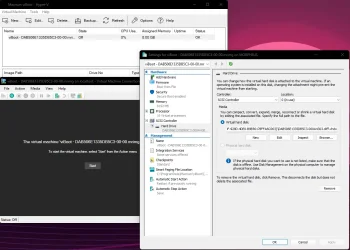
If you have created a Virtual Machine in viBoot you can still mount the image in Windows through the .vhdx it created.

So.. Create the Virtual Machine in viBoot. Double click the viBoot and go into File -> Settings. Locate the .vhdx file in explorer and when you right click that file, you'll see the mount option.
 

Attachments

  • explorer_2026-05-16_06-28-54.webp
    explorer_2026-05-16_06-28-54.webp
    84.4 KB · Views: 2
Last edited:

My Computer My Computer

At a glance

Windows 11 Pro
OS
Windows 11 Pro
Computer type
PC/Desktop
If you have created a Virtual Machine in viBoot you can still mount the image in Windows through the .vhdx it created.

So.. Create the Virtual Machine in viBoot. Double click the viBoot and go into File -> Settings. Locate the .vhdx file in explorer and when you right click that file, you'll see the mount option.
Please give more details since I get an error following your instructions.
1778912003140.webp
 

My Computer My Computer

At a glance

Windows 11 ProCore i7-13700K64 GB Kingston Fury Beast DDR5Gigabyte GeForce RTX 2060 Super Gaming OC 8G
OS
Windows 11 Pro
Computer type
PC/Desktop
Manufacturer/Model
Self build
CPU
Core i7-13700K
Motherboard
Asus TUF Gaming Plus WiFi Z790
Memory
64 GB Kingston Fury Beast DDR5
Graphics Card(s)
Gigabyte GeForce RTX 2060 Super Gaming OC 8G
Sound Card
Realtek S1200A
Monitor(s) Displays
Viewsonic VP2770 & Dell (secondary)
Screen Resolution
2560 x 1440
Hard Drives
Kingston KC3000 2TB NVME SSD & SATA HDDs & SSD
PSU
EVGA SuperNova G2 850W
Case
Nanoxia Deep Silence 1
Cooling
Noctua NH-D14
Keyboard
Microsoft Digital Media Pro
Mouse
Logitech Wireless
Internet Speed
80 Mb / s
Browser
Chrome
Antivirus
Defender, Malwarebytes Free & AdwCleaner
Maybe you powered on the Virtual Machine? If so, then power it off. I haven't had any issues myself.

or

Detach in Disk Management:
  • Right-click the Windows Start button and open Disk Management.
  • Scroll down to check if the .vhdx is already listed at the bottom. If it is, right-click its header and select Detach VHD.

Otherwise a reboot might help.
 

My Computer My Computer

At a glance

Windows 11 Pro
OS
Windows 11 Pro
Computer type
PC/Desktop
With all this hassle, I'm glad I so rarely need to extract a file from an image. Maybe once a year at most.
While, if necessary,I can mount a Macrium image from one of my other computers that has Windows 7 &10 VMs, on my main machine I'll just alternate my images between Macrium and Haselo (where I can still mount an image.)
Trying to keep up with these 8 pages have given me a headache. Anyone got an aspirin?
 

My Computers My Computers

  • At a glance

    Windows 11 Pro 25H2 26200.8875i9-10900 10 core 20 threads32 gbnone-Intel UHD Graphics 630
    OS
    Windows 11 Pro 25H2 26200.8875
    Computer type
    PC/Desktop
    Manufacturer/Model
    Dell Optiplex 7080
    CPU
    i9-10900 10 core 20 threads
    Motherboard
    DELL 0J37VM
    Memory
    32 gb
    Graphics Card(s)
    none-Intel UHD Graphics 630
    Sound Card
    Integrated Realtek
    Monitor(s) Displays
    Benq 27
    Screen Resolution
    2560x1440
    Hard Drives
    2x1tb Solidigm m.2 nvme /External drives 512gb Samsung m.2 sata+2tb Kingston m2.nvme
    PSU
    500w
    Case
    MT
    Cooling
    Dell Premium
    Keyboard
    Logitech wired
    Mouse
    Logitech wireless
    Internet Speed
    so slow I'm too embarrassed to tell
    Browser
    #1 Edge #2 Firefox
    Antivirus
    Defender+MWB Premium
  • At a glance

    Windows 11 Pro 24H2 26200.8875AMD Ryzen 7 6800U32 gbintegrated
    Operating System
    Windows 11 Pro 24H2 26200.8875
    Computer type
    PC/Desktop
    Manufacturer/Model
    Beelink Mini PC SER5
    CPU
    AMD Ryzen 7 6800U
    Memory
    32 gb
    Graphics card(s)
    integrated
    Sound Card
    integrated
    Monitor(s) Displays
    Benq 27
    Screen Resolution
    2560x1440
    Hard Drives
    1TB Crucial nvme
    Keyboard
    Logitech wired
    Mouse
    Logitech wireless
    Internet Speed
    still too embarrassed to tell
    Browser
    Firefox
    Antivirus
    Defender
    Other Info
    System 3 is non compliant Dell 9020 i7-4770/24gb ram Win11 PRO 26200.8875
With all this hassle, I'm glad I so rarely need to extract a file from an image. Maybe once a year at most.
While, if necessary,I can mount a Macrium image from one of my other computers that has Windows 7 &10 VMs, on my main machine I'll just alternate my images between Macrium and Haselo (where I can still mount an image.)
Trying to keep up with these 8 pages have given me a headache. Anyone got an aspiri
My new routine.

Weekly image with Macrium Image free followed after this by Active@ Disk Image. I rarely have the need to mount an image and Active@Disk Image works with no problem. It took me some time to learn the interface on this program. It is very fast.


My Computer My Computer

At a glance

windows 11 ,Ubuntu Cinnamon - for tinkering onlyIntel i51140016 GB0
OS
windows 11 ,Ubuntu Cinnamon - for tinkering only
Computer type
PC/Desktop
Manufacturer/Model
No Name - Assembled by a Compute shop in a Strip Mall.
CPU
Intel i511400
Motherboard
ASUS PRIME B560-PLUS motherboard
Memory
16 GB
Graphics Card(s)
0
Sound Card
0
Monitor(s) Displays
25 in BenQ
Screen Resolution
1920 x 1080
Hard Drives
9 SSDs 4 Nvme, 2 in M.2 slot and 2 in PCIE with adapter + 5 Sata. DVD drive
PSU
600w
Case
Antec- VSK4000E-U3 Mid Tower
Internet Speed
Bell pure fibre optic. 3 GB package. 6E Wireless adapter 750/500
Browser
Firefox, Microsoft Edge
Antivirus
Defender
Curious, anyone know how to install a previous version of the Microsoft Vulnerable Block List?
 

My Computer My Computer

At a glance

Windows 11
OS
Windows 11

Latest Support Threads

Back
Top Bottom