PC is crashing


matt11

Member
Local time
6:26 PM
Posts
43
OS
Windows 11
Crashing when gaming.
 
Windows Build/Version
Windows 11 22H2

Attachments

My Computer My Computer

At a glance

Windows 11Intel i7-10700k32 GB (16x2) Trident Z RgbMSI RTX 2070 Super Gaming X
OS
Windows 11
Computer type
PC/Desktop
CPU
Intel i7-10700k
Motherboard
Gigabyte Z490 Aorus Ultra
Memory
32 GB (16x2) Trident Z Rgb
Graphics Card(s)
MSI RTX 2070 Super Gaming X
Monitor(s) Displays
Gigabyte G32QC
Screen Resolution
1440p
Hard Drives
WD Sn750 1TB
PSU
Corsair RM1000x
Case
Corsair 4000X
Cooling
Corsair iCUE H150i ELITE CAPELLIX
Keyboard
Corsair K57 RGB
Mouse
Corsair Harpoon RGB
Internet Speed
1000 Mbps
Browser
Chrome
Antivirus
Windows Defender
For all of the steps below please attach any recently disconnected external or flash drives that were at any time connected during the past 30 days.


1) Run: HD Tune: (free or trial version) (all drives)
Post images or share links for results on these tabs:
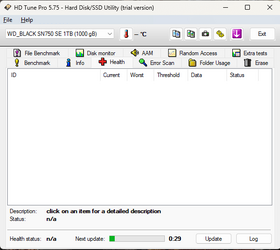
a) Health
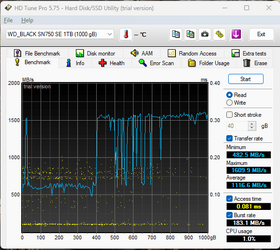
b) Benchmark
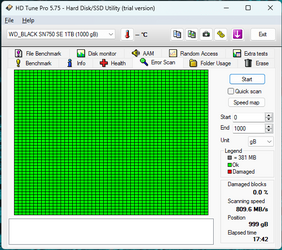
c) Full error scan


2) Run: Sea Tools for Windows
Post images or share links for the long generic test


3) Open administrative command prompt and type or copy and paste:

chkdsk /b /v

Run on all drives using the syntax: chkdsk /b /v C: or chkdsk /b /v D: or chkdsk /b /v E:

These chkdsk switches can take substantial time to run so plan to run on the Windows drive overnight while sleeping.

C:\WINDOWS\system32>chkdsk /b /v
The type of the file system is NTFS.
Cannot lock current drive.

Chkdsk cannot run because the volume is in use by another
process. Would you like to schedule this volume to be
checked the next time the system restarts? (Y/N)


Type: Y

Reboot


4) After completing steps 1, 2, and 3 run HD Sentinel (free or trial version)

(please do not run HD Sentinel before completing all of the prior steps)

Post images or share links for results on these tabs:
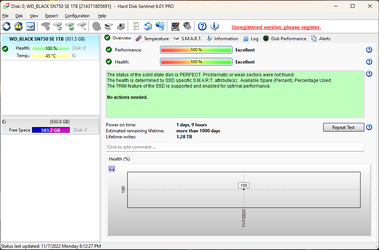
a) Overview
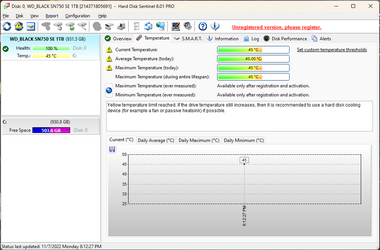
b) Temperature
c) SMART


5) After completing the above steps post a new V2 share link for any new BSOD

 

My Computer My Computer

At a glance

Windows 10Intel(R) Core(TM) i7-4800MQ CPU @ 2.70GHz16 GB Total: Manufacturer : Samsung MemoryTyp...NVIDIA Quadro K3100M; Intel(R) HD Graphics 4600
OS
Windows 10
Computer type
Laptop
Manufacturer/Model
HP
CPU
Intel(R) Core(TM) i7-4800MQ CPU @ 2.70GHz
Motherboard
Product : 190A Version : KBC Version 94.56
Memory
16 GB Total: Manufacturer : Samsung MemoryType : DDR3 FormFactor : SODIMM Capacity : 8GB Speed : 1600
Graphics Card(s)
NVIDIA Quadro K3100M; Intel(R) HD Graphics 4600
Sound Card
IDT High Definition Audio CODEC; PNP Device ID HDAUDIO\FUNC_01&VEN_111D&DEV_76E0
Hard Drives
Model Hitachi HTS727575A9E364
Antivirus
Microsoft Defender
Other Info
Mobile Workstation
1) Run: HD Tune
a) Doesn't show anything after waiting for timer even after 15 minutes
b) See image
c) See image

2) Run: Sea Tools for Windows - See image

3) Open administrative command prompt and type or copy and paste: chkdsk /b /v - See image

4) After completing steps 1, 2, and 3 run HD Sentinel - See image

5) New V2 log - See attached file
 

Attachments

  • HDTUNE_Errorscan.png
    HDTUNE_Errorscan.png
    15.4 KB · Views: 2
  • HDTUNE_Health.png
    HDTUNE_Health.png
    14.3 KB · Views: 2
  • HDTUNE_read.png
    HDTUNE_read.png
    19.5 KB · Views: 2
  • OverviewHDsent.png
    OverviewHDsent.png
    31.2 KB · Views: 2
  • Seagatetest.png
    Seagatetest.png
    23.6 KB · Views: 2
  • SMARTHDSent.png
    SMARTHDSent.png
    34.1 KB · Views: 2
  • TempHDSent.png
    TempHDSent.png
    31.7 KB · Views: 2
  • Z490-DESKTOP-(2022-11-07_21-22-21).zip
    Z490-DESKTOP-(2022-11-07_21-22-21).zip
    1.4 MB · Views: 2

My Computer My Computer

At a glance

Windows 11Intel i7-10700k32 GB (16x2) Trident Z RgbMSI RTX 2070 Super Gaming X
OS
Windows 11
Computer type
PC/Desktop
CPU
Intel i7-10700k
Motherboard
Gigabyte Z490 Aorus Ultra
Memory
32 GB (16x2) Trident Z Rgb
Graphics Card(s)
MSI RTX 2070 Super Gaming X
Monitor(s) Displays
Gigabyte G32QC
Screen Resolution
1440p
Hard Drives
WD Sn750 1TB
PSU
Corsair RM1000x
Case
Corsair 4000X
Cooling
Corsair iCUE H150i ELITE CAPELLIX
Keyboard
Corsair K57 RGB
Mouse
Corsair Harpoon RGB
Internet Speed
1000 Mbps
Browser
Chrome
Antivirus
Windows Defender
The drive tests results were unremarkable yet Windows had reported drive problems.


Was there another drive, external or flash that had been connected in the past 30 days or was a cable reconnected or replaced?


1) Run:


Post a share link into this thread using one drive, drop box, or google drive.


2) Run Memtest86 (free version) for two tests of four passes each (total eight passes)
Memtest86 can run overnight while sleeping.
Take pictures and post share links into this thread using one drive, drop box, or google drive.


Code:
Event[333]
  Log Name: System
  Source: Ntfs
  Date: 2022-10-09T15:09:13.6450000Z
  Event ID: 55
  Task: N/A
  Level: Error
  Opcode: Info
  Keyword: N/A
  User: S-1-5-18
  User Name: NT AUTHORITY\SYSTEM
  Computer: Z490-Desktop
  Description:
A corruption was discovered in the file system structure on volume \\?\Volume{fcc7da63-8641-4bd2-95be-98650f314d37}.

The exact nature of the corruption is unknown.  The file system structures need to be scanned online.


Event[334]
  Log Name: System
  Source: Ntfs
  Date: 2022-10-09T15:09:13.6450000Z
  Event ID: 55
  Task: N/A
  Level: Error
  Opcode: Info
  Keyword: N/A
  User: S-1-5-18
  User Name: NT AUTHORITY\SYSTEM
  Computer: Z490-Desktop
  Description:
A corruption was discovered in the file system structure on volume \\?\Volume{fcc7da63-8641-4bd2-95be-98650f314d37}.

The Master File Table (MFT) contains a corrupted file record.  The file reference number is 0x1000000000000.  The name of the file is "<unable to determine file name>".


Event[335]
  Log Name: System
  Source: Ntfs
  Date: 2022-10-09T15:09:13.9240000Z
  Event ID: 55
  Task: N/A
  Level: Error
  Opcode: Info
  Keyword: N/A
  User: S-1-5-18
  User Name: NT AUTHORITY\SYSTEM
  Computer: Z490-Desktop
  Description:
A corruption was discovered in the file system structure on volume \\?\Volume{fcc7da63-8641-4bd2-95be-98650f314d37}.

The Master File Table (MFT) contains a corrupted file record.  The file reference number is 0x1000000000000.  The name of the file is "<unable to determine file name>".


Event[336]
  Log Name: System
  Source: Ntfs
  Date: 2022-10-09T15:09:14.1730000Z
  Event ID: 55
  Task: N/A
  Level: Error
  Opcode: Info
  Keyword: N/A
  User: S-1-5-18
  User Name: NT AUTHORITY\SYSTEM
  Computer: Z490-Desktop
  Description:
A corruption was discovered in the file system structure on volume \\?\Volume{fcc7da63-8641-4bd2-95be-98650f314d37}.

The Master File Table (MFT) contains a corrupted file record.  The file reference number is 0x1000000000000.  The name of the file is "<unable to determine file name>".


Event[337]
  Log Name: System
  Source: Ntfs
  Date: 2022-10-09T15:09:14.4760000Z
  Event ID: 55
  Task: N/A
  Level: Error
  Opcode: Info
  Keyword: N/A
  User: S-1-5-18
  User Name: NT AUTHORITY\SYSTEM
  Computer: Z490-Desktop
  Description:
A corruption was discovered in the file system structure on volume \\?\Volume{fcc7da63-8641-4bd2-95be-98650f314d37}.

The Master File Table (MFT) contains a corrupted file record.  The file reference number is 0x1000000000000.  The name of the file is "<unable to determine file name>".


Event[338]
  Log Name: System
  Source: Ntfs
  Date: 2022-10-09T15:09:14.6950000Z
  Event ID: 55
  Task: N/A
  Level: Error
  Opcode: Info
  Keyword: N/A
  User: S-1-5-18
  User Name: NT AUTHORITY\SYSTEM
  Computer: Z490-Desktop
  Description:
A corruption was discovered in the file system structure on volume \\?\Volume{fcc7da63-8641-4bd2-95be-98650f314d37}.

The Master File Table (MFT) contains a corrupted file record.  The file reference number is 0x1000000000000.  The name of the file is "<unable to determine file name>".


Code:
Event[359]
  Log Name: System
  Source: disk
  Date: 2022-10-09T15:12:20.6490000Z
  Event ID: 154
  Task: N/A
  Level: Error
  Opcode: N/A
  Keyword: Classic
  User: N/A
  User Name: N/A
  Computer: Z490-Desktop
  Description:
The IO operation at logical block address 0x0 for Disk 1 (PDO name: \Device\000000c1) failed due to a hardware error.

Event[360]
  Log Name: System
  Source: disk
  Date: 2022-10-09T15:12:20.6540000Z
  Event ID: 154
  Task: N/A
  Level: Error
  Opcode: N/A
  Keyword: Classic
  User: N/A
  User Name: N/A
  Computer: Z490-Desktop
  Description:
The IO operation at logical block address 0x8000 for Disk 1 (PDO name: \Device\000000c1) failed due to a hardware error.

Event[361]
  Log Name: System
  Source: disk
  Date: 2022-10-09T15:12:20.6540000Z
  Event ID: 154
  Task: N/A
  Level: Error
  Opcode: N/A
  Keyword: Classic
  User: N/A
  User Name: N/A
  Computer: Z490-Desktop
  Description:
The IO operation at logical block address 0x8000 for Disk 1 (PDO name: \Device\000000c1) failed due to a hardware error.

Event[362]
  Log Name: System
  Source: disk
  Date: 2022-10-09T15:12:20.6550000Z
  Event ID: 154
  Task: N/A
  Level: Error
  Opcode: N/A
  Keyword: Classic
  User: N/A
  User Name: N/A
  Computer: Z490-Desktop
  Description:
The IO operation at logical block address 0x0 for Disk 1 (PDO name: \Device\000000c1) failed due to a hardware error.

Event[363]
  Log Name: System
  Source: disk
  Date: 2022-10-09T15:12:20.6550000Z
  Event ID: 154
  Task: N/A
  Level: Error
  Opcode: N/A
  Keyword: Classic
  User: N/A
  User Name: N/A
  Computer: Z490-Desktop
  Description:
The IO operation at logical block address 0x8000 for Disk 1 (PDO name: \Device\000000c1) failed due to a hardware error.

Event[364]
  Log Name: System
  Source: disk
  Date: 2022-10-09T15:12:20.6560000Z
  Event ID: 154
  Task: N/A
  Level: Error
  Opcode: N/A
  Keyword: Classic
  User: N/A
  User Name: N/A
  Computer: Z490-Desktop
  Description:
The IO operation at logical block address 0x8000 for Disk 1 (PDO name: \Device\000000c1) failed due to a hardware error.

Event[365]
  Log Name: System
  Source: disk
  Date: 2022-10-09T15:12:20.6560000Z
  Event ID: 154
  Task: N/A
  Level: Error
  Opcode: N/A
  Keyword: Classic
  User: N/A
  User Name: N/A
  Computer: Z490-Desktop
  Description:
The IO operation at logical block address 0x8000 for Disk 1 (PDO name: \Device\000000c1) failed due to a hardware error.

Event[366]
  Log Name: System
  Source: disk
  Date: 2022-10-09T15:12:21.3880000Z
  Event ID: 154
  Task: N/A
  Level: Error
  Opcode: N/A
  Keyword: Classic
  User: N/A
  User Name: N/A
  Computer: Z490-Desktop
  Description:
The IO operation at logical block address 0x8000 for Disk 1 (PDO name: \Device\000000c1) failed due to a hardware error.

Event[367]
  Log Name: System
  Source: disk
  Date: 2022-10-09T15:12:21.3890000Z
  Event ID: 154
  Task: N/A
  Level: Error
  Opcode: N/A
  Keyword: Classic
  User: N/A
  User Name: N/A
  Computer: Z490-Desktop
  Description:
The IO operation at logical block address 0x8000 for Disk 1 (PDO name: \Device\000000c1) failed due to a hardware error.

Event[368]
  Log Name: System
  Source: disk
  Date: 2022-10-09T15:12:21.3890000Z
  Event ID: 154
  Task: N/A
  Level: Error
  Opcode: N/A
  Keyword: Classic
  User: N/A
  User Name: N/A
  Computer: Z490-Desktop
  Description:
The IO operation at logical block address 0x0 for Disk 1 (PDO name: \Device\000000c1) failed due to a hardware error.

Event[369]
  Log Name: System
  Source: disk
  Date: 2022-10-09T15:12:21.3900000Z
  Event ID: 154
  Task: N/A
  Level: Error
  Opcode: N/A
  Keyword: Classic
  User: N/A
  User Name: N/A
  Computer: Z490-Desktop
  Description:
The IO operation at logical block address 0x8000 for Disk 1 (PDO name: \Device\000000c1) failed due to a hardware error.

Event[370]
  Log Name: System
  Source: disk
  Date: 2022-10-09T15:12:21.3930000Z
  Event ID: 154
  Task: N/A
  Level: Error
  Opcode: N/A
  Keyword: Classic
  User: N/A
  User Name: N/A
  Computer: Z490-Desktop
  Description:
The IO operation at logical block address 0x8000 for Disk 1 (PDO name: \Device\000000c1) failed due to a hardware error.

Event[371]
  Log Name: System
  Source: disk
  Date: 2022-10-09T15:12:21.3940000Z
  Event ID: 154
  Task: N/A
  Level: Error
  Opcode: N/A
  Keyword: Classic
  User: N/A
  User Name: N/A
  Computer: Z490-Desktop
  Description:
The IO operation at logical block address 0x8000 for Disk 1 (PDO name: \Device\000000c1) failed due to a hardware error.

Event[372]
  Log Name: System
  Source: disk
  Date: 2022-10-09T15:12:21.3940000Z
  Event ID: 154
  Task: N/A
  Level: Error
  Opcode: N/A
  Keyword: Classic
  User: N/A
  User Name: N/A
  Computer: Z490-Desktop
  Description:
The IO operation at logical block address 0x0 for Disk 1 (PDO name: \Device\000000c1) failed due to a hardware error.

Event[373]
  Log Name: System
  Source: disk
  Date: 2022-10-09T15:12:21.3950000Z
  Event ID: 154
  Task: N/A
  Level: Error
  Opcode: N/A
  Keyword: Classic
  User: N/A
  User Name: N/A
  Computer: Z490-Desktop
  Description:
The IO operation at logical block address 0x8000 for Disk 1 (PDO name: \Device\000000c1) failed due to a hardware error.
 

My Computer My Computer

At a glance

Windows 10Intel(R) Core(TM) i7-4800MQ CPU @ 2.70GHz16 GB Total: Manufacturer : Samsung MemoryTyp...NVIDIA Quadro K3100M; Intel(R) HD Graphics 4600
OS
Windows 10
Computer type
Laptop
Manufacturer/Model
HP
CPU
Intel(R) Core(TM) i7-4800MQ CPU @ 2.70GHz
Motherboard
Product : 190A Version : KBC Version 94.56
Memory
16 GB Total: Manufacturer : Samsung MemoryType : DDR3 FormFactor : SODIMM Capacity : 8GB Speed : 1600
Graphics Card(s)
NVIDIA Quadro K3100M; Intel(R) HD Graphics 4600
Sound Card
IDT High Definition Audio CODEC; PNP Device ID HDAUDIO\FUNC_01&VEN_111D&DEV_76E0
Hard Drives
Model Hitachi HTS727575A9E364
Antivirus
Microsoft Defender
Other Info
Mobile Workstation

Latest Support Threads

Back
Top Bottom