Performance issue - RAM?


Barbaatos

Member
Local time
5:31 AM
Posts
8
OS
W11
Hey Guys,

After over a month of fighting on my own with this issue I have decided to ask for help.

To briefly describe my issue - about 2 months ago my game (WoW) started to stutter to an extend that it was unplayable. Apparently issue was with the NVidia drivers which were faulty. I have learned it along the way while going through multiple forums and rolling the drivers back to the older version.

However after doing so (while preforming BIOS reset, OS reinstallations (7 times) and multiple different actions - I have yet to fail to bring my PC back into the state that I could enjoy gaming. My last resort/last hope was to remove 2 DDR5 DIMS and go back to using only 2 DDR5 DIMS (Kingston FURY 32GB (2x16GB) 6400MHz CL32 Renegade RGB).

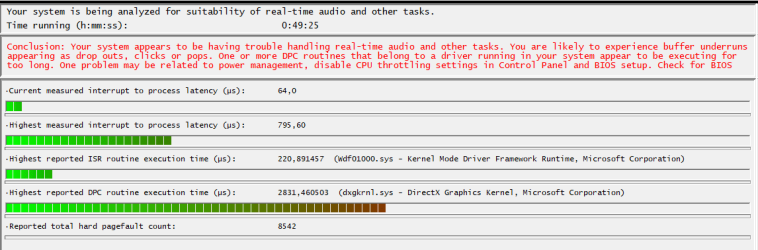
Recently I have downloaded LatencyMon which clearly states that there are issues with DPC routines while advising to disable CPU Throttling which I did although I was not really convinced that I should as before I never had issues with default settings. Today I have resorted even to reapplying new thermal paste on CPU which improved nothing.

At this point of time I'm desperate to get any help to be able to finally fix my PC. I'd greatly appreciate any help.
 
Windows Build/Version
Windows11

Attachments

  • Screenshot 2024-01-21 094842.png
    Screenshot 2024-01-21 094842.png
    18.2 KB · Views: 3

My Computer My Computer

At a glance

W11CPU Type 8C+8c Intel Core i7-13700KF, 5300 MHzKingston FURY 32GB (2x16GB) 6400MHz CL32 Rene...NVIDIA GeForce RTX 4080 (16376 MB)
OS
W11
Computer type
PC/Desktop
Manufacturer/Model
Gigabyte
CPU
CPU Type 8C+8c Intel Core i7-13700KF, 5300 MHz
Motherboard
Gigabyte Z790 Aero G (3 PCI-E x16, 5 M.2, 4 DDR5 DIMM, Audio, Video, 2.5GbE LAN, WiFi)
Memory
Kingston FURY 32GB (2x16GB) 6400MHz CL32 Renegade RGB
Graphics Card(s)
NVIDIA GeForce RTX 4080 (16376 MB)
Sound Card
nVIDIA AD103 HDMI/DP @ nVIDIA AD103 - High Definition Audio Controller
Monitor(s) Displays
Samsung LC49G95T (DP) [49" VA LCD] (H1AK500000) {2020}
Screen Resolution
5120x1440
Hard Drives
KINGSTON SKC3000S1024G (1024 GB, PCI-E 4.0 x4)

My Computer My Computer

At a glance

Microsoft Windows 11 HomeIntel Core i5-13490F2 x 16 Patriot Memory (PDP Systems) PSD516G56...GIGABYTE GeForce RTX 4070 WINDFORCE OC 12G (G...
OS
Microsoft Windows 11 Home
Computer type
PC/Desktop
Manufacturer/Model
MSI MS-7D98
CPU
Intel Core i5-13490F
Motherboard
MSI B760 GAMING PLUS WIFI
Memory
2 x 16 Patriot Memory (PDP Systems) PSD516G560081 6400MT (32-37-37-74); 1.35V)
Graphics Card(s)
GIGABYTE GeForce RTX 4070 WINDFORCE OC 12G (GV-N4070WF3OC-12GD)
Sound Card
Bluetooth Аудио
Monitor(s) Displays
INNOCN 15K1F
Screen Resolution
1920 x 1080
Hard Drives
WD_BLACK SN770 250GB
KINGSTON SNV2S1000G (ELFK0S.6)
PSU
Thermaltake Toughpower GF3 1000W
Case
CG560 - DeepCool
Cooling
ID-COOLING SE-224-XTS / 2 x 140Mm Fan - rear and top; 3 x 120Mm - front
Keyboard
Corsair K70 RGB TKL
Mouse
Corsair KATAR PRO XT
Internet Speed
100 Mbps
Browser
Firefox
Antivirus
Microsoft Defender Antivirus
Other Info
https://www.userbenchmark.com/UserRun/66553205
Hi,

Did you try to install DirectX End-User Runtime that adds support for D3DX9 and up? Also look for chipset driver updates and reset BIOS to its default settings.

Good luck,
werty
 

My Computer My Computer

At a glance

Windows 11 Pro 25H2AMD Ryzen™ 7 6800H 3.2-4.7 GHz32 GB DDR5 4800MHz Dual Channel CrucialNVIDIA GeForce RTX™ 3050
OS
Windows 11 Pro 25H2
Computer type
Laptop
Manufacturer/Model
ASUS ROG STRIX G513RC
CPU
AMD Ryzen™ 7 6800H 3.2-4.7 GHz
Memory
32 GB DDR5 4800MHz Dual Channel Crucial
Graphics Card(s)
NVIDIA GeForce RTX™ 3050
Monitor(s) Displays
15.6 inches FHD (1920 x 1080) IPS Display
Hard Drives
Crucial T500 2TB
Western Digital Black SN770 2TB
Keyboard
RGB Keyboard
Hey Werty, thank you for an advise but it didn't fix an issue. What I have noticed is minimizing number of audio channels improved slightly situation but it is not consistent. BIOS is set to default with XMP1 enabled.

Abactuon I did very limited testing in other games as I'm not using my PC to play any other game. It is an online game, yes.
 

My Computer My Computer

At a glance

W11CPU Type 8C+8c Intel Core i7-13700KF, 5300 MHzKingston FURY 32GB (2x16GB) 6400MHz CL32 Rene...NVIDIA GeForce RTX 4080 (16376 MB)
OS
W11
Computer type
PC/Desktop
Manufacturer/Model
Gigabyte
CPU
CPU Type 8C+8c Intel Core i7-13700KF, 5300 MHz
Motherboard
Gigabyte Z790 Aero G (3 PCI-E x16, 5 M.2, 4 DDR5 DIMM, Audio, Video, 2.5GbE LAN, WiFi)
Memory
Kingston FURY 32GB (2x16GB) 6400MHz CL32 Renegade RGB
Graphics Card(s)
NVIDIA GeForce RTX 4080 (16376 MB)
Sound Card
nVIDIA AD103 HDMI/DP @ nVIDIA AD103 - High Definition Audio Controller
Monitor(s) Displays
Samsung LC49G95T (DP) [49" VA LCD] (H1AK500000) {2020}
Screen Resolution
5120x1440
Hard Drives
KINGSTON SKC3000S1024G (1024 GB, PCI-E 4.0 x4)
So we can assume the system was working fine, even with WoW, prior to 2 months ago? If so something changed 2 months ago to begin causing issues. And from the sound of things it's not just WoW but the system itself.
 

My Computer My Computer

At a glance

Win 7/10/11
OS
Win 7/10/11
Computer type
PC/Desktop
Other Info
I'm a computer enthusiast so have quite a few systems that I run. More like an advanced hobby.
From what I've seen, Z790 DDR5 motherboards may have trouble if 4 DIMMs are installed. If you check Gigabyte's list of certified RAM for the board, most are for 1 or 2 DIMMs only.

However, if you could run stably with 4, I wouldn't expect that to change over time. If memory serves, some boards will automatically limit the RAM frequency if 4 DIMMs are installed.

If you haven't done it already, you could try a system file check (sfc /scannow in a command line window with admin privileges). It probably won't help.

I don't do gaming these days. In the past, the main cause of issues for me was audio drivers. You could try uninstalling the nVidia audio drivers. They were installed with the video drivers, but can be uninstalled separately.
 

My Computers My Computers

  • At a glance

    Windows 11 26200.8728Amd Threadripper 7970X128GB (4 X 32) G.Skill DDR5 6400 (RDIMM)Gigabyte RTX 4090 OC
    OS
    Windows 11 26200.8728
    Computer type
    PC/Desktop
    Manufacturer/Model
    homebuilt
    CPU
    Amd Threadripper 7970X
    Motherboard
    Gigabyte TRX50 Aero D Rev. 1.0
    Memory
    128GB (4 X 32) G.Skill DDR5 6400 (RDIMM)
    Graphics Card(s)
    Gigabyte RTX 4090 OC
    Sound Card
    none (USB to speakers), Realtek
    Monitor(s) Displays
    Innocn 32" OLED
    Screen Resolution
    3840 X 2160 @ 60Hz
    Hard Drives
    Crucial T700 2TB M.2 NVME SSD
    WD 4TB Blue SATA SSD
    Seagate 18TB IronWolf Pro
    PSU
    BeQuiet! Straight Power 12 1500W
    Case
    Lian Li 011 Dynamic Evo XL
    Cooling
    SilverStone Technology XE360-TR5, with 3 Phanteks T30 fans
    Keyboard
    Cherry KC 500 MX LP (mechanical)
    Mouse
    Logitech M500s (wired)
    Internet Speed
    2000/250 Mbps (down/up)
    Other Info
    xFinity gateway
  • At a glance

    windows 11 26200.8728Intel I9-13900K64GB G.Skill DDR5-6000Gigabyte RTX 3090 ti
    Operating System
    windows 11 26200.8728
    Computer type
    PC/Desktop
    Manufacturer/Model
    homebuilt
    CPU
    Intel I9-13900K
    Motherboard
    Asus RoG Strix Z690-E
    Memory
    64GB G.Skill DDR5-6000
    Graphics card(s)
    Gigabyte RTX 3090 ti
    Sound Card
    built in Realtek
    Monitor(s) Displays
    Philips 27E1N8900 27" OLED
    Screen Resolution
    3840 X 2160 @60Hz
    Hard Drives
    WDC SN850 1TB
    8TB Seagate Ironwolf
    4TB Seagate Ironwolf
    PSU
    eVGA SuperNOVA 1300 GT
    Case
    Lian Li 011 Dynamic Evo
    Cooling
    Corsair iCUE H150i ELITE CAPELLIX Liquid CPU Cooler
    Keyboard
    Cherry Streaming (wired)
    Mouse
    Logitech M500s (wired)
Hey, first of all thank you all for posts and for your help.

I only recall updating BIOS before leaving for holidays and then this GeForce driver which screwed me hard.

SFC/ scan came without the issues and same goes for MeMTest. Nvidia audio driver is uninstalled and same goes for Realtek one.

I think something is broken in general from the 3d acceleration side as from what I have noticed while playing and opening char menu with the 3d miniature of my model, my FPS drops by 50% and stutter goes sky high.

I'm uncertain yet on which level it is broken as I have installed multiple versions of drivers and DirectX - without the luck so far.

I have abandoned 4 DIMS now, but 2 months back PC was running on 4 but only with tweaking and around 5700 speed.
 

My Computer My Computer

At a glance

W11CPU Type 8C+8c Intel Core i7-13700KF, 5300 MHzKingston FURY 32GB (2x16GB) 6400MHz CL32 Rene...NVIDIA GeForce RTX 4080 (16376 MB)
OS
W11
Computer type
PC/Desktop
Manufacturer/Model
Gigabyte
CPU
CPU Type 8C+8c Intel Core i7-13700KF, 5300 MHz
Motherboard
Gigabyte Z790 Aero G (3 PCI-E x16, 5 M.2, 4 DDR5 DIMM, Audio, Video, 2.5GbE LAN, WiFi)
Memory
Kingston FURY 32GB (2x16GB) 6400MHz CL32 Renegade RGB
Graphics Card(s)
NVIDIA GeForce RTX 4080 (16376 MB)
Sound Card
nVIDIA AD103 HDMI/DP @ nVIDIA AD103 - High Definition Audio Controller
Monitor(s) Displays
Samsung LC49G95T (DP) [49" VA LCD] (H1AK500000) {2020}
Screen Resolution
5120x1440
Hard Drives
KINGSTON SKC3000S1024G (1024 GB, PCI-E 4.0 x4)
Since you've reinstalled Win11 multiple times I'm not so sure it's the Nvidia driver that is the issue to focus on. I will tell you what I do on a fresh install of Windows. I install the OS first. When that is finished the next thing I do is to install all(or most) of the motherboard supplies drivers. I just prefer to do this in case Microsoft Update fails to install a needed one. I see from your Gigabyte motherboard there are 6 different Chipset drivers required/suggested. I would pre download these plus the Audio drivers and install them manually after installing the OS clean.

Once that is done then let Microsoft Update do it's thing. Worry about the Nvidia drivers until MU is finished updating. Some time in all the update you can install the DirectX drivers.

Is it possible one of the DIMMs is flakey? Something with the motherboard? What about the GPU itself?
 

My Computer My Computer

At a glance

Win 7/10/11
OS
Win 7/10/11
Computer type
PC/Desktop
Other Info
I'm a computer enthusiast so have quite a few systems that I run. More like an advanced hobby.
Hey, first of all thank you all for posts and for your help.

I only recall updating BIOS before leaving for holidays and then this GeForce driver which screwed me hard.

SFC/ scan came without the issues and same goes for MeMTest. Nvidia audio driver is uninstalled and same goes for Realtek one.

I think something is broken in general from the 3d acceleration side as from what I have noticed while playing and opening char menu with the 3d miniature of my model, my FPS drops by 50% and stutter goes sky high.

I'm uncertain yet on which level it is broken as I have installed multiple versions of drivers and DirectX - without the luck so far.

I have abandoned 4 DIMS now, but 2 months back PC was running on 4 but only with tweaking and around 5700 speed.
Hi,
What BIOS versions did you upgrade from and to?
 

My Computers My Computers

  • At a glance

    Windows 11 Pro x64i9 14900K P/E 5.8/4.5 GHz, cache 5.0 GHz96GB (2x48) G.skill Ripjaws 6800 MT/sAsus ROG Strix 4070 Ti OC
    OS
    Windows 11 Pro x64
    Computer type
    PC/Desktop
    Manufacturer/Model
    📷🔈🎧 🪛 DIY Photoshop/Audio/Game/tinker
    CPU
    i9 14900K P/E 5.8/4.5 GHz, cache 5.0 GHz
    Motherboard
    Asus ROG Maximus Z790 Dark Hero
    Memory
    🐏 96GB (2x48) G.skill Ripjaws 6800 MT/s
    Graphics Card(s)
    Asus ROG Strix 4070 Ti OC
    Sound Card
    🔊Bowers & Wilkins 606 S3 speakers; Audiolabs 7000a integrated amp; RSL 10S Mk2 sub; Creative Pebble Pro Minimilist
    Monitor(s) Displays
    🖥️🖥️ Eizo CG2730 ColorEdge, ViewSonic VP2768
    Screen Resolution
    🖥️🖥️ 2560 x 1440p x 2
    Hard Drives
    💾 WDC SN850X 4TB nvme, SN850 1TB nvme, SK-Hynix 2 TB P41 nvme,. Sabrent USB-C DS-SC5B 5-bay docking station: 6TB WDC Black, 6TB Ironwolf Pro; 2x 2TB WDC Black HDD
    PSU
    ⚡️ 850W Seasonic Vertex PX-850 ATX 3.0/PCI-E 5.0
    Case
    Fractal Design North XL Mesh, Black Walnut
    Cooling
    ❄️ EK Nucleus black 360 AIO w/Phanteks T30-120 fans, 2 Noctua NF-A14 Chromax case fan, 1 T30-120 fan cooling memory
    Keyboard
    ⌨️ Keychron Q3 Max TKL with custom GMK Redsuns Red Samuri keycaps, TX Stabs
    Mouse
    🖱️ Logitech G305 wireless gaming
    Internet Speed
    ⬇️ 500 Mb/s ⬆️ 12 Mb/s
    Browser
    🔥🦊 Firefox
    Antivirus
    🦺 Defender, Macrium Reflect X 🏆
    Other Info
    Phangkey Amaterasu V2 Desk Mat
  • At a glance

    Apple M1
    Computer type
    Laptop
    Manufacturer/Model
    💻 Apple 13" Macbook Pro 2020 (m1)
    CPU
    Apple M1
    Screen Resolution
    2560x1600
    Browser
    Firefox
Hey Geneu,

I went from F7(I believe) to F10d and then straight to F10. Frankly speaking I cant remember exact BIOS update before updating, but that will be my guess. Z790 AERO G (rev. 1.0) Support | Motherboard - GIGABYTE Global

Bamalnark - yeah, I guess I could consider starting of clean again. I'll test today with 2nd pair of DIMS.
 
Last edited:

My Computer My Computer

At a glance

W11CPU Type 8C+8c Intel Core i7-13700KF, 5300 MHzKingston FURY 32GB (2x16GB) 6400MHz CL32 Rene...NVIDIA GeForce RTX 4080 (16376 MB)
OS
W11
Computer type
PC/Desktop
Manufacturer/Model
Gigabyte
CPU
CPU Type 8C+8c Intel Core i7-13700KF, 5300 MHz
Motherboard
Gigabyte Z790 Aero G (3 PCI-E x16, 5 M.2, 4 DDR5 DIMM, Audio, Video, 2.5GbE LAN, WiFi)
Memory
Kingston FURY 32GB (2x16GB) 6400MHz CL32 Renegade RGB
Graphics Card(s)
NVIDIA GeForce RTX 4080 (16376 MB)
Sound Card
nVIDIA AD103 HDMI/DP @ nVIDIA AD103 - High Definition Audio Controller
Monitor(s) Displays
Samsung LC49G95T (DP) [49" VA LCD] (H1AK500000) {2020}
Screen Resolution
5120x1440
Hard Drives
KINGSTON SKC3000S1024G (1024 GB, PCI-E 4.0 x4)
I find it preferable to manage my own drivers and leave windows update out of it. The very first thing I do after a clean install is disable including drivers with windows update. That way there is no conflict as WU sometimes installs older drivers. I don't want to be bumping heads with WU. If you run PRO use the group policy method. If you run HOME use the regedit method. The regedit method also works in PRO but group policy is best.
 

My Computers My Computers

  • At a glance

    Windows 11 Pro 25H2 26200.8655i9-10900 10 core 20 threads32 gbnone-Intel UHD Graphics 630
    OS
    Windows 11 Pro 25H2 26200.8655
    Computer type
    PC/Desktop
    Manufacturer/Model
    Dell Optiplex 7080
    CPU
    i9-10900 10 core 20 threads
    Motherboard
    DELL 0J37VM
    Memory
    32 gb
    Graphics Card(s)
    none-Intel UHD Graphics 630
    Sound Card
    Integrated Realtek
    Monitor(s) Displays
    Benq 27
    Screen Resolution
    2560x1440
    Hard Drives
    2x1tb Solidigm m.2 nvme /External drives 512gb Samsung m.2 sata+2tb Kingston m2.nvme
    PSU
    500w
    Case
    MT
    Cooling
    Dell Premium
    Keyboard
    Logitech wired
    Mouse
    Logitech wireless
    Internet Speed
    so slow I'm too embarrassed to tell
    Browser
    #1 Edge #2 Firefox
    Antivirus
    Defender+MWB Premium
  • At a glance

    Windows 11 Pro 24H2 26200.8457AMD Ryzen 7 6800U32 gbintegrated
    Operating System
    Windows 11 Pro 24H2 26200.8457
    Computer type
    PC/Desktop
    Manufacturer/Model
    Beelink Mini PC SER5
    CPU
    AMD Ryzen 7 6800U
    Memory
    32 gb
    Graphics card(s)
    integrated
    Sound Card
    integrated
    Monitor(s) Displays
    Benq 27
    Screen Resolution
    2560x1440
    Hard Drives
    1TB Crucial nvme
    Keyboard
    Logitech wired
    Mouse
    Logitech wireless
    Internet Speed
    still too embarrassed to tell
    Browser
    Firefox
    Antivirus
    Defender
    Other Info
    System 3 is non compliant Dell 9020 i7-4770/24gb ram Win11 PRO 26200.8457
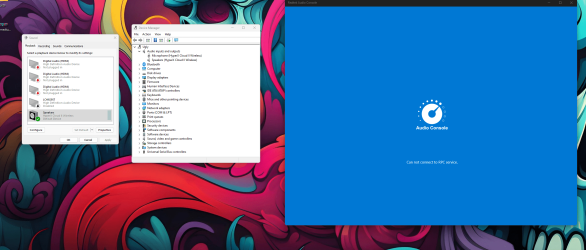
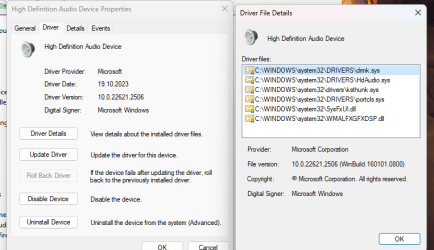
Hey Glasskuter! I did all of that however what is interesting, Realtek driver is no where to be found after installing it from Vendor website. Console is installed with AUD driver - but console gives error message that it is not able to establish connection with RPC service.
 

Attachments

  • Screenshot 2024-01-22 153327.png
    Screenshot 2024-01-22 153327.png
    401.2 KB · Views: 1

My Computer My Computer

At a glance

W11CPU Type 8C+8c Intel Core i7-13700KF, 5300 MHzKingston FURY 32GB (2x16GB) 6400MHz CL32 Rene...NVIDIA GeForce RTX 4080 (16376 MB)
OS
W11
Computer type
PC/Desktop
Manufacturer/Model
Gigabyte
CPU
CPU Type 8C+8c Intel Core i7-13700KF, 5300 MHz
Motherboard
Gigabyte Z790 Aero G (3 PCI-E x16, 5 M.2, 4 DDR5 DIMM, Audio, Video, 2.5GbE LAN, WiFi)
Memory
Kingston FURY 32GB (2x16GB) 6400MHz CL32 Renegade RGB
Graphics Card(s)
NVIDIA GeForce RTX 4080 (16376 MB)
Sound Card
nVIDIA AD103 HDMI/DP @ nVIDIA AD103 - High Definition Audio Controller
Monitor(s) Displays
Samsung LC49G95T (DP) [49" VA LCD] (H1AK500000) {2020}
Screen Resolution
5120x1440
Hard Drives
KINGSTON SKC3000S1024G (1024 GB, PCI-E 4.0 x4)
Hey Glasskuter! I did all of that however what is interesting, Realtek driver is no where to be found after installing it from Vendor website. Console is installed with AUD driver - but console gives error message that it is not able to establish connection with RPC service.
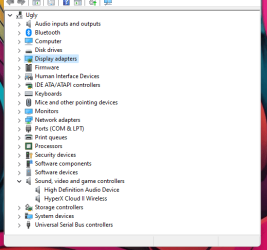
Check under Sound, video and game controllers menu in Device manager if Realtek driver is present.
 

My Computer My Computer

At a glance

Windows 11 Pro 25H2AMD Ryzen™ 7 6800H 3.2-4.7 GHz32 GB DDR5 4800MHz Dual Channel CrucialNVIDIA GeForce RTX™ 3050
OS
Windows 11 Pro 25H2
Computer type
Laptop
Manufacturer/Model
ASUS ROG STRIX G513RC
CPU
AMD Ryzen™ 7 6800H 3.2-4.7 GHz
Memory
32 GB DDR5 4800MHz Dual Channel Crucial
Graphics Card(s)
NVIDIA GeForce RTX™ 3050
Monitor(s) Displays
15.6 inches FHD (1920 x 1080) IPS Display
Hard Drives
Crucial T500 2TB
Western Digital Black SN770 2TB
Keyboard
RGB Keyboard
Hey Werty, no where to be found.

image_2024-01-22_154336529.png
 

My Computer My Computer

At a glance

W11CPU Type 8C+8c Intel Core i7-13700KF, 5300 MHzKingston FURY 32GB (2x16GB) 6400MHz CL32 Rene...NVIDIA GeForce RTX 4080 (16376 MB)
OS
W11
Computer type
PC/Desktop
Manufacturer/Model
Gigabyte
CPU
CPU Type 8C+8c Intel Core i7-13700KF, 5300 MHz
Motherboard
Gigabyte Z790 Aero G (3 PCI-E x16, 5 M.2, 4 DDR5 DIMM, Audio, Video, 2.5GbE LAN, WiFi)
Memory
Kingston FURY 32GB (2x16GB) 6400MHz CL32 Renegade RGB
Graphics Card(s)
NVIDIA GeForce RTX 4080 (16376 MB)
Sound Card
nVIDIA AD103 HDMI/DP @ nVIDIA AD103 - High Definition Audio Controller
Monitor(s) Displays
Samsung LC49G95T (DP) [49" VA LCD] (H1AK500000) {2020}
Screen Resolution
5120x1440
Hard Drives
KINGSTON SKC3000S1024G (1024 GB, PCI-E 4.0 x4)

My Computer My Computer

At a glance

Windows 11 Pro 25H2AMD Ryzen™ 7 6800H 3.2-4.7 GHz32 GB DDR5 4800MHz Dual Channel CrucialNVIDIA GeForce RTX™ 3050
OS
Windows 11 Pro 25H2
Computer type
Laptop
Manufacturer/Model
ASUS ROG STRIX G513RC
CPU
AMD Ryzen™ 7 6800H 3.2-4.7 GHz
Memory
32 GB DDR5 4800MHz Dual Channel Crucial
Graphics Card(s)
NVIDIA GeForce RTX™ 3050
Monitor(s) Displays
15.6 inches FHD (1920 x 1080) IPS Display
Hard Drives
Crucial T500 2TB
Western Digital Black SN770 2TB
Keyboard
RGB Keyboard
Unfortunately no luck. Could it be that even after installing drivers from manufacturer website some are not working well...? Or could it be more of HW failure? Hmmmm

Could be that this is an answer to all issues, some drivers just not working/installing as they should.
 

My Computer My Computer

At a glance

W11CPU Type 8C+8c Intel Core i7-13700KF, 5300 MHzKingston FURY 32GB (2x16GB) 6400MHz CL32 Rene...NVIDIA GeForce RTX 4080 (16376 MB)
OS
W11
Computer type
PC/Desktop
Manufacturer/Model
Gigabyte
CPU
CPU Type 8C+8c Intel Core i7-13700KF, 5300 MHz
Motherboard
Gigabyte Z790 Aero G (3 PCI-E x16, 5 M.2, 4 DDR5 DIMM, Audio, Video, 2.5GbE LAN, WiFi)
Memory
Kingston FURY 32GB (2x16GB) 6400MHz CL32 Renegade RGB
Graphics Card(s)
NVIDIA GeForce RTX 4080 (16376 MB)
Sound Card
nVIDIA AD103 HDMI/DP @ nVIDIA AD103 - High Definition Audio Controller
Monitor(s) Displays
Samsung LC49G95T (DP) [49" VA LCD] (H1AK500000) {2020}
Screen Resolution
5120x1440
Hard Drives
KINGSTON SKC3000S1024G (1024 GB, PCI-E 4.0 x4)
Unfortunately no luck. Could it be that even after installing drivers from manufacturer website some are not working well...? Or could it be more of HW failure? Hmmmm

Could be that this is an answer to all issues, some drivers just not working/installing as they should.
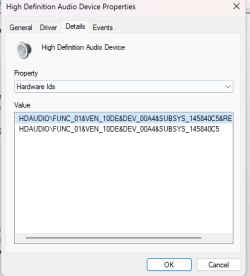
Post a screenshot of the hardware id of the High definition audio device.
 

My Computer My Computer

At a glance

Windows 11 Pro 25H2AMD Ryzen™ 7 6800H 3.2-4.7 GHz32 GB DDR5 4800MHz Dual Channel CrucialNVIDIA GeForce RTX™ 3050
OS
Windows 11 Pro 25H2
Computer type
Laptop
Manufacturer/Model
ASUS ROG STRIX G513RC
CPU
AMD Ryzen™ 7 6800H 3.2-4.7 GHz
Memory
32 GB DDR5 4800MHz Dual Channel Crucial
Graphics Card(s)
NVIDIA GeForce RTX™ 3050
Monitor(s) Displays
15.6 inches FHD (1920 x 1080) IPS Display
Hard Drives
Crucial T500 2TB
Western Digital Black SN770 2TB
Keyboard
RGB Keyboard
Attaching. image_2024-01-22_185342113.png
 

Attachments

  • Screenshot 2024-01-22 185225.png
    Screenshot 2024-01-22 185225.png
    23.3 KB · Views: 1

My Computer My Computer

At a glance

W11CPU Type 8C+8c Intel Core i7-13700KF, 5300 MHzKingston FURY 32GB (2x16GB) 6400MHz CL32 Rene...NVIDIA GeForce RTX 4080 (16376 MB)
OS
W11
Computer type
PC/Desktop
Manufacturer/Model
Gigabyte
CPU
CPU Type 8C+8c Intel Core i7-13700KF, 5300 MHz
Motherboard
Gigabyte Z790 Aero G (3 PCI-E x16, 5 M.2, 4 DDR5 DIMM, Audio, Video, 2.5GbE LAN, WiFi)
Memory
Kingston FURY 32GB (2x16GB) 6400MHz CL32 Renegade RGB
Graphics Card(s)
NVIDIA GeForce RTX 4080 (16376 MB)
Sound Card
nVIDIA AD103 HDMI/DP @ nVIDIA AD103 - High Definition Audio Controller
Monitor(s) Displays
Samsung LC49G95T (DP) [49" VA LCD] (H1AK500000) {2020}
Screen Resolution
5120x1440
Hard Drives
KINGSTON SKC3000S1024G (1024 GB, PCI-E 4.0 x4)
This is an Nvidia High definition audio device not a Realtek one. You'll need the audio drivers from Nvidia.

On your motherboard's support site I saw the recent bios changes and some of them are related to the RAM. Maybe after all this is the issue and not audio or video drivers.
 

My Computer My Computer

At a glance

Windows 11 Pro 25H2AMD Ryzen™ 7 6800H 3.2-4.7 GHz32 GB DDR5 4800MHz Dual Channel CrucialNVIDIA GeForce RTX™ 3050
OS
Windows 11 Pro 25H2
Computer type
Laptop
Manufacturer/Model
ASUS ROG STRIX G513RC
CPU
AMD Ryzen™ 7 6800H 3.2-4.7 GHz
Memory
32 GB DDR5 4800MHz Dual Channel Crucial
Graphics Card(s)
NVIDIA GeForce RTX™ 3050
Monitor(s) Displays
15.6 inches FHD (1920 x 1080) IPS Display
Hard Drives
Crucial T500 2TB
Western Digital Black SN770 2TB
Keyboard
RGB Keyboard

My Computers My Computers

  • At a glance

    Windows 11 Pro 25H2 26200.8655i9-10900 10 core 20 threads32 gbnone-Intel UHD Graphics 630
    OS
    Windows 11 Pro 25H2 26200.8655
    Computer type
    PC/Desktop
    Manufacturer/Model
    Dell Optiplex 7080
    CPU
    i9-10900 10 core 20 threads
    Motherboard
    DELL 0J37VM
    Memory
    32 gb
    Graphics Card(s)
    none-Intel UHD Graphics 630
    Sound Card
    Integrated Realtek
    Monitor(s) Displays
    Benq 27
    Screen Resolution
    2560x1440
    Hard Drives
    2x1tb Solidigm m.2 nvme /External drives 512gb Samsung m.2 sata+2tb Kingston m2.nvme
    PSU
    500w
    Case
    MT
    Cooling
    Dell Premium
    Keyboard
    Logitech wired
    Mouse
    Logitech wireless
    Internet Speed
    so slow I'm too embarrassed to tell
    Browser
    #1 Edge #2 Firefox
    Antivirus
    Defender+MWB Premium
  • At a glance

    Windows 11 Pro 24H2 26200.8457AMD Ryzen 7 6800U32 gbintegrated
    Operating System
    Windows 11 Pro 24H2 26200.8457
    Computer type
    PC/Desktop
    Manufacturer/Model
    Beelink Mini PC SER5
    CPU
    AMD Ryzen 7 6800U
    Memory
    32 gb
    Graphics card(s)
    integrated
    Sound Card
    integrated
    Monitor(s) Displays
    Benq 27
    Screen Resolution
    2560x1440
    Hard Drives
    1TB Crucial nvme
    Keyboard
    Logitech wired
    Mouse
    Logitech wireless
    Internet Speed
    still too embarrassed to tell
    Browser
    Firefox
    Antivirus
    Defender
    Other Info
    System 3 is non compliant Dell 9020 i7-4770/24gb ram Win11 PRO 26200.8457

Latest Support Threads

Back
Top Bottom