Pitch Black Accent Color


TonyBirt

New member
Local time
9:45 PM
Posts
6
OS
Windows 11
Would anyone know how to get a true Pitch Black accent color in Windows 11? Under Personalization Accent Color won't allow anything darker than a Dark Grey (25), thanks.
 
Windows Build/Version
Windows 11 22000.100

Attachments

  • Untitled.png
    Untitled.png
    202.4 KB · Views: 28

My Computer My Computer

At a glance

Windows 11
OS
Windows 11
ff.JPG

About as close as you can get
 

My Computers My Computers

  • At a glance

    Windows11 Pro 26300.9550Intel Core i9 14900F (24 -Core, 68 MB Total C...32GB DDR5RTX 4080 Super w/610..88
    OS
    Windows11 Pro 26300.9550
    Computer type
    PC/Desktop
    Manufacturer/Model
    Dell Alienware Aurora R16
    CPU
    Intel Core i9 14900F (24 -Core, 68 MB Total Cache)
    Motherboard
    Dell Alienware
    Memory
    32GB DDR5
    Graphics Card(s)
    RTX 4080 Super w/610..88
    Sound Card
    Realtec
    Monitor(s) Displays
    Corsair XENEON 32QHD165
    Screen Resolution
    2560 X 1440
    Hard Drives
    1-2TB Samsung 990 Pro PCIe NVMe M2 SSD
    1-4TB Samsung 990 Pro PCIe NVMe M2 SSD
    PSU
    1000 Watt Platinum Dell
    Case
    Alienware
    Cooling
    Liquid Closed Loop
    Keyboard
    Corsair Strafe RGB
    Mouse
    Logitech MK270 Wireless
    Internet Speed
    100Gb's Down-20 Up
    Browser
    Firefox 157.0
    Antivirus
    Defender
    Other Info
    Very Quiet And Fast
    CyberPower UPS CP1500PFCLCD
  • At a glance

    MX-Linux13th Gen Inter(R) Core(TM) i3-1315U64 GB DDR4 @3200 MHz.Internal
    Operating System
    MX-Linux
    Computer type
    PC/Desktop
    Manufacturer/Model
    Intel
    CPU
    13th Gen Inter(R) Core(TM) i3-1315U
    Motherboard
    Intel
    Memory
    64 GB DDR4 @3200 MHz.
    Graphics card(s)
    Internal
    Sound Card
    None
    Monitor(s) Displays
    Dell 2419HGCF
    Screen Resolution
    1920 X 1080
    Hard Drives
    SAMSUNG 980 PRO SSD 2TB, PCIe 4.0 M.2 2280
    PSU
    Chicony 30 Watt
    Case
    Small
    Keyboard
    Dell
    Mouse
    Razor
    Internet Speed
    1GB
    Browser
    Slimjet
Would anyone know how to get a true Pitch Black accent color in Windows 11? Under Personalization Accent Color won't allow anything darker than a Dark Grey (25), thanks.
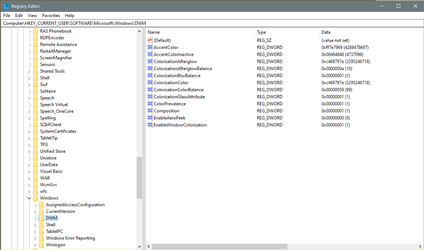
Changing accent color to black [#000000] requires registry tweaks to work. Note that registry allows only #BBGGRR not #RRGGBB.
 

My Computers My Computers

  • At a glance

    Windows 11 HomeCore i5-12450HX20GB DDR5-4800iGPU + RTX 3050 Mobile (6GB)
    OS
    Windows 11 Home
    Computer type
    Laptop
    Manufacturer/Model
    Lenovo
    CPU
    Core i5-12450HX
    Memory
    20GB DDR5-4800
    Graphics Card(s)
    iGPU + RTX 3050 Mobile (6GB)
    Sound Card
    Realtek
    Monitor(s) Displays
    the built-in laptop screen, and a generic monitor
    Screen Resolution
    1080p * 2
    Hard Drives
    GIGABYTE NVMe SSD 256GB (GP-GSM2NE3256GNTD)
    Micron NVMe SSD 512GB (MTFDKCD512QFM-1BDIAABLA)
    Browser
    Firefox
    Antivirus
    WD
  • At a glance

    Windows 10 ProCore i3-21004GB DDR3-2133iGPU
    Operating System
    Windows 10 Pro
    Computer type
    PC/Desktop
    Manufacturer/Model
    Dell
    CPU
    Core i3-2100
    Memory
    4GB DDR3-2133
    Graphics card(s)
    iGPU
    Screen Resolution
    1080p
    Antivirus
    WD

My Computer My Computer

At a glance

Windows 10 Home 64bitIntel Core i7 8700K32GB 2666MHz DDR4nVidea GeForce GTX 1080Ti
OS
Windows 10 Home 64bit
Computer type
PC/Desktop
Manufacturer/Model
Alienware Aurora R7
CPU
Intel Core i7 8700K
Motherboard
Z370
Memory
32GB 2666MHz DDR4
Graphics Card(s)
nVidea GeForce GTX 1080Ti
Sound Card
NVIDIA High Definition Audio
Monitor(s) Displays
HP 27es / ACER 27
Screen Resolution
1920x1080
Hard Drives
Toshiba 256GB M.2 PCIe NVMe SSD (boot)
Toshiba 1TB DT01ACA100 SATA (storage)
Seagate Backup 4TB (Macrium)
Would anyone know how to get a true Pitch Black accent color in Windows 11? Under Personalization Accent Color won't allow anything darker than a Dark Grey (25), thanks.


I'm not on Windows 11 at the moment, but this worked in Windows 10, AND came over to Windows 11 when I did an In-Place upgrade

Ten Forums - Windows 10 Help and Support Forum


I'm betting that the rest of the windows colors are similarly setup.


Image1.png
 

My Computers My Computers

  • At a glance

    Win 11 Home ♦♦♦26300.9550 ♦♦♦♦♦♦♦26H2AMD Ryzen 7 3700XG.Skill (F4-3200C14D-16GTZKW)EVGA RTX 2070 (08G-P4-2171-KR)
    OS
    Win 11 Home ♦♦♦26300.9550 ♦♦♦♦♦♦♦26H2
    Computer type
    PC/Desktop
    Manufacturer/Model
    Built by Ghot® [May 2020]
    CPU
    AMD Ryzen 7 3700X
    Motherboard
    Asus Pro WS X570-ACE (BIOS 5302)
    Memory
    G.Skill (F4-3200C14D-16GTZKW)
    Graphics Card(s)
    EVGA RTX 2070 (08G-P4-2171-KR)
    Sound Card
    Realtek ALC1220P / ALC S1220A
    Monitor(s) Displays
    Dell U3011 30"
    Screen Resolution
    2560 x 1600
    Hard Drives
    2x Samsung 860 EVO 500GB,
    WD 4TB Black FZBX - SATA III,
    WD 8TB Black FZBX - SATA III,
    DRW-24B1ST CD/DVD Burner
    PSU
    PC Power & Cooling 750W Quad EPS12V
    Case
    Cooler Master ATCS 840 Tower
    Cooling
    CM Hyper 212 EVO (push/pull)
    Keyboard
    Ducky DK9008 Shine II Blue LED
    Mouse
    Logitech Optical M-100
    Internet Speed
    300/300
    Browser
    Firefox (latest)
    Antivirus
    Bitdefender Total Security
    Other Info
    Speakers: Klipsch Pro Media 2.1
  • At a glance

    Windows XP Pro 32bit w/SP3AMD Athlon 64 X2 5000+ (OC'd @ 3.2Ghz)TWIN2X2048-6400C4DHX (2 x 1GB, DDR2 800)EVGA 256-P2-N758-TR GeForce 8600GT SSC
    Operating System
    Windows XP Pro 32bit w/SP3
    Computer type
    PC/Desktop
    Manufacturer/Model
    Built by Ghot® (not in use)
    CPU
    AMD Athlon 64 X2 5000+ (OC'd @ 3.2Ghz)
    Motherboard
    ASUS M2N32-SLI Deluxe Wireless Edition
    Memory
    TWIN2X2048-6400C4DHX (2 x 1GB, DDR2 800)
    Graphics card(s)
    EVGA 256-P2-N758-TR GeForce 8600GT SSC
    Sound Card
    Onboard
    Monitor(s) Displays
    ViewSonic G90FB Black 19" Professional (CRT)
    Screen Resolution
    up to 2048 x 1536
    Hard Drives
    WD 36GB 10,000rpm Raptor SATA
    Seagate 80GB 7200rpm SATA
    Lite-On LTR-52246S CD/RW
    Lite-On LH-18A1P CD/DVD Burner
    PSU
    PC Power & Cooling Silencer 750 Quad EPS12V
    Case
    Generic Beige case, 80mm fans
    Cooling
    ZALMAN 9500A 92mm CPU Cooler
    Keyboard
    Logitech Classic Keybooard 200
    Mouse
    Logitech Optical M-BT96a
    Internet Speed
    300/300
    Browser
    Firefox 3.x ??
    Antivirus
    Symantec (Norton)
    Other Info
    Still assembled, still runs. Haven't turned it on for 15 years?
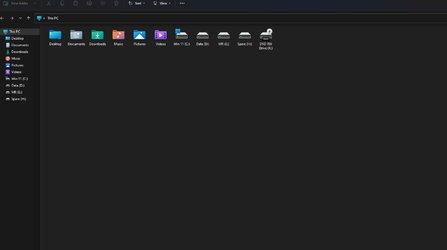
@Ghot Thanks, yeah I have managed to get Black title bars for Applications on Active & Inactive Windows, just not sure where to look to change background color for Windows. Also tried looking at C:\Windows\Resources\Themes\dark.theme with no luck.
 

Attachments

  • Untitled.jpg
    Untitled.jpg
    146 KB · Views: 38

My Computer My Computer

At a glance

Windows 11
OS
Windows 11
@Ghot Thanks, yeah I have managed to get Black title bars for Applications on Active & Inactive Windows, just not sure where to look to change background color for Windows. Also tried looking at C:\Windows\Resources\Themes\dark.theme with no luck.


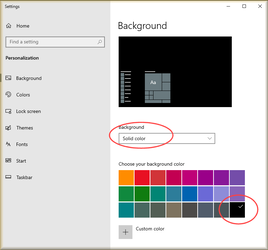
My "black" background came over from Windows 10 also.
This is the setting location in Win 10.


Image1.png


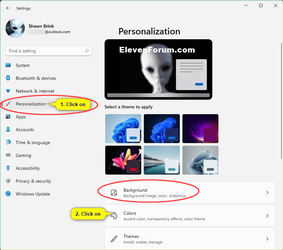
I believe this is the location in Win 11...


Image1.png


I know for sure, I got it working....


000000 Win 10 vs Win 11.png


Although not shown in this pic... I used TranslucentTB (free), from the Microsoft Store, to get a clear taskbar as well.
If my left knee wasn't the size of a cantaloupe, I'd get up, take the left side off computer and switch to the Win 11 SSD. :-)
 
Last edited:

My Computers My Computers

  • At a glance

    Win 11 Home ♦♦♦26300.9550 ♦♦♦♦♦♦♦26H2AMD Ryzen 7 3700XG.Skill (F4-3200C14D-16GTZKW)EVGA RTX 2070 (08G-P4-2171-KR)
    OS
    Win 11 Home ♦♦♦26300.9550 ♦♦♦♦♦♦♦26H2
    Computer type
    PC/Desktop
    Manufacturer/Model
    Built by Ghot® [May 2020]
    CPU
    AMD Ryzen 7 3700X
    Motherboard
    Asus Pro WS X570-ACE (BIOS 5302)
    Memory
    G.Skill (F4-3200C14D-16GTZKW)
    Graphics Card(s)
    EVGA RTX 2070 (08G-P4-2171-KR)
    Sound Card
    Realtek ALC1220P / ALC S1220A
    Monitor(s) Displays
    Dell U3011 30"
    Screen Resolution
    2560 x 1600
    Hard Drives
    2x Samsung 860 EVO 500GB,
    WD 4TB Black FZBX - SATA III,
    WD 8TB Black FZBX - SATA III,
    DRW-24B1ST CD/DVD Burner
    PSU
    PC Power & Cooling 750W Quad EPS12V
    Case
    Cooler Master ATCS 840 Tower
    Cooling
    CM Hyper 212 EVO (push/pull)
    Keyboard
    Ducky DK9008 Shine II Blue LED
    Mouse
    Logitech Optical M-100
    Internet Speed
    300/300
    Browser
    Firefox (latest)
    Antivirus
    Bitdefender Total Security
    Other Info
    Speakers: Klipsch Pro Media 2.1
  • At a glance

    Windows XP Pro 32bit w/SP3AMD Athlon 64 X2 5000+ (OC'd @ 3.2Ghz)TWIN2X2048-6400C4DHX (2 x 1GB, DDR2 800)EVGA 256-P2-N758-TR GeForce 8600GT SSC
    Operating System
    Windows XP Pro 32bit w/SP3
    Computer type
    PC/Desktop
    Manufacturer/Model
    Built by Ghot® (not in use)
    CPU
    AMD Athlon 64 X2 5000+ (OC'd @ 3.2Ghz)
    Motherboard
    ASUS M2N32-SLI Deluxe Wireless Edition
    Memory
    TWIN2X2048-6400C4DHX (2 x 1GB, DDR2 800)
    Graphics card(s)
    EVGA 256-P2-N758-TR GeForce 8600GT SSC
    Sound Card
    Onboard
    Monitor(s) Displays
    ViewSonic G90FB Black 19" Professional (CRT)
    Screen Resolution
    up to 2048 x 1536
    Hard Drives
    WD 36GB 10,000rpm Raptor SATA
    Seagate 80GB 7200rpm SATA
    Lite-On LTR-52246S CD/RW
    Lite-On LH-18A1P CD/DVD Burner
    PSU
    PC Power & Cooling Silencer 750 Quad EPS12V
    Case
    Generic Beige case, 80mm fans
    Cooling
    ZALMAN 9500A 92mm CPU Cooler
    Keyboard
    Logitech Classic Keybooard 200
    Mouse
    Logitech Optical M-BT96a
    Internet Speed
    300/300
    Browser
    Firefox 3.x ??
    Antivirus
    Symantec (Norton)
    Other Info
    Still assembled, still runs. Haven't turned it on for 15 years?
If you set the above to Black it will work as you can see if you you open say Edge (the top bar will be Jet Black) but then open something else (in my case my media player (MusicBee) and it reverts back to Dark Grey and you can go back and see the slider will have moved.
 

My Computer My Computer

At a glance

Windows 10Intel i7-4790k @ 5GHZ32GB Corsair Dominator Platinum 2400Mhz @ 10-...Nvidia RTX 3090FE @ Core 2200 MHZ / Memory 21...
OS
Windows 10
Computer type
PC/Desktop
Manufacturer/Model
Self Built
CPU
Intel i7-4790k @ 5GHZ
Motherboard
Asus Maximus VI Extreme
Memory
32GB Corsair Dominator Platinum 2400Mhz @ 10-12-11-27-1T
Graphics Card(s)
Nvidia RTX 3090FE @ Core 2200 MHZ / Memory 21 GHZ
Sound Card
Creative SoundBlaster ZxR
Monitor(s) Displays
LG 32GN600 (G-Sync Comp)
Screen Resolution
1440p
Hard Drives
C: Primary SSD > Samsung 860 PRO 512GB
G: Gaming SSD > Samsung 860 PRO 1TB
S: Storage SSD > Samsung 860 EVO 4TB x2 (Windows Storage Spaces = 8TB)
X: Ext Backup > IcyBox+WD Red 4TB x4 (Raid 10)
PSU
Corsair AX1600i
Case
NZXT Phantom 630 (Black)
Cooling
Noctua NH-D15S Chromax Black
Keyboard
Logitech G613
Mouse
Logitech G903 LS (Hero)+PowerPlay Wireless Charge Pad
Internet Speed
VM 1Gb/s
Browser
Edge
Antivirus
Eset
If you set the above to Black it will work as you can see if you you open say Edge (the top bar will be Jet Black) but then open something else (in my case my media player (MusicBee) and it reverts back to Dark Grey and you can go back and see the slider will have moved.


"Some" 3rd party programs will have their own color scheme.
I don't have a lot installed on Win 10 or Win 11 (same on both), but they all follow the color choices I set for Active/Inactive title bar.


Image1.png
 

My Computers My Computers

  • At a glance

    Win 11 Home ♦♦♦26300.9550 ♦♦♦♦♦♦♦26H2AMD Ryzen 7 3700XG.Skill (F4-3200C14D-16GTZKW)EVGA RTX 2070 (08G-P4-2171-KR)
    OS
    Win 11 Home ♦♦♦26300.9550 ♦♦♦♦♦♦♦26H2
    Computer type
    PC/Desktop
    Manufacturer/Model
    Built by Ghot® [May 2020]
    CPU
    AMD Ryzen 7 3700X
    Motherboard
    Asus Pro WS X570-ACE (BIOS 5302)
    Memory
    G.Skill (F4-3200C14D-16GTZKW)
    Graphics Card(s)
    EVGA RTX 2070 (08G-P4-2171-KR)
    Sound Card
    Realtek ALC1220P / ALC S1220A
    Monitor(s) Displays
    Dell U3011 30"
    Screen Resolution
    2560 x 1600
    Hard Drives
    2x Samsung 860 EVO 500GB,
    WD 4TB Black FZBX - SATA III,
    WD 8TB Black FZBX - SATA III,
    DRW-24B1ST CD/DVD Burner
    PSU
    PC Power & Cooling 750W Quad EPS12V
    Case
    Cooler Master ATCS 840 Tower
    Cooling
    CM Hyper 212 EVO (push/pull)
    Keyboard
    Ducky DK9008 Shine II Blue LED
    Mouse
    Logitech Optical M-100
    Internet Speed
    300/300
    Browser
    Firefox (latest)
    Antivirus
    Bitdefender Total Security
    Other Info
    Speakers: Klipsch Pro Media 2.1
  • At a glance

    Windows XP Pro 32bit w/SP3AMD Athlon 64 X2 5000+ (OC'd @ 3.2Ghz)TWIN2X2048-6400C4DHX (2 x 1GB, DDR2 800)EVGA 256-P2-N758-TR GeForce 8600GT SSC
    Operating System
    Windows XP Pro 32bit w/SP3
    Computer type
    PC/Desktop
    Manufacturer/Model
    Built by Ghot® (not in use)
    CPU
    AMD Athlon 64 X2 5000+ (OC'd @ 3.2Ghz)
    Motherboard
    ASUS M2N32-SLI Deluxe Wireless Edition
    Memory
    TWIN2X2048-6400C4DHX (2 x 1GB, DDR2 800)
    Graphics card(s)
    EVGA 256-P2-N758-TR GeForce 8600GT SSC
    Sound Card
    Onboard
    Monitor(s) Displays
    ViewSonic G90FB Black 19" Professional (CRT)
    Screen Resolution
    up to 2048 x 1536
    Hard Drives
    WD 36GB 10,000rpm Raptor SATA
    Seagate 80GB 7200rpm SATA
    Lite-On LTR-52246S CD/RW
    Lite-On LH-18A1P CD/DVD Burner
    PSU
    PC Power & Cooling Silencer 750 Quad EPS12V
    Case
    Generic Beige case, 80mm fans
    Cooling
    ZALMAN 9500A 92mm CPU Cooler
    Keyboard
    Logitech Classic Keybooard 200
    Mouse
    Logitech Optical M-BT96a
    Internet Speed
    300/300
    Browser
    Firefox 3.x ??
    Antivirus
    Symantec (Norton)
    Other Info
    Still assembled, still runs. Haven't turned it on for 15 years?
MusicBee used to follow my settings on Win 10, I had it Blue for active and Grey for non active, then it changed to grey all the time.

That does not explain why when opened it changes the global slider back to Grey for Edge.
 

My Computer My Computer

At a glance

Windows 10Intel i7-4790k @ 5GHZ32GB Corsair Dominator Platinum 2400Mhz @ 10-...Nvidia RTX 3090FE @ Core 2200 MHZ / Memory 21...
OS
Windows 10
Computer type
PC/Desktop
Manufacturer/Model
Self Built
CPU
Intel i7-4790k @ 5GHZ
Motherboard
Asus Maximus VI Extreme
Memory
32GB Corsair Dominator Platinum 2400Mhz @ 10-12-11-27-1T
Graphics Card(s)
Nvidia RTX 3090FE @ Core 2200 MHZ / Memory 21 GHZ
Sound Card
Creative SoundBlaster ZxR
Monitor(s) Displays
LG 32GN600 (G-Sync Comp)
Screen Resolution
1440p
Hard Drives
C: Primary SSD > Samsung 860 PRO 512GB
G: Gaming SSD > Samsung 860 PRO 1TB
S: Storage SSD > Samsung 860 EVO 4TB x2 (Windows Storage Spaces = 8TB)
X: Ext Backup > IcyBox+WD Red 4TB x4 (Raid 10)
PSU
Corsair AX1600i
Case
NZXT Phantom 630 (Black)
Cooling
Noctua NH-D15S Chromax Black
Keyboard
Logitech G613
Mouse
Logitech G903 LS (Hero)+PowerPlay Wireless Charge Pad
Internet Speed
VM 1Gb/s
Browser
Edge
Antivirus
Eset
MusicBee used to follow my settings on Win 10, I had it Blue for active and Grey for non active, then it changed to grey all the time.

That does not explain why when opened it changes the global slider back to Grey for Edge.


That, I couldn't tell ya. For one, I don't even use Edge.
But like I said... the active/nonactive title bar colors work for me.

The active, I set in Personalization, and the inactive, I set in the registry.
 

My Computers My Computers

  • At a glance

    Win 11 Home ♦♦♦26300.9550 ♦♦♦♦♦♦♦26H2AMD Ryzen 7 3700XG.Skill (F4-3200C14D-16GTZKW)EVGA RTX 2070 (08G-P4-2171-KR)
    OS
    Win 11 Home ♦♦♦26300.9550 ♦♦♦♦♦♦♦26H2
    Computer type
    PC/Desktop
    Manufacturer/Model
    Built by Ghot® [May 2020]
    CPU
    AMD Ryzen 7 3700X
    Motherboard
    Asus Pro WS X570-ACE (BIOS 5302)
    Memory
    G.Skill (F4-3200C14D-16GTZKW)
    Graphics Card(s)
    EVGA RTX 2070 (08G-P4-2171-KR)
    Sound Card
    Realtek ALC1220P / ALC S1220A
    Monitor(s) Displays
    Dell U3011 30"
    Screen Resolution
    2560 x 1600
    Hard Drives
    2x Samsung 860 EVO 500GB,
    WD 4TB Black FZBX - SATA III,
    WD 8TB Black FZBX - SATA III,
    DRW-24B1ST CD/DVD Burner
    PSU
    PC Power & Cooling 750W Quad EPS12V
    Case
    Cooler Master ATCS 840 Tower
    Cooling
    CM Hyper 212 EVO (push/pull)
    Keyboard
    Ducky DK9008 Shine II Blue LED
    Mouse
    Logitech Optical M-100
    Internet Speed
    300/300
    Browser
    Firefox (latest)
    Antivirus
    Bitdefender Total Security
    Other Info
    Speakers: Klipsch Pro Media 2.1
  • At a glance

    Windows XP Pro 32bit w/SP3AMD Athlon 64 X2 5000+ (OC'd @ 3.2Ghz)TWIN2X2048-6400C4DHX (2 x 1GB, DDR2 800)EVGA 256-P2-N758-TR GeForce 8600GT SSC
    Operating System
    Windows XP Pro 32bit w/SP3
    Computer type
    PC/Desktop
    Manufacturer/Model
    Built by Ghot® (not in use)
    CPU
    AMD Athlon 64 X2 5000+ (OC'd @ 3.2Ghz)
    Motherboard
    ASUS M2N32-SLI Deluxe Wireless Edition
    Memory
    TWIN2X2048-6400C4DHX (2 x 1GB, DDR2 800)
    Graphics card(s)
    EVGA 256-P2-N758-TR GeForce 8600GT SSC
    Sound Card
    Onboard
    Monitor(s) Displays
    ViewSonic G90FB Black 19" Professional (CRT)
    Screen Resolution
    up to 2048 x 1536
    Hard Drives
    WD 36GB 10,000rpm Raptor SATA
    Seagate 80GB 7200rpm SATA
    Lite-On LTR-52246S CD/RW
    Lite-On LH-18A1P CD/DVD Burner
    PSU
    PC Power & Cooling Silencer 750 Quad EPS12V
    Case
    Generic Beige case, 80mm fans
    Cooling
    ZALMAN 9500A 92mm CPU Cooler
    Keyboard
    Logitech Classic Keybooard 200
    Mouse
    Logitech Optical M-BT96a
    Internet Speed
    300/300
    Browser
    Firefox 3.x ??
    Antivirus
    Symantec (Norton)
    Other Info
    Still assembled, still runs. Haven't turned it on for 15 years?

My Computer My Computer

At a glance

Windows 11AMD Phenom(tm) II X2 555 Processor 3.20 GHzKingston 16GB DDR3NVidia GeForce GTX 650
OS
Windows 11
Computer type
PC/Desktop
Manufacturer/Model
Unbranded
CPU
AMD Phenom(tm) II X2 555 Processor 3.20 GHz
Motherboard
Asus M4A785T-M
Memory
Kingston 16GB DDR3
Graphics Card(s)
NVidia GeForce GTX 650
Sound Card
VIA HD Audio
Monitor(s) Displays
2x LG 20" Display
Screen Resolution
1600 x 900 60MHz
Hard Drives
WD Blue 1TB HDD
ADATA 500GB SSD
Midas Force 500GB SSD
PSU
Enermax 500W
Case
Unbranded
Cooling
Unbranded
Keyboard
Logitech Wired K120
Mouse
Logitech Wired B100
Internet Speed
20MB Download 1,5MB Upload
Browser
Firefox
Antivirus
McAffee, Malwarebytes, Windows Defender
Other Info
Are you sneaking?
Changing accent color to black [#000000] requires registry tweaks to work. Note that registry allows only #BBGGRR not #RRGGBB.
What are the registry changes required? I have tried several things posted on the Internet but none seem to work for me. I end up with grey each time. Here is what I tried....
Open the Windows registry and navigate to the following location.
HKEY_CURRENT_USER\SOFTWARE\Microsoft\Windows\DWM
Here, look for a value called AccentColor. Double-click it and set its value to 171717. Next look for a key value called ColorPrevalence and double-click it and set its value to 1.

Update: I found a solution - a tool "Pure Dark Theme Tool" by Ceofix. It's free. It works! It's portable.
 
Last edited:

My Computer My Computer

At a glance

Windows 11Version 21H2 (OS Build 22000.4698th Gen Intel Core i584008GB DDR4 + 16GB Optane Memory, 1TB HDD
OS
Windows 11Version 21H2 (OS Build 22000.469
Computer type
PC/Desktop
Manufacturer/Model
Acer Aspire TC-885 Desktop
CPU
8th Gen Intel Core i58400
Memory
8GB DDR4 + 16GB Optane Memory, 1TB HDD
Browser
Google, Firefox
Antivirus
Windows Defender, McAfee Total Access-Total Protection
Other Info
Realtime: Malwarebytes, HMP Alert, UAC Highest Level. On Demand: Adwcleaner, MRT, Emsisoft EEK

Latest Support Threads

Back
Top Bottom