Solved Playing Computer Music Files Through Stereo Receiver


@MalwareT , how old are you if you don't mind me asking?
We've all tried to help you. It is supposed to be a very basic thing to do.
After plugging in the cable to the DAC, you should be set already.


Ok never mind. I didn't see your post that you already got it to work.
 

My Computers My Computers

  • At a glance

    Windows 11 ProAMD Ryzen 7 9800X3D32GB DDR5 CL30 Kingston FuryASUS Prime Radeon RX 9060 XT OC Edition 16GB
    OS
    Windows 11 Pro
    Computer type
    PC/Desktop
    CPU
    AMD Ryzen 7 9800X3D
    Motherboard
    MSI PRO B850-P Wifi
    Memory
    32GB DDR5 CL30 Kingston Fury
    Graphics Card(s)
    ASUS Prime Radeon RX 9060 XT OC Edition 16GB
    Monitor(s) Displays
    LG Ultrawide 34" + LG 27" 1080p
    Screen Resolution
    3440x1440
    Hard Drives
    Main Boot Drive : 512GB Adata XPG RGB Gen3x4 NVMe M.2 SSD
    PSU
    EVGA 750 Watts 80+ Gold
    Case
    Deepcool Genome II
    Cooling
    Thermalright Burst Assassin 120
    Internet Speed
    1Gbps
    Browser
    Chrome
    Antivirus
    "Moderna"
  • At a glance

    Windows 11 Proi7-4790K16GB Corsair Vengeance ProMSI R9 290
    Operating System
    Windows 11 Pro
    Computer type
    PC/Desktop
    CPU
    i7-4790K
    Motherboard
    ASRock Xtreme6 Z97
    Memory
    16GB Corsair Vengeance Pro
    Graphics card(s)
    MSI R9 290
    Monitor(s) Displays
    LG Ultrawide 34"
    Screen Resolution
    3440x1440
    Hard Drives
    500GB Adata SSD (OS Only)
    PSU
    Thermaltake 475 Watts 80 Bronze
    Case
    Thermaltake Commander I Snow Edition
    Cooling
    Deep Cool Archer Air Cooler
    Keyboard
    Armageddon MKA-5R RGB-Hornet
    Mouse
    Logitech G402
    Internet Speed
    1Gbps
    Browser
    Chrome
    Antivirus
    Moderna :)
select the right audio source on your Denon and play some music on your PC.
If that still doesn't work for you, it's probably time to call a technician.

@MalwareT

So this is your DAC?

Yeah, that's it. My guy was upside down. 😳
 

My Computer My Computer

At a glance

Windows 11Hexa-Core i5-8600T processor 3.2GHz32GB of DDR4 RAMintegrated Intel HD 630 coprocessor
OS
Windows 11
Computer type
PC/Desktop
Manufacturer/Model
Dell OptiPlex 7060
CPU
Hexa-Core i5-8600T processor 3.2GHz
Motherboard
Dell Inc. 0DWPVW A00
Memory
32GB of DDR4 RAM
Graphics Card(s)
integrated Intel HD 630 coprocessor
Monitor(s) Displays
Intel(R) UHD Graphics 630 [Display adapter] DELL S2230MX [Monitor] (21.7"vis, s/n XX-05GX1Y-XXXXX-23J-08WM, March 2012)
Antivirus
Windows Defender Version 4.18.24090.11 Malwarebytes Anti-Malware Version 5.2.4.157
Well, well, well. It finally worked. However, now I have the problem of not being able to use my Altec Landsing speakers. So, it looks like Windows 11 only gives you two options for audio output: (1) The built-in speaker in my computer itself and (2) One DAC device. And if so, then that kind of sucks.
If you want to listen to your Altec Lansing speakers, just unplug the audio cable in front of the DAC. Headphone jack always takes priority. So just unplug it and your Altect Lansing speakers will work.
Windows 11 have nothing to do with number of audio output. Audio output is hardware related not OS related.
 

My Computers My Computers

  • At a glance

    Windows 11 ProAMD Ryzen 7 9800X3D32GB DDR5 CL30 Kingston FuryASUS Prime Radeon RX 9060 XT OC Edition 16GB
    OS
    Windows 11 Pro
    Computer type
    PC/Desktop
    CPU
    AMD Ryzen 7 9800X3D
    Motherboard
    MSI PRO B850-P Wifi
    Memory
    32GB DDR5 CL30 Kingston Fury
    Graphics Card(s)
    ASUS Prime Radeon RX 9060 XT OC Edition 16GB
    Monitor(s) Displays
    LG Ultrawide 34" + LG 27" 1080p
    Screen Resolution
    3440x1440
    Hard Drives
    Main Boot Drive : 512GB Adata XPG RGB Gen3x4 NVMe M.2 SSD
    PSU
    EVGA 750 Watts 80+ Gold
    Case
    Deepcool Genome II
    Cooling
    Thermalright Burst Assassin 120
    Internet Speed
    1Gbps
    Browser
    Chrome
    Antivirus
    "Moderna"
  • At a glance

    Windows 11 Proi7-4790K16GB Corsair Vengeance ProMSI R9 290
    Operating System
    Windows 11 Pro
    Computer type
    PC/Desktop
    CPU
    i7-4790K
    Motherboard
    ASRock Xtreme6 Z97
    Memory
    16GB Corsair Vengeance Pro
    Graphics card(s)
    MSI R9 290
    Monitor(s) Displays
    LG Ultrawide 34"
    Screen Resolution
    3440x1440
    Hard Drives
    500GB Adata SSD (OS Only)
    PSU
    Thermaltake 475 Watts 80 Bronze
    Case
    Thermaltake Commander I Snow Edition
    Cooling
    Deep Cool Archer Air Cooler
    Keyboard
    Armageddon MKA-5R RGB-Hornet
    Mouse
    Logitech G402
    Internet Speed
    1Gbps
    Browser
    Chrome
    Antivirus
    Moderna :)
@MalwareT , how old are you if you don't mind me asking?
We've all tried to help you. It is supposed to be a very basic thing to do.
After plugging in the cable to the DAC, you should be set already.


Ok never mind. I didn't see your post that you already got it to work.
Hmmm. Are you sure you didn't want me to see your post anyway? 🙄
 

My Computer My Computer

At a glance

Windows 11Hexa-Core i5-8600T processor 3.2GHz32GB of DDR4 RAMintegrated Intel HD 630 coprocessor
OS
Windows 11
Computer type
PC/Desktop
Manufacturer/Model
Dell OptiPlex 7060
CPU
Hexa-Core i5-8600T processor 3.2GHz
Motherboard
Dell Inc. 0DWPVW A00
Memory
32GB of DDR4 RAM
Graphics Card(s)
integrated Intel HD 630 coprocessor
Monitor(s) Displays
Intel(R) UHD Graphics 630 [Display adapter] DELL S2230MX [Monitor] (21.7"vis, s/n XX-05GX1Y-XXXXX-23J-08WM, March 2012)
Antivirus
Windows Defender Version 4.18.24090.11 Malwarebytes Anti-Malware Version 5.2.4.157
Hmmm. Are you sure you didn't want me to see your post anyway? 🙄
No, that's intentional. I know you saw it already so I didn't delete it.
 

My Computers My Computers

  • At a glance

    Windows 11 ProAMD Ryzen 7 9800X3D32GB DDR5 CL30 Kingston FuryASUS Prime Radeon RX 9060 XT OC Edition 16GB
    OS
    Windows 11 Pro
    Computer type
    PC/Desktop
    CPU
    AMD Ryzen 7 9800X3D
    Motherboard
    MSI PRO B850-P Wifi
    Memory
    32GB DDR5 CL30 Kingston Fury
    Graphics Card(s)
    ASUS Prime Radeon RX 9060 XT OC Edition 16GB
    Monitor(s) Displays
    LG Ultrawide 34" + LG 27" 1080p
    Screen Resolution
    3440x1440
    Hard Drives
    Main Boot Drive : 512GB Adata XPG RGB Gen3x4 NVMe M.2 SSD
    PSU
    EVGA 750 Watts 80+ Gold
    Case
    Deepcool Genome II
    Cooling
    Thermalright Burst Assassin 120
    Internet Speed
    1Gbps
    Browser
    Chrome
    Antivirus
    "Moderna"
  • At a glance

    Windows 11 Proi7-4790K16GB Corsair Vengeance ProMSI R9 290
    Operating System
    Windows 11 Pro
    Computer type
    PC/Desktop
    CPU
    i7-4790K
    Motherboard
    ASRock Xtreme6 Z97
    Memory
    16GB Corsair Vengeance Pro
    Graphics card(s)
    MSI R9 290
    Monitor(s) Displays
    LG Ultrawide 34"
    Screen Resolution
    3440x1440
    Hard Drives
    500GB Adata SSD (OS Only)
    PSU
    Thermaltake 475 Watts 80 Bronze
    Case
    Thermaltake Commander I Snow Edition
    Cooling
    Deep Cool Archer Air Cooler
    Keyboard
    Armageddon MKA-5R RGB-Hornet
    Mouse
    Logitech G402
    Internet Speed
    1Gbps
    Browser
    Chrome
    Antivirus
    Moderna :)

My Computer My Computer

At a glance

Windows 11Hexa-Core i5-8600T processor 3.2GHz32GB of DDR4 RAMintegrated Intel HD 630 coprocessor
OS
Windows 11
Computer type
PC/Desktop
Manufacturer/Model
Dell OptiPlex 7060
CPU
Hexa-Core i5-8600T processor 3.2GHz
Motherboard
Dell Inc. 0DWPVW A00
Memory
32GB of DDR4 RAM
Graphics Card(s)
integrated Intel HD 630 coprocessor
Monitor(s) Displays
Intel(R) UHD Graphics 630 [Display adapter] DELL S2230MX [Monitor] (21.7"vis, s/n XX-05GX1Y-XXXXX-23J-08WM, March 2012)
Antivirus
Windows Defender Version 4.18.24090.11 Malwarebytes Anti-Malware Version 5.2.4.157

My Computer My Computer

At a glance

Windows 11Hexa-Core i5-8600T processor 3.2GHz32GB of DDR4 RAMintegrated Intel HD 630 coprocessor
OS
Windows 11
Computer type
PC/Desktop
Manufacturer/Model
Dell OptiPlex 7060
CPU
Hexa-Core i5-8600T processor 3.2GHz
Motherboard
Dell Inc. 0DWPVW A00
Memory
32GB of DDR4 RAM
Graphics Card(s)
integrated Intel HD 630 coprocessor
Monitor(s) Displays
Intel(R) UHD Graphics 630 [Display adapter] DELL S2230MX [Monitor] (21.7"vis, s/n XX-05GX1Y-XXXXX-23J-08WM, March 2012)
Antivirus
Windows Defender Version 4.18.24090.11 Malwarebytes Anti-Malware Version 5.2.4.157
It looks like some of you guys don't have patience with people coming to this forum. Because I saw how some of you treated that other guy: SOMETHING WEIRD is going on........
a thank you would be nice.
that guy was drunk and called everyone names.
I was politely asking you a question because you can seem to figure out what you want to do.
 

My Computers My Computers

  • At a glance

    Windows 11 ProAMD Ryzen 7 9800X3D32GB DDR5 CL30 Kingston FuryASUS Prime Radeon RX 9060 XT OC Edition 16GB
    OS
    Windows 11 Pro
    Computer type
    PC/Desktop
    CPU
    AMD Ryzen 7 9800X3D
    Motherboard
    MSI PRO B850-P Wifi
    Memory
    32GB DDR5 CL30 Kingston Fury
    Graphics Card(s)
    ASUS Prime Radeon RX 9060 XT OC Edition 16GB
    Monitor(s) Displays
    LG Ultrawide 34" + LG 27" 1080p
    Screen Resolution
    3440x1440
    Hard Drives
    Main Boot Drive : 512GB Adata XPG RGB Gen3x4 NVMe M.2 SSD
    PSU
    EVGA 750 Watts 80+ Gold
    Case
    Deepcool Genome II
    Cooling
    Thermalright Burst Assassin 120
    Internet Speed
    1Gbps
    Browser
    Chrome
    Antivirus
    "Moderna"
  • At a glance

    Windows 11 Proi7-4790K16GB Corsair Vengeance ProMSI R9 290
    Operating System
    Windows 11 Pro
    Computer type
    PC/Desktop
    CPU
    i7-4790K
    Motherboard
    ASRock Xtreme6 Z97
    Memory
    16GB Corsair Vengeance Pro
    Graphics card(s)
    MSI R9 290
    Monitor(s) Displays
    LG Ultrawide 34"
    Screen Resolution
    3440x1440
    Hard Drives
    500GB Adata SSD (OS Only)
    PSU
    Thermaltake 475 Watts 80 Bronze
    Case
    Thermaltake Commander I Snow Edition
    Cooling
    Deep Cool Archer Air Cooler
    Keyboard
    Armageddon MKA-5R RGB-Hornet
    Mouse
    Logitech G402
    Internet Speed
    1Gbps
    Browser
    Chrome
    Antivirus
    Moderna :)

My Computer My Computer

At a glance

Windows 11Hexa-Core i5-8600T processor 3.2GHz32GB of DDR4 RAMintegrated Intel HD 630 coprocessor
OS
Windows 11
Computer type
PC/Desktop
Manufacturer/Model
Dell OptiPlex 7060
CPU
Hexa-Core i5-8600T processor 3.2GHz
Motherboard
Dell Inc. 0DWPVW A00
Memory
32GB of DDR4 RAM
Graphics Card(s)
integrated Intel HD 630 coprocessor
Monitor(s) Displays
Intel(R) UHD Graphics 630 [Display adapter] DELL S2230MX [Monitor] (21.7"vis, s/n XX-05GX1Y-XXXXX-23J-08WM, March 2012)
Antivirus
Windows Defender Version 4.18.24090.11 Malwarebytes Anti-Malware Version 5.2.4.157
I guess we're done here. So mark this thread close. And you are very welcome.
 

My Computers My Computers

  • At a glance

    Windows 11 ProAMD Ryzen 7 9800X3D32GB DDR5 CL30 Kingston FuryASUS Prime Radeon RX 9060 XT OC Edition 16GB
    OS
    Windows 11 Pro
    Computer type
    PC/Desktop
    CPU
    AMD Ryzen 7 9800X3D
    Motherboard
    MSI PRO B850-P Wifi
    Memory
    32GB DDR5 CL30 Kingston Fury
    Graphics Card(s)
    ASUS Prime Radeon RX 9060 XT OC Edition 16GB
    Monitor(s) Displays
    LG Ultrawide 34" + LG 27" 1080p
    Screen Resolution
    3440x1440
    Hard Drives
    Main Boot Drive : 512GB Adata XPG RGB Gen3x4 NVMe M.2 SSD
    PSU
    EVGA 750 Watts 80+ Gold
    Case
    Deepcool Genome II
    Cooling
    Thermalright Burst Assassin 120
    Internet Speed
    1Gbps
    Browser
    Chrome
    Antivirus
    "Moderna"
  • At a glance

    Windows 11 Proi7-4790K16GB Corsair Vengeance ProMSI R9 290
    Operating System
    Windows 11 Pro
    Computer type
    PC/Desktop
    CPU
    i7-4790K
    Motherboard
    ASRock Xtreme6 Z97
    Memory
    16GB Corsair Vengeance Pro
    Graphics card(s)
    MSI R9 290
    Monitor(s) Displays
    LG Ultrawide 34"
    Screen Resolution
    3440x1440
    Hard Drives
    500GB Adata SSD (OS Only)
    PSU
    Thermaltake 475 Watts 80 Bronze
    Case
    Thermaltake Commander I Snow Edition
    Cooling
    Deep Cool Archer Air Cooler
    Keyboard
    Armageddon MKA-5R RGB-Hornet
    Mouse
    Logitech G402
    Internet Speed
    1Gbps
    Browser
    Chrome
    Antivirus
    Moderna :)

My Computer My Computer

At a glance

Windows 11Hexa-Core i5-8600T processor 3.2GHz32GB of DDR4 RAMintegrated Intel HD 630 coprocessor
OS
Windows 11
Computer type
PC/Desktop
Manufacturer/Model
Dell OptiPlex 7060
CPU
Hexa-Core i5-8600T processor 3.2GHz
Motherboard
Dell Inc. 0DWPVW A00
Memory
32GB of DDR4 RAM
Graphics Card(s)
integrated Intel HD 630 coprocessor
Monitor(s) Displays
Intel(R) UHD Graphics 630 [Display adapter] DELL S2230MX [Monitor] (21.7"vis, s/n XX-05GX1Y-XXXXX-23J-08WM, March 2012)
Antivirus
Windows Defender Version 4.18.24090.11 Malwarebytes Anti-Malware Version 5.2.4.157

My Computers My Computers

  • At a glance

    Windows 11 ProAMD Ryzen 7 9800X3D32GB DDR5 CL30 Kingston FuryASUS Prime Radeon RX 9060 XT OC Edition 16GB
    OS
    Windows 11 Pro
    Computer type
    PC/Desktop
    CPU
    AMD Ryzen 7 9800X3D
    Motherboard
    MSI PRO B850-P Wifi
    Memory
    32GB DDR5 CL30 Kingston Fury
    Graphics Card(s)
    ASUS Prime Radeon RX 9060 XT OC Edition 16GB
    Monitor(s) Displays
    LG Ultrawide 34" + LG 27" 1080p
    Screen Resolution
    3440x1440
    Hard Drives
    Main Boot Drive : 512GB Adata XPG RGB Gen3x4 NVMe M.2 SSD
    PSU
    EVGA 750 Watts 80+ Gold
    Case
    Deepcool Genome II
    Cooling
    Thermalright Burst Assassin 120
    Internet Speed
    1Gbps
    Browser
    Chrome
    Antivirus
    "Moderna"
  • At a glance

    Windows 11 Proi7-4790K16GB Corsair Vengeance ProMSI R9 290
    Operating System
    Windows 11 Pro
    Computer type
    PC/Desktop
    CPU
    i7-4790K
    Motherboard
    ASRock Xtreme6 Z97
    Memory
    16GB Corsair Vengeance Pro
    Graphics card(s)
    MSI R9 290
    Monitor(s) Displays
    LG Ultrawide 34"
    Screen Resolution
    3440x1440
    Hard Drives
    500GB Adata SSD (OS Only)
    PSU
    Thermaltake 475 Watts 80 Bronze
    Case
    Thermaltake Commander I Snow Edition
    Cooling
    Deep Cool Archer Air Cooler
    Keyboard
    Armageddon MKA-5R RGB-Hornet
    Mouse
    Logitech G402
    Internet Speed
    1Gbps
    Browser
    Chrome
    Antivirus
    Moderna :)

My Computer My Computer

At a glance

Windows 11Hexa-Core i5-8600T processor 3.2GHz32GB of DDR4 RAMintegrated Intel HD 630 coprocessor
OS
Windows 11
Computer type
PC/Desktop
Manufacturer/Model
Dell OptiPlex 7060
CPU
Hexa-Core i5-8600T processor 3.2GHz
Motherboard
Dell Inc. 0DWPVW A00
Memory
32GB of DDR4 RAM
Graphics Card(s)
integrated Intel HD 630 coprocessor
Monitor(s) Displays
Intel(R) UHD Graphics 630 [Display adapter] DELL S2230MX [Monitor] (21.7"vis, s/n XX-05GX1Y-XXXXX-23J-08WM, March 2012)
Antivirus
Windows Defender Version 4.18.24090.11 Malwarebytes Anti-Malware Version 5.2.4.157
Post 113 is my post. But no big deal.
Over and out.
I gave you a Like in post #113. But now you have a Like and a thank you. Over and out. 😏
 

My Computer My Computer

At a glance

Windows 11Hexa-Core i5-8600T processor 3.2GHz32GB of DDR4 RAMintegrated Intel HD 630 coprocessor
OS
Windows 11
Computer type
PC/Desktop
Manufacturer/Model
Dell OptiPlex 7060
CPU
Hexa-Core i5-8600T processor 3.2GHz
Motherboard
Dell Inc. 0DWPVW A00
Memory
32GB of DDR4 RAM
Graphics Card(s)
integrated Intel HD 630 coprocessor
Monitor(s) Displays
Intel(R) UHD Graphics 630 [Display adapter] DELL S2230MX [Monitor] (21.7"vis, s/n XX-05GX1Y-XXXXX-23J-08WM, March 2012)
Antivirus
Windows Defender Version 4.18.24090.11 Malwarebytes Anti-Malware Version 5.2.4.157
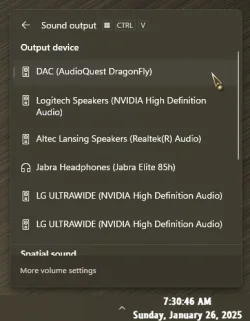
Is there only a limit of two output audio devices in Windows 11 computers?... it looks like Windows 11 only gives you two options for audio output...
You can have as many as you want, really. As long as Windows recognizes the device(s) and all are routable to your output device.
And..., all are easily accessible from the System Tray...

9392.webp
 

My Computers My Computers

  • At a glance

    Windows 11 Pro
    OS
    Windows 11 Pro
    Computer type
    PC/Desktop
    Manufacturer/Model
    ASUS ROG Strix
  • At a glance

    Windows 11 Pro
    Operating System
    Windows 11 Pro
    Computer type
    Laptop
    Manufacturer/Model
    ASUS VivoBook
  • ASUS VivoBook 'Lite' ~ Windows 11 Home
You can have as many as you want, really. As long as Windows recognizes the device(s) and all are routable to your output device.
And..., all are easily accessible from the System Tray...

View attachment 123306
Thanks. And that is why I opened this thread again because I have been having trouble doing the above. Also, what I thought was the solution really wasn't because going through my DAC has bypassed my subwoofer and I'm only getting right/left sound through my Denon. Therefore, if you, Edwin, or anyone else could breakdown as to how I can get Windows to recognize other audio devices, which is basically what I've been trying to do throughout this whole thread, I would really appreciate it.
 

My Computer My Computer

At a glance

Windows 11Hexa-Core i5-8600T processor 3.2GHz32GB of DDR4 RAMintegrated Intel HD 630 coprocessor
OS
Windows 11
Computer type
PC/Desktop
Manufacturer/Model
Dell OptiPlex 7060
CPU
Hexa-Core i5-8600T processor 3.2GHz
Motherboard
Dell Inc. 0DWPVW A00
Memory
32GB of DDR4 RAM
Graphics Card(s)
integrated Intel HD 630 coprocessor
Monitor(s) Displays
Intel(R) UHD Graphics 630 [Display adapter] DELL S2230MX [Monitor] (21.7"vis, s/n XX-05GX1Y-XXXXX-23J-08WM, March 2012)
Antivirus
Windows Defender Version 4.18.24090.11 Malwarebytes Anti-Malware Version 5.2.4.157
@MalwareT

See the screen capture below. This shows ALL audio devices even if disabled. Bear in mind any USB connected DAC's may need to be turned on before Windows recognises them. There is no limit on the number of audio devices in Windows 11.

win11 sound all devices.webp
 

My Computers My Computers

  • At a glance

    Windows 11 Pro 25H2Intel Core i9 13900KCorsair Dominator Platinum 64gb 5600MT/s DDR5...Sapphire NITRO+ AMD Radeon RX 7900 XTX Vapor-...
    OS
    Windows 11 Pro 25H2
    Computer type
    PC/Desktop
    Manufacturer/Model
    Homebuilt
    CPU
    Intel Core i9 13900K
    Motherboard
    Asus ProArt Z790 Creator WiFi - Bios 3107
    Memory
    Corsair Dominator Platinum 64gb 5600MT/s DDR5 Dual Channel
    Graphics Card(s)
    Sapphire NITRO+ AMD Radeon RX 7900 XTX Vapor-X 24GB
    Sound Card
    External DAC: Cambridge Audio DACMagic200M - Headphone Amp: Topping L50
    Monitor(s) Displays
    Panasonic MX950 Mini LED 55" TV 120hz
    Screen Resolution
    3840 x 2160 120hz
    Hard Drives
    Samsung 980 Pro 2TB (OS)
    Samsung 980 Pro 1TB (Files)
    Lexar NZ790 4TB
    LaCie d2 Professional 6TB external - USB 3.1
    Seagate Expansion 16TB external - USB 3.2
    Seagate One Touch 18TB external HD - USB 3.0
    PSU
    Corsair RM1200x Shift
    Case
    Corsair RGB Smart Case 5000x (white)
    Cooling
    Corsair iCue H150i Elite Capellix XT
    Keyboard
    Incase Ergonomic USB (Microsoft clone)
    Mouse
    Logitech MX Master 3S
    Internet Speed
    Fibre 900/500 Mbps
    Browser
    Microsoft Edge Chromium
    Antivirus
    Bitdefender Total Security
    Other Info
    AMD Radeon Software & Drivers 26.1.1
    Hasleo Backup Suite
    Dashlane password manager
    Kensington Verimark fingerprint reader
    Logitech Brio 4K webcam
    Orico 10-port powered USB 3.0 hub
  • At a glance

    Windows 11 Pro 25H2Intel® Core™ i9-13900H32GB DDR4-3200 Dual channel*Intel Iris Xᵉ Graphics G7
    Operating System
    Windows 11 Pro 25H2
    Computer type
    Laptop
    Manufacturer/Model
    Asus Vivobook X1605VA
    CPU
    Intel® Core™ i9-13900H
    Motherboard
    Asus X1605VA bios 309
    Memory
    32GB DDR4-3200 Dual channel
    Graphics card(s)
    *Intel Iris Xᵉ Graphics G7
    Sound Card
    Realtek | Intel SST Bluetooth & USB
    Monitor(s) Displays
    16.0-inch, WUXGA 16:10 aspect ratio, IPS-level Panel
    Screen Resolution
    1920 x 1200 60hz
    Hard Drives
    512GB M.2 NVMe™ PCIe® 3.0 SSD
    Mouse
    Logitech MX Ergo Trackball
    Antivirus
    Bitdefender Total Security
    Other Info
    720p Webcam
    WiFi & USB to ethernet
... how I can get Windows to recognize other audio devices...
Windows will automatically recognize pretty much any device, provided there is a driver for it, generic or not, floating around in cyberspace.
But don't worry about that right now..., your primary concern is how to get the default audio output from your tower, to the DAC, to your Denon, to the Sub and speakers.
... going through my DAC has bypassed my subwoofer and I'm only getting right/left sound through my Denon.
I have a suspicion it's because, in your latest pic, you have L/R RCA's going out of the back of your D1..., and the 3.5mm coming out the headphone port on the front of the D1..., one is cancelling out the other!

9390.webp
 

My Computers My Computers

  • At a glance

    Windows 11 Pro
    OS
    Windows 11 Pro
    Computer type
    PC/Desktop
    Manufacturer/Model
    ASUS ROG Strix
  • At a glance

    Windows 11 Pro
    Operating System
    Windows 11 Pro
    Computer type
    Laptop
    Manufacturer/Model
    ASUS VivoBook
  • ASUS VivoBook 'Lite' ~ Windows 11 Home
Windows will automatically recognize pretty much any device, provided there is a driver for it, generic or not, floating around in cyberspace.
But don't worry about that right now..., your primary concern is how to get the default audio output from your tower, to the DAC, to your Denon, to the Sub and speakers.

I have a suspicion it's because, in your latest pic, you have L/R RCA's going out of the back of your D1..., and the 3.5mm coming out the headphone port on the front of the D1..., one is cancelling out the other!

View attachment 123347
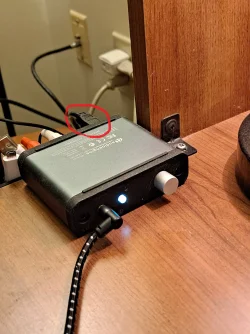
(1) Yes. Those are routed to my separate Altec Lansing speakers. (2) The DAC is receiving a signal from my PC through the black chord (circled in red) next to the white cord, which has a USB connection going into my computer at the end of it. (3) Yes. That goes to my Denon, and I have a right and a left speaker connected to my Denon along with a subwoofer.

DAC.red.circle.webp
 

My Computer My Computer

At a glance

Windows 11Hexa-Core i5-8600T processor 3.2GHz32GB of DDR4 RAMintegrated Intel HD 630 coprocessor
OS
Windows 11
Computer type
PC/Desktop
Manufacturer/Model
Dell OptiPlex 7060
CPU
Hexa-Core i5-8600T processor 3.2GHz
Motherboard
Dell Inc. 0DWPVW A00
Memory
32GB of DDR4 RAM
Graphics Card(s)
integrated Intel HD 630 coprocessor
Monitor(s) Displays
Intel(R) UHD Graphics 630 [Display adapter] DELL S2230MX [Monitor] (21.7"vis, s/n XX-05GX1Y-XXXXX-23J-08WM, March 2012)
Antivirus
Windows Defender Version 4.18.24090.11 Malwarebytes Anti-Malware Version 5.2.4.157
I have a suspicion it's because, in your latest pic, you have L/R RCA's going out of the back of your D1..., and the 3.5mm coming out the headphone port on the front of the D1..., one is cancelling out the other!

View attachment 123347
That makes sense. So, it sounds like I need to disconnect my Altec Lansing speakers and find a way to only connect my Denon to the DAC without having the front R/L RCA cord connected.
 

My Computer My Computer

At a glance

Windows 11Hexa-Core i5-8600T processor 3.2GHz32GB of DDR4 RAMintegrated Intel HD 630 coprocessor
OS
Windows 11
Computer type
PC/Desktop
Manufacturer/Model
Dell OptiPlex 7060
CPU
Hexa-Core i5-8600T processor 3.2GHz
Motherboard
Dell Inc. 0DWPVW A00
Memory
32GB of DDR4 RAM
Graphics Card(s)
integrated Intel HD 630 coprocessor
Monitor(s) Displays
Intel(R) UHD Graphics 630 [Display adapter] DELL S2230MX [Monitor] (21.7"vis, s/n XX-05GX1Y-XXXXX-23J-08WM, March 2012)
Antivirus
Windows Defender Version 4.18.24090.11 Malwarebytes Anti-Malware Version 5.2.4.157
Back
Top Bottom