Solved pop ups


Teamviewer may be one of the Hidden Icons running in the background
Click the Up arrow to the left of the Clock on the taskbar to view these apps.

Start Temviewer Click the Gear Icon in the upper right.
Under General, Uncheck Start Teamviewer with Windows.
Or uninstall Teamviewer if you don't use it by right clicking the Start button and choosing Installed Apps select it and choose the 3 dots to the right and choose Uninstall.

Or use Revo Uninstaller
 

My Computer

System One

  • OS
    Windows 11 Pro Insider 64 bit 25H2 26200.5742
    Computer type
    PC/Desktop
    Manufacturer/Model
    Gigabyte Z390 UD
    CPU
    Intel Core i7 9700K 3.60
    Motherboard
    Gigabyte Z390 UD
    Memory
    16 GB
    Graphics Card(s)
    nVidia GEForce RTX 2060 Super
    Sound Card
    onboard
    Monitor(s) Displays
    Two 27" Dell 4K monitors
    Screen Resolution
    3840 x 2160
    Hard Drives
    M.2 NVME SSD, 500 GB; Two 2TB Mechanical HDD's
    PSU
    850w PSU
    Case
    Cyberpower PC
    Cooling
    Water cooled
    Keyboard
    Backlit Cyberpower gaming keyboard
    Mouse
    Backlit Cyberpower gaming mouse
    Internet Speed
    1 GB mbps
    Browser
    Brave
    Antivirus
    Windows Security

Spink thanks for the info, TeamViewer isn't showing as one of the hidden icons, I don't have TeamViewer installed or if it is installed it is well hidden as I cannot find it.
 

My Computer

System One

  • OS
    Windows 11 pro
    Computer type
    Laptop
    Manufacturer/Model
    HP Zbook
    CPU
    Intel(R) Core(TM) i7-8850H CPU @ 2.60GHz 2.59 GHz
    Motherboard
    HP 842D
    Memory
    32GB
    Graphics Card(s)
    Nvidia Quadro P3200
    Hard Drives
    Samsung 980 1TB M.2
    Toshiba KXG50ZNV512G M.2
    Crucial P5 Plus 2TB M.2
    Mouse
    MX Master 3
    Internet Speed
    500MBPS
    Browser
    Chrome, Edge
    Antivirus
    Windows defender
Do a Search for Teamviewer, It is usually located in
C:\Program Files (x86) if there is no folder there for Teamviewer, it is no longer on your system.
 

My Computer

System One

  • OS
    Windows 11 Pro Insider 64 bit 25H2 26200.5742
    Computer type
    PC/Desktop
    Manufacturer/Model
    Gigabyte Z390 UD
    CPU
    Intel Core i7 9700K 3.60
    Motherboard
    Gigabyte Z390 UD
    Memory
    16 GB
    Graphics Card(s)
    nVidia GEForce RTX 2060 Super
    Sound Card
    onboard
    Monitor(s) Displays
    Two 27" Dell 4K monitors
    Screen Resolution
    3840 x 2160
    Hard Drives
    M.2 NVME SSD, 500 GB; Two 2TB Mechanical HDD's
    PSU
    850w PSU
    Case
    Cyberpower PC
    Cooling
    Water cooled
    Keyboard
    Backlit Cyberpower gaming keyboard
    Mouse
    Backlit Cyberpower gaming mouse
    Internet Speed
    1 GB mbps
    Browser
    Brave
    Antivirus
    Windows Security

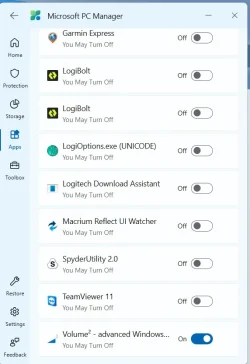
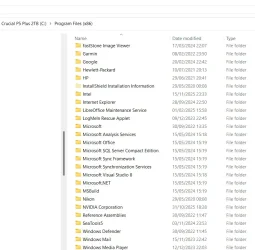
Screenshot 2025-12-07 234806.webpScreenshot 2025-12-07 234855.webpNot visable in program files yet visable in the PC manager
 

My Computer

System One

  • OS
    Windows 11 pro
    Computer type
    Laptop
    Manufacturer/Model
    HP Zbook
    CPU
    Intel(R) Core(TM) i7-8850H CPU @ 2.60GHz 2.59 GHz
    Motherboard
    HP 842D
    Memory
    32GB
    Graphics Card(s)
    Nvidia Quadro P3200
    Hard Drives
    Samsung 980 1TB M.2
    Toshiba KXG50ZNV512G M.2
    Crucial P5 Plus 2TB M.2
    Mouse
    MX Master 3
    Internet Speed
    500MBPS
    Browser
    Chrome, Edge
    Antivirus
    Windows defender
Press the Windows key +S and Search for Teamviewer.
It may be in C:\Program Files not (x86)

You may see it as a Hidden File in C:\Users\UserName\AppData\Roaming also in Local
If the TeamViewer folder is there, you can Delete it.
 

My Computer

System One

  • OS
    Windows 11 Pro Insider 64 bit 25H2 26200.5742
    Computer type
    PC/Desktop
    Manufacturer/Model
    Gigabyte Z390 UD
    CPU
    Intel Core i7 9700K 3.60
    Motherboard
    Gigabyte Z390 UD
    Memory
    16 GB
    Graphics Card(s)
    nVidia GEForce RTX 2060 Super
    Sound Card
    onboard
    Monitor(s) Displays
    Two 27" Dell 4K monitors
    Screen Resolution
    3840 x 2160
    Hard Drives
    M.2 NVME SSD, 500 GB; Two 2TB Mechanical HDD's
    PSU
    850w PSU
    Case
    Cyberpower PC
    Cooling
    Water cooled
    Keyboard
    Backlit Cyberpower gaming keyboard
    Mouse
    Backlit Cyberpower gaming mouse
    Internet Speed
    1 GB mbps
    Browser
    Brave
    Antivirus
    Windows Security

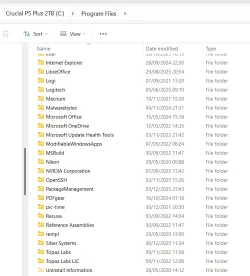
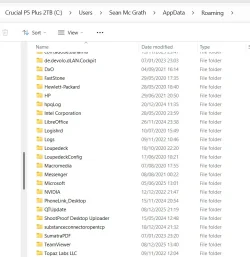
I finally found it, thanks for helping me with this issue, i have now deleted it.
 

Attachments

  • Screenshot 2025-12-09 230549.webp
    Screenshot 2025-12-09 230549.webp
    56.8 KB · Views: 3
  • Screenshot 2025-12-09 230738.webp
    Screenshot 2025-12-09 230738.webp
    55.6 KB · Views: 1

My Computer

System One

  • OS
    Windows 11 pro
    Computer type
    Laptop
    Manufacturer/Model
    HP Zbook
    CPU
    Intel(R) Core(TM) i7-8850H CPU @ 2.60GHz 2.59 GHz
    Motherboard
    HP 842D
    Memory
    32GB
    Graphics Card(s)
    Nvidia Quadro P3200
    Hard Drives
    Samsung 980 1TB M.2
    Toshiba KXG50ZNV512G M.2
    Crucial P5 Plus 2TB M.2
    Mouse
    MX Master 3
    Internet Speed
    500MBPS
    Browser
    Chrome, Edge
    Antivirus
    Windows defender
Unfortunatly the Teamviewer pop up is back.
 

My Computer

System One

  • OS
    Windows 11 pro
    Computer type
    Laptop
    Manufacturer/Model
    HP Zbook
    CPU
    Intel(R) Core(TM) i7-8850H CPU @ 2.60GHz 2.59 GHz
    Motherboard
    HP 842D
    Memory
    32GB
    Graphics Card(s)
    Nvidia Quadro P3200
    Hard Drives
    Samsung 980 1TB M.2
    Toshiba KXG50ZNV512G M.2
    Crucial P5 Plus 2TB M.2
    Mouse
    MX Master 3
    Internet Speed
    500MBPS
    Browser
    Chrome, Edge
    Antivirus
    Windows defender
Do a Search for Teamviewer. If you have uninstalled Teamviewer
Open the Registry Editor. Go to search or Windows key+R and type
regedit and press enter
First backup the Registry

Go to the Toolbar, click Edit/Find/ in the Find What box, type Teamviewer and press enter.
The will search the registry and stop on the right panel and press the Del key, then Press Enter to acknowledge the deletion, then press F3 to continue searching the registry.

Do these last 3 steps until you get the message
Finished Searching the Registry. Restart the computer. Teamviewer will now be fully removed
 

My Computer

System One

  • OS
    Windows 11 Pro Insider 64 bit 25H2 26200.5742
    Computer type
    PC/Desktop
    Manufacturer/Model
    Gigabyte Z390 UD
    CPU
    Intel Core i7 9700K 3.60
    Motherboard
    Gigabyte Z390 UD
    Memory
    16 GB
    Graphics Card(s)
    nVidia GEForce RTX 2060 Super
    Sound Card
    onboard
    Monitor(s) Displays
    Two 27" Dell 4K monitors
    Screen Resolution
    3840 x 2160
    Hard Drives
    M.2 NVME SSD, 500 GB; Two 2TB Mechanical HDD's
    PSU
    850w PSU
    Case
    Cyberpower PC
    Cooling
    Water cooled
    Keyboard
    Backlit Cyberpower gaming keyboard
    Mouse
    Backlit Cyberpower gaming mouse
    Internet Speed
    1 GB mbps
    Browser
    Brave
    Antivirus
    Windows Security
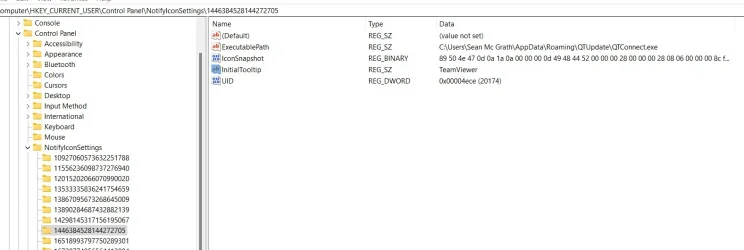
Backed up the registry, this is what has been found.
 

Attachments

  • Screenshot 2025-12-16 231850.webp
    Screenshot 2025-12-16 231850.webp
    53.5 KB · Views: 1

My Computer

System One

  • OS
    Windows 11 pro
    Computer type
    Laptop
    Manufacturer/Model
    HP Zbook
    CPU
    Intel(R) Core(TM) i7-8850H CPU @ 2.60GHz 2.59 GHz
    Motherboard
    HP 842D
    Memory
    32GB
    Graphics Card(s)
    Nvidia Quadro P3200
    Hard Drives
    Samsung 980 1TB M.2
    Toshiba KXG50ZNV512G M.2
    Crucial P5 Plus 2TB M.2
    Mouse
    MX Master 3
    Internet Speed
    500MBPS
    Browser
    Chrome, Edge
    Antivirus
    Windows defender
if you are sure its not due to a malicious code, just install teamviewer and use revo uninstaller to uninstall it and it will find all leftovers (folders, reg keys, etc) and let you delete them post-uninstall
 

My Computer

System One

  • OS
    Windows 11 Pro
I have never had Teamviewer installed
 

My Computer

System One

  • OS
    Windows 11 pro
    Computer type
    Laptop
    Manufacturer/Model
    HP Zbook
    CPU
    Intel(R) Core(TM) i7-8850H CPU @ 2.60GHz 2.59 GHz
    Motherboard
    HP 842D
    Memory
    32GB
    Graphics Card(s)
    Nvidia Quadro P3200
    Hard Drives
    Samsung 980 1TB M.2
    Toshiba KXG50ZNV512G M.2
    Crucial P5 Plus 2TB M.2
    Mouse
    MX Master 3
    Internet Speed
    500MBPS
    Browser
    Chrome, Edge
    Antivirus
    Windows defender
i understand that. but hunting for all of these leftovers is going to prove virtually impossible. doing that is going to give you the best results... unless its malicious. then you have a whole other problem on your hands
 

My Computer

System One

  • OS
    Windows 11 Pro
i understand that. but hunting for all of these leftovers is going to prove virtually impossible. doing that is going to give you the best results... unless its malicious. then you have a whole other problem on your hands
Thank you, im not sure what to do now to be honest, as im sure ya know im no computer expert, the image i posted above found Teamviewer,
 

My Computer

System One

  • OS
    Windows 11 pro
    Computer type
    Laptop
    Manufacturer/Model
    HP Zbook
    CPU
    Intel(R) Core(TM) i7-8850H CPU @ 2.60GHz 2.59 GHz
    Motherboard
    HP 842D
    Memory
    32GB
    Graphics Card(s)
    Nvidia Quadro P3200
    Hard Drives
    Samsung 980 1TB M.2
    Toshiba KXG50ZNV512G M.2
    Crucial P5 Plus 2TB M.2
    Mouse
    MX Master 3
    Internet Speed
    500MBPS
    Browser
    Chrome, Edge
    Antivirus
    Windows defender
Press the Windows and "R" keys simultaneously, type or paste "windowsdefender:" into the "Open" box and click "OK". Don't leave out the colon at the end. When the Defender window opens, scroll down and click "Firewall and Network Protection" and make sure that the firewall on the active network is on. If it isn't, click on the network and turn it on. If that doesn't help, scroll to the bottom and click "Restore firewalls to default".

Ben
 

My Computer

System One

  • OS
    Windows 10 Home
    Computer type
    Laptop
    Manufacturer/Model
    HP Elitebook 2530p
    CPU
    Intel Core 2 Duo [email protected] GHz
    Memory
    2 GB
Thank you, im not sure what to do now to be honest, as im sure ya know im no computer expert, the image i posted above found Teamviewer,
OK, in the registry where you are in tis pic, select Teamviewer in the right panel press the Del key on the keyboard.
Press F3 key to continue searching the registry. Delete anything it stops on and continue searching until you see the message
Finished Searching the Registry. Restart the computer.
 

My Computer

System One

  • OS
    Windows 11 Pro Insider 64 bit 25H2 26200.5742
    Computer type
    PC/Desktop
    Manufacturer/Model
    Gigabyte Z390 UD
    CPU
    Intel Core i7 9700K 3.60
    Motherboard
    Gigabyte Z390 UD
    Memory
    16 GB
    Graphics Card(s)
    nVidia GEForce RTX 2060 Super
    Sound Card
    onboard
    Monitor(s) Displays
    Two 27" Dell 4K monitors
    Screen Resolution
    3840 x 2160
    Hard Drives
    M.2 NVME SSD, 500 GB; Two 2TB Mechanical HDD's
    PSU
    850w PSU
    Case
    Cyberpower PC
    Cooling
    Water cooled
    Keyboard
    Backlit Cyberpower gaming keyboard
    Mouse
    Backlit Cyberpower gaming mouse
    Internet Speed
    1 GB mbps
    Browser
    Brave
    Antivirus
    Windows Security
You still don't appear to have run RevoUninstaller, if not just to check on programs installed on your device. If Team Viewer is installed (albeit "hidden") Revo will show it (also check under the Apps tab) either as Team Viewer, Microsoft Team Viewer or Windows Team Viewer

If nothing shows up, download and run an alternative to Revo - Geek Uninstaller
 

My Computers

System One System Two

  • OS
    Windows 11 2xH2 (latest update ... forever anal)
    Computer type
    PC/Desktop
    Manufacturer/Model
    HP Slim S01
    CPU
    Intel i5-12400
    Memory
    8GB
    Graphics Card(s)
    NVIDIA GeForce GT730
    Sound Card
    OOBE
    Monitor(s) Displays
    Acer 32"
    Screen Resolution
    1920x1080
    Hard Drives
    512GB KIOXIA NVMe
    1TB SATA SSD
    PSU
    OOBE
    Case
    OOBE
    Cooling
    OOBE
    Keyboard
    BT
    Mouse
    BT
    Browser
    Brave FFox Chrome Opera
    Antivirus
    KIS
  • Operating System
    Windows 11 Pro 2xH2 (latest update ... 4ever anal)
    Computer type
    Laptop
    Manufacturer/Model
    HP Pavillion 15
    CPU
    i7-1165G7 @ 2.80GHz
    Graphics card(s)
    Intel Iris Xe Graphics
    Hard Drives
    Samsung NVMe 512GB
    + numerous/multiple SSD Type C USB enclosures
    Internet Speed
    NBN FTTN 50
    Browser
    Brave
    Antivirus
    KIS
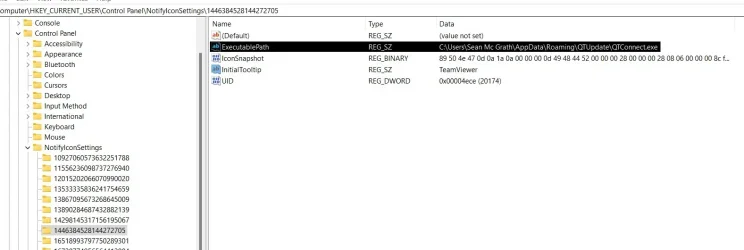
I'd have a look at the Executable Path.

Highlighted in black.

Cheers Freck

Screenshot 2025-12-16 231850.webp
 

My Computer

System One

  • OS
    Windows 11 Pro 25H2 Build 26200.7623
    Computer type
    PC/Desktop
    Manufacturer/Model
    Custom
    CPU
    AMD Ryzen 5 1600 Six-Core Processor
    Motherboard
    MSI B350M MORTAR ARCTIC (MS-7A37) 2.0
    Memory
    x2 Capacity: 4 GB Type: DDR4-2933 PC4-23466 Speed: 2800MT/s Model: TEAMGROUP-UD4-3000
    Graphics Card(s)
    NVIDIA GeForce GTX 980 VRAM: 3.99 GB
    Sound Card
    Realtek High Definition Audio
    Monitor(s) Displays
    Samsung 75 inch QLED 4K
    Screen Resolution
    3840x2160
    Hard Drives
    PC601 NVMe SK hynix 256GB Size: 256GB Partitions: 4 (Windows Installed)
    ST4000VN000-1H4168 Size: 4TB Partitions: 1
    WDC WD40EFRX-68WT0N0 Size: 4TB Partitions: 1
    ST8000AS0002-1NA17Z Size: 8TB Partitions: 2
    WDC WD40EFRX-68WT0N0 Size: 4TB Partitions: 1
    WDC WD30EZRX-00MMMB0 Size: 3TB Partitions: 1
    TOSHIBA DT01ACA300 Size: 3TB Partitions: 1
    ST2000DM001-1ER164 Size: 2TB Partitions: 1
    ST3000DM001-1CH166 Size: 3TB Partitions: 2
    PSU
    Corsair 850W RM850x 80+ Gold Fully Modular ATX
    Case
    N/A
    Cooling
    N/A
    Keyboard
    N/A
    Mouse
    N/A
    Internet Speed
    800mbps Down, 40mbps up, HFC Cable
    Browser
    Chrome / Firefox / Edge(not used, installed only)
    Antivirus
    Defender
    Other Info
    This machine is used as a media pc for watching tv shows and movies.

    Kodi is installed and used for media.

    This windows install is completely stock, not running any start menu or any other type of program to modify windows explorer or start menus. Only uninstalled pre installed apps.
Do a Search for Teamviewer. If you have uninstalled Teamviewer
Open the Registry Editor. Go to search or Windows key+R and type
regedit and press enter
First backup the Registry

Go to the Toolbar, click Edit/Find/ in the Find What box, type Teamviewer and press enter.
The will search the registry and stop on the right panel and press the Del key, then Press Enter to acknowledge the deletion, then press F3 to continue searching the registry.

Do these last 3 steps until you get the message
Finished Searching the Registry. Restart the computer. Teamviewer will now be fully removed
Followed your instructions and have been using the PC most of the day and not one popup 🤞
 

My Computer

System One

  • OS
    Windows 11 pro
    Computer type
    Laptop
    Manufacturer/Model
    HP Zbook
    CPU
    Intel(R) Core(TM) i7-8850H CPU @ 2.60GHz 2.59 GHz
    Motherboard
    HP 842D
    Memory
    32GB
    Graphics Card(s)
    Nvidia Quadro P3200
    Hard Drives
    Samsung 980 1TB M.2
    Toshiba KXG50ZNV512G M.2
    Crucial P5 Plus 2TB M.2
    Mouse
    MX Master 3
    Internet Speed
    500MBPS
    Browser
    Chrome, Edge
    Antivirus
    Windows defender
I am so glad you got it sorted.

Please Mark this thread as Solved
on the right hand side around the same height as the thread title, should be a big button that says mark as solved
 

My Computer

System One

  • OS
    Windows 11 Pro Insider 64 bit 25H2 26200.5742
    Computer type
    PC/Desktop
    Manufacturer/Model
    Gigabyte Z390 UD
    CPU
    Intel Core i7 9700K 3.60
    Motherboard
    Gigabyte Z390 UD
    Memory
    16 GB
    Graphics Card(s)
    nVidia GEForce RTX 2060 Super
    Sound Card
    onboard
    Monitor(s) Displays
    Two 27" Dell 4K monitors
    Screen Resolution
    3840 x 2160
    Hard Drives
    M.2 NVME SSD, 500 GB; Two 2TB Mechanical HDD's
    PSU
    850w PSU
    Case
    Cyberpower PC
    Cooling
    Water cooled
    Keyboard
    Backlit Cyberpower gaming keyboard
    Mouse
    Backlit Cyberpower gaming mouse
    Internet Speed
    1 GB mbps
    Browser
    Brave
    Antivirus
    Windows Security
Spunk thanks for staying with me to resolve this, much appreciated.
 

My Computer

System One

  • OS
    Windows 11 pro
    Computer type
    Laptop
    Manufacturer/Model
    HP Zbook
    CPU
    Intel(R) Core(TM) i7-8850H CPU @ 2.60GHz 2.59 GHz
    Motherboard
    HP 842D
    Memory
    32GB
    Graphics Card(s)
    Nvidia Quadro P3200
    Hard Drives
    Samsung 980 1TB M.2
    Toshiba KXG50ZNV512G M.2
    Crucial P5 Plus 2TB M.2
    Mouse
    MX Master 3
    Internet Speed
    500MBPS
    Browser
    Chrome, Edge
    Antivirus
    Windows defender

Latest Support Threads

Back
Top Bottom