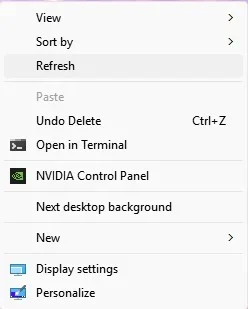
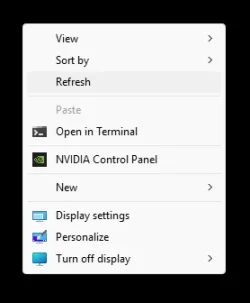
I reinstall windows few hours ago and I am not sure if I did something since then until not but I just notest that when you right click on something and bring the context menu(including the old menu(which comes by choosing "Show more options" )),when I am pointing over any menu the highlighting is barely visible(the highlight color is almost the same color as the actual menu color))
Before the reinstall I remember it was definitely more visible(I moved the images to my phone to make sure it's not my screen but it's also barely visible there)
Maybe there is some registry keys that allows you to change the color
I have not reinstall windows in a very long time,maybe I had some change done before
Before the reinstall I remember it was definitely more visible(I moved the images to my phone to make sure it's not my screen but it's also barely visible there)
Maybe there is some registry keys that allows you to change the color
I have not reinstall windows in a very long time,maybe I had some change done before
Attachments
My Computer
At a glance
Windows 1114700HX64GBRTX 4070
- OS
- Windows 11
- Computer type
- Laptop
- Manufacturer/Model
- MSI Sword 17 HX
- CPU
- 14700HX
- Memory
- 64GB
- Graphics Card(s)
- RTX 4070