Solved Program called "Files"


larrydonline

Well-known member
Member
VIP
Local time
1:06 AM
Posts
128
OS
Windows 11
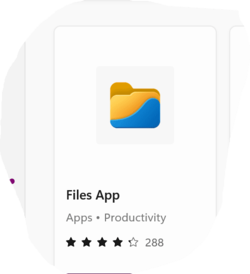
There is an icon labeled "Files" that appears on my task bar sometimes when I have folders open. It appears to be an app for organizing the files on my computer. I can't find it in programs in Control Panel. Is this an integral part of Windows 11 or can it be removed? It is not the file explorer, just something that pops up on the task bar from time to time.
 

My Computer My Computer

At a glance

Windows 1112th Gen Intel(R) Core(TM) i9-12900K 3.20 GHz65262 Megabytes Usable Installed MemoryNVIDIA GeForce RTX 3070
OS
Windows 11
Computer type
PC/Desktop
Manufacturer/Model
Dell 8950
CPU
12th Gen Intel(R) Core(TM) i9-12900K 3.20 GHz
Motherboard
0DYKKV A00
Memory
65262 Megabytes Usable Installed Memory
Graphics Card(s)
NVIDIA GeForce RTX 3070
Sound Card
Multimedia Intel(R) Display Audio NVIDIA High Definition Audio NVIDIA Virtual Audio Device (Wave Extensible) (WDM) Realtek(R) Audio WsAudio_Device
Monitor(s) Displays
Dell
Mouse
Logitech
Internet Speed
D/L 120 mbps
Browser
Firefox
Antivirus
Malwarebytes
Is it the "Files" app from the Windows Store? Without screenshots I'm unsure.
 

My Computers My Computers

  • At a glance

    Windows 11 Pro βIntel® Core™ i7-1165G732 GB DDR4-3200 SDRAMIntel® Iris® Xᵉ Graphics
    OS
    Windows 11 Pro β
    Computer type
    Laptop
    Manufacturer/Model
    HP Pavilion Laptop 15-eg0070wm
    CPU
    Intel® Core™ i7-1165G7
    Memory
    32 GB DDR4-3200 SDRAM
    Graphics Card(s)
    Intel® Iris® Xᵉ Graphics
    Screen Resolution
    1920x1080
    Hard Drives
    2TB PCIe® NVMe™ M.2 SSD
  • At a glance

    macOS Ventura3.4 GHz Quad-Core Intel Core i540 GB 2400 MHz DDR4Radeon Pro 570 4 GB
    Operating System
    macOS Ventura
    Computer type
    PC/Desktop
    Manufacturer/Model
    Apple iMac 27" 5K (2017)
    CPU
    3.4 GHz Quad-Core Intel Core i5
    Memory
    40 GB 2400 MHz DDR4
    Graphics card(s)
    Radeon Pro 570 4 GB
    Monitor(s) Displays
    27" 5K, 34" UW
    Screen Resolution
    Mon 1: 5120 × 2880 Mon 2: 2560 x 1080
    Hard Drives
    32GB NVME, 1TB SSD
If the icon looks like this, it is indeed the Windows store files app. Uninstall it using one of these methods..
Uninstall from the Start menu
  1. Select Start and look for the app or program in the list shown.
  2. Press and hold (or right-click) on the app, then select Uninstall.
Uninstall from the Settings page
  1. Select Start , then select Settings > Apps > Apps & features. Or just click the shortcut link at the bottom of this article.
  2. Select the app you want to remove, and then select Uninstall.
 

Attachments

  • Screenshot 2022-03-20 174100.png
    Screenshot 2022-03-20 174100.png
    7.3 KB · Views: 2

My Computers My Computers

  • At a glance

    Windows 11 Pro 25H2 26200.9445i9-10900 10 core 20 threads32 gbnone-Intel UHD Graphics 630
    OS
    Windows 11 Pro 25H2 26200.9445
    Computer type
    PC/Desktop
    Manufacturer/Model
    Dell Optiplex 7080
    CPU
    i9-10900 10 core 20 threads
    Motherboard
    DELL 0J37VM
    Memory
    32 gb
    Graphics Card(s)
    none-Intel UHD Graphics 630
    Sound Card
    Integrated Realtek
    Monitor(s) Displays
    Benq 27
    Screen Resolution
    2560x1440
    Hard Drives
    2x1tb Solidigm m.2 nvme /External drives 512gb Samsung m.2 sata+2tb Kingston m2.nvme
    PSU
    500w
    Case
    MT
    Cooling
    Dell Premium
    Keyboard
    Logitech wired
    Mouse
    Logitech wireless
    Internet Speed
    so slow I'm too embarrassed to tell
    Browser
    #1 Edge #2 Firefox
    Antivirus
    Defender+MWB Premium
  • At a glance

    Windows 11 Pro 24H2 26200.9445AMD Ryzen 7 6800U32 gbintegrated
    Operating System
    Windows 11 Pro 24H2 26200.9445
    Computer type
    PC/Desktop
    Manufacturer/Model
    Beelink Mini PC SER5
    CPU
    AMD Ryzen 7 6800U
    Memory
    32 gb
    Graphics card(s)
    integrated
    Sound Card
    integrated
    Monitor(s) Displays
    Benq 27
    Screen Resolution
    2560x1440
    Hard Drives
    1TB Crucial nvme
    Keyboard
    Logitech wired
    Mouse
    Logitech wireless
    Internet Speed
    still too embarrassed to tell
    Browser
    Firefox
    Antivirus
    Defender
  • System 3 is non compliant Dell 9020 i7-4770/24gb ram Win11 PRO 26200.9445
Thanks, Glasskutter. By serendipity when checking start to see if it was gone after I uninstalled it I discovered how to see the old programs list like you'd see in the Start menu of Windows 10. Looks like they almost tried to hide it.
 

My Computer My Computer

At a glance

Windows 1112th Gen Intel(R) Core(TM) i9-12900K 3.20 GHz65262 Megabytes Usable Installed MemoryNVIDIA GeForce RTX 3070
OS
Windows 11
Computer type
PC/Desktop
Manufacturer/Model
Dell 8950
CPU
12th Gen Intel(R) Core(TM) i9-12900K 3.20 GHz
Motherboard
0DYKKV A00
Memory
65262 Megabytes Usable Installed Memory
Graphics Card(s)
NVIDIA GeForce RTX 3070
Sound Card
Multimedia Intel(R) Display Audio NVIDIA High Definition Audio NVIDIA Virtual Audio Device (Wave Extensible) (WDM) Realtek(R) Audio WsAudio_Device
Monitor(s) Displays
Dell
Mouse
Logitech
Internet Speed
D/L 120 mbps
Browser
Firefox
Antivirus
Malwarebytes

Latest Support Threads

Back
Top Bottom