Solved Program Not Running and can't be uninstalled


Kashegan

Well-known member
Member
Local time
5:49 AM
Posts
35
OS
Windows 11
I had a slight hiccup with my laptop and one particular program has not returned as is was previously. The program (Stardock Fences) was working OK but didn't work after the hiccup . I reinstalled it, but still no response. I tried, several times, to uninstall it but it doesn't appear on installed applications list. I tried to delete the folder, but it won't delete, saying there is a file still in use - but I can't find any running file for it. Any suggestions as to how to uninstall it so that I can reinstall it again? Thanks
 

My Computer

System One

  • OS
    Windows 11
    Computer type
    PC/Desktop
    Manufacturer/Model
    ASUS
    CPU
    Intel i7 3.2MHz
    Motherboard
    Gigabyte Technology Co. Ltd. B360M DS3H (U3E1)
    Memory
    24Gb
    Graphics Card(s)
    NVIDIA GeForce GTX 1060 6GB
    Sound Card
    Sound Blaster Audigy Fx
    Monitor(s) Displays
    BenQ GC2870
    Screen Resolution
    1920x1080@60Hz
    Hard Drives
    447GB KINGSTON SA1000M8480G
    1863GB Seagate ST2000DX002-2DV164
    Cooling
    Water
    Antivirus
    Norton 360
I had a slight hiccup with my laptop and one particular program has not returned as is was previously. The program (Stardock Fences) was working OK but didn't work after the hiccup . I reinstalled it, but still no response. I tried, several times, to uninstall it but it doesn't appear on installed applications list. I tried to delete the folder, but it won't delete, saying there is a file still in use - but I can't find any running file for it. Any suggestions as to how to uninstall it so that I can reinstall it again? Thanks
Have you rebooted after the uninstall?
Usually .Dlls remain in use and locked sometimes after an uninstall.
You do not mention the name of the locked file, so it is just speculation.
 

My Computers

System One System Two

  • OS
    All Branches but Release
    Computer type
    Laptop
    Manufacturer/Model
    Acer Nitro ANV15-51
    CPU
    AMD Ryzen 7 7735HS 3200-4500 Mhz 8 cores x 2
    Motherboard
    Sportage_RBH
    Memory
    32 GB DDR5
    Graphics Card(s)
    Radeon Graphic / NVIDIA GeForce RTX 4060 8 GB GDDR6
    Sound Card
    AMD/Realtek(R) Audio
    Monitor(s) Displays
    Integrated Monitor (15.3"vis)
    Screen Resolution
    FHD 1920X1080 16:9 144Hz
    Hard Drives
    KINGSTON OM8SEP4512Q-AA 1TB
    Western Digital 256GB
    PSU
    19V DC 6.32 A 120 W
    Cooling
    Dual Fans
    Mouse
    MS Bluetooth
    Internet Speed
    Fiber 1GB Cox -us & 1GB Orange-fr
    Browser
    Edge Canary- Firefox Nightly-Chrome Dev-Chrome Dev
    Antivirus
    Windows Defender
  • Operating System
    Windows 11 Beta
    Computer type
    Laptop
    Manufacturer/Model
    Asus X751BP
    CPU
    AMD A9-9420
    Memory
    8 GB of DDR4
    Graphics card(s)
    AMD Radeon R5
    Screen Resolution
    1600x900
    Hard Drives
    Seagate 1 TB
Stardock has a great forum. Here is the Fences section:


There is a particular process for the removal and testing of Fences.

Also, saying Hiccup, does not help us help you. What happened?
 

My Computers

System One System Two

  • OS
    Windows 11 Pro 25H2 Build 26200.8655
    Computer type
    PC/Desktop
    Manufacturer/Model
    Sin-built 2013
    CPU
    Intel(R) Core(TM) i7-4770K CPU @ 3.50GHz
    Motherboard
    ASUS ROG Maximus VI Formula
    Memory
    32.0 GB of I forget and the box is in storage.
    Graphics Card(s)
    Gigabyte nVidia GeForce GTX 1660 Super OC 6GB
    Sound Card
    Onboard thingy
    Monitor(s) Displays
    5 x LG 25MS500-B - 1 x 24MK430H-B - 1 x Wacom Pro 22" Touch Screen Tablet
    Screen Resolution
    All over the place
    Hard Drives
    Too many to list.
    OS on Samsung 1TB 870 QVO SATA
    PSU
    Silverstone 1500
    Case
    NZXT Phantom 820 Full-Tower Case
    Cooling
    Noctua NH-D15 Elite Class Dual Tower CPU Cooler / 6 x EziDIY 120mm / 2 x Corsair 140mm somethings / 1 x 140mm Thermaltake something / 2 x 200mm Corsair.
    Keyboard
    Corsair K95 / Logitech diNovo Edge Wireless
    Mouse
    Logitech: G402 / G502 / Mx Masters / Mx Air Cordless
    Internet Speed
    2000/500Mbps
    Browser
    All sorts
    Antivirus
    Kaspersky Premium
    Other Info
    ㅤㅤㅤㅤㅤㅤㅤㅤㅤㅤㅤㅤㅤㅤㅤㅤㅤㅤㅤㅤㅤㅤㅤㅤㅤㅤㅤㅤㅤㅤㅤㅤㅤㅤㅤㅤㅤㅤㅤㅤ⠀⠀⠀⠀⠀⠀⠀⠀⠀⠀
    TP-Link BE9300 WiFi 7 Bluetooth 5.4 (Archer TBE550E)
    TP-Link TX201 V1 2.5GB Lan

    Grandstream HT812 - VoIP
    ASUS DSL-AX82U - Mesh
    ASUS RT-AC68U - Mesh
    ASUS RT-BE88U Router

    Brother MFC-L2880DW Printer

    I’m on a horse.
  • Operating System
    Windows 11 Pro 25H2 Build 26200.8655
    Computer type
    Laptop
    Manufacturer/Model
    LENOVO Yoga 7 14IRL8 - 7i EVO OLED 14" Touchscreen i5 12 Core 16GB/512GB
    CPU
    Intel Core 12th Gen i5-1240P Processor (1.7 - 4.4GHz)
    Memory
    16GB LPDDR5 RAM
    Graphics card(s)
    Intel Iris Xe Graphics Processor
    Sound Card
    Optimized with Dolby Atmos®
    Screen Resolution
    QHD 2880 x 1800 OLED
    Hard Drives
    M.2 512GB
    Antivirus
    Defender / Malwarebytes
    Other Info
    …still on a horse.
Can't help with your problem, but here's ten points just for filling out your computer specs. :-)
 

My Computers

System One System Two

  • OS
    Win 11 Home ♦♦♦26200.8655 ♦♦♦♦♦♦♦25H2
    Computer type
    PC/Desktop
    Manufacturer/Model
    Built by Ghot® [May 2020]
    CPU
    AMD Ryzen 7 3700X
    Motherboard
    Asus Pro WS X570-ACE (BIOS 5302)
    Memory
    G.Skill (F4-3200C14D-16GTZKW)
    Graphics Card(s)
    EVGA RTX 2070 (08G-P4-2171-KR)
    Sound Card
    Realtek ALC1220P / ALC S1220A
    Monitor(s) Displays
    Dell U3011 30"
    Screen Resolution
    2560 x 1600
    Hard Drives
    2x Samsung 860 EVO 500GB,
    WD 4TB Black FZBX - SATA III,
    WD 8TB Black FZBX - SATA III,
    DRW-24B1ST CD/DVD Burner
    PSU
    PC Power & Cooling 750W Quad EPS12V
    Case
    Cooler Master ATCS 840 Tower
    Cooling
    CM Hyper 212 EVO (push/pull)
    Keyboard
    Ducky DK9008 Shine II Blue LED
    Mouse
    Logitech Optical M-100
    Internet Speed
    300/300
    Browser
    Firefox (latest)
    Antivirus
    Bitdefender Total Security
    Other Info
    Speakers: Klipsch Pro Media 2.1
  • Operating System
    Windows XP Pro 32bit w/SP3
    Computer type
    PC/Desktop
    Manufacturer/Model
    Built by Ghot® (not in use)
    CPU
    AMD Athlon 64 X2 5000+ (OC'd @ 3.2Ghz)
    Motherboard
    ASUS M2N32-SLI Deluxe Wireless Edition
    Memory
    TWIN2X2048-6400C4DHX (2 x 1GB, DDR2 800)
    Graphics card(s)
    EVGA 256-P2-N758-TR GeForce 8600GT SSC
    Sound Card
    Onboard
    Monitor(s) Displays
    ViewSonic G90FB Black 19" Professional (CRT)
    Screen Resolution
    up to 2048 x 1536
    Hard Drives
    WD 36GB 10,000rpm Raptor SATA
    Seagate 80GB 7200rpm SATA
    Lite-On LTR-52246S CD/RW
    Lite-On LH-18A1P CD/DVD Burner
    PSU
    PC Power & Cooling Silencer 750 Quad EPS12V
    Case
    Generic Beige case, 80mm fans
    Cooling
    ZALMAN 9500A 92mm CPU Cooler
    Keyboard
    Logitech Classic Keybooard 200
    Mouse
    Logitech Optical M-BT96a
    Internet Speed
    300/300
    Browser
    Firefox 3.x ??
    Antivirus
    Symantec (Norton)
    Other Info
    Still assembled, still runs. Haven't turned it on for 15 years?
I had a slight hiccup with my laptop and one particular program has not returned as is was previously. The program (Stardock Fences) was working OK but didn't work after the hiccup . I reinstalled it, but still no response. I tried, several times, to uninstall it but it doesn't appear on installed applications list. I tried to delete the folder, but it won't delete, saying there is a file still in use - but I can't find any running file for it. Any suggestions as to how to uninstall it so that I can reinstall it again? Thanks
Delete each file individually until you find the one in use and you'll find out which process is causing the hangup. You'll also need to delete any related folders in %ProgramData and %users/AppData. It's probably servicehost.exe, most likely an update service for the application. To delete the service open a command prompt as admin and type SC Delete [service name]. To remove it from the list of programs and features, open regedit as admin, navigate to HKEY_LOCAL_MACHINE\SOFTWARE\Microsoft\Windows\CurrentVersion\Uninstall and delete the entire folder for that application.
 

My Computer

System One

  • OS
    Windows 11 22H2 Pro (X-lite Micro 11 version)
    Computer type
    Laptop
    Manufacturer/Model
    Dell/ Precision 7680
    CPU
    i7 13850HX (20 cores, 28 threads)
    Motherboard
    Dell
    Memory
    32GB DDR5
    Graphics Card(s)
    Intel UHD/ RTX 1000 ADA
    Sound Card
    Realtek
    Monitor(s) Displays
    4K UHD Touchscreen
    Screen Resolution
    3840 x 2400
    Hard Drives
    Samsung 512GB system drive
    WD Blue 1TB game drive
    PSU
    240W AC adapter, 1800W when docked
    Internet Speed
    1 gigabit symmetrical
    Browser
    Firefox, Librewolf
    Antivirus
    None. Manully configured so nobody except me can change any critical system files. (Don't ask how, it's probably against some rule somewhere)
a bug for your ear - Using Revo Uninstaller Free to uninstall apps can cleanly uninstall a progrem and all remnants of it. After uninstall, check advanced scan. Then click the scan button. When scan finishes be sure to choose to remove all the leftovers Revo finds. I consider it the #1 app on my system.
 

My Computers

System One System Two

  • OS
    Windows 11 Pro 25H2 26200.8655
    Computer type
    PC/Desktop
    Manufacturer/Model
    Dell Optiplex 7080
    CPU
    i9-10900 10 core 20 threads
    Motherboard
    DELL 0J37VM
    Memory
    32 gb
    Graphics Card(s)
    none-Intel UHD Graphics 630
    Sound Card
    Integrated Realtek
    Monitor(s) Displays
    Benq 27
    Screen Resolution
    2560x1440
    Hard Drives
    2x1tb Solidigm m.2 nvme /External drives 512gb Samsung m.2 sata+2tb Kingston m2.nvme
    PSU
    500w
    Case
    MT
    Cooling
    Dell Premium
    Keyboard
    Logitech wired
    Mouse
    Logitech wireless
    Internet Speed
    so slow I'm too embarrassed to tell
    Browser
    #1 Edge #2 Firefox
    Antivirus
    Defender+MWB Premium
  • Operating System
    Windows 11 Pro 24H2 26200.8457
    Computer type
    PC/Desktop
    Manufacturer/Model
    Beelink Mini PC SER5
    CPU
    AMD Ryzen 7 6800U
    Memory
    32 gb
    Graphics card(s)
    integrated
    Sound Card
    integrated
    Monitor(s) Displays
    Benq 27
    Screen Resolution
    2560x1440
    Hard Drives
    1TB Crucial nvme
    Keyboard
    Logitech wired
    Mouse
    Logitech wireless
    Internet Speed
    still too embarrassed to tell
    Browser
    Firefox
    Antivirus
    Defender
    Other Info
    System 3 is non compliant Dell 9020 i7-4770/24gb ram Win11 PRO 26200.8457
Stardock has a great forum. Here is the Fences section:


There is a particular process for the removal and testing of Fences.

Also, saying Hiccup, does not help us help you. What happened?
I can'r really determine what happened. I switched on the laptop, after a few days away, and it wouldn't boot up. I restarted it and it booted up and reported an update had been installed, but several programs were missing or didn't work.
Delete each file individually until you find the one in use and you'll find out which process is causing the hangup. You'll also need to delete any related folders in %ProgramData and %users/AppData. It's probably servicehost.exe, most likely an update service for the application. To delete the service open a command prompt as admin and type SC Delete [service name]. To remove it from the list of programs and features, open regedit as admin, navigate to HKEY_LOCAL_MACHINE\SOFTWARE\Microsoft\Windows\CurrentVersion\Uninstall and delete the entire folder for that application.
Have tried this suggestion, but every file I try to delete generates the "file in use" message.
 

My Computer

System One

  • OS
    Windows 11
    Computer type
    PC/Desktop
    Manufacturer/Model
    ASUS
    CPU
    Intel i7 3.2MHz
    Motherboard
    Gigabyte Technology Co. Ltd. B360M DS3H (U3E1)
    Memory
    24Gb
    Graphics Card(s)
    NVIDIA GeForce GTX 1060 6GB
    Sound Card
    Sound Blaster Audigy Fx
    Monitor(s) Displays
    BenQ GC2870
    Screen Resolution
    1920x1080@60Hz
    Hard Drives
    447GB KINGSTON SA1000M8480G
    1863GB Seagate ST2000DX002-2DV164
    Cooling
    Water
    Antivirus
    Norton 360
I'm somewhat guessing that it won't uninstall because it's registered a shell extension/context menu and Fences.exe is still running at boot, despite not showing in Programs & Features.

Open a command prompt as admin;

Try running this command, copied from the Fences registry entries;

Code:
"C:\Program Files (x86)\Stardock\Fences\uninstall.exe" "/U:C:\Program Files (x86)\Stardock\Fences\Uninstall\uninstall.xml"

Make sure you include the quotes so that the spaces aren't an issue - if you've already deleted uninstall.xml that command will probably fail.
Either way, next you can try unregistering the DLL that provides the context menu and then attempt to delete everything before a reinstall.

Code:
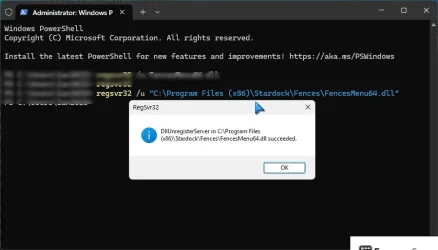
regsvr32 /u "C:\Program Files (x86)\Stardock\Fences\FencesMenu64.dll"

You should get a success message like this;
2026-01-20_121530 fences.webp

There are some more DLLs you might need to take care of the same way;

C:\Program Files (x86)\Stardock\Fences\SdCrashReporter64.dll
C:\Program Files (x86)\Stardock\Fences\SdAppServices_x64.dll
C:\Program Files (x86)\Stardock\Fences\FencesMenu64.dll <done
C:\Program Files (x86)\Stardock\Fences\Detour64.dll
C:\Program Files (x86)\Stardock\Fences\DesktopDock64.dll
C:\Program Files (x86)\Stardock\Fences\BugSplatRc64.dll
C:\Program Files (x86)\Stardock\Fences\BugSplat64.dll

Now use task manager to make sure Fences.exe isn't running (and kill it if it is)

That should allow you to delete everything.
 
Last edited:

My Computer

System One

  • OS
    Win11Pro 24H2 (26100.7462)
    Computer type
    PC/Desktop
    Manufacturer/Model
    self-built
    CPU
    i7-12700f
    Motherboard
    gigabyte auros b660
    Memory
    32gb ddr4
    Graphics Card(s)
    nvidia rtx3060ti
    Sound Card
    onboard realtek
    Monitor(s) Displays
    1 x benq, 2 x lg
    Screen Resolution
    1 at 2560x1080, 2 at 1920x1080
    Hard Drives
    nvme 1tb crucial ssd
    sata 1tb samsung ssd
    1tb HDD, 3tb HDD
    PSU
    corsair rm750
    Case
    NZXT H710
    Cooling
    BeQuiet Dark Rock
    Keyboard
    steelseries apex 3
    Mouse
    generic usb
    Internet Speed
    500 down 20 up
    Browser
    librewolf
    Antivirus
    eset nod32
The program (Stardock Fences) was working OK but didn't work after the hiccup

Check the startup items in Task Manager. Is Fences Enabled?

Have tried this suggestion, but every file I try to delete generates the "file in use" message.

Have you reinstalled Fences before you attempt the removal?

Reinstall Fences
Go to Startup apps and disable Fences from starting
Reboot
Go to task scheduler and delete all the tasks for Fences
Uninstall Fences.

OR

Reinstall Fences
Follow the Fences purging and re-installing guide, but you will need to reinstall Fences before you start, if you haven’t already:


My Computers

System One System Two

  • OS
    Windows 11 Pro 25H2 Build 26200.8655
    Computer type
    PC/Desktop
    Manufacturer/Model
    Sin-built 2013
    CPU
    Intel(R) Core(TM) i7-4770K CPU @ 3.50GHz
    Motherboard
    ASUS ROG Maximus VI Formula
    Memory
    32.0 GB of I forget and the box is in storage.
    Graphics Card(s)
    Gigabyte nVidia GeForce GTX 1660 Super OC 6GB
    Sound Card
    Onboard thingy
    Monitor(s) Displays
    5 x LG 25MS500-B - 1 x 24MK430H-B - 1 x Wacom Pro 22" Touch Screen Tablet
    Screen Resolution
    All over the place
    Hard Drives
    Too many to list.
    OS on Samsung 1TB 870 QVO SATA
    PSU
    Silverstone 1500
    Case
    NZXT Phantom 820 Full-Tower Case
    Cooling
    Noctua NH-D15 Elite Class Dual Tower CPU Cooler / 6 x EziDIY 120mm / 2 x Corsair 140mm somethings / 1 x 140mm Thermaltake something / 2 x 200mm Corsair.
    Keyboard
    Corsair K95 / Logitech diNovo Edge Wireless
    Mouse
    Logitech: G402 / G502 / Mx Masters / Mx Air Cordless
    Internet Speed
    2000/500Mbps
    Browser
    All sorts
    Antivirus
    Kaspersky Premium
    Other Info
    ㅤㅤㅤㅤㅤㅤㅤㅤㅤㅤㅤㅤㅤㅤㅤㅤㅤㅤㅤㅤㅤㅤㅤㅤㅤㅤㅤㅤㅤㅤㅤㅤㅤㅤㅤㅤㅤㅤㅤㅤ⠀⠀⠀⠀⠀⠀⠀⠀⠀⠀
    TP-Link BE9300 WiFi 7 Bluetooth 5.4 (Archer TBE550E)
    TP-Link TX201 V1 2.5GB Lan

    Grandstream HT812 - VoIP
    ASUS DSL-AX82U - Mesh
    ASUS RT-AC68U - Mesh
    ASUS RT-BE88U Router

    Brother MFC-L2880DW Printer

    I’m on a horse.
  • Operating System
    Windows 11 Pro 25H2 Build 26200.8655
    Computer type
    Laptop
    Manufacturer/Model
    LENOVO Yoga 7 14IRL8 - 7i EVO OLED 14" Touchscreen i5 12 Core 16GB/512GB
    CPU
    Intel Core 12th Gen i5-1240P Processor (1.7 - 4.4GHz)
    Memory
    16GB LPDDR5 RAM
    Graphics card(s)
    Intel Iris Xe Graphics Processor
    Sound Card
    Optimized with Dolby Atmos®
    Screen Resolution
    QHD 2880 x 1800 OLED
    Hard Drives
    M.2 512GB
    Antivirus
    Defender / Malwarebytes
    Other Info
    …still on a horse.
Thanks for everyone's help. I found another program installation that was causing issues, but it gave an indication of the location of the issue. I traced THAT problem to an antivirus program (that I didn't know was running) which was quarantining a file in the installation. Once I restored the quarantined file and stopped the anti virus program the installation progressed. After that, the Fences installation also progressed. So the problem is solved. But I still don't know how the 'odd' antivirus program came to be installed and running.
 

My Computer

System One

  • OS
    Windows 11
    Computer type
    PC/Desktop
    Manufacturer/Model
    ASUS
    CPU
    Intel i7 3.2MHz
    Motherboard
    Gigabyte Technology Co. Ltd. B360M DS3H (U3E1)
    Memory
    24Gb
    Graphics Card(s)
    NVIDIA GeForce GTX 1060 6GB
    Sound Card
    Sound Blaster Audigy Fx
    Monitor(s) Displays
    BenQ GC2870
    Screen Resolution
    1920x1080@60Hz
    Hard Drives
    447GB KINGSTON SA1000M8480G
    1863GB Seagate ST2000DX002-2DV164
    Cooling
    Water
    Antivirus
    Norton 360
Back
Top Bottom