Solved QTTabBar


I ran 57048237 and 58988972 consecutively and I was back in business.
I saw that the japaneese are back with another solution that look quite complexe!
I'm glad your simpler solution works :)
 

My Computer

System One

  • OS
    windows 11 pro 25H2
    Computer type
    PC/Desktop
    Manufacturer/Model
    HP
    CPU
    12th Gen Intel(R) Core(TM) i7-12700K
    Memory
    32,0Go 4800 MT/s
    Graphics Card(s)
    Nvidia RTX A2000 12Gb

I saw that the japaneese are back with another solution that look quite complexe!
I'm not even gonna go there! QT 2048 is hell to uninstall! I like it for dark mode on Canary, but, on my Go-to machine, I still use 1038, no dark mode but it's more reliable and versatile! 🤷‍♂️
 

My Computers

System One System Two

  • OS
    Windows 11 Pro
    Computer type
    PC/Desktop
    Manufacturer/Model
    ASUS ROG Strix
  • Operating System
    Windows 11 Pro
    Computer type
    Laptop
    Manufacturer/Model
    ASUS VivoBook
I'm not even gonna go there! QT 2048 is hell to uninstall! I like it for dark mode on Canary, but, on my Go-to machine, I still use 1038, no dark mode but it's more reliable and versatile! 🤷‍♂️
I have the 2048 beta 2, and never had a problem installing or uninstalling it! Oo

I think their might have been a misunderstanding, When I said the "japanese are back with another solution", I'm talking about the website "windows-waza.com", that provided the first solution with vivetool.
Windows Update適用後に「QTTabBar」が消える不具合の解決法 | Windows 技!

I'm not talking about the crappy chinese version of qttabbar available on github with a different number version that is indeed painful to use install or uninstall! ^^

But misunderstanding or not, disable id:57048237 and id:58988972 after the KB5077241 update on win11 with a Qttabbar 2048 beta 2 works! :)
 

My Computer

System One

  • OS
    windows 11 pro 25H2
    Computer type
    PC/Desktop
    Manufacturer/Model
    HP
    CPU
    12th Gen Intel(R) Core(TM) i7-12700K
    Memory
    32,0Go 4800 MT/s
    Graphics Card(s)
    Nvidia RTX A2000 12Gb

Hi

Today Qttabbar was gone again after the new Windows 11 updates.

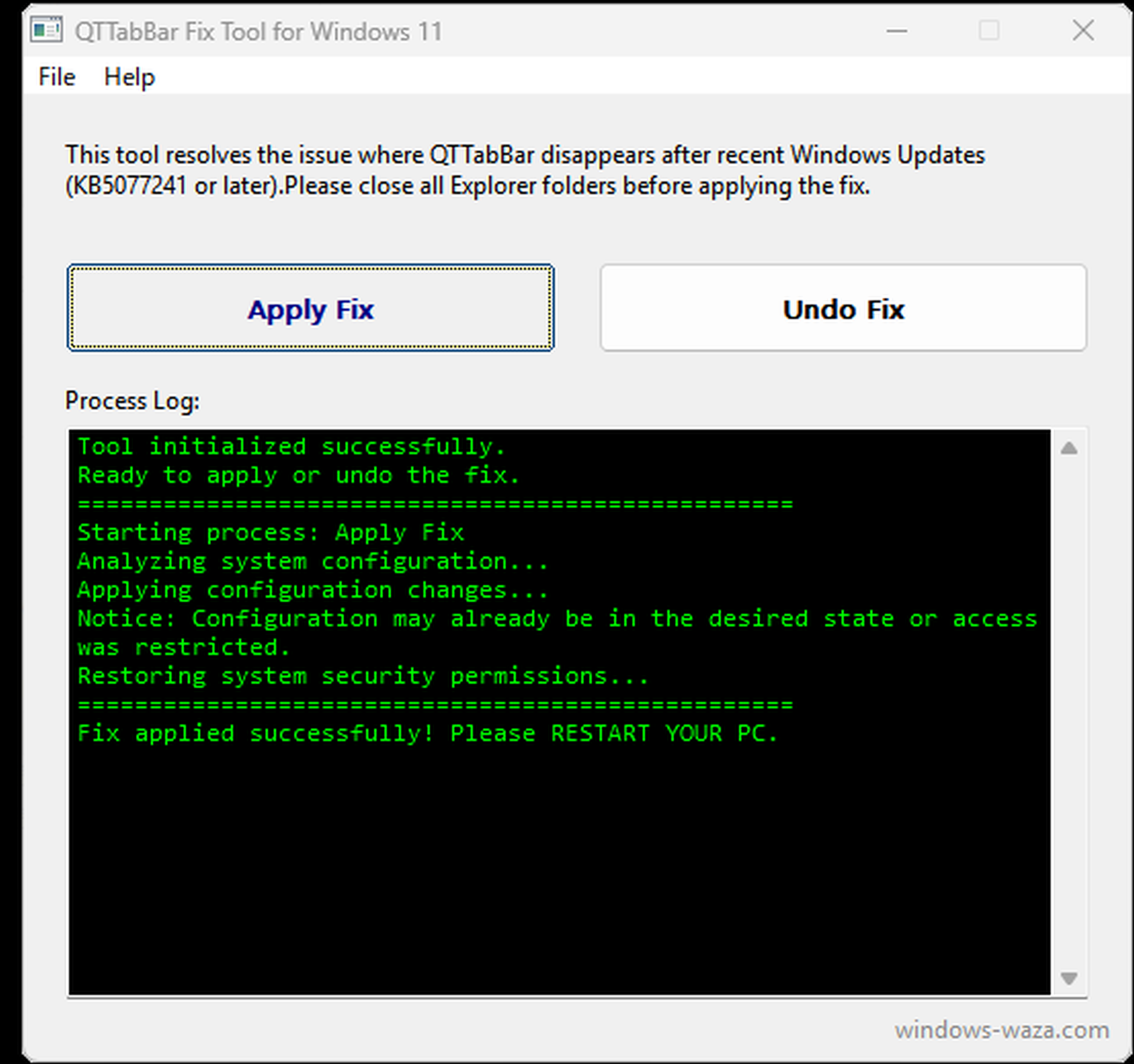
I checked the japanese blogger Waza website and he released a tool that fixes the Qttabbar. I tried it and it worked after restarting Windows.


mKGVE3A.png
 

My Computer

System One

  • OS
    Windows 11 Pro
    Computer type
    PC/Desktop
    CPU
    13900K
    Graphics Card(s)
    RTX 4090
    Screen Resolution
    4K
    PSU
    Corsair 2500 W
Having just aquired my first Win 11 laptop (ex business t480s) adapting the layout and appearance and restoring file explorer's 'classic' ribbon were priorities. 26200.8039. Qttabbar v20248.

I use Qttabbar's 'appearance' options to colour file explorer's background, and I very quickly noted that effect vanished as soon as I closed file explorer and was not present when I relaunched it..

I also found Qttabbarenabler.exe included with the 2048 build seemed now to have no effect.

I checked this was not due to me using explorerpatcher or WindowBlinds.

I solved the issues with Qttabbar not being accessible by restoring the classic ribbon and found a solution to the above:

Resolved by using Vivetool:

I'm reproducing the steps here to get it working so its easy for others. This is what worked for me.
1. Download QT Tabbar
2. Install as administrator. Right click the EXE and run as administrator.
3. As indiff stated in this post: :
a. v1.5.6 Stopped showing win11 25h2 26220.7271 #427 (comment)
b. Download from Releases · thebookisclosed/ViVe
c. Extract the file to a local folder eg. C:\vivetools

d. Open a command prompt as administrator. (right click run CMD as administrator)

5. Type CD C:\vivetools , press enter
6. Type
vivetool /disable /id:57048216 , press enter
vivetool /disable /id:57048237 , press enter
vivetool /disable /id:58988972 , press enter

a message should show each time: "Successfully set feature configuration”

This is where I've got to in 1 day playing with Win 11.. - still a work in progress.
Untitled.webp
 

My Computer

System One

  • OS
    Windows 11 Pro
    Computer type
    Laptop
    Manufacturer/Model
    Lenovo t480s
    CPU
    i7-8650U
    Memory
    16GB
    Graphics Card(s)
    Intel UHD 620
    Screen Resolution
    1920x1080
    Hard Drives
    C SN810 SDCPNRY-512G-1006
    Browser
    Edge, Firefox
    Antivirus
    Defender
Same Build, 2048 Beta 2 working fine.
The only thing that drives me nuts is that he spelled Launcher wrong!!! And, neglected to capitalize the L!!!

12866.webp

As a matter of fact, I think it was MS who started the trend of not capitalizing the subsequent words of menu titles and App titles!!! :(
 

My Computers

System One System Two

  • OS
    Windows 11 Pro
    Computer type
    PC/Desktop
    Manufacturer/Model
    ASUS ROG Strix
  • Operating System
    Windows 11 Pro
    Computer type
    Laptop
    Manufacturer/Model
    ASUS VivoBook
Another broken QTTabBar following a Windows 11 update, and QTTabBar Fix Tool to the rescue... :cool:
 

My Computers

System One System Two

  • OS
    Windows 11 Pro 25H2
    Computer type
    PC/Desktop
    Manufacturer/Model
    Custom Build
    CPU
    Ryzen 9 5900X
    Motherboard
    ASUS ROG STRIX B550-A GAMING
    Memory
    G.Skill F4-3600C16D Ripjaws V 32GB (8GB x 4) DDR4 3600MHz
    Graphics Card(s)
    Gigabyte Nvidia GeForce RTX 3090 Eagle 24GB
    Sound Card
    Onboard
    Monitor(s) Displays
    Dell P3222QE 32" UHD 4K
    Screen Resolution
    4K (3840x2160)
    Hard Drives
    Mushkin Vortex 1TB PCIe 4.0 x4 NVMe M.2 2280 SSD (Primary)
    Seagate Barracuda 2TB HDD (Secondary)
    PSU
    Super Flower Leadex III ARGB Gold 850W 80 Plus Gold Fully Modular
    Case
    Phanteks Eclipse P300A Tempered Glass Black Steel ATX Mid Tower
    Cooling
    ID-Cooling FrostFlow X 240 Lite 240mm Liquid CPU Cooler
    Keyboard
    Logitech K520 Keyboard (Combo)
    Mouse
    Logitech K520 Mouse (Combo)
    Internet Speed
    100Mbps
    Browser
    Chrome, Firefox
    Antivirus
    Windows Defender
  • Operating System
    Windows 11 Pro 25H2
    Computer type
    PC/Desktop
    Manufacturer/Model
    Custom Build
    CPU
    Ryzen 9 7900X
    Motherboard
    MSI X670E GAMING PLUS WIFI
    Memory
    G.Skill F5-6000J3040G32GX2-TZ5N Trident Z5 NEO 64GB (2x32GB)
    Graphics card(s)
    Palit GeForce RTX 3080 GamingPro LHR Edition
    Sound Card
    Onboard
    Monitor(s) Displays
    Dell G2724D 27" (x 2)
    Screen Resolution
    WQHD (2560x1440) 165Hz 1ms
    Hard Drives
    Samsung 990 PRO 2TB M.2 NVMe SSD (Primary)
    XPG GAMMIX S70 BLADE 2TB M.2 NVMe (Secondary)
    Seagate Ironwolf 4TB HDD (Tertiary)
    PSU
    Super Flower SF-1000F14PE Leadex VI Platinum Pro 1000W 80 Plus Platinum
    Case
    Montech AIR 903 MAX Black RGB
    Cooling
    ID-Cooling FX360 PRO 360mm + Case Fans
    Keyboard
    Redragon Devarajas K556 RGB Mechanical Gaming
    Mouse
    Redragon M810 Taipan Pro
    Internet Speed
    150Mbps
    Browser
    Chrome, Firefox
    Antivirus
    Windows Defender
Another broken QTTabBar following a Windows 11 update, and QTTabBar Fix Tool to the rescue... :cool:
I tried to launch it too, but it keep showing me "restart tool", never the next step. I've put all QTTabBarFixTool.exe, vivetool.exe and its other files and the pstools folder as well all in the same folder, I've launch it as administrator but nothing!

I've reaed that if "management sharing" was disabled it could do that :

HKLM\System\CurrentControlSet\Services\LanmanServer\Parameters

AutoShareWks (from 0 to 1)

but I don't have this key in my register!

Did you do something special to launch it?


I've also tried the good old way by disabling :

vivetool /disable /id:57048216
vivetool /disable /id:57048237
vivetool /disable /id:58988972

but it didn't work this time...
 

My Computer

System One

  • OS
    windows 11 pro 25H2
    Computer type
    PC/Desktop
    Manufacturer/Model
    HP
    CPU
    12th Gen Intel(R) Core(TM) i7-12700K
    Memory
    32,0Go 4800 MT/s
    Graphics Card(s)
    Nvidia RTX A2000 12Gb

I tried to launch it too, but it keep showing me "restart tool", never the next step. I've put all QTTabBarFixTool.exe, vivetool.exe and its other files and the pstools folder as well all in the same folder, I've launch it as administrator but nothing!
@chrome chrome - Just to confirm, your Vivetool folder looks something like this?
1775121698496.webp
 

My Computers

System One System Two

  • OS
    Windows 11 Pro 25H2
    Computer type
    PC/Desktop
    Manufacturer/Model
    Custom Build
    CPU
    Ryzen 9 5900X
    Motherboard
    ASUS ROG STRIX B550-A GAMING
    Memory
    G.Skill F4-3600C16D Ripjaws V 32GB (8GB x 4) DDR4 3600MHz
    Graphics Card(s)
    Gigabyte Nvidia GeForce RTX 3090 Eagle 24GB
    Sound Card
    Onboard
    Monitor(s) Displays
    Dell P3222QE 32" UHD 4K
    Screen Resolution
    4K (3840x2160)
    Hard Drives
    Mushkin Vortex 1TB PCIe 4.0 x4 NVMe M.2 2280 SSD (Primary)
    Seagate Barracuda 2TB HDD (Secondary)
    PSU
    Super Flower Leadex III ARGB Gold 850W 80 Plus Gold Fully Modular
    Case
    Phanteks Eclipse P300A Tempered Glass Black Steel ATX Mid Tower
    Cooling
    ID-Cooling FrostFlow X 240 Lite 240mm Liquid CPU Cooler
    Keyboard
    Logitech K520 Keyboard (Combo)
    Mouse
    Logitech K520 Mouse (Combo)
    Internet Speed
    100Mbps
    Browser
    Chrome, Firefox
    Antivirus
    Windows Defender
  • Operating System
    Windows 11 Pro 25H2
    Computer type
    PC/Desktop
    Manufacturer/Model
    Custom Build
    CPU
    Ryzen 9 7900X
    Motherboard
    MSI X670E GAMING PLUS WIFI
    Memory
    G.Skill F5-6000J3040G32GX2-TZ5N Trident Z5 NEO 64GB (2x32GB)
    Graphics card(s)
    Palit GeForce RTX 3080 GamingPro LHR Edition
    Sound Card
    Onboard
    Monitor(s) Displays
    Dell G2724D 27" (x 2)
    Screen Resolution
    WQHD (2560x1440) 165Hz 1ms
    Hard Drives
    Samsung 990 PRO 2TB M.2 NVMe SSD (Primary)
    XPG GAMMIX S70 BLADE 2TB M.2 NVMe (Secondary)
    Seagate Ironwolf 4TB HDD (Tertiary)
    PSU
    Super Flower SF-1000F14PE Leadex VI Platinum Pro 1000W 80 Plus Platinum
    Case
    Montech AIR 903 MAX Black RGB
    Cooling
    ID-Cooling FX360 PRO 360mm + Case Fans
    Keyboard
    Redragon Devarajas K556 RGB Mechanical Gaming
    Mouse
    Redragon M810 Taipan Pro
    Internet Speed
    150Mbps
    Browser
    Chrome, Firefox
    Antivirus
    Windows Defender
Can confirm using that just worked for me after an update
- had to restart too.

1.webp
 
Last edited:

My Computer

System One

  • OS
    Windows 11 Pro
    Computer type
    Laptop
    Manufacturer/Model
    Lenovo t480s
    CPU
    i7-8650U
    Memory
    16GB
    Graphics Card(s)
    Intel UHD 620
    Screen Resolution
    1920x1080
    Hard Drives
    C SN810 SDCPNRY-512G-1006
    Browser
    Edge, Firefox
    Antivirus
    Defender
Exactly like that! even same folder on the C drive!
@chrome chrome - That's strange, because it works on my end and for @dalchina.

All I did was to rerun the following with Vivetool:
vivetool /disable /id:57048216
vivetool /disable /id:5077241
vivetool /disable /id:57048237
vivetool /disable /id:58988972

After that, the tabs were still missing in QTabBar. I clean uninstalled QTTabBar, and restarted the PC. Then I ran the QTTabBar Fix Tool (as admin), then restarted PC. Lastly, I reinstalled QTTabBar v2048 Beta 2 as usual, and all worked fine after these steps.
 

My Computers

System One System Two

  • OS
    Windows 11 Pro 25H2
    Computer type
    PC/Desktop
    Manufacturer/Model
    Custom Build
    CPU
    Ryzen 9 5900X
    Motherboard
    ASUS ROG STRIX B550-A GAMING
    Memory
    G.Skill F4-3600C16D Ripjaws V 32GB (8GB x 4) DDR4 3600MHz
    Graphics Card(s)
    Gigabyte Nvidia GeForce RTX 3090 Eagle 24GB
    Sound Card
    Onboard
    Monitor(s) Displays
    Dell P3222QE 32" UHD 4K
    Screen Resolution
    4K (3840x2160)
    Hard Drives
    Mushkin Vortex 1TB PCIe 4.0 x4 NVMe M.2 2280 SSD (Primary)
    Seagate Barracuda 2TB HDD (Secondary)
    PSU
    Super Flower Leadex III ARGB Gold 850W 80 Plus Gold Fully Modular
    Case
    Phanteks Eclipse P300A Tempered Glass Black Steel ATX Mid Tower
    Cooling
    ID-Cooling FrostFlow X 240 Lite 240mm Liquid CPU Cooler
    Keyboard
    Logitech K520 Keyboard (Combo)
    Mouse
    Logitech K520 Mouse (Combo)
    Internet Speed
    100Mbps
    Browser
    Chrome, Firefox
    Antivirus
    Windows Defender
  • Operating System
    Windows 11 Pro 25H2
    Computer type
    PC/Desktop
    Manufacturer/Model
    Custom Build
    CPU
    Ryzen 9 7900X
    Motherboard
    MSI X670E GAMING PLUS WIFI
    Memory
    G.Skill F5-6000J3040G32GX2-TZ5N Trident Z5 NEO 64GB (2x32GB)
    Graphics card(s)
    Palit GeForce RTX 3080 GamingPro LHR Edition
    Sound Card
    Onboard
    Monitor(s) Displays
    Dell G2724D 27" (x 2)
    Screen Resolution
    WQHD (2560x1440) 165Hz 1ms
    Hard Drives
    Samsung 990 PRO 2TB M.2 NVMe SSD (Primary)
    XPG GAMMIX S70 BLADE 2TB M.2 NVMe (Secondary)
    Seagate Ironwolf 4TB HDD (Tertiary)
    PSU
    Super Flower SF-1000F14PE Leadex VI Platinum Pro 1000W 80 Plus Platinum
    Case
    Montech AIR 903 MAX Black RGB
    Cooling
    ID-Cooling FX360 PRO 360mm + Case Fans
    Keyboard
    Redragon Devarajas K556 RGB Mechanical Gaming
    Mouse
    Redragon M810 Taipan Pro
    Internet Speed
    150Mbps
    Browser
    Chrome, Firefox
    Antivirus
    Windows Defender

My Computers

System One System Two

  • OS
    Windows 11 Pro
    Computer type
    PC/Desktop
    Manufacturer/Model
    ASUS ROG Strix
  • Operating System
    Windows 11 Pro
    Computer type
    Laptop
    Manufacturer/Model
    ASUS VivoBook

My Computers

System One System Two

  • OS
    Windows 11 Pro 25H2
    Computer type
    PC/Desktop
    Manufacturer/Model
    Custom Build
    CPU
    Ryzen 9 5900X
    Motherboard
    ASUS ROG STRIX B550-A GAMING
    Memory
    G.Skill F4-3600C16D Ripjaws V 32GB (8GB x 4) DDR4 3600MHz
    Graphics Card(s)
    Gigabyte Nvidia GeForce RTX 3090 Eagle 24GB
    Sound Card
    Onboard
    Monitor(s) Displays
    Dell P3222QE 32" UHD 4K
    Screen Resolution
    4K (3840x2160)
    Hard Drives
    Mushkin Vortex 1TB PCIe 4.0 x4 NVMe M.2 2280 SSD (Primary)
    Seagate Barracuda 2TB HDD (Secondary)
    PSU
    Super Flower Leadex III ARGB Gold 850W 80 Plus Gold Fully Modular
    Case
    Phanteks Eclipse P300A Tempered Glass Black Steel ATX Mid Tower
    Cooling
    ID-Cooling FrostFlow X 240 Lite 240mm Liquid CPU Cooler
    Keyboard
    Logitech K520 Keyboard (Combo)
    Mouse
    Logitech K520 Mouse (Combo)
    Internet Speed
    100Mbps
    Browser
    Chrome, Firefox
    Antivirus
    Windows Defender
  • Operating System
    Windows 11 Pro 25H2
    Computer type
    PC/Desktop
    Manufacturer/Model
    Custom Build
    CPU
    Ryzen 9 7900X
    Motherboard
    MSI X670E GAMING PLUS WIFI
    Memory
    G.Skill F5-6000J3040G32GX2-TZ5N Trident Z5 NEO 64GB (2x32GB)
    Graphics card(s)
    Palit GeForce RTX 3080 GamingPro LHR Edition
    Sound Card
    Onboard
    Monitor(s) Displays
    Dell G2724D 27" (x 2)
    Screen Resolution
    WQHD (2560x1440) 165Hz 1ms
    Hard Drives
    Samsung 990 PRO 2TB M.2 NVMe SSD (Primary)
    XPG GAMMIX S70 BLADE 2TB M.2 NVMe (Secondary)
    Seagate Ironwolf 4TB HDD (Tertiary)
    PSU
    Super Flower SF-1000F14PE Leadex VI Platinum Pro 1000W 80 Plus Platinum
    Case
    Montech AIR 903 MAX Black RGB
    Cooling
    ID-Cooling FX360 PRO 360mm + Case Fans
    Keyboard
    Redragon Devarajas K556 RGB Mechanical Gaming
    Mouse
    Redragon M810 Taipan Pro
    Internet Speed
    150Mbps
    Browser
    Chrome, Firefox
    Antivirus
    Windows Defender
Not working for me either. :(
 

My Computers

System One System Two

  • OS
    Windows 11 Pro
    Computer type
    PC/Desktop
    Manufacturer/Model
    ASUS ROG Strix
  • Operating System
    Windows 11 Pro
    Computer type
    Laptop
    Manufacturer/Model
    ASUS VivoBook
I'm on 26200.8117; KB5074828 was also installed the same day
 

My Computer

System One

  • OS
    Windows 11 Pro
    Computer type
    Laptop
    Manufacturer/Model
    Lenovo t480s
    CPU
    i7-8650U
    Memory
    16GB
    Graphics Card(s)
    Intel UHD 620
    Screen Resolution
    1920x1080
    Hard Drives
    C SN810 SDCPNRY-512G-1006
    Browser
    Edge, Firefox
    Antivirus
    Defender

My Computers

System One System Two

  • OS
    Windows 11 Pro
    Computer type
    PC/Desktop
    Manufacturer/Model
    ASUS ROG Strix
  • Operating System
    Windows 11 Pro
    Computer type
    Laptop
    Manufacturer/Model
    ASUS VivoBook
Phew! was worried.. restarted just to check, and unexpectedly it was going through some update sequence..but still 26200.8117. Qttabbar still ok.

Untitled.webp
 

My Computer

System One

  • OS
    Windows 11 Pro
    Computer type
    Laptop
    Manufacturer/Model
    Lenovo t480s
    CPU
    i7-8650U
    Memory
    16GB
    Graphics Card(s)
    Intel UHD 620
    Screen Resolution
    1920x1080
    Hard Drives
    C SN810 SDCPNRY-512G-1006
    Browser
    Edge, Firefox
    Antivirus
    Defender
Strange thing is, on .8117, everything QTTabBar worked except the Tab Bar itself! 🤷‍♂️

Back on .8039 and everything seems fine...

12874.webp
 

My Computers

System One System Two

  • OS
    Windows 11 Pro
    Computer type
    PC/Desktop
    Manufacturer/Model
    ASUS ROG Strix
  • Operating System
    Windows 11 Pro
    Computer type
    Laptop
    Manufacturer/Model
    ASUS VivoBook
What happens if you select the Qttabbar - bottom vs the Qttabbar toolbar?
For some reason in '11 I'm using the 1st: Having just tried selecting the Qttabbar toolbar, I find it appears as normal, but dismissing it or selecting Qttabbar - bottom leaves the bar with no tabs!

In '10 there's no such problem.
 

My Computer

System One

  • OS
    Windows 11 Pro
    Computer type
    Laptop
    Manufacturer/Model
    Lenovo t480s
    CPU
    i7-8650U
    Memory
    16GB
    Graphics Card(s)
    Intel UHD 620
    Screen Resolution
    1920x1080
    Hard Drives
    C SN810 SDCPNRY-512G-1006
    Browser
    Edge, Firefox
    Antivirus
    Defender

Latest Support Threads

Back
Top Bottom