
Random Audio Pop


GetTheClicker

Well-known member
Member
Local time
3:45 PM
Posts
115
OS
Windows 11
At random I can hear a pop in my audio.
It doesn't matter if I'm on Plex, Youtube, or playing games.

I have tried 3 different power supplies because I suspected it was a power issue.
I uninstalled my audio drivers and let windows reinstall them.
Downloaded updated drivers straight from Gigabyte.
Switched over to HDMI so sound comes from the tv instead of the Sony STR-DE897.
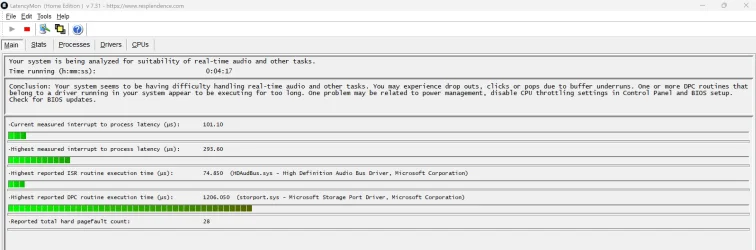
So then I found LatencyMon which tells me it's a power issue.


Attachments
  • Audio Pop.webp
    Audio Pop.webp
    132.5 KB · Views: 1

My Computer My Computer

At a glance

Windows 11AMD 5950X64gigs DDR4 4000mhz Neo TridentZRadeon 7900XTX
OS
Windows 11
Computer type
PC/Desktop
Manufacturer/Model
Aorus
CPU
AMD 5950X
Motherboard
Aorus X570S Master
Memory
64gigs DDR4 4000mhz Neo TridentZ
Graphics Card(s)
Radeon 7900XTX
Monitor(s) Displays
Dual 42" Insignia 1080p 55" TCL 6 series
Screen Resolution
3200x1800 / 3840x2160
Hard Drives
1 500gb NvMe Operating System Drive
3x 2TB NvMe
1 2tb SSD
1 500gb SSD
PSU
Lian Li Edge Serie - 1000W
Cooling
ARCTIC Liquid Freezer II 360
Browser
Chrome
This pop could arise from a capacitor first charging and then unexpectedly discharging. The capacitor must be in the audio circuit. If you are using onboard audio, the cap can be on the motherboard or on the powered speakers or if you are using discrete audio card, it can also be on this card.

Power issue does not necessarily mean power supply unit.

Hope this helps.
 

My Computers My Computers

  • At a glance

    Windows 11 Pro build 26200.8524Intel i7-4790Teams DDR3-1600 4x4 GBMSI Nvidia GeForce GTX 1050Ti
    OS
    Windows 11 Pro build 26200.8524
    Computer type
    PC/Desktop
    Manufacturer/Model
    Home Built
    CPU
    Intel i7-4790
    Motherboard
    Asus H97 Pro Gamer with add-on TPM1.2 module
    Memory
    Teams DDR3-1600 4x4 GB
    Graphics Card(s)
    MSI Nvidia GeForce GTX 1050Ti
    Sound Card
    Realtek ALC1150
    Monitor(s) Displays
    Dell P2425D
    Screen Resolution
    2560 by 1440 pixels
    Hard Drives
    Corsair NVMe M.2 Core XT 1000 GB (Windows 11 v.25H2); Samsung SATA Evo 870 500 GB (Windows 11 v.25H2);
    PSU
    Corsair HX850
    Case
    Gigabyte Solo 210
    Cooling
    Zalman CNPS7X Tower
    Keyboard
    Microsoft AIO Wireless (includes touchpad)
    Mouse
    HP S1000 Plus Wireless
    Internet Speed
    500 Mb fiber optic
    Browser
    Chrome; MS Edge
    Antivirus
    Windows Defender
  • At a glance

    MacOS 12 MontereyIntel Core i58 GBIntel integrated
    Operating System
    MacOS 12 Monterey
    Computer type
    Laptop
    Manufacturer/Model
    Apple Macbook Air
    CPU
    Intel Core i5
    Memory
    8 GB
    Graphics card(s)
    Intel integrated
    Screen Resolution
    1440 by 900 pixels
    Hard Drives
    128 GB
    Keyboard
    Built-in
    Mouse
    Microsoft Wireless
    Internet Speed
    802.11 ac
    Browser
    Chrome; Safari
    Antivirus
    N/A
I suspected the motherboard but can't confirm as I don't have a spare. I'll look into a sound card to see if that solves the issue.
 

My Computer My Computer

At a glance

Windows 11AMD 5950X64gigs DDR4 4000mhz Neo TridentZRadeon 7900XTX
OS
Windows 11
Computer type
PC/Desktop
Manufacturer/Model
Aorus
CPU
AMD 5950X
Motherboard
Aorus X570S Master
Memory
64gigs DDR4 4000mhz Neo TridentZ
Graphics Card(s)
Radeon 7900XTX
Monitor(s) Displays
Dual 42" Insignia 1080p 55" TCL 6 series
Screen Resolution
3200x1800 / 3840x2160
Hard Drives
1 500gb NvMe Operating System Drive
3x 2TB NvMe
1 2tb SSD
1 500gb SSD
PSU
Lian Li Edge Serie - 1000W
Cooling
ARCTIC Liquid Freezer II 360
Browser
Chrome
If you install a discrete sound card, you must disable the onboard audio in BIOS first before you start testing.

Hope this helps.
 

My Computers My Computers

  • At a glance

    Windows 11 Pro build 26200.8524Intel i7-4790Teams DDR3-1600 4x4 GBMSI Nvidia GeForce GTX 1050Ti
    OS
    Windows 11 Pro build 26200.8524
    Computer type
    PC/Desktop
    Manufacturer/Model
    Home Built
    CPU
    Intel i7-4790
    Motherboard
    Asus H97 Pro Gamer with add-on TPM1.2 module
    Memory
    Teams DDR3-1600 4x4 GB
    Graphics Card(s)
    MSI Nvidia GeForce GTX 1050Ti
    Sound Card
    Realtek ALC1150
    Monitor(s) Displays
    Dell P2425D
    Screen Resolution
    2560 by 1440 pixels
    Hard Drives
    Corsair NVMe M.2 Core XT 1000 GB (Windows 11 v.25H2); Samsung SATA Evo 870 500 GB (Windows 11 v.25H2);
    PSU
    Corsair HX850
    Case
    Gigabyte Solo 210
    Cooling
    Zalman CNPS7X Tower
    Keyboard
    Microsoft AIO Wireless (includes touchpad)
    Mouse
    HP S1000 Plus Wireless
    Internet Speed
    500 Mb fiber optic
    Browser
    Chrome; MS Edge
    Antivirus
    Windows Defender
  • At a glance

    MacOS 12 MontereyIntel Core i58 GBIntel integrated
    Operating System
    MacOS 12 Monterey
    Computer type
    Laptop
    Manufacturer/Model
    Apple Macbook Air
    CPU
    Intel Core i5
    Memory
    8 GB
    Graphics card(s)
    Intel integrated
    Screen Resolution
    1440 by 900 pixels
    Hard Drives
    128 GB
    Keyboard
    Built-in
    Mouse
    Microsoft Wireless
    Internet Speed
    802.11 ac
    Browser
    Chrome; Safari
    Antivirus
    N/A

Latest Support Threads

Back
Top Bottom




