Random reboots, BlueSOD & BlackSOD, Event Viewer show random events


Phyzx

Member
Member
Local time
12:33 AM
Posts
11
OS
Windows 11
As the title says...
I have been suffering from this multi phased plague since April 2026. I have gone through Bleeping computer and Fortect processes till the end game of 'Clean Install'.
I suffer the suffering. I come here and lo and behold I see ALL my pc crash events. Perfect.
I would like to run V2 from this site Resources but can not locate that. If this is even the start of my adventure here.
I would like further crumbs to follow. My restore points and backups are not to be trusted.
The events reported in the event viewer are not to be trusted at this point as they are random. This points me to indexing and Defender corruption. I have run those fixes to no avail.
I believe there is something under the hood that is responsible for the randomness of every one suffering.
I am willing to do the digging to find the quirk.
SFC /scannow sometimes chokes. DISM says failure sometimes. I have jumped through the hoops and landed here.
If any body can help then we can squash this bug. I have even found threads that curse Microsoft for identified bugs that arent fixed.
At this point I dont even think a 'Clean install' is the answer. I have no hardware problems. Driver fixes are relegated to my laptop maker MSI.
I can t even install Firefox. I am in DuckDuckGo browser. Blender crashes at a touch of a button. Visio 2016 crashes in a timely manner.
So here I am, waiting for the next autoreboot.
One would think the Micro Soft would put a copy button in the Winver panel.
 
Windows Build/Version
Version 25h2 26200.9445

My Computer My Computer

At a glance

Windows 11I9192GBRTX4090
OS
Windows 11
Computer type
Laptop
Manufacturer/Model
MSI Titan HV 18
CPU
I9
Motherboard
MSI
Memory
192GB
Graphics Card(s)
RTX4090
Monitor(s) Displays
Hisense 40, Hisense 48, VGA 32
Hard Drives
2tb SSD

Hello @ Phyzx and welcome to ElevenForum. :-)


You can find the BSOD posting instructions here...


My Computers My Computers

  • At a glance

    Win 11 Home ♦♦♦26300.9445 ♦♦♦♦♦♦♦26H2AMD Ryzen 7 3700XG.Skill (F4-3200C14D-16GTZKW)EVGA RTX 2070 (08G-P4-2171-KR)
    OS
    Win 11 Home ♦♦♦26300.9445 ♦♦♦♦♦♦♦26H2
    Computer type
    PC/Desktop
    Manufacturer/Model
    Built by Ghot® [May 2020]
    CPU
    AMD Ryzen 7 3700X
    Motherboard
    Asus Pro WS X570-ACE (BIOS 5302)
    Memory
    G.Skill (F4-3200C14D-16GTZKW)
    Graphics Card(s)
    EVGA RTX 2070 (08G-P4-2171-KR)
    Sound Card
    Realtek ALC1220P / ALC S1220A
    Monitor(s) Displays
    Dell U3011 30"
    Screen Resolution
    2560 x 1600
    Hard Drives
    2x Samsung 860 EVO 500GB,
    WD 4TB Black FZBX - SATA III,
    WD 8TB Black FZBX - SATA III,
    DRW-24B1ST CD/DVD Burner
    PSU
    PC Power & Cooling 750W Quad EPS12V
    Case
    Cooler Master ATCS 840 Tower
    Cooling
    CM Hyper 212 EVO (push/pull)
    Keyboard
    Ducky DK9008 Shine II Blue LED
    Mouse
    Logitech Optical M-100
    Internet Speed
    300/300
    Browser
    Firefox (latest)
    Antivirus
    Bitdefender Total Security
    Other Info
    Speakers: Klipsch Pro Media 2.1
  • At a glance

    Windows XP Pro 32bit w/SP3AMD Athlon 64 X2 5000+ (OC'd @ 3.2Ghz)TWIN2X2048-6400C4DHX (2 x 1GB, DDR2 800)EVGA 256-P2-N758-TR GeForce 8600GT SSC
    Operating System
    Windows XP Pro 32bit w/SP3
    Computer type
    PC/Desktop
    Manufacturer/Model
    Built by Ghot® (not in use)
    CPU
    AMD Athlon 64 X2 5000+ (OC'd @ 3.2Ghz)
    Motherboard
    ASUS M2N32-SLI Deluxe Wireless Edition
    Memory
    TWIN2X2048-6400C4DHX (2 x 1GB, DDR2 800)
    Graphics card(s)
    EVGA 256-P2-N758-TR GeForce 8600GT SSC
    Sound Card
    Onboard
    Monitor(s) Displays
    ViewSonic G90FB Black 19" Professional (CRT)
    Screen Resolution
    up to 2048 x 1536
    Hard Drives
    WD 36GB 10,000rpm Raptor SATA
    Seagate 80GB 7200rpm SATA
    Lite-On LTR-52246S CD/RW
    Lite-On LH-18A1P CD/DVD Burner
    PSU
    PC Power & Cooling Silencer 750 Quad EPS12V
    Case
    Generic Beige case, 80mm fans
    Cooling
    ZALMAN 9500A 92mm CPU Cooler
    Keyboard
    Logitech Classic Keybooard 200
    Mouse
    Logitech Optical M-BT96a
    Internet Speed
    300/300
    Browser
    Firefox 3.x ??
    Antivirus
    Symantec (Norton)
    Other Info
    Still assembled, still runs. Haven't turned it on for 15 years?
Blue Screen of Death (also known as a blue screen or BSoD) is an error screen displayed on a Windows computer system after a fatal system error, also known as a system crash: when the operating system reaches a condition where it can no longer operate safely. BSoDs can be caused by poorly written device drivers or malfunctioning hardware, such as faulty memory, power supply issues, overheating of components, or hardware running beyond its specification limits.

This guide will walk you through opening, analyzing, managing, and making sense of Windows crash dump files.


My Computer My Computer

At a glance

Windows 11AMD Ryzen 7 5700GMicron Technology DDR4-3200 16GBNVIDIA GeForce RTX 3060
OS
Windows 11
Computer type
PC/Desktop
Manufacturer/Model
HP Pavilion
CPU
AMD Ryzen 7 5700G
Motherboard
Erica6
Memory
Micron Technology DDR4-3200 16GB
Graphics Card(s)
NVIDIA GeForce RTX 3060
Sound Card
Realtek ALC671
Monitor(s) Displays
Samsung SyncMaster U28E590
Screen Resolution
3840 x 2160
Hard Drives
SAMSUNG MZVLQ1T0HALB-000H1
How are you so sure that you have no hardware problems?
In my experience and others, random error codes can be a sign of a hardware fault. Each time, a different piece of code encounters the hardware fault, resulting in a different error code each time.

I assume you've run CHKDSK on your drives to check for drive faults?
The next thing to check is RAM faults. Use MemTest86 or some other such utility.
 

My Computer My Computer

At a glance

Windows 11Ryzen 9 7900X64 GBNvidia GeForce GTX 1650
OS
Windows 11
Computer type
PC/Desktop
Manufacturer/Model
Custom
CPU
Ryzen 9 7900X
Motherboard
ASUS ROG STRIX B-650 E-F
Memory
64 GB
Graphics Card(s)
Nvidia GeForce GTX 1650
Hard Drives
C: SSD, 500 GB
D: HDD, 1 TB
J: HDD, 1 TB
Antivirus
Norton
Power off shutdown the computer and restart.
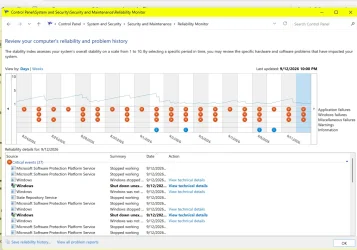
In the Search box,type in---reliability---and what entries are there which appear after the restart?
Additionally,what is the first red-flagged entry for each problem event and is it a constant ?
At the bottom of the Reliability History page,click on ---view all problem reports---and in the page presented,Right click on an event which will give you a Report Sent page.The first three lines identify the problem and enables you to search for a solution.
 

My Computer My Computer

At a glance

win 10amd ryzen 5-2600ng skill sniper x 16gbnvidea gtx 1050
OS
win 10
Computer type
PC/Desktop
Manufacturer/Model
home built
CPU
amd ryzen 5-2600
Motherboard
gigabyte b450m-ds3h
Memory
ng skill sniper x 16gb
Graphics Card(s)
nvidea gtx 1050
Monitor(s) Displays
benq fp 92
Hard Drives
samsung 860 evo 500gb m2 ssd
PSU
antec ea550g
Case
nzxt noctis 450
Browser
edge
How are you so sure that you have no hardware problems?
In my experience and others, random error codes can be a sign of a hardware fault. Each time, a different piece of code encounters the hardware fault, resulting in a different error code each time.

I assume you've run CHKDSK on your drives to check for drive faults?
The next thing to check is RAM faults. Use MemTest86 or some other such utility.
Yes I have run all these.
 

My Computer My Computer

At a glance

Windows 11I9192GBRTX4090
OS
Windows 11
Computer type
Laptop
Manufacturer/Model
MSI Titan HV 18
CPU
I9
Motherboard
MSI
Memory
192GB
Graphics Card(s)
RTX4090
Monitor(s) Displays
Hisense 40, Hisense 48, VGA 32
Hard Drives
2tb SSD

Here is the requested V2 file.
V2 log collector file.

Let me know when I can delete it for space savings.
I have three monitors. Hisense 48" HDMI straight out the back. A USB convertor for a Hisense 40" HDMI and a USB VGA convertor to an old 32".
One of tests would be to image backup, Clean install, and let the machine sit running with Blender 5.2 running to see if the crash or reboot happens. As of now I have left this current image run with Blender5.2 launched. With no mouse movements the machine will just sit there and be 'Stable' a good 4 hours. I have even moved the mouse in file explorer and the reboot happens. The additional screen it sits on is USB connected HDMI. Consistently I have had reboots with mouse movements in Blender 5.2 and File Explorer. Duckduckgo never crashes. But pages sometimes flash. The pattern I am starting to see is when an app wants to test the internet for connection. Visio2016 is a mess. I know this was Micro Soft's first version to call home every so often. There are past complaints about this.
 
Last edited:

My Computer My Computer

At a glance

Windows 11I9192GBRTX4090
OS
Windows 11
Computer type
Laptop
Manufacturer/Model
MSI Titan HV 18
CPU
I9
Motherboard
MSI
Memory
192GB
Graphics Card(s)
RTX4090
Monitor(s) Displays
Hisense 40, Hisense 48, VGA 32
Hard Drives
2tb SSD
1789276826860.webp
I wonder what Micro Soft will do with these?
 

My Computer My Computer

At a glance

Windows 11I9192GBRTX4090
OS
Windows 11
Computer type
Laptop
Manufacturer/Model
MSI Titan HV 18
CPU
I9
Motherboard
MSI
Memory
192GB
Graphics Card(s)
RTX4090
Monitor(s) Displays
Hisense 40, Hisense 48, VGA 32
Hard Drives
2tb SSD

My Computer My Computer

At a glance

Windows 10Intel(R) Core(TM) i7-4800MQ CPU @ 2.70GHz16 GB Total: Manufacturer : Samsung MemoryTyp...NVIDIA Quadro K3100M; Intel(R) HD Graphics 4600
OS
Windows 10
Computer type
Laptop
Manufacturer/Model
HP
CPU
Intel(R) Core(TM) i7-4800MQ CPU @ 2.70GHz
Motherboard
Product : 190A Version : KBC Version 94.56
Memory
16 GB Total: Manufacturer : Samsung MemoryType : DDR3 FormFactor : SODIMM Capacity : 8GB Speed : 1600
Graphics Card(s)
NVIDIA Quadro K3100M; Intel(R) HD Graphics 4600
Sound Card
IDT High Definition Audio CODEC; PNP Device ID HDAUDIO\FUNC_01&VEN_111D&DEV_76E0
Hard Drives
Model Hitachi HTS727575A9E364
Antivirus
Microsoft Defender
Other Info
Mobile Workstation
Last edited:

My Computer My Computer

At a glance

Windows 11I9192GBRTX4090
OS
Windows 11
Computer type
Laptop
Manufacturer/Model
MSI Titan HV 18
CPU
I9
Motherboard
MSI
Memory
192GB
Graphics Card(s)
RTX4090
Monitor(s) Displays
Hisense 40, Hisense 48, VGA 32
Hard Drives
2tb SSD


Here's ten points, just for filling out your computer specs. :-)

When you get some time, this will help you finish filling out your computer specs...


And...

Here's some other things that you may find useful...


My Computers My Computers

  • At a glance

    Win 11 Home ♦♦♦26300.9445 ♦♦♦♦♦♦♦26H2AMD Ryzen 7 3700XG.Skill (F4-3200C14D-16GTZKW)EVGA RTX 2070 (08G-P4-2171-KR)
    OS
    Win 11 Home ♦♦♦26300.9445 ♦♦♦♦♦♦♦26H2
    Computer type
    PC/Desktop
    Manufacturer/Model
    Built by Ghot® [May 2020]
    CPU
    AMD Ryzen 7 3700X
    Motherboard
    Asus Pro WS X570-ACE (BIOS 5302)
    Memory
    G.Skill (F4-3200C14D-16GTZKW)
    Graphics Card(s)
    EVGA RTX 2070 (08G-P4-2171-KR)
    Sound Card
    Realtek ALC1220P / ALC S1220A
    Monitor(s) Displays
    Dell U3011 30"
    Screen Resolution
    2560 x 1600
    Hard Drives
    2x Samsung 860 EVO 500GB,
    WD 4TB Black FZBX - SATA III,
    WD 8TB Black FZBX - SATA III,
    DRW-24B1ST CD/DVD Burner
    PSU
    PC Power & Cooling 750W Quad EPS12V
    Case
    Cooler Master ATCS 840 Tower
    Cooling
    CM Hyper 212 EVO (push/pull)
    Keyboard
    Ducky DK9008 Shine II Blue LED
    Mouse
    Logitech Optical M-100
    Internet Speed
    300/300
    Browser
    Firefox (latest)
    Antivirus
    Bitdefender Total Security
    Other Info
    Speakers: Klipsch Pro Media 2.1
  • At a glance

    Windows XP Pro 32bit w/SP3AMD Athlon 64 X2 5000+ (OC'd @ 3.2Ghz)TWIN2X2048-6400C4DHX (2 x 1GB, DDR2 800)EVGA 256-P2-N758-TR GeForce 8600GT SSC
    Operating System
    Windows XP Pro 32bit w/SP3
    Computer type
    PC/Desktop
    Manufacturer/Model
    Built by Ghot® (not in use)
    CPU
    AMD Athlon 64 X2 5000+ (OC'd @ 3.2Ghz)
    Motherboard
    ASUS M2N32-SLI Deluxe Wireless Edition
    Memory
    TWIN2X2048-6400C4DHX (2 x 1GB, DDR2 800)
    Graphics card(s)
    EVGA 256-P2-N758-TR GeForce 8600GT SSC
    Sound Card
    Onboard
    Monitor(s) Displays
    ViewSonic G90FB Black 19" Professional (CRT)
    Screen Resolution
    up to 2048 x 1536
    Hard Drives
    WD 36GB 10,000rpm Raptor SATA
    Seagate 80GB 7200rpm SATA
    Lite-On LTR-52246S CD/RW
    Lite-On LH-18A1P CD/DVD Burner
    PSU
    PC Power & Cooling Silencer 750 Quad EPS12V
    Case
    Generic Beige case, 80mm fans
    Cooling
    ZALMAN 9500A 92mm CPU Cooler
    Keyboard
    Logitech Classic Keybooard 200
    Mouse
    Logitech Optical M-BT96a
    Internet Speed
    300/300
    Browser
    Firefox 3.x ??
    Antivirus
    Symantec (Norton)
    Other Info
    Still assembled, still runs. Haven't turned it on for 15 years?
pending
 

My Computer My Computer

At a glance

Windows 10Intel(R) Core(TM) i7-4800MQ CPU @ 2.70GHz16 GB Total: Manufacturer : Samsung MemoryTyp...NVIDIA Quadro K3100M; Intel(R) HD Graphics 4600
OS
Windows 10
Computer type
Laptop
Manufacturer/Model
HP
CPU
Intel(R) Core(TM) i7-4800MQ CPU @ 2.70GHz
Motherboard
Product : 190A Version : KBC Version 94.56
Memory
16 GB Total: Manufacturer : Samsung MemoryType : DDR3 FormFactor : SODIMM Capacity : 8GB Speed : 1600
Graphics Card(s)
NVIDIA Quadro K3100M; Intel(R) HD Graphics 4600
Sound Card
IDT High Definition Audio CODEC; PNP Device ID HDAUDIO\FUNC_01&VEN_111D&DEV_76E0
Hard Drives
Model Hitachi HTS727575A9E364
Antivirus
Microsoft Defender
Other Info
Mobile Workstation

My Computers My Computers

  • At a glance

    Win 11 Pro 25H2 26200.9445Intel® Core™ i7-14700KG.SKILL Ripjaws S5 Series 64GB (2 x 32GB) DDR5ASUS GeForce RTX 4070 Super 12GB
    OS
    Win 11 Pro 25H2 26200.9445
    Computer type
    PC/Desktop
    Manufacturer/Model
    Self Built
    CPU
    Intel® Core™ i7-14700K
    Motherboard
    ASUS TUF Z690-PLUS WIFI (BIOS 4505)
    Memory
    G.SKILL Ripjaws S5 Series 64GB (2 x 32GB) DDR5
    Graphics Card(s)
    ASUS GeForce RTX 4070 Super 12GB
    Sound Card
    Sound Blaster AE-5 Plus
    Monitor(s) Displays
    ASUS TUF Gaming 27" 2K HDR Gaming
    Screen Resolution
    2560 x 1440
    Hard Drives
    Samsung 990 Pro 1TB NVMe (Win 11 25H2)
    SK hynix P41 500GB NVMe
    SK hynix P41 2TB NVMe (x3)
    Crucial P3 Plus 4TB
    PSU
    Corsair RM850x Shift
    Case
    Antec Dark Phantom DP502 FLUX
    Cooling
    Corsair Nautilus 360 RS AIO
    Keyboard
    Logitech MK 320
    Mouse
    Razer Basilisk V3
    Internet Speed
    750Mbs
    Browser
    Firefox
    Antivirus
    Winows Security
    Other Info
    MR 8.1 Home
  • At a glance

    Win 11 Pro 25H2 26200.9445Intel Core i5-1140064 GB DDR4MSI GeForce RTX 3060 Ventus 2X 12GB
    Operating System
    Win 11 Pro 25H2 26200.9445
    Computer type
    PC/Desktop
    Manufacturer/Model
    Self Built
    CPU
    Intel Core i5-11400
    Motherboard
    Asus TUF Gaming Z590 Plus WiFi (BIOS 2803)
    Memory
    64 GB DDR4
    Graphics card(s)
    MSI GeForce RTX 3060 Ventus 2X 12GB
    Sound Card
    SoundBlaster Audigy Fx V2
    Monitor(s) Displays
    Samsung F27T350
    Screen Resolution
    1920x1080
    Hard Drives
    Samsung 980 Pro 1TB
    Samsung 970 EVO Plus 2TB
    Samsung 870 EVO 500GB SSD
    PSU
    Corsair HX750
    Case
    Cougar MX330-G Window
    Cooling
    Thermalright Frozen Edge 240 Black AIO
    Internet Speed
    350Mbps
    Browser
    Firefox
    Antivirus
    Windows Security
  • System Three
    Win 11 Pro 25H2 26200.9445
    ASUS PRIME Z370-P II BIOS 3004 7/12/21
    Intel Core i7-8700 CPU @ 3.20GHz
    32GB DDR4 RAM (4x8)
    EVGA RTX 2060 (used)
    iGPU Intel UHD Graphics 630 (backup)
    Cooler Master Hyper 212
    Mid-Tower Desktop
1789345441762.webp
 

My Computer My Computer

At a glance

Windows 11I9192GBRTX4090
OS
Windows 11
Computer type
Laptop
Manufacturer/Model
MSI Titan HV 18
CPU
I9
Motherboard
MSI
Memory
192GB
Graphics Card(s)
RTX4090
Monitor(s) Displays
Hisense 40, Hisense 48, VGA 32
Hard Drives
2tb SSD
1) Turn off WDV:


2) Uninstall:

t6sta T6 USB Station Service c:\windows\system32\drivers\t6sta.sys


3) Enable regback:


4) Create a new restore point:


5) Run > post a share link

Code:
sfc /scannow
dism /online /cleanup-image /scanhealth
dism /online /cleanup-image /restorehealth
sfc /scannow
chkdsk /scan
fltsmn


6) Run each command > post share links


Code:
Get-CimInstance Win32_OSRecoveryConfiguration |
    Select-Object AutoReboot

Code:
Set-CimInstance -ClassName Win32_OSRecoveryConfiguration `
    -Property @{AutoReboot = $false}

Code:
Get-CimInstance Win32_OSRecoveryConfiguration |
    Select-Object AutoReboot


Code:
Get-CimInstance Win32_OSRecoveryConfiguration |
    Select-Object DebugInfoType


Code:
Set-CimInstance -ClassName Win32_OSRecoveryConfiguration `
    -Property @{DebugInfoType = 7}


Code:
Get-CimInstance Win32_OSRecoveryConfiguration |
    Select-Object DebugInfoType


Code:
Get-CimInstance Win32_PageFileSetting |
    Format-List *


Code:
Get-CimInstance Win32_PageFileUsage |
    Format-List *


Code:
Get-CimInstance Win32_PageFileSetting |
    Select-Object Name, InitialSize, MaximumSize


Code:
Get-CimInstance Win32_PageFileUsage |
    Select-Object Name, AllocatedBaseSize, CurrentUsage, PeakUsage


Code:
Get-CimInstance Win32_ComputerSystem |
    Select-Object AutomaticManagedPagefile


Code:
Set-CimInstance -ClassName Win32_ComputerSystem `
    -Property @{AutomaticManagedPagefile = $true}


Code:
Get-CimInstance Win32_ComputerSystem |
    Select-Object AutomaticManagedPagefile


Code:
bcdedit /enum '{badmemory}'


Code:
t6sta.sys    Thu Jul 11 02:56:45 2024 (668F903D)
 

My Computer My Computer

At a glance

Windows 10Intel(R) Core(TM) i7-4800MQ CPU @ 2.70GHz16 GB Total: Manufacturer : Samsung MemoryTyp...NVIDIA Quadro K3100M; Intel(R) HD Graphics 4600
OS
Windows 10
Computer type
Laptop
Manufacturer/Model
HP
CPU
Intel(R) Core(TM) i7-4800MQ CPU @ 2.70GHz
Motherboard
Product : 190A Version : KBC Version 94.56
Memory
16 GB Total: Manufacturer : Samsung MemoryType : DDR3 FormFactor : SODIMM Capacity : 8GB Speed : 1600
Graphics Card(s)
NVIDIA Quadro K3100M; Intel(R) HD Graphics 4600
Sound Card
IDT High Definition Audio CODEC; PNP Device ID HDAUDIO\FUNC_01&VEN_111D&DEV_76E0
Hard Drives
Model Hitachi HTS727575A9E364
Antivirus
Microsoft Defender
Other Info
Mobile Workstation
1) Turn off WDV:


2) Uninstall:

t6sta T6 USB Station Service c:\windows\system32\drivers\t6sta.sys


3) Enable regback:


4) Create a new restore point:


5) Run > post a share link

Code:
sfc /scannow
dism /online /cleanup-image /scanhealth
dism /online /cleanup-image /restorehealth
sfc /scannow
chkdsk /scan
fltsmn


6) Run each command > post share links


Code:
Get-CimInstance Win32_OSRecoveryConfiguration |
    Select-Object AutoReboot

Code:
Set-CimInstance -ClassName Win32_OSRecoveryConfiguration `
    -Property @{AutoReboot = $false}

Code:
Get-CimInstance Win32_OSRecoveryConfiguration |
    Select-Object AutoReboot


Code:
Get-CimInstance Win32_OSRecoveryConfiguration |
    Select-Object DebugInfoType


Code:
Set-CimInstance -ClassName Win32_OSRecoveryConfiguration `
    -Property @{DebugInfoType = 7}


Code:
Get-CimInstance Win32_OSRecoveryConfiguration |
    Select-Object DebugInfoType


Code:
Get-CimInstance Win32_PageFileSetting |
    Format-List *


Code:
Get-CimInstance Win32_PageFileUsage |
    Format-List *


Code:
Get-CimInstance Win32_PageFileSetting |
    Select-Object Name, InitialSize, MaximumSize


Code:
Get-CimInstance Win32_PageFileUsage |
    Select-Object Name, AllocatedBaseSize, CurrentUsage, PeakUsage


Code:
Get-CimInstance Win32_ComputerSystem |
    Select-Object AutomaticManagedPagefile


Code:
Set-CimInstance -ClassName Win32_ComputerSystem `
    -Property @{AutomaticManagedPagefile = $true}


Code:
Get-CimInstance Win32_ComputerSystem |
    Select-Object AutomaticManagedPagefile


Code:
bcdedit /enum '{badmemory}'


Code:
t6sta.sys    Thu Jul 11 02:56:45 2024 (668F903D)
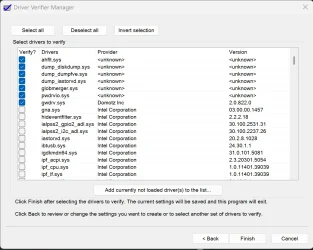
The WDV step ALL NON-Microsoft drivers. I have a list that doesnt match the tenforums screen. Do I still select all? I ask because the intel list is long.
1789351112870.webp
 

My Computer My Computer

At a glance

Windows 11I9192GBRTX4090
OS
Windows 11
Computer type
Laptop
Manufacturer/Model
MSI Titan HV 18
CPU
I9
Motherboard
MSI
Memory
192GB
Graphics Card(s)
RTX4090
Monitor(s) Displays
Hisense 40, Hisense 48, VGA 32
Hard Drives
2tb SSD
@zbook

Is TenForums offline?

I've seen several Win 10 issues posted in the past few days.
 

My Computer My Computer

At a glance

Windows 11 Pro 25H2
OS
Windows 11 Pro 25H2
Computer type
Laptop
Manufacturer/Model
Toshiba

My Computer My Computer

At a glance

Windows 10Intel(R) Core(TM) i7-4800MQ CPU @ 2.70GHz16 GB Total: Manufacturer : Samsung MemoryTyp...NVIDIA Quadro K3100M; Intel(R) HD Graphics 4600
OS
Windows 10
Computer type
Laptop
Manufacturer/Model
HP
CPU
Intel(R) Core(TM) i7-4800MQ CPU @ 2.70GHz
Motherboard
Product : 190A Version : KBC Version 94.56
Memory
16 GB Total: Manufacturer : Samsung MemoryType : DDR3 FormFactor : SODIMM Capacity : 8GB Speed : 1600
Graphics Card(s)
NVIDIA Quadro K3100M; Intel(R) HD Graphics 4600
Sound Card
IDT High Definition Audio CODEC; PNP Device ID HDAUDIO\FUNC_01&VEN_111D&DEV_76E0
Hard Drives
Model Hitachi HTS727575A9E364
Antivirus
Microsoft Defender
Other Info
Mobile Workstation
Turn off WDV running verifier /reset


Learn the methods to recover from BSOD caused by WDV by booting into safe mode and running one or more of these commands:

verifier /reset

verifier /bootmode resetonbootfail


WDV will be used later in the thread.
 

My Computer My Computer

At a glance

Windows 10Intel(R) Core(TM) i7-4800MQ CPU @ 2.70GHz16 GB Total: Manufacturer : Samsung MemoryTyp...NVIDIA Quadro K3100M; Intel(R) HD Graphics 4600
OS
Windows 10
Computer type
Laptop
Manufacturer/Model
HP
CPU
Intel(R) Core(TM) i7-4800MQ CPU @ 2.70GHz
Motherboard
Product : 190A Version : KBC Version 94.56
Memory
16 GB Total: Manufacturer : Samsung MemoryType : DDR3 FormFactor : SODIMM Capacity : 8GB Speed : 1600
Graphics Card(s)
NVIDIA Quadro K3100M; Intel(R) HD Graphics 4600
Sound Card
IDT High Definition Audio CODEC; PNP Device ID HDAUDIO\FUNC_01&VEN_111D&DEV_76E0
Hard Drives
Model Hitachi HTS727575A9E364
Antivirus
Microsoft Defender
Other Info
Mobile Workstation
Turn off WDV running verifier /reset


Learn the methods to recover from BSOD caused by WDV by booting into safe mode and running one or more of these commands:

verifier /reset

verifier /bootmode resetonbootfail


WDV will be used later in the thread.
I can do all of this but my question is since my non-Microsoft list is different and there are a lot of Intel do I just select all Non-MS on my system and proceed further? In the case of MSI products they have all their own modified drives. Intel, MSI, Nvidia.
 

My Computer My Computer

At a glance

Windows 11I9192GBRTX4090
OS
Windows 11
Computer type
Laptop
Manufacturer/Model
MSI Titan HV 18
CPU
I9
Motherboard
MSI
Memory
192GB
Graphics Card(s)
RTX4090
Monitor(s) Displays
Hisense 40, Hisense 48, VGA 32
Hard Drives
2tb SSD
Back
Top Bottom