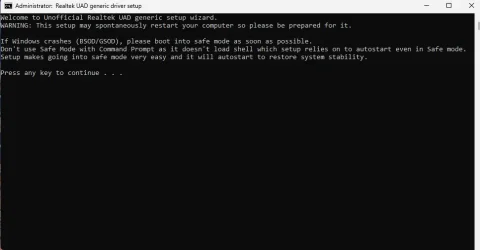
Solved realtek audio


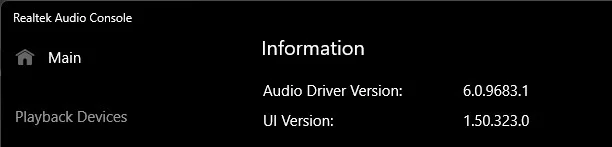
The Realtek Audio console shows this version, but it's on an Acer, so it will be different than your OEM driver.
audio.webp
 

My Computers

System One System Two

  • OS
    All Branches but Release
    Computer type
    Laptop
    Manufacturer/Model
    Acer Nitro ANV15-51
    CPU
    AMD Ryzen 7 7735HS 3200-4500 Mhz 8 cores x 2
    Motherboard
    Sportage_RBH
    Memory
    32 GB DDR5
    Graphics Card(s)
    Radeon Graphic / NVIDIA GeForce RTX 4060 8 GB GDDR6
    Sound Card
    AMD/Realtek(R) Audio
    Monitor(s) Displays
    Integrated Monitor (15.3"vis)
    Screen Resolution
    FHD 1920X1080 16:9 144Hz
    Hard Drives
    KINGSTON OM8SEP4512Q-AA 1TB
    Western Digital 256GB
    PSU
    19V DC 6.32 A 120 W
    Cooling
    Dual Fans
    Mouse
    MS Bluetooth
    Internet Speed
    Fiber 1GB Cox -us & 1GB Orange-fr
    Browser
    Edge Canary- Firefox Nightly-Chrome Dev-Chrome Dev
    Antivirus
    Windows Defender
  • Operating System
    Windows 11 Beta
    Computer type
    Laptop
    Manufacturer/Model
    Asus X751BP
    CPU
    AMD A9-9420
    Memory
    8 GB of DDR4
    Graphics card(s)
    AMD Radeon R5
    Screen Resolution
    1600x900
    Hard Drives
    Seagate 1 TB
i have
The Realtek Audio console shows this version:

View attachment 153589
it won't open anymore though because i get could not connect to rpc service so i don't know how to fix it that's the problem and if i install Realtek high definition audio driver ver:6.0.9231.1 from ASRock i can't hear anything after restating since i have a B360M Pro4 motherboard
 

My Computer

System One

  • OS
    Windows 11 Pro X64 Version 25H2 Build 260200.6901
    Computer type
    PC/Desktop
    Manufacturer/Model
    Custom Build
    CPU
    Intel(R) Core(TM) i5-8400 CPU @ 2.80GHz
    Motherboard
    ASROCK B360M Pro4
    Memory
    24GB
    Graphics Card(s)
    NVIDIA GeForce GTX 960
    Sound Card
    Realtek(R) Audio 6.0.9231.1
    Monitor(s) Displays
    Generic Monitor (Dell S2721HN)
    Screen Resolution
    1920x1080
    Hard Drives
    CT240BX500SSD1
    EDILOCA ES106 500GB
    SATA SDD
    Keyboard
    TECKNET Wired Gaming Keyboard Model TK-B002
    Mouse
    Logitech G203 LIGHTSYNC Gaming Mouse
    Browser
    Firefox/Chrome
    Antivirus
    Malwarebytes
i have

it won't open anymore though because i get could not connect to rpc service so i don't know how to fix it that's the problem and if i install Realtek high definition audio driver ver:6.0.9231.1 from ASRock i can't hear anything after restating since i have a B360M Pro4 motherboard
Based on this:

Your driver should be 6.0.9520.1 and is in MS the catalog page -link below.


My Computers

System One System Two

  • OS
    All Branches but Release
    Computer type
    Laptop
    Manufacturer/Model
    Acer Nitro ANV15-51
    CPU
    AMD Ryzen 7 7735HS 3200-4500 Mhz 8 cores x 2
    Motherboard
    Sportage_RBH
    Memory
    32 GB DDR5
    Graphics Card(s)
    Radeon Graphic / NVIDIA GeForce RTX 4060 8 GB GDDR6
    Sound Card
    AMD/Realtek(R) Audio
    Monitor(s) Displays
    Integrated Monitor (15.3"vis)
    Screen Resolution
    FHD 1920X1080 16:9 144Hz
    Hard Drives
    KINGSTON OM8SEP4512Q-AA 1TB
    Western Digital 256GB
    PSU
    19V DC 6.32 A 120 W
    Cooling
    Dual Fans
    Mouse
    MS Bluetooth
    Internet Speed
    Fiber 1GB Cox -us & 1GB Orange-fr
    Browser
    Edge Canary- Firefox Nightly-Chrome Dev-Chrome Dev
    Antivirus
    Windows Defender
  • Operating System
    Windows 11 Beta
    Computer type
    Laptop
    Manufacturer/Model
    Asus X751BP
    CPU
    AMD A9-9420
    Memory
    8 GB of DDR4
    Graphics card(s)
    AMD Radeon R5
    Screen Resolution
    1600x900
    Hard Drives
    Seagate 1 TB
remove what i have 2

Realtek(R) Audio
High Definition Audio Device
No offense but if you're asking these kinds of questions, you should NOT be messing around with drivers. But yes, remove both entries.
 

My Computers

System One System Two

  • OS
    Windows 11 build 26200.7296 / WSL 2 running Ubuntu
    Computer type
    Laptop
    Manufacturer/Model
    Dell Inspiron 14 5430
    CPU
    Intel i7-1355U
    Motherboard
    Dell 0GMW80
    Memory
    16GB
    Graphics Card(s)
    Intel Iris XE
    Sound Card
    Realtek
    Monitor(s) Displays
    Dell 14", LG 32" Curved Wide screen monitor and LG Ultrawide 26"
    Screen Resolution
    1920 x 1200 @ 60Hz, 1920 x 1080 @ 100Hz and 2560 x 1080 @ 60Hz
    Hard Drives
    Samsung 990 Pro 1TB NVME Gen 4 M.2 SSD
    PSU
    Dell
    Case
    Dell
    Cooling
    Dell
    Keyboard
    Dell KM3322W
    Mouse
    Dell Trackpad or Dell KM3322W
    Internet Speed
    900mb down / 400mb up FTTP
    Browser
    Edge 142.0.3595.90
    Antivirus
    Windows Defender
    Other Info
    Windows 365
    1TB OneDrive
    Outlook Classic
    Visual Studio Code running in WSL
    Python 3.14
    Samsung Magician
    Garmin Express
    Dell TB16 Thunderbolt dock
    WSL
    WEI Score: 8.3
  • Operating System
    Windows 11
    Computer type
    Tablet
    Manufacturer/Model
    Microsoft Surface Pro 7
    CPU
    Core i5 - 1035G4
    Motherboard
    Microsoft
    Memory
    8GB
    Graphics card(s)
    Intel Iris Plus
    Monitor(s) Displays
    Surface touch
    Screen Resolution
    2736 x 1824
    Hard Drives
    128GB
    PSU
    Microsoft
    Case
    Microsoft Keyboard
    Cooling
    None
    Keyboard
    Microsoft Surface Keyboard
    Mouse
    Microsoft Arc Intellimouse
    Internet Speed
    900mb / 400mb FTTP
    Browser
    Edge
    Antivirus
    Windows Defender
  • Like
Reactions: OAT
No offense but if you're asking these kinds of questions, you should NOT be messing around with drivers. But yes, remove both entries.
okay then what
 

My Computer

System One

  • OS
    Windows 11 Pro X64 Version 25H2 Build 260200.6901
    Computer type
    PC/Desktop
    Manufacturer/Model
    Custom Build
    CPU
    Intel(R) Core(TM) i5-8400 CPU @ 2.80GHz
    Motherboard
    ASROCK B360M Pro4
    Memory
    24GB
    Graphics Card(s)
    NVIDIA GeForce GTX 960
    Sound Card
    Realtek(R) Audio 6.0.9231.1
    Monitor(s) Displays
    Generic Monitor (Dell S2721HN)
    Screen Resolution
    1920x1080
    Hard Drives
    CT240BX500SSD1
    EDILOCA ES106 500GB
    SATA SDD
    Keyboard
    TECKNET Wired Gaming Keyboard Model TK-B002
    Mouse
    Logitech G203 LIGHTSYNC Gaming Mouse
    Browser
    Firefox/Chrome
    Antivirus
    Malwarebytes
Based on this:

Your driver should be 6.0.9520.1 and is in MS the catalog page -link below.

which one do i download the first one

Realtek Semiconductor Corp. - MEDIA - 6.0.9520.1Windows 11 Client, version 22H2 and later, Servicing Drivers

how do i run these anyway
 

My Computer

System One

  • OS
    Windows 11 Pro X64 Version 25H2 Build 260200.6901
    Computer type
    PC/Desktop
    Manufacturer/Model
    Custom Build
    CPU
    Intel(R) Core(TM) i5-8400 CPU @ 2.80GHz
    Motherboard
    ASROCK B360M Pro4
    Memory
    24GB
    Graphics Card(s)
    NVIDIA GeForce GTX 960
    Sound Card
    Realtek(R) Audio 6.0.9231.1
    Monitor(s) Displays
    Generic Monitor (Dell S2721HN)
    Screen Resolution
    1920x1080
    Hard Drives
    CT240BX500SSD1
    EDILOCA ES106 500GB
    SATA SDD
    Keyboard
    TECKNET Wired Gaming Keyboard Model TK-B002
    Mouse
    Logitech G203 LIGHTSYNC Gaming Mouse
    Browser
    Firefox/Chrome
    Antivirus
    Malwarebytes
which one do i download the first one
Yes.
1- Uninstall all audio drivers, do not reboot
2- Download the .cab file from MS catalog
3- unzip the cab file to a folder
4- Install the driver by pointing to the unzipped cab folder.
 

My Computers

System One System Two

  • OS
    All Branches but Release
    Computer type
    Laptop
    Manufacturer/Model
    Acer Nitro ANV15-51
    CPU
    AMD Ryzen 7 7735HS 3200-4500 Mhz 8 cores x 2
    Motherboard
    Sportage_RBH
    Memory
    32 GB DDR5
    Graphics Card(s)
    Radeon Graphic / NVIDIA GeForce RTX 4060 8 GB GDDR6
    Sound Card
    AMD/Realtek(R) Audio
    Monitor(s) Displays
    Integrated Monitor (15.3"vis)
    Screen Resolution
    FHD 1920X1080 16:9 144Hz
    Hard Drives
    KINGSTON OM8SEP4512Q-AA 1TB
    Western Digital 256GB
    PSU
    19V DC 6.32 A 120 W
    Cooling
    Dual Fans
    Mouse
    MS Bluetooth
    Internet Speed
    Fiber 1GB Cox -us & 1GB Orange-fr
    Browser
    Edge Canary- Firefox Nightly-Chrome Dev-Chrome Dev
    Antivirus
    Windows Defender
  • Operating System
    Windows 11 Beta
    Computer type
    Laptop
    Manufacturer/Model
    Asus X751BP
    CPU
    AMD A9-9420
    Memory
    8 GB of DDR4
    Graphics card(s)
    AMD Radeon R5
    Screen Resolution
    1600x900
    Hard Drives
    Seagate 1 TB
Yes.
1- Uninstall all audio drivers, do not reboot
2- Download the .cab file from MS catalog
3- unzip the cab file to a folder
4- Install the driver by pointing to the unzipped cab folder.

done step 1 and 2 but cab file is on my downloads how do i install the driver by pointing to the unzipped cab folder. do i need to extract the file using winrar which file is it this is my cab file

04493ae4-1699-4729-babb-70cd18e1272e_ff1cc134a5d000b5434b94461800652c08f59e39

it just opens up the files like this when i do command prompt

i downloaded the first file from Microsoft Update Catalog
 

Attachments

  • Screenshot 2025-11-19 183537.webp
    Screenshot 2025-11-19 183537.webp
    20 KB · Views: 3

My Computer

System One

  • OS
    Windows 11 Pro X64 Version 25H2 Build 260200.6901
    Computer type
    PC/Desktop
    Manufacturer/Model
    Custom Build
    CPU
    Intel(R) Core(TM) i5-8400 CPU @ 2.80GHz
    Motherboard
    ASROCK B360M Pro4
    Memory
    24GB
    Graphics Card(s)
    NVIDIA GeForce GTX 960
    Sound Card
    Realtek(R) Audio 6.0.9231.1
    Monitor(s) Displays
    Generic Monitor (Dell S2721HN)
    Screen Resolution
    1920x1080
    Hard Drives
    CT240BX500SSD1
    EDILOCA ES106 500GB
    SATA SDD
    Keyboard
    TECKNET Wired Gaming Keyboard Model TK-B002
    Mouse
    Logitech G203 LIGHTSYNC Gaming Mouse
    Browser
    Firefox/Chrome
    Antivirus
    Malwarebytes
i know have
 

Attachments

  • Screenshot 2025-11-19 184247.webp
    Screenshot 2025-11-19 184247.webp
    2.6 KB · Views: 1

My Computer

System One

  • OS
    Windows 11 Pro X64 Version 25H2 Build 260200.6901
    Computer type
    PC/Desktop
    Manufacturer/Model
    Custom Build
    CPU
    Intel(R) Core(TM) i5-8400 CPU @ 2.80GHz
    Motherboard
    ASROCK B360M Pro4
    Memory
    24GB
    Graphics Card(s)
    NVIDIA GeForce GTX 960
    Sound Card
    Realtek(R) Audio 6.0.9231.1
    Monitor(s) Displays
    Generic Monitor (Dell S2721HN)
    Screen Resolution
    1920x1080
    Hard Drives
    CT240BX500SSD1
    EDILOCA ES106 500GB
    SATA SDD
    Keyboard
    TECKNET Wired Gaming Keyboard Model TK-B002
    Mouse
    Logitech G203 LIGHTSYNC Gaming Mouse
    Browser
    Firefox/Chrome
    Antivirus
    Malwarebytes
it comes up with this now everytime i restart or shutdown my computer how do i remove it or stop it appearing

okay fixed it
 

Attachments

  • Screenshot 2025-11-19 184554.webp
    Screenshot 2025-11-19 184554.webp
    22.2 KB · Views: 1
Last edited:

My Computer

System One

  • OS
    Windows 11 Pro X64 Version 25H2 Build 260200.6901
    Computer type
    PC/Desktop
    Manufacturer/Model
    Custom Build
    CPU
    Intel(R) Core(TM) i5-8400 CPU @ 2.80GHz
    Motherboard
    ASROCK B360M Pro4
    Memory
    24GB
    Graphics Card(s)
    NVIDIA GeForce GTX 960
    Sound Card
    Realtek(R) Audio 6.0.9231.1
    Monitor(s) Displays
    Generic Monitor (Dell S2721HN)
    Screen Resolution
    1920x1080
    Hard Drives
    CT240BX500SSD1
    EDILOCA ES106 500GB
    SATA SDD
    Keyboard
    TECKNET Wired Gaming Keyboard Model TK-B002
    Mouse
    Logitech G203 LIGHTSYNC Gaming Mouse
    Browser
    Firefox/Chrome
    Antivirus
    Malwarebytes
now i can't hear anything again

comes up with same message about realtek audio console as well cannot connect to rpc service

it says i have version 6.0.9356.1 but no sound appears to be coming out of headphones

this is so annyoing

now i get this windows could not start the realtek audio universal service on local computer Error 2: The system cannot find the file specified

anyone help me i don't know what to do

High Definition Audio Device works but not realtek(R) audio strange
 
Last edited:

My Computer

System One

  • OS
    Windows 11 Pro X64 Version 25H2 Build 260200.6901
    Computer type
    PC/Desktop
    Manufacturer/Model
    Custom Build
    CPU
    Intel(R) Core(TM) i5-8400 CPU @ 2.80GHz
    Motherboard
    ASROCK B360M Pro4
    Memory
    24GB
    Graphics Card(s)
    NVIDIA GeForce GTX 960
    Sound Card
    Realtek(R) Audio 6.0.9231.1
    Monitor(s) Displays
    Generic Monitor (Dell S2721HN)
    Screen Resolution
    1920x1080
    Hard Drives
    CT240BX500SSD1
    EDILOCA ES106 500GB
    SATA SDD
    Keyboard
    TECKNET Wired Gaming Keyboard Model TK-B002
    Mouse
    Logitech G203 LIGHTSYNC Gaming Mouse
    Browser
    Firefox/Chrome
    Antivirus
    Malwarebytes
I am really sorry and I do not know what to tell you.

- Remove all installed Realtek Audio drivers from Device Manager.

audio.webp

Now , from Device Manager again, Select Actions, Add drivers.
Point to where you unzipped the .cab file

audio2.webp

It will search for valid drivers for your system, it may take a while.

audio3.webp

It will say Driver(s) installed.

audio4.webp

Click on Action, scan for hardware change.
You might want to reboot and should be OK.
 

My Computers

System One System Two

  • OS
    All Branches but Release
    Computer type
    Laptop
    Manufacturer/Model
    Acer Nitro ANV15-51
    CPU
    AMD Ryzen 7 7735HS 3200-4500 Mhz 8 cores x 2
    Motherboard
    Sportage_RBH
    Memory
    32 GB DDR5
    Graphics Card(s)
    Radeon Graphic / NVIDIA GeForce RTX 4060 8 GB GDDR6
    Sound Card
    AMD/Realtek(R) Audio
    Monitor(s) Displays
    Integrated Monitor (15.3"vis)
    Screen Resolution
    FHD 1920X1080 16:9 144Hz
    Hard Drives
    KINGSTON OM8SEP4512Q-AA 1TB
    Western Digital 256GB
    PSU
    19V DC 6.32 A 120 W
    Cooling
    Dual Fans
    Mouse
    MS Bluetooth
    Internet Speed
    Fiber 1GB Cox -us & 1GB Orange-fr
    Browser
    Edge Canary- Firefox Nightly-Chrome Dev-Chrome Dev
    Antivirus
    Windows Defender
  • Operating System
    Windows 11 Beta
    Computer type
    Laptop
    Manufacturer/Model
    Asus X751BP
    CPU
    AMD A9-9420
    Memory
    8 GB of DDR4
    Graphics card(s)
    AMD Radeon R5
    Screen Resolution
    1600x900
    Hard Drives
    Seagate 1 TB
i did that but still can't hear anything i don't know why i still get error failed to play test tone

just restarted as well nothing

even Realtek HD Audio Universal Service is on

windows audio in services is running as well
 

My Computer

System One

  • OS
    Windows 11 Pro X64 Version 25H2 Build 260200.6901
    Computer type
    PC/Desktop
    Manufacturer/Model
    Custom Build
    CPU
    Intel(R) Core(TM) i5-8400 CPU @ 2.80GHz
    Motherboard
    ASROCK B360M Pro4
    Memory
    24GB
    Graphics Card(s)
    NVIDIA GeForce GTX 960
    Sound Card
    Realtek(R) Audio 6.0.9231.1
    Monitor(s) Displays
    Generic Monitor (Dell S2721HN)
    Screen Resolution
    1920x1080
    Hard Drives
    CT240BX500SSD1
    EDILOCA ES106 500GB
    SATA SDD
    Keyboard
    TECKNET Wired Gaming Keyboard Model TK-B002
    Mouse
    Logitech G203 LIGHTSYNC Gaming Mouse
    Browser
    Firefox/Chrome
    Antivirus
    Malwarebytes
i did that but still can't hear anything i don't know why i still get error failed to play test tone

just restarted as well nothing

even Realtek HD Audio Universal Service is on

windows audio in services is running as well
Sorry I am out of ideas, as you saw, I did the entire process to take the screenshots and everything works OK.
Maybe someone else has a solution to your on-going issue.
 

My Computers

System One System Two

  • OS
    All Branches but Release
    Computer type
    Laptop
    Manufacturer/Model
    Acer Nitro ANV15-51
    CPU
    AMD Ryzen 7 7735HS 3200-4500 Mhz 8 cores x 2
    Motherboard
    Sportage_RBH
    Memory
    32 GB DDR5
    Graphics Card(s)
    Radeon Graphic / NVIDIA GeForce RTX 4060 8 GB GDDR6
    Sound Card
    AMD/Realtek(R) Audio
    Monitor(s) Displays
    Integrated Monitor (15.3"vis)
    Screen Resolution
    FHD 1920X1080 16:9 144Hz
    Hard Drives
    KINGSTON OM8SEP4512Q-AA 1TB
    Western Digital 256GB
    PSU
    19V DC 6.32 A 120 W
    Cooling
    Dual Fans
    Mouse
    MS Bluetooth
    Internet Speed
    Fiber 1GB Cox -us & 1GB Orange-fr
    Browser
    Edge Canary- Firefox Nightly-Chrome Dev-Chrome Dev
    Antivirus
    Windows Defender
  • Operating System
    Windows 11 Beta
    Computer type
    Laptop
    Manufacturer/Model
    Asus X751BP
    CPU
    AMD A9-9420
    Memory
    8 GB of DDR4
    Graphics card(s)
    AMD Radeon R5
    Screen Resolution
    1600x900
    Hard Drives
    Seagate 1 TB
now realtek audio console works and i can change volume of mic and speakers but i still can't test it since i get the same error message which is failed to test play tone i am on version 6.0.9356.1 but if i remove the driver and then restart my computer it goes to version 10.0.26100.3624 instead

it says as well it's from microsoft not realtek in properties under driver tab

i downloaded this and now it is version 6.0.9520.1


but now realtek audio console is not running as i get the same error message again

can anyone help me getting annoyed now :mad::mad::mad::mad:

if i click mute volume then unmute i can here a clicking noise for some reason
 
Last edited:

My Computer

System One

  • OS
    Windows 11 Pro X64 Version 25H2 Build 260200.6901
    Computer type
    PC/Desktop
    Manufacturer/Model
    Custom Build
    CPU
    Intel(R) Core(TM) i5-8400 CPU @ 2.80GHz
    Motherboard
    ASROCK B360M Pro4
    Memory
    24GB
    Graphics Card(s)
    NVIDIA GeForce GTX 960
    Sound Card
    Realtek(R) Audio 6.0.9231.1
    Monitor(s) Displays
    Generic Monitor (Dell S2721HN)
    Screen Resolution
    1920x1080
    Hard Drives
    CT240BX500SSD1
    EDILOCA ES106 500GB
    SATA SDD
    Keyboard
    TECKNET Wired Gaming Keyboard Model TK-B002
    Mouse
    Logitech G203 LIGHTSYNC Gaming Mouse
    Browser
    Firefox/Chrome
    Antivirus
    Malwarebytes
i'm now on 6.0.1.8186 but realtek audio console says it does not support this machine with the version i have i getting really annoyed right now i just want to have a fully working realtek audio driver that doesn't have any problems and can get realtek audio console working as well instead of getting messages pop up like could not connect to rpc service and does not support this machine with the version and that plays audio. it's from the realtek website but it's from 2016

if i use this one ASRock > B360M Pro4

then

Realtek high definition audio driver ver:6.0.9231.1 it installs but no sound is being heard and i can't here my voice from my mic i must have changed something in a setting somewhere or done something wrong since other versions of the audio drivers work but i can't get realtek audio console to load

i'm just going to wait until someone can help me get it fixed as i don't know what i am doing it was all working fine a few days ago when i had 6.0.9231.1 but now it isn't :mad: :mad: :mad: :mad: :mad:
 

My Computer

System One

  • OS
    Windows 11 Pro X64 Version 25H2 Build 260200.6901
    Computer type
    PC/Desktop
    Manufacturer/Model
    Custom Build
    CPU
    Intel(R) Core(TM) i5-8400 CPU @ 2.80GHz
    Motherboard
    ASROCK B360M Pro4
    Memory
    24GB
    Graphics Card(s)
    NVIDIA GeForce GTX 960
    Sound Card
    Realtek(R) Audio 6.0.9231.1
    Monitor(s) Displays
    Generic Monitor (Dell S2721HN)
    Screen Resolution
    1920x1080
    Hard Drives
    CT240BX500SSD1
    EDILOCA ES106 500GB
    SATA SDD
    Keyboard
    TECKNET Wired Gaming Keyboard Model TK-B002
    Mouse
    Logitech G203 LIGHTSYNC Gaming Mouse
    Browser
    Firefox/Chrome
    Antivirus
    Malwarebytes
Posting multiple threads on the same topic won’t help either. Just do a clean install and see if that sorts it.
 

My Computers

System One System Two

  • OS
    Windows 11 build 26200.7296 / WSL 2 running Ubuntu
    Computer type
    Laptop
    Manufacturer/Model
    Dell Inspiron 14 5430
    CPU
    Intel i7-1355U
    Motherboard
    Dell 0GMW80
    Memory
    16GB
    Graphics Card(s)
    Intel Iris XE
    Sound Card
    Realtek
    Monitor(s) Displays
    Dell 14", LG 32" Curved Wide screen monitor and LG Ultrawide 26"
    Screen Resolution
    1920 x 1200 @ 60Hz, 1920 x 1080 @ 100Hz and 2560 x 1080 @ 60Hz
    Hard Drives
    Samsung 990 Pro 1TB NVME Gen 4 M.2 SSD
    PSU
    Dell
    Case
    Dell
    Cooling
    Dell
    Keyboard
    Dell KM3322W
    Mouse
    Dell Trackpad or Dell KM3322W
    Internet Speed
    900mb down / 400mb up FTTP
    Browser
    Edge 142.0.3595.90
    Antivirus
    Windows Defender
    Other Info
    Windows 365
    1TB OneDrive
    Outlook Classic
    Visual Studio Code running in WSL
    Python 3.14
    Samsung Magician
    Garmin Express
    Dell TB16 Thunderbolt dock
    WSL
    WEI Score: 8.3
  • Operating System
    Windows 11
    Computer type
    Tablet
    Manufacturer/Model
    Microsoft Surface Pro 7
    CPU
    Core i5 - 1035G4
    Motherboard
    Microsoft
    Memory
    8GB
    Graphics card(s)
    Intel Iris Plus
    Monitor(s) Displays
    Surface touch
    Screen Resolution
    2736 x 1824
    Hard Drives
    128GB
    PSU
    Microsoft
    Case
    Microsoft Keyboard
    Cooling
    None
    Keyboard
    Microsoft Surface Keyboard
    Mouse
    Microsoft Arc Intellimouse
    Internet Speed
    900mb / 400mb FTTP
    Browser
    Edge
    Antivirus
    Windows Defender
i don't want to lose anything so I not doing a clean install i'm just going to use the one i have from realtek website until someone can help me
 

My Computer

System One

  • OS
    Windows 11 Pro X64 Version 25H2 Build 260200.6901
    Computer type
    PC/Desktop
    Manufacturer/Model
    Custom Build
    CPU
    Intel(R) Core(TM) i5-8400 CPU @ 2.80GHz
    Motherboard
    ASROCK B360M Pro4
    Memory
    24GB
    Graphics Card(s)
    NVIDIA GeForce GTX 960
    Sound Card
    Realtek(R) Audio 6.0.9231.1
    Monitor(s) Displays
    Generic Monitor (Dell S2721HN)
    Screen Resolution
    1920x1080
    Hard Drives
    CT240BX500SSD1
    EDILOCA ES106 500GB
    SATA SDD
    Keyboard
    TECKNET Wired Gaming Keyboard Model TK-B002
    Mouse
    Logitech G203 LIGHTSYNC Gaming Mouse
    Browser
    Firefox/Chrome
    Antivirus
    Malwarebytes
if I try any other versions i can't hear anything but if I uninstall the driver then restart the computer it shows a version from this year which I can hear stuff on my computer. is there an actual thread on this website for realtek audio latest versions like on tenforums via
 

My Computer

System One

  • OS
    Windows 11 Pro X64 Version 25H2 Build 260200.6901
    Computer type
    PC/Desktop
    Manufacturer/Model
    Custom Build
    CPU
    Intel(R) Core(TM) i5-8400 CPU @ 2.80GHz
    Motherboard
    ASROCK B360M Pro4
    Memory
    24GB
    Graphics Card(s)
    NVIDIA GeForce GTX 960
    Sound Card
    Realtek(R) Audio 6.0.9231.1
    Monitor(s) Displays
    Generic Monitor (Dell S2721HN)
    Screen Resolution
    1920x1080
    Hard Drives
    CT240BX500SSD1
    EDILOCA ES106 500GB
    SATA SDD
    Keyboard
    TECKNET Wired Gaming Keyboard Model TK-B002
    Mouse
    Logitech G203 LIGHTSYNC Gaming Mouse
    Browser
    Firefox/Chrome
    Antivirus
    Malwarebytes
my brother says to just use a version that works and not the one I am using from


and will work with realtek audio console if I can get it to work and have it say could not connect to rpc service. i don't know how to fix this error by the way i have tried what a lot if youtube videos have said by searching for could not connect to rpc service windows 11 but nothing seems to fix it
 

My Computer

System One

  • OS
    Windows 11 Pro X64 Version 25H2 Build 260200.6901
    Computer type
    PC/Desktop
    Manufacturer/Model
    Custom Build
    CPU
    Intel(R) Core(TM) i5-8400 CPU @ 2.80GHz
    Motherboard
    ASROCK B360M Pro4
    Memory
    24GB
    Graphics Card(s)
    NVIDIA GeForce GTX 960
    Sound Card
    Realtek(R) Audio 6.0.9231.1
    Monitor(s) Displays
    Generic Monitor (Dell S2721HN)
    Screen Resolution
    1920x1080
    Hard Drives
    CT240BX500SSD1
    EDILOCA ES106 500GB
    SATA SDD
    Keyboard
    TECKNET Wired Gaming Keyboard Model TK-B002
    Mouse
    Logitech G203 LIGHTSYNC Gaming Mouse
    Browser
    Firefox/Chrome
    Antivirus
    Malwarebytes

Latest Support Threads

Back
Top Bottom