Remote desktop user list


Bikeit

Well-known member
Member
VIP
Local time
8:29 AM
Posts
259
OS
Windows 11 pro
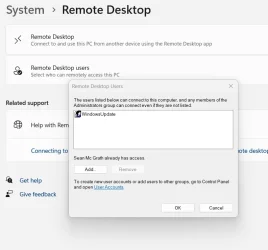
I have the user below in my list, anyone know what this is and is it safe to delete it?
Screenshot 2025-12-28 152344.webp
 

My Computer

System One

  • OS
    Windows 11 pro
    Computer type
    Laptop
    Manufacturer/Model
    HP Zbook
    CPU
    Intel(R) Core(TM) i7-8850H CPU @ 2.60GHz 2.59 GHz
    Motherboard
    HP 842D
    Memory
    32GB
    Graphics Card(s)
    Nvidia Quadro P3200
    Hard Drives
    Samsung 980 1TB M.2
    Toshiba KXG50ZNV512G M.2
    Crucial P5 Plus 2TB M.2
    Mouse
    MX Master 3
    Internet Speed
    500MBPS
    Browser
    Chrome, Edge
    Antivirus
    Windows defender
I think it looks suspicious. Windows Update runs under the SYSTEM identity, so it doesn't need any created user profile to work. Therefore, Windows doesn't have any legitimate user named "WindowsUpdate", nor should it have remote access.

You should review any recent changes or activity on your PC, which involve 3rd-party apps.
 

My Computer

System One

  • OS
    Windows 7
I use RDC a lot, and I've never seen Windows Update listed! I have to go with @garlin , that looks pretty dicey to me!
 

My Computers

System One System Two

  • OS
    Win 11 Pro 25H2, Build 26200.8524
    Computer type
    PC/Desktop
    Manufacturer/Model
    Home Brew
    CPU
    Intel Core i5 14500
    Motherboard
    Gigabyte B760M G P WIFI
    Memory
    64GB DDR4
    Graphics Card(s)
    GeForce RTX 4060
    Sound Card
    Chipset Realtek
    Monitor(s) Displays
    LG 45" Ultragear, Acer 24" 1080p
    Screen Resolution
    5120x1440, 1920x1080
    Hard Drives
    Crucial P310 2TB 2280 PCIe Gen4 3D NAND NVMe M.2 SSD (O/S)
    Silicon Power 2TB US75 NVMe PCIe Gen4 M.2 2280 SSD (backup)
    Crucial BX500 2TB 3D NAND (2nd backup)
    Seagate 4TB Ironwolf, rotating HDD archive files
    External off-line backup Drives: 2 NVMe 4TB drives in external enclosures
    PSU
    Thermaltake Toughpower GF3 750W
    Case
    LIAN LI LANCOOL 216 E-ATX PC Case
    Cooling
    Lots of fans!
    Keyboard
    Microsoft Comfort Curve 2000
    Mouse
    Logitech G305
    Internet Speed
    Verizon FiOS 1GB
    Browser
    Firefox
    Antivirus
    Malware Bytes & Windows Defender Security
  • Operating System
    Win 11 Pro 25H2, Build 26200.8524
    Computer type
    PC/Desktop
    Manufacturer/Model
    Home Brew
    CPU
    Intel Core i5 14400
    Motherboard
    Gigabyte B760M DS3H AX
    Memory
    32GB DDR5
    Graphics card(s)
    Intel 700 Embedded GPU
    Sound Card
    Realtek Embedded
    Monitor(s) Displays
    27" HP 1080p
    Screen Resolution
    1920x1080
    Hard Drives
    Crucial P310 2TB 2280 PCIe Gen4 eD NAND PCIe SSD
    Samsung EVO 990 2TB NVMe Gen4 SSD
    Samsung 2TB SATA SSD
    PSU
    Thermaltake Smart BM3 650W
    Case
    Okinos Micro ATX Case
    Cooling
    Fans
    Keyboard
    Microsoft Comfort Curve 2000
    Mouse
    Logitech G305
    Internet Speed
    Verizon FiOS 1GB
    Browser
    Firefox
    Antivirus
    Malware Bytes & Windows Defender Security
So I am better to delete it?
 

My Computer

System One

  • OS
    Windows 11 pro
    Computer type
    Laptop
    Manufacturer/Model
    HP Zbook
    CPU
    Intel(R) Core(TM) i7-8850H CPU @ 2.60GHz 2.59 GHz
    Motherboard
    HP 842D
    Memory
    32GB
    Graphics Card(s)
    Nvidia Quadro P3200
    Hard Drives
    Samsung 980 1TB M.2
    Toshiba KXG50ZNV512G M.2
    Crucial P5 Plus 2TB M.2
    Mouse
    MX Master 3
    Internet Speed
    500MBPS
    Browser
    Chrome, Edge
    Antivirus
    Windows defender
I think it looks suspicious. Windows Update runs under the SYSTEM identity, so it doesn't need any created user profile to work. Therefore, Windows doesn't have any legitimate user named "WindowsUpdate", nor should it have remote access.

You should review any recent changes or activity on your PC, which involve 3rd-party apps.
The only third party apps I use are, Photoshop, Lightroom, Goodsync, Acronis true image. Oh I downloaded Revo uninstaller recently.
 

My Computer

System One

  • OS
    Windows 11 pro
    Computer type
    Laptop
    Manufacturer/Model
    HP Zbook
    CPU
    Intel(R) Core(TM) i7-8850H CPU @ 2.60GHz 2.59 GHz
    Motherboard
    HP 842D
    Memory
    32GB
    Graphics Card(s)
    Nvidia Quadro P3200
    Hard Drives
    Samsung 980 1TB M.2
    Toshiba KXG50ZNV512G M.2
    Crucial P5 Plus 2TB M.2
    Mouse
    MX Master 3
    Internet Speed
    500MBPS
    Browser
    Chrome, Edge
    Antivirus
    Windows defender
@garlin is correct. I've used remote desktop and have never seen that before. I would make an image first and then delete it and if anything changes...that being on the safe side.
 

My Computer

System One

  • OS
    Windows 11 Pro
    Computer type
    PC/Desktop
    Manufacturer/Model
    Home Built
    CPU
    AMD Ryzen 7 5800X
    Motherboard
    GIGABYTE B550 AORUS ELITE AX V2
    Memory
    32GB
    Graphics Card(s)
    Nvidea??
    Sound Card
    MB Sound only
    Hard Drives
    m2.nvme
    PSU
    Seasonic Focus
    Case
    Cougar
    Cooling
    Enermax Liquid CPU
    Keyboard
    Logitech K800
    Mouse
    Logitech MX Master 3
    Internet Speed
    2.5 GB
    Browser
    BRAVE
    Antivirus
    Windows Defender
Make sure to scan your computer for malware infections as the remote access suspicious.
 

My Computer

System One

  • OS
    Windows 11
    Computer type
    PC/Desktop
    Manufacturer/Model
    HP Pavilion
    CPU
    AMD Ryzen 7 5700G
    Motherboard
    Erica6
    Memory
    Micron Technology DDR4-3200 16GB
    Graphics Card(s)
    NVIDIA GeForce RTX 3060
    Sound Card
    Realtek ALC671
    Monitor(s) Displays
    Samsung SyncMaster U28E590
    Screen Resolution
    3840 x 2160
    Hard Drives
    SAMSUNG MZVLQ1T0HALB-000H1
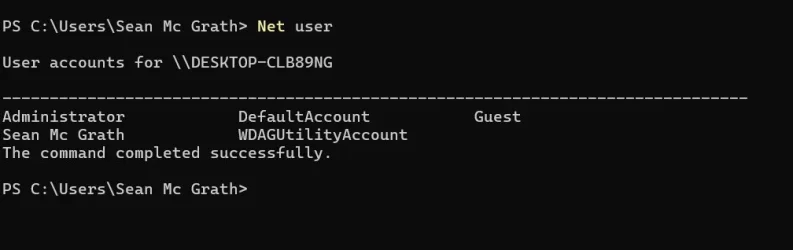
And do run this command in Terminal on all your network computers to check if you have a user called WindowsUpdate on any of them.
Net user

I assume you do not know who Sean McGrath is.


Denis
 

My Computer

System One

  • OS
    Windows 11 Home x64 Version 25H2 Build 26200.8037
I am Sean Mc Grath, ran Malwarebytes and malwarebytes ADwcleaner, nothing found
 

My Computer

System One

  • OS
    Windows 11 pro
    Computer type
    Laptop
    Manufacturer/Model
    HP Zbook
    CPU
    Intel(R) Core(TM) i7-8850H CPU @ 2.60GHz 2.59 GHz
    Motherboard
    HP 842D
    Memory
    32GB
    Graphics Card(s)
    Nvidia Quadro P3200
    Hard Drives
    Samsung 980 1TB M.2
    Toshiba KXG50ZNV512G M.2
    Crucial P5 Plus 2TB M.2
    Mouse
    MX Master 3
    Internet Speed
    500MBPS
    Browser
    Chrome, Edge
    Antivirus
    Windows defender
And do run this command in Terminal on all your network computers to check if you have a user called WindowsUpdate on any of them.
Net user

I assume you do not know who Sean McGrath is.


Denis
 

Attachments

  • Screenshot 2025-12-28 175517.webp
    Screenshot 2025-12-28 175517.webp
    17.9 KB · Views: 1

My Computer

System One

  • OS
    Windows 11 pro
    Computer type
    Laptop
    Manufacturer/Model
    HP Zbook
    CPU
    Intel(R) Core(TM) i7-8850H CPU @ 2.60GHz 2.59 GHz
    Motherboard
    HP 842D
    Memory
    32GB
    Graphics Card(s)
    Nvidia Quadro P3200
    Hard Drives
    Samsung 980 1TB M.2
    Toshiba KXG50ZNV512G M.2
    Crucial P5 Plus 2TB M.2
    Mouse
    MX Master 3
    Internet Speed
    500MBPS
    Browser
    Chrome, Edge
    Antivirus
    Windows defender
Assuming those Net user results are the same on every network computer then there is no sign of malware infiltration but you still need to find out how WindowsUpdate managed to get the Admin permission necessary to add that username to the list of those granted access ***.
While you're at it, check if WindowsUpdate has any access permissions to any folders-files on the computer concerned.

You can go ahead and select WindowsUpdate in that dialog and remove it.

*** Just a thought but have you left the built-in Admin [userame Administrator] enabled whilst connected to the internet? It has no password by default.


Denis
 

My Computer

System One

  • OS
    Windows 11 Home x64 Version 25H2 Build 26200.8037
There is only one computer on the network
 

My Computer

System One

  • OS
    Windows 11 pro
    Computer type
    Laptop
    Manufacturer/Model
    HP Zbook
    CPU
    Intel(R) Core(TM) i7-8850H CPU @ 2.60GHz 2.59 GHz
    Motherboard
    HP 842D
    Memory
    32GB
    Graphics Card(s)
    Nvidia Quadro P3200
    Hard Drives
    Samsung 980 1TB M.2
    Toshiba KXG50ZNV512G M.2
    Crucial P5 Plus 2TB M.2
    Mouse
    MX Master 3
    Internet Speed
    500MBPS
    Browser
    Chrome, Edge
    Antivirus
    Windows defender
Back
Top Bottom