remove recent events from Protection History


I have read many ways to remove recent items from Defender's protection history but none work or only apply to Windows 10.
When I reboot these items are still listed.
I have built up quite a list over time.
Or am I better off leaving them there. I wonder why others can but I cannot; I suspect something wrong may be wrong with my system; I did get a reply from M.S. that some users are having trouble with this task but a cumulative update just came out and I still cannot remove them.
I prefer not to hack the reg as my skill level is not that good. I did follow file explorer 's folders to the end of the chain and deleted as told.
Is there some way to accomplish this?
 

My Computers My Computers

  • At a glance

    Win 11 ProAMD Ryzen™ 7 7730U24GB Dual-Channel DDR4 @ 1596MHz (22-22-22-52)512MB ATI AMD Radeon Graphics (ASUStek Comput...
    OS
    Win 11 Pro
    Computer type
    Laptop
    Manufacturer/Model
    ASUS Vivobook
    CPU
    AMD Ryzen™ 7 7730U
    Motherboard
    M1605YA
    Memory
    24GB Dual-Channel DDR4 @ 1596MHz (22-22-22-52)
    Graphics Card(s)
    512MB ATI AMD Radeon Graphics (ASUStek Computer Inc)
    Monitor(s) Displays
    Generic PnP Monitor (1920x1200@60Hz) - P1 PLUS (1920x1080@59Hz)
    Screen Resolution
    1920 X 1200
    Hard Drives
    953GB Western Digital WD
    PSU
    45 Watts
    Mouse
    Lenovo Bluetooth.
    Internet Speed
    500 Mbps
    Browser
    Edge
    Antivirus
    Defender
  • At a glance

    Windows 11AMD Ryzen 7 5800H / 3.2 GHz32 GB DDR4 SDRAM 3200 MHzNVIDIA GeForce RTX 3060 6 GB GDDR6 SDRAM
    Operating System
    Windows 11
    Computer type
    Laptop
    Manufacturer/Model
    ACER NITRO
    CPU
    AMD Ryzen 7 5800H / 3.2 GHz
    Motherboard
    CZ Scala_CAS (FP6)
    Memory
    32 GB DDR4 SDRAM 3200 MHz
    Graphics card(s)
    NVIDIA GeForce RTX 3060 6 GB GDDR6 SDRAM
    Sound Card
    Realtek Audio. NVIDIA High Definition Audio
    Monitor(s) Displays
    15.6" LED backlight 1920 x 1080 (Full HD) 144 Hz
    Screen Resolution
    1920 x 1080 (Full HD)
    Hard Drives
    Samsung 970 Evo Plus 2TB NVMe M.2
    PSU
    180 Watt, 19.5 V
    Mouse
    Lenovo Bluetooth
    Internet Speed
    500 Mbps
    Browser
    Edge
    Antivirus
    Defender
Did you execute batch script while Security Center opened, i have mind always closed while executing the batch script.
 

My Computer My Computer

At a glance

Windows 11AMD Ryzen 7 5700GMicron Technology DDR4-3200 16GBNVIDIA GeForce RTX 3060
OS
Windows 11
Computer type
PC/Desktop
Manufacturer/Model
HP Pavilion
CPU
AMD Ryzen 7 5700G
Motherboard
Erica6
Memory
Micron Technology DDR4-3200 16GB
Graphics Card(s)
NVIDIA GeForce RTX 3060
Sound Card
Realtek ALC671
Monitor(s) Displays
Samsung SyncMaster U28E590
Screen Resolution
3840 x 2160
Hard Drives
SAMSUNG MZVLQ1T0HALB-000H1
Security centre closed and tamper protection off.
 

My Computers My Computers

  • At a glance

    Win 11 ProAMD Ryzen™ 7 7730U24GB Dual-Channel DDR4 @ 1596MHz (22-22-22-52)512MB ATI AMD Radeon Graphics (ASUStek Comput...
    OS
    Win 11 Pro
    Computer type
    Laptop
    Manufacturer/Model
    ASUS Vivobook
    CPU
    AMD Ryzen™ 7 7730U
    Motherboard
    M1605YA
    Memory
    24GB Dual-Channel DDR4 @ 1596MHz (22-22-22-52)
    Graphics Card(s)
    512MB ATI AMD Radeon Graphics (ASUStek Computer Inc)
    Monitor(s) Displays
    Generic PnP Monitor (1920x1200@60Hz) - P1 PLUS (1920x1080@59Hz)
    Screen Resolution
    1920 X 1200
    Hard Drives
    953GB Western Digital WD
    PSU
    45 Watts
    Mouse
    Lenovo Bluetooth.
    Internet Speed
    500 Mbps
    Browser
    Edge
    Antivirus
    Defender
  • At a glance

    Windows 11AMD Ryzen 7 5800H / 3.2 GHz32 GB DDR4 SDRAM 3200 MHzNVIDIA GeForce RTX 3060 6 GB GDDR6 SDRAM
    Operating System
    Windows 11
    Computer type
    Laptop
    Manufacturer/Model
    ACER NITRO
    CPU
    AMD Ryzen 7 5800H / 3.2 GHz
    Motherboard
    CZ Scala_CAS (FP6)
    Memory
    32 GB DDR4 SDRAM 3200 MHz
    Graphics card(s)
    NVIDIA GeForce RTX 3060 6 GB GDDR6 SDRAM
    Sound Card
    Realtek Audio. NVIDIA High Definition Audio
    Monitor(s) Displays
    15.6" LED backlight 1920 x 1080 (Full HD) 144 Hz
    Screen Resolution
    1920 x 1080 (Full HD)
    Hard Drives
    Samsung 970 Evo Plus 2TB NVMe M.2
    PSU
    180 Watt, 19.5 V
    Mouse
    Lenovo Bluetooth
    Internet Speed
    500 Mbps
    Browser
    Edge
    Antivirus
    Defender
I have no idea why script won't work for you, it always works for me.
 

My Computer My Computer

At a glance

Windows 11AMD Ryzen 7 5700GMicron Technology DDR4-3200 16GBNVIDIA GeForce RTX 3060
OS
Windows 11
Computer type
PC/Desktop
Manufacturer/Model
HP Pavilion
CPU
AMD Ryzen 7 5700G
Motherboard
Erica6
Memory
Micron Technology DDR4-3200 16GB
Graphics Card(s)
NVIDIA GeForce RTX 3060
Sound Card
Realtek ALC671
Monitor(s) Displays
Samsung SyncMaster U28E590
Screen Resolution
3840 x 2160
Hard Drives
SAMSUNG MZVLQ1T0HALB-000H1
I have no idea why script won't work for you, it always works for me.
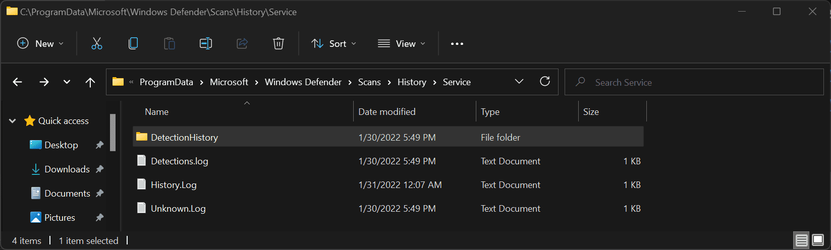
I think that something, a program or app, broke something in Defender a while ago and so the protection history is now stored in a different location. It has to be, otherwise it wouldn't record it. Question is where?
It's still recording.

Screenshot_7.png
 

My Computers My Computers

  • At a glance

    Win 11 ProAMD Ryzen™ 7 7730U24GB Dual-Channel DDR4 @ 1596MHz (22-22-22-52)512MB ATI AMD Radeon Graphics (ASUStek Comput...
    OS
    Win 11 Pro
    Computer type
    Laptop
    Manufacturer/Model
    ASUS Vivobook
    CPU
    AMD Ryzen™ 7 7730U
    Motherboard
    M1605YA
    Memory
    24GB Dual-Channel DDR4 @ 1596MHz (22-22-22-52)
    Graphics Card(s)
    512MB ATI AMD Radeon Graphics (ASUStek Computer Inc)
    Monitor(s) Displays
    Generic PnP Monitor (1920x1200@60Hz) - P1 PLUS (1920x1080@59Hz)
    Screen Resolution
    1920 X 1200
    Hard Drives
    953GB Western Digital WD
    PSU
    45 Watts
    Mouse
    Lenovo Bluetooth.
    Internet Speed
    500 Mbps
    Browser
    Edge
    Antivirus
    Defender
  • At a glance

    Windows 11AMD Ryzen 7 5800H / 3.2 GHz32 GB DDR4 SDRAM 3200 MHzNVIDIA GeForce RTX 3060 6 GB GDDR6 SDRAM
    Operating System
    Windows 11
    Computer type
    Laptop
    Manufacturer/Model
    ACER NITRO
    CPU
    AMD Ryzen 7 5800H / 3.2 GHz
    Motherboard
    CZ Scala_CAS (FP6)
    Memory
    32 GB DDR4 SDRAM 3200 MHz
    Graphics card(s)
    NVIDIA GeForce RTX 3060 6 GB GDDR6 SDRAM
    Sound Card
    Realtek Audio. NVIDIA High Definition Audio
    Monitor(s) Displays
    15.6" LED backlight 1920 x 1080 (Full HD) 144 Hz
    Screen Resolution
    1920 x 1080 (Full HD)
    Hard Drives
    Samsung 970 Evo Plus 2TB NVMe M.2
    PSU
    180 Watt, 19.5 V
    Mouse
    Lenovo Bluetooth
    Internet Speed
    500 Mbps
    Browser
    Edge
    Antivirus
    Defender
Just to compare which makes me wonder if I should clear all after scans?
Since I did a repair I have no history or service.

I tested the windows security fix and restore. I restarted the pc. After that, History\Service\DetectionHistory is still there.
You could try an in-place upgrade to fix it.

Repair Install Windows 11 with an In-place Upgrade Tutorial

Personally, I probably wouldn’t do that if the protection and scanning worked normally.

Edit: I tested that batch script which was in the first post, and it also deleted the DetectionHistory folder, not just history files
After that, I created DetectionHistory folder myself. I restored the history folders and files I deleted there. After that the defender shows up again in the protection history events. In other words, you could also try to create the folders you need there yourself, but that may not fix the original problem
 
Last edited:

My Computer My Computer

At a glance

Windows 11 Pro 23H2 (22631.3155)AMD Ryzen 5 5600XKingston 16GB (2 x 8GB) DDR4 3200MHzGigabyte Radeon RX 580 AORUS 8GB GDDR5
OS
Windows 11 Pro 23H2 (22631.3155)
Computer type
PC/Desktop
CPU
AMD Ryzen 5 5600X
Motherboard
Asus TUF Gaming B550-Plus
Memory
Kingston 16GB (2 x 8GB) DDR4 3200MHz
Graphics Card(s)
Gigabyte Radeon RX 580 AORUS 8GB GDDR5
Monitor(s) Displays
Samsung
Screen Resolution
1920X11080
Hard Drives
Samsung 970 EVO Plus NVMe M.2 500GB (OS)
Samsung 980 NVMe 1TB (Games)
Samsung 860 EVO 250GB
Samsung 850 EVO 250GB (Music)
PSU
Super Flower / Leadex 750W 80Plus Titanium
Cooling
SilentiumPC Fortis 3 HE1425 v2
Keyboard
Logitech K520
Mouse
Logitech G700S
Internet Speed
50mbps/10mbps
Browser
Firefox, Chrome, Edge, Opera
Antivirus
Windows Defender
I tested the windows security fix and restore. I restarted the pc. After that, History\Service\DetectionHistory is still there.
You could try an in-place upgrade to fix it.

Repair Install Windows 11 with an In-place Upgrade Tutorial

Personally, I probably wouldn’t do that if the protection and scanning worked normally.

Edit: I tested that batch script which was in the first post, and it also deleted the DetectionHistory folder, not just history files
After that, I created DetectionHistory folder myself. I restored the history folders and files I deleted there. After that the defender shows up again in the protection history events. In other words, you could also try to create the folders you need there yourself, but that may not fix the original problem
No it does not batch script only delete "C:\ProgramData\Microsoft\Windows Defender\Scans\History\Service" folder.
 

My Computer My Computer

At a glance

Windows 11AMD Ryzen 7 5700GMicron Technology DDR4-3200 16GBNVIDIA GeForce RTX 3060
OS
Windows 11
Computer type
PC/Desktop
Manufacturer/Model
HP Pavilion
CPU
AMD Ryzen 7 5700G
Motherboard
Erica6
Memory
Micron Technology DDR4-3200 16GB
Graphics Card(s)
NVIDIA GeForce RTX 3060
Sound Card
Realtek ALC671
Monitor(s) Displays
Samsung SyncMaster U28E590
Screen Resolution
3840 x 2160
Hard Drives
SAMSUNG MZVLQ1T0HALB-000H1
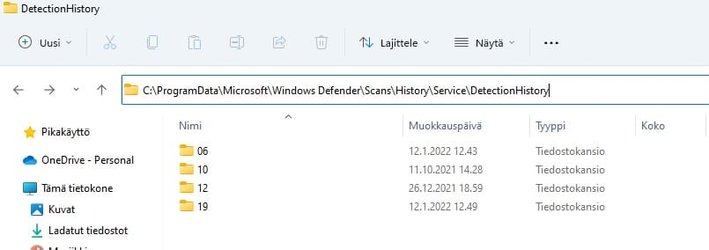
Before

Windows protectionhistorydelete.jpg

Those numbered folders are the ones where the actual files are.

After batch script

windows protectionhistorydelete2.jpg
 

My Computer My Computer

At a glance

Windows 11 Pro 23H2 (22631.3155)AMD Ryzen 5 5600XKingston 16GB (2 x 8GB) DDR4 3200MHzGigabyte Radeon RX 580 AORUS 8GB GDDR5
OS
Windows 11 Pro 23H2 (22631.3155)
Computer type
PC/Desktop
CPU
AMD Ryzen 5 5600X
Motherboard
Asus TUF Gaming B550-Plus
Memory
Kingston 16GB (2 x 8GB) DDR4 3200MHz
Graphics Card(s)
Gigabyte Radeon RX 580 AORUS 8GB GDDR5
Monitor(s) Displays
Samsung
Screen Resolution
1920X11080
Hard Drives
Samsung 970 EVO Plus NVMe M.2 500GB (OS)
Samsung 980 NVMe 1TB (Games)
Samsung 860 EVO 250GB
Samsung 850 EVO 250GB (Music)
PSU
Super Flower / Leadex 750W 80Plus Titanium
Cooling
SilentiumPC Fortis 3 HE1425 v2
Keyboard
Logitech K520
Mouse
Logitech G700S
Internet Speed
50mbps/10mbps
Browser
Firefox, Chrome, Edge, Opera
Antivirus
Windows Defender
Oh i think i know why it does not work i have upgraded from Windows 10 maybe that is the reason script works for me.
 

My Computer My Computer

At a glance

Windows 11AMD Ryzen 7 5700GMicron Technology DDR4-3200 16GBNVIDIA GeForce RTX 3060
OS
Windows 11
Computer type
PC/Desktop
Manufacturer/Model
HP Pavilion
CPU
AMD Ryzen 7 5700G
Motherboard
Erica6
Memory
Micron Technology DDR4-3200 16GB
Graphics Card(s)
NVIDIA GeForce RTX 3060
Sound Card
Realtek ALC671
Monitor(s) Displays
Samsung SyncMaster U28E590
Screen Resolution
3840 x 2160
Hard Drives
SAMSUNG MZVLQ1T0HALB-000H1
Oh i think i know why it does not work i have upgraded from Windows 10 maybe that is the reason script works for me.
I don't think so as all, except one, of my laptops have been upgraded. None have had a clean install of Win 11.
 

My Computers My Computers

  • At a glance

    Win 11 ProAMD Ryzen™ 7 7730U24GB Dual-Channel DDR4 @ 1596MHz (22-22-22-52)512MB ATI AMD Radeon Graphics (ASUStek Comput...
    OS
    Win 11 Pro
    Computer type
    Laptop
    Manufacturer/Model
    ASUS Vivobook
    CPU
    AMD Ryzen™ 7 7730U
    Motherboard
    M1605YA
    Memory
    24GB Dual-Channel DDR4 @ 1596MHz (22-22-22-52)
    Graphics Card(s)
    512MB ATI AMD Radeon Graphics (ASUStek Computer Inc)
    Monitor(s) Displays
    Generic PnP Monitor (1920x1200@60Hz) - P1 PLUS (1920x1080@59Hz)
    Screen Resolution
    1920 X 1200
    Hard Drives
    953GB Western Digital WD
    PSU
    45 Watts
    Mouse
    Lenovo Bluetooth.
    Internet Speed
    500 Mbps
    Browser
    Edge
    Antivirus
    Defender
  • At a glance

    Windows 11AMD Ryzen 7 5800H / 3.2 GHz32 GB DDR4 SDRAM 3200 MHzNVIDIA GeForce RTX 3060 6 GB GDDR6 SDRAM
    Operating System
    Windows 11
    Computer type
    Laptop
    Manufacturer/Model
    ACER NITRO
    CPU
    AMD Ryzen 7 5800H / 3.2 GHz
    Motherboard
    CZ Scala_CAS (FP6)
    Memory
    32 GB DDR4 SDRAM 3200 MHz
    Graphics card(s)
    NVIDIA GeForce RTX 3060 6 GB GDDR6 SDRAM
    Sound Card
    Realtek Audio. NVIDIA High Definition Audio
    Monitor(s) Displays
    15.6" LED backlight 1920 x 1080 (Full HD) 144 Hz
    Screen Resolution
    1920 x 1080 (Full HD)
    Hard Drives
    Samsung 970 Evo Plus 2TB NVMe M.2
    PSU
    180 Watt, 19.5 V
    Mouse
    Lenovo Bluetooth
    Internet Speed
    500 Mbps
    Browser
    Edge
    Antivirus
    Defender
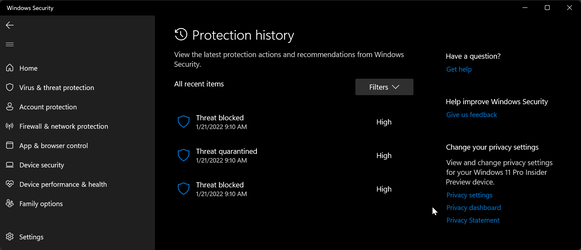
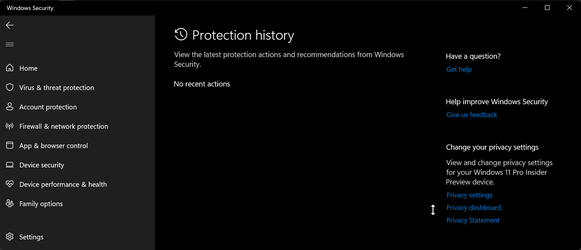
Here is the result of the batch script on my side.

2022-01-21_9-11-47.png
2022-01-21_9-13-08.png
 

My Computer My Computer

At a glance

Windows 11AMD Ryzen 7 5700GMicron Technology DDR4-3200 16GBNVIDIA GeForce RTX 3060
OS
Windows 11
Computer type
PC/Desktop
Manufacturer/Model
HP Pavilion
CPU
AMD Ryzen 7 5700G
Motherboard
Erica6
Memory
Micron Technology DDR4-3200 16GB
Graphics Card(s)
NVIDIA GeForce RTX 3060
Sound Card
Realtek ALC671
Monitor(s) Displays
Samsung SyncMaster U28E590
Screen Resolution
3840 x 2160
Hard Drives
SAMSUNG MZVLQ1T0HALB-000H1
@FreeBooter
I realize I am raising the dead here but wish to clear those recent entries in protection history. -you seem successful.
Apparently you were able to clear the recent entries in protection history.
In post 16 I have the same as fabler, do you? On my last click after service I see a gray , "unknown" and delete it. I cannot clear the recent entries. I wonder if your file explorer chain is the same as fabler and mine. If so we should be able to clear it. If not there is a problem out of my control.
 

My Computers My Computers

  • At a glance

    Windows 11 proIntel Core i9- 12900K Alder Lake 3.2 GHz LGA1700G-Skill Ripjaws S5 32GBNVIDIA GEForce GTX1616 Super dual fan
    OS
    Windows 11 pro
    Computer type
    PC/Desktop
    Manufacturer/Model
    ASUS built by Micro center
    CPU
    Intel Core i9- 12900K Alder Lake 3.2 GHz LGA1700
    Motherboard
    Asus prime Z790-v WI FI Intel LGA1700 ATX
    Memory
    G-Skill Ripjaws S5 32GB
    Graphics Card(s)
    NVIDIA GEForce GTX1616 Super dual fan
    Hard Drives
    Samsung 500GB 860 EVO
    PSU
    Thermalake 500 Watt
    Case
    V 100ATX
    Antivirus
    Defender primary with MBAM free secondary
  • At a glance

    Windows 11 Pro 21H2 22000.438
    Operating System
    Windows 11 Pro 21H2 22000.438
    Computer type
    PC/Desktop
    Manufacturer/Model
    ASUS board built
    Motherboard
    Asus Tuf Z390 - Tuf Plus Gaming WI = FI
2022-01-31_0-22-37.png
 

My Computer My Computer

At a glance

Windows 11AMD Ryzen 7 5700GMicron Technology DDR4-3200 16GBNVIDIA GeForce RTX 3060
OS
Windows 11
Computer type
PC/Desktop
Manufacturer/Model
HP Pavilion
CPU
AMD Ryzen 7 5700G
Motherboard
Erica6
Memory
Micron Technology DDR4-3200 16GB
Graphics Card(s)
NVIDIA GeForce RTX 3060
Sound Card
Realtek ALC671
Monitor(s) Displays
Samsung SyncMaster U28E590
Screen Resolution
3840 x 2160
Hard Drives
SAMSUNG MZVLQ1T0HALB-000H1
As I once said Microsoft told me there is the problem with some people not being able to clear protection history's recent issues.
I suspect that many who can were using 10 and upgraded not clean install. I could be wrong.
Thanks all-I guess case closed unsolved.
 

My Computers My Computers

  • At a glance

    Windows 11 proIntel Core i9- 12900K Alder Lake 3.2 GHz LGA1700G-Skill Ripjaws S5 32GBNVIDIA GEForce GTX1616 Super dual fan
    OS
    Windows 11 pro
    Computer type
    PC/Desktop
    Manufacturer/Model
    ASUS built by Micro center
    CPU
    Intel Core i9- 12900K Alder Lake 3.2 GHz LGA1700
    Motherboard
    Asus prime Z790-v WI FI Intel LGA1700 ATX
    Memory
    G-Skill Ripjaws S5 32GB
    Graphics Card(s)
    NVIDIA GEForce GTX1616 Super dual fan
    Hard Drives
    Samsung 500GB 860 EVO
    PSU
    Thermalake 500 Watt
    Case
    V 100ATX
    Antivirus
    Defender primary with MBAM free secondary
  • At a glance

    Windows 11 Pro 21H2 22000.438
    Operating System
    Windows 11 Pro 21H2 22000.438
    Computer type
    PC/Desktop
    Manufacturer/Model
    ASUS board built
    Motherboard
    Asus Tuf Z390 - Tuf Plus Gaming WI = FI
This one worked for me:

DefenderUI

DefenderUI significantly improves usability
& unlocks many hidden security features of Microsoft Defender.
Compatible with Windows 10 / 11 & truly free. Free 100%
and safe to use.

Delete_Windows_Defender_Protection_History.png
it boots to safe mode automatically to completely delete the protection history.
Restart to normal mode and check it out on security panel. Done
 

My Computer My Computer

At a glance

windows 11
OS
windows 11
Computer type
PC/Desktop
Manufacturer/Model
msi
 

My Computer My Computer

At a glance

windows 11
OS
windows 11
Computer type
PC/Desktop
Manufacturer/Model
msi
I boot into Safe Mode then delete the Defender history folder at
C:\ProgramData\Microsoft\Windows Defender\Scans\History\Service.
 

My Computer My Computer

At a glance

Windows 11 ProCore i7-13700K64 GB Kingston Fury Beast DDR5Gigabyte GeForce RTX 2060 Super Gaming OC 8G
OS
Windows 11 Pro
Computer type
PC/Desktop
Manufacturer/Model
Self build
CPU
Core i7-13700K
Motherboard
Asus TUF Gaming Plus WiFi Z790
Memory
64 GB Kingston Fury Beast DDR5
Graphics Card(s)
Gigabyte GeForce RTX 2060 Super Gaming OC 8G
Sound Card
Realtek S1200A
Monitor(s) Displays
Viewsonic VP2770 & Dell (secondary)
Screen Resolution
2560 x 1440
Hard Drives
Kingston KC3000 2TB NVME SSD & SATA HDDs & SSD
PSU
EVGA SuperNova G2 850W
Case
Nanoxia Deep Silence 1
Cooling
Noctua NH-D14
Keyboard
Microsoft Digital Media Pro
Mouse
Logitech Wireless
Internet Speed
80 Mb / s
Browser
Chrome
Antivirus
Defender, Malwarebytes Free & AdwCleaner

Latest Support Threads

Back
Top Bottom