Unable to remove Recent files from File Explorer


tony359

Well-known member
Local time
6:53 AM
Posts
116
OS
Windows 10
Hi all,

I have noticed that I have a bunch of old Onedrive files under "Recents" in File Explorer. If I clear File Explorer history, they don't go away. If I manually select them and select "Remove from list", they don't go away.

Some of those files are tagged as "accessed in 2014", something's fishy here.

The Recents folder on the FS is empty and so is the relevant place in the registry.

Can someone please help me?
Thanks
 

My Computers

System One System Two

  • OS
    Windows 10
    Computer type
    PC/Desktop
    CPU
    Ryzen 5800X
    Motherboard
    MSI B550 Tomahawk
    Memory
    32GB
    Graphics Card(s)
    RTX 3070
  • Operating System
    Windows 11 24H1
    Computer type
    Laptop
    Manufacturer/Model
    Lenovo
    CPU
    Ryzen 6800HS
    Memory
    32GB
To stop OneDrive from syncing, right-click the OneDrive icon in the taskbar, select "Settings," then go to the "Account" tab to choose "Unlink this PC" or adjust which folders to sync under the "Choose folders" option. You can also pause syncing temporarily if needed.

Browse to C:\Users\UserName\OneDrive are your files there?
Also do a search for any of those files.
You can move them to your Documents folder or delete them, if you have already backed them up.
 

My Computer

System One

  • OS
    Windows 11 Pro Insider 64 bit 25H2 26200.5742
    Computer type
    PC/Desktop
    Manufacturer/Model
    Gigabyte Z390 UD
    CPU
    Intel Core i7 9700K 3.60
    Motherboard
    Gigabyte Z390 UD
    Memory
    16 GB
    Graphics Card(s)
    nVidia GEForce RTX 2060 Super
    Sound Card
    onboard
    Monitor(s) Displays
    Two 27" Dell 4K monitors
    Screen Resolution
    3840 x 2160
    Hard Drives
    M.2 NVME SSD, 500 GB; Two 2TB Mechanical HDD's
    PSU
    850w PSU
    Case
    Cyberpower PC
    Cooling
    Water cooled
    Keyboard
    Backlit Cyberpower gaming keyboard
    Mouse
    Backlit Cyberpower gaming mouse
    Internet Speed
    1 GB mbps
    Browser
    Brave
    Antivirus
    Windows Security
Thanks but I'm not sure what your point is. I have some "recent files" in File Explorer which I am unable to remove from the list - I didn't really check whether they are actually linked to files, I would like to clear the "Recent files" list.

I have tried booting without onedrive and they're still there.

I'm not looking for those files - I'm talking about the "recent files" list.

Am I missing something?
 

My Computers

System One System Two

  • OS
    Windows 10
    Computer type
    PC/Desktop
    CPU
    Ryzen 5800X
    Motherboard
    MSI B550 Tomahawk
    Memory
    32GB
    Graphics Card(s)
    RTX 3070
  • Operating System
    Windows 11 24H1
    Computer type
    Laptop
    Manufacturer/Model
    Lenovo
    CPU
    Ryzen 6800HS
    Memory
    32GB
If you remove the files from their original location, when you clear Recent Files, they will not return

To clear recent files in Windows 11, open File Explorer, click on the three dots at the top, select Options, and then click the 'Clear' button at the bottom of the dialog. You can also uncheck the option to show recently used files to prevent them from appearing in the future.
 

My Computer

System One

  • OS
    Windows 11 Pro Insider 64 bit 25H2 26200.5742
    Computer type
    PC/Desktop
    Manufacturer/Model
    Gigabyte Z390 UD
    CPU
    Intel Core i7 9700K 3.60
    Motherboard
    Gigabyte Z390 UD
    Memory
    16 GB
    Graphics Card(s)
    nVidia GEForce RTX 2060 Super
    Sound Card
    onboard
    Monitor(s) Displays
    Two 27" Dell 4K monitors
    Screen Resolution
    3840 x 2160
    Hard Drives
    M.2 NVME SSD, 500 GB; Two 2TB Mechanical HDD's
    PSU
    850w PSU
    Case
    Cyberpower PC
    Cooling
    Water cooled
    Keyboard
    Backlit Cyberpower gaming keyboard
    Mouse
    Backlit Cyberpower gaming mouse
    Internet Speed
    1 GB mbps
    Browser
    Brave
    Antivirus
    Windows Security
If it's just particular entries you want removed, delete the shortcuts manually from your temps.

Press Win + R, type %AppData%\Microsoft\Windows\Recent\, and press Enter.
Select and delete.
 

My Computer

System One

  • OS
    Linux Debain
    Computer type
    PC/Desktop
    Manufacturer/Model
    Custom
To clear recent files in Windows 11, open File Explorer, click on the three dots at the top, select Options, and then click the 'Clear' button at the bottom of the dialog. You can also uncheck the option to show recently used files to prevent them from appearing in the future.
@Spunk see my first post

> If I clear File Explorer history, they don't go away. If I manually select them and select "Remove from list", they don't go away.

Press Win + R, type %AppData%\Microsoft\Windows\Recent\, and press Enter.
Select and delete.
@norty see my first post


>The Recents folder on the FS is empty and so is the relevant place in the registry.
 

My Computers

System One System Two

  • OS
    Windows 10
    Computer type
    PC/Desktop
    CPU
    Ryzen 5800X
    Motherboard
    MSI B550 Tomahawk
    Memory
    32GB
    Graphics Card(s)
    RTX 3070
  • Operating System
    Windows 11 24H1
    Computer type
    Laptop
    Manufacturer/Model
    Lenovo
    CPU
    Ryzen 6800HS
    Memory
    32GB
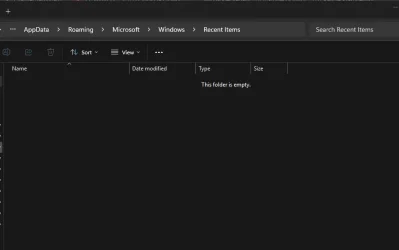
Adding some more evidence:

Recent folder is empty
Screenshot 2025-11-15 165652.webp

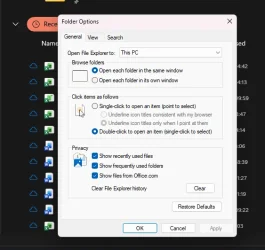
This is what I select to clear the list
Screenshot 2025-11-15 165800.webp

Note that all files in the list are Onedrive files. They do exist.
 

My Computers

System One System Two

  • OS
    Windows 10
    Computer type
    PC/Desktop
    CPU
    Ryzen 5800X
    Motherboard
    MSI B550 Tomahawk
    Memory
    32GB
    Graphics Card(s)
    RTX 3070
  • Operating System
    Windows 11 24H1
    Computer type
    Laptop
    Manufacturer/Model
    Lenovo
    CPU
    Ryzen 6800HS
    Memory
    32GB
In the Registry, User shell folders
HKEY_CURRENT_USER\SOFTWARE\Microsoft\Windows\CurrentVersion\Explorer\User Shell Folders
Does the Recent entry match its common value?
%USERPROFILE%\AppData\Roaming\Microsoft\Windows\Recent


Denis
 

My Computer

System One

  • OS
    Windows 11 Home x64 Version 25H2 Build 26200.8037
Yes it does

Screenshot 2025-11-15 171614.webp

AI suggests that those are Onedrive Recent files which will disappear if I disable "office recent" files (it's true) and cannot be removed.

Is that right??
 

My Computers

System One System Two

  • OS
    Windows 10
    Computer type
    PC/Desktop
    CPU
    Ryzen 5800X
    Motherboard
    MSI B550 Tomahawk
    Memory
    32GB
    Graphics Card(s)
    RTX 3070
  • Operating System
    Windows 11 24H1
    Computer type
    Laptop
    Manufacturer/Model
    Lenovo
    CPU
    Ryzen 6800HS
    Memory
    32GB

Latest Support Threads

Back
Top Bottom