Unable to Remove the Libraries in Explorer


BackSpace

Well-known member
Member
Local time
5:21 AM
Posts
26
Location
Vancouver, B.C.
OS
Version 21H2 (OS Build 22000.2538)
I've recently had to roll my system back to 21H2 (Build 22000 2538) and
have been unable to remove unwanted objects in Explorer. I have tried . . .
Remove_Libraries_from_navigation_pane_in_File_Explorer.reg and
Remove_Quick_access_from_File_Explorer_Home_for_all_users.reg
and several older versions of individual registry tweaks by the talented
and generous Shawn Brink but still they persist in occupying real-estate.
I've also tried Winaero Tweaker but they aren't even available for removal.
I'd love to see them gone forever.

(2025.07.23) 13.58.27.webp

Thanks for stopping by,
Peter
 
Windows Build/Version
21H2 (Build 22000 2538)

My Computer

System One

  • OS
    Version 21H2 (OS Build 22000.2538)
    Computer type
    PC/Desktop
    Manufacturer/Model
    Dell Inc. OptiPlex 9020 01
    CPU
    Intel(R) Core(TM) i7-4770 CPU @ 3.40GHz
    Motherboard
    Dell Inc. 0PC5F7 A03
    Memory
    32 Gigabytes
    Graphics Card(s)
    Intel(R) HD Graphics 4600
    Sound Card
    Realtek High Definition Audio
    Monitor(s) Displays
    (#1) Samsung SMS27A550H, (#2) Samsung S24D330, (#3) Samsung SyncMaster SA550
    Screen Resolution
    (#1) 3840x2160, (#2) 1920x1080, (#3) 1920x1080
    Hard Drives
    C: D: Fanxiang S101Q 1TB (1024.2 GB) ssd
    E: WDC WDS100T2B0A-00SM50 (1000.2 GB) ssd
    F: WDC WD10SPZX-21Z10T0 (1000.2 GB) hdd
    G: HAJAAN HS512E 512GB (512.1 GB) ssd
    PSU
    Standard 255 Watt
    Case
    Tower
    Cooling
    Fans
    Keyboard
    PS/2
    Mouse
    PS/2
    Internet Speed
    955 Mbps Down, 18 Mbps Up
    Browser
    Firefox 150.0 (64-bit)
    Antivirus
    Malwarebytes

My Computers

System One System Two

  • OS
    Windows 11 Enterprise 25H2 26200 7462
    Computer type
    PC/Desktop
    Manufacturer/Model
    Custom Build
    CPU
    Intel XEON E5-2699 v3
    Motherboard
    ASUS X99-A
    Memory
    64GB Teamgroup UD4-3600
    Graphics Card(s)
    NVIDIA GeForce GTX 1080 Ti
    Sound Card
    Integrated
    Monitor(s) Displays
    ACER X34 Predator
    Screen Resolution
    3440 x 1440
    Hard Drives
    Crucial CT1000P 3P SSD8 1TB
    Crucial CT1000 BX500 SSD 1TB
    PSU
    GameMax Pro
    Case
    Fractal Design
    Cooling
    Corsair H110iGT + 6 140mm Fans
    Keyboard
    Corsair K4
    Mouse
    G-Skill G502
    Internet Speed
    300MBs
    Browser
    Chrome
    Antivirus
    OEM
    Other Info
    ASUS RT-AC87U Router
  • Operating System
    25H2 26200.5074
    Computer type
    Laptop
    Manufacturer/Model
    ASUS X555LA
    Memory
    8GB
    Browser
    Chrome
    Antivirus
    OEM
Hi Rollback_Jockey,

That looked like a solution. I did a right-click/delete on them but "they all came back".
(wasn't that a song?) Anyway, even after a re-boot, there they are (laughing at us).
Thanks. It was a good try.

(2025.07.23) 18.37.29.webp
Peter
 

My Computer

System One

  • OS
    Version 21H2 (OS Build 22000.2538)
    Computer type
    PC/Desktop
    Manufacturer/Model
    Dell Inc. OptiPlex 9020 01
    CPU
    Intel(R) Core(TM) i7-4770 CPU @ 3.40GHz
    Motherboard
    Dell Inc. 0PC5F7 A03
    Memory
    32 Gigabytes
    Graphics Card(s)
    Intel(R) HD Graphics 4600
    Sound Card
    Realtek High Definition Audio
    Monitor(s) Displays
    (#1) Samsung SMS27A550H, (#2) Samsung S24D330, (#3) Samsung SyncMaster SA550
    Screen Resolution
    (#1) 3840x2160, (#2) 1920x1080, (#3) 1920x1080
    Hard Drives
    C: D: Fanxiang S101Q 1TB (1024.2 GB) ssd
    E: WDC WDS100T2B0A-00SM50 (1000.2 GB) ssd
    F: WDC WD10SPZX-21Z10T0 (1000.2 GB) hdd
    G: HAJAAN HS512E 512GB (512.1 GB) ssd
    PSU
    Standard 255 Watt
    Case
    Tower
    Cooling
    Fans
    Keyboard
    PS/2
    Mouse
    PS/2
    Internet Speed
    955 Mbps Down, 18 Mbps Up
    Browser
    Firefox 150.0 (64-bit)
    Antivirus
    Malwarebytes
@BackSpace


My Computers

System One System Two

  • OS
    Win 11 Home ♦♦♦26200.8655 ♦♦♦♦♦♦♦25H2
    Computer type
    PC/Desktop
    Manufacturer/Model
    Built by Ghot® [May 2020]
    CPU
    AMD Ryzen 7 3700X
    Motherboard
    Asus Pro WS X570-ACE (BIOS 5302)
    Memory
    G.Skill (F4-3200C14D-16GTZKW)
    Graphics Card(s)
    EVGA RTX 2070 (08G-P4-2171-KR)
    Sound Card
    Realtek ALC1220P / ALC S1220A
    Monitor(s) Displays
    Dell U3011 30"
    Screen Resolution
    2560 x 1600
    Hard Drives
    2x Samsung 860 EVO 500GB,
    WD 4TB Black FZBX - SATA III,
    WD 8TB Black FZBX - SATA III,
    DRW-24B1ST CD/DVD Burner
    PSU
    PC Power & Cooling 750W Quad EPS12V
    Case
    Cooler Master ATCS 840 Tower
    Cooling
    CM Hyper 212 EVO (push/pull)
    Keyboard
    Ducky DK9008 Shine II Blue LED
    Mouse
    Logitech Optical M-100
    Internet Speed
    300/300
    Browser
    Firefox (latest)
    Antivirus
    Bitdefender Total Security
    Other Info
    Speakers: Klipsch Pro Media 2.1
  • Operating System
    Windows XP Pro 32bit w/SP3
    Computer type
    PC/Desktop
    Manufacturer/Model
    Built by Ghot® (not in use)
    CPU
    AMD Athlon 64 X2 5000+ (OC'd @ 3.2Ghz)
    Motherboard
    ASUS M2N32-SLI Deluxe Wireless Edition
    Memory
    TWIN2X2048-6400C4DHX (2 x 1GB, DDR2 800)
    Graphics card(s)
    EVGA 256-P2-N758-TR GeForce 8600GT SSC
    Sound Card
    Onboard
    Monitor(s) Displays
    ViewSonic G90FB Black 19" Professional (CRT)
    Screen Resolution
    up to 2048 x 1536
    Hard Drives
    WD 36GB 10,000rpm Raptor SATA
    Seagate 80GB 7200rpm SATA
    Lite-On LTR-52246S CD/RW
    Lite-On LH-18A1P CD/DVD Burner
    PSU
    PC Power & Cooling Silencer 750 Quad EPS12V
    Case
    Generic Beige case, 80mm fans
    Cooling
    ZALMAN 9500A 92mm CPU Cooler
    Keyboard
    Logitech Classic Keybooard 200
    Mouse
    Logitech Optical M-BT96a
    Internet Speed
    300/300
    Browser
    Firefox 3.x ??
    Antivirus
    Symantec (Norton)
    Other Info
    Still assembled, still runs. Haven't turned it on for 15 years?
Update to 24H2 the Quick access yellow star has been replaced by the Home icon and Gallery icon.
To remove those others Right Click > Unpin from Quick Access.

So you win more, but lose some, scenario.

Those are special system folders not Libraries is my understanding.
The Show Libraries On/Off option > 3 dots > Options > View Tab, towards the bottom.
 

My Computer

System One

  • OS
    Windows 11
Did you uncheck this from control panel>file explorer options?
Screenshot 2025-07-23 211934.webp
 

My Computers

System One System Two

  • OS
    Windows 11 Pro 25H2 26200.8655
    Computer type
    PC/Desktop
    Manufacturer/Model
    Dell Optiplex 7080
    CPU
    i9-10900 10 core 20 threads
    Motherboard
    DELL 0J37VM
    Memory
    32 gb
    Graphics Card(s)
    none-Intel UHD Graphics 630
    Sound Card
    Integrated Realtek
    Monitor(s) Displays
    Benq 27
    Screen Resolution
    2560x1440
    Hard Drives
    2x1tb Solidigm m.2 nvme /External drives 512gb Samsung m.2 sata+2tb Kingston m2.nvme
    PSU
    500w
    Case
    MT
    Cooling
    Dell Premium
    Keyboard
    Logitech wired
    Mouse
    Logitech wireless
    Internet Speed
    so slow I'm too embarrassed to tell
    Browser
    #1 Edge #2 Firefox
    Antivirus
    Defender+MWB Premium
  • Operating System
    Windows 11 Pro 24H2 26200.8457
    Computer type
    PC/Desktop
    Manufacturer/Model
    Beelink Mini PC SER5
    CPU
    AMD Ryzen 7 6800U
    Memory
    32 gb
    Graphics card(s)
    integrated
    Sound Card
    integrated
    Monitor(s) Displays
    Benq 27
    Screen Resolution
    2560x1440
    Hard Drives
    1TB Crucial nvme
    Keyboard
    Logitech wired
    Mouse
    Logitech wireless
    Internet Speed
    still too embarrassed to tell
    Browser
    Firefox
    Antivirus
    Defender
    Other Info
    System 3 is non compliant Dell 9020 i7-4770/24gb ram Win11 PRO 26200.8457
Hello Ghot,
Remove_all_folders_from_This_PC_in_File_Explorer.reg
Remove_Libraries_from_navigation_pane_in_File_Explorer.reg
Remove_Quick_access_from_File_Explorer_Home_for_all_users.reg
All done without success. I even opened RegEdit to make sure that
the keys had been deleted and the others were changed as per .reg

(2025.07.23) 21.31.42.webp

Good evening Helmut,

Re: Update to 24H2:
Other than "Security Updates" all I get from "Windows Update" is ...
"Your device is missing important security updates. Make sure to
keep your device on and plugged in so updates can complete", and
of course, nothing ever happens.

Can I jump from 21H2 to 24H2 in one gulp? . . . How? . . . Where?
Re: File Explorer Options > Show libraries: Yes, it's OFF but thanks.
I keep a dunce-cap nearby in case I miss one like that :)

Peter
 

My Computer

System One

  • OS
    Version 21H2 (OS Build 22000.2538)
    Computer type
    PC/Desktop
    Manufacturer/Model
    Dell Inc. OptiPlex 9020 01
    CPU
    Intel(R) Core(TM) i7-4770 CPU @ 3.40GHz
    Motherboard
    Dell Inc. 0PC5F7 A03
    Memory
    32 Gigabytes
    Graphics Card(s)
    Intel(R) HD Graphics 4600
    Sound Card
    Realtek High Definition Audio
    Monitor(s) Displays
    (#1) Samsung SMS27A550H, (#2) Samsung S24D330, (#3) Samsung SyncMaster SA550
    Screen Resolution
    (#1) 3840x2160, (#2) 1920x1080, (#3) 1920x1080
    Hard Drives
    C: D: Fanxiang S101Q 1TB (1024.2 GB) ssd
    E: WDC WDS100T2B0A-00SM50 (1000.2 GB) ssd
    F: WDC WD10SPZX-21Z10T0 (1000.2 GB) hdd
    G: HAJAAN HS512E 512GB (512.1 GB) ssd
    PSU
    Standard 255 Watt
    Case
    Tower
    Cooling
    Fans
    Keyboard
    PS/2
    Mouse
    PS/2
    Internet Speed
    955 Mbps Down, 18 Mbps Up
    Browser
    Firefox 150.0 (64-bit)
    Antivirus
    Malwarebytes
"Can I jump from 21H2 to 24H2 in one gulp? . . . How? . . . Where?"
I presume you mean from 23H2 as in your specs.
Either way, I never do that so cannot help, Windows updates have always worked for me, no system mods to Windows or components thereof.
24H2 had 2 holds on mine and was installed about 3/4 months late, but went through easily. I was always reading about people forcing the update complaining etc.
Some updates require previous updates to be done so doing them at the time in date order ensures minimal effort/problems.

View attachment 140308
 

My Computer

System One

  • OS
    Windows 11
UPDATE: 2 down, 6 to go.
I deleted the link to "OneDrive" by deleting the App itself . . .
Settings > Apps > Apps & features > Microsoft OneDrive > . . . Uninstall

And I got rid of "Quick Access" by adding ...
_____________________________________________________________________________________________

Windows Registry Editor Version 5.00

[HKEY_LOCAL_MACHINE\SOFTWARE\Microsoft\Windows\CurrentVersion\Explorer]
"HubMode"=dword:00000001

______________________________________________________________________________________________

Now, if I could only find a way to ditch . . .
Desktop, Documents, Downloads, Music, Pictures, Videos

Peter ( in need to reclaim real-estate in the left-plane )
 

My Computer

System One

  • OS
    Version 21H2 (OS Build 22000.2538)
    Computer type
    PC/Desktop
    Manufacturer/Model
    Dell Inc. OptiPlex 9020 01
    CPU
    Intel(R) Core(TM) i7-4770 CPU @ 3.40GHz
    Motherboard
    Dell Inc. 0PC5F7 A03
    Memory
    32 Gigabytes
    Graphics Card(s)
    Intel(R) HD Graphics 4600
    Sound Card
    Realtek High Definition Audio
    Monitor(s) Displays
    (#1) Samsung SMS27A550H, (#2) Samsung S24D330, (#3) Samsung SyncMaster SA550
    Screen Resolution
    (#1) 3840x2160, (#2) 1920x1080, (#3) 1920x1080
    Hard Drives
    C: D: Fanxiang S101Q 1TB (1024.2 GB) ssd
    E: WDC WDS100T2B0A-00SM50 (1000.2 GB) ssd
    F: WDC WD10SPZX-21Z10T0 (1000.2 GB) hdd
    G: HAJAAN HS512E 512GB (512.1 GB) ssd
    PSU
    Standard 255 Watt
    Case
    Tower
    Cooling
    Fans
    Keyboard
    PS/2
    Mouse
    PS/2
    Internet Speed
    955 Mbps Down, 18 Mbps Up
    Browser
    Firefox 150.0 (64-bit)
    Antivirus
    Malwarebytes
Now, if I could only find a way to ditch . . .
Desktop, Documents, Downloads, Music, Pictures, Videos


See the threads in post #4, mainly this one...


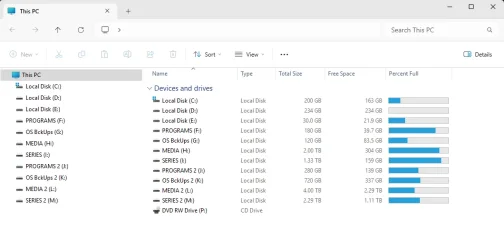
Mine looks like this...

00000 Hard Drives1.webp
 

My Computers

System One System Two

  • OS
    Win 11 Home ♦♦♦26200.8655 ♦♦♦♦♦♦♦25H2
    Computer type
    PC/Desktop
    Manufacturer/Model
    Built by Ghot® [May 2020]
    CPU
    AMD Ryzen 7 3700X
    Motherboard
    Asus Pro WS X570-ACE (BIOS 5302)
    Memory
    G.Skill (F4-3200C14D-16GTZKW)
    Graphics Card(s)
    EVGA RTX 2070 (08G-P4-2171-KR)
    Sound Card
    Realtek ALC1220P / ALC S1220A
    Monitor(s) Displays
    Dell U3011 30"
    Screen Resolution
    2560 x 1600
    Hard Drives
    2x Samsung 860 EVO 500GB,
    WD 4TB Black FZBX - SATA III,
    WD 8TB Black FZBX - SATA III,
    DRW-24B1ST CD/DVD Burner
    PSU
    PC Power & Cooling 750W Quad EPS12V
    Case
    Cooler Master ATCS 840 Tower
    Cooling
    CM Hyper 212 EVO (push/pull)
    Keyboard
    Ducky DK9008 Shine II Blue LED
    Mouse
    Logitech Optical M-100
    Internet Speed
    300/300
    Browser
    Firefox (latest)
    Antivirus
    Bitdefender Total Security
    Other Info
    Speakers: Klipsch Pro Media 2.1
  • Operating System
    Windows XP Pro 32bit w/SP3
    Computer type
    PC/Desktop
    Manufacturer/Model
    Built by Ghot® (not in use)
    CPU
    AMD Athlon 64 X2 5000+ (OC'd @ 3.2Ghz)
    Motherboard
    ASUS M2N32-SLI Deluxe Wireless Edition
    Memory
    TWIN2X2048-6400C4DHX (2 x 1GB, DDR2 800)
    Graphics card(s)
    EVGA 256-P2-N758-TR GeForce 8600GT SSC
    Sound Card
    Onboard
    Monitor(s) Displays
    ViewSonic G90FB Black 19" Professional (CRT)
    Screen Resolution
    up to 2048 x 1536
    Hard Drives
    WD 36GB 10,000rpm Raptor SATA
    Seagate 80GB 7200rpm SATA
    Lite-On LTR-52246S CD/RW
    Lite-On LH-18A1P CD/DVD Burner
    PSU
    PC Power & Cooling Silencer 750 Quad EPS12V
    Case
    Generic Beige case, 80mm fans
    Cooling
    ZALMAN 9500A 92mm CPU Cooler
    Keyboard
    Logitech Classic Keybooard 200
    Mouse
    Logitech Optical M-BT96a
    Internet Speed
    300/300
    Browser
    Firefox 3.x ??
    Antivirus
    Symantec (Norton)
    Other Info
    Still assembled, still runs. Haven't turned it on for 15 years?
Doesn't Right Click/Unpin work?

10263.webp
 

My Computers

System One System Two

  • OS
    Windows 11 Pro
    Computer type
    PC/Desktop
    Manufacturer/Model
    ASUS ROG Strix
  • Operating System
    Windows 11 Pro
    Computer type
    Laptop
    Manufacturer/Model
    ASUS VivoBook
As @Edwin mentioned... the ones at the very top (in Quick Access), can just be right clicked and choose: Unpin.
 

My Computers

System One System Two

  • OS
    Win 11 Home ♦♦♦26200.8655 ♦♦♦♦♦♦♦25H2
    Computer type
    PC/Desktop
    Manufacturer/Model
    Built by Ghot® [May 2020]
    CPU
    AMD Ryzen 7 3700X
    Motherboard
    Asus Pro WS X570-ACE (BIOS 5302)
    Memory
    G.Skill (F4-3200C14D-16GTZKW)
    Graphics Card(s)
    EVGA RTX 2070 (08G-P4-2171-KR)
    Sound Card
    Realtek ALC1220P / ALC S1220A
    Monitor(s) Displays
    Dell U3011 30"
    Screen Resolution
    2560 x 1600
    Hard Drives
    2x Samsung 860 EVO 500GB,
    WD 4TB Black FZBX - SATA III,
    WD 8TB Black FZBX - SATA III,
    DRW-24B1ST CD/DVD Burner
    PSU
    PC Power & Cooling 750W Quad EPS12V
    Case
    Cooler Master ATCS 840 Tower
    Cooling
    CM Hyper 212 EVO (push/pull)
    Keyboard
    Ducky DK9008 Shine II Blue LED
    Mouse
    Logitech Optical M-100
    Internet Speed
    300/300
    Browser
    Firefox (latest)
    Antivirus
    Bitdefender Total Security
    Other Info
    Speakers: Klipsch Pro Media 2.1
  • Operating System
    Windows XP Pro 32bit w/SP3
    Computer type
    PC/Desktop
    Manufacturer/Model
    Built by Ghot® (not in use)
    CPU
    AMD Athlon 64 X2 5000+ (OC'd @ 3.2Ghz)
    Motherboard
    ASUS M2N32-SLI Deluxe Wireless Edition
    Memory
    TWIN2X2048-6400C4DHX (2 x 1GB, DDR2 800)
    Graphics card(s)
    EVGA 256-P2-N758-TR GeForce 8600GT SSC
    Sound Card
    Onboard
    Monitor(s) Displays
    ViewSonic G90FB Black 19" Professional (CRT)
    Screen Resolution
    up to 2048 x 1536
    Hard Drives
    WD 36GB 10,000rpm Raptor SATA
    Seagate 80GB 7200rpm SATA
    Lite-On LTR-52246S CD/RW
    Lite-On LH-18A1P CD/DVD Burner
    PSU
    PC Power & Cooling Silencer 750 Quad EPS12V
    Case
    Generic Beige case, 80mm fans
    Cooling
    ZALMAN 9500A 92mm CPU Cooler
    Keyboard
    Logitech Classic Keybooard 200
    Mouse
    Logitech Optical M-BT96a
    Internet Speed
    300/300
    Browser
    Firefox 3.x ??
    Antivirus
    Symantec (Norton)
    Other Info
    Still assembled, still runs. Haven't turned it on for 15 years?
Hi Ghot,

Been there. . . Done that . . . Did it again (third time) . . . All I got was another
T-shirt. Re-started Explorer.exe . . . Re-Booted CPU . . They're STILL there.
What you have is exactly what I had before my 23H2 went totally bananas.
 

My Computer

System One

  • OS
    Version 21H2 (OS Build 22000.2538)
    Computer type
    PC/Desktop
    Manufacturer/Model
    Dell Inc. OptiPlex 9020 01
    CPU
    Intel(R) Core(TM) i7-4770 CPU @ 3.40GHz
    Motherboard
    Dell Inc. 0PC5F7 A03
    Memory
    32 Gigabytes
    Graphics Card(s)
    Intel(R) HD Graphics 4600
    Sound Card
    Realtek High Definition Audio
    Monitor(s) Displays
    (#1) Samsung SMS27A550H, (#2) Samsung S24D330, (#3) Samsung SyncMaster SA550
    Screen Resolution
    (#1) 3840x2160, (#2) 1920x1080, (#3) 1920x1080
    Hard Drives
    C: D: Fanxiang S101Q 1TB (1024.2 GB) ssd
    E: WDC WDS100T2B0A-00SM50 (1000.2 GB) ssd
    F: WDC WD10SPZX-21Z10T0 (1000.2 GB) hdd
    G: HAJAAN HS512E 512GB (512.1 GB) ssd
    PSU
    Standard 255 Watt
    Case
    Tower
    Cooling
    Fans
    Keyboard
    PS/2
    Mouse
    PS/2
    Internet Speed
    955 Mbps Down, 18 Mbps Up
    Browser
    Firefox 150.0 (64-bit)
    Antivirus
    Malwarebytes
Hi Ghot,

Been there. . . Done that . . . Did it again (third time) . . . All I got was another
T-shirt. Re-started Explorer.exe . . . Re-Booted CPU . . They're STILL there.
What you have is exactly what I had before my 23H2 went totally bananas.


Many registry edits require a reboot of the computer itself, before they take effect.
Even for the ones that don't claim to need a reboot... I reboot anyway.


You could also just do an In-Place upgrade. It will "fix" Window's problems.
Do Option 2, the ISO method...


An In-Place Upgrade "compares" what is installed on the computer, with the Windows ISO image.
Then, it overwrites any corrupted Windows files, with clean copies from the ISO image.
This is how it "repairs" Windows while allowing you to keep your programs and personal files.


My Computers

System One System Two

  • OS
    Win 11 Home ♦♦♦26200.8655 ♦♦♦♦♦♦♦25H2
    Computer type
    PC/Desktop
    Manufacturer/Model
    Built by Ghot® [May 2020]
    CPU
    AMD Ryzen 7 3700X
    Motherboard
    Asus Pro WS X570-ACE (BIOS 5302)
    Memory
    G.Skill (F4-3200C14D-16GTZKW)
    Graphics Card(s)
    EVGA RTX 2070 (08G-P4-2171-KR)
    Sound Card
    Realtek ALC1220P / ALC S1220A
    Monitor(s) Displays
    Dell U3011 30"
    Screen Resolution
    2560 x 1600
    Hard Drives
    2x Samsung 860 EVO 500GB,
    WD 4TB Black FZBX - SATA III,
    WD 8TB Black FZBX - SATA III,
    DRW-24B1ST CD/DVD Burner
    PSU
    PC Power & Cooling 750W Quad EPS12V
    Case
    Cooler Master ATCS 840 Tower
    Cooling
    CM Hyper 212 EVO (push/pull)
    Keyboard
    Ducky DK9008 Shine II Blue LED
    Mouse
    Logitech Optical M-100
    Internet Speed
    300/300
    Browser
    Firefox (latest)
    Antivirus
    Bitdefender Total Security
    Other Info
    Speakers: Klipsch Pro Media 2.1
  • Operating System
    Windows XP Pro 32bit w/SP3
    Computer type
    PC/Desktop
    Manufacturer/Model
    Built by Ghot® (not in use)
    CPU
    AMD Athlon 64 X2 5000+ (OC'd @ 3.2Ghz)
    Motherboard
    ASUS M2N32-SLI Deluxe Wireless Edition
    Memory
    TWIN2X2048-6400C4DHX (2 x 1GB, DDR2 800)
    Graphics card(s)
    EVGA 256-P2-N758-TR GeForce 8600GT SSC
    Sound Card
    Onboard
    Monitor(s) Displays
    ViewSonic G90FB Black 19" Professional (CRT)
    Screen Resolution
    up to 2048 x 1536
    Hard Drives
    WD 36GB 10,000rpm Raptor SATA
    Seagate 80GB 7200rpm SATA
    Lite-On LTR-52246S CD/RW
    Lite-On LH-18A1P CD/DVD Burner
    PSU
    PC Power & Cooling Silencer 750 Quad EPS12V
    Case
    Generic Beige case, 80mm fans
    Cooling
    ZALMAN 9500A 92mm CPU Cooler
    Keyboard
    Logitech Classic Keybooard 200
    Mouse
    Logitech Optical M-BT96a
    Internet Speed
    300/300
    Browser
    Firefox 3.x ??
    Antivirus
    Symantec (Norton)
    Other Info
    Still assembled, still runs. Haven't turned it on for 15 years?
I've said it all in posts #5,#8 and so have others.
OneDrive is uninstalled and unpinned from that File Explorer View, I choose to Pin Documents and Downloads in #8.
No need for system mods and registry edits, wasted effort.

Eventually you will update Windows and File Explorer gets better options.
 

My Computer

System One

  • OS
    Windows 11
You have to do some tweaking...,
ideally, you should Show This PC only,
you have to remove Home and Gallery,
don't Show All Folders,
and unpin the rest..., and only pin what you desire...

9479.webp
 

My Computers

System One System Two

  • OS
    Windows 11 Pro
    Computer type
    PC/Desktop
    Manufacturer/Model
    ASUS ROG Strix
  • Operating System
    Windows 11 Pro
    Computer type
    Laptop
    Manufacturer/Model
    ASUS VivoBook
So . . . Are we having fun yet? NOP! I did the . . .
(2025.07.26) 12.17.22.webp
. . . with the "keep-my-stuff" option and using the on-line method. What a disaster! Program Files and Program Files (x86) were
wiped clean of all my installed applications. It would take me a month to put everything back. While I was there, I noticed that
Background Slideshow won't work at all. "Solid Color" is all you get.

Now for the real kicker. NONE of Shawn Brink's reliable "REMOVE this crap . . . REG's" did anything at all. Needless to say, C: was
restored from a back-up clone. It's beginning to look like I may have to put up with Micro$oft's ever increasing appetite for Bloatware.
 

My Computer

System One

  • OS
    Version 21H2 (OS Build 22000.2538)
    Computer type
    PC/Desktop
    Manufacturer/Model
    Dell Inc. OptiPlex 9020 01
    CPU
    Intel(R) Core(TM) i7-4770 CPU @ 3.40GHz
    Motherboard
    Dell Inc. 0PC5F7 A03
    Memory
    32 Gigabytes
    Graphics Card(s)
    Intel(R) HD Graphics 4600
    Sound Card
    Realtek High Definition Audio
    Monitor(s) Displays
    (#1) Samsung SMS27A550H, (#2) Samsung S24D330, (#3) Samsung SyncMaster SA550
    Screen Resolution
    (#1) 3840x2160, (#2) 1920x1080, (#3) 1920x1080
    Hard Drives
    C: D: Fanxiang S101Q 1TB (1024.2 GB) ssd
    E: WDC WDS100T2B0A-00SM50 (1000.2 GB) ssd
    F: WDC WD10SPZX-21Z10T0 (1000.2 GB) hdd
    G: HAJAAN HS512E 512GB (512.1 GB) ssd
    PSU
    Standard 255 Watt
    Case
    Tower
    Cooling
    Fans
    Keyboard
    PS/2
    Mouse
    PS/2
    Internet Speed
    955 Mbps Down, 18 Mbps Up
    Browser
    Firefox 150.0 (64-bit)
    Antivirus
    Malwarebytes
UPDATE: 2 down, 6 to go.
I deleted the link to "OneDrive" by deleting the App itself . . .
Settings > Apps > Apps & features > Microsoft OneDrive > . . . Uninstall

And I got rid of "Quick Access" by adding ...
_____________________________________________________________________________________________

Windows Registry Editor Version 5.00

[HKEY_LOCAL_MACHINE\SOFTWARE\Microsoft\Windows\CurrentVersion\Explorer]
"HubMode"=dword:00000001

______________________________________________________________________________________________

Now, if I could only find a way to ditch . . .
Desktop, Documents, Downloads, Music, Pictures, Videos

Peter ( in need to reclaim real-estate in the left-plane )
yes, I would also like to ditch some of those other folders. Anyone know all the values of the keyword CurrentVersion\Explorer?

To be clear, I'm not exactly a registry expert. Quite the opposite.
 

My Computer

System One

  • OS
    Windows 11 2H25
    Computer type
    PC/Desktop
    Manufacturer/Model
    DIY
    CPU
    AMD 9900X
    Motherboard
    MSI X870E Carbon
    Memory
    64 GB
    Graphics Card(s)
    AMD 9070 XT
    Sound Card
    built-in
    Monitor(s) Displays
    Dell 24"
    Hard Drives
    Sabrent 1 TB NVMe, 4 x SSD (need to check models), 4 x 3.5" HDD, 8-16 TB, all WD
    PSU
    Seasonic 850
    Case
    Fractal Design North XL (which I likw)
    Cooling
    Corsair AIO for CPU, fans for case
    Keyboard
    Das Keyboard 4
    Mouse
    Corsair M65 (white)
    Internet Speed
    1 TB download
    Browser
    Firefox
    Antivirus
    Bitdefender
    Other Info
    Also have Lenovo T14S laptop (me) and Lenovo Slim 71 (wife)
Hello x509 (any acquaintance to 007?) - Welcome to Registry Bashing 101

So far, I've succeeded in the miraculous disappearance of ALL except "Documents" (because it was passed my bedtime).
Please set a RESTORE POINT or some other complete Registry Back-up before following this amateur's instructions.

Go to: HKEY_LOCAL_MACHINE\SOFTWARE\Microsoft\Windows\CurrentVersion\Explorer\FolderDescriptions
From the following list of hieroglyphics, locate each of the following ...

{0ddd015d-b06c-45d5-8c4c-f59713854639} = Pictures
{24D89E24-2F19-4534-9DDE-6A6671FBB8FE} = Documents
{3214FAB5-9757-4298-BB61-92A9DEAA44FF} = Music
{33E28130-4E1E-4676-835A-98395C3BC3BB} = Pictures
{35286a68-3c57-41a1-bbb1-0eae73d76c95} = Videos
{374DE290-123F-4565-9164-39C4925E467B} = Downloads

NOTE: I AM NOT POSITIVE ABOUT THE LIST ABOVE.
By clicking on each one, you'll be able to find the culprits.
You may also find that there's more than one for each category.

(2025.08.06) 23.30.15.webp

Example: How to give Pictures the boot ...
If there in NO subkey called PropertyBag, then create one.
Click on PropertyBag and go into the right plane and create a String Value
Rename the New Value #1 to ThisPCPolicy
Right-click ThisPCPolicy and Modify... its Data Value to Hide

(2025.08.06) 23.30.35.webp

As I recall, when you're all done, a re-boot may be necessary to see results.
Good luck. My sketchy advice usually needs it.
Peter

PS: I just found "Documents" at {f42ee2d3-909f-4907-8871-4c22fc0bf756}.

(2025.08.07) 00.46.23.webp
 
Last edited:

My Computer

System One

  • OS
    Version 21H2 (OS Build 22000.2538)
    Computer type
    PC/Desktop
    Manufacturer/Model
    Dell Inc. OptiPlex 9020 01
    CPU
    Intel(R) Core(TM) i7-4770 CPU @ 3.40GHz
    Motherboard
    Dell Inc. 0PC5F7 A03
    Memory
    32 Gigabytes
    Graphics Card(s)
    Intel(R) HD Graphics 4600
    Sound Card
    Realtek High Definition Audio
    Monitor(s) Displays
    (#1) Samsung SMS27A550H, (#2) Samsung S24D330, (#3) Samsung SyncMaster SA550
    Screen Resolution
    (#1) 3840x2160, (#2) 1920x1080, (#3) 1920x1080
    Hard Drives
    C: D: Fanxiang S101Q 1TB (1024.2 GB) ssd
    E: WDC WDS100T2B0A-00SM50 (1000.2 GB) ssd
    F: WDC WD10SPZX-21Z10T0 (1000.2 GB) hdd
    G: HAJAAN HS512E 512GB (512.1 GB) ssd
    PSU
    Standard 255 Watt
    Case
    Tower
    Cooling
    Fans
    Keyboard
    PS/2
    Mouse
    PS/2
    Internet Speed
    955 Mbps Down, 18 Mbps Up
    Browser
    Firefox 150.0 (64-bit)
    Antivirus
    Malwarebytes

Latest Support Threads

Back
Top Bottom