
I use Windows 11
Personal use
How many GBs or TBs do you need to back up? Sorry do not know
I use Paragon for backups
Normal user
What have you tried so far? - Paragon
In trying to rescue a Paragon backup I made.
Someone kindly sent me the following, but to date I am struggling to implement it.
Any help or advise please in trying to re-install this backup would be greatly appreciated:
According to Google AI, you can mount your Paragon backup as a virtual disk. Once you have done that, you should be able to copy your files from the virtual disk to another drive.
To access your email, You would need to figure out how to restore your email programs data to a new installation of your email software.
In any event, getting access to your files as a virtual disk is a good step to preserve your data in a format that you can use to access your data in other ways.
After doing that, if you could continue to try to restore your troublesome Paragon Drive image backup, but it looks like that may be very difficult or impossible.
Here's what Google AI says:
You can access a Paragon backup as a virtual disk by using the Universal Image Mounter to mount the backup archive as a network drive, or by using the P2V Adjust OS tool to convert the backup into a virtual disk file (.vhd, .vmdk) that can be used by virtualization software like VMware, Oracle VirtualBox, or Hyper-V. The method you choose depends on whether you want to access individual files or use the entire system in a virtual machine.
Method 1: Use Universal Image Mounter (for file access)
This method gives you access to individual files within the backup as if it were a drive letter.
Open the Paragon application, such as Paragon Hard Disk Manager.
Find and use the Universal Image Mounter (UIM) tool.
Map the backup archive to a network drive letter.
Browse the contents of the mapped drive to access files and folders.
Made some progress, the Image Mounter I feel is now embeded into Paragon Backup and Recovery 18 Community Edition.
Clicked Advance restore options
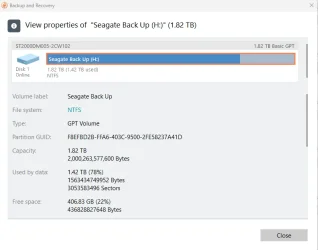
Then Seagate Back Up (H:)
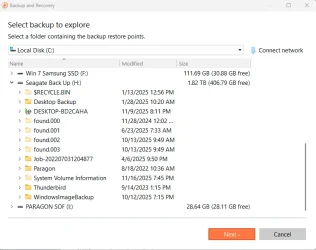
Explore/Restore Files
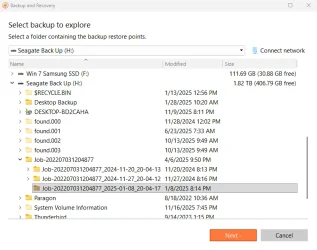
Seagate Back Up (H:)
Job-20207031204877
Job-202207031204877_2025_-0 1/8/2025 8:14PM
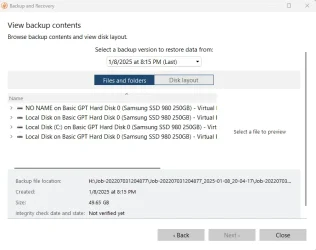
Next
See attached four images:
Personal use
How many GBs or TBs do you need to back up? Sorry do not know
I use Paragon for backups
Normal user
What have you tried so far? - Paragon
In trying to rescue a Paragon backup I made.
Someone kindly sent me the following, but to date I am struggling to implement it.
Any help or advise please in trying to re-install this backup would be greatly appreciated:
According to Google AI, you can mount your Paragon backup as a virtual disk. Once you have done that, you should be able to copy your files from the virtual disk to another drive.
To access your email, You would need to figure out how to restore your email programs data to a new installation of your email software.
In any event, getting access to your files as a virtual disk is a good step to preserve your data in a format that you can use to access your data in other ways.
After doing that, if you could continue to try to restore your troublesome Paragon Drive image backup, but it looks like that may be very difficult or impossible.
Here's what Google AI says:
You can access a Paragon backup as a virtual disk by using the Universal Image Mounter to mount the backup archive as a network drive, or by using the P2V Adjust OS tool to convert the backup into a virtual disk file (.vhd, .vmdk) that can be used by virtualization software like VMware, Oracle VirtualBox, or Hyper-V. The method you choose depends on whether you want to access individual files or use the entire system in a virtual machine.
Method 1: Use Universal Image Mounter (for file access)
This method gives you access to individual files within the backup as if it were a drive letter.
Open the Paragon application, such as Paragon Hard Disk Manager.
Find and use the Universal Image Mounter (UIM) tool.
Map the backup archive to a network drive letter.
Browse the contents of the mapped drive to access files and folders.
Made some progress, the Image Mounter I feel is now embeded into Paragon Backup and Recovery 18 Community Edition.
Clicked Advance restore options
Then Seagate Back Up (H:)
Explore/Restore Files
Seagate Back Up (H:)
Job-20207031204877
Job-202207031204877_2025_-0 1/8/2025 8:14PM
Next
See attached four images:
Attachments
My Computer
At a glance
Windows 11
- OS
- Windows 11
- Computer type
- PC/Desktop






