Personalization Reset and Re-register Windows Spotlight in Windows 11


Windows_Spotlight-new_header.webp

This tutorial will show you how to reset and re-register Windows Spotlight for your account in Windows 11.

In Windows 11, you can have Windows Spotlight as a theme and display different background images on your desktop and lock screen, and occasionally offers suggestions on the lock screen.

If Windows Spotlights stops working and/or stops changing the background image, you can reset and re-register Windows Spotlight to fix it.

Windows Spotlight will not work while connected to a metered network (ethernet or wireless), or in Battery Saver mode.

Windows Spotlight requires Background Apps to be turned on.

Country or region and Device setup region must be the same for Spotlight to work.
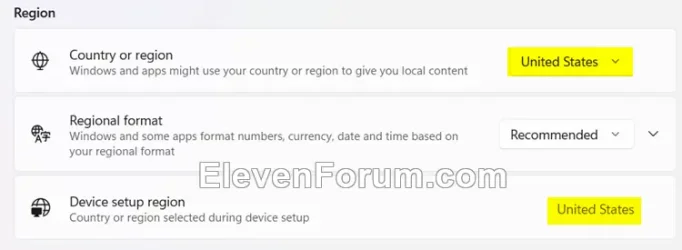
Region.webp


Sometimes it may take 24 to 48 hours after resetting for Windows Spotlight to sync again.


Another option is to use the Windows spotlight, dynamic images theme.

OR:


EXAMPLE: Windows Spotlight on Desktop and Lock screen

Windows_Spotlight_desktop_background.jpg
Windows_Spotlight_lock_screen.jpg


Here's How:

1 Change your desktop background to something other than Windows Spotlight. (see screenshot below)


Windows_Spotlight_desktop_background-1.png

2 Change your lock screen background to something other than Windows Spotlight. (see screenshot below)


Windows_Spotlight_lock_screen_background-1.png

3 Click/tap on the download button below to download the file below.

Reset_and_re-register_Windows_Spotlight.zip​


(Contents of BAT file for reference)
Code:
:: Turn on background apps
reg delete "HKEY_CURRENT_USER\Software\Microsoft\Windows\CurrentVersion\BackgroundAccessApplications" /v GlobalUserDisabled /f
reg delete "HKEY_CURRENT_USER\Software\Microsoft\Windows\CurrentVersion\Search" /v BackgroundAppGlobalToggle /f

:: Reset Windows Spotlight
DEL /F /S /Q /A "%USERPROFILE%/AppData\Local\Packages\MicrosoftWindows.Client.CBS_cw5n1h2txyewy\LocalCache\Microsoft\IrisService"
DEL /F /S /Q /A "%USERPROFILE%/AppData\Local\Packages\Microsoft.Windows.ContentDeliveryManager_cw5n1h2txyewy\LocalCache\Microsoft\IrisService"
DEL /F /S /Q /A "%USERPROFILE%/AppData\Local\Packages\Microsoft.Windows.ContentDeliveryManager_cw5n1h2txyewy\LocalState\Assets"
DEL /F /S /Q /A "%USERPROFILE%/AppData\Local\Packages\Microsoft.Windows.ContentDeliveryManager_cw5n1h2txyewy\Settings"

:: Re-register Windows Spotlight
PowerShell -Command "Get-AppxPackage -AllUsers *Microsoft.Windows.ContentDeliveryManager* | Reset-AppxPackage"
PowerShell -Command "Get-AppxPackage -AllUsers *MicrosoftWindows.Client.CBS* | Reset-AppxPackage"

PowerShell -ExecutionPolicy Unrestricted -Command "& {$manifest = (Get-AppxPackage *ContentDeliveryManager*).InstallLocation + '\AppxManifest.xml' ; Add-AppxPackage -DisableDevelopmentMode -Register $manifest}"
PowerShell -ExecutionPolicy Unrestricted -Command "& {$manifest = (Get-AppxPackage *MicrosoftWindows.Client.CBS*).InstallLocation + '\AppxManifest.xml' ; Add-AppxPackage -DisableDevelopmentMode -Register $manifest}"

4 Save the ZIP file to your desktop.

5 Unblock the ZIP file.

6 Extract the BAT file from the ZIP file.

7 Run the BAT file.

8 Restart the computer to apply.

9 After you sign in, you can change your desktop background back to Windows Spotlight if wanted. (see screenshot below)


Windows_Spotlight_desktop_background-2.png

10 Change your lock screen background back to Windows Spotlight if wanted. (see screenshot below)


Windows_Spotlight_lock_screen_background-2.png


That's it,
Shawn Brink


Attachments

Last edited:
MicrosoftWindows.Client.CBS is for desktop Spotlight.
Microsoft.Windows.ContentDeliveryManager is for lockscreen Spotlight.

Normally, you should only use the command targeting the module that is acting wayward (in my case, ContentDeliveryManager, and in @HHH03's case, Client.CBS) on your computer, but it isn't decisively known whether these two ping one another when they fetch content from Microsoft's servers or if they're fully independent. However, it won't cost you anything to run the full front-page script (which targets both modules) even if it resets the Spotlight type that does work for you.

We're just stabbing in the dark, that's all----keeping an ear out for something that cries back.
 

My Computers My Computers

  • At a glance

    Windows 11 25H2 ProAMD Ryzen 7 9700X32GB Crucial Pro DDR5-6000-CL36 UDIMM OC Gami...ASUS Prime GeForce RTX 4070 Super OC
    OS
    Windows 11 25H2 Pro
    Computer type
    PC/Desktop
    Manufacturer/Model
    Custom
    CPU
    AMD Ryzen 7 9700X
    Motherboard
    Asus ROG Strix X870E-E Gaming Wifi7 NEO
    Memory
    32GB Crucial Pro DDR5-6000-CL36 UDIMM OC Gaming Memory (2 x CP16G60C36U5B), CL36-38-38-80
    Graphics Card(s)
    ASUS Prime GeForce RTX 4070 Super OC
    Monitor(s) Displays
    LG UltraGear 27GS85Q-B/EU 27'' Fast IPS
    Screen Resolution
    2560x1440
    Hard Drives
    1 Kingston Fury Renegade (gen4) 1TB + 1 Kingston Fury Renegade G5 2TB + 1 WD_Black SN850X 1TB + 1 Samsung 870 EVO 1TB + 3 x Western Digital Green 2TB
    PSU
    Be Quiet! Pure Power 12M 850W + Be Quiet! 12V-2X6/12VHPWR 90° Reversed cable
    Case
    Lian Li Lancool III Black
    Cooling
    Thermalright Phantom Spirit 120 SE ARGB
    Keyboard
    Logitech Deluxe 250
    Mouse
    Logitech G502X Black
    Other Info
    Work in progress. Hoping to upgrade to a Zen 7 and 60/70-series GPU in the future...if either scenario ever eventuates.
  • At a glance

    Windows 10 Pro 22H2Intel Core i5-25008GB Kingston HyperX Black DDR3-1600 (KHX16C9B...MSI GeForce GTX970 GAMING 4G
    Operating System
    Windows 10 Pro 22H2
    Computer type
    PC/Desktop
    CPU
    Intel Core i5-2500
    Motherboard
    Asus P8P67LE B3 LGA1155
    Memory
    8GB Kingston HyperX Black DDR3-1600 (KHX16C9B1BK2/8X)
    Graphics card(s)
    MSI GeForce GTX970 GAMING 4G
    Monitor(s) Displays
    ASUS VS238N 24''
    Screen Resolution
    1920x1080px
    Hard Drives
    1 x Samsung 850 Pro 128GB MZ-7KE128 2.5'' SATA SSD
    1 x Western Digital Green 2TB WD20EZRX-00DC0B0 3.5'' SATA HDD
    2 x Western Digital Green 2TB WD20EZRX-00D8PB0 3.5'' SATA HDD
    PSU
    Be Quiet! Pure Power L8-630W 80+ Bronze
    Case
    CoolerMaster Gladiator 600
    Cooling
    CoolerMaster Hyper 212 EVO single-tower CPU air cooler
    Keyboard
    Logitech 250 Deluxe
    Mouse
    Logitech M500
    Other Info
    Bought in summer of 2012. Permanently decommissioned and stripped of its parts in January 2025.
    RIP old boy.
Okay, so I created a second account on my PC and within a minute, lockscreen had new images ready. Desktop didn't, but I may have been a bit too impatient.
Is it possible ContentDeliveryManager is borked at a very low level for my main account? Or could it be another module in %LOCALAPPDATA%\Packages\?

I will proceed with a small experiment: overwriting my main account's CDM folder AND the registry folders for IrisService, LockScreen and CDM with their counterparts from this guest account. Let's see if it changes something.


EDIT: another avenue I'm pondering is whether the length of one's username could be an internal hurdle. My username (which is my full name) is 18 characters long and I did set it manually (as I wanted to simply drop in a lot of AppData stuff salvaged from my previous Windows install). I think the maximum is 16, but I am doubtful, as on my old Windows 11 25H2, I used the same 18-char username and lockscreen!Spotlight was updating without any issue.
 
Last edited:

My Computers My Computers

  • At a glance

    Windows 11 25H2 ProAMD Ryzen 7 9700X32GB Crucial Pro DDR5-6000-CL36 UDIMM OC Gami...ASUS Prime GeForce RTX 4070 Super OC
    OS
    Windows 11 25H2 Pro
    Computer type
    PC/Desktop
    Manufacturer/Model
    Custom
    CPU
    AMD Ryzen 7 9700X
    Motherboard
    Asus ROG Strix X870E-E Gaming Wifi7 NEO
    Memory
    32GB Crucial Pro DDR5-6000-CL36 UDIMM OC Gaming Memory (2 x CP16G60C36U5B), CL36-38-38-80
    Graphics Card(s)
    ASUS Prime GeForce RTX 4070 Super OC
    Monitor(s) Displays
    LG UltraGear 27GS85Q-B/EU 27'' Fast IPS
    Screen Resolution
    2560x1440
    Hard Drives
    1 Kingston Fury Renegade (gen4) 1TB + 1 Kingston Fury Renegade G5 2TB + 1 WD_Black SN850X 1TB + 1 Samsung 870 EVO 1TB + 3 x Western Digital Green 2TB
    PSU
    Be Quiet! Pure Power 12M 850W + Be Quiet! 12V-2X6/12VHPWR 90° Reversed cable
    Case
    Lian Li Lancool III Black
    Cooling
    Thermalright Phantom Spirit 120 SE ARGB
    Keyboard
    Logitech Deluxe 250
    Mouse
    Logitech G502X Black
    Other Info
    Work in progress. Hoping to upgrade to a Zen 7 and 60/70-series GPU in the future...if either scenario ever eventuates.
  • At a glance

    Windows 10 Pro 22H2Intel Core i5-25008GB Kingston HyperX Black DDR3-1600 (KHX16C9B...MSI GeForce GTX970 GAMING 4G
    Operating System
    Windows 10 Pro 22H2
    Computer type
    PC/Desktop
    CPU
    Intel Core i5-2500
    Motherboard
    Asus P8P67LE B3 LGA1155
    Memory
    8GB Kingston HyperX Black DDR3-1600 (KHX16C9B1BK2/8X)
    Graphics card(s)
    MSI GeForce GTX970 GAMING 4G
    Monitor(s) Displays
    ASUS VS238N 24''
    Screen Resolution
    1920x1080px
    Hard Drives
    1 x Samsung 850 Pro 128GB MZ-7KE128 2.5'' SATA SSD
    1 x Western Digital Green 2TB WD20EZRX-00DC0B0 3.5'' SATA HDD
    2 x Western Digital Green 2TB WD20EZRX-00D8PB0 3.5'' SATA HDD
    PSU
    Be Quiet! Pure Power L8-630W 80+ Bronze
    Case
    CoolerMaster Gladiator 600
    Cooling
    CoolerMaster Hyper 212 EVO single-tower CPU air cooler
    Keyboard
    Logitech 250 Deluxe
    Mouse
    Logitech M500
    Other Info
    Bought in summer of 2012. Permanently decommissioned and stripped of its parts in January 2025.
    RIP old boy.
I did DEL /F /S /Q /A "%USERPROFILE%/AppData\Local\Packages\MicrosoftWindows.Client.CBS_cw5n1h2txyewy\LocalCache\Microsoft\IrisService"
and it generated a new picture after restarting but when I ran the cmd to reregister I get this message.
 

Attachments

  • Screenshot (490).webp
    Screenshot (490).webp
    124.7 KB · Views: 10
Last edited:

My Computer My Computer

At a glance

Windows 11Ryzen 7945HX
OS
Windows 11
Computer type
Laptop
Manufacturer/Model
MSI Raider A18 HX
CPU
Ryzen 7945HX
I did DEL /F /S /Q /A "%USERPROFILE%/AppData\Local\Packages\Microsoft.Windows.ContentDeliveryManager_cw5n1h2txyewy\Settings" and it generated new pictures
Was the new images for the lock screen or the desktop spotlight images? Most of the fixes are working well for the lock screen spotlight, but these fixes don’t seem to reset and fix the desktop spotlight.
 

My Computer My Computer

At a glance

Windows 11 ProThreadripper Pro 3945WX32 GB DDR4 3200/EEC HynixNvidia RTX 2070 Super FE
OS
Windows 11 Pro
Computer type
PC/Desktop
Manufacturer/Model
Lenovo P620
CPU
Threadripper Pro 3945WX
Motherboard
Lenovo 1046
Memory
32 GB DDR4 3200/EEC Hynix
Graphics Card(s)
Nvidia RTX 2070 Super FE
Sound Card
N/A
Monitor(s) Displays
Samsung CRG5
Screen Resolution
1920X1080 240mHz
Hard Drives
Samsung PM9A1 1TB NVMe
Samsung 970 EVO Plus 500 GB NVMe
Samsung 850 EVO 1 TB
Samsung 850 PRO 256 GB
PSU
1000 Watt Lenovo 80 plus Platinum
Keyboard
Corsair K95 Platinum XT
Mouse
M65 Pro RGB
Was the new images for the lock screen or the desktop spotlight images? Most of the fixes are working well for the lock screen spotlight, but these fixes don’t seem to reset and fix the desktop spotl
The folders are empty though in %LocalAppData%\Packages\MicrosoftWindows.Client.CBS_cw5n1h2txyewy\LocalCache\Microsoft\IrisService\
 

My Computer My Computer

At a glance

Windows 11Ryzen 7945HX
OS
Windows 11
Computer type
Laptop
Manufacturer/Model
MSI Raider A18 HX
CPU
Ryzen 7945HX
The folders are empty though in %LocalAppData%\Packages\MicrosoftWindows.Client.CBS_cw5n1h2txyewy\LocalCache\Microsoft\IrisService\
With the account where desktop spotlight images aren’t being updated… the Microsoft\IrisService hasn’t been created yet. Registry also shows Microsoft hasn’t attempted to create these folders either… This is the problem I’m having, Microsoft hasn’t enabled Desktop Spotlight for new images on one of my user accounts, while the other account is working perfectly. I’m just trying to find a way to get Microsoft to activate Desktop Spotlight so it downloads the new images… so far I’ve failed on the quest.
 

My Computer My Computer

At a glance

Windows 11 ProThreadripper Pro 3945WX32 GB DDR4 3200/EEC HynixNvidia RTX 2070 Super FE
OS
Windows 11 Pro
Computer type
PC/Desktop
Manufacturer/Model
Lenovo P620
CPU
Threadripper Pro 3945WX
Motherboard
Lenovo 1046
Memory
32 GB DDR4 3200/EEC Hynix
Graphics Card(s)
Nvidia RTX 2070 Super FE
Sound Card
N/A
Monitor(s) Displays
Samsung CRG5
Screen Resolution
1920X1080 240mHz
Hard Drives
Samsung PM9A1 1TB NVMe
Samsung 970 EVO Plus 500 GB NVMe
Samsung 850 EVO 1 TB
Samsung 850 PRO 256 GB
PSU
1000 Watt Lenovo 80 plus Platinum
Keyboard
Corsair K95 Platinum XT
Mouse
M65 Pro RGB
With the account where desktop spotlight images aren’t being updated… the Microsoft\IrisService hasn’t been created yet. Registry also shows Microsoft hasn’t attempted to create these folders either… This is the problem I’m having, Microsoft hasn’t enabled Desktop Spotlight for new images on one of my user accounts, while the other account is working perfectly. I’m just trying to find a way to get Microsoft to activate Desktop Spotlight so it downloads the new images… so far I’ve failed on the quest.
I put in the correct screenshot. Had the wrong screenshot
 

My Computer My Computer

At a glance

Windows 11Ryzen 7945HX
OS
Windows 11
Computer type
Laptop
Manufacturer/Model
MSI Raider A18 HX
CPU
Ryzen 7945HX
Well, I at least know username length is not a factor: I tried creating a new user account with 22 characters and Spotlight still updated the lockscreen within minutes of account creation. That possibility is now out of the way.
I tried copy-pasting the whole folder into Packages and updating the URLs inside the \LocalState\TargetedContentCache\v3\338387 files to make sure they're pointing at the right user folder, but no joy.
At this point, I'm not even sure the problem lies with Microsoft.Windows.ContentDeliveryManager. Maybe one of the other modules (IrisService, LockApp, etc) that serves as internal connective tissue?

The part that is alarming me and pushing me in that direction is the fact that resets and re-registers sometimes result in incomplete Microsoft.Windows.ContentDeliveryManager folders from the get-go. Sometimes, /Assets/ is not created, even after multiple reboots. It could be a sign something else is broken on the pipeline that ends with CDM. CDM is just not getting proper instructions to update itself. That's what it feels like at this moment, and I don't know what to try next.
 

My Computers My Computers

  • At a glance

    Windows 11 25H2 ProAMD Ryzen 7 9700X32GB Crucial Pro DDR5-6000-CL36 UDIMM OC Gami...ASUS Prime GeForce RTX 4070 Super OC
    OS
    Windows 11 25H2 Pro
    Computer type
    PC/Desktop
    Manufacturer/Model
    Custom
    CPU
    AMD Ryzen 7 9700X
    Motherboard
    Asus ROG Strix X870E-E Gaming Wifi7 NEO
    Memory
    32GB Crucial Pro DDR5-6000-CL36 UDIMM OC Gaming Memory (2 x CP16G60C36U5B), CL36-38-38-80
    Graphics Card(s)
    ASUS Prime GeForce RTX 4070 Super OC
    Monitor(s) Displays
    LG UltraGear 27GS85Q-B/EU 27'' Fast IPS
    Screen Resolution
    2560x1440
    Hard Drives
    1 Kingston Fury Renegade (gen4) 1TB + 1 Kingston Fury Renegade G5 2TB + 1 WD_Black SN850X 1TB + 1 Samsung 870 EVO 1TB + 3 x Western Digital Green 2TB
    PSU
    Be Quiet! Pure Power 12M 850W + Be Quiet! 12V-2X6/12VHPWR 90° Reversed cable
    Case
    Lian Li Lancool III Black
    Cooling
    Thermalright Phantom Spirit 120 SE ARGB
    Keyboard
    Logitech Deluxe 250
    Mouse
    Logitech G502X Black
    Other Info
    Work in progress. Hoping to upgrade to a Zen 7 and 60/70-series GPU in the future...if either scenario ever eventuates.
  • At a glance

    Windows 10 Pro 22H2Intel Core i5-25008GB Kingston HyperX Black DDR3-1600 (KHX16C9B...MSI GeForce GTX970 GAMING 4G
    Operating System
    Windows 10 Pro 22H2
    Computer type
    PC/Desktop
    CPU
    Intel Core i5-2500
    Motherboard
    Asus P8P67LE B3 LGA1155
    Memory
    8GB Kingston HyperX Black DDR3-1600 (KHX16C9B1BK2/8X)
    Graphics card(s)
    MSI GeForce GTX970 GAMING 4G
    Monitor(s) Displays
    ASUS VS238N 24''
    Screen Resolution
    1920x1080px
    Hard Drives
    1 x Samsung 850 Pro 128GB MZ-7KE128 2.5'' SATA SSD
    1 x Western Digital Green 2TB WD20EZRX-00DC0B0 3.5'' SATA HDD
    2 x Western Digital Green 2TB WD20EZRX-00D8PB0 3.5'' SATA HDD
    PSU
    Be Quiet! Pure Power L8-630W 80+ Bronze
    Case
    CoolerMaster Gladiator 600
    Cooling
    CoolerMaster Hyper 212 EVO single-tower CPU air cooler
    Keyboard
    Logitech 250 Deluxe
    Mouse
    Logitech M500
    Other Info
    Bought in summer of 2012. Permanently decommissioned and stripped of its parts in January 2025.
    RIP old boy.
Well, I at least know username length is not a factor: I tried creating a new user account with 22 characters and Spotlight still updated the lockscreen within minutes of account creation. That possibility is now out of the way.
I tried copy-pasting the whole folder into Packages and updating the URLs inside the \LocalState\TargetedContentCache\v3\338387 files to make sure they're pointing at the right user folder, but no joy.
At this point, I'm not even sure the problem lies with Microsoft.Windows.ContentDeliveryManager. Maybe one of the other modules (IrisService, LockApp, etc) that serves as internal connective tissue?
Just doing the reset command worked as new backgrounds were generated for desktop spotlight.
 

My Computer My Computer

At a glance

Windows 11Ryzen 7945HX
OS
Windows 11
Computer type
Laptop
Manufacturer/Model
MSI Raider A18 HX
CPU
Ryzen 7945HX
If I had a dollar for every single time I issued a Powershell reset or re-register command, I'd be able to afford a new graphics card. >_>
 

My Computers My Computers

  • At a glance

    Windows 11 25H2 ProAMD Ryzen 7 9700X32GB Crucial Pro DDR5-6000-CL36 UDIMM OC Gami...ASUS Prime GeForce RTX 4070 Super OC
    OS
    Windows 11 25H2 Pro
    Computer type
    PC/Desktop
    Manufacturer/Model
    Custom
    CPU
    AMD Ryzen 7 9700X
    Motherboard
    Asus ROG Strix X870E-E Gaming Wifi7 NEO
    Memory
    32GB Crucial Pro DDR5-6000-CL36 UDIMM OC Gaming Memory (2 x CP16G60C36U5B), CL36-38-38-80
    Graphics Card(s)
    ASUS Prime GeForce RTX 4070 Super OC
    Monitor(s) Displays
    LG UltraGear 27GS85Q-B/EU 27'' Fast IPS
    Screen Resolution
    2560x1440
    Hard Drives
    1 Kingston Fury Renegade (gen4) 1TB + 1 Kingston Fury Renegade G5 2TB + 1 WD_Black SN850X 1TB + 1 Samsung 870 EVO 1TB + 3 x Western Digital Green 2TB
    PSU
    Be Quiet! Pure Power 12M 850W + Be Quiet! 12V-2X6/12VHPWR 90° Reversed cable
    Case
    Lian Li Lancool III Black
    Cooling
    Thermalright Phantom Spirit 120 SE ARGB
    Keyboard
    Logitech Deluxe 250
    Mouse
    Logitech G502X Black
    Other Info
    Work in progress. Hoping to upgrade to a Zen 7 and 60/70-series GPU in the future...if either scenario ever eventuates.
  • At a glance

    Windows 10 Pro 22H2Intel Core i5-25008GB Kingston HyperX Black DDR3-1600 (KHX16C9B...MSI GeForce GTX970 GAMING 4G
    Operating System
    Windows 10 Pro 22H2
    Computer type
    PC/Desktop
    CPU
    Intel Core i5-2500
    Motherboard
    Asus P8P67LE B3 LGA1155
    Memory
    8GB Kingston HyperX Black DDR3-1600 (KHX16C9B1BK2/8X)
    Graphics card(s)
    MSI GeForce GTX970 GAMING 4G
    Monitor(s) Displays
    ASUS VS238N 24''
    Screen Resolution
    1920x1080px
    Hard Drives
    1 x Samsung 850 Pro 128GB MZ-7KE128 2.5'' SATA SSD
    1 x Western Digital Green 2TB WD20EZRX-00DC0B0 3.5'' SATA HDD
    2 x Western Digital Green 2TB WD20EZRX-00D8PB0 3.5'' SATA HDD
    PSU
    Be Quiet! Pure Power L8-630W 80+ Bronze
    Case
    CoolerMaster Gladiator 600
    Cooling
    CoolerMaster Hyper 212 EVO single-tower CPU air cooler
    Keyboard
    Logitech 250 Deluxe
    Mouse
    Logitech M500
    Other Info
    Bought in summer of 2012. Permanently decommissioned and stripped of its parts in January 2025.
    RIP old boy.
If I had a dollar for every single time I issued a Powershell reset or re-register command, I'd be able to afford a new graphics card. >_>
It does seem something is definitely broken with Desktop Spotlight. For some reason the proper enabling mechanism isn’t enabling it.
 

My Computer My Computer

At a glance

Windows 11 ProThreadripper Pro 3945WX32 GB DDR4 3200/EEC HynixNvidia RTX 2070 Super FE
OS
Windows 11 Pro
Computer type
PC/Desktop
Manufacturer/Model
Lenovo P620
CPU
Threadripper Pro 3945WX
Motherboard
Lenovo 1046
Memory
32 GB DDR4 3200/EEC Hynix
Graphics Card(s)
Nvidia RTX 2070 Super FE
Sound Card
N/A
Monitor(s) Displays
Samsung CRG5
Screen Resolution
1920X1080 240mHz
Hard Drives
Samsung PM9A1 1TB NVMe
Samsung 970 EVO Plus 500 GB NVMe
Samsung 850 EVO 1 TB
Samsung 850 PRO 256 GB
PSU
1000 Watt Lenovo 80 plus Platinum
Keyboard
Corsair K95 Platinum XT
Mouse
M65 Pro RGB
Just doing the reset command worked as new backgrounds were generated for desktop spotlight.
If you could share those commands here just in case I’ve missed something. I’ve tried quite a few different scripts… not sure which ones work for the CBS system that’s not enabled as CDM is working perfectly for me.
 

My Computer My Computer

At a glance

Windows 11 ProThreadripper Pro 3945WX32 GB DDR4 3200/EEC HynixNvidia RTX 2070 Super FE
OS
Windows 11 Pro
Computer type
PC/Desktop
Manufacturer/Model
Lenovo P620
CPU
Threadripper Pro 3945WX
Motherboard
Lenovo 1046
Memory
32 GB DDR4 3200/EEC Hynix
Graphics Card(s)
Nvidia RTX 2070 Super FE
Sound Card
N/A
Monitor(s) Displays
Samsung CRG5
Screen Resolution
1920X1080 240mHz
Hard Drives
Samsung PM9A1 1TB NVMe
Samsung 970 EVO Plus 500 GB NVMe
Samsung 850 EVO 1 TB
Samsung 850 PRO 256 GB
PSU
1000 Watt Lenovo 80 plus Platinum
Keyboard
Corsair K95 Platinum XT
Mouse
M65 Pro RGB
If you could share those commands here just in case I’ve missed something. I’ve tried quite a few different scripts… not sure which ones work for the CBS system that’s not enabled as CDM is working perfectly for me.
All I did was change my desktop wallpaper to a normal wallpaper and then DEL /F /S /Q /A "%USERPROFILE%/AppData\Local\Packages\MicrosoftWindows.Client.CBS_cw5n1h2txyewy\LocalCache\Microsoft\IrisService". After that I restarted my computer and selected spotlight for desktop wallpaper and a new picture appeared afterwards.
 

My Computer My Computer

At a glance

Windows 11Ryzen 7945HX
OS
Windows 11
Computer type
Laptop
Manufacturer/Model
MSI Raider A18 HX
CPU
Ryzen 7945HX
All I did was change my desktop wallpaper to a normal wallpaper and then DEL /F /S /Q /A "%USERPROFILE%/AppData\Local\Packages\MicrosoftWindows.Client.CBS_cw5n1h2txyewy\LocalCache\Microsoft\IrisService". After that I restarted my computer and selected spotlight for desktop wallpaper and a new picture appeared afterwards.
That’s what’s wrong with my computer on the account where Desktop Spotlight isn’t working… those folders \Microsoft \IrisService aren't present and have never been created. Those files are present on the user account where Desktop Spotlight is working.
 

My Computer My Computer

At a glance

Windows 11 ProThreadripper Pro 3945WX32 GB DDR4 3200/EEC HynixNvidia RTX 2070 Super FE
OS
Windows 11 Pro
Computer type
PC/Desktop
Manufacturer/Model
Lenovo P620
CPU
Threadripper Pro 3945WX
Motherboard
Lenovo 1046
Memory
32 GB DDR4 3200/EEC Hynix
Graphics Card(s)
Nvidia RTX 2070 Super FE
Sound Card
N/A
Monitor(s) Displays
Samsung CRG5
Screen Resolution
1920X1080 240mHz
Hard Drives
Samsung PM9A1 1TB NVMe
Samsung 970 EVO Plus 500 GB NVMe
Samsung 850 EVO 1 TB
Samsung 850 PRO 256 GB
PSU
1000 Watt Lenovo 80 plus Platinum
Keyboard
Corsair K95 Platinum XT
Mouse
M65 Pro RGB
Reran the front-page script last night before turning my PC off, and this morning I switched back to Spotlight for lock screen and desktop.
The initial state of %LOCALAPPDATA%\Packages\Microsoft.Windows.ContentDeliveryManager_cw5n1h2txyewy\ is rather dour:
\AC\ contains four folders, but there is absolutely nothing inside of them.
\AppData\, \LocalCache\ and \RoamingState\ also contain zilch and \LocalState\, where \Assets\ (among others) is supposed to show up, is a no man's land except for one empty folder titled "Tips"
\Settings\ has four important files: two logs and roaming.lock and settings.dat.
\SystemAppData\ and \TempState\ are also empty.

%LOCALAPPDATA%\Packages\MicrosoftWindows.Client.CBS_cw5n1h2txyewy\ (desktop Spotlight), on the other hand, is in a better state, but no wallpapers have so far been fetched in \LocalCache\Microsoft\IrisService\ yet (had to create \Microsoft\IrisService\ manually, by the way). That, however, is not much of a concern as I know the retrieval process is much slower (can take up to a day or two), whereas lock screen Spotlight should work in a matter of minutes.
 
Last edited:

My Computers My Computers

  • At a glance

    Windows 11 25H2 ProAMD Ryzen 7 9700X32GB Crucial Pro DDR5-6000-CL36 UDIMM OC Gami...ASUS Prime GeForce RTX 4070 Super OC
    OS
    Windows 11 25H2 Pro
    Computer type
    PC/Desktop
    Manufacturer/Model
    Custom
    CPU
    AMD Ryzen 7 9700X
    Motherboard
    Asus ROG Strix X870E-E Gaming Wifi7 NEO
    Memory
    32GB Crucial Pro DDR5-6000-CL36 UDIMM OC Gaming Memory (2 x CP16G60C36U5B), CL36-38-38-80
    Graphics Card(s)
    ASUS Prime GeForce RTX 4070 Super OC
    Monitor(s) Displays
    LG UltraGear 27GS85Q-B/EU 27'' Fast IPS
    Screen Resolution
    2560x1440
    Hard Drives
    1 Kingston Fury Renegade (gen4) 1TB + 1 Kingston Fury Renegade G5 2TB + 1 WD_Black SN850X 1TB + 1 Samsung 870 EVO 1TB + 3 x Western Digital Green 2TB
    PSU
    Be Quiet! Pure Power 12M 850W + Be Quiet! 12V-2X6/12VHPWR 90° Reversed cable
    Case
    Lian Li Lancool III Black
    Cooling
    Thermalright Phantom Spirit 120 SE ARGB
    Keyboard
    Logitech Deluxe 250
    Mouse
    Logitech G502X Black
    Other Info
    Work in progress. Hoping to upgrade to a Zen 7 and 60/70-series GPU in the future...if either scenario ever eventuates.
  • At a glance

    Windows 10 Pro 22H2Intel Core i5-25008GB Kingston HyperX Black DDR3-1600 (KHX16C9B...MSI GeForce GTX970 GAMING 4G
    Operating System
    Windows 10 Pro 22H2
    Computer type
    PC/Desktop
    CPU
    Intel Core i5-2500
    Motherboard
    Asus P8P67LE B3 LGA1155
    Memory
    8GB Kingston HyperX Black DDR3-1600 (KHX16C9B1BK2/8X)
    Graphics card(s)
    MSI GeForce GTX970 GAMING 4G
    Monitor(s) Displays
    ASUS VS238N 24''
    Screen Resolution
    1920x1080px
    Hard Drives
    1 x Samsung 850 Pro 128GB MZ-7KE128 2.5'' SATA SSD
    1 x Western Digital Green 2TB WD20EZRX-00DC0B0 3.5'' SATA HDD
    2 x Western Digital Green 2TB WD20EZRX-00D8PB0 3.5'' SATA HDD
    PSU
    Be Quiet! Pure Power L8-630W 80+ Bronze
    Case
    CoolerMaster Gladiator 600
    Cooling
    CoolerMaster Hyper 212 EVO single-tower CPU air cooler
    Keyboard
    Logitech 250 Deluxe
    Mouse
    Logitech M500
    Other Info
    Bought in summer of 2012. Permanently decommissioned and stripped of its parts in January 2025.
    RIP old boy.
Reran the front-page script last night before turning my PC off, and this morning I switched back to Spotlight for lock screen and desktop.
The initial state of %LOCALAPPDATA%\Packages\Microsoft.Windows.ContentDeliveryManager_cw5n1h2txyewy\ is rather dour:
\AC\ contains four folders, but there is absolutely nothing inside of them.
\AppData\, \LocalCache\ and \RoamingState\ also contain zilch and \LocalState\, where \Assets\ (among others) is supposed to show up, is a no man's land except for one empty folder titled "Tips"
\Settings\ has four important files: two logs and roaming.lock and settings.dat.
\SystemAppData\ and \TempState\ are also empty.

%LOCALAPPDATA%\Packages\MicrosoftWindows.Client.CBS_cw5n1h2txyewy\ (desktop Spotlight), on the other hand, is in a better state, but no wallpapers have so far been fetched in \LocalCache\Microsoft\IrisService\ yet (had to create \Microsoft\IrisService\ manually, by the way). That, however, is not much of a concern as I know the retrieval process is much slower (can take up to a day or two), whereas lock screen Spotlight should work in a matter of minutes.
It seems like there’s something broken with Windows Spotlight as no individual should have to run scripts and create other user accounts to get something to work. I’ve noticed that my desktop background isn’t rotating now even though it’s enabled and all the folders are present. Is it broken again? Who knows.
 

My Computer My Computer

At a glance

Windows 11 ProThreadripper Pro 3945WX32 GB DDR4 3200/EEC HynixNvidia RTX 2070 Super FE
OS
Windows 11 Pro
Computer type
PC/Desktop
Manufacturer/Model
Lenovo P620
CPU
Threadripper Pro 3945WX
Motherboard
Lenovo 1046
Memory
32 GB DDR4 3200/EEC Hynix
Graphics Card(s)
Nvidia RTX 2070 Super FE
Sound Card
N/A
Monitor(s) Displays
Samsung CRG5
Screen Resolution
1920X1080 240mHz
Hard Drives
Samsung PM9A1 1TB NVMe
Samsung 970 EVO Plus 500 GB NVMe
Samsung 850 EVO 1 TB
Samsung 850 PRO 256 GB
PSU
1000 Watt Lenovo 80 plus Platinum
Keyboard
Corsair K95 Platinum XT
Mouse
M65 Pro RGB
@HHH03 At this point I must openly wonder if I should wait for 26H2 or another monthly update that introduces a deep overhaul of the modules in C:\Windows\SystemApps\ (where many of the package binaries are actually stored) and in %LOCALAPPDATA%\Packages\

Maybe I'll stick with static wallpapers because I have a sneaking suspicion my tinkering has incidentally borked CBS (the engine for desktop spotlight), too. >_<
 

My Computers My Computers

  • At a glance

    Windows 11 25H2 ProAMD Ryzen 7 9700X32GB Crucial Pro DDR5-6000-CL36 UDIMM OC Gami...ASUS Prime GeForce RTX 4070 Super OC
    OS
    Windows 11 25H2 Pro
    Computer type
    PC/Desktop
    Manufacturer/Model
    Custom
    CPU
    AMD Ryzen 7 9700X
    Motherboard
    Asus ROG Strix X870E-E Gaming Wifi7 NEO
    Memory
    32GB Crucial Pro DDR5-6000-CL36 UDIMM OC Gaming Memory (2 x CP16G60C36U5B), CL36-38-38-80
    Graphics Card(s)
    ASUS Prime GeForce RTX 4070 Super OC
    Monitor(s) Displays
    LG UltraGear 27GS85Q-B/EU 27'' Fast IPS
    Screen Resolution
    2560x1440
    Hard Drives
    1 Kingston Fury Renegade (gen4) 1TB + 1 Kingston Fury Renegade G5 2TB + 1 WD_Black SN850X 1TB + 1 Samsung 870 EVO 1TB + 3 x Western Digital Green 2TB
    PSU
    Be Quiet! Pure Power 12M 850W + Be Quiet! 12V-2X6/12VHPWR 90° Reversed cable
    Case
    Lian Li Lancool III Black
    Cooling
    Thermalright Phantom Spirit 120 SE ARGB
    Keyboard
    Logitech Deluxe 250
    Mouse
    Logitech G502X Black
    Other Info
    Work in progress. Hoping to upgrade to a Zen 7 and 60/70-series GPU in the future...if either scenario ever eventuates.
  • At a glance

    Windows 10 Pro 22H2Intel Core i5-25008GB Kingston HyperX Black DDR3-1600 (KHX16C9B...MSI GeForce GTX970 GAMING 4G
    Operating System
    Windows 10 Pro 22H2
    Computer type
    PC/Desktop
    CPU
    Intel Core i5-2500
    Motherboard
    Asus P8P67LE B3 LGA1155
    Memory
    8GB Kingston HyperX Black DDR3-1600 (KHX16C9B1BK2/8X)
    Graphics card(s)
    MSI GeForce GTX970 GAMING 4G
    Monitor(s) Displays
    ASUS VS238N 24''
    Screen Resolution
    1920x1080px
    Hard Drives
    1 x Samsung 850 Pro 128GB MZ-7KE128 2.5'' SATA SSD
    1 x Western Digital Green 2TB WD20EZRX-00DC0B0 3.5'' SATA HDD
    2 x Western Digital Green 2TB WD20EZRX-00D8PB0 3.5'' SATA HDD
    PSU
    Be Quiet! Pure Power L8-630W 80+ Bronze
    Case
    CoolerMaster Gladiator 600
    Cooling
    CoolerMaster Hyper 212 EVO single-tower CPU air cooler
    Keyboard
    Logitech 250 Deluxe
    Mouse
    Logitech M500
    Other Info
    Bought in summer of 2012. Permanently decommissioned and stripped of its parts in January 2025.
    RIP old boy.
@HHH03 At this point I must openly wonder if I should wait for 26H2 or another monthly update that introduces a deep overhaul of the modules in C:\Windows\SystemApps\ (where many of the package binaries are actually stored) and in %LOCALAPPDATA%\Packages\

Maybe I'll stick with static wallpapers because I have a sneaking suspicion my tinkering has incidentally borked CBS (the engine for desktop spotlight), too. >_<
Very possible. Hopefully the “C” update will fix whatever is broken. I’ve also tried some insider builds too recently, they too had broken Desktop Spotlight.
 

My Computer My Computer

At a glance

Windows 11 ProThreadripper Pro 3945WX32 GB DDR4 3200/EEC HynixNvidia RTX 2070 Super FE
OS
Windows 11 Pro
Computer type
PC/Desktop
Manufacturer/Model
Lenovo P620
CPU
Threadripper Pro 3945WX
Motherboard
Lenovo 1046
Memory
32 GB DDR4 3200/EEC Hynix
Graphics Card(s)
Nvidia RTX 2070 Super FE
Sound Card
N/A
Monitor(s) Displays
Samsung CRG5
Screen Resolution
1920X1080 240mHz
Hard Drives
Samsung PM9A1 1TB NVMe
Samsung 970 EVO Plus 500 GB NVMe
Samsung 850 EVO 1 TB
Samsung 850 PRO 256 GB
PSU
1000 Watt Lenovo 80 plus Platinum
Keyboard
Corsair K95 Platinum XT
Mouse
M65 Pro RGB
Maybe I'll stick with static wallpapers because I have a sneaking suspicion my tinkering has incidentally borked CBS (the engine for desktop spotlight), too. >_<
I've ran a ton of PowerShell commands trying to discover why Desktop Spotlight isn't working... basically someone answers the phone, but says we don't have anything to give you. The summery of the PowerShell scripts I've run summed up here...

Desktop Spotlight is making requests to Microsoft's Iris service successfully. The request to fd.api.iris.microsoft.com returns HTTP 200, but the Iris response for placement 88000448 is:
Error 2040: Demand source returns error (Name: GN_ps, Error: No eligible content.)
 

My Computer My Computer

At a glance

Windows 11 ProThreadripper Pro 3945WX32 GB DDR4 3200/EEC HynixNvidia RTX 2070 Super FE
OS
Windows 11 Pro
Computer type
PC/Desktop
Manufacturer/Model
Lenovo P620
CPU
Threadripper Pro 3945WX
Motherboard
Lenovo 1046
Memory
32 GB DDR4 3200/EEC Hynix
Graphics Card(s)
Nvidia RTX 2070 Super FE
Sound Card
N/A
Monitor(s) Displays
Samsung CRG5
Screen Resolution
1920X1080 240mHz
Hard Drives
Samsung PM9A1 1TB NVMe
Samsung 970 EVO Plus 500 GB NVMe
Samsung 850 EVO 1 TB
Samsung 850 PRO 256 GB
PSU
1000 Watt Lenovo 80 plus Platinum
Keyboard
Corsair K95 Platinum XT
Mouse
M65 Pro RGB
...doesn't really explain why ONE freshly-created account can fetch content on essentially first try while another cannot. They both draw from the same binaries in C:\Windows \SystemApps.

As for me, both Client.CBS and ContentDeliveryManager seem to be borked, the latter one far more thoroughly than the former.
 

My Computers My Computers

  • At a glance

    Windows 11 25H2 ProAMD Ryzen 7 9700X32GB Crucial Pro DDR5-6000-CL36 UDIMM OC Gami...ASUS Prime GeForce RTX 4070 Super OC
    OS
    Windows 11 25H2 Pro
    Computer type
    PC/Desktop
    Manufacturer/Model
    Custom
    CPU
    AMD Ryzen 7 9700X
    Motherboard
    Asus ROG Strix X870E-E Gaming Wifi7 NEO
    Memory
    32GB Crucial Pro DDR5-6000-CL36 UDIMM OC Gaming Memory (2 x CP16G60C36U5B), CL36-38-38-80
    Graphics Card(s)
    ASUS Prime GeForce RTX 4070 Super OC
    Monitor(s) Displays
    LG UltraGear 27GS85Q-B/EU 27'' Fast IPS
    Screen Resolution
    2560x1440
    Hard Drives
    1 Kingston Fury Renegade (gen4) 1TB + 1 Kingston Fury Renegade G5 2TB + 1 WD_Black SN850X 1TB + 1 Samsung 870 EVO 1TB + 3 x Western Digital Green 2TB
    PSU
    Be Quiet! Pure Power 12M 850W + Be Quiet! 12V-2X6/12VHPWR 90° Reversed cable
    Case
    Lian Li Lancool III Black
    Cooling
    Thermalright Phantom Spirit 120 SE ARGB
    Keyboard
    Logitech Deluxe 250
    Mouse
    Logitech G502X Black
    Other Info
    Work in progress. Hoping to upgrade to a Zen 7 and 60/70-series GPU in the future...if either scenario ever eventuates.
  • At a glance

    Windows 10 Pro 22H2Intel Core i5-25008GB Kingston HyperX Black DDR3-1600 (KHX16C9B...MSI GeForce GTX970 GAMING 4G
    Operating System
    Windows 10 Pro 22H2
    Computer type
    PC/Desktop
    CPU
    Intel Core i5-2500
    Motherboard
    Asus P8P67LE B3 LGA1155
    Memory
    8GB Kingston HyperX Black DDR3-1600 (KHX16C9B1BK2/8X)
    Graphics card(s)
    MSI GeForce GTX970 GAMING 4G
    Monitor(s) Displays
    ASUS VS238N 24''
    Screen Resolution
    1920x1080px
    Hard Drives
    1 x Samsung 850 Pro 128GB MZ-7KE128 2.5'' SATA SSD
    1 x Western Digital Green 2TB WD20EZRX-00DC0B0 3.5'' SATA HDD
    2 x Western Digital Green 2TB WD20EZRX-00D8PB0 3.5'' SATA HDD
    PSU
    Be Quiet! Pure Power L8-630W 80+ Bronze
    Case
    CoolerMaster Gladiator 600
    Cooling
    CoolerMaster Hyper 212 EVO single-tower CPU air cooler
    Keyboard
    Logitech 250 Deluxe
    Mouse
    Logitech M500
    Other Info
    Bought in summer of 2012. Permanently decommissioned and stripped of its parts in January 2025.
    RIP old boy.
Back
Top Bottom